Descript Pricing: What Each Plan Costs and How Far the Credits Go
Descript has a free plan and three paid plans, from $16 to $50 per editor a month on yearly billing. The price is the easy part: what decides your plan is two allowances, media minutes and AI credits.
This article contains affiliate links. We may earn a commission at no extra cost to you.
The Free plan needs no credit card.

Quick answer: how much does Descript cost?
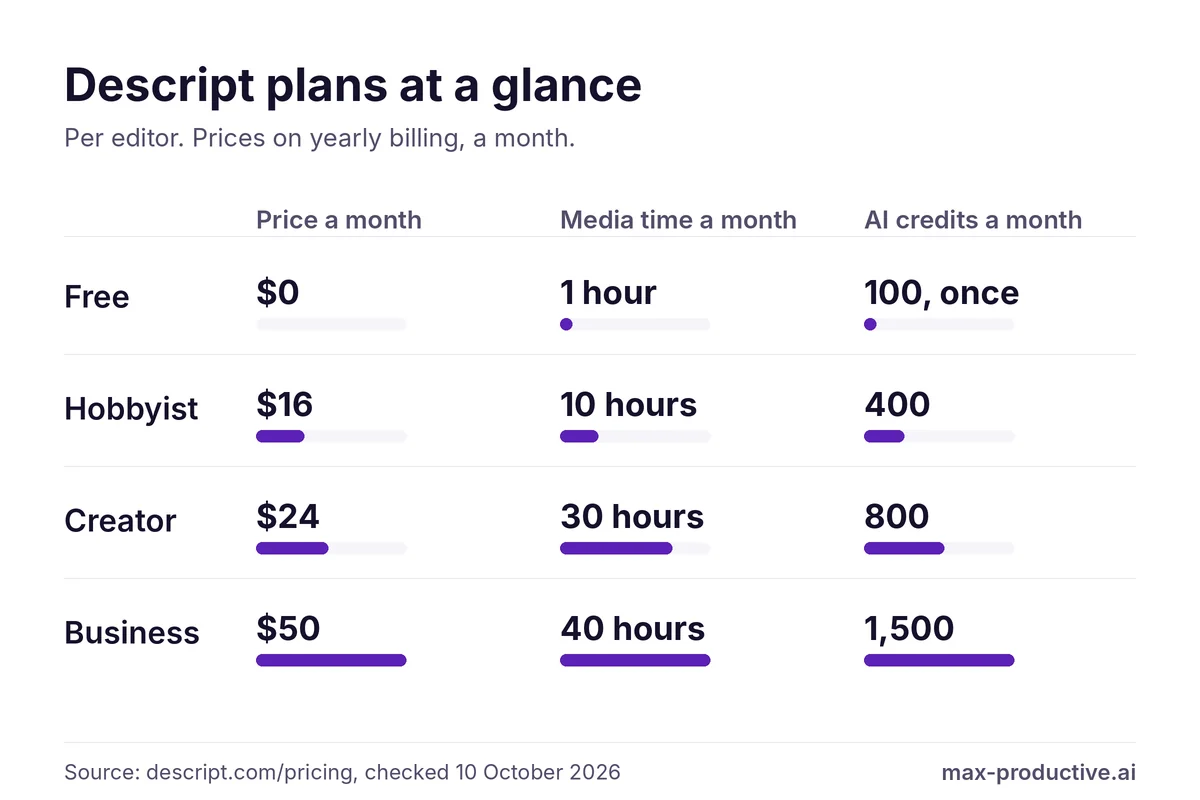
As of October 2026, Descript pricing starts with a Free plan at $0. The paid plans are Hobbyist at $16, Creator at $24 and Business at $50 per editor a month on yearly billing, or $24, $35 and $65 billed monthly. Every plan comes with two allowances. Media time covers what you upload or record, from 1 to 40 hours a month. AI credits pay for Underlord and the AI tools, from 400 to 1,500 a month on paid plans. Our read: for a solo creator the choice is between Hobbyist and Creator, and the AI credits are the number to look at first.
Start on the Free plan if
- You want to try editing video by editing text on a short recording
- A 720p export is fine while you test
The trade. You get one hour of media a month, and 100 AI credits that Descript's pricing page lists as one-time.
Try Descript freeGo straight to a paid plan if
- You publish every week and need 1080p or 4K exports without a watermark
- You plan to use Underlord or Studio Sound on most projects
The trade. Hobbyist covers one person's regular editing. Creator adds 4K, twice the credits, and the option to buy more when you run short.
Compare Hobbyist and CreatorDescript pricing at a glance
| Plan | Billed yearly | Billed monthly | Media time | AI credits |
|---|---|---|---|---|
| Free | $0 | $0 | 1 hour a month | 100, one-time |
| Hobbyist | $16 | $24 | 10 hours a month | 400 a month |
| Creator | $24 | $35 | 30 hours a month | 800 a month |
| Business | $50 | $65 | 40 hours a month | 1,500 a month |
| Enterprise | Custom | Custom | Sized to the team | Sized to the team |
Swipe sideways to see every column.
Prices are per editor, per month, as Descript's pricing page showed them to us in US dollars on October 10, 2026. New subscribers may see their own currency at checkout. Descript can change them at any time, so confirm on its site before you buy. See every source
Descript pricing looks simple: the plan names and prices take a minute to read. What takes longer is working out how far each plan goes. Descript measures usage in two different ways, and explains them across its pricing page, its Help Center and its changelog.
So we read all three and put the answers in one place. This guide covers what each plan includes, what uses up minutes and credits, what it costs to buy more, and how to pick a plan without overpaying.
How we checked
- Sources
- Descript's pricing page, Help Center and changelog
- Date checked
- 10 October 2026
- Our account
- A Descript account on the Free plan
- Not tested
- Paid plans, top-ups, exports and the cost of Underlord requests
The prices and allowances in this guide come from Descript's own pricing page, Help Center and changelog, read on October 10, 2026. Where two Descript pages disagree, we show both. We opened one of our own video projects in a Free plan account that day, and the screenshot in this guide comes from it.
We haven't bought a paid plan or a top-up for this guide, we didn't export a video, and we didn't run Underlord requests to measure what they cost. When we describe how credits are spent, we're relying on Descript's documentation.
 Descript
Our rating: 4.6 / 5
Descript
Our rating: 4.6 / 5
Free plan at $0. Paid plans start at $16 per editor a month, billed yearly.
Try Descript free4.6 is our score for Descript as a whole. Read the Descript review.
Descript Pricing Plans: What Each One Includes
Descript sells five plans: Free, three paid plans with public prices, and Enterprise on request. The paid plans are priced per person, so a team pays for each editor.
-
Free: $0
For testingOne editor, 1 hour of media a month, 100 AI credits, 720p export and 5GB of storage. You don't need a credit card. It's the right place to find out whether editing a video by editing its transcript suits you.
-
Hobbyist: $16 a month billed yearly, $24 billed monthly
One person, 1080pOne editor, 10 media hours and 400 AI credits a month, 1080p export without a watermark and 100GB of storage. It includes Underlord, Studio Sound, Remove Filler Words, Create Clips and AI Speech with custom voice clones. Our read: this is the plan for a solo podcaster or YouTuber who publishes about once a week.
-
Creator: $24 a month billed yearly, $35 billed monthly
4K and top-upsUp to three editors, each billed separately, with 30 media hours and 800 AI credits a month for each. Export goes up to 4K and storage to 1TB. Descript describes it as full access to Underlord and more than 20 other AI tools, with AI video generation and the whole stock media library. It is also the first plan that lets you buy top-ups.
-
Business: $50 a month billed yearly, $65 billed monthly
TeamsUp to five editors, each billed separately, with 40 media hours and 1,500 AI credits a month each, and 2TB of storage. It adds team-wide Brand Studio, proofreading for translated captions and dubbing, and priority support.
-
Enterprise: custom price
Large teamsCredits and media hours are sized to the team. Descript lists single sign-on, audit logs, data controls and a dedicated contact. You get a quote from its sales team.
The full comparison
| What you get | Free | Hobbyist | Creator | Business |
|---|---|---|---|---|
| Price, billed yearly | $0 | $16 | $24 | $50 |
| Price, billed monthly | $0 | $24 | $35 | $65 |
| Editors | 1 | 1 | 1 to 3 | Up to 5 |
| Media time a month | 1 hour | 10 hours | 30 hours | 40 hours |
| AI credits | 100, one-time | 400 a month | 800 a month | 1,500 a month |
| Video export | 720p | 1080p, no watermark | 4K, no watermark | 4K, no watermark |
| Storage | 5GB | 100GB | 1TB | 2TB |
| Recording sessions, per Drive | 2 hours | 5 hours a month | 15 hours a month | 25 hours a month |
| Underlord | Limited | Access | Full access | Included |
| Stock media search | First 5 results | First 12 results | Unlimited | Unlimited |
| Top-ups | No | No | Yes | Yes |
Swipe sideways to see every column.
Source: Descript's pricing page and its plan comparison table, checked October 10, 2026. Prices are per editor, per month. Media time and AI credits are per editor too, and they go into a pool shared by the Drive, which is Descript's name for a team's workspace.
One detail to keep in mind on Hobbyist: Descript's pricing page says it has access to Underlord, while Creator has full access. The page doesn't spell out the difference, so if a specific Underlord feature matters to you, ask Descript before you choose.
Media Minutes and Descript AI Credits: How the Two Allowances Work
This is the part of Descript pricing that decides which plan you need. Descript counts two things, and they have nothing to do with each other.
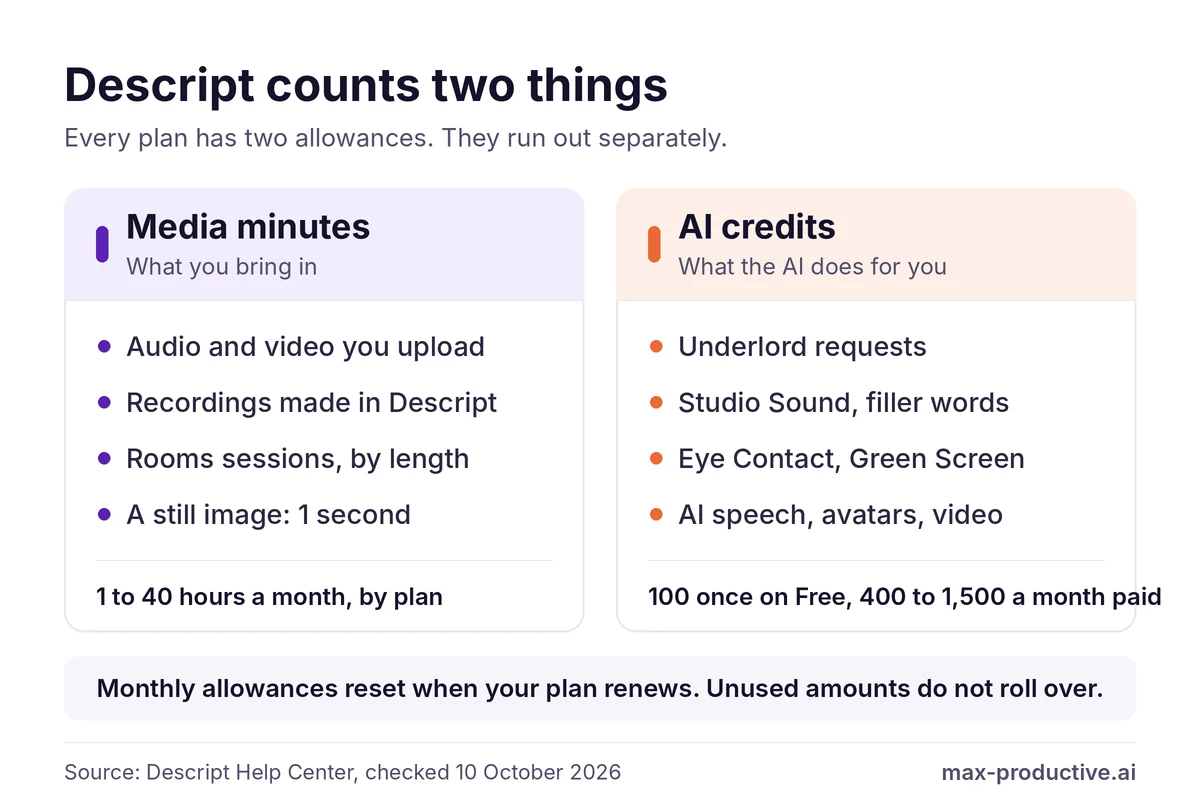
Media minutes count what you bring in. Uploading an audio or video file uses its length. So does anything you record in Descript: screen, webcam, microphone or a Rooms session. A still image counts as one second. One friendly rule for podcasters: a Rooms recording counts the length of the session once, not once per guest, so an hour with five people uses 60 minutes.
AI credits count what the AI does. Descript's Help Center names Underlord, Studio Sound, Remove Filler Words, Green Screen, Eye Contact, AI speech, avatars and generated video, among others. Everything on that list is an AI feature. Cutting and rearranging in the transcript isn't on it.
Neither one rolls over. Both allowances reset when your plan renews, and what you didn't use is gone. On a team, each editor's minutes and credits go into one pool that every editor on the Drive can draw from.
What an AI action costs in credits
Descript doesn't publish a full price list for credits. These are the figures it does give.
| AI tool | Cost in AI credits |
|---|---|
| Studio Sound | Up to 30 per file |
| Remove Filler Words | Up to 30 each time you apply it |
| Smoothing jump cuts | 0.5 per second of audio, 1 per second of video |
| Underlord, a chat message | A few credits |
| Underlord, a request that runs a tool | The thinking plus the tool. It varies |
| Eye Contact, Green Screen, AI speech, avatars, generated video | Not published. Descript says costs scale with the length of the media and, for generated media, with the model |
Descript's changelog of August 5, 2026 raised the most Underlord can spend on thinking in one turn from 100 to 200 credits. The per-second price for smoothing dates from September 17, 2026.
Sources: 2 Descript Help Center pages and 2 changelog entries, checked October 10, 2026
Underlord is the one to watch. Descript says its cost is not fixed. The same request can use a different number of credits from one run to the next, depending on the model and on how much work the task takes.
At the top of the range, the thinking step of one Underlord turn can use up to 200 credits. By our math that is half of Hobbyist's monthly 400, before the cost of any tool it runs. A chat message uses only a few, so the range is wide. Cleanup is easier to budget: at 30 credits at most per file, 400 credits cover at least 13 passes of Studio Sound, again by our math.
We haven't measured Underlord's cost ourselves, so check it with your own material before you plan a month around it.
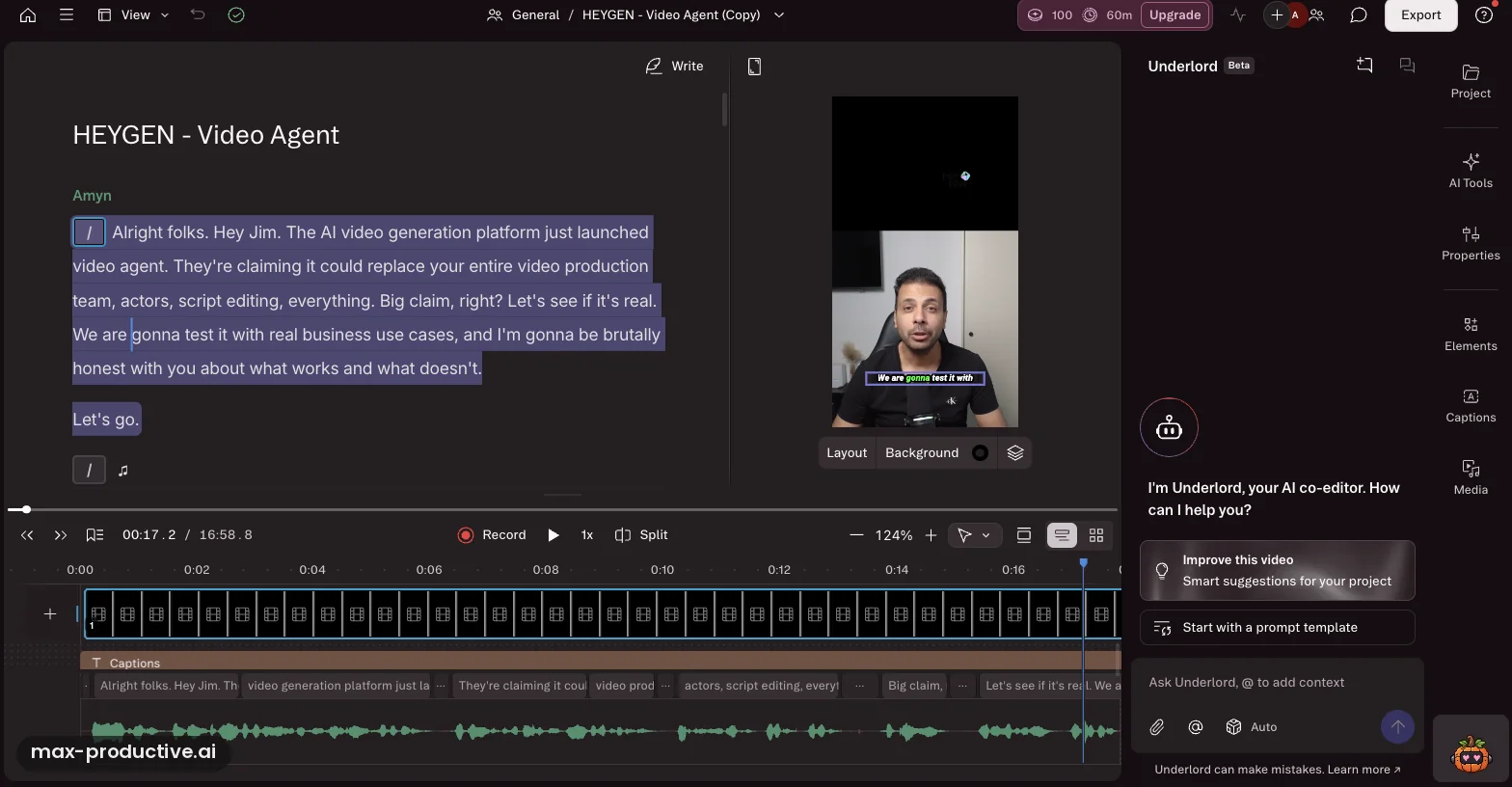
You don't have to guess where you stand. In our Free plan account, the top bar shows both numbers next to the Upgrade button: 100 credits and 60 minutes. The Underlord panel on the right carries a Beta label, and Descript's Help Center confirms it is still in beta. For the detail, the Help Center points to Settings, then your Drive, then the Usage tab, which lists what each Underlord run cost.
Our advice for making credits last
Do the cutting yourself in the transcript, which isn't on Descript's list of credit uses. Keep credits for cleanup such as Studio Sound and filler words, and try Underlord on one short project before you rely on it every week.
What Happens When You Run Out: Descript Top-Ups
As of October 2026, Creator and Business accounts can buy extra AI credits or media hours as one-time top-ups. Free and Hobbyist accounts can't. On Hobbyist you wait for the next renewal or move up a plan. On Free, the pricing page lists the credits as one-time, so more credits means a paid plan.
| Top-up | Price | Cost per unit |
|---|---|---|
| 350 AI credits | $35 | $0.10 a credit |
| 1,000 AI credits | $80 | $0.08 a credit |
| 4,000 AI credits | $200 | $0.05 a credit |
| 5 media hours | $25 | $5 an hour |
| 20 media hours | $80 | $4 an hour |
| 50 media hours | $150 | $3 an hour |
Source: Descript's Help Center page on top-ups, checked October 10, 2026. Top-ups are shared by everyone on the Drive and can't be refunded.
Top-ups behave differently from the monthly allowance, in a helpful way. Descript only draws on them once the month's allowance is used up, and they carry over from month to month for up to a year after you buy them.
This is the practical difference between the two middle plans. If you run out on Hobbyist, your options are to wait for the renewal or move up a plan. On Creator, a busy month costs you a one-time top-up and your plan stays the same.
See the current plans and top-up options on Descript's site.
See Descript plansDescript Hobbyist vs Creator: Which Plan Is Enough?
For one person, we'd narrow it down to these two. On yearly billing, Creator costs $8 a month more, which is $96 over the year by our math.
| What you get | Hobbyist | Creator |
|---|---|---|
| Price, billed yearly | $16 a month | $24 a month |
| Media time | 10 hours a month | 30 hours a month |
| AI credits | 400 a month | 800 a month |
| Video export | 1080p | 4K |
| Storage | 100GB | 1TB |
| Editors | 1 | Up to 3, billed separately |
| Top-ups | No | Yes |
Source: Descript's pricing page, checked October 10, 2026.
Ten hours of media is generous for a weekly show. By our math, a weekly one-hour show recorded as one file uses four to five hours a month, so Hobbyist's media time is unlikely to run out first. Our read: the credits are more likely to be the tighter number, and how tight depends on how much you hand to Underlord. If you record inside Descript, check one more line: recording sessions are capped at 5 hours a month on Hobbyist and 15 on Creator.
-
You publish a weekly show or video in 1080p
HobbyistTen hours and 400 credits should cover a weekly show with audio cleanup for one person. By our math, that is at least 13 cleanup passes a month at Descript's maximum of 30 credits each. Start here and watch your usage for a month.
-
You need 4K, or you work with one or two other editors
Creator4K export and shared seats start on this plan. Each editor is billed, and each one adds 30 hours and 800 credits to the shared pool.
-
You plan to use Underlord or AI video on most projects
CreatorTwice the credits, and top-ups if a month runs heavy. On Hobbyist you would have to wait for the renewal or change plan.
-
You run a team with brand templates or proofread translations
BusinessBrand Studio for the whole team, proofread translation and dubbing, and priority support are the reasons to pay $50 per editor a month on yearly billing.
Yearly or Monthly Billing, Seats and Refunds
Descript's plan cards lead with the yearly rate. It is the lower figure, and it is charged in one payment for the year.
| Plan | Yearly, per month | Charged once a year | Monthly | Saving on yearly |
|---|---|---|---|---|
| Hobbyist | $16 | $192 | $24 | About 33% |
| Creator | $24 | $288 | $35 | About 31% |
| Business | $50 | $600 | $65 | About 23% |
Swipe sideways to see every column.
Prices from Descript's pricing page, checked October 10, 2026. The yearly totals and the savings are our math.
Seats. Hobbyist is for one person. Creator can grow to three editors and Business to five, and every editor is a paid seat. Viewers and people invited to a single project can't use features that draw on minutes or credits.
Refunds. Descript's refund policy gives you 48 hours from the invoice date to ask for a refund on a plan, and seven days on an added editor seat. Top-ups can't be refunded. If you cancel or downgrade, the change takes effect at the end of the billing period, with no refund for the unused time.
Cancelling. A cancelled account moves to the Free plan when the paid period ends. Your projects stay available, without the features that belong to the paid plan.
A low-risk way to start
Because the refund window on a plan is short, we'd pay monthly for the first month. If the plan fits, switch to yearly: Descript applies an upgrade to yearly billing right away and credits the unused part of your month toward it.
Sources: Descript's pricing page and 3 Help Center pages, checked October 10, 2026
- Descript's pricing page
- Refund policy
- Cancel your subscription
- Media minutes and AI credits
Descript Discounts: What Is Available
Three ways to pay less than the list price exist today, and all three are on Descript's own pages.
-
Yearly billing
Open to everyone: by our math, about a third off Hobbyist and Creator, and about a quarter off Business, compared with paying monthly.
-
Education and nonprofit plan
Students, teachers and staff at accredited schools can apply, and so can nonprofits with charitable status. The plan has all Hobbyist features at $8 per editor a month paid yearly, or $12 paid monthly. You apply with your school or nonprofit email and Descript reviews the request.
-
Promo codes
Descript's checkout accepts promo codes, with limits: one code per purchase, used once, and only on a new account upgrading from Free to a paid plan. Descript's promo code page doesn't list a public code, so check any code you find against these rules before you count on it.
Sources: Descript's Help Center pages on the education and nonprofit plan and on promo codes, checked October 10, 2026.
We also looked for a lifetime deal, since people search for one. Descript's pricing page lists monthly and yearly subscriptions only.
What the Descript Free Plan Includes
The Free plan costs $0 and needs no credit card. Descript's pricing page presents it as a plan, with no time limit stated, and doesn't offer a separate free trial of the paid plans.
You get one editor, 1 hour of media a month, 720p export, 5GB of storage, two hours of recording sessions and limited use of Underlord and the AI tools. That should be enough to try the transcript-based workflow on a short video.
Descript's pages differ on two Free plan details
The pricing page lists the Free plan's 100 AI credits as one-time and doesn't include watermark-free export. One of Descript's tool pages, the video caption generator, lists 100 AI credits a month and a 720p export that is watermark-free. We'd plan around the pricing page, and check the export on a short test project before a deadline.
In our own Free plan account, the counter showed 100 credits and 60 minutes on October 10, 2026. That fits both pages, and a single reading can't show whether the credits renew.
Descript vs Other Editors: Where Each One Fits
Comparing Descript pricing with other editors on price alone can mislead, because each tool is built around a different job. Descript is built around editing spoken content through its transcript. We don't list other tools' prices here, since they change often: each of our reviews has the current plans. Here is where the tools we've reviewed are the better fit.
-
Riverside
Remote recordingRiverside (4.4) is built around capturing high-quality recordings from remote guests. For interview-led shows with light edits, it is the better fit.
-
CapCut
Short-form videoCapCut (4) is geared to short-form content. For short social clips, it is the better fit.
-
VEED
Browser editingVEED (4.2) is a browser-based editor with automatic subtitles. For quick subtitled videos with nothing to install, it is the better fit. Our VEED vs CapCut comparison covers both.
-
Gling
Rough cutsGling (4.1) automates the rough cut of talking-head video by removing silences, filler words and bad takes. If you finish in a professional editor and only want that first pass done, it is the better fit. We compare the two in Descript vs Gling.
You'll find all of them, and more, in our video editing tools directory.
Descript Pricing Changes in 2026
We read every entry in Descript's changelog from April to September 2026. None of them announces a change to Descript pricing or to the plan names. Most of what changed is about how credits are spent.
| Date | What changed | What it means for you |
|---|---|---|
| June 11, 2026 | Business drives get 10 Control Room producer slots, up from 3 | More capacity on Business at the same price |
| August 5, 2026 | The most Underlord can spend on thinking in one turn went from 100 to 200 credits | Complex requests can do more, and can cost more |
| September 17, 2026 | Smoothing jump cuts is priced per second: 0.5 credits for audio, 1 for video | Short fixes cost little, long ones add up |
| September 17, 2026 | New subscribers see prices in their own currency, with more ways to pay | Easier checkout outside the US |
Source: Descript's changelog, checked October 10, 2026. The latest entry on that date was September 17, 2026.
Which Descript plan should you pick?
As of October 2026, Descript pricing runs from $0 on the Free plan to $16, $24 or $50 per editor a month on yearly billing for Hobbyist, Creator and Business. The price buys two monthly allowances, media time and AI credits, and neither rolls over. For a solo creator, we'd narrow the choice to Hobbyist or Creator. It comes down to 4K, a second editor, and how much you'll lean on Underlord.
What we'd do. Start on the Free plan to confirm the workflow suits you, then take Hobbyist monthly for a month and watch the credit counter. If you finish the month with credits to spare, switch to yearly billing. If you run short, Creator gives you twice the credits and the option to top up.
Our Descript rating: 4.6 / 5
Our Descript rating
Descript pricing FAQ
How much does Descript cost?
Descript costs $0 on the Free plan, $16 a month on Hobbyist, $24 on Creator and $50 on Business, per editor on yearly billing, as of October 2026. Paying monthly costs $24, $35 and $65. Enterprise is priced on request. Every paid plan includes a monthly allowance of media time and AI credits.
Is Descript free?
Descript has a Free plan that costs $0 and needs no credit card. It includes one editor, 1 hour of media a month, 720p export and 100 AI credits, which Descript's pricing page lists as one-time. Paid plans start at $16 a month on yearly billing.
Does Descript have a free trial?
Descript's pricing page doesn't offer a time-limited free trial of its paid plans, as of October 2026. The Free plan plays that role: it has no end date and gives limited use of Underlord and the AI tools, so you can test the editor before paying.
What are Descript AI credits?
Descript AI credits are the allowance that pays for its AI features, including Underlord, Studio Sound, Remove Filler Words, Eye Contact, Green Screen, AI speech and avatars. Hobbyist includes 400 a month, Creator 800 and Business 1,500. Cutting and rearranging in the transcript isn't on Descript's list of credit uses.
Do Descript media minutes and AI credits roll over?
Descript's monthly media minutes and AI credits do not roll over. Both reset when your plan renews, and unused amounts are lost. Top-ups are the exception: credits and hours bought as a top-up carry over for up to a year from the purchase.
What happens when you run out of AI credits in Descript?
When a Descript account runs out of AI credits, you need more credits to keep using the AI features. Creator and Business accounts can buy top-ups, from $35 for 350 credits. Free and Hobbyist accounts can't buy top-ups. On Hobbyist the options are to wait for the next renewal or to move up a plan.
Is Descript priced per user?
Descript's paid plans are priced per editor. Hobbyist is for one person, Creator can grow to three editors and Business to five, and each editor is billed separately. Each seat adds its media time and AI credits to a pool shared by the team.
Can you get a refund from Descript?
Descript refunds a plan purchase if you ask within 48 hours of the invoice date, and an added editor seat within seven days, according to its refund policy. Top-ups can't be refunded, and cancelling partway through a billing period doesn't bring a prorated refund.
Does Descript have a student discount?
Descript offers an education and nonprofit plan with all Hobbyist features for $8 per editor a month paid yearly, or $12 paid monthly. Students, teachers and staff at accredited schools can apply, along with nonprofits that have charitable status. Descript reviews each application before the price applies.
Did Descript pricing change in 2026?
Descript's changelog shows no change to subscription prices or plan names between April and September 2026. What changed is how some AI credits are spent. Since September 17, 2026, smoothing a jump cut costs 0.5 credits per second of audio and 1 per second of video. In August, Underlord's thinking limit per turn rose from 100 to 200 credits.
Which Descript plan is best for podcasters?
Descript's Hobbyist plan is our pick for a solo podcaster: 10 media hours and 400 AI credits a month should cover a weekly show with audio cleanup. Creator is the better fit if you publish video in 4K, work with a co-editor, or use Underlord heavily, because it doubles the credits and allows top-ups.
Read next
Tools in this article




About this guide
Based on Descript's pricing page, Help Center and changelog, read on 10 October 2026, and on our own Free plan account. First published 10 October 2026. Last updated 10 October 2026.
Sources checked
- Plans and prices. Descript's pricing page, its plan comparison table and its pricing FAQ, checked 10 October 2026.
- Media minutes and AI credits. Descript Help Center: Track and understand your media minutes and AI credits and Underlord, your AI co-editor.
- Top-ups, refunds and cancelling. Descript Help Center: Top-ups, Refund policy and Cancel your subscription.
- Discounts. Descript Help Center: Nonprofit and education plan and Promo codes.
- Changes in 2026. Descript's changelog, entries from April 16 to September 17, 2026.
- Other editors. Our own reviews of Riverside, CapCut, VEED and Gling. Our screenshot comes from a Free plan account on 10 October 2026.
Update log
- 10 October 2026. First published.
Scores next to tool names are the overall ratings from our own reviews, on a 5-point scale.