
SaneBox vs Clean Email (2026): Which AI Email Management Tool Is Best for You?
Two powerful email tools, two different approaches. Here's how to choose the right one for your inbox.

Choose SaneBox
If you want invisible, AI-driven filtering that works inside your existing Gmail or Outlook with no new interface to learn.
Choose Clean Email
If you need powerful bulk cleanup, manual control, granular automation rules, and a privacy-first approach.
| Feature | SaneBox | Clean Email |
|---|---|---|
| Best For | Ongoing AI triage | Deep inbox cleanup |
| Starting Price | ~$4.92/mo (annual) | ~$2.50/mo (annual) |
| Key Strength | Works inside your email client | Bulk actions + granular rules |
If you're drowning in emails, you've probably heard of both SaneBox and Clean Email. Both promise to rescue your inbox from chaos, but they take fundamentally different approaches. SaneBox works invisibly inside your existing email client, using AI to auto-sort messages. Clean Email operates from its own interface, giving you powerful bulk actions and granular control.
After testing both extensively, here's the truth: neither is universally "better." The right choice depends entirely on how you prefer to manage email. This comparison breaks down exactly what each tool does, how they differ, and which one fits your workflow.
What Is SaneBox?
SaneBox is an AI-powered email assistant that works invisibly in the background. Founded in 2010 in Boston, it connects to your email via IMAP, EWS-OWA, or ActiveSync and creates smart, trainable folders directly in your existing inbox. There's no separate app to learn—everything happens inside Gmail, Outlook, Yahoo, Apple Mail, or any IMAP-compatible client.
The core philosophy is "set and forget." SaneBox analyzes your email patterns and automatically sorts incoming messages into folders like @SaneLater (non-urgent), @SaneNews (newsletters), and @SaneBlackHole (unwanted senders). Over time, the AI adapts to your behavior, learning from every email you move.
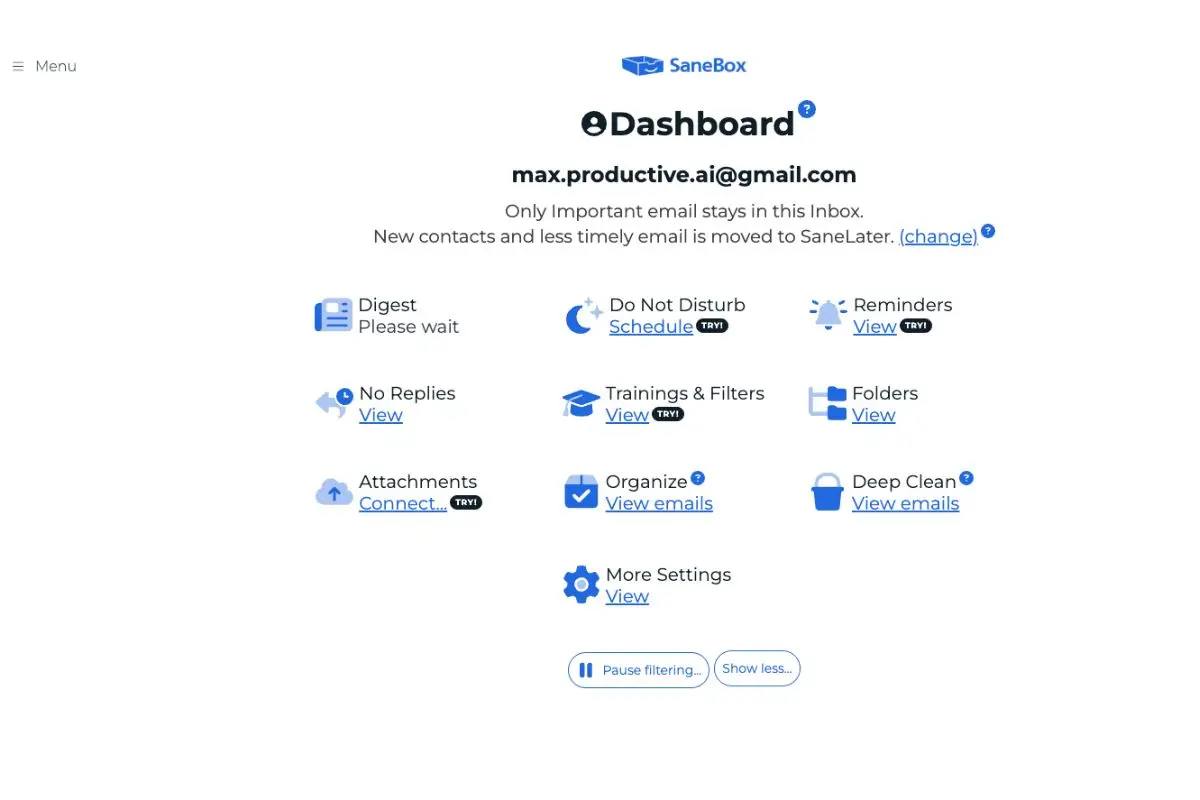
Security: SaneBox uses OAuth login (no passwords stored) and only scans email headers—never the body content or attachments. It's Google-verified and doesn't sell your data to third parties.
What Is Clean Email?
Clean Email is a privacy-first bulk email cleaner that prioritizes manual control over AI automation. Rather than working invisibly, it operates through its own web app, iOS app, Android app, or macOS app, giving you powerful tools to clean, organize, and automate your inbox on your terms.
The approach is rule-based rather than AI-driven. You create explicit automation rules with specific conditions (sender, domain, age, size, read/unread status) and actions (Trash, Star, Archive, Move, Label). Smart Views pre-categorize your emails so you can take bulk actions on thousands of messages at once.

Security: Clean Email connects via IMAP using OAuth, scans headers only (never email content), is Google-verified, and includes a Privacy Monitor that alerts you if your email appears in data breaches.
How Each Tool Integrates With Your Email
SaneBox: Native Client Folders
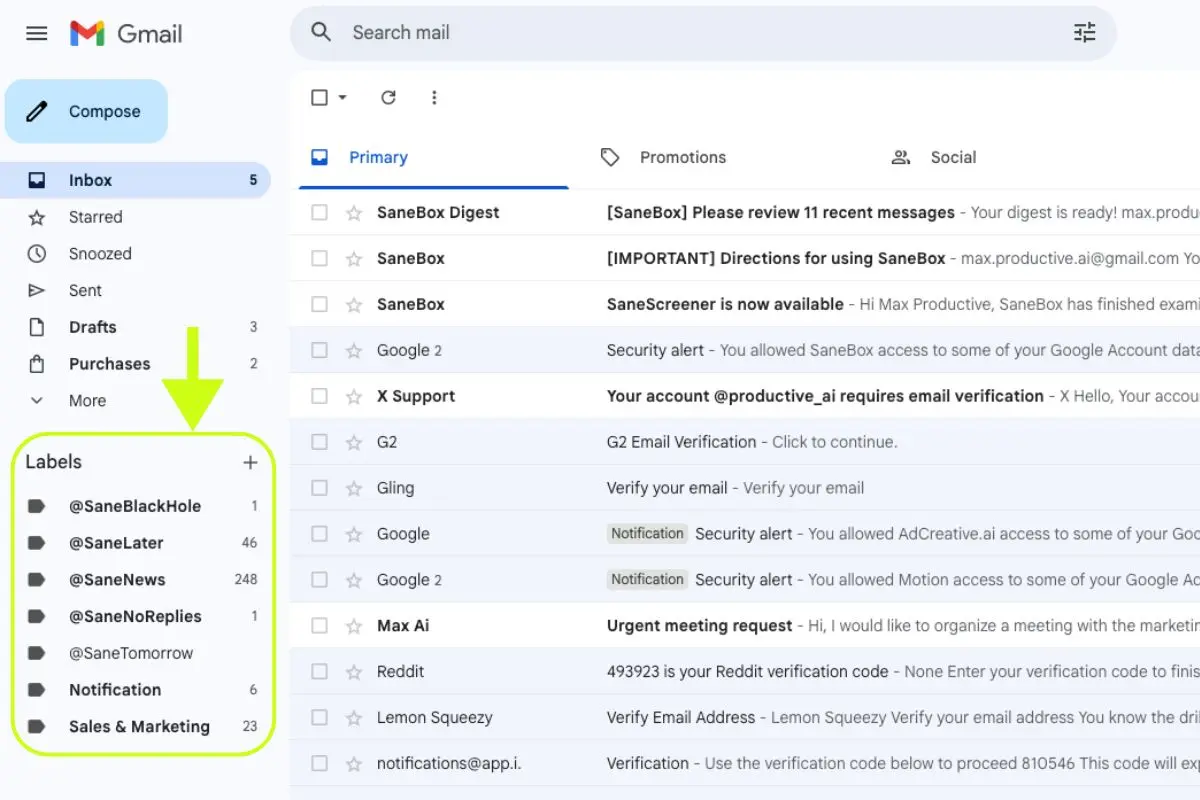
SaneBox creates and manages smart folders directly inside your mailbox. You never leave Gmail, Outlook, or Apple Mail—new folders simply appear with names like @SaneLater and @SaneNews. The tool works entirely in the background via IMAP, so there's zero context switching.
Clean Email: Dedicated Web/Mobile Interface
Clean Email requires using its own interface for cleaning operations. While this adds a step, it enables far deeper cleaning capabilities and bulk operations that wouldn't be possible inside a native email client. After you take actions in Clean Email, changes sync back to your inbox.

Smart Folders & Organization
SaneBox: Trainable Folders with DIY Custom Options
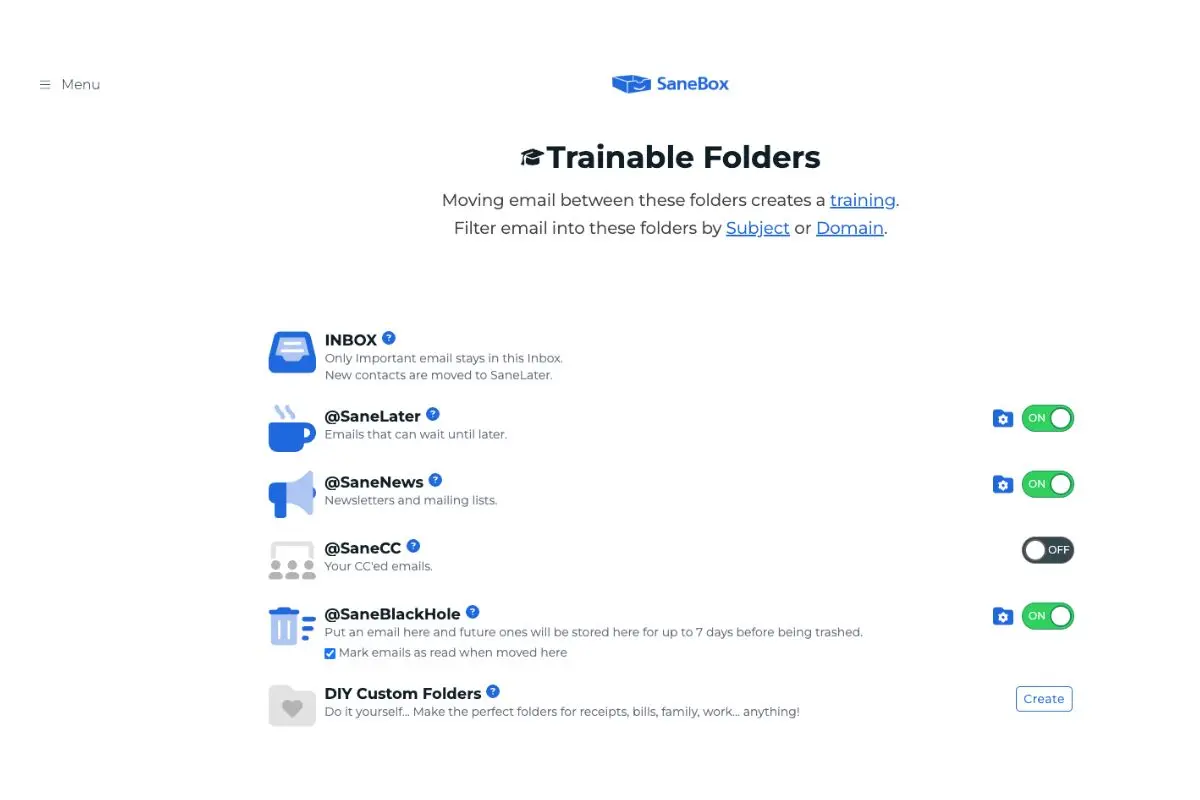
SaneBox provides a comprehensive folder system that you can turn on/off based on your needs:
| Folder | Purpose | Default |
|---|---|---|
| @SaneLater | Non-urgent emails auto-sorted here | ON |
| @SaneNews | Newsletters and mailing lists | ON |
| @SaneCC | Emails where you're CC'd | OFF |
| @SaneBlackHole | Permanently filter unwanted senders | ON |
| @SaneNoReplies | Track unanswered emails you sent | ON |
| @SaneNotSpam | Rescue inbox-worthy from spam | ON |
| DIY Custom | Create your own (receipts, bills, etc.) | Create |
SaneBox Snooze Folders (Unique Feature)
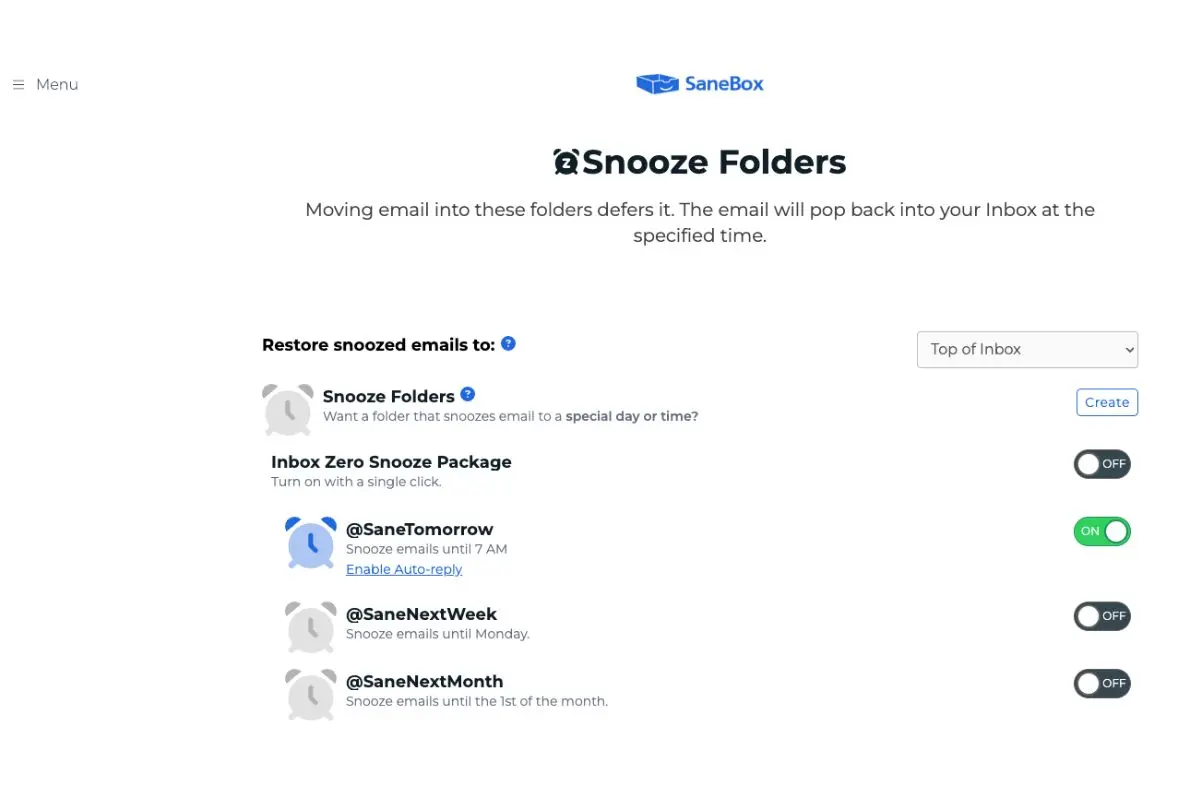
SaneBox offers built-in email snoozing via special folders:
| Folder | Behavior |
|---|---|
| @SaneTomorrow | Email returns at 7 AM next day |
| @SaneNextWeek | Email returns Monday morning |
| @SaneNextMonth | Email returns 1st of next month |
| Custom Snooze | Create folders for specific dates/times |
Clean Email: Pre-built Smart Views
Clean Email uses Smart Views to automatically categorize your emails. Pre-built categories include Top Senders, Automated Messages, Unread, No-reply Messages, Productivity Tools, Misc Notifications, Finance and Insurance, Social Notifications, Seasonal Sales, Gaming, GDPR, Reviews and Recommendations, Online Shopping, Ride Sharing, Food Delivery, and Newspapers.

Training & Learning
SaneBox: AI-Powered Learning
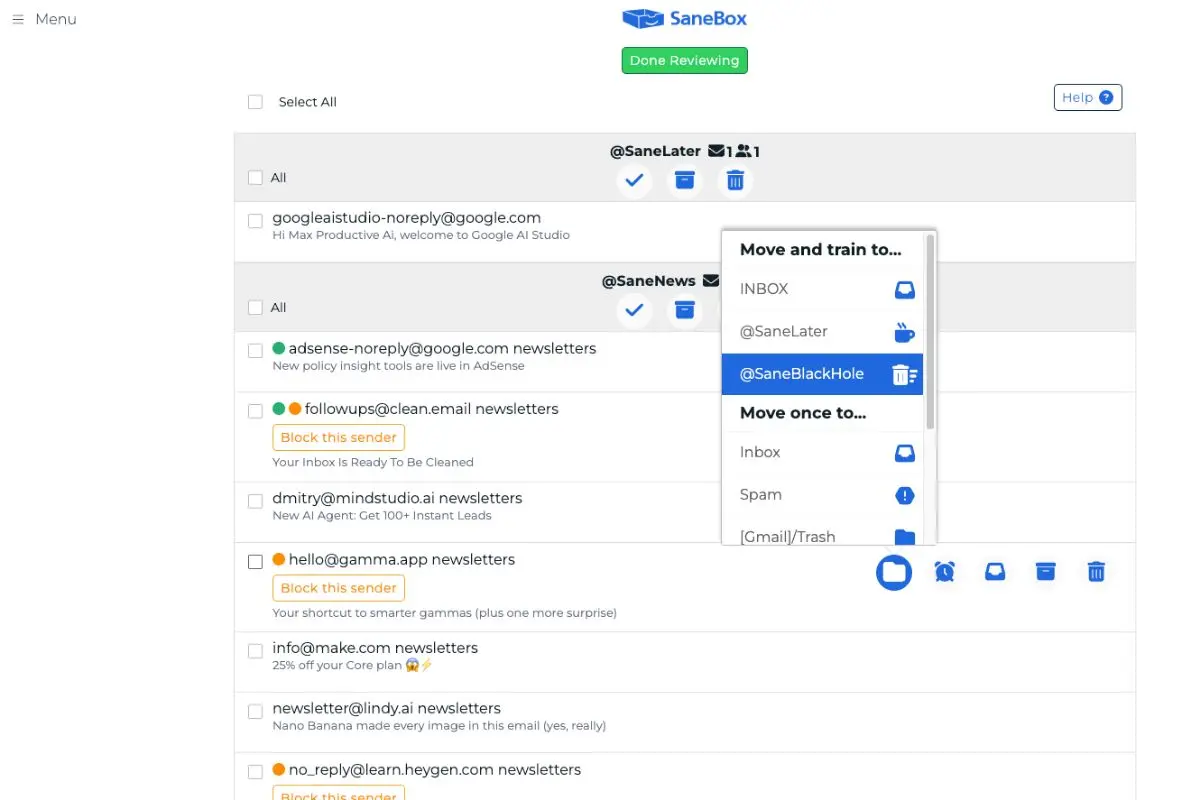
Training SaneBox is simple: drag emails between folders. When you move an email from Inbox to @SaneLater, SaneBox learns that sender isn't urgent. Use "Move and train to..." for permanent training or "Move once to..." for one-time actions. The AI continuously adapts based on your behavior.
Clean Email: Rule-Based Automation
Clean Email's Auto Clean feature lets you create explicit rules with precise conditions and actions. Conditions include sender, domain, age, size, and read/unread status. Actions include Trash, Star, Mark Read, Archive, Move, Label, Keep Newest, and Change Labels. This gives you granular control but requires more active management.

Power Tools & Advanced Features
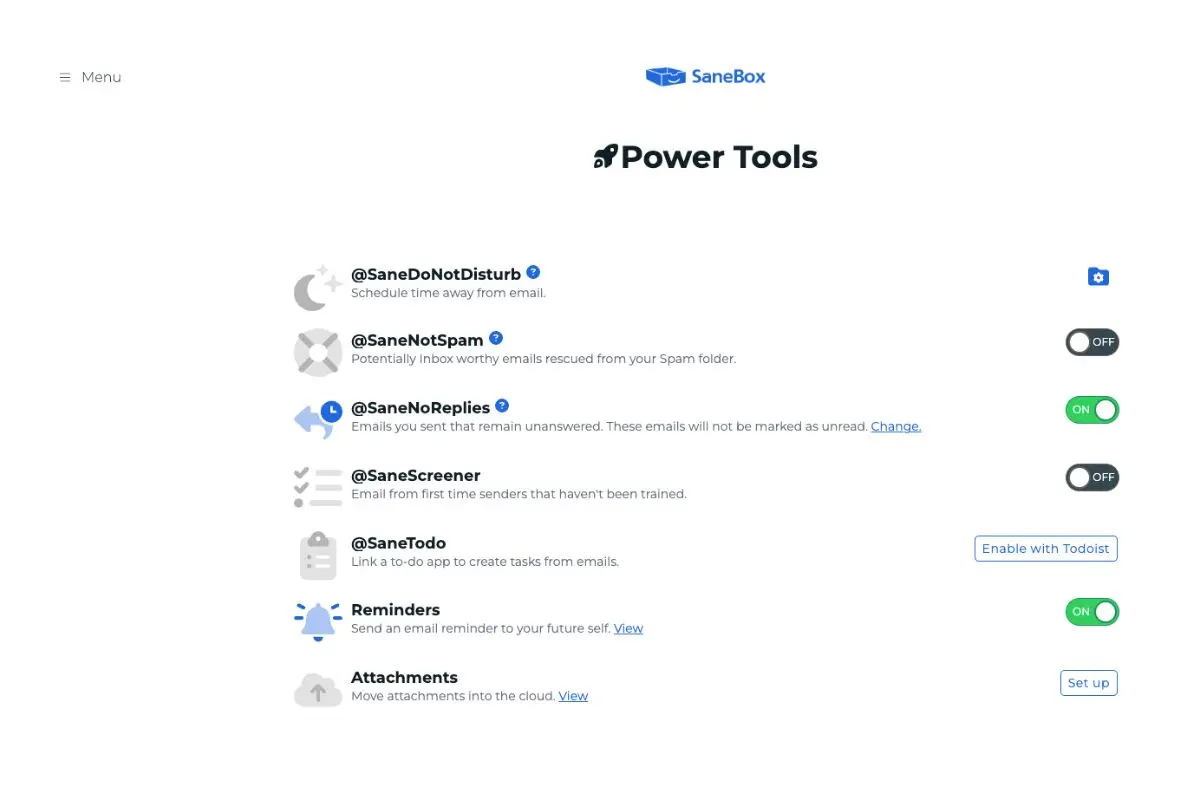
SaneBox Power Tools
| Feature | Description |
|---|---|
| @SaneDoNotDisturb | Schedule email-free focus time |
| @SaneNotSpam | Rescue inbox-worthy emails from Spam |
| @SaneNoReplies | Track unanswered sent emails |
| @SaneScreener | Hold emails from first-time senders |
| @SaneTodo | Create tasks from emails (Todoist integration) |
| SaneReminders | Send reminders to your future self |
| SaneAttachments | Move attachments to cloud storage (Dropbox, Box) |
| Deep Clean | Analyze and bulk-delete old emails by sender/size |
| Daily Digest | Summary email of filtered messages |
Clean Email Advanced Features
| Feature | Description |
|---|---|
| Screener | Hold messages from unknown senders for review |
| Privacy Monitor | Alerts if your email appears in data breaches |
| Unsubscriber | Send actual unsubscribe requests (Premium) |
| Sender Settings | Per-sender customization |
| Block/Mute | Stop emails from specific senders/domains |
| Keep Newest | Auto-delete old emails, keep latest from sender |
| Action History | Log of all automated actions |
| Pinned Messages | Protect selected messages from rules |

Unsubscribe & Blocking (Critical Difference)
This is one of the most important distinctions between these tools.
SaneBox: @SaneBlackHole (Filter, NOT Unsubscribe)
When you drag an email to @SaneBlackHole, SaneBox automatically moves future emails from that sender to Trash. However, it does not send an actual unsubscribe request. The sender still thinks you're subscribed—their emails just get filtered. Messages remain in SaneBlackHole for 7 days before deletion (or sooner if the folder exceeds 250 emails).
Clean Email: True Unsubscriber
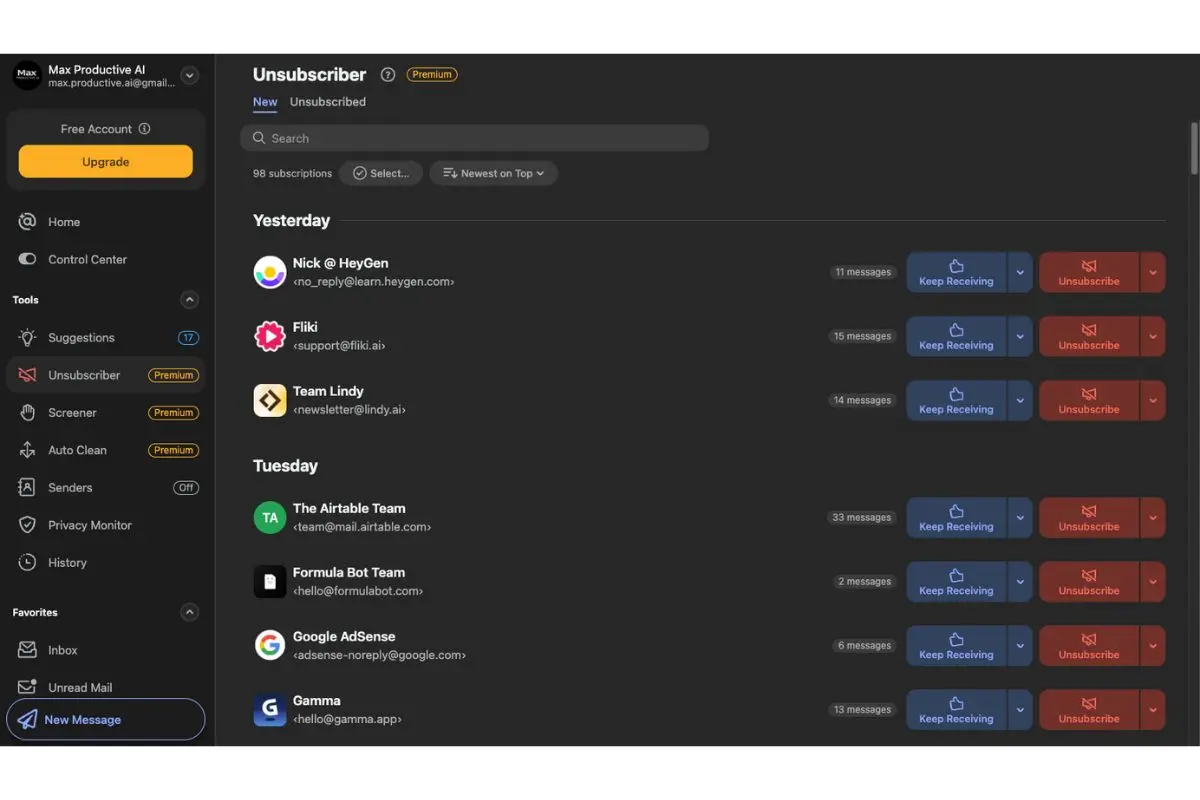
Clean Email's Unsubscriber sends actual unsubscribe requests to senders, removing you from their mailing lists entirely. You can view all your subscriptions in one centralized list, choose to "Keep Receiving" or "Unsubscribe," and even "Pause" subscriptions temporarily.
Privacy & Data Handling
Both tools take privacy seriously and handle your data responsibly:
- ✅ Only scan email headers (sender, subject, metadata)
- ✅ Never read email body content or attachments
- ✅ Google-verified/certified
- ✅ No third-party data selling
- ✅ OAuth connection (no passwords stored)
Clean Email Extra: Includes Privacy Monitor for data breach alerts and provides detailed privacy policy information.
Pricing Comparison (2026)
SaneBox Pricing
| Plan | Monthly | Annual | Accounts | Features |
|---|---|---|---|---|
| Snack | $7/mo | $59/yr (~$4.92/mo) | 1 | Pick 2 features |
| Lunch | $12/mo | $99/yr (~$8.25/mo) | 2 | 6 features each |
| Dinner | $36/mo | $299/yr (~$24.92/mo) | 4 | All features |
| Business | Custom | $8.25/mo per license | 10+ | API, admin, analytics |
Free Trial: 14 days with all features
Clean Email Pricing
| Plan | Monthly | Annual | Accounts | Features |
|---|---|---|---|---|
| Individual | $9.99/mo | $29.99/yr (~$2.50/mo) | 1 | All features |
| Family | $19.99/mo | $49.99/yr | 5 | All features |
| Team | $29.99/mo | $99.99/yr | 10 | All features |
Free Trial: Clean up to 1,000 emails free (no credit card required)
Supported Email Providers
Both tools support virtually all major email providers:
- Gmail / Google Workspace
- Microsoft Outlook / Exchange / Microsoft 365
- Yahoo! Mail
- Apple iCloud Mail
- AOL
- Fastmail
- Amazon WorkMail
- Any IMAP-compatible provider
SaneBox Specific: Also supports EWS-OWA and ActiveSync. Does NOT support POP (most providers can switch to IMAP).
Pros and Cons
SaneBox
Pros
- Works invisibly in existing inbox (Gmail, Outlook, etc.)
- No new app to learn - uses native email client
- AI learns and adapts automatically
- "Set and forget" simplicity
- Todoist integration for task creation
- Email snoozing (SaneTomorrow, SaneNextWeek, SaneNextMonth)
- Lower monthly entry price ($7/mo)
- 14-day free trial with all features
Cons
- Not built for bulk cleanup of old emails
- @SaneBlackHole doesn't truly unsubscribe
- Features locked behind higher pricing tiers
- Max 4 accounts on standard plans
- No breach monitoring
Clean Email
Pros
- Powerful bulk cleanup (delete 10k-100k+ emails instantly)
- True Unsubscriber sends actual opt-out requests
- Granular Auto Clean automation rules
- All features on all plans (no restrictions)
- Up to 10 accounts supported
- Privacy Monitor for data breach alerts
- Screener for new sender filtering
- Free trial with 1,000 emails (no credit card)
- Lower annual price ($29.99/yr)
Cons
- Must use separate app (not inside native email client)
- More manual than AI-driven
- Unsubscriber is premium-only
- Higher monthly entry price ($9.99/mo)
- Requires active management (less "invisible")
User Reviews & Feedback
SaneBox Reviews (G2, Capterra, Trustpilot)
Ratings: G2: 4.8/5 · Capterra: 4.9/5 · Trustpilot: Highly positive
What users love:
- "The amount of organization and ability to prioritize tasks is fantastic"
- "No app required - works with existing inbox"
- Deep Clean feature praised for bulk cleanup capabilities
Minor complaints: SaneNoReplies and SaneReminders can be confusing initially. Some users note customer support could be more responsive.
Press endorsements: TechCrunch, Forbes, NYT. PCMag called it one of the best things to happen to email.
Clean Email Reviews (Trustpilot, Capterra)
Ratings: 4.5/5 based on 3,300+ reviews
What users love:
- "Total game changer for managing my inbox"
- "Easy to use, lots of WOW factor"
- "Unsubscribing from lists I didn't know I was on!"
- Users report cleaning tens of thousands of emails quickly
Minor complaints: Some users find initial setup slightly confusing. Website could better explain how to use features.
Who Should Choose Each Tool?
Who Should Choose SaneBox?
Ideal for:
- Busy executives/professionals receiving 100+ emails/day
- Users who hate switching apps (want everything in Gmail/Outlook)
- Anyone wanting minimal setup ("set and forget")
- Users who need follow-up tracking (SaneNoReplies)
- Todoist users wanting email-to-task integration
- People who prefer AI learning over manual rules
- Users who want email snoozing functionality
Use case example: A solopreneur who checks email in Gmail and wants unimportant messages auto-sorted without touching settings or learning new software.
$25 off with this link
Who Should Choose Clean Email?
Ideal for:
- Users with massive email backlog (20k-100k+ unread)
- "Control freaks" wanting precise, granular rules
- Privacy-conscious users wanting breach alerts
- Multi-account managers (5-10 inboxes)
- Anyone wanting TRUE unsubscribing (not just filtering)
- Users comfortable with a dedicated app interface
- Teams needing centralized email management
Use case example: A content creator with 50,000 unread emails across Gmail and Yahoo who wants to bulk delete old newsletters and automate future cleanup with precise rules.
No credit card required
Can You Use Both Together?
Yes, technically—but it's usually overkill for most users.
Potential power user strategy:
- SaneBox: AI triage for daily incoming email filtering
- Clean Email: Quarterly/monthly deep inbox purges + true unsubscribing
Most users are better served choosing ONE tool based on their primary pain point.
Final Verdict: SaneBox vs Clean Email
| Invisible AI filtering in native inbox | SaneBox |
| Bulk cleanup of old emails | Clean Email |
| True unsubscribe (not just filter) | Clean Email |
| Works inside Gmail/Outlook | SaneBox |
| Granular automation rules | Clean Email |
| "Set and forget" simplicity | SaneBox |
| Email snoozing | SaneBox |
| Multi-account (5-10) support | Clean Email |
| Breach/privacy monitoring | Clean Email |
| Lower monthly price | SaneBox |
| Lower annual price | Clean Email |
| All features on all plans | Clean Email |
Bottom line: Both are excellent, privacy-safe tools. The right choice depends entirely on your primary pain point:
- Choose SaneBox for ongoing triage — if you want emails automatically sorted without changing how you work
- Choose Clean Email for inbox overhaul + automation — if you need to clean a massive backlog and want granular control
Frequently Asked Questions
Learn more about other email management tools in our comprehensive guide. For deeper analysis, read our full SaneBox review or Clean Email review.