
The 9 Best Squarespace Alternatives in 2026: Where to Go After the Price Hike
In July 2026, Squarespace raised prices on three of its four plans, up to 26% on published tiers, and told customers by email rather than a public announcement, with the new rates applying at each site's first renewal after August 4. If one of those emails is why you're here, you're in the right place: we compared nine alternatives on live pricing checked August 16, 2026, tested three of them from our own accounts, and tell you plainly which tools pay us and which don't.

The short answer, as of August 2026: Hostinger Website Builder is where most price-hike refugees should look first, a capable AI builder bundled with hosting from $2.99/month on promotional terms, a fraction of any Squarespace plan. Wix is the closest like-for-like swap and the only major all-rounder here with a free plan you can actually live on. If you never want to rent your website again, WordPress is the exit that ends the conversation, either managed on WordPress.com or AI-built through 10Web. And if your site is really a store, Shopify does commerce better than the platform you're leaving.
Best budget escape: Hostinger Website Builder
Hostinger Website Builder bundles the site builder, AI generation, hosting, and a free domain into hosting plans that start at $2.99/month on long-term promotional billing, renewing near $10.99. That is the biggest cost gap in this list against Squarespace's cheapest tier. We timed its AI generation flow in our own 2025 speed test, and it remains the highest-rated website builder on this site at 4.7/5. Know the trade going in: your site lives on Hostinger, and users report there's no export path out.
Closest like-for-like swap: Wix
Wix covers everything Squarespace does, templates, blogging, commerce, scheduling, with a free-form editor instead of Squarespace's grid, an AI prompt-to-site builder included on every plan, and a free plan Squarespace has never offered. Paid plans rendered at $17/month (Light) and $29/month (Core) on annual billing when we checked. The honest cost is a busier, heavier editor that takes longer to feel at home in.
| Tool | Built For | Entry Price | Rating |
|---|---|---|---|
| Hostinger Website Builder | Budget sites, hosting and domain bundled | From $2.99/mo (promo) | 4.7 / 5 |
| Wix | Closest all-round swap, free plan | Free; paid from $17/mo | — |
| WordPress.com | Managed WordPress, no maintenance | Free; paid from $4/mo | — |
| 10Web | AI-built WordPress you own | From $10/mo (annual) | 4.4 / 5 |
| Webflow | Design control beyond Squarespace | From $15/mo (annual) | — |
| Framer | Modern portfolio and marketing sites | Free; paid from $10/mo | — |
| Durable | Small-business site live in minutes | Free; paid from $22/mo | 4.3 / 5 |
| Shopify | Serious online stores | $29/mo (annual) | 4.6 / 5 |
| Pixpa | Photographer portfolios on a budget | From $5.40/mo (annual) | — |
Prices verified August 16, 2026 against live pricing pages. Several of these companies changed pricing in the last three months alone, so confirm your exact price at checkout.
One thing worth knowing upfront: four of the nine tools below pay this site a commission. Five of them, Wix, WordPress.com, Webflow, Framer, and Pixpa, pay us nothing at all and made the list anyway. We tell you which is which in each section, and the ranking doesn't care.
Search for Squarespace alternatives and look at who's answering: Squarespace itself ranks on this exact topic with its own "Wix Alternatives" post, Wix and Lovable buy the ads above the results, and most of what remains is either a listicle refreshed on a schedule or a vendor grading its own homework. We don't sell a website builder. We run an independent AI tools review site, we hold our own accounts on three of the tools below, and we've been hands-on testing this category since our 2025 no-credit-card speed test. This article exists because a good product with a new price is still a decision worth re-running.
Why Everyone Is Searching for a Squarespace Alternative in August 2026
Squarespace spent 2025 restructuring its plans, retiring the old Personal, Business, and Commerce tiers for the current Basic, Core, Plus, and Advanced lineup. Then, in July 2026, came the increase: reporting based on archived pricing pages puts Basic going from $16 to $19/month, Core from $23 to $29, and Plus from $39 to $49 on annual billing, with Advanced holding at $99. The company didn't publish a blog post. Customers learned from an email stating that pricing updates reflect continued investment in the platform, with new rates applying at each site's first renewal after August 4, 2026.
The receipts landed on Reddit within days. Threads dated July 16 and 17, 2026 posted billing histories jumping from $138 to $204 year over year, and some longer-running sites reported steeper totals where the 2025 plan restructuring and the 2026 increase stack together. One user's line, quoted in TechRadar's coverage, sums up the mood: "I feel like I'm paying for things I sincerely did not ask for", referring to the AI features the investment is meant to fund. The discontent predates the hike, a September 2025 thread complained about price increases without visible new features, and a March 2026 thread asked what people were switching to when a basic business site runs $33/month. The July email turned a grumble into a migration.
Two fairness notes before the list. First, Squarespace's templates and out-of-the-box polish still draw genuine praise even in the exit threads; if design-per-hour-of-effort is your only metric, it remains excellent, and we cover who should stay at the end. Second, Squarespace has never had a free plan, only a time-limited trial, which matters below because four of the nine alternatives have real free tiers you can live on while you decide.
The 9 Squarespace Alternatives at a Glance
| Tool | Free plan | Entry price (annual billing) | Moving your Squarespace site | Our rating |
|---|---|---|---|---|
| Hostinger Website Builder | No (low promo entry) | From $2.99/mo promo, renews ~$10.99 | Rebuild (AI regenerates from a prompt) | 4.7 / 5 |
| Wix | Yes (ads, Wix subdomain) | $17/mo (Light) | Rebuild, no importer | — |
| WordPress.com | Yes | $4/mo ($2.75 on 3-year terms) | XML import: posts and pages, not design | — |
| 10Web | Free AI generation, 7-day trial | From $10/mo | XML import into WordPress, design rebuilt by AI | 4.4 / 5 |
| Webflow | Yes (staging) | $15/mo (Basic), $25/mo (Premium) | Official docs: a rebuild, not a transfer | — |
| Framer | Yes (500 credits) | $10/mo (Basic) | Rebuild, no importer | — |
| Durable | Yes (subdomain, capped AI) | $22–25/mo (Launch, see note) | Rebuild (AI generates in minutes) | 4.3 / 5 |
| Shopify | No ($1/mo for 3 months intro) | $29/mo, plus card fees | Products via CSV, pages rebuilt | 4.6 / 5 |
| Pixpa | 15-day trial, no card | From $5.40/mo | Rebuild, galleries re-uploaded | — |
1. Hostinger Website Builder — The Budget Escape With Hosting Included
The math is the argument. Hostinger's Website Builder comes bundled inside its hosting plans: Premium from $2.99/month on long-term promotional billing ($11.99 if you pay month to month, renewing near $10.99), and Business from $3.79/month if you want ecommerce, both with a free domain for the first year and AI tools for layouts, copy, images, and SEO built in. Against a post-hike Squarespace Basic at a reported $19/month, that's a year of hosting and builder for roughly the cost of two Squarespace months. Since we first reviewed it, Hostinger has kept shipping: a July 2026 update moved builder sites onto its own CDN by default, and every plan now includes a prompt-based building flow alongside the classic drag-and-drop editor.
We've had our hands on this one: our 2025 speed test timed Hostinger's AI generation flow against its rivals, and our standalone review rates it 4.7/5, the highest score in our website-builder category. The honest trade-offs: the output leans templated until you push on it, users report the AI copy needs a human pass to sound like a real business, and, the big one, the builder is proprietary. User threads consistently report there's no way to export a finished site to WordPress or anywhere else, and Hostinger's documentation doesn't advertise an export path, so confirm that before you commit if portability matters to you. You're trading Squarespace's rented walled garden for a much cheaper rented walled garden, with eyes open.

Choose Hostinger over Squarespace if: cost is the reason you're leaving, you want hosting, domain, and builder handled in one bill, and you're fine committing to the platform. Steer toward the 12-month-plus plans, that's where the pricing makes sense, and check the current promo price, because Hostinger's promotions move constantly.
2. Wix — The Closest Like-for-Like Swap, With a Real Free Plan
Wix pays us nothing, and it's the most complete replacement on this list. Everything Squarespace does, Wix does: designer templates by the thousand, blogging, scheduling, commerce, email campaigns, plus a free-form editor where Squarespace's grid says no. Its AI website builder, which generates a site from a single prompt and lets you flow between AI and manual editing, is included on every plan, free included. In the alternatives threads it's the most-recommended destination for people who want to change landlords without changing how they work.
Pricing as rendered for us on August 16, 2026: Free at $0 (ads and a Wix subdomain), Light at $17/month, Core at $29/month with basic ecommerce, and Business at roughly $36–39/month depending on promotional framing, annual billing throughout with a 14-day money-back window. Storage is the quiet gate, Light caps at 2GB. The friction: Wix's editor is busier and heavier than Squarespace's, it takes longer to learn, and switchers who came for simplicity sometimes bounce onward, one documented switcher praised the customization and still ended up on Webflow later. One buying note that saves confusion: Wix also sells Wixel, a standalone AI design tool with its own separate subscription. It is not the website builder and doesn't sync with Wix sites, so don't buy it thinking you're buying the site product. Our full Wix review goes deeper.
Choose Wix over Squarespace if: you want the same all-in-one model with more editing freedom, a free plan to squat on while you decide, and you'll accept a heavier interface as the price of flexibility.
3. WordPress.com — Managed WordPress Without the Maintenance
WordPress.com pays us nothing. It's the managed, hosted flavor of WordPress: same open ecosystem underneath, but hosting, security, and updates are handled for you, which is exactly the objection most Squarespace users have to "just use WordPress." Pricing starts at $4/month on annual billing, or $2.75/month if you commit to three years, with a permanently free tier that needs no card. That's Squarespace-grade simplicity at a fraction of post-hike Squarespace prices, and it's the one destination where your content genuinely belongs to you, portable to any WordPress host on the planet, forever.
It's also the only migration on this list that's partly automated: Squarespace's official export produces a WordPress-format XML file, and WordPress.com imports it. Posts, pages, text, and images come across; your design does not, more on that in the migration section below. The pattern in the exit threads matches: an April 2026 r/squarespace thread documents a user who hated Squarespace, found self-hosted WordPress too much to manage alone, and landed on WordPress.com as the middle path. That's the fair way to frame it: less instant polish than Squarespace out of the box, far more ownership, and the widest escape routes later. If you'd rather self-host from day one, cheap WordPress hosting plus a free theme gets you a comparable setup with more control and more responsibility.
Choose WordPress.com over Squarespace if: ownership and portability are the point, you blog seriously, and you'd rather learn one deeper platform than pay rising rent on a shallow one.
4. 10Web — AI-Built WordPress You Actually Own
10Web is the bridge between the last two entries: describe your site, and it generates a real WordPress site, theme, pages, content, images, hosted on its managed platform, with WooCommerce wired in automatically if you sell. The AI generation step is free, a one-week trial covers everything, and paid plans start at $10/month per site on annual billing. Because the output is genuine WordPress, you keep the ecosystem's plugins and, crucially, the exit door: a 10Web site can move to any WordPress host later, which no proprietary builder in this list can say.

We hold an account and the screenshot above is from our own dashboard. Precision matters on one feature: 10Web's one-click migration is for sites already on WordPress, it won't inhale a Squarespace site whole. Coming from Squarespace, you import the XML export like any WordPress move, then let 10Web's AI handle the design layer instead of hand-building a theme, which is exactly the part of a Squarespace-to-WordPress move people dread. The trade-offs: per-site pricing adds up if you run several sites, and you're adopting WordPress's deeper mental model, which is the point for some readers and a burden for others. Our 10Web review (4.4/5) covers it in full.
Choose 10Web over Squarespace if: you want WordPress ownership without building a WordPress site by hand, or you're a Squarespace commerce user eyeing WooCommerce. Generate a site free on 10Web and judge the output before paying anything.
5. Webflow — For the Design Control Squarespace Won't Give You
Webflow pays us nothing. It's where designers go when Squarespace's grid becomes the enemy: granular control over layout, styling, and animation, production-grade CMS, and none of it requires writing code, though it absolutely requires learning. Pricing got simpler in 2026: on May 13, Webflow merged its CMS and Business plans into a single Premium plan at $25/month annual ($39 monthly), nudged Basic from $14 to $15/month while doubling its static-page limit to 300, and added monthly AI credits to every workspace. Existing sites moved to the new pricing at renewals from June 29, 2026, so if you're comparing against an older review's numbers, they're stale.
Webflow earns points for honesty about the move itself. Its own migration guide says a Squarespace move is "a rebuild, not a transfer", you recreate layouts, styles, and CMS structure rather than importing them, and that's the correct expectation for every design-first platform here. The community reality matches: a June 2026 thread on conversion-focused rebuilds shows people doing exactly this and being glad they did, while years of threads agree the learning curve is the toll booth. Budget real time, or budget a freelancer.
Choose Webflow over Squarespace if: design control is why you're leaving, you'll invest the learning weeks, and $25/month for Premium reads as fair for a professional tool, which, post-hike, is now cheaper than Squarespace Core.
6. Framer — Modern Sites for Portfolio and Marketing People
Framer pays us nothing. It's the design-world favorite that keeps coming up in the very Reddit threads that rank for this search, one working cinematographer in the top thread built their portfolio on it, and it has quietly become the default for modern marketing sites and creative portfolios: fast, animation-native, and a pleasure to design in. The free plan (500 credits to try, Framer subdomain) is enough to know if it fits you. Paid starts at $10/month Basic, whose bandwidth allowance jumped from 10GB to 50GB in a May 2026 update that also halved extra-seat pricing to $20 and added a $10 content-editor role, and Pro runs $30/month.
The fit is narrower than Wix or WordPress: Framer is superb at pages that look and move beautifully, thinner on blogging depth and commerce, and there's no Squarespace importer, you rebuild. We don't hold a Framer account, so no hands-on claims here, and we didn't find dated threads documenting Squarespace-to-Framer moves specifically, just designers who ended up there and stayed. Treat the free tier as your test.
Choose Framer over Squarespace if: your site is a portfolio or marketing site first, motion and polish matter, and blogging or a big store isn't the job.
7. Durable — A Small-Business Site Live Before Your Coffee Cools
Durable does one job faster than anything else in this list: a service business, a landing presence, a "we exist and here's how to reach us" site, generated by AI in minutes and bundled with a small CRM, invoicing, and marketing tools aimed squarely at solo operators. Since our review, it added a genuinely free tier: $0 gets you a published site on a Durable subdomain with capped AI usage (5 AI images and 10 AI chat messages a month, CRM for up to 10 customers). Paid is where the numbers get interesting, and we mean that literally: on the day we checked, durable.co's own pricing cards showed Launch at $25/month and Grow at $49, while the comparison table on the same page showed $22 and $41. Both figures, same page, same vendor. Budget for the higher number and let the billing toggle surprise you.
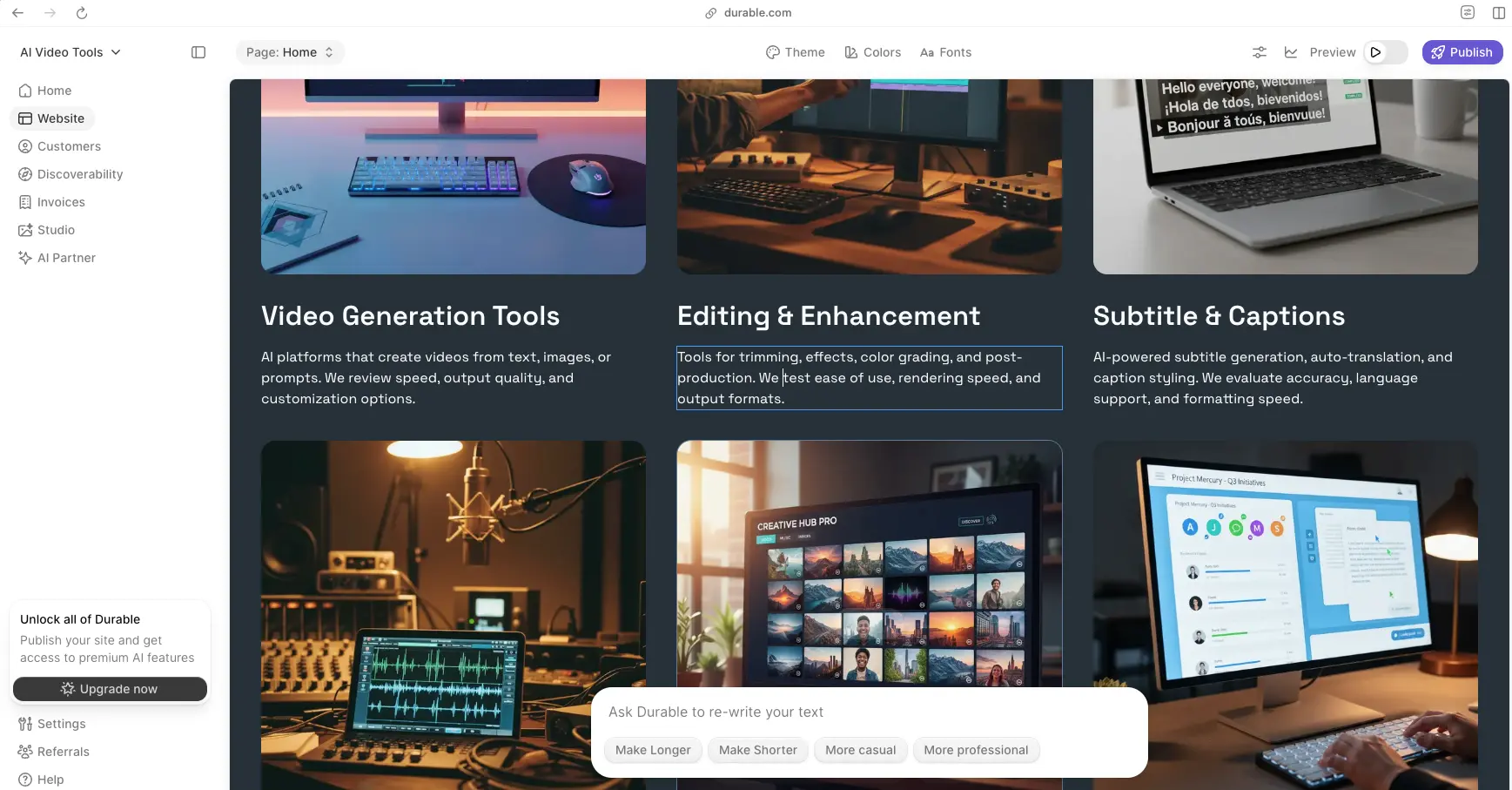
We hold an account, the editor above is our own screenshot, and our Durable review (4.3/5) has the long version. The limits are the flip side of the speed: customization is shallow compared to everything else here, SEO tooling is basic, and this is not the platform for a content-heavy or design-precious site. It's the platform for the plumber, the consultant, and the person who has put off "make the website" for a year. Domains transfer in within minutes and, to Durable's credit, transfer out on cancellation.
Choose Durable over Squarespace if: you were only using a fraction of Squarespace anyway and the site's job is to exist, look credible, and capture leads. Durable's free tier answers the fit question in ten minutes.
8. Shopify — When Your Squarespace Site Is Really a Store
If most of your Squarespace dashboard time is orders and inventory, you're not shopping for a website builder, you're shopping for a commerce platform, and Shopify is the category's benchmark. Basic runs $29/month on annual billing ($39 monthly) with card rates from 2.9% + 30¢, a $1/month-for-3-months intro deal, and an AI layer, the Sidekick assistant plus a prompt-based store generator, included on every paid tier. Watch one fee if you keep your own payment processor: Shopify adds a 2% third-party-payments fee on Basic. Products move over via CSV; pages and blog content are a rebuild, like everywhere else.

We hold a Shopify account (screenshot above), and our Shopify review rates it 4.6/5. The counterweights: app costs stack as your store grows, and content marketing on Shopify is serviceable rather than great, if your store is really a blog with products attached, WooCommerce on WordPress may fit better, a decision we've mapped in detail in our 10Web vs Shopify comparison.
Choose Shopify over Squarespace if: the store is the business, you want checkout, shipping, and sales channels that never fight you, and $29/month buys tools Squarespace commerce can't match. Shopify's $1/month intro makes the test nearly free.
9. Pixpa — The Photographer's Exit
Pixpa pays us nothing. It's the specialist pick for the largest single tribe in the Squarespace exit threads: photographers and visual creatives who used Squarespace as a portfolio and now resent the bill. Pixpa bundles portfolio galleries, client proofing galleries, a store, and blogging from $5.40/month on annual billing, with a 15-day trial that needs no card, and, unlike Format, its closest rival at $10–14/month entry, it takes no commission on sales through your site, where Format's marketplace takes 15% on its Pro tier.
Full disclosure on the evidence: the loudest Squarespace-to-Pixpa switching stories are on Pixpa's own testimonials page, vendor-curated praise, so weigh it as such, and a January 2025 Reddit thread pushed back hard on the company's responsiveness to feature requests. That mixed picture is why it's ninth and not fourth. At this price, with a no-card trial, the cheapest way to resolve the question is to upload one gallery and see.
Choose Pixpa over Squarespace if: you're a photographer or visual artist, client galleries matter, and you want the portfolio job done for a third of post-hike Squarespace money.
Free Squarespace Alternatives: What You Actually Get at $0
Squarespace has no free plan, so anything free is already a win for the undecided. The real free tiers: Wix Free is a full builder with ads and a Wix subdomain, the most complete $0 option here. WordPress.com Free gives you a real WordPress blog and site on a subdomain. Durable Free publishes a live business site with capped AI usage. Framer Free includes 500 credits and a subdomain, plenty to feel the editor. 10Web lets you generate your site free and take a 7-day trial before its $10/month plans, and Pixpa's 15-day trial asks for no card. Hostinger has no free plan, its answer is the $2.99 promotional entry and a money-back window. If free-first is your whole strategy, our free AI website builders roundup ranks the $0 tiers in detail.
The Migration Reality: What Actually Leaves Squarespace With You
This is the part most alternatives lists skip, and it decides more switches than pricing does. Squarespace's official export produces one WordPress-format XML file, and its scope is narrow: pages and blog posts as text and images, from a live, published site, and if you run multiple blogs, only the one you mark as primary comes along. What does not export, per Squarespace's own documentation and years of confirmed migration threads: your products, your member areas, and your entire design, templates, styles, and layouts stay behind. A June 2026 migration thread put the practical shape on it: content moves as data, design gets rebuilt, and every URL needs a redirect checked by hand.
Map that onto the destinations. WordPress.com and 10Web import the XML, so your writing survives the move, then the design layer is rebuilt, by hand on WordPress.com, by AI on 10Web. Webflow says it plainly in its own docs: rebuild, not transfer. Wix, Hostinger, Durable, Framer, and Pixpa have no Squarespace importer at all, you're recreating the site, which is less painful than it sounds on the AI builders, where regeneration takes minutes, and most painful on design-first tools, where the rebuild is the product. Shopify takes your product catalog via CSV and leaves the rest to you. Whatever you choose: export the XML first, screenshot every page, keep Squarespace live until DNS flips, and write your redirect map before you cancel, not after. Your domain, if registered through Squarespace, transfers out through the standard unlock-and-transfer process, so build a week of buffer into the switch.
What Reddit Actually Says About Leaving Squarespace
The dated arc is unusually clean. September 29, 2025: a thread complaining about price increases with no visible new features, from a user who says they already left after the previous hike. March 13, 2026: "$33/month for a basic business site feels insane in 2026, what are people switching to?", switching-destination talk months before the email. July 16–17, 2026: the receipts threads, side-by-side billing histories, $138 to $204, posted within a day of each other. July 26, 2026: a thread flatly observing that many users are departing over the increase. And running underneath it all, the year-old thread that still ranks first for this search, "with all the hate on Squarespace, any alternative...", where the answers scatter exactly the way this article does: one user on Adobe Portfolio because it's already paid for, a cinematographer on Framer, one person who had ChatGPT write plain HTML.
The destination pattern across threads: budget leavers go to Hostinger or stay-cheap options like Pixpa; ownership leavers go to WordPress, with the managed WordPress.com path chosen by people who tried self-hosting and backed away, as one April 2026 thread documents; design professionals go to Webflow or Framer; and store owners were mostly never asking, they'd already found Shopify. Weigh all of it as what it is, individual experiences, but the pattern has held across a year of threads and maps cleanly onto the pricing and migration facts above.
A Note on What Ranks for This Search
Worth naming what you're wading through when you search this topic. Squarespace itself ranks on this SERP, with its own list of Wix alternatives, a company answering the question "what should I use instead of you" with "here's what to use instead of our competitor." Wix buys the top ad slot. Lovable, an AI app builder from a different category entirely, buys the one next to it (that world is real but different, we cover it in our Lovable alternatives guide). The rest is a familiar rotation of affiliate listicles refreshed on a calendar. None of it is worthless, but almost every page was written to end with you in someone's checkout. Ours ends with a recommendation that depends on your site, four tools that pay us, five that don't, and a migration section that tells you what you'll lose on the way out. That's the whole difference.
How to Choose Your Squarespace Alternative
Match the tool to the reason you're leaving, not to feature lists. Leaving over the price hike, want the bill gone: Hostinger Website Builder, one cheap bundle, just don't forget the lock-in. Leaving the price but not the model: Wix, same all-in-one shape, free plan included. Leaving because you're done renting: WordPress.com if you want it managed, 10Web if you want AI to do the WordPress part. Leaving because the grid fought your design: Webflow for full control, Framer for portfolio and marketing polish. The site just needs to exist: Durable, minutes, done. The site is a store: Shopify, and read our 10Web vs Shopify piece if WooCommerce tempts you. You're a photographer: Pixpa, a third of the money for the actual job. And if you read this far and the math still works for you: staying on Squarespace is a legitimate call too, its templates remain the category's best-looking starting points, and nobody ever got fired for renewing.
Final Verdict — The Best Squarespace Alternatives in 2026
| Best budget escape | Hostinger Website Builder (from $2.99/mo promo, our 4.7/5) |
| Closest like-for-like swap | Wix (free plan, AI builder on every tier, no commission to us) |
| Best for ownership | WordPress.com (managed) or 10Web (AI-built WordPress) |
| Best for designers | Webflow (full control) or Framer (portfolio polish) |
| Fastest small-business site | Durable (free tier, live in minutes) |
| Best for stores | Shopify ($29/mo, commerce benchmark) |
| Best for photographers | Pixpa (from $5.40/mo, zero sales commission) |
Bottom line: Squarespace is still a well-made product whose July 2026 price email turned a quiet grumble into an open migration. The good news is the exits have specialized: Hostinger for the cheapest credible bundle, Wix for the same life at a better price with a free plan, WordPress via WordPress.com or 10Web for people done renting, Webflow and Framer for design control, Durable for speed, Shopify for stores, Pixpa for photographers. Before you commit anywhere, run the migration checklist above, export your XML, map your redirects, keep the old site live until DNS flips, and spend one evening in a free tier or trial building your three most important pages. That evening answers more than any article can, including this one.