
Kling AI
AI video generator by Kuaishou Technology — create photorealistic videos from text prompts, images, or reference videos. Motion Control, Avatar 2.0, native audio, and the #1 ELO benchmark score in 2026.
Try Kling AI →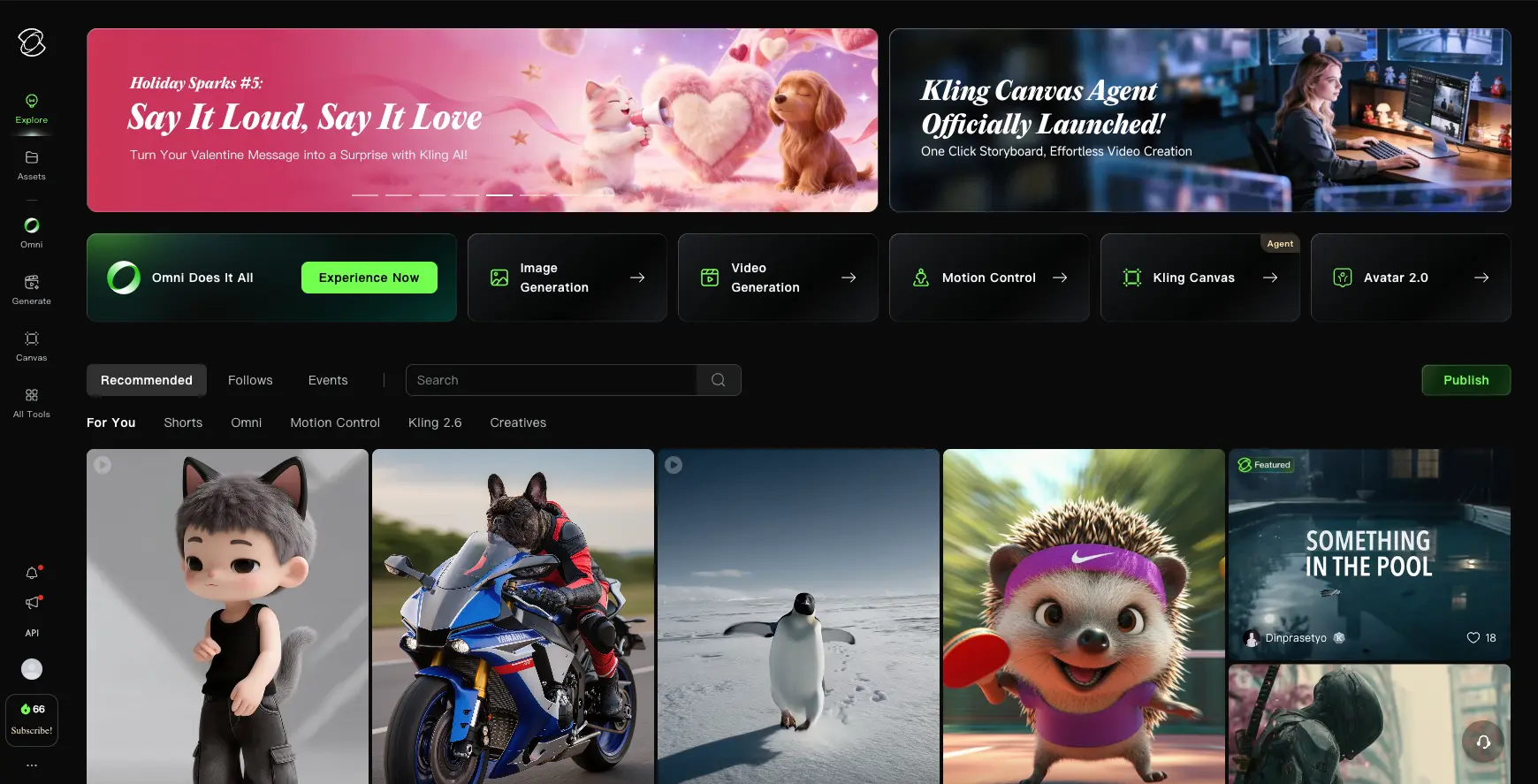
The Best AI Video Generator You Can't
Fully Trust (Yet)
Kling AI occupies a paradoxical position in April 2026: it's technically the most capable AI video generator available—#1 on ELO benchmarks, best-in-class human realism, and features like Motion Control that no competitor matches. At $6.99/month with commercial rights included, the value proposition is hard to argue with. But the billing practices, absent customer support, and Chinese data jurisdiction are real concerns that prevent a perfect score. For social media creators and marketing teams who go in with open eyes, Kling AI delivers exceptional video quality at a price point nobody else touches.
✓ What We Love
- Best-in-class photorealistic humans and lip-sync
- Motion Control—extract and transfer motion between subjects
- ~40% cheaper per second than Runway
- Native audio + video generation in one pass
! Could Be Better
- Customer support is effectively non-existent
- Intro pricing vs. renewal pricing mismatch
- Content censorship from Chinese regulations
- Credits deducted even for failed generations
What Is Kling AI?
The AI video generator that tops every benchmark—but comes with fine print worth reading.
Kling AI is an AI video and image generation platform built by Kuaishou Technology, a publicly traded Beijing-based company founded in 2011. If you haven't heard of Kuaishou, you've probably encountered their other product: one of China's largest short-video platforms with hundreds of millions of daily users. That matters because Kling isn't a startup side project—it's backed by a company that understands video at massive scale.
Since launching in June 2024, the platform has grown to over 22 million users worldwide who've collectively generated more than 168 million video clips. By December 2025, Kling AI hit an annualized revenue run rate of $240 million—just 19 months after launch. Those aren't vanity metrics; they reflect a tool that's genuinely captured the market.
Here's the thing that separates Kling AI from tools like Pika or Luma AI: its photorealistic human generation is in a different league. The proprietary diffusion-based Transformer architecture combined with a 3D Variational Autoencoder means the model understands how bodies move through space, how fabric drapes, how light plays across skin—not frame-by-frame, but as a continuous flow. Independent reviewers consistently rate it the strongest tool for human-subject video in 2026.
Who Is Kling AI Best For?
Social media content creators producing TikTok, YouTube Shorts, and Instagram Reels at volume. Marketing teams needing product demos and promotional video without stock footage costs. Developers building video AI applications who need immediate API access. Anyone working with human subjects where photorealistic faces and lip-sync are the priority—Kling AI is the clear leader for that use case.
And then there's Motion Control—Kling's most distinctive feature. Upload a reference video of someone dancing, and the AI extracts that motion pattern and applies it to a completely different subject. An animated character. A product. A cat. No other major AI video platform offers anything equivalent natively. This feature alone drove a viral explosion in early 2026, spawning millions of dance-transfer videos across TikTok and Instagram.
Worth noting: Kling 3.0, released February 5, 2026, holds the #1 ELO benchmark score (1243) among all AI video models—ahead of Google Veo 3.1, Runway Gen-4.5, and Pika 2.2. With OpenAI's Sora announced for shutdown on March 24, 2026, Kling's lead in the space is now uncontested. If you're a former Sora user looking for what comes next, check our guide to the best Sora alternatives.
But I'd be doing you a disservice if I didn't flag the downsides early. Kling's customer support is, to put it diplomatically, a significant weakness. The billing practices—intro pricing that silently jumps at renewal, credits deducted for failed generations—have generated real frustration. And as a Chinese-regulated platform, content censorship on politically sensitive topics is a reality. More on all of this in the Pros & Cons section below.
See Kling AI in Action
Real screenshots from the platform showing the dashboard, video generation, Motion Control, and Avatar features.
Dashboard & Homepage
Your starting point with access to all major creation modules
The dashboard is clean and well-organized. The top row gives direct access to each creation module—Image Generation, Video Generation, Motion Control, Kling Canvas, and Avatar 2.0. The "Omni" option is the unified multimodal entry point introduced with Kling O1. Below, a community feed shows featured creations filtered by type (Shorts, Omni, Motion Control, Kling 2.6, Creatives). The dark interface works well for visual content work.
Video Generation Interface
Text-to-video with prompt dictionary and camera movement presets
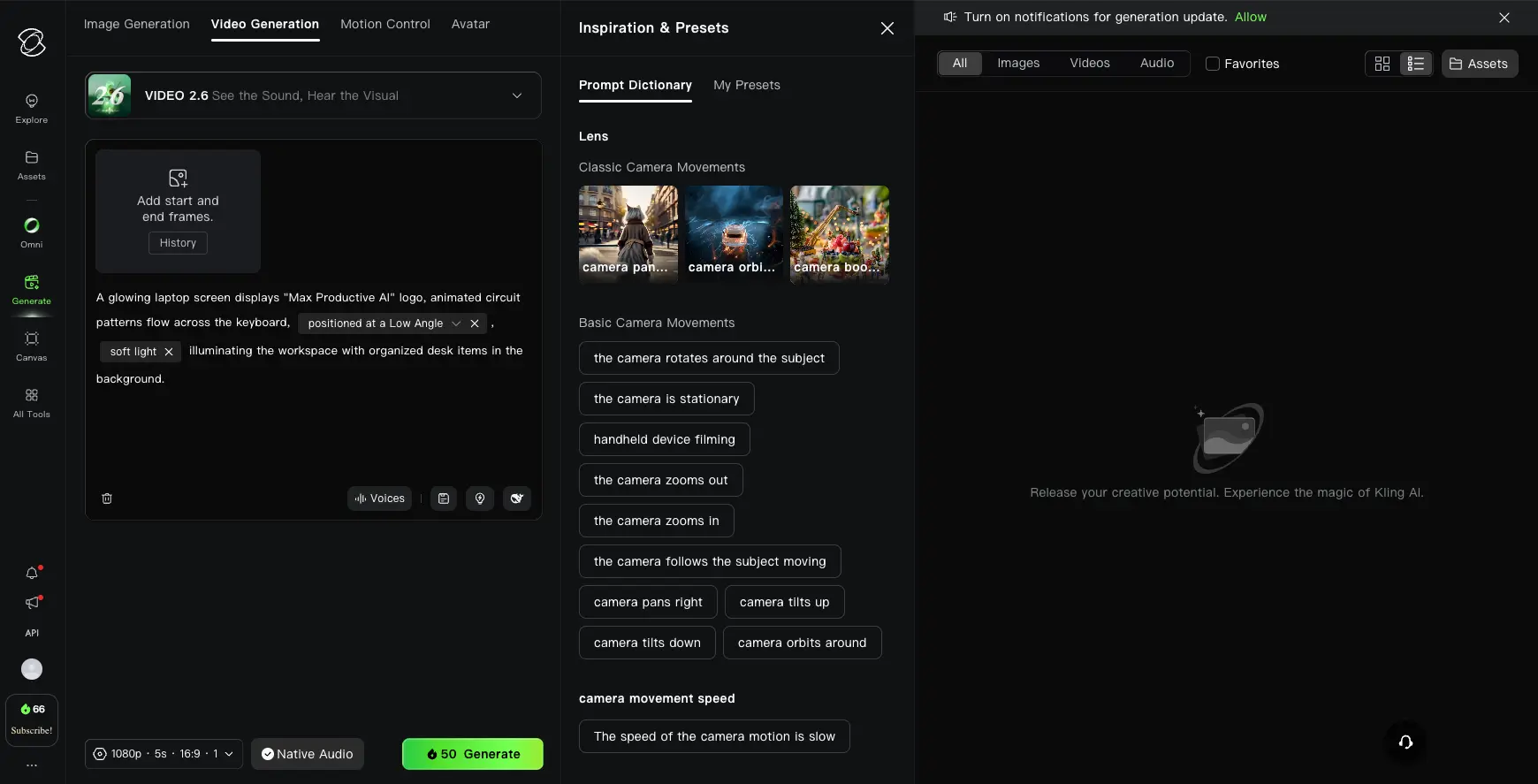
This is where you'll spend most of your time. The left panel handles your prompt—with a detailed text area, start/end frame upload, and voice options. On the right, the Inspiration & Presets panel is genuinely useful: it offers preset camera movements (pan, orbit, boom, zoom, tilt, stationary, handheld) so you don't need to describe every camera action in your prompt. The bottom bar shows resolution, duration, and credit cost before you generate. A small detail that matters: the "Native Audio" toggle lets you generate synchronized sound alongside video in one pass.
Want to test Kling AI's video generation with the free tier?
Try Kling AI →Free tier with 66 daily credits • No credit card requiredMotion Control Library
Extract motion from reference videos and apply to new subjects
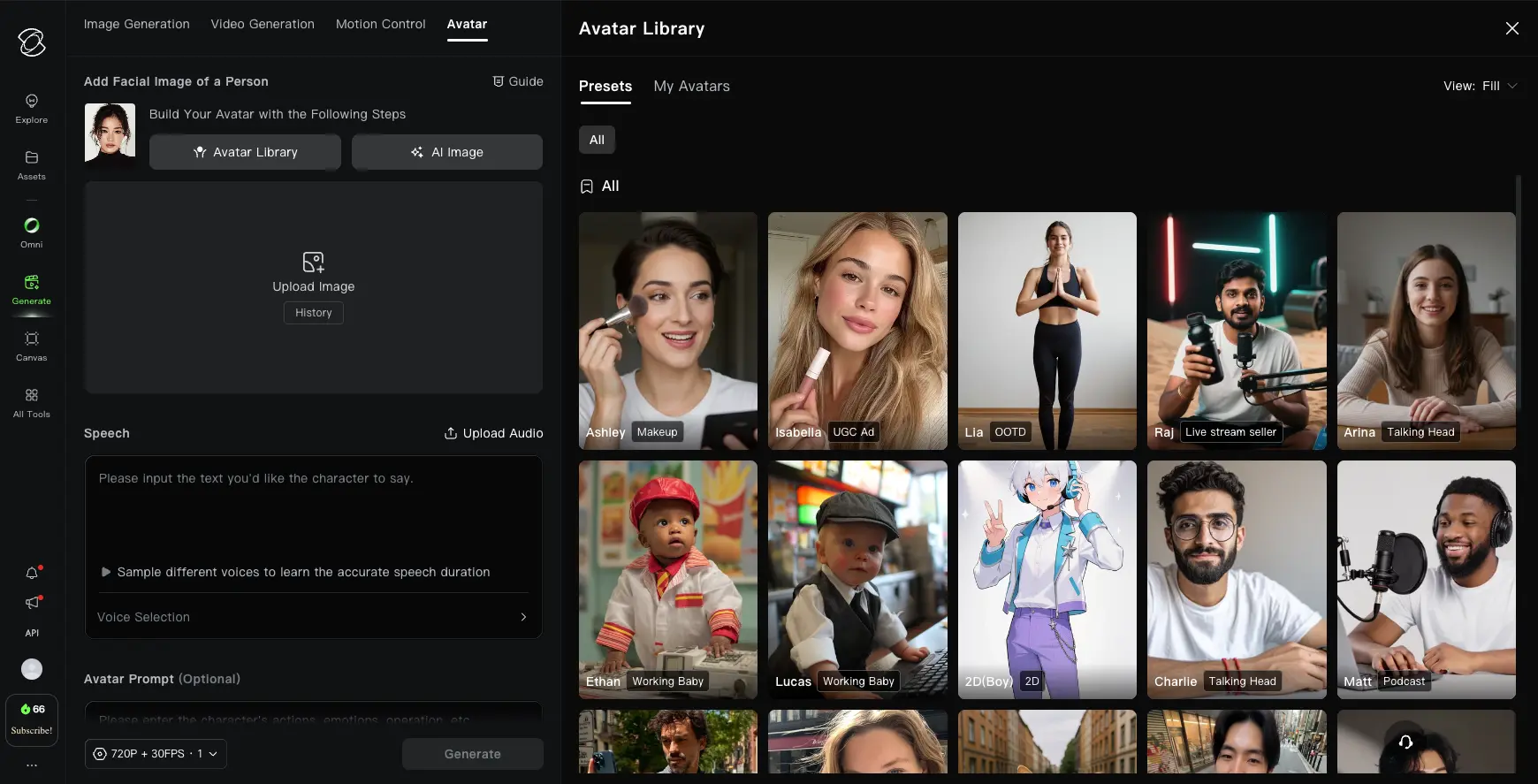
This is Kling AI's killer feature and the one no competitor matches natively. The Motion Library offers preset motion templates—dances, gestures, expressions—that you can apply to any character you upload. Or upload your own reference video and extract its motion pattern. The quality depends on how clean the motion in your reference video is: solo movements work beautifully, while overlapping crowd movements produce less accurate transfers. You can toggle between "Character Orientation Matches Video" and "Matches Image" depending on your source material.
Avatar Library & Digital Humans
Pre-built and custom AI avatars for talking head content
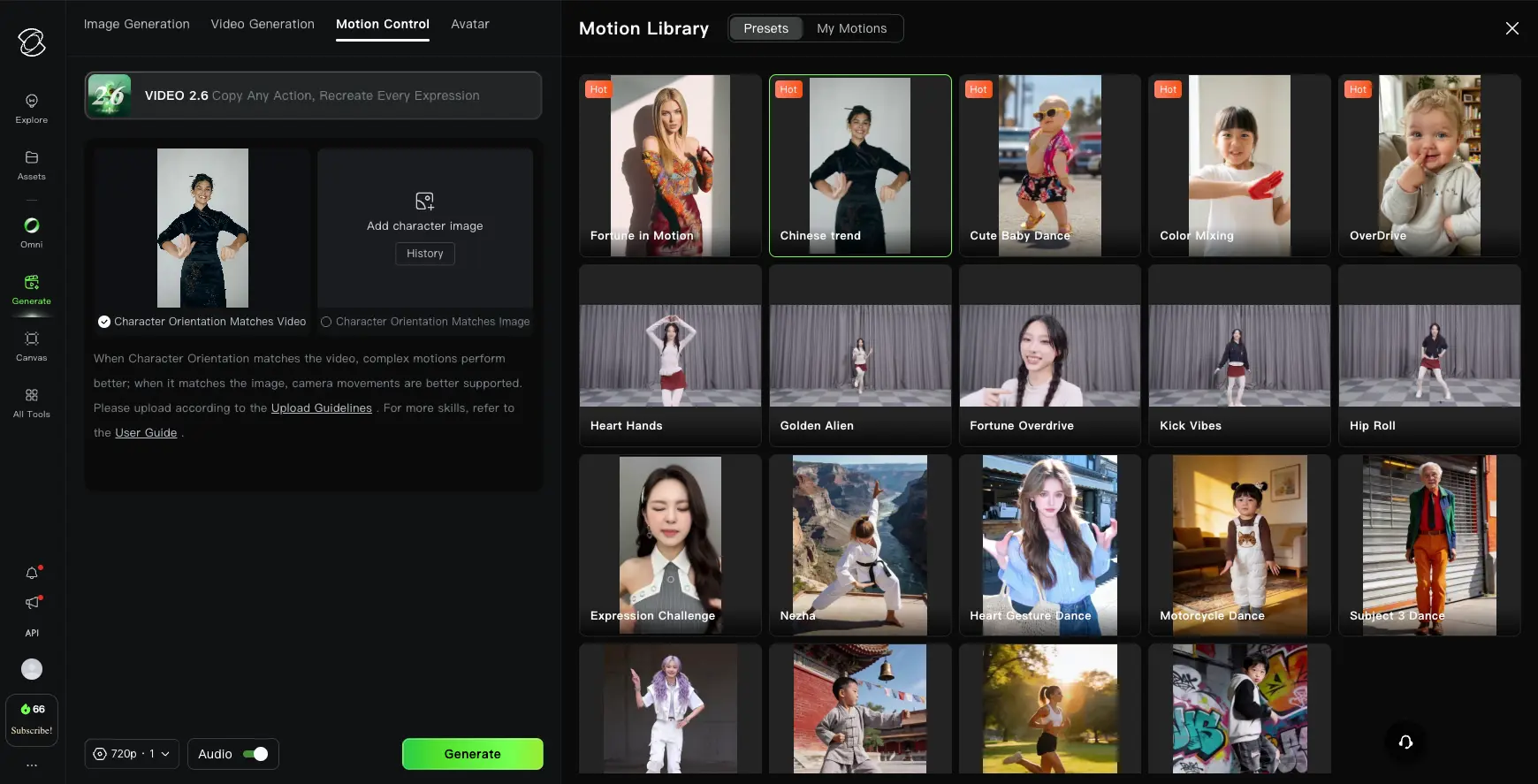
Avatar 2.0 is where Kling AI competes directly with tools like HeyGen and Synthesia. The library includes categorized preset avatars (Makeup, UGC Ad, OOTD, Live Stream, Talking Head, Podcast) or you can upload your own face to build a custom avatar from a single image. Type or upload the speech text, select a voice, and generate a talking avatar video with synchronized lip movements. Avatar 2.0 can maintain identity consistency for up to five continuous minutes—a meaningful upgrade for long-form content like e-learning or product demos.
How Kling AI Works
From text prompt to finished video in four steps. The process is straightforward—the prompting is where the skill comes in.
Write Your Prompt (or Upload an Image)
Kling AI accepts three input types: a text description, a still image to animate, or a combination of both. For text-to-video, the platform rewards structured, cinematic-style descriptions. A vague prompt like "a woman walking in a city" will get you generic output. A detailed prompt like "Medium close-up shot, a 30-year-old woman in a navy trench coat walks through a rain-soaked Tokyo street at night, neon signs reflected in puddles, cinematic bokeh background" will get something genuinely impressive. The sweet spot is 30–60 words—under 30 tends to be too vague, over 100 risks contradictory instructions.
Configure Settings & Camera Controls
Before generating, you'll choose your model version (Kling 2.6 or 3.0 if available on your plan), resolution (up to 1080p, or 4K on Kling 3.0), duration (5s, 10s, or 15s on 3.0), and frame rate (up to 48fps). The Prompt Dictionary panel offers one-click camera movement presets—pan, orbit, zoom, handheld, stationary—so you don't have to describe camera behavior in text. Toggle Native Audio if you want synchronized sound generated alongside the video. Each configuration shows the credit cost before you commit.
Generate & Wait
Hit Generate and the AI processes your request. Generation typically takes 3–12 minutes depending on resolution, duration, and queue load. Free tier users may experience significantly longer waits—sometimes hours during peak times. Kling 3.0 uses Chain-of-Thought reasoning under the hood, breaking your prompt into logical steps before generating frames. This means complex scenes with multiple elements render more coherently than on earlier versions. One frustration worth flagging: if a generation fails at 99% completion, credits may still be deducted. That's a known issue users report frequently.
Download, Extend, or Iterate
Once your clip is ready, download it watermark-free (paid plans) or with a watermark (free tier). You can extend clips by chaining generations together—up to approximately 3 minutes of total content using the extension feature. If the output isn't right, refine your prompt and regenerate. Here's where Kling's lack of an in-platform editor shows: there's no way to adjust the clip after generation. You accept it, regenerate, or take it to a separate editor like VEED or a traditional video editing tool.
Prompting Makes or Breaks Your Results
Kling AI is prompt-dependent in a way that matters. The four-part formula that works best: Subject (with specific physical descriptors) → Action (precise movement, not generic verbs) → Context (location, lighting, time of day—3–5 elements max) → Style (camera type, lens, color palette). Spending an extra minute on your prompt consistently produces better results than regenerating five times with a vague one.
A Note on Sora's Shutdown
OpenAI announced Sora's discontinuation on March 24, 2026, citing computing costs and a pivot toward enterprise tools. The web app shuts down April 26, 2026; the API follows September 24, 2026. If you're migrating from Sora, Kling AI is the closest match on video quality and cost. For a full breakdown of alternatives, see our best Sora alternatives guide.
Key Features
What makes Kling AI different from every other AI video generator in 2026—and where it still falls short.
Text-to-Video & Image-to-Video
Generate video from natural language descriptions or animate still images with motion, depth, and camera dynamics. Image-to-video is widely regarded as Kling's strongest capability—the 3D face and body reconstruction technology reduces the warping distortion common in simpler tools. Supports up to 1080p (4K on Kling 3.0) at up to 48fps.
Motion Control
The feature nobody else has. Upload a reference video and Kling extracts its motion pattern—then applies it to a completely different subject. This drove a viral moment in early 2026 and remains Kling's most distinctive differentiator. Runway has a Motion Brush for manual painting, but nothing that automatically extracts motion from reference footage.
Elements (Character Consistency)
Upload up to four reference images to lock a character's visual identity across multiple generations. Combined with start/end frame control and clip extension, this lets you build longer sequences with consistent characters—a problem that plagues most AI video tools.
Native Audio Generation
Since Kling 2.6, the platform generates synchronized audio and video in a single pass—sound effects, ambient audio, and spoken dialogue. Kling 3.0 extends this to multiple languages including Chinese, Japanese, Spanish, and English variants, with multi-character dialogue and accurate lip-sync. Only Google Veo 3.1 offers comparable native audio among competitors.
Multi-Shot Scene Logic
Kling 3.0 plans and executes scene sequences with consistent lighting, camera direction, and character identity across multiple cuts. This is a genuine step toward AI-assisted filmmaking rather than isolated clip generation. Early access on Ultra plans currently, with broader rollout ongoing.
Avatar 2.0 (Digital Humans)
Generate hyper-realistic talking avatars from a single image with up to five minutes of continuous identity-consistent output. Competes directly with HeyGen and Synthesia for talking head content. Preset avatar library covers use cases from UGC ads to podcasts to live stream presenters.
API Access (No Waitlist)
Production-ready API with transparent per-second pricing (~$0.028/s standard, ~$0.042/s professional). No waitlist, no approval process—sign up and start building. A meaningful advantage over competitors like Pika, which restricts API access to select partners.
Multi-Language Audio
Generate native audio in Chinese, Japanese, Spanish, American English, British English, and Indian English with accurate lip-sync. Not translation—actual native-language generation in one pass. If you're creating content for international audiences, this saves the cost of separate voiceover and lip-sync tools.
One honest gap worth noting: Kling AI is an output-only tool. There's no built-in post-production editor. You generate a clip, download it, and take it elsewhere for editing. Runway is the only major competitor that lets you generate and edit within the same platform—inpainting, outpainting, camera path control, color grading, the works. If post-production workflow matters to you, that's a meaningful distinction.
Test all features with the free tier—no credit card required:
Try Kling AI →66 free credits daily • Upgrade anytimePricing Plans
Credit-based pricing with a free tier. Read the fine print on intro vs. renewal prices before committing.
Free
- ✓ 66 credits/day (expire daily)
- ✓ Standard mode only
- ✓ Lower resolution (360p–540p)
- ✗ Watermark on all videos
- ✗ Non-commercial use only
Standard
- ✓ 660 credits/month
- ✓ Professional mode access
- ✓ 1080p resolution
- ✓ Watermark-free downloads
- ✓ Commercial use included
- ⚠ Renews at $8.80/mo
Pro
- ✓ 3,000 credits/month
- ✓ Kling 3.0 model access
- ✓ Private Mode included
- ✓ Motion Control & Elements
- ✓ Commercial use included
- ⚠ Renews at $32.56/mo
Important: All subscription credits expire at the end of each billing cycle—they do not roll over. Top-up credit packs purchased separately do not expire.
Pricing last verified April 2026. Visit Kling AI for current rates.
How Do Credits Actually Translate to Videos?
On the Standard plan (660 credits), that's roughly 33 Standard-mode clips or 19 Pro-mode clips per month. On Pro (3,000 credits), you're looking at 85–150 Professional-mode 5-second videos. Keep in mind: a single 10-second clip at 1080p Pro costs approximately 200 credits—so longer, higher-quality content eats through your budget faster than you might expect.
For pricing context: Runway starts at $15/month with commercial rights. Pika starts at $8/month but requires upgrading to Pro ($28/month) for commercial use and watermark-free exports—a detail that's easy to miss. Luma AI similarly requires the $29.99/month Plus plan for commercial rights. Kling AI's Standard plan at $6.99/month with commercial rights included from day one is the strongest value proposition in the category—just factor the $8.80 renewal price into your budget, not the intro rate.
Detailed Pros & Cons
An honest assessment of where Kling AI excels and where it genuinely falls short.
✓ Pros
No other AI video tool in April 2026 renders human faces, body motion, skin texture, and lip-sync as well as Kling AI. Multiple independent benchmarks and head-to-head comparisons confirm this. If your content involves people—marketing videos, avatars, talking heads—this is the tool.
Extracting motion from reference footage and applying it to new subjects is something no major competitor offers natively. Runway's Motion Brush lets you paint motion manually, but it doesn't extract motion from video automatically. This feature alone justifies serious consideration.
At roughly 40% cheaper per second of generated video than Runway, Kling offers the best price-to-quality ratio in the market. Commercial rights from the entry $6.99/month plan—something Pika and Luma AI don't include until their $28+ and $30+ tiers respectively.
Generating synchronized audio alongside video in one pass, with multilingual support, is a capability shared only with Google Veo 3.1 among the major platforms. Runway, Pika, and Luma AI all require separate audio tools.
66 daily credits with no credit card required. That's enough to generate 1–3 test videos per day—adequate for evaluating whether the tool fits your workflow before paying anything. Not generous, but genuinely free.
No waitlist, transparent per-second pricing, well-documented. For developers building video AI applications, this is a significant practical advantage over competitors with restricted or invitation-only API access.
✗ Cons
This is the single biggest red flag. Emails go unanswered, subscription cancellations are reported as difficult, and billing disputes drag on without resolution. The support experience is consistently described as the worst aspect of the platform by users across multiple review sites. If you hit a billing problem, be prepared to escalate through your card issuer.
Standard starts at $6.99 but renews at $8.80. Pro starts at $25.99 but renews at $32.56. The jump isn't enormous, but it's not disclosed prominently during signup. Always budget based on the renewal price, not the intro rate.
The "99% completion bug" is a documented issue where credits are consumed even when a video fails to render completely. When you're paying for credits that expire monthly, losing them to platform errors stings. This is one of the most frequently cited complaints.
As a platform regulated under Chinese law, Kling blocks politically sensitive topics—government criticism, territorial disputes, certain historical events. Filters are opaque and inconsistent; you'll discover restrictions through trial and error. No NSFW toggle exists and no appeal mechanism is available for blocked prompts. For creative professionals working with sensitive or political content, this is a real constraint.
Kling is an output-only tool. Generate, download, edit elsewhere. Runway offers inpainting, outpainting, camera path control, and color grading within the same platform. If your workflow depends on post-generation fine-tuning, you'll need a separate editor.
Your content is processed under Chinese data law. Kuaishou's Terms of Service grant them rights to use your content for model training. For personal creative work and general marketing content, this is typically acceptable. For enterprises handling regulated data, client faces without consent, or GDPR-sensitive material, it's a compliance concern worth evaluating with your legal team.
Kling AI vs Alternatives
How Kling AI compares to the leading AI video generators in April 2026.
| Feature | Reviewed Kling AI | Runway | Pika | Luma AI |
|---|---|---|---|---|
| Starting Price | $6.99/mo | $15/mo | $8/mo (annual) | $9.99/mo |
| Commercial Rights | ✓ From Standard | ✓ From Standard | ✗ Pro required ($28/mo) | ✗ Plus required ($29.99/mo) |
| Free Tier | 66 credits/day | 125 one-time | 80 credits/mo | Limited daily |
| Max Resolution | 4K (Kling 3.0) | 1080p + 4K upscale | 1080p | 1080p + 4K upscale |
| Native Audio | ✓ Multi-language | ✗ | Partial | ✗ |
| Human Realism | ★★★★★ | ★★★★ | ★★★ | ★★★ |
| In-Platform Editing | ✗ None | ✓ Full suite | ✓ Basic | Limited |
| Unique Strength | Motion Control + Cost | Camera control + Editing | Pikaffects VFX | 3D spatial awareness |
| Best For | Social media, marketing | Professional filmmaking | Viral VFX content | Architectural / spatial |
Which Tool Is Right For You?
Kling AI
ReviewedBest for: Social media creators and marketing teams who need high-volume, photorealistic video at the lowest cost per clip. The sweet spot is if you prioritize human realism, want commercial rights without paying premium prices, and can tolerate the billing quirks. Motion Control and Avatar 2.0 are capabilities no competitor currently matches at this price point.
Runway
Professional WorkflowBest for: Professional filmmakers, VFX artists, and commercial studios who need in-platform editing alongside generation. The only major tool with camera path control, inpainting, outpainting, and color grading built in. More expensive than Kling and no native audio, but the post-production workflow is unmatched. US data jurisdiction if that matters to you.

Pika
Creative VFXBest for: Creators who want unique visual effects that no other tool offers. Pikaffects—crush, melt, inflate, explode, dissolve, crystallize—are genuinely distinctive and drive viral social content. The friendliest interface for beginners, with a strong Discord community. But beware: the $8/month Standard plan doesn't include commercial rights or watermark-free exports. You need Pro ($28/month) for professional use.
Luma AI
Spatial & CinematicBest for: Architectural visualization, interior design, product photography, and cinematic storytelling where depth and 3D spatial awareness matter most. Ray3.14 delivers native 1080p at fast speeds. Like Pika, the entry Lite plan ($9.99/month) doesn't include commercial use—you need Plus ($29.99/month). US data jurisdiction.

HeyGen
Avatar SpecialistBest for: Teams focused specifically on talking head and AI spokesperson content. While Kling's Avatar 2.0 competes in this space, HeyGen remains the dedicated platform with deeper avatar customization, voice cloning, and enterprise features. Choose HeyGen if avatars are your primary use case; choose Kling if avatars are one feature among many you need.

Synthesia
Enterprise AvatarBest for: Enterprise teams needing professional AI avatars for training, onboarding, and corporate communications at scale. More polished and enterprise-ready than Kling's Avatar 2.0, with stronger compliance and data handling. Higher price point justified by dedicated support and GDPR compliance—areas where Kling falls short.
Frequently Asked Questions
Should You Try Kling AI?
Kling AI in April 2026 is simultaneously the most technically impressive and the most frustrating AI video generator on the market. The video quality—especially for human subjects—is genuinely best-in-class. Motion Control is a feature nobody else offers. The cost per clip undercuts every major competitor. And with OpenAI Sora shutting down, Kling's position at the top of the benchmarks is uncontested.
But the business side of the product has real problems. The billing practices—intro vs. renewal price mismatches, credits deducted for failed generations, expiring monthly credits—create friction that a tool this capable shouldn't have. Customer support being nearly non-existent is a genuine risk if anything goes wrong. And the Chinese data jurisdiction and content censorship constraints are practical considerations for certain use cases.
Our Recommendation
Start with the free tier—66 daily credits, no credit card required. Test your use case: try text-to-video, image-to-video, and Motion Control if those features interest you. If the output quality fits your needs, move to the Standard plan ($6.99/month) for commercial rights and watermark-free downloads. Budget based on the $8.80 renewal price, not the intro rate. And keep a separate editor in your workflow—Kling generates the footage, but you'll finish it elsewhere.