
Wispr Flow
AI-powered voice dictation that turns your speech into clean, formatted text inside any app. Context-aware formatting, Command Mode AI editing, and the only major dictation tool available on Mac, Windows, iOS, and Android.
Try Wispr Flow Free →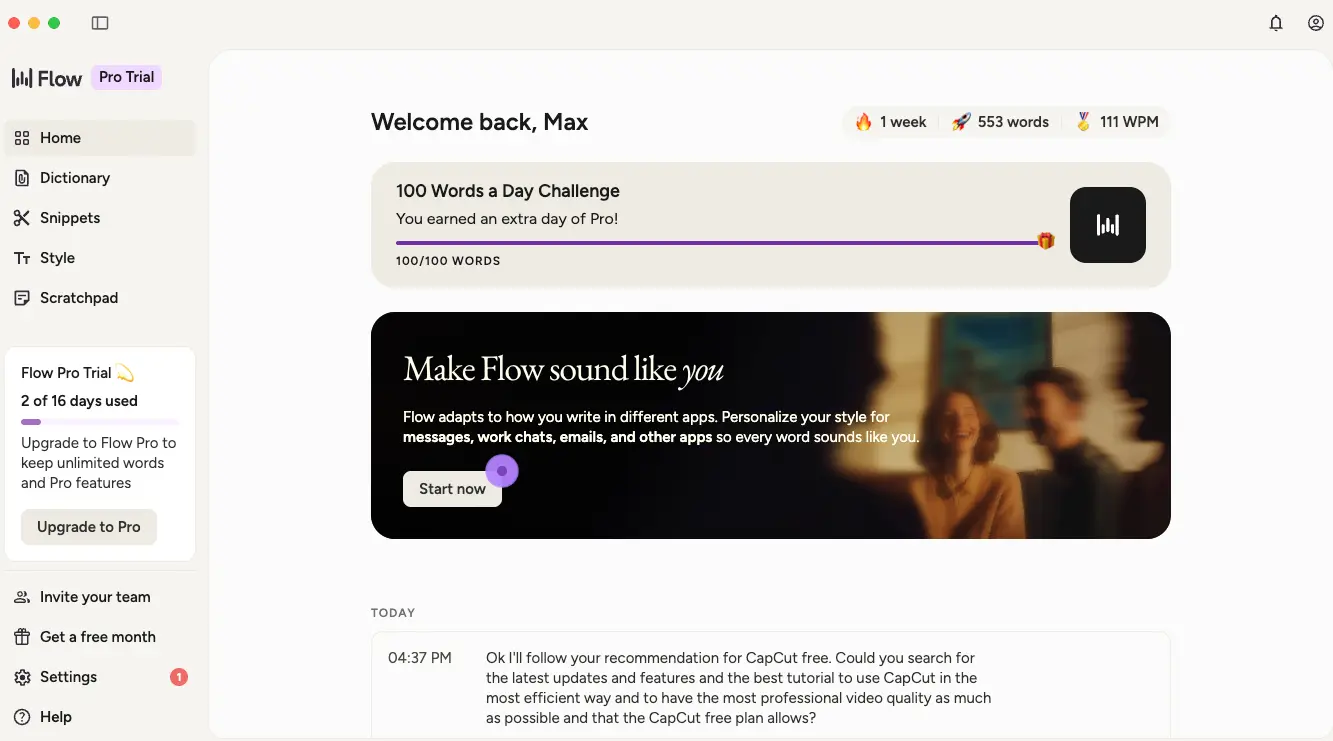
The Best Cross-Platform AI Dictation
Tool in 2026
After months of daily use, Wispr Flow has fundamentally changed how I produce written content. It converts natural speech into clean, formatted text inside any application — with context-aware tone adjustment, filler word removal, and AI-powered editing via Command Mode. At $12-15/month with a generous free tier, it is the most complete AI dictation tool available across all four major platforms.
✓ What We Love
- Works on Mac, Windows, iOS & Android
- Context-aware formatting per app
- Command Mode AI text editing (Pro)
- HIPAA-compliant on all plans incl. free
! Could Be Better
- No offline mode — cloud processing only
- Windows version less stable than Mac
- Accuracy drops in noisy environments
What Is Wispr Flow?
A comprehensive overview of the platform, how it differs from basic dictation, and who benefits most.
Wispr Flow is an AI-powered voice dictation application that converts your natural speech into clean, polished text inside any application on your device. You activate it with a keyboard shortcut (the Fn key on Mac by default), speak naturally, and it inserts formatted text directly where your cursor sits — whether that's Gmail, Slack, Notion, Google Docs, VS Code, Cursor, WhatsApp, or virtually any other text field.
What makes Wispr Flow fundamentally different from basic speech-to-text tools (including Apple Dictation and Google Voice Typing) is that it doesn't just transcribe your words verbatim. Your voice runs through multiple AI layers simultaneously: the first handles transcription, while additional layers remove filler words like "um," "uh," and "like," apply intelligent punctuation, correct backtracking (saying "meet Tuesday — wait, Wednesday" becomes "meet Wednesday"), and adapt the writing style to match the application you're using. A Slack reply comes out casual; the same thought sent via Gmail becomes a properly structured professional email.
As of April 2026, Wispr Flow is available on Mac, Windows, iOS, and Android — making it the only major AI dictation tool available on all four platforms simultaneously. The company has raised over $80M in venture funding, including a $30M Series A from Menlo Ventures in mid-2025, signaling serious long-term investment in the product.
Independent testers document consistent output of 150-184 words per minute with Wispr Flow, compared to average professional typing speeds of 60-80 WPM. For professionals who produce large volumes of written content daily, this translates to measurable time savings of 1-2 hours per day.
Who Is Wispr Flow Best For?
Wispr Flow is ideal for knowledge workers who produce high volumes of written content daily across multiple apps: writers, content creators, developers dictating prompts and documentation into IDEs like Cursor and Windsurf, business professionals handling email and CRM notes, healthcare and legal professionals needing HIPAA-compliant voice input, multilingual users working across 100+ supported languages, and users with RSI, arthritis, or motor impairments who benefit from reducing keyboard dependency.
The platform generates text through cloud-based AI processing, which means an internet connection is required at all times — there is no offline mode. This is Wispr Flow's most commonly cited limitation, and it's worth noting upfront. If your workflow demands offline dictation, tools like SuperWhisper or Voibe offer fully on-device alternatives, though with fewer AI features. For everyone else, Wispr Flow's combination of accuracy, formatting intelligence, and cross-platform reach makes it the most versatile option in the category.
See Wispr Flow in Action
Real screenshots from our hands-on testing showing key features and the daily workflow.
Dashboard & Dictation Stats
Your home screen with daily word count, streak tracking, and speed metrics
The Wispr Flow dashboard shows your dictation activity at a glance. In our testing session, the app tracked 553 words dictated in the first week at 111 WPM — already faster than most professional typists. The "100 Words a Day Challenge" adds a gamification element that helps build the voice-first habit. Below the stats, a real-time activity feed shows your recent dictations with timestamps.
Custom Dictionary
Train Wispr Flow to recognize your personal vocabulary, names, and jargon
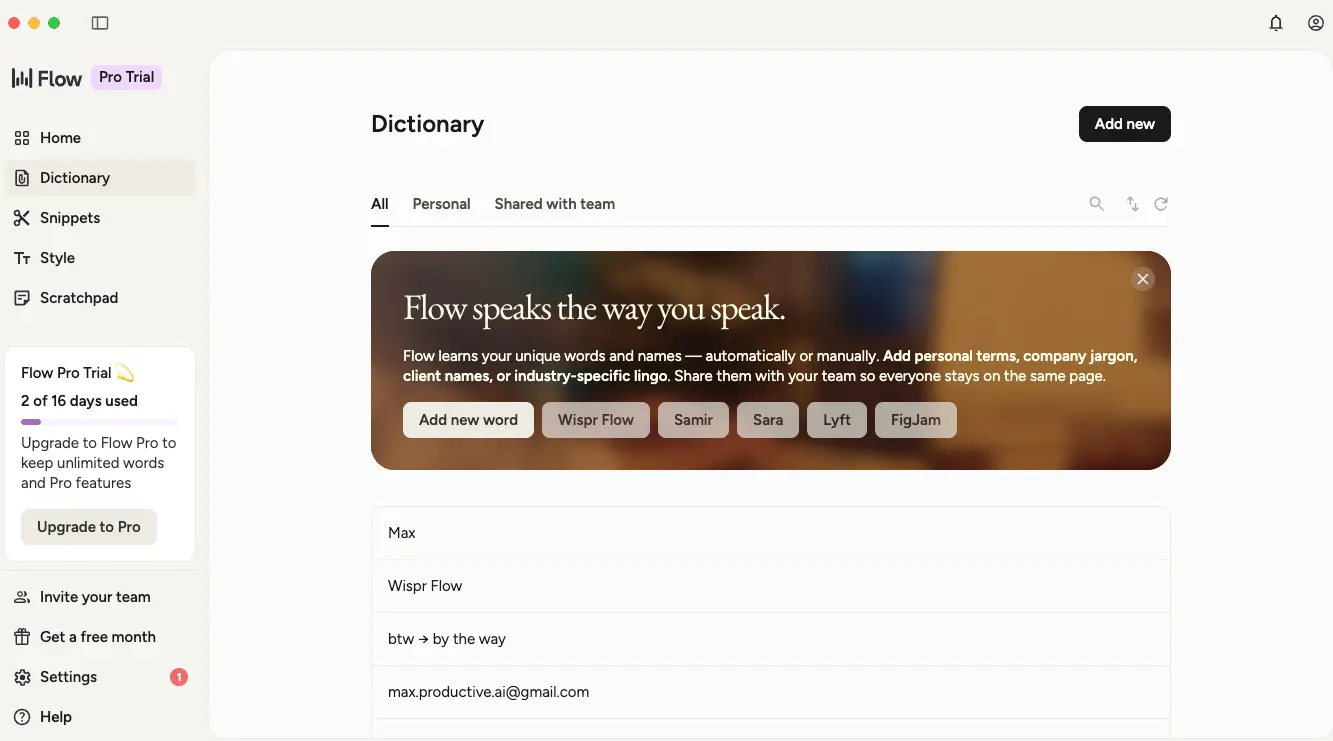
The Dictionary feature is essential for accuracy with specialized vocabulary. You can add personal names, company jargon, client names, and technical terms that the AI might otherwise misinterpret. The text shortcut feature ("btw → by the way") adds a useful text expansion layer. Entries can be kept personal or shared with your team — particularly valuable for organizations with domain-specific terminology.
Snippets — Voice Shortcuts
Save frequently typed content and trigger it by speaking a keyword
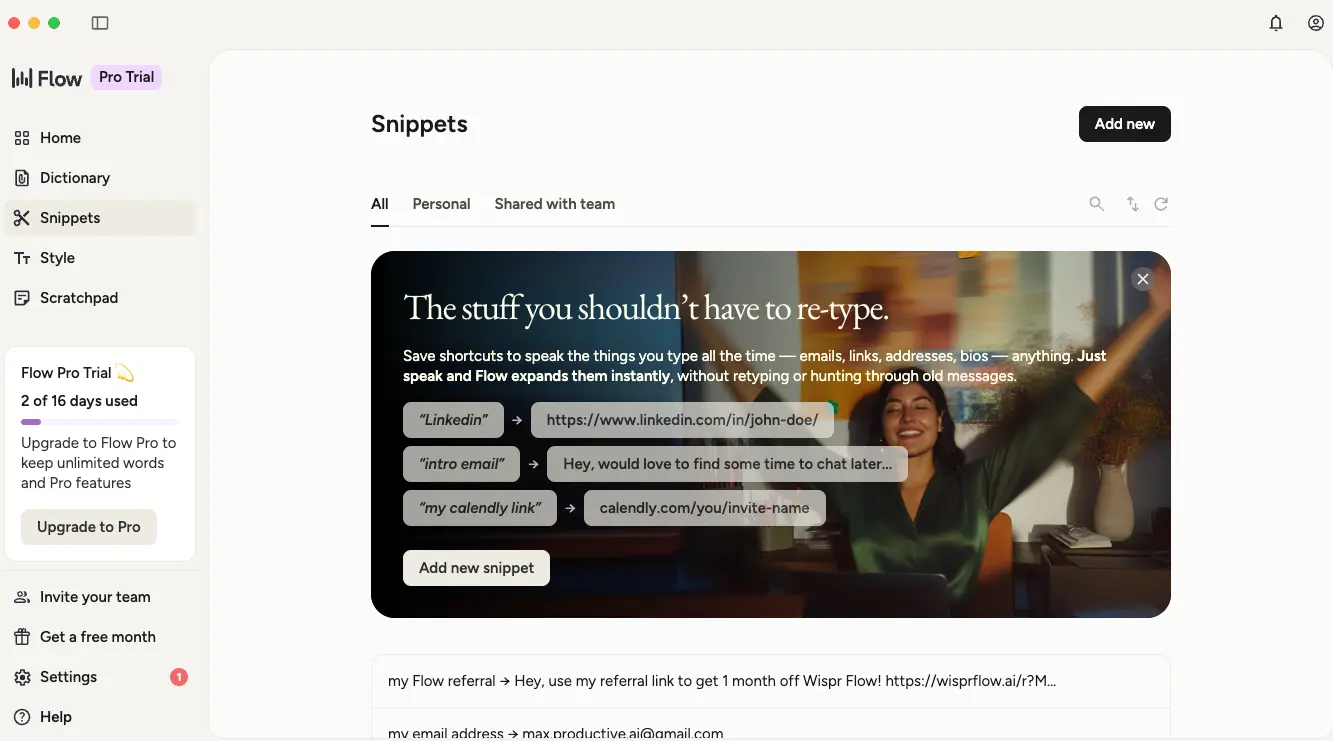
Snippets save you from retyping content you use repeatedly — email addresses, links, standard replies, addresses, bios, and more. Just speak the trigger phrase and Wispr Flow expands it instantly. Think of it as voice-activated text expansion. The real power emerges when combined with team sharing: an entire support team can share canned responses, or a sales team can share product descriptions and pricing templates.
Style Personalization
Set different writing tones for personal messages, work chats, and emails
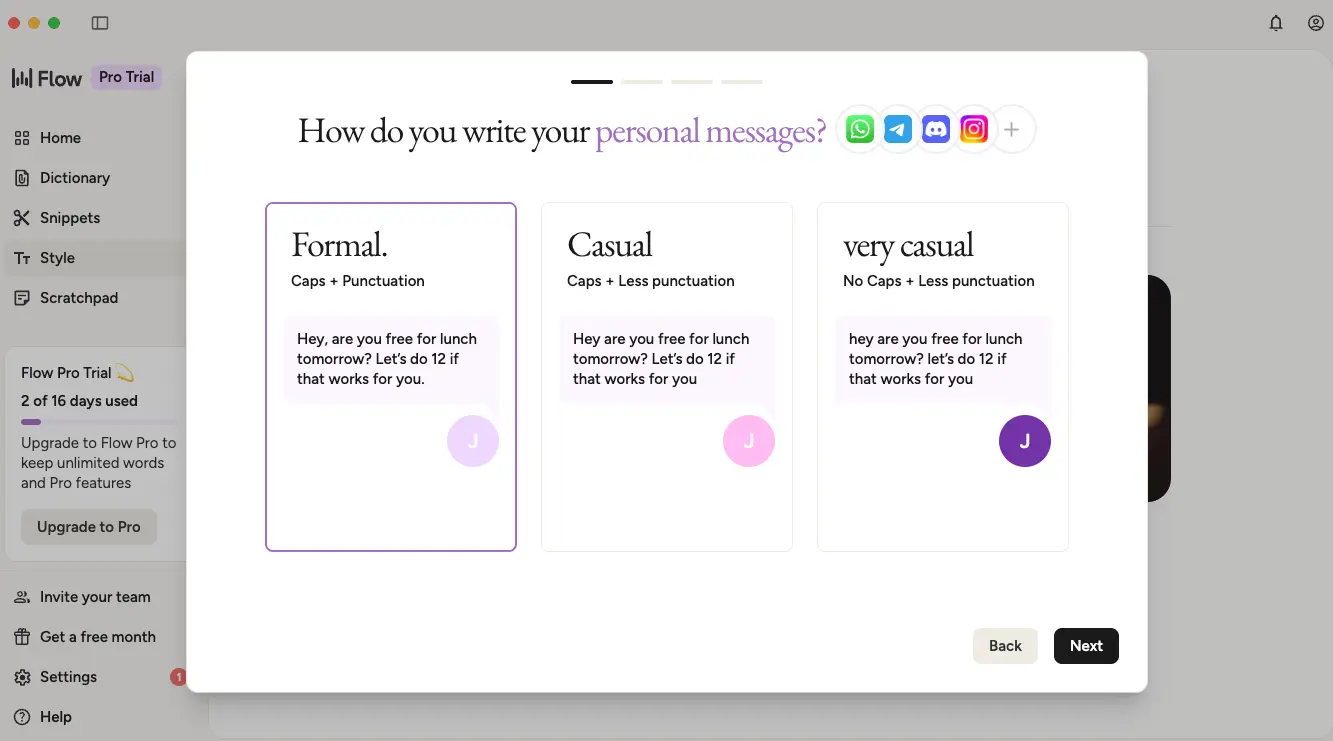
This is one of Wispr Flow's most thoughtful features. You can configure different writing styles for different app categories — formal for email and docs, casual for work chat, very casual for personal messaging on WhatsApp or Instagram. The preview shows exactly how the same spoken sentence appears in each style. The result: you speak the same way every time, but the output automatically matches the context.
Vibe Coding Settings
Native IDE integration for developers using Cursor, Windsurf, and VS Code
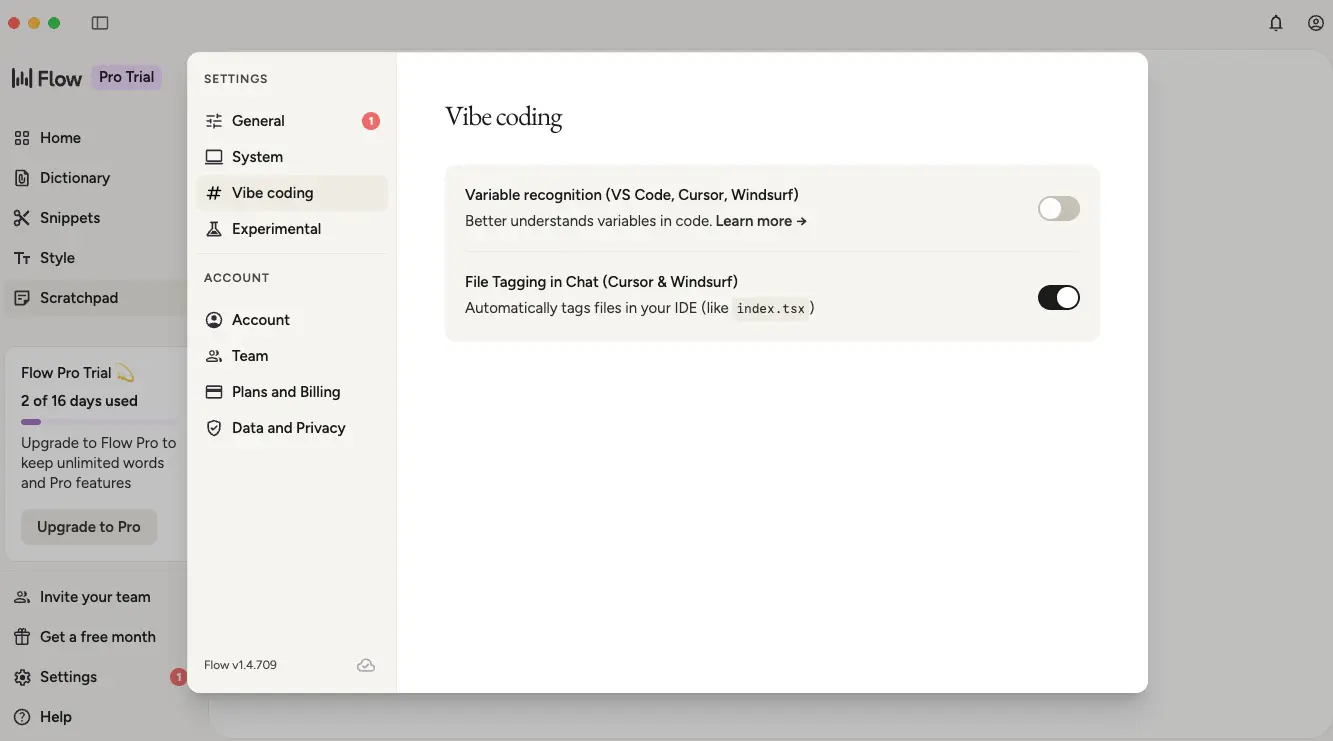
For developers, the "Vibe coding" settings panel enables native integration with Cursor, Windsurf, and VS Code. File Tagging in Chat automatically tags files in your IDE when you mention them by voice — say "fix the auth issue in userService.ts" and it references the file directly. Variable Recognition helps the AI better understand code-specific vocabulary and syntax. This is where Wispr Flow goes beyond simple dictation into genuine developer productivity tooling.
Ready to try voice-first productivity?
Try Wispr Flow Free →Free plan • No credit card required • 14-day Pro trialHow Wispr Flow Works
From installation to dictating at 150+ WPM in four simple steps.
Install & Set Your Style
Download Wispr Flow on your platform of choice (Mac, Windows, iOS, or Android) and create a free account — no credit card required. During onboarding, you'll choose your writing style preferences for different contexts: formal for emails, casual for Slack, very casual for texting. This takes about two minutes and immediately shapes how your dictation output looks across different apps.
Train Your Dictionary
Before your first heavy dictation session, spend 5-10 minutes adding your most-used terminology to the custom dictionary. This includes client names, company names, product terms, technical jargon, and any specialized vocabulary your field uses. This step is optional but dramatically improves accuracy for domain-specific content — users report accuracy jumping from around 88% to baseline 96%+ after dictionary training.
Dictate Anywhere
Place your cursor in any text field — Gmail, Notion, Slack, Google Docs, VS Code, WhatsApp, or any other app — and press the activation shortcut (Fn key on Mac). Speak naturally, including corrections and backtracking. Wispr Flow processes your speech in real-time, removing filler words, applying punctuation, and formatting the output to match the tone of the application you're using. Most users reach 150+ WPM within their first week.
Edit with Voice (Pro)
With Command Mode (available on Pro plans), you can highlight any existing text and speak editing instructions: "make this more professional," "summarize into three bullets," "translate to French," or "shorten this paragraph." The AI rewrites the selected text based on your command. The "Hey Flow" wake word also enables hands-free voice commands without dictating first — useful for navigating, searching, and triggering actions.
Privacy & Security
Wispr Flow holds SOC 2 Type II and ISO 27001 certifications. When Privacy Mode is enabled (available free on all plans), zero audio, transcripts, or edits are stored after processing, and your data is never used for model training. HIPAA BAA signing is available in-app on all plans including free. Important to note: all processing happens on cloud servers — there is no on-device mode.
Cross-Device Sync
One Pro subscription covers all your devices. Your custom dictionary, snippets, and style preferences sync automatically between Mac, Windows, iOS, and Android. Start drafting an email by voice on your Mac, continue on your iPhone — the same vocabulary and settings follow you everywhere.
Key Features
Everything Wispr Flow offers for voice-first productivity in 2026.
Context-Aware Formatting
Wispr Flow automatically adjusts tone, punctuation, and formality based on the application you're dictating into. A Slack message comes out casual; the same words in Gmail become a professional email. No switching modes — the AI detects context automatically.
Command Mode
Highlight any text and speak editing instructions — "make this more professional," "summarize into bullets," "translate to French." The AI rewrites the selection based on your command. Replaces the need to open a separate AI chat for routine text editing tasks.
Filler Word Removal
Automatically strips out "um," "uh," "like," "you know," and other verbal fillers from your dictation. Also corrects backtracking — saying "meet Tuesday, wait, Wednesday" outputs "meet Wednesday." The result is clean text that reads as if it were carefully typed.
Custom Dictionary & Snippets
Add personal vocabulary — client names, technical jargon, product terms — so the AI recognizes them correctly. Snippets let you save frequently used text (email addresses, URLs, canned responses) and insert them by speaking a trigger phrase.
100+ Languages
Full dictation support in over 100 languages with model parity for 7 languages beyond English. Not basic translation — genuine multilingual voice-to-text with the same formatting intelligence and accuracy.
Cross-Platform Sync
Works on Mac, Windows, iOS, and Android. One subscription covers all platforms. Dictionary, snippets, and style preferences sync automatically across devices — the only dictation tool offering this breadth of coverage in 2026.
Developer IDE Integration
Native integrations with Cursor, Windsurf, and VS Code. File Tagging automatically references files when you mention them by voice. Variable Recognition understands code syntax. Built for developers who dictate prompts, comments, and documentation.
HIPAA Compliance (All Plans)
Sign a Business Associate Agreement directly in-app at no extra cost — available on all plans including free. Signing automatically enables Privacy Mode with zero data retention. Backed by SOC 2 Type II and ISO 27001 certifications.
Beyond these core features, Wispr Flow includes a "Hey Flow" wake word for hands-free voice commands, a Scratchpad for quick voice notes, and team features like shared dictionary and shared snippets on the Teams plan. The platform continuously learns from your editing patterns, improving accuracy and formatting over time.
Experience all features free for 14 days:
Try Wispr Flow Free →Free plan • No credit card • 14-day Pro trial includedPricing Plans
Wispr Flow pricing in April 2026 — from free to team plans.
Flow Basic
Flow Pro
Teams
Pro monthly billing: $15/month • Annual billing saves: $36/year ($12/mo vs $15/mo)
Is Wispr Flow Pro Worth the $12/Month?
For professionals dictating more than 30 minutes per day, the speed difference translates to 1-2 hours saved daily. At any reasonable hourly rate, the $12/month investment pays for itself within the first few days of each billing cycle. The free plan's 2,000-word weekly limit is typically exhausted in 2-3 days of serious professional use — making the Pro upgrade practical rather than optional for daily writers.
Wispr Flow Pro costs $144/year on annual billing. For context: SuperWhisper is $85/year (Mac only), Voibe is $99 one-time lifetime (Mac Apple Silicon only), and Dragon Professional is $700 one-time (Windows only). Wispr Flow's pricing sits in the mid-range, but it's the only option covering all four platforms with AI editing features. There is no one-time purchase or lifetime deal available — subscription only.
Detailed Pros & Cons
An honest assessment based on months of daily use across Mac and Windows.
✓ Pros
Mac, Windows, iOS, and Android — with one subscription covering all platforms and settings syncing automatically. No other AI dictation tool matches this breadth. SuperWhisper is Mac/iOS only, Dragon is Windows only, Voibe is Apple Silicon only. If you work across multiple devices and operating systems, Wispr Flow is the only serious option.
The automatic tone adjustment between apps sounds like a gimmick — but in practice, it eliminates the friction of mentally switching between "email voice" and "Slack voice." You speak naturally and the output fits the medium. After a week, going back to standard dictation feels noticeably worse.
Instead of copying text to ChatGPT or Claude, editing, and pasting back, you highlight text and speak a command. "Summarize this." "Make it shorter." "Translate to Spanish." It keeps you inside your working application for routine text transformations — a genuine workflow improvement for heavy writers.
Most tools reserve HIPAA compliance for enterprise tiers. Wispr Flow offers BAA signing on the free plan — a meaningful differentiator for healthcare professionals, therapists, and legal professionals who need compliant voice input without enterprise pricing.
Native Cursor, Windsurf, and VS Code support with file tagging and variable recognition. For developers who dictate prompts, comments, documentation, and code-related chat messages, this is a genuine productivity multiplier that no other dictation tool offers at this level.
The free plan with 2,000 words/week plus a 14-day Pro trial (no credit card required) gives you a genuine window to evaluate the tool before committing. You can test Command Mode, cross-device sync, and your most-used applications during the trial period.
✗ Cons
All transcription happens on cloud servers. If your internet drops, dictation stops. Privacy Mode eliminates data retention, but audio still travels to the cloud for every session. For users who need audio to never leave the device, SuperWhisper or Voibe are better alternatives.
The Mac experience is the flagship — launched first and most feature-complete. The Windows version works well but has historically used more system resources (around 800MB RAM, 8% CPU at idle according to independent reports) and occasional compatibility issues with some enterprise applications.
In quiet conditions with a good mic, accuracy reaches 96-97%. In a coffee shop or open office without a close-proximity microphone, accuracy can drop to around 88%. A wired headset or quality wireless mic is recommended for shared spaces.
2,000 words per week is adequate for casual evaluation but is typically exhausted in 2-3 days of professional writing. This makes the free plan more of a trial than a sustainable daily-use tier — the Pro upgrade feels necessary for serious use.
Out of the box, specialized vocabulary — medical terms, programming keywords, client names, industry acronyms — gets misinterpreted. Investing 5-10 minutes in dictionary setup before heavy use solves this, but it's an extra step that basic dictation doesn't require.
Subscription-only pricing means a 3-year cost of $432 (annual billing). Competitors like Voibe offer $99 lifetime and SuperWhisper offers $250 lifetime. For cost-conscious users willing to sacrifice cross-platform coverage, one-time purchase alternatives exist.
Wispr Flow vs Alternatives
How Wispr Flow compares to the best AI dictation and speech-to-text tools in 2026.
| Feature | Wispr Flow | SuperWhisper | Dragon Professional | Otter.ai | VoiceType AI |
|---|---|---|---|---|---|
| Starting Price | Free / $12/mo | $8.49/mo | $55/mo | Free / $16.99/mo | ~$19.50/mo |
| Lifetime Option | ❌ Subscription only | $249.99 | $700 (Windows) | ❌ | $19.97–$44.97 (deal sites) |
| Platforms | Mac, Win, iOS, Android | Mac, iOS | Windows, iOS | Web, iOS, Android | Mac, Windows |
| Offline Mode | ❌ Cloud only | ✅ On-device | ✅ (Windows) | ❌ | ❌ |
| AI Formatting | ✅ Context-aware | ✅ Via modes | ❌ | Limited | ✅ |
| AI Text Editing | ✅ Command Mode | ✅ Via modes | ❌ | ❌ | ❌ |
| Filler Word Removal | ✅ | ✅ (Mar 2026) | Partial | ✅ | ✅ |
| Languages | 100+ | 100+ | Limited | Multiple | 35+ |
| HIPAA Compliance | ✅ All plans (free) | ❌ | ✅ (Enterprise) | ✅ (Business) | ❌ |
| IDE Integration | ✅ Cursor/Windsurf | ❌ | ❌ | ❌ | ❌ |
| Best For | Multi-platform professionals | Privacy-first Mac users | Windows legal/medical | Meeting transcription | Light Mac/Win dictation |
Which Tool Is Right For You?
Wispr Flow
Editor's PickBest for: Professionals who produce high volumes of written content across multiple devices and apps. Wispr Flow is the only major AI dictation tool available on Mac, Windows, iOS, and Android simultaneously. Its combination of context-aware formatting, Command Mode AI editing, developer IDE integrations, and HIPAA compliance on all plans makes it the most feature-complete option in 2026. Ideal if you need one tool that works everywhere.

SuperWhisper
Privacy-FirstBest for: Mac and iOS users who need 100% on-device, offline dictation. Audio never leaves your machine — a hard privacy guarantee no cloud tool can match. The customizable "modes" system lets you define how speech is processed for different contexts: legal, creative writing, action items, translation. Rated 4.9/5 on Product Hunt. At $85/year or $250 lifetime, it's cheaper than Wispr Flow long-term but limited to Apple platforms only.

Dragon Professional
EnterpriseBest for: Windows-based legal and medical professionals who need specialized vocabulary depth. Dragon's 400M+ legal terms and decades of domain-specific training make it the industry standard for courtroom transcription, medical documentation, and regulated environments. At $55/month or $700 one-time (Windows only), it's premium-priced and lacks modern AI formatting features, but nothing matches its specialized vocabulary accuracy in those fields.
Otter.ai
MeetingsBest for: Meeting transcription and team collaboration — a different use case than real-time dictation. Otter.ai excels at recording and transcribing meetings with speaker identification, searchable transcripts, and summary generation. If your primary need is meeting notes rather than composing text across apps, Otter.ai is the better fit. Less suitable for general voice-to-text productivity where Wispr Flow dominates.
VoiceType AI
Mac & WindowsBest for: Light Mac and Windows dictation users who want a basic AI voice-to-text tool. VoiceType offers system-wide dictation with context-aware transcription and 35+ languages. StackSocial lifetime deals at $20-45 offer value for occasional users. The tool covers the basics but lacks Wispr Flow's Command Mode, HIPAA compliance, IDE integration, and mobile platforms. Worth evaluating if your needs are straightforward and budget is a primary concern.
Frequently Asked Questions
What the history shows: In 2024-2025, Wispr Flow faced criticism after users discovered the app was forcing itself into startup items and generating background network traffic while idle. The company issued a public apology, fixed the startup behavior, and rewrote Privacy Mode controls for clarity. Training on user content is now opt-in and off by default.
Practical advice: Enable Privacy Mode immediately upon installation. If you work in healthcare or law, sign the HIPAA BAA in-app (free). If your data policy is "audio never leaves the device," Wispr Flow cannot meet that requirement — consider SuperWhisper or Voibe instead.
On Android, the floating bubble automatically hides in 50+ financial and banking apps for security — a deliberate design choice. On Windows, compatibility is strong overall but some edge cases exist in certain enterprise applications where text insertion can behave unpredictably. For developers, native integrations with Cursor and Windsurf IDEs enable voice-based file tagging: saying "fix the auth issue in userService.ts" tags the file directly without any extension or plugin.
Refund policy: Wispr Flow's Terms of Service state that refunds are only issued if required by law. There is no standard money-back guarantee. If you have a billing dispute, email support@flowvoice.ai.
Practical advice: Use the 14-day free Pro trial fully — no credit card is required upfront. Test Command Mode, cross-device sync, and your most-used applications during the trial before committing to the annual plan.
Wispr Flow is not ideal for users requiring offline processing, Windows-primary users who need Mac-level stability, or very light users unlikely to exceed Apple Dictation's free capabilities.
Should You Try Wispr Flow?
After months of daily use across Mac and Windows, Wispr Flow has earned its place as the best all-around AI dictation tool in 2026. The context-aware formatting genuinely works — dictating the same thought into Slack and Gmail produces appropriately different outputs without any manual switching. Command Mode replaces the need to open a separate AI chat for routine text edits. And the cross-platform coverage means one tool follows you across all your devices.
The limitations are real: no offline mode means you're dependent on internet connectivity, the Windows experience isn't quite as polished as Mac, and the 2,000-word free limit pushes you toward the paid plan faster than you might expect. But for professionals who produce meaningful volumes of written content daily, the productivity gains — 150+ WPM dictation, automatic formatting, voice-driven editing — are substantial enough to justify $12/month without much debate.
Our Recommendation
Start with the free plan — no credit card required, and the 14-day Pro trial gives you full access to Command Mode, cross-device sync, and unlimited dictation. Spend the first few days adding your key vocabulary to the custom dictionary and testing in your most-used apps. If Wispr Flow clicks for your workflow by day 7, the Pro upgrade is an easy decision. If you need offline processing or are exclusively on Mac, evaluate SuperWhisper and Voibe as well — they trade cross-platform reach for absolute privacy.
Ready to Write at the Speed of Speech?
Join thousands of professionals using Wispr Flow to dictate at 150+ WPM across every app and device