Wispr Flow vs Superwhisper: Do You Still Need a Dictation App?
For most people who dictate across many apps and devices, Wispr Flow is the easier pick, while Superwhisper suits people who want local processing and more control, especially on a Mac. Both still do things the free mic in your phone, computer or AI app doesn't.
This article contains affiliate links. We may earn a commission at no extra cost to you.
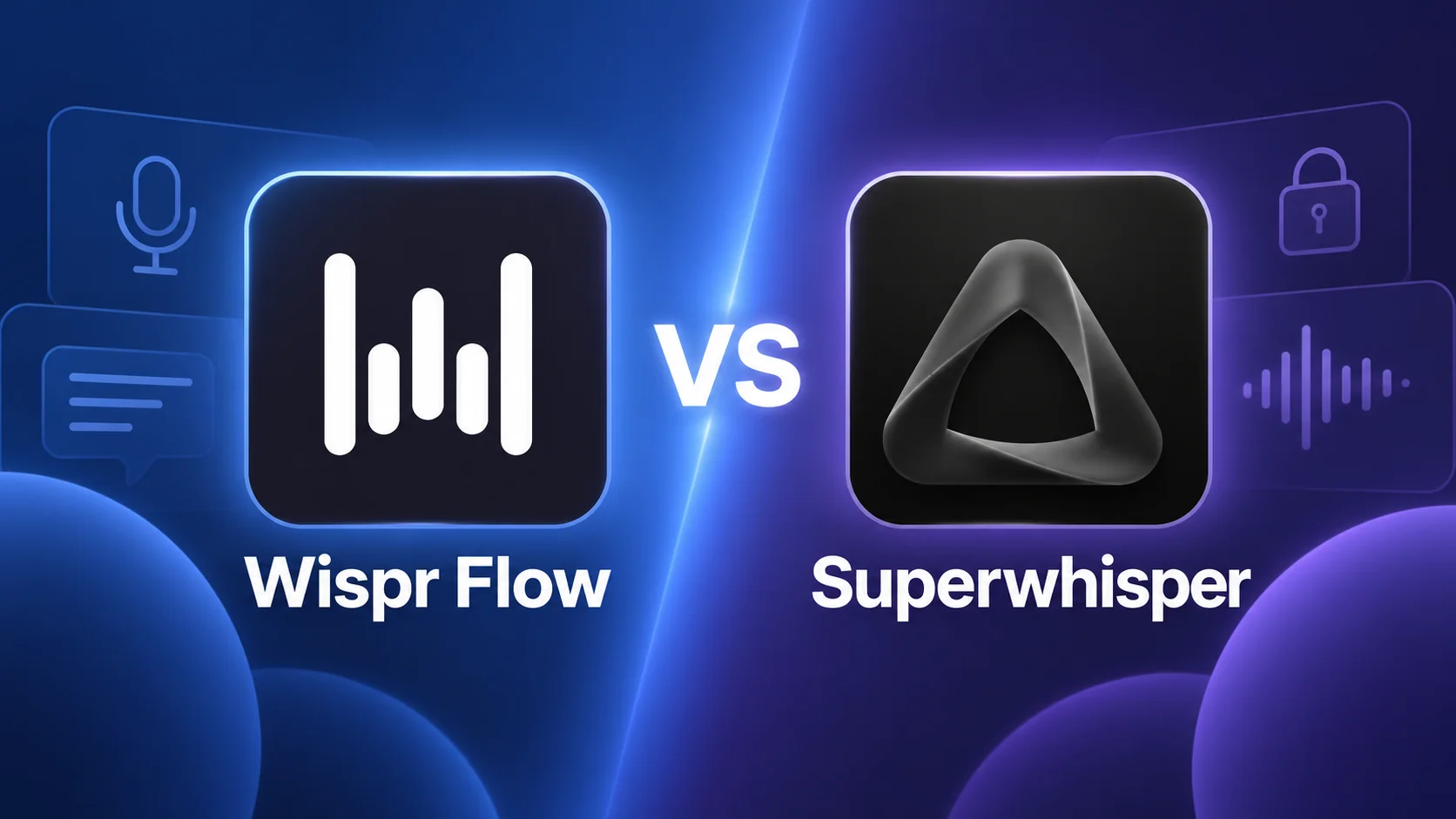
Quick answer: Wispr Flow or Superwhisper?
As of October 2026, Wispr Flow is the better fit for most people. It needs little setup, types clean text into any app on your computer, and also runs on iPhone and Android, with Pro at $144 a year. Superwhisper suits people who want local, offline dictation, especially on a Mac, and more control over the AI. It costs less, with a one-time license as an option. A dictation app still earns its place, too. The mic in ChatGPT or Claude only types into that app, and the newest built-in dictation needs recent hardware.
 Wispr FlowOur rating: 4.8 / 5
Free plan. Pro is $12 a month billed yearly, or $15 monthly.
Pick Wispr Flow if
- You want polished dictation from day one, with little setup
- You write on a mix of Mac, Windows, iPhone and Android
- You want meeting notes on Windows as well as Mac
 SuperwhisperOur rating: 4.6 / 5
Free plan. Pro is $8.49 a month, $84.99 a year or $249.99 once.
Pick Superwhisper if
- You want dictation that can stay on your Mac, fully offline
- You like to choose the models and write your own instructions
- You'd rather pay once than every year
Wispr Flow vs Superwhisper at a glance
| Feature | Wispr Flow | Superwhisper |
|---|---|---|
| Best for | Polished dictation with no setup | Local dictation and full control |
| Works offline | No, transcription runs in the cloud | Yes, with local models |
| AI cleanup | Automatic, with three levels | Modes with your own instructions |
| Setup | Light: sensible defaults | More if you build custom modes |
| Platforms | Mac, Windows, iPhone, Android | Mac, Windows, iPhone, Android |
| Meeting notes | Notetaker on Mac and Windows | Meetings on Mac |
| How you pay | Subscription | Subscription or one-time license |
Features as listed on each vendor's pricing page, help center and changelog on October 17, 2026. See every source
Both apps do the same basic job. You press a shortcut, talk, and clean text appears wherever your cursor is: an email, a Slack message, a ChatGPT prompt or a code editor. They differ in where your speech is processed, how much you can tune, and how you pay.
How we checked
- Sources
- Wispr Flow's and Superwhisper's pricing pages, help centers and changelogs, plus Apple, Microsoft, Google, OpenAI and Anthropic help pages
- Date checked
- 17 October 2026
- Our account
- Our own Wispr Flow and Superwhisper accounts, both used for our everyday writing
- Not tested
- Wispr Notetaker, Superwhisper Meetings, a timed speed or accuracy test, and the new built-in dictation on Apple, Windows and Pixel devices
Every price, limit and date in this comparison comes from the vendors' own pages, read on October 17, 2026, and each page is listed in the sources at the end. We use both Wispr Flow and Superwhisper for our own writing. The Wispr Flow screenshots come from our April 2026 review, taken during the Pro trial, and the Superwhisper ones from its Mac app, for our June 2026 review.
We haven't tested the new meeting features in either app or the new built-in dictation on Apple, Windows and Pixel devices. We also didn't run a speed or accuracy test of our own. The one benchmark we mention is Wispr's, and we say so where it appears.
Do You Still Need a Dictation App in 2026?
As of October 2026, voice input is built into many of the places you write. ChatGPT and Claude have a mic in their apps, and Apple, Microsoft and Google now add AI cleanup to their own dictation on recent devices.
So it's fair to ask why anyone would pay for Wispr Flow or Superwhisper. Our answer: going by what their makers document, the built-in options now cover short, occasional dictation. From our own daily use of Wispr Flow and Superwhisper, a dedicated app still wins when voice is how you write all day, in every app.
Wispr Flow vs Apple Dictation, ChatGPT dictation and other built-in options
| Built-in option | Where it types | What it does with your words | What you need |
|---|---|---|---|
| ChatGPT and Claude apps | Inside that app only | Turns your speech into text in the app's message box | The ChatGPT app, or Claude's iPhone or Android app |
| Apple Dictation (macOS and iOS 27) | Any text field | Capitalization, punctuation and formatting from Apple's newest on-device model | For the new model: a Mac with M3 or later and at least 12GB of memory, or a recent iPhone such as the iPhone 17 Pro or iPhone Air |
| Windows Fluid Dictation | Any text field, through Voice Access | Fixes grammar, punctuation and filler words on the device | A Copilot+ PC, in English |
| Gboard Rambler | Any app that uses Gboard | Removes filler words and fixes grammar and punctuation with Gemini | A Pixel 11 phone; full features need internet |
Swipe sideways to see every column.
Sources: Apple's announcement of September 14, 2026, Microsoft Support, Google Pixel Help, and the OpenAI and Claude help centers, checked October 17, 2026. On other devices you still get each platform's standard dictation.
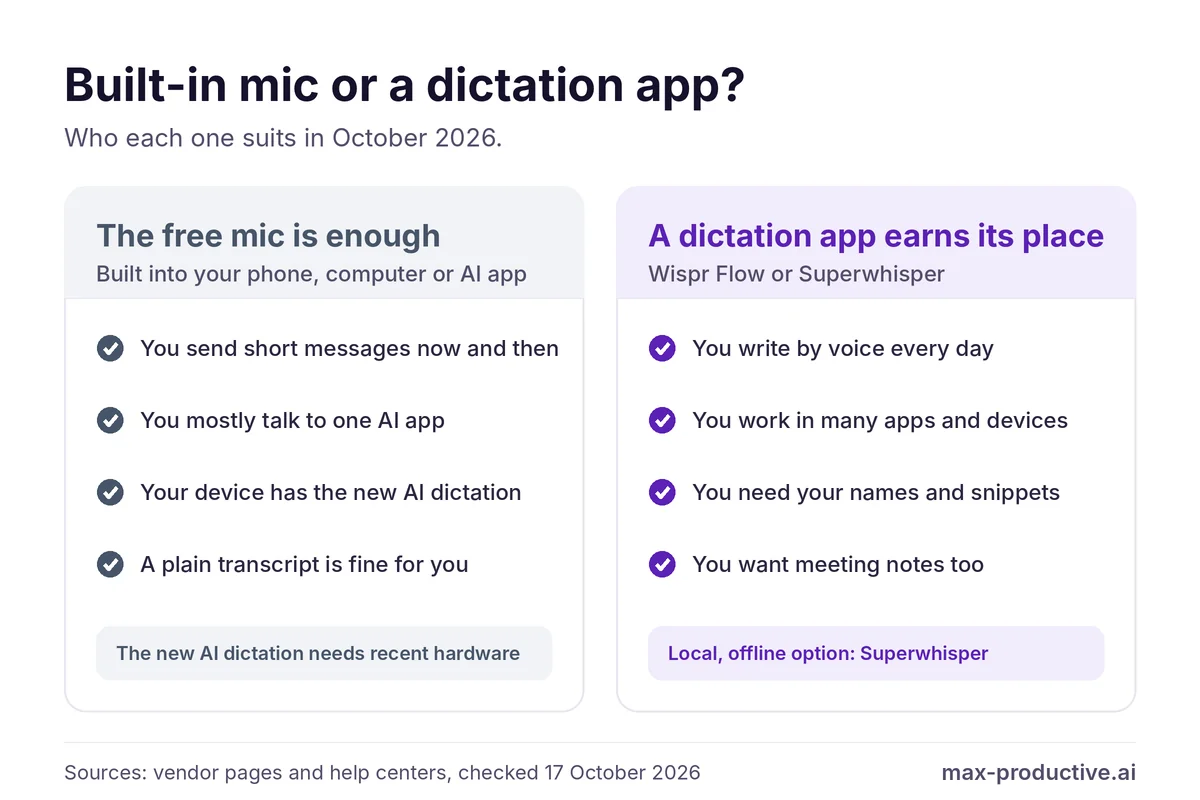
Where a dictation app still earns its place
One tool in every app. ChatGPT dictation fills ChatGPT's message box, and Claude's fills Claude's. Both Wispr Flow and Superwhisper type wherever your cursor is, so the same app works in Gmail, Slack, a CRM, a code editor or an AI chat.
One tool across your devices. Built-in dictation differs between your Mac, your Windows PC and your phone, and the new AI versions need recent hardware. Both apps run on Mac, Windows, iPhone and Android under one account or license, even if a few features stay on the desktop.
Your words, your way. You can teach both apps the names and jargon you use, and both let you shape the output: styles and snippets in Wispr Flow, custom modes and prompts in Superwhisper. The built-in options give you fewer of these controls.
Privacy, if you need it. Apple's new model and Windows Fluid Dictation run on the device too. Superwhisper adds local dictation with your own modes and vocabulary, in every app on your Mac, which is useful for client notes or other confidential text.
In our own use, this is why both apps stay on our Mac. We press one key, talk, and clean text lands in whatever app is open. The voice input inside individual apps varies more in quality, and none of it follows us to the next app.
Our read: if you dictate a few short messages a week, start with the free mic you already have. If you often fix transcripts by hand, or switch apps just to dictate, try a dedicated app. Both have a free plan, so the test costs nothing.
AI Cleanup: How Wispr Flow and Superwhisper Edit What You Say
This is where the two apps feel most different. Wispr Flow gives you good defaults and a few simple controls, while Superwhisper hands you the controls.
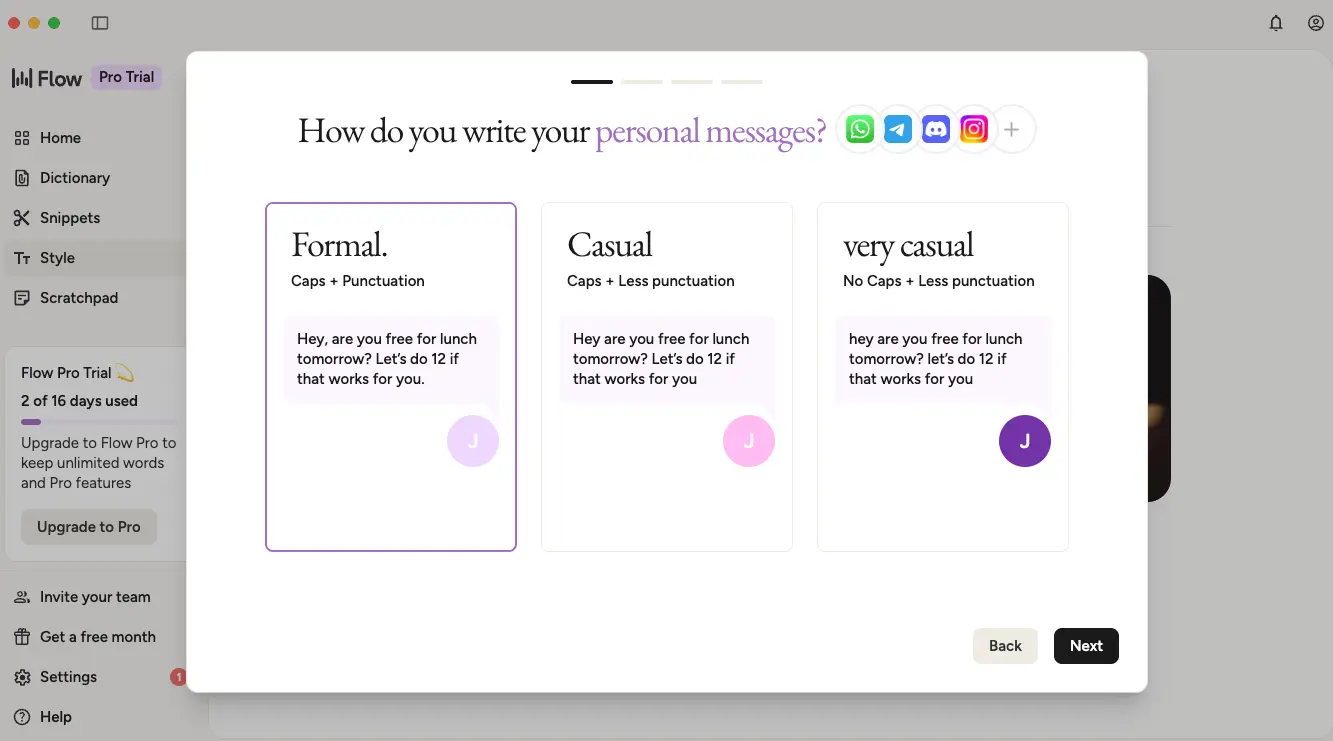
Wispr Flow: automatic cleanup, three levels
Out of the box, Wispr Flow removes filler words, fixes grammar and resolves self-corrections. Say "meet at 2, actually 3" and you get the time you meant. Since April 2026 you choose how much it edits. None pastes the raw transcript, Light removes fillers and fixes grammar, and Medium may reword phrases for clarity. Light is the default.
Styles let you choose how formal your text should be for personal messages and other kinds of apps. On September 17, 2026, Wispr also moved every user to Canto, its first in-house speech model. In Wispr's tests on about 10 hours of real English dictations from more than 2,300 speakers, Canto had the lowest error rate of the models it tried. That benchmark is Wispr's own, so we read it as a promising sign rather than a final verdict.
Superwhisper: modes you configure
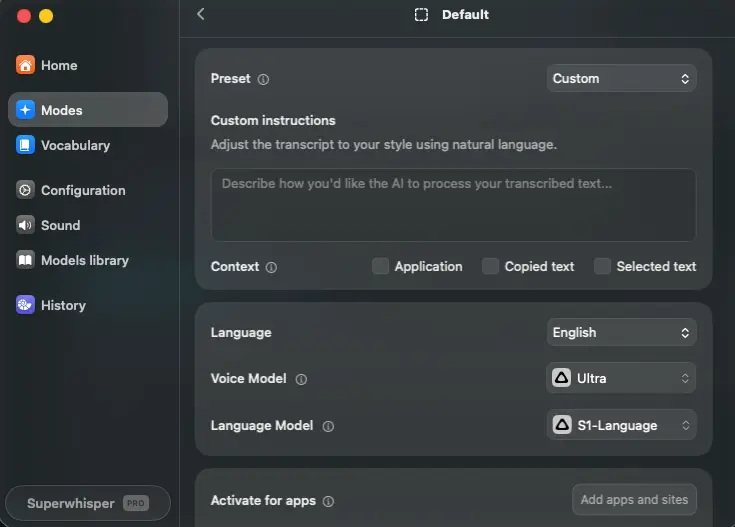
Superwhisper splits the job in two. A voice model turns your speech into text, then an optional language model rewrites it, following the instructions you write in a mode. You can set a mode to switch on in certain apps, so email gets one treatment and chat another.
That flexibility is Superwhisper's main appeal, and it asks for more of your time. The Free plan includes two modes without AI processing. Pro unlocks unlimited modes, cloud models and AI modes such as Super and Mail. In August 2026, Superwhisper added S1-mini, a small model that tidies your text on the device, and a September update improved filler word removal with the Scribe realtime cloud model.
Edge: Wispr Flow. It gives you polished text with little setup, while Superwhisper rewards people who enjoy tuning their own modes.
Privacy and Offline Dictation: Cloud vs Local
As of October 2026, this is the clearest difference between the two: Wispr Flow always transcribes in the cloud, while Superwhisper can run entirely on your Mac.
According to Wispr's data controls page, transcription always happens in the cloud, so you need an internet connection. You get clear controls over the rest. A setting called "Improve the model for everyone" decides whether your dictations help train Wispr's models. It replaced the old Privacy Mode switch, with the meaning flipped: turning it off keeps your dictations out of training. It is on by default on Free and Pro, and you'll find it in Settings, under Data and Privacy.
A separate Dictation Cloud Storage setting decides whether your history is kept on Wispr's servers. Wispr says it is SOC 2 Type II compliant, and its Growth plan adds organization-wide HIPAA support with a signed BAA. Since October 2, 2026, model training is switched off for everyone on Growth and Enterprise plans.
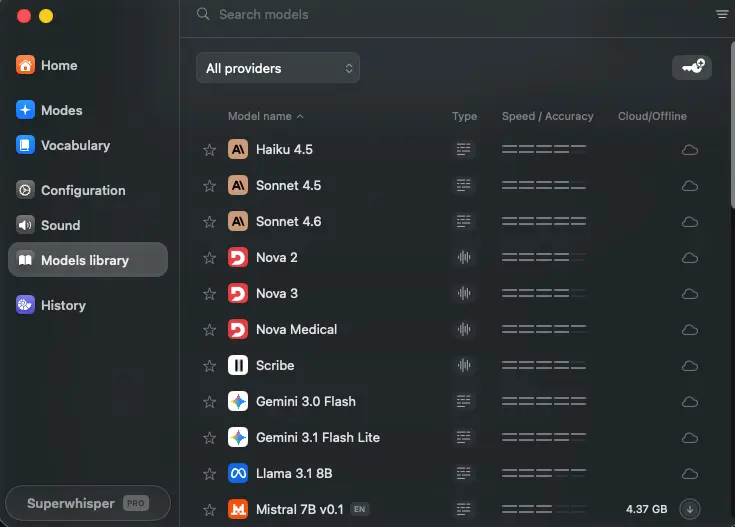
Superwhisper takes the opposite approach. Its local Whisper models run on your Mac, and its August 26, 2026 update made all of them free on macOS. Its plans page says that on the Free plan, with those local models, nothing you dictate leaves your device. For AI cleanup that stays local too, S1-mini is its on-device language model. Local models run best on Apple Silicon. On an Intel Mac, Superwhisper recommends its cloud models.
When you do pick a cloud model, Superwhisper's terms say your content is processed on a zero-retention basis and isn't used to train AI models. If you need an offline dictation app, Superwhisper is the one of the two that can do it.
Edge: Superwhisper. It is the one to choose when your dictation has to stay on your own computer.
Meeting Notes: Wispr Flow Notetaker and Superwhisper Meetings
Both apps went beyond dictation in 2026 and now take meeting notes too.
On August 5, 2026, Wispr Flow launched Notetaker for Mac, and Windows followed on September 15. It records Zoom, Google Meet, Teams and Slack huddles without a bot joining the call. It identifies speakers and writes summaries organized by topic, with decisions and owners. You can search past meetings, ask questions about them, and connect your notes to Claude, ChatGPT or Gemini.
Free and Pro include Notetaker with limits: Free has a weekly meeting limit, and Pro raises it and keeps notes longer. Teams get unlimited Notetaker on the Growth plan with Notetaker. Notetaker can also import your past notes from Otter, with speaker names kept, and from Granola.
Superwhisper followed on October 15, 2026 with version 3.0, which records, transcribes and summarizes meetings, with speaker identification. It's Mac only for now. Superwhisper lists Meetings in its Free plan and speaker separation under Pro.
Paying for Granola?
For people on an individual paid Granola plan, Wispr Flow runs a switch offer. Wispr covers the paid time left on your Granola plan as Wispr credit and adds up to three bonus months, up to 12 months in total. You can start using Wispr right away while it checks your Granola plan. Granola is still a strong meeting notes app; the offer mainly helps if you'd like dictation and meeting notes in one subscription. See the Granola switch offer.
Edge: Wispr Flow. Its Notetaker runs on Mac and Windows and can bring in your past notes, while Superwhisper's Meetings suits people who only need notes on a Mac.
Mac, Windows, iPhone and Android Support
Both apps now cover the same four platforms. Wispr Flow's Android app arrived in February 2026, so one subscription now covers Mac, Windows, iPhone and Android. Its cleanup levels are set in the Mac and Windows apps.
Superwhisper is on all four too, and one Pro license covers unlimited Macs and Windows PCs plus your iPhone and Android phone. A few features are Mac only for now. Meetings is one of them, and the August change that made every local Whisper model free applies to macOS.
Edge: even. Both cover the four platforms. The one difference is meetings: Superwhisper's are Mac only, while Wispr Flow's Notetaker also runs on Windows.
Wispr Flow vs Superwhisper Pricing
As of October 2026, Superwhisper Pro costs less on both monthly and yearly billing, and it's the only one of the two you can buy once.
| Plan | Wispr Flow | Superwhisper |
|---|---|---|
| Free | 2,000 words a week on Mac and Windows, 1,000 on mobile | Unlimited dictation with local Whisper models |
| Pro, billed monthly | $15 a month | $8.49 a month |
| Pro, billed yearly | $144 a year ($12 a month) | $84.99 a year |
| Pay once | Not offered | $249.99 lifetime license |
| Try Pro free | 14-day trial | 3,000 words |
| Teams | Growth from $18 per user a month, billed yearly | Enterprise, custom price |
Prices from Wispr Flow's and Superwhisper's pricing pages and help centers, in US dollars, checked October 17, 2026. Wispr says its prices vary by region and currency. Superwhisper offers a 30-day refund and 40% off for students. See every source
Our math: on yearly billing, Superwhisper Pro costs $59.01 less a year than Wispr Flow Pro. The lifetime license equals about 2.9 years of Superwhisper's annual plan, so it makes sense if you already know you'll use it for three years or more.
The extra you pay for Wispr Flow buys the things we covered above: cleanup that works with little setup, Notetaker on two platforms, and team features such as a shared dictionary. If you mostly dictate on a Mac and like to configure your tools, Superwhisper is the better value.
Edge: Superwhisper. Its Pro plan costs less, monthly or yearly, and you can buy it once.
Both apps have a free plan, so you can try each one on your own writing before you pay.
Try Wispr Flow freeWispr Flow or Superwhisper: Which One Should You Pick?
| If you... | Pick |
|---|---|
| Want polished results from day one, with little setup | Wispr Flow |
| Need dictation that stays on your Mac | Superwhisper |
| Want meeting notes on Windows as well as Mac | Wispr Flow |
| Like to write your own prompts and choose models | Superwhisper |
| Prefer to pay once | Superwhisper |
| Pay for Granola and want dictation too | Wispr Flow, with its switch offer |
| Dictate a few short messages a week | Your device's built-in dictation |
Based on the features and prices in this comparison, checked October 17, 2026.
If you're still torn on Superwhisper vs Wispr Flow, install both and dictate the same few emails and messages with each for a week. The one you reach for without thinking is the one to keep.
Wispr Flow or Superwhisper: our verdict
As of October 2026, a dedicated dictation app is still worth it if you write by voice every day, across several apps and devices. The mic in ChatGPT or Claude stays inside that app, and the new built-in AI dictation needs recent hardware. Between the two apps, Wispr Flow is the easier choice for most people. Superwhisper is the better fit if you want local processing, more control or a one-time price, especially on a Mac.
What we'd do. Start Wispr Flow's 14-day Pro trial and use it in the apps where you write most. When it ends, the free plan carries on with a weekly word allowance, and if you miss the extra, Pro is the next step. If privacy or price matters more to you than easy setup, install Superwhisper alongside it and compare the two on your own writing.
Wispr Flow vs Superwhisper FAQ
Is Wispr Flow better than Superwhisper?
Wispr Flow is the better choice for most people who want polished dictation with little setup on Mac, Windows, iPhone and Android, as of October 2026. Superwhisper is the better choice if you want dictation that stays on your Mac, custom modes with your own prompts, or a one-time license. Both have a free plan, so the quickest way to decide is to try each one on your own writing for a few days.
Do I still need a dictation app if ChatGPT has voice input?
You don't need Wispr Flow or Superwhisper if you mostly dictate prompts into ChatGPT, because its mic already turns your speech into text you can edit before sending. A dictation app becomes useful when you write by voice in many apps. Both apps type wherever your cursor is, in any app, with your own vocabulary and cleanup settings, on Mac, Windows, iPhone and Android.
Does Wispr Flow work offline?
No, Wispr Flow needs an internet connection, because its transcription always runs in the cloud, as of October 2026. You can stop your dictations being used for model training and turn off cloud storage of your history, but the audio is still processed online. If you need an offline dictation app, Superwhisper's local models run on your Mac without a connection.
Is Superwhisper free?
Yes, Superwhisper has a free plan with unlimited dictation using local Whisper models, custom vocabulary and up to two modes without AI processing. New users also get 3,000 words of Pro features to try. Pro costs $8.49 a month, $84.99 a year or $249.99 once, as of October 2026, and adds cloud models, AI modes and file transcription.
How much does Wispr Flow cost?
Wispr Flow costs $12 a month on the Pro plan billed yearly, or $15 billed monthly, as of October 2026. The free plan gives you 2,000 words a week on Mac and Windows and 1,000 on mobile. Teams can choose Growth plans from $18 per user a month, billed yearly, and new users get a 14-day Pro trial.
Does Superwhisper work on Windows and Android?
Yes, Superwhisper runs on Mac, Windows, iPhone and Android as of October 2026, and one Pro license covers all of them. A few features are Mac only for now, including Meetings, and local models run best on Apple Silicon Macs. You get the same four platforms with Wispr Flow, on one subscription.
What is Wispr Flow Notetaker?
Wispr Flow Notetaker is the meeting assistant Wispr launched in August 2026. It records Zoom, Google Meet, Teams and Slack huddles on Mac and Windows without a bot joining the call, then writes a transcript and a summary with decisions and owners. The Free plan has a weekly meeting limit, Pro raises it, and the Growth plan with Notetaker makes it unlimited for teams.
Can I switch from Granola to Wispr Flow?
Yes, Wispr Flow runs a switch offer for people on an individual paid Granola plan, as of October 2026. Wispr covers the paid time left on your Granola plan as Wispr credit, adds up to three bonus months, and caps the total at 12 months. You verify your Granola plan after signing up, and Notetaker can import your past Granola notes.
Is Superwhisper private?
Yes, Superwhisper can keep your dictation on your Mac. Its plans page says that on the Free plan, with local Whisper models, nothing you dictate leaves your device. Pro adds cloud models, and Superwhisper's terms say cloud content is processed on a zero-retention basis and isn't used to train AI models. Superwhisper lists SOC 2 Type II for its Enterprise plan.
Read next
Tools in this article

About this comparison
Based on Wispr Flow's and Superwhisper's pricing pages, help centers and changelogs, the built-in dictation pages of Apple, Microsoft, Google, OpenAI and Anthropic, read on 17 October 2026, and on our own daily use of Wispr Flow and Superwhisper. First published 17 October 2026. Last updated 17 October 2026.
Sources checked
- Wispr Flow plans and prices. Wispr Flow's pricing page and its help center article Flow plans and what's included, checked October 17, 2026.
- Wispr Flow features and updates. Wispr's What's new page, its help article on Auto Cleanup, and its Canto research page of September 17, 2026.
- Wispr Flow privacy. Wispr's Data Controls page (updated August 18, 2026) and its setup guide.
- Wispr Notetaker and the Granola offer. Wispr's Notetaker announcement of August 5, 2026, its blog, and the Switch from Granola page.
- Superwhisper plans, features and privacy. Superwhisper's home page, its plans and pricing docs, its changelog and its terms of service (June 2026).
- Built-in dictation. Apple's announcement of September 14, 2026, Microsoft's Fluid dictation page, Google's Rambler help page, OpenAI's dictation FAQ and Anthropic's Claude dictation help page.
Update log
- 17 October 2026. Added our own everyday use of Superwhisper to How we checked.
- 17 October 2026. First published.
Scores next to tool names are the overall ratings from our own reviews, on a 5-point scale.