Gamma vs Plus AI: Web-First Decks or Native PowerPoint Slides?
Gamma is the better pick for polished decks you share as a link or a PDF. Plus AI suits decks that have to live as PowerPoint or Google Slides files, and we tested both in October 2026.
This article contains affiliate links. We may earn a commission at no extra cost to you.

Quick answer: Gamma or Plus AI?
As of October 2026, Gamma is the better pick if you share decks as links or PDFs and want a polished first draft fast. It has a free plan, and paid plans start at $9 a month billed annually. Plus AI is the better pick if your deck has to be a PowerPoint or Google Slides file. It builds native slides inside those apps, and its editing tools are made for decks you already have. It starts at $10 a month billed annually, after a 7-day trial.
 GammaOur rating: 4.6 / 5
Free plan. Plus is $9 a month billed annually.
Pick Gamma if
- You share decks as a link or a PDF more often than as a file
- You want a designed first draft from a short brief
- You'd like to start on a free plan
 Plus AIOur rating: 4.4 / 5
7-day trial. Basic is $10 a month billed annually.
Pick Plus AI if
- Your deck has to end up as a PowerPoint or Google Slides file
- You mostly revise decks you already have
- You want your logo, colors and fonts on every deck (Team plan)
Gamma vs Plus AI at a glance
| Feature | Gamma | Plus AI |
|---|---|---|
| Best for | Polished decks shared by link or PDF | Decks that live in PowerPoint or Google Slides |
| Where you build | Gamma's own web editor | Inside PowerPoint and Google Slides, plus a web app |
| PowerPoint output | PPTX export, without a slide master | Native slides in the add-in, no export step |
| Google Slides | Export to Google Slides | Add-on that works inside Google Slides |
| AI agent | Gamma Agent asks questions and plans the deck with you | Agent mode in PowerPoint, not in Google Slides yet |
| Free access | Free plan with 400 one-time credits | 7-day trial with 1,000 credits, card required |
| Paid plans from | $9 a month, billed annually | $10 a month, billed annually |
Plans and features from Gamma's and Plus AI's pricing pages and help centers, checked October 22, 2026. Gamma's US price is from its pricing page on October 5, 2026. See every source
The two tools take opposite routes. Gamma gives you a new place to make presentations. The other adds AI to PowerPoint and Google Slides, where many offices already work. So the most useful question is where your deck will end up.
How we checked
- Sources
- Gamma's and Plus AI's pricing pages, help centers and product pages, and Gamma's Gamma 5 announcement
- Date checked
- October 22, 2026
- Our account
- Our own Gamma account on the Free plan, and a Plus AI paid plan during its 7-day trial, both used in early October 2026
- Not tested
- Plus AI's Google Slides add-on and Team branding, Gamma's paid-only features such as analytics, custom domains and the API, and a slide-by-slide check of a Gamma export in PowerPoint
We built a deck about our own site in each tool for our October 2026 reviews of Gamma and Plus AI. In Gamma we used the current version, Gamma 5, on the Free plan. In Plus AI we used the web app and the add-in in desktop PowerPoint, on a paid plan during the free trial. Every screenshot in this comparison comes from those two tests.
Most prices, limits and dates come from the vendors' own pages, read on October 22, 2026. Gamma's US prices, Beautiful.ai's price and a few product details come from our October 5, 2026 reviews, which checked the vendors' pages that day. Every source is listed at the end. Two test decks show how each tool works, not how it will handle every subject, and nothing here is a lab benchmark. Our testing method explains how we review and rate tools.
Gamma vs Plus AI: Where Your Deck Lives
Gamma is a separate app with its own format. Plus AI works inside the presentation apps you may already use.
Gamma is an AI tool that makes presentations, documents, websites and social posts in its own web editor. A Gamma deck is a set of responsive cards rather than fixed slides. The cards grow with their content and read well on a phone or a laptop, which is why Gamma decks work so well as links. You can still export to PowerPoint, Google Slides, PDF or images.
Plus AI is an AI assistant from Plus Docs, Inc. that runs as an add-in for PowerPoint and an add-on for Google Slides. It also has a web app for quick drafts. Its slides are ordinary PowerPoint or Google Slides objects from the start, so a colleague without Plus AI can open the file and keep editing. Plus says it builds its own renderer to produce native PPTX files.
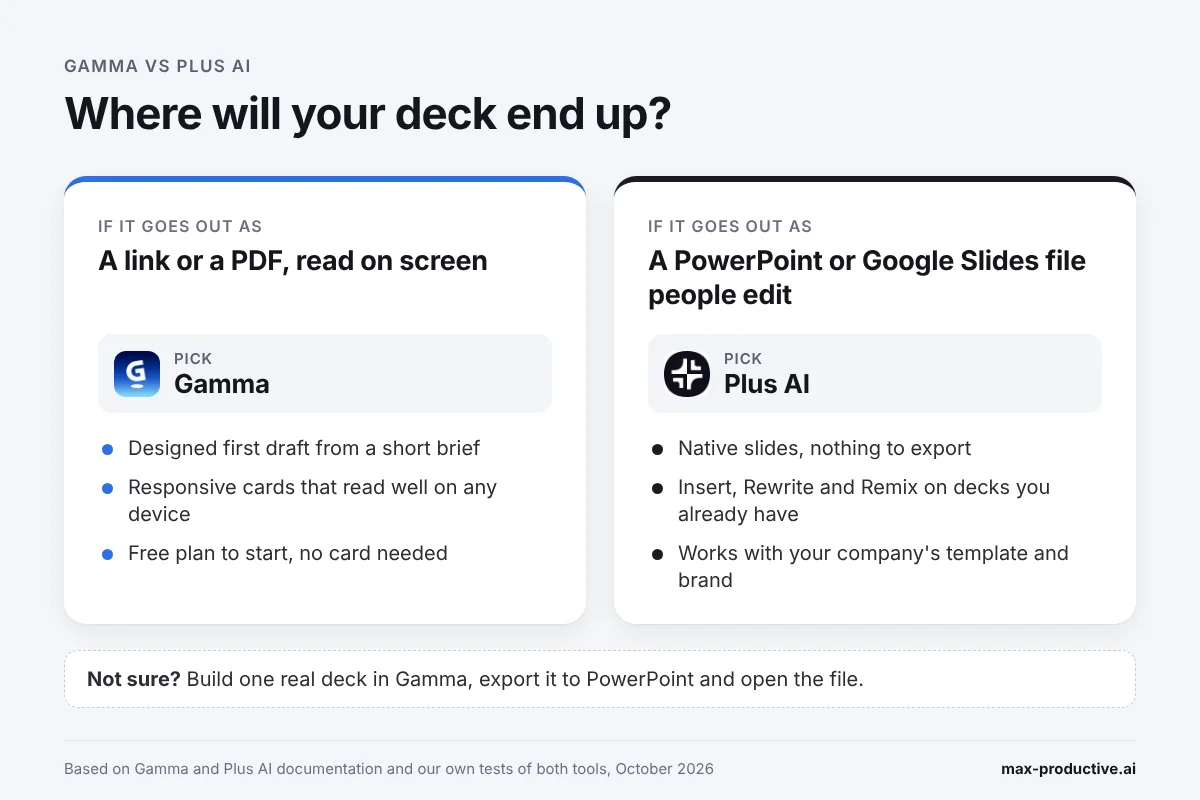
Our read: picture the last deck you sent. If it went out as a link or a PDF, Gamma fits the way you already work. If it went out as a .pptx that someone edited and sent back, Plus AI will feel more natural.
Edge: it depends on your file. Gamma suits decks that are shared and read on screen, and Plus AI suits decks that live as PowerPoint or Google Slides files.
Creating a First Draft: Gamma Agent vs Plus AI Agent Mode
Both tools now have an AI agent that turns a short brief into a full deck. We asked each one for a deck about our own site: Gamma got a one-paragraph brief, and Plus AI a one-sentence prompt.
Gamma: questions first, then a plan
In Gamma 5, the Agent didn't start writing straight away. It opened a short form asking who the deck was for, what it should lead with and how long it should be. Then it drafted an 8-slide outline, suggested a template and an image source, and waited for us to press Generate. Fixing the story at that point costs little.
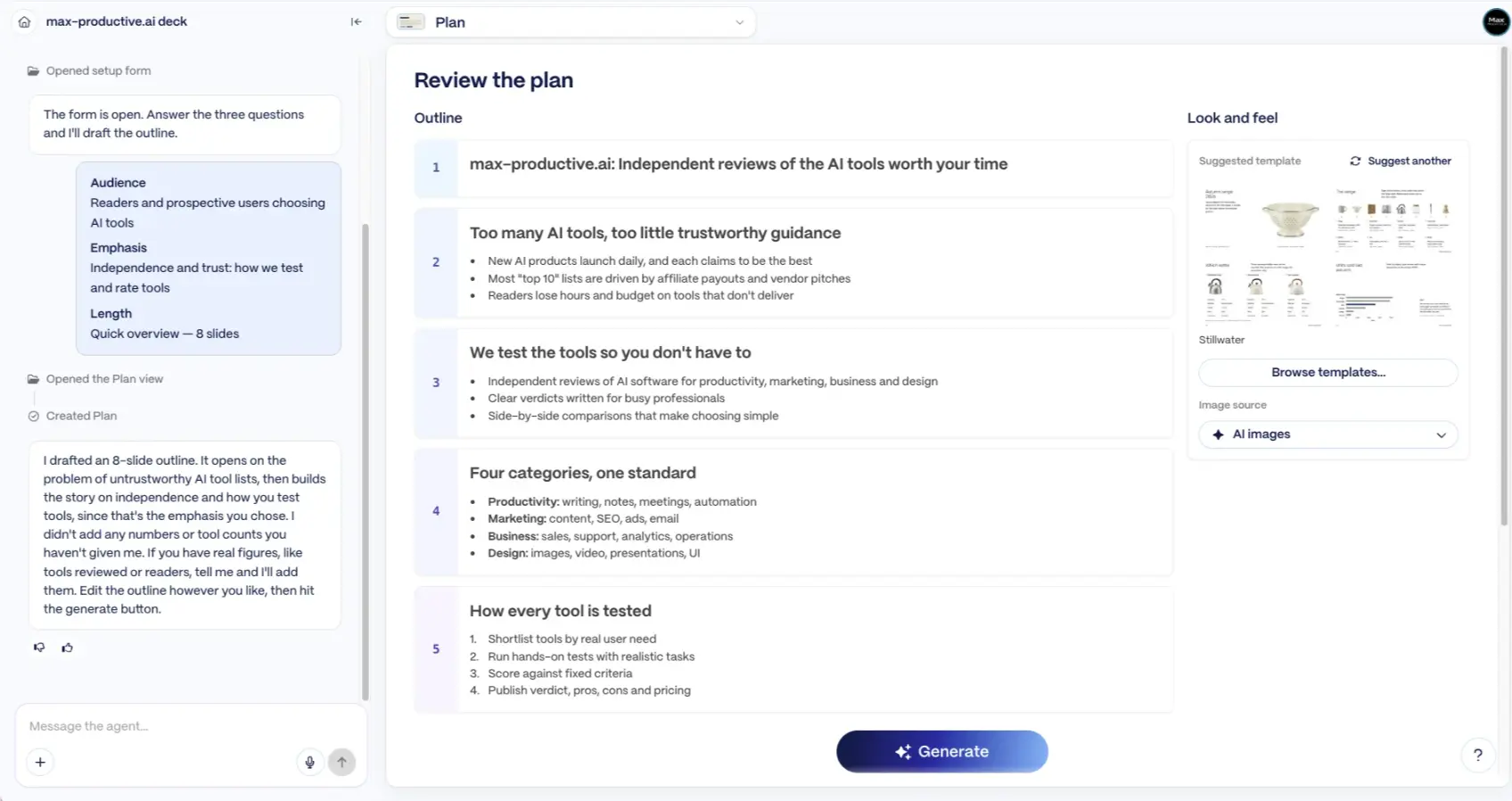
One line in the chat stood out. The Agent said it hadn't added any numbers we hadn't given it, and offered to add real figures if we supplied them. As far as we saw, the deck kept that promise, though the title slide carried a couple of confident taglines we hadn't written. We'd still read every slide before sharing it.
Plus AI: one sentence, a deck in PowerPoint
In PowerPoint, we switched the Plus AI sidebar to Agent mode and asked for a presentation about our site in one sentence. It posted a 10-slide outline in the chat and built the slides straight into the open file. Then it told us it hadn't checked text sizes or the overall look yet, and that we should go through the slides before using them.
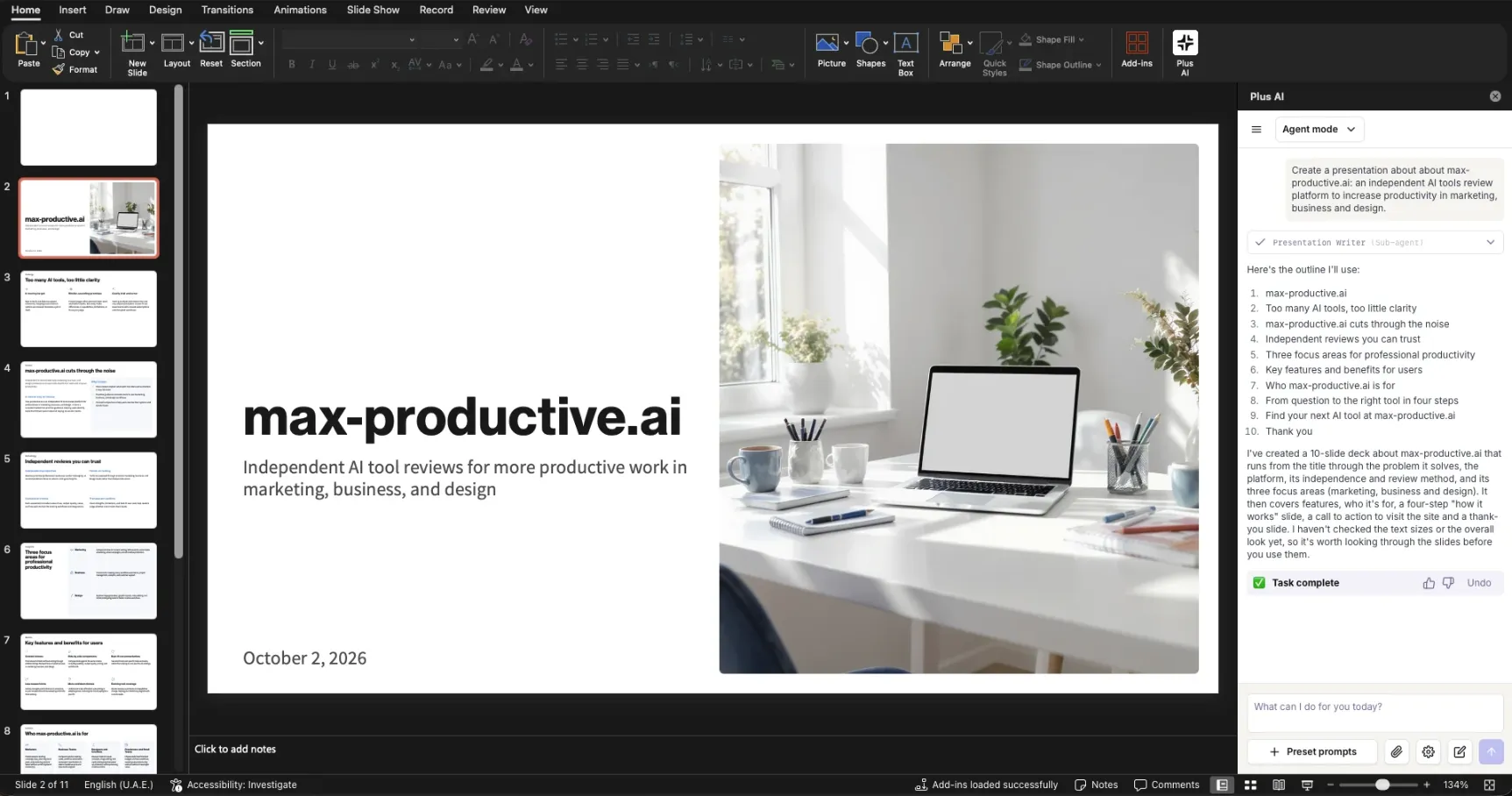
The title slide came back clean, with a desk photo and the date already in place. One small tidy-up: the blank first slide of our new file stayed at the front, so the file had 11 slides, with one blank slide to delete. There's also an outline-first flow, and a Slide by slide mode where you set each slide's content and layout yourself.
Edge: Gamma. Its agent asks and plans before it builds, and its first draft looked more finished to us. Our two briefs weren't identical, so treat this as a first impression.
Editing an Existing Deck: Plus AI's Strongest Round
Many decks get revised far more than they get built, and this is the round where Plus AI pulls ahead.
The editing tools work on any slide in your file. Insert adds one slide in a layout you pick. Rewrite shortens, expands, changes the tone or translates, on a selection, a slide or the whole deck. Remix keeps a slide's content and pours it into a new layout, and its Strict mode keeps approved wording as close to the original as it can.
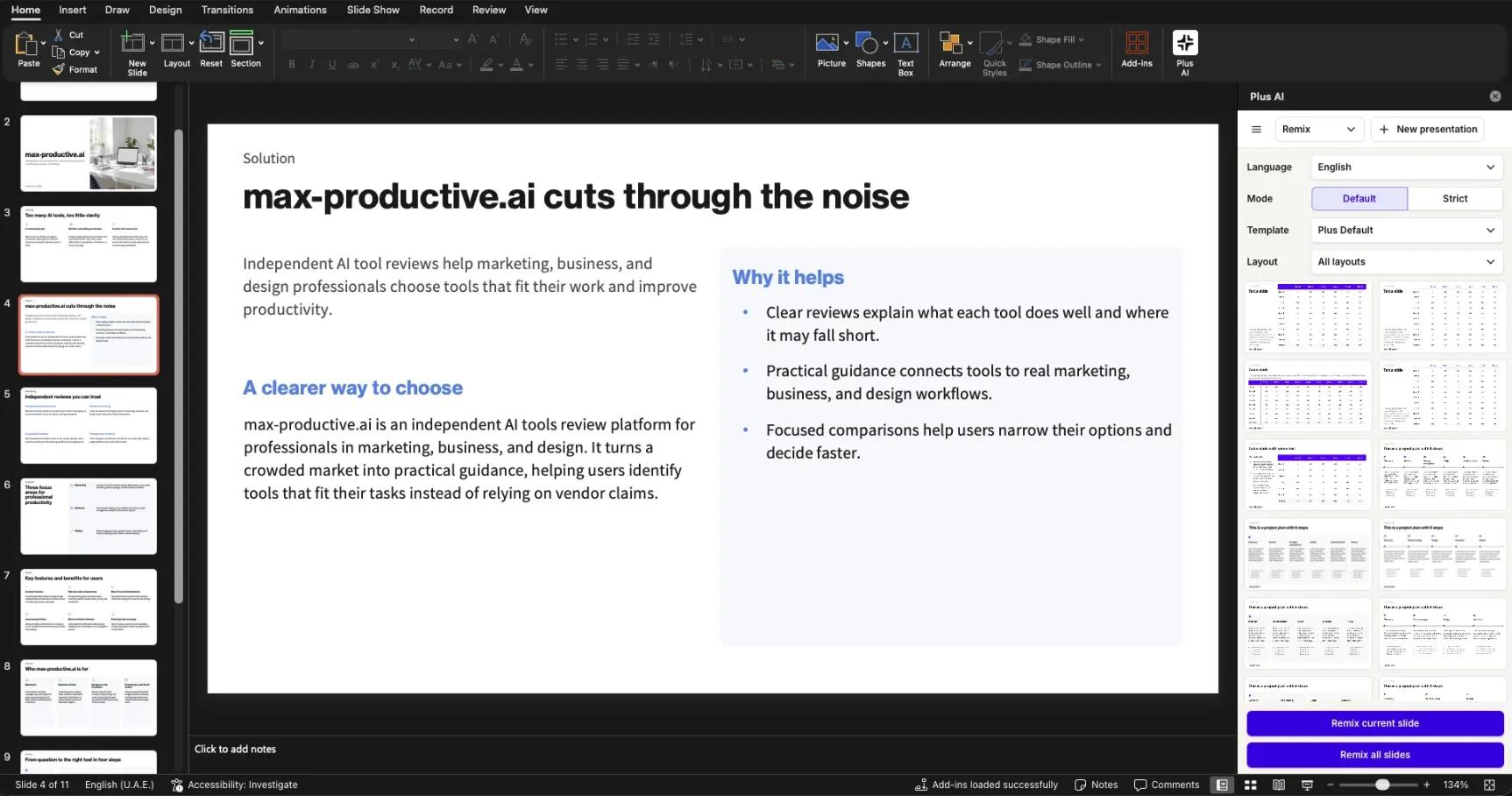
Remix is the tool we'd show a colleague first. A crowded slide is usually fixed by dragging text boxes around. Here you pick a layout thumbnail and let Plus AI refit the slide. Remix all slides works through a deck in one go, up to 30 slides at a time.
Gamma edits in a different way. You ask the Agent for targeted changes, such as shortening a section or adding a slide, and it works on those parts without rebuilding everything. Gamma 5 also added a freeform canvas for moving single elements, and PowerPoint imports that keep their original design. That helps, though the deck becomes a Gamma while you edit it.
Our advice: if you inherit decks from colleagues or clients, test Plus AI on one of them during the trial. If you mostly start new decks, Gamma's Agent can make targeted edits as you go.
Edge: Plus AI. Insert, Rewrite and Remix fix one slide without touching the rest, inside the file you already have.
Have a deck that needs tidying? Try Remix on it during Plus AI's 7-day trial.
Try Plus AI freeGamma vs Plus AI for PowerPoint and Google Slides
As of October 2026, both tools can give you a PowerPoint file. The difference is how the file gets made.
In the Plus AI add-in, nothing is exported. It creates the slides inside PowerPoint or Google Slides, so you save and share the file as usual. Gamma builds the deck in its own format and exports it, and its help center lists what changes on the way out.
What changes in a Gamma export
| Part of the deck | In a Gamma export to PowerPoint or Google Slides |
|---|---|
| Slide content and styling | Exported and editable |
| Tables | Editable tables on every plan, with square corners |
| Speaker notes | Included |
| Fonts | Embedded in the PPTX, though Google Slides swaps in its own |
| Slide master | Not included, so the master layout is blank |
| Gradient headings and frosted backgrounds | Can show as a single color or a simpler style |
| Gamma badge | Added to Free-plan PDF and PowerPoint exports, removed on paid plans |
Source: Gamma's help article on exporting to PowerPoint, checked October 22, 2026.
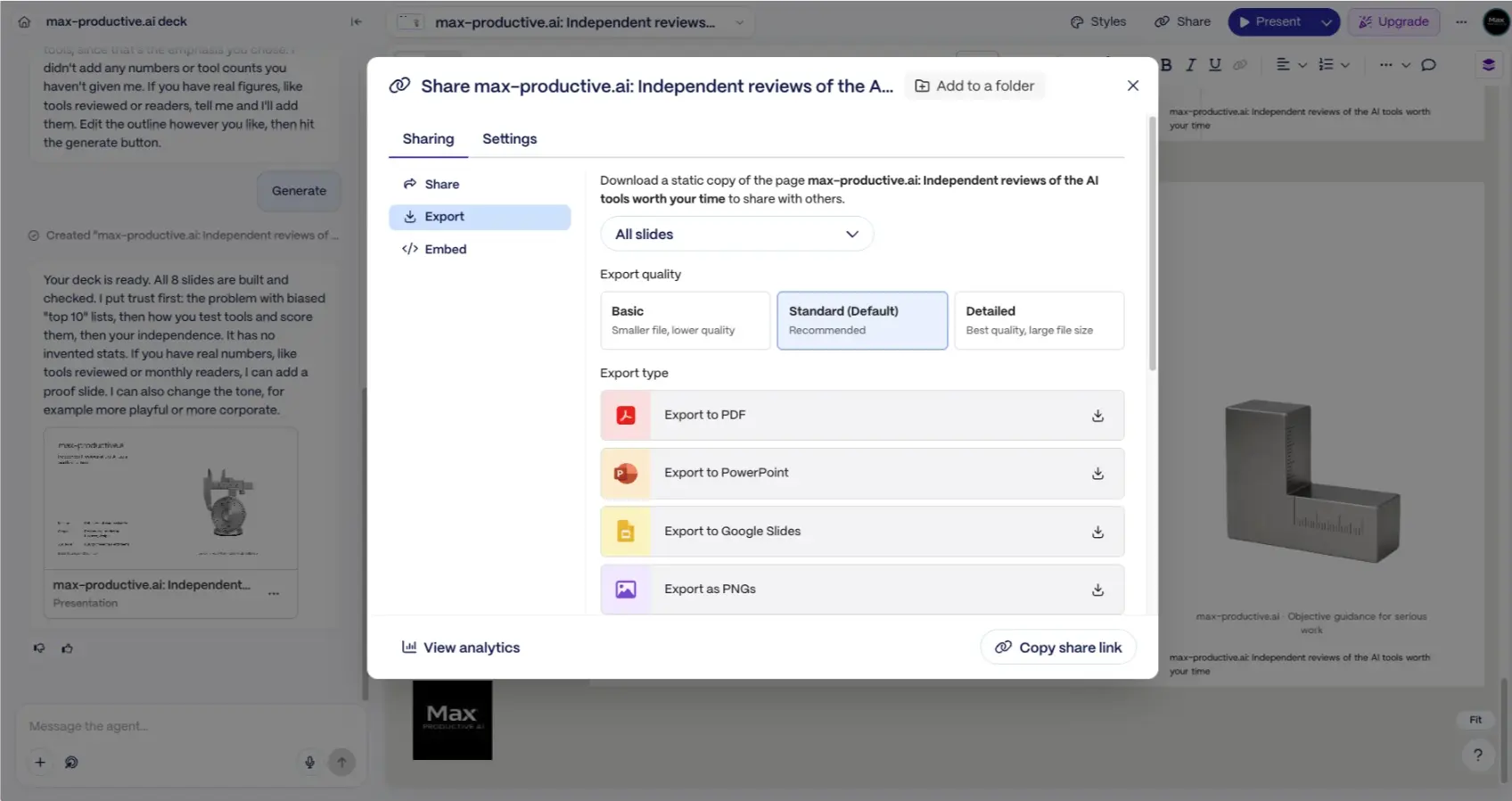
These changes matter most when a team will rework the file for months, or when a company expects its own slide master. We didn't run a slide-by-slide check of an export, so our advice is to export one real deck and open it in PowerPoint before you commit.
Google Slides
In Google Slides, the Plus AI add-on covers generation, Insert, Rewrite, Remix and AI images, and one subscription covers both apps. Its Agent mode isn't available in Google Slides yet, so Plus suggests letting the agent make a PPTX and uploading it. Gamma exports straight to Google Slides, where fonts follow Google's rules. We didn't test the Google Slides add-on, so this part comes from each vendor's documentation.
Edge: Plus AI. When the deliverable is a PowerPoint or Google Slides file, building it there saves the export step and the check that follows.
Design and Visuals: Plus AI vs Gamma
Gamma aims for a deck that looks designed from the first draft. The aim in Plus AI is clean business slides that sit well next to a corporate template.
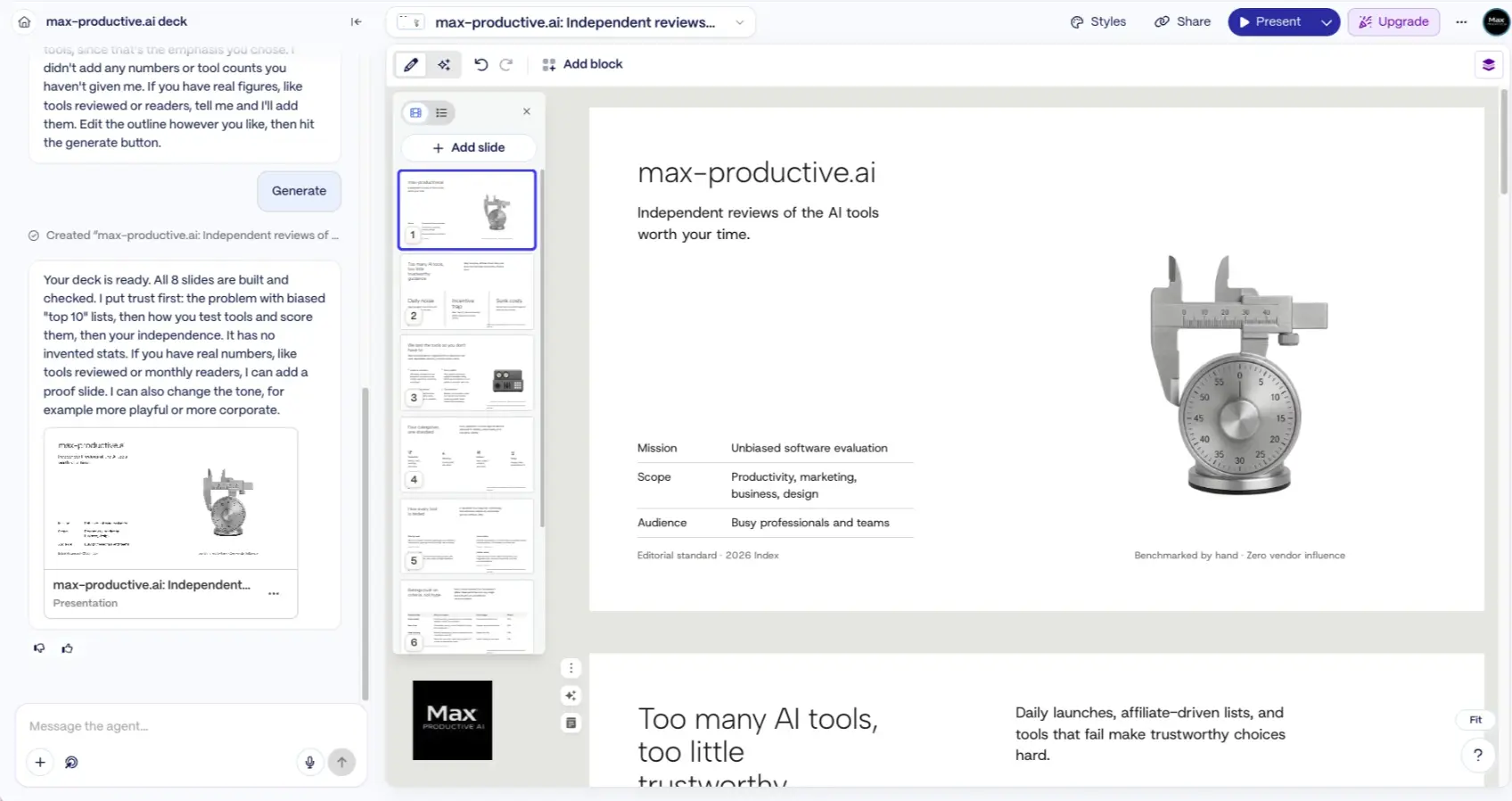
Gamma handled hierarchy, spacing and imagery for us. Our test deck came back with one consistent look, including a small table and a fitting AI image on the title slide. We didn't align a single object. Gamma 5 added a wider range of visual styles, and the paid plans open more advanced image models.
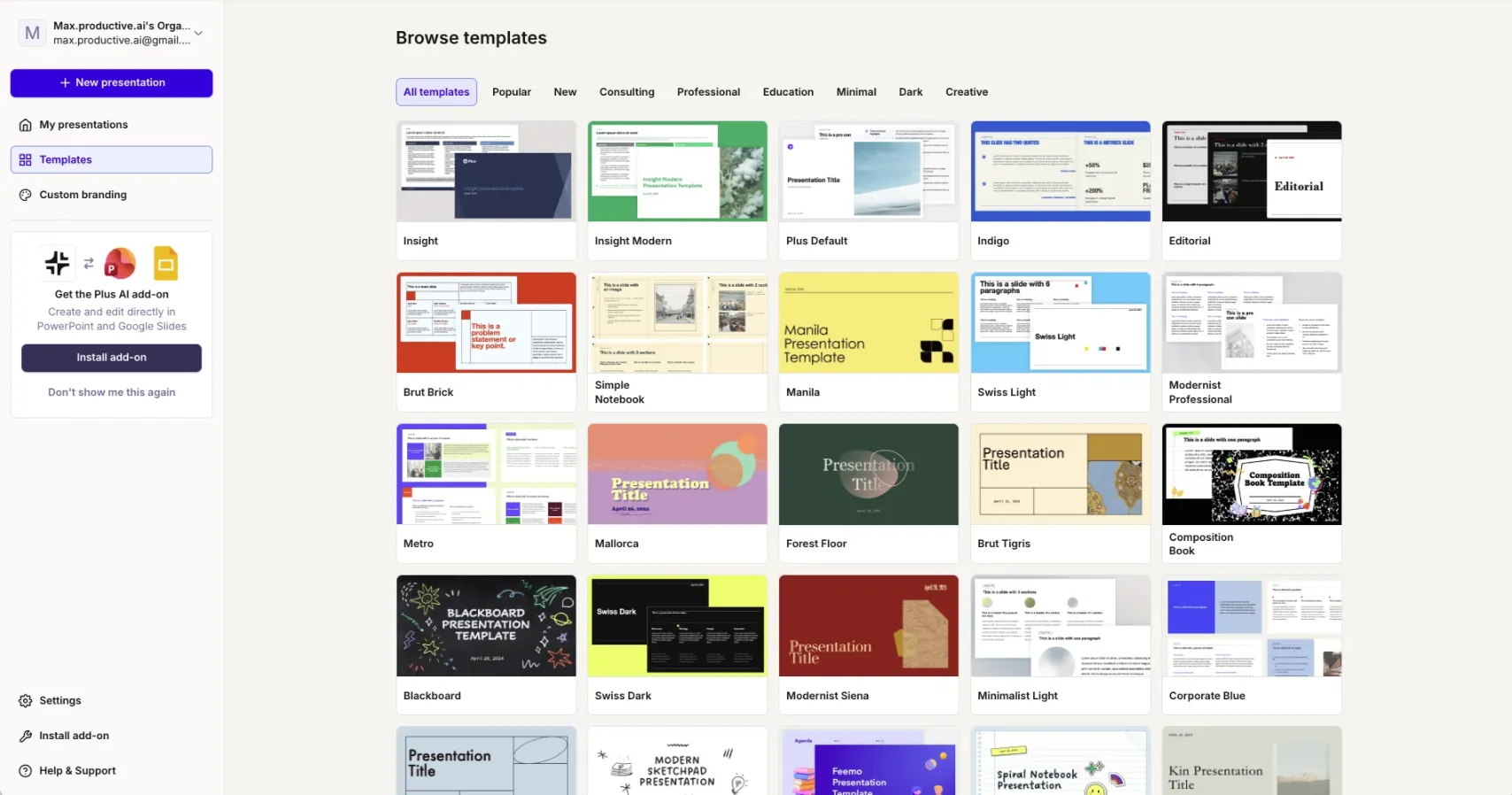
The templates in Plus AI have a clean, business-first look. Its library sorts designs into Consulting, Professional, Education, Minimal, Dark and Creative. That restrained style suits board updates and client reports. A few slides in our test deck had more white space than content, and Remix is the quick way to rebalance them. Prompts steer the content, not the design, so the look comes from your template and, on the Team plan, your brand settings.
For images, Plus AI starts generation on Pro, with four models in the panel we used, and Team opens up the more advanced ones. Gamma includes basic image models on its Free plan.
Edge: Gamma. It gives you the more striking first draft, while Plus AI suits decks that need to look like the rest of your company's slides.
Sharing, Teams and Security
The two tools share decks in very different ways. Both state SOC 2 Type II compliance, and each offers SSO on its business tier.
Gamma is at its best when you send a link. Viewers scroll or click through in a browser, and you can keep improving the deck after it's sent. Pro adds detailed analytics, password protection and up to 10 custom domains, which helps with proposals and sales follow-ups.
There's no extra sharing layer in Plus AI. Your deck is a normal file, so you share, comment and review it the way your team already does. Its Team plan adds your logo, colors and fonts, plus shared presets. Pro includes a Presentation API and an MCP server, so other apps and AI agents can create decks through Plus AI.
Gamma has an API on Pro too, with integrations for popular automation tools. On data use, Gamma's individual plans let your content help improve its AI by default, and you can switch that off under Settings, in Data Controls. Team and Business workspaces are excluded automatically. On the Plus AI side, the privacy policy says Google Workspace API data isn't used to train generalized AI models. If your decks are confidential, check the data settings for the plan you choose.
Edge: Gamma for decks shared as links. For decks shared as files, Plus AI fits the way your team already works, and on security the two are even.
Gamma vs Plus AI Pricing
As of October 2026, Gamma is cheaper to start, with a free plan, and its Plus and Pro plans cost slightly less than Plus AI's Basic and Pro.
| Plan | Gamma | Plus AI |
|---|---|---|
| Free | Free plan: 400 one-time credits, up to 10 slides per prompt | No free plan |
| Try before you pay | Free plan, no card needed | 7-day trial with 1,000 credits, card needed |
| Entry plan | Plus: $9 a month billed annually, 1,000 credits a month | Basic: $10 a month billed annually ($15 monthly), 1,500 credits a month |
| Mid plan | Pro: $18 a month billed annually, 4,000 credits a month | Pro: $20 a month billed annually ($25 monthly), 3,000 credits a month |
| Branding | Custom branding on Pro | Team: $30 a month billed annually ($40 monthly), 6,000 credits a month |
| Top plan | Ultra: $90 a month, 20,000 credits a month | Max: $200 a month billed annually ($240 monthly), unlimited credits |
Plus AI prices from its pricing page, checked October 22, 2026. Gamma's credits and plan features from its pricing page and help center the same day. Gamma shows prices in local currency: its US prices are from its pricing page on October 5, 2026, and its help center says Ultra is billed monthly for now. See every source
Credits don't compare one to one. Gamma meters AI work per slide and per image, and unused credits roll over up to twice your monthly allowance. A typical task in Plus AI uses between 40 and 170 credits, according to its pricing page. At the entry level, Plus AI gives more credits, 1,500 a month against 1,000, and Max removes the limit for people who use the agent every day.
Our math, in US prices: on annual billing, Gamma Plus costs $108 a year and Plus AI Basic $120, a $12 difference. One level up, Gamma Pro is $216 a year and Plus AI Pro $240. The bigger gap is at zero. Gamma lets you build real decks for free, while Plus AI asks for a card at the start of its trial.
Which plan we'd start with: on Gamma, Plus for a few internal decks a month, and Pro for client-facing work with branding and analytics. On Plus AI, Pro, because Basic has no document uploads and no AI images.
Edge: Gamma. It has a free plan and slightly lower prices at the entry and mid levels.
Gamma's free plan includes 400 credits and every export format, so you can test it on a real deck at no cost.
Try Gamma freeGamma vs Plus AI vs Beautiful.ai, and Where Tome Fits Now
Beautiful.ai and Tome often come up in the same searches as Gamma and Plus AI, and both have changed since many older comparisons were written.
Beautiful.ai sits between Gamma and Plus AI. Its Smart Slides adjust spacing and layout automatically as you add content, which keeps a team's decks consistent, and it offers a PowerPoint add-in and editable exports. It's a good pick for teams that want design guardrails. Pro is $12 a month on annual billing, with a trial and no free plan. Our Gamma vs Beautiful.ai comparison covers it in detail.
Tome now presents itself as more than slides, with a focus on sales work such as account research and deal updates. If that's the help you want, Tome is worth a look. For decks alone, Gamma is the closest in spirit, and our Gamma alternatives guide lists more options.
Gamma or Plus AI: our verdict
As of October 2026, Gamma and Plus AI suit different jobs, and both do theirs well. Gamma is the better choice for most people who want a polished deck quickly and share it as a link or a PDF. Its free plan makes it easy to try. Plus AI is the better choice when the deck has to be a PowerPoint or Google Slides file that gets edited again and again. That's especially true if you work from existing decks or want your brand built in.
What we'd do. Decide by format. If your deck goes out as a link or a PDF, open Gamma's free plan and build one deck you need this month. If it's a PowerPoint or Google Slides file, start Plus AI's 7-day trial on Pro and run Remix and Rewrite on a deck you already have. Set a calendar reminder before the trial ends.
Gamma vs Plus AI FAQ
Is Gamma better than Plus AI?
Gamma is better than Plus AI for decks you share as a link or a PDF, as of October 2026. It also suits anyone who wants a designed first draft and a free plan. Plus AI is better when the result must be a PowerPoint or Google Slides file, because it builds native slides inside those apps and edits existing decks well. Gamma's free plan and Plus AI's 7-day trial let you test both on a real deck.
Gamma Plus vs Plus AI: are they the same thing?
No, Gamma Plus and Plus AI are different things from different companies. Gamma Plus is Gamma's entry paid plan, at $9 a month billed annually, with 1,000 AI credits a month and no Gamma badge. Plus AI is a separate product from Plus Docs, Inc. It's an AI add-in for PowerPoint and Google Slides, with plans from $10 a month billed annually.
Does Plus AI have a free plan?
No, Plus AI doesn't have a free plan as of October 2026. Every paid plan starts with a 7-day free trial for new customers, with 1,000 AI credits, and it asks for a card up front. Your plan starts billing when the trial ends unless you cancel. Gamma, by contrast, has a free plan with 400 one-time credits and no card required.
Can Gamma export to PowerPoint?
Yes, Gamma exports to PowerPoint on every plan, including Free, along with PDF, PNG and Google Slides. Tables arrive as editable tables and speaker notes come along. The export has no slide master, and a few effects such as gradient headings can show in a simpler style. Free-plan PDF and PowerPoint exports carry a Gamma badge, which paid plans remove.
Which is better for Google Slides, Gamma or Plus AI?
Plus AI is the better fit for Google Slides if you want to work inside the app, as of October 2026. Its add-on generates and edits native slides there, with Insert, Rewrite, Remix and AI images, though its Agent mode is PowerPoint only for now. Gamma exports finished decks to Google Slides, where Google substitutes its own fonts.
Can you use Gamma and Plus AI together?
In principle, Gamma and Plus AI can work together, since Gamma exports PowerPoint files and Plus AI works inside PowerPoint. You could draft and design a deck in Gamma, export it to PPTX, then use Plus AI's Rewrite or Remix on single slides. We haven't tested this workflow ourselves, so try it on one deck before paying for both.
Is Plus AI safe to use for work?
Plus AI states that it has SOC 2 Type II compliance, and its Enterprise plan adds SSO and user management, as of October 2026. Its privacy policy says Google Workspace API data isn't used to train generalized AI models. Gamma also states SOC 2 Type II compliance and offers SSO on its Business plan. On Gamma's individual plans, check the Data Controls setting before you upload confidential material.
How much do Gamma and Plus AI cost?
Gamma costs $0 on its free plan, $9 a month for Plus and $18 for Pro billed annually, and $90 a month for Ultra, in US prices as of October 2026. On annual billing, Plus AI costs $10 a month for Basic, $20 for Pro, $30 for Team and $200 for Max, or $15, $25, $40 and $240 billed monthly. Instead of a free plan, Plus AI offers a 7-day trial.
What's new in Gamma 5?
Gamma 5 is the release Gamma calls the biggest overhaul in its history, rolled out from September and announced on October 6, 2026 for every plan. Its Agent asks questions and develops the idea with you before designing, and you can switch between agent-led editing and a freeform canvas. PowerPoint and PDF imports keep their design, and a wider range of visual styles is available.
Read next
Tools in this article


About this comparison
Based on the vendors' pricing pages, help centers and product pages, read on October 22, 2026, and on our hands-on tests for our October 2026 reviews. First published 20 July 2025. Last updated 22 October 2026.
Sources checked
- Gamma plans and prices. Gamma's pricing page and its help article Gamma pricing, checked October 22, 2026. US prices from Gamma's pricing page, as recorded in our Gamma review on October 5, 2026.
- Gamma exports. Gamma's help article How do I export my Gamma to PowerPoint, checked October 22, 2026.
- Gamma 5. Gamma's announcement Introducing Gamma 5, dated October 6, 2026, and our Gamma review for data controls and security.
- Plus AI plans, trial and security. Plus AI's pricing page and home page, checked October 22, 2026, and our Plus AI review for editing tools and privacy.
- Plus AI agent and Google Slides. Plus AI's AI agent for presentations page and its Google Workspace Marketplace listing, checked October 22, 2026.
- Beautiful.ai. Our Beautiful.ai review, with its price as listed in our Gamma and Plus AI reviews on October 5, 2026.
- Tome. Tome's home page, checked October 22, 2026.
Update log
- 22 October 2026. Rewritten from scratch for Gamma 5 and Plus AI's agent mode, with our own screenshots of both tools, facts re-checked in October 2026, and a new address.
- 20 July 2025. First published.
Scores next to tool names are the overall ratings from our own reviews, on a 5-point scale.