
Symphony by Wix
Symphony by Wix gives a small business a team of AI agents for outreach, marketing, scheduling, research, finance and design, all run through one chat with an orchestrator called Maestro. You say what you want done. Maestro decides who does it and checks with you before anything goes out.
Try Symphony →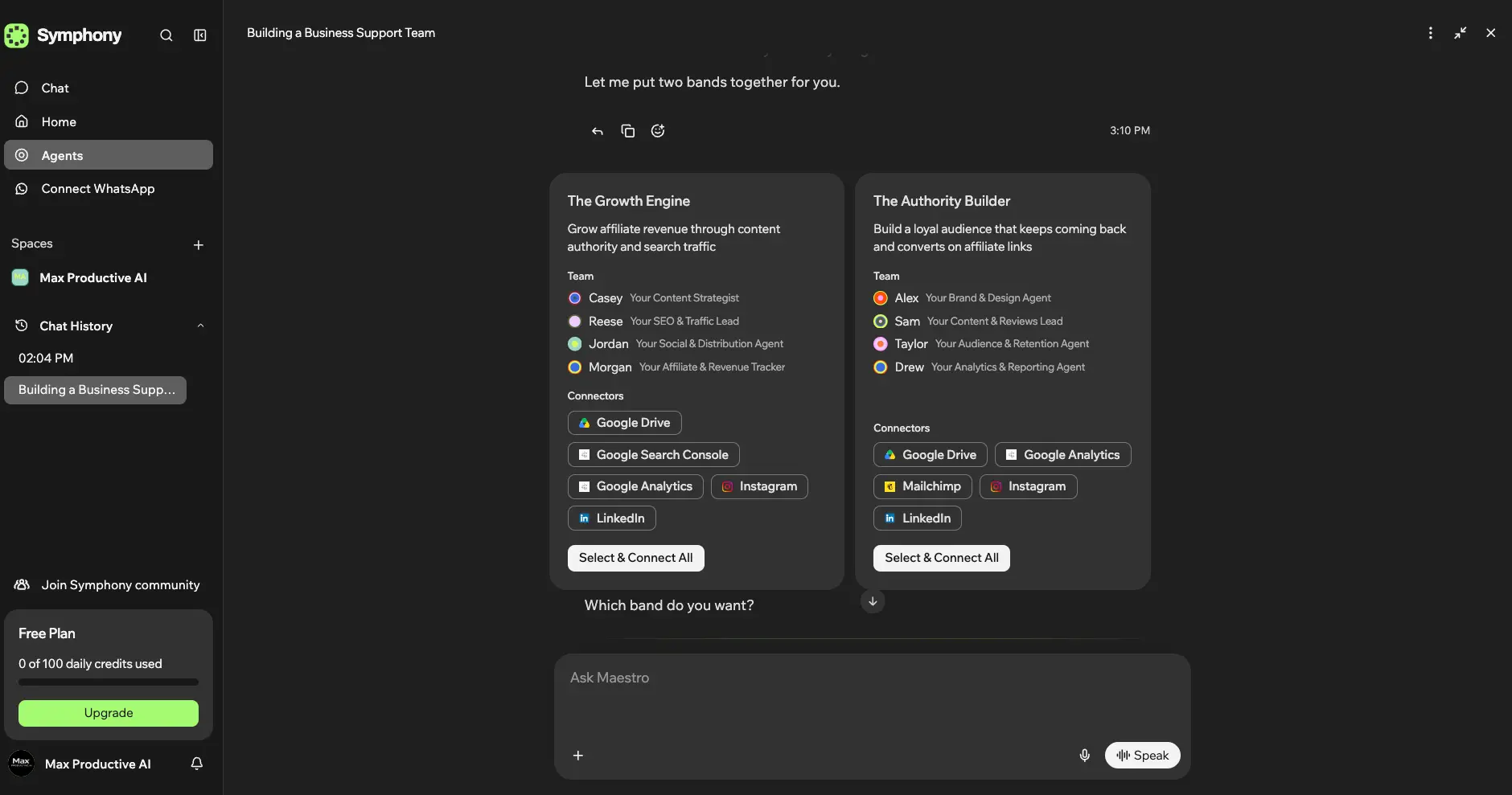
The Easiest AI Team for Small Business,
Still Earning Your Trust
As of October 2026, Symphony by Wix is the lowest-effort way I've found to put a team of AI agents to work on a small business. You don't build a workflow. You tell Maestro about the business, and a few minutes later it hands you a team of named specialists with the right tools attached, then asks before anything goes out. That part is excellent. The product behind it only launched in August, though, and early users have hit memory slips and status reports that don't match what actually happened. Start on the free plan, which has no time limit, and test anything customer-facing before you let the agents run it.
✓ What We Love
- Maestro picks and coordinates the agents, so there's no workflow to build
- An agent team shaped around your business within minutes of describing it
- Approval gates plus a review agent before work reaches you
- Free plan with no clock on it; paid plans from $16/mo
! Could Be Better
- Very young product, with early reports of memory and status errors
- No upfront credit cost per task, and bad output isn't refunded
- Far less step-by-step control than Make or n8n
What Is Symphony by Wix?
Most people looking for a Wix Symphony review want one thing settled first: no, it isn't a website builder.
Symphony by Wix is a standalone AI agent platform for small businesses and independent operators. Wix launched it on August 11, 2026, and despite the name, it has nothing to do with Wix's website builder. You don't need a Wix site to use it. Wix calls it platform-agnostic, meaning it works for businesses on Wix, on another platform, or with no website at all. It's also unrelated to SymphonyAI, the enterprise AI company, and to Symphony, the secure messaging app used in finance. Three products, one crowded name.
The idea is simple to explain and hard to pull off. With Zapier, Make or n8n, you design the automation yourself: pick a trigger, add the steps, handle the errors. With Symphony, you talk to one agent, Maestro, and describe the outcome you want. Maestro works out which specialists should take the job, coordinates them behind the scenes and comes back to you when something needs your approval. Those specialists come in three kinds. There are six built-in agents covering outreach, marketing, scheduling, research, finance and design. There are custom agents you set up around your own rules and tone. And there are external agents from providers such as Shopify and Zendesk. All of them sit under the same orchestrator and share the same context.
The musical vocabulary runs all the way through. Maestro conducts, agents are grouped into "bands", and the bands play together. It's branding, sure, but it also describes the product well. When I told Maestro what Max Productive AI does, it didn't show me a template gallery. It proposed two four-agent bands built around an affiliate content business, each with its own list of tools to connect. That's a very different starting point from an empty canvas.
How We Tested for This Symphony by Wix Review
I set up a free Symphony account for Max Productive AI, went through onboarding with Maestro, reviewed the agent bands it proposed, and connected Google Search Console and Google Analytics. I then ran a few tasks against our own site data. Those screens show private site figures, so the screenshots on this page stop at setup. Pricing and credit rules come from Wix's own pricing and help pages, checked on October 1, 2026. The reliability picture comes from independent hands-on reviews and public user reports, not from a controlled test. Symphony is about seven weeks old and ships updates constantly, so read this as a review of an early product.
So who is it for? Solo founders, consultants, local and service businesses, and small teams who want help with the repetitive work Maestro mentions in its very first message: follow-ups, bookings, posts and numbers. If you've ever opened Make or n8n and closed the tab when you saw the canvas, Symphony was built for you. Agencies and people running more than one business get separate workspaces, so each brand keeps its own agents, files and conversations. And who isn't it for? Anyone who needs to know exactly what happens at every step. That's still a job for a workflow builder.
See Symphony in Action
Screenshots from our own free account, from Maestro's first message to the WhatsApp setup.
Maestro's First Message
Onboarding is a conversation, not a setup wizard
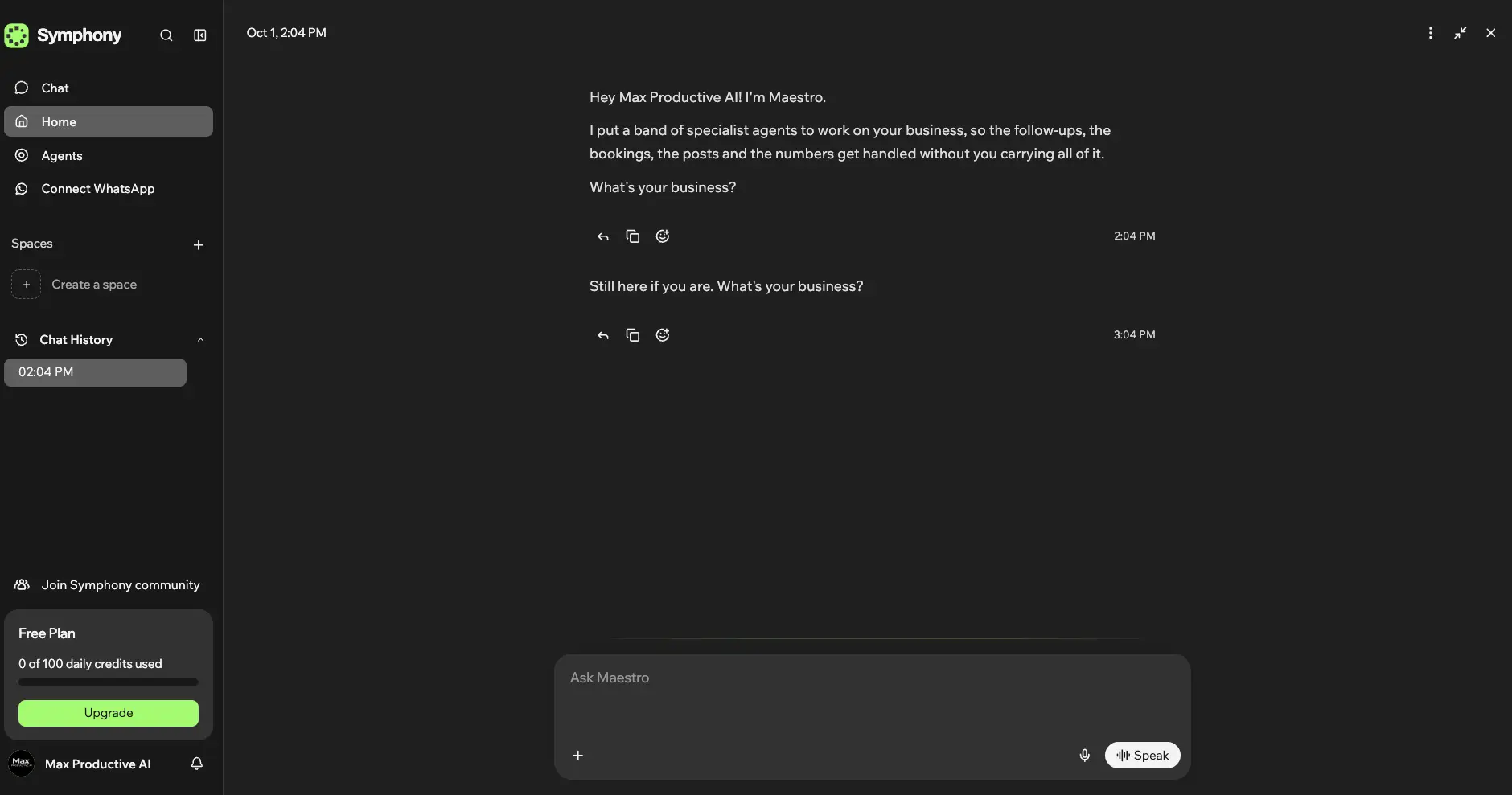
There's no product tour and no template picker. Maestro greets you by business name, explains that it has put a band of specialist agents to work so the follow-ups, bookings, posts and numbers don't all land on you, and asks one question: what's your business? I left it unanswered for an hour, and Maestro came back with a short "still here if you are" nudge. Small detail, but it's the first glimpse of the proactive behavior Wix builds the whole product around. The sidebar keeps your daily credit usage in view at all times, next to Spaces (Symphony's workspaces) and a Connect WhatsApp shortcut.
Agent Bands Built Around Your Business
Two ready-made teams, with names, roles and tools to connect
This is the screen that sells Symphony. After I described Max Productive AI, Maestro came back with two teams built around an affiliate content business. The Growth Engine has a content strategist, an SEO and traffic lead, a social and distribution agent and an affiliate and revenue tracker, wired to Google Drive, Search Console, Analytics, Instagram and LinkedIn. The Authority Builder swaps in brand and design, content and reviews, audience retention and analytics roles, and adds Mailchimp. Each agent even has a first name. Reaching this point in Make or n8n would mean designing the whole setup yourself. The caveat: names and job titles are the easy part. What counts is what the agents do once they're connected, and that's where early reports get mixed.
Want to see which band Maestro builds for your business?
Try Symphony Free →Free plan, no time limit • Paid plans from $16/moThe Design Agent at Work
An animated logo nobody asked for, made while setup ran
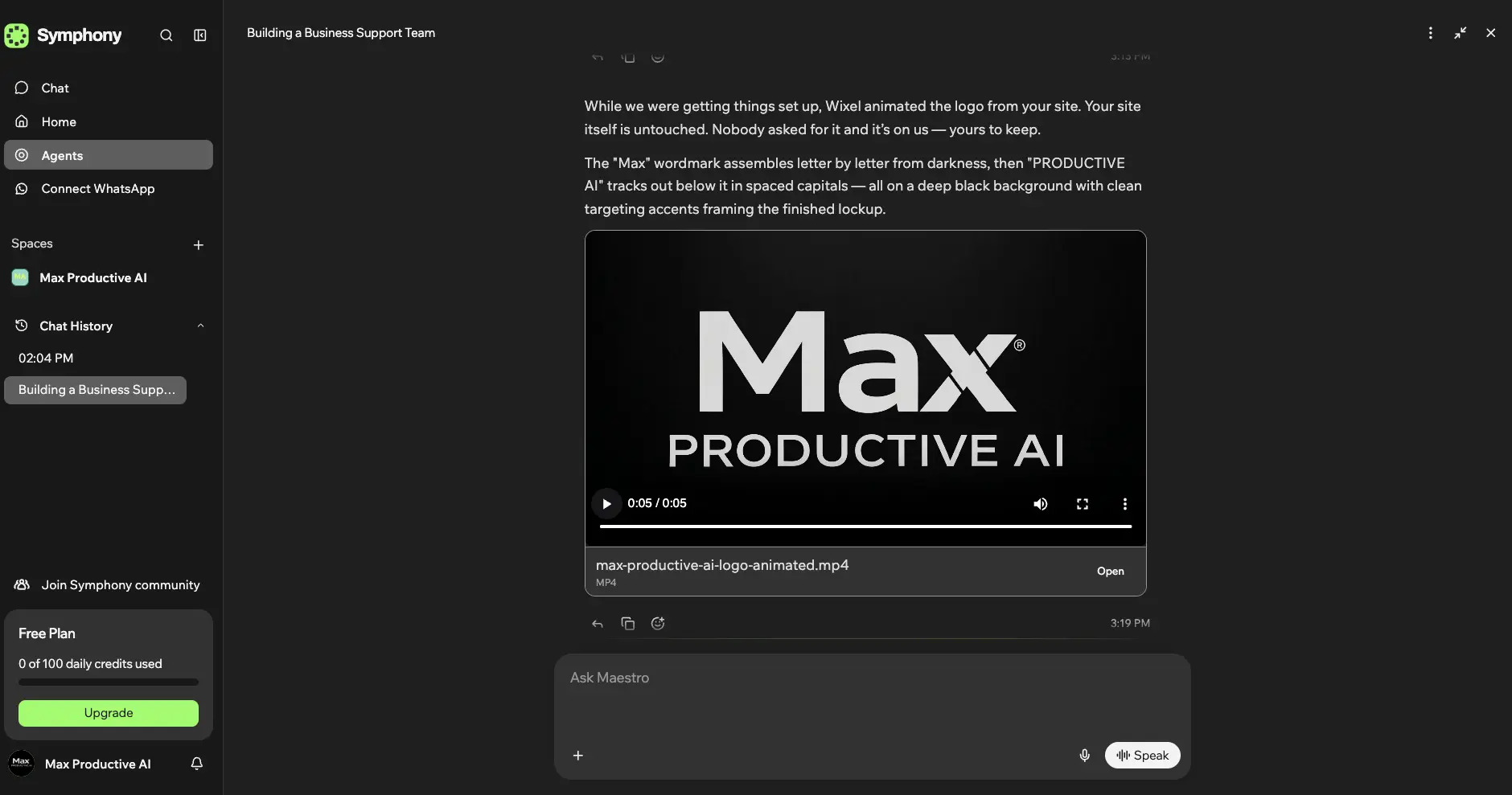
While I was getting set up, the design side of the team (the chat credits it to Wixel) pulled our logo from the site and turned it into a five-second animated MP4. Nobody asked for it, and the message says so, adding that the site itself was left untouched and the file is ours to keep. The animation is decent: the wordmark builds letter by letter out of black, then "PRODUCTIVE AI" spreads out underneath. Is it a sales demo? Of course. But it's a well-chosen one, because it shows what a design agent can produce before you've given it a single instruction. The credit counter still read 0 of 100 afterwards. That fits Wix's rule that chatting with Maestro is free and credits only go on background work, although the balance can take a few minutes to catch up, so don't treat the counter as live.
WhatsApp Connection
Symphony wants to reach you where you already are
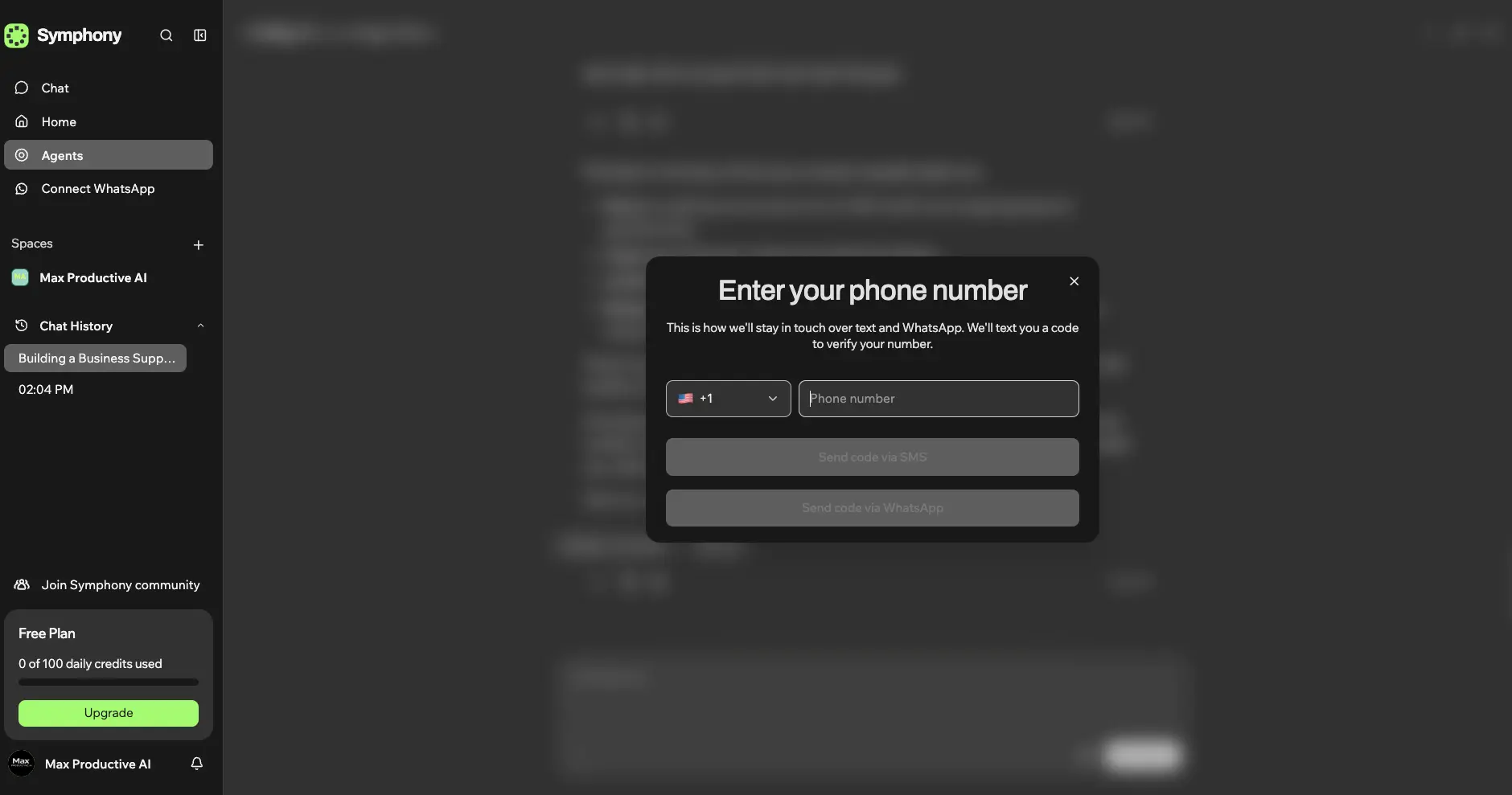
Connect WhatsApp sits in the main sidebar rather than in a settings menu, which tells you how Wix expects people to use this. Enter a phone number, verify it with a code sent by SMS or WhatsApp, and Symphony can stay in touch with you over text and WhatsApp. Add the iOS app, which got five updates in September alone, and you have a product designed for owners who spend the day in a shop, on a job site or on the road. One word of caution: approving an action from your phone is quick, and that's the point. Read what you approve, because it goes out under your business name.
How Symphony Works
From one conversation to a working AI team in four steps.
Tell Maestro About Your Business
Describe what you do, by typing or speaking, on the web or in the mobile app. Maestro asks follow-up questions about your goals and how you work. You don't pick agents, templates or triggers. That's Maestro's job, and it's the main thing that separates Symphony from every workflow builder in this category.
Choose a Team and Connect Your Tools
Maestro proposes one or more agent bands, each with the tools it needs. You connect them by chatting: Google Drive, Search Console, Analytics, Mailchimp, social accounts, your calendar or CRM. The more you connect, the more the agents can do on their own. You can also create custom agents by describing them, with their own rules and tone, and bring in external agents from third-party providers.
Agents Plan, Work and Check Each Other
Maestro routes each job to the right specialist and keeps them coordinated. A separate review agent checks work before it reaches you, which is a sensible layer for anything client-facing. Every day, the agents also hold a "morning meeting" that sums up what happened, what needs your attention and which opportunities they've spotted in your business activity.
Approve, Then Let It Run
Actions that leave the building, such as sending a message or a campaign, come to you for approval first. Once you approve, agents do the work in the background and draw on your credits as they go. Credit costs are calculated while the work runs, unused credits don't roll over, and when you run out, background work pauses until the next reset or an upgrade.
Proactive, but on a Leash
Approval gates are the right design for a product that can contact your customers. They aren't a guarantee, though. In a detailed Reddit account of a week with Symphony, one entrepreneur said an outreach message they had approved was changed before sending to add an AI introduction. One report doesn't make a pattern, and Wix may well have fixed it since. Until the product has a longer track record, run customer-facing workflows on test contacts first.
Privacy Notes
Wix hasn't published a Symphony-specific privacy statement or list of AI models that we could find. Wix's broader Generative AI Policy says user content and automatically generated user data can be used in developing Wix's generative AI, and Wix works with several third-party AI providers across its services. That doesn't mean all of them power Symphony. It does mean you should connect only the accounts each workflow needs and read Wix's AI and privacy terms before plugging in customer data. Separate workspaces help, since context isn't meant to cross between them.
Key Features
What Symphony by Wix AI agents can do today, and where the marketing runs ahead of the product.
Maestro Orchestrator
The heart of the product. You describe a goal, and Maestro picks the agents, plans the work and brings back anything that needs your sign-off. Think of it as a chief of staff who never asks which tool to open. Lindy comes closest, but nothing else in our Task Automation list hides the plumbing this completely.
Six Built-In Specialties
Outreach handles follow-ups, confirmations and reminders. Marketing drafts campaigns, posts and editorial calendars. Scheduling runs bookings and reminder sequences. Research gathers information and insights. Finance watches revenue, flags unpaid invoices and reconciles payments. Design produces on-brand assets and product copy. Together they map neatly onto a solo owner's week.
Custom Agents
Create an agent by describing it to Maestro: give it a name and a personality, set your rules and tone, then approve its goals. There's no code layer at all. Custom agents run inside the same orchestrated system as the built-in ones, so they share context instead of working alone. That makes them far more useful than a library of saved prompts.
Connectors, External Agents & MCP
Symphony can bring in third-party agents from providers such as Shopify and Zendesk, and Wix says platforms that support MCP or A2A (the agent-to-agent protocol) can plug in through its Connectors & MCPs area. Wix advertises thousands of integrations. Independent testers counted roughly 62 to 66 connectors listed in the product in September. Both can be true, since MCP and external agents reach further than the visible list, but confirm your key tools are covered before you commit.
Approval Gates & Review Agent
Messages and campaigns are surfaced for approval before they run, and a separate quality-review agent checks work before you see it. In one independent hands-on test, the finance agent caught and corrected its own wrong invoice date. For software that touches your invoices, that's reassuring.
Morning Meeting & Proactive Insights
Symphony doesn't wait to be asked. The agents meet daily to sum up what happened, flag what needs attention and suggest opportunities based on business activity and customer behavior. If you're used to a chatbot that sits idle until you type, this is the biggest mental shift.
Business Memory & Workspaces
Symphony is meant to learn your goals, customers and processes, with every correction and approval teaching it how you work. Each workspace keeps its own agents, files, conversations and dashboard metrics, which suits agencies and multi-brand owners. Memory is also where early users report the most trouble, so double-check anything important it claims to know.
Mobile App & WhatsApp
Symphony is designed to run from a phone as much as a desktop. The iOS app has been updated several times a month since launch, and text and WhatsApp let Maestro reach you without opening the app. Most tools in this category still assume you're sitting at a computer.
Two things to keep in mind. First, Symphony's biggest strength is also its main limit. Hiding the workflow is what makes it easy, and it's also why you can't set exact branching, data transformations, retries or error handling the way you would in Make or n8n. Second, the integrations story needs a footnote. "Thousands of integrations" in the marketing and a visible list of around sixty connectors aren't the same thing. Neither point is a dealbreaker for the owners Symphony targets. Both matter if you're coming from a workflow tool.
See how far the free plan's credits go for your business:
Check Symphony's plans →Free plan • Paid from $16/mo billed annuallySymphony by Wix Pricing
A free plan and three paid tiers, all built around AI credits. Here's what the credits mean in practice.
Free
- ✓ 500 AI credits a month, up to 100 a day
- ✓ Chatting with Maestro is free
- ✓ 2 bonus agent actions and 2 business briefings
- ✓ No time limit, not a trial
- ✗ Agents work across only a few integrations
Basic
- ✓ 2,000 AI credits per month
- ✓ No daily credit cap
- ✓ More connected tools than Free
- ✓ $192 a year on annual billing
- ✗ Unused credits don't roll over
Pro
- ✓ 5,000 AI credits per month
- ✓ No daily credit cap
- ✓ Agents work across your full tool stack
- ✓ $480 a year on annual billing
- ✗ Unused credits don't roll over
Annual billing: Saves 20% on every paid plan, and you can upgrade or downgrade at any time
How credits work: Each action's cost depends on its type and complexity and is calculated as the work runs. Symphony credits are separate from Wix Premium and Wixel credits, and Wix's AI terms say consumed credits aren't restored when a result contains errors
Pricing last verified October 2026. Visit Symphony for current rates.
Is It Worth the Money?
On annual billing, Basic costs about 53 cents a day. What that buys is harder to pin down, because Wix doesn't publish a credit cost per action. The best public data point so far: in one independent free-plan test, a batch of six social posts used 82 of the 100 daily credits in about half an hour. At that rate, Basic's 2,000 monthly credits would cover roughly 140 posts, but research, outreach and finance tasks will cost different amounts. Run your own workflows on the free plan for a week and watch the counter before you pick a tier.
What I like about the pricing is that the free plan is a real plan, not a countdown. It won't run a business, but it's enough to watch Maestro build your team and see a few agents work on real tasks. Two limits matter. The daily cap goes quickly, and on the free plan agents work across only a few integrations, so connect the tools that matter most first. My free account showed the 100-credit daily cap Wix documents today (an older Wix article from August still says 50). Paid plans drop the daily cap altogether, and Wix doesn't limit how many agents you run on any plan. Credits are what you'll run out of. What I like less: they're spent as the work runs, so a complex task can cost more than you expected, and if an agent gets it wrong, those credits are gone.
Against the rest of the Task Automation field, Symphony sits at the affordable end, although the units don't line up neatly. Lindy Plus is $29.99 per user a month for 3,000 credits. Zapier's Agents Pro plan is $33.33 a month on annual billing for 1,500 activities. MindStudio costs $20 a month plus model usage. Make Core is cheaper at $12 a month for 10,000 credits, and n8n Cloud Starter is €20 a month on annual billing for 2,500 executions, but with both of those you build every workflow yourself. With Symphony, the price covers the setup work too. Whether that's worth it depends on what your own time is worth.
Detailed Pros & Cons
The full picture, including what Wix's launch pages leave out.
✓ Pros
This is the reason to choose Symphony. You never touch a trigger, a router or a field mapping. You describe what you want, and Maestro decides how it gets done. For an owner who gave up on Make or n8n after ten minutes, this is automation they'll actually use.
Maestro's first proposal for us was two four-agent bands built around an affiliate content site, with the right tools attached to each. Nothing about it felt generic. Wix says owners can go from working alone to a tailored AI team in minutes, and on the setup side, that matched my experience.
Approval gates before messages and campaigns go out, plus a review agent that checks work before you see it. For software that can email your clients, that's the right architecture.
There's no trial clock. Symphony's free plan keeps working for as long as you want, with chat free and a monthly credit allowance for agent work, so you can judge an AI team on your own schedule, with your own business.
The Wix name suggests you need a Wix site. You don't. Symphony works with businesses on other platforms or with no website at all, so a Shopify store or a consultant who lives on LinkedIn can use it the same way a Wix customer would.
A mobile-first design, an iOS app that's improving fast, and WhatsApp as a channel. In a Wix Studio community post from late September, one user described cutting a roughly 30-minute campervan listing update to about two minutes: Symphony took details sent over WhatsApp, filled in the CMS fields, handled the images and drafted the newsletter copy. One person's account, not a benchmark, but it's the kind of messy, phone-first job that rigid automations handle badly.
✗ Cons
Symphony launched on August 11, 2026. Independent testing since then has turned up memory and context failures, finished tasks still shown as incomplete, and an agent reporting execution status that didn't match reality. Zapier, Make and n8n have years of production use behind them. Symphony has weeks.
The approved-message report covered above is the most worrying, and it isn't alone. An independent tester also ran into limits on which sender address outbound email used. Company and contact discovery for outreach got better marks. Until things settle, treat anything that emails real customers as the part to test hardest.
Credit cost depends on the action and its complexity, and it's worked out as the job runs. That makes the first month hard to budget. You'll only learn your real burn rate by using the product.
Wix's AI terms say consumed credits aren't restored when a result contains errors, hallucinations or bugs. With an early product that still makes mistakes, you pay for the misses as well as the hits.
The marketing says thousands. Testers counted 62 to 66 connectors in the product in September. External agents and MCP may cover the gap, but if one specific tool is essential to you, confirm it's supported before you build around it.
When a process has to run the same way every time, with precise branching, data transformations, retries and error handling, Symphony is the wrong tool. Make and n8n let you see and fix every step. Symphony asks you to trust the orchestra.
What to Hand Symphony Now, and What to Hold Back
Symphony's agents aren't equally ready for every job. Here's where I'd start, based on how the product is designed and what independent testers have reported so far.
| Task | Our Take | Why |
|---|---|---|
| Social posts, campaigns, content calendars | ✓ Start here | Nothing goes out until you approve it, and drafting is what the marketing agent is built for. |
| Lead and company research | ✓ Start here | Even the most critical early user report said contact discovery worked reasonably well. |
| Analytics and Search Console summaries | ✓ With spot checks | Handy for daily summaries, but an agent has misreported its own work in independent testing, so check key numbers against the source. |
| Invoice tracking and payment reconciliation | Promising, verify | One tester watched the finance agent catch its own wrong invoice date. It's still your money, so review before acting. |
| Emails and messages to real customers | ! Test on dummy contacts first | Early reports include sender-address limits and an approved message that was altered before sending. |
| Processes that must run the same way every time | ✗ Use another tool | Order syncs, data pipelines and strict branching logic belong in Make, n8n or Zapier. |
Symphony vs Alternatives
How Symphony compares with the Task Automation tools it gets shortlisted against.
| Feature | Reviewed Symphony | Lindy | Make | n8n | Zapier |
|---|---|---|---|---|---|
| Entry Paid Plan | $16/mo annual ($20 monthly) | $29.99/user/mo (Plus) | $12/mo (Core) | €20/mo annual (Starter) | $33.33/mo annual (Agents Pro) |
| Core Approach | Orchestrated team of agents | AI assistant with computer use | Visual scenarios + AI Agents | Workflows + AI Agents | Zaps + Agents + MCP |
| Integrations | Thousands advertised, ~60 listed | Thousands + MCP | 3,000+ apps | 1,000+ | 9,000+ apps |
| Workflow Building | None needed | Light | Required | Required | Required for Zaps |
| Self-Hosting | ✗ | ✗ | ✗ | ✓ Community Edition | ✗ |
| Standout Strength | Lowest setup burden | Closest to a human assistant | Visual logic | Control & self-hosting | Biggest app library |
| Best For | Non-technical small-business owners | Busy professionals and small teams | Visual automation builders | Technical teams | Teams on a large SaaS stack |
Symphony vs Lindy: The Short Version
Lindy is Symphony's closest rival, and the choice comes down to the kind of help you want. Lindy behaves like one very capable assistant. It manages your inbox, records meetings, works your calendar, runs scheduled routines and can operate a computer, with thousands of integrations, MCP support and approvals built in. Symphony behaves like a small team with a manager. You don't brief each agent; Maestro assembles them around your business and runs them, at a lower entry price. If your bottleneck is your own inbox and calendar, start with Lindy. If it's the business itself (leads, bookings, posts, invoices) and you don't want to design anything, start with Symphony.
Which Tool Is Right For You?
Symphony by Wix
ReviewedBest for: Solo founders, consultants, and local or service businesses that want AI agents handling outreach, marketing, scheduling, research, finance and design without designing a single workflow. Maestro and the free plan are the reasons to try it. The approval gates are the reason you can trust it with clients, once you've tested your key workflows. Start free and watch your credit burn before you pick a tier.

Lindy
Closest RivalBest for: Professionals who want one AI assistant across email, meetings, calendar and computer tasks. Lindy keeps persistent workspace context, runs scheduled routines and asks for approval before acting. It costs more per seat than Symphony and feels more like a personal employee than a business team, which is exactly what some people want.

n8n
Most ControlBest for: Technical users who want full control. n8n offers code steps, custom nodes, Git versioning and a free self-hosted Community Edition, and its Agents can be triggered from Slack, schedules or other workflows. Cloud plans start at €20 a month on annual billing. It barely competes with Symphony for the same buyer: if you enjoy building automations, pick n8n.

Make
Best Visual BuilderBest for: People who want to see their automation laid out on a canvas. Make connects to 3,000+ apps, has a free plan, and its redesigned AI Agents (open beta since February 2026, with MCP tool support added in June) bring agent features into visual scenarios. Make lets you build the automation; Symphony tries to build and run it for you.

Zapier
Most IntegrationsBest for: Teams whose stack spans dozens of SaaS apps. With 9,000+ integrations, Zapier connects to almost anything, and it now combines Zaps with Agents and MCP. Zapier Agents has a free tier with 400 activities a month. Pricing across tasks and activities can get complicated, but nothing else here matches its reach.

MindStudio
Agent BuilderBest for: Builders who want to create and deploy their own AI agents and apps. MindStudio supports 200+ AI models, 1,000+ integrations, API and webhook deployment, email-triggered and scheduled agents, and MCP servers, from $20 a month plus model usage with unlimited agents and runs. Choose it to build agents; choose Symphony to have agents run your business.

MuleRun
Cloud WorkerBest for: Long-running, general-purpose work. MuleRun pitches itself as an all-day digital worker, with an always-on cloud computer, scheduled tasks, a knowledge base, and channels that include WhatsApp and Telegram. Team accounts cost $20 per seat a month with a three-seat minimum. It's broader than Symphony and less shaped around small-business operations.

Voiceflow
Customer ServiceBest for: Customer-facing voice and chat agents. Voiceflow V4, generally available since May 2026, gives CX teams live data access, human handoff, policy controls, observability and SOC 2 Type II and ISO 27001 credentials. If your goal is AI customer service, pick Voiceflow. For the rest of the business, Symphony fits better.
Flowith also sits in our Task Automation list, but it's a different animal: a visual canvas for research, writing and creative generation, with custom integrations still marked as coming soon. It's good for creative work and a weak fit for running business operations.
Frequently Asked Questions
Should You Try Symphony by Wix?
Symphony by Wix gets the hardest part of AI automation right for the people who need it most. A small-business owner shouldn't have to learn triggers, routers and field mapping to get help with follow-ups, bookings, posts and invoices, and with Symphony they don't. Maestro builds a team around the business, the agents check each other and ask before acting, and the free plan lets you try all of it without a deadline. In our Task Automation list, only Lindy comes close on ease of use, and Symphony's paid plans start lower.
The 4.5 rating reflects the gap between that concept and its execution today. Symphony is weeks old. Early users have reported memory slips, wrong status updates and problems with outreach. Credits are hard to budget and aren't refunded when an agent gets it wrong. And when a process must run identically every time, Make or n8n remain the better tools. If Wix irons out the reliability issues over the next few months, this score will go up.
Our Recommendation
Start on the free plan. Tell Maestro about your business, pick the band that fits, and connect only the tools that band needs. Run one internal task, such as a report or a content plan, and one customer-facing task on test contacts, then read every approval request in full. Watch how quickly your daily credits go. If the output holds up after a week, Basic at $16 a month on annual billing is the place to start, and you can move up once you know your real usage.