
Fyxer
AI email assistant for Gmail and Outlook that sorts your inbox, drafts replies in your own tone, and takes your meeting notes—inside the email app you already use.
Try Fyxer →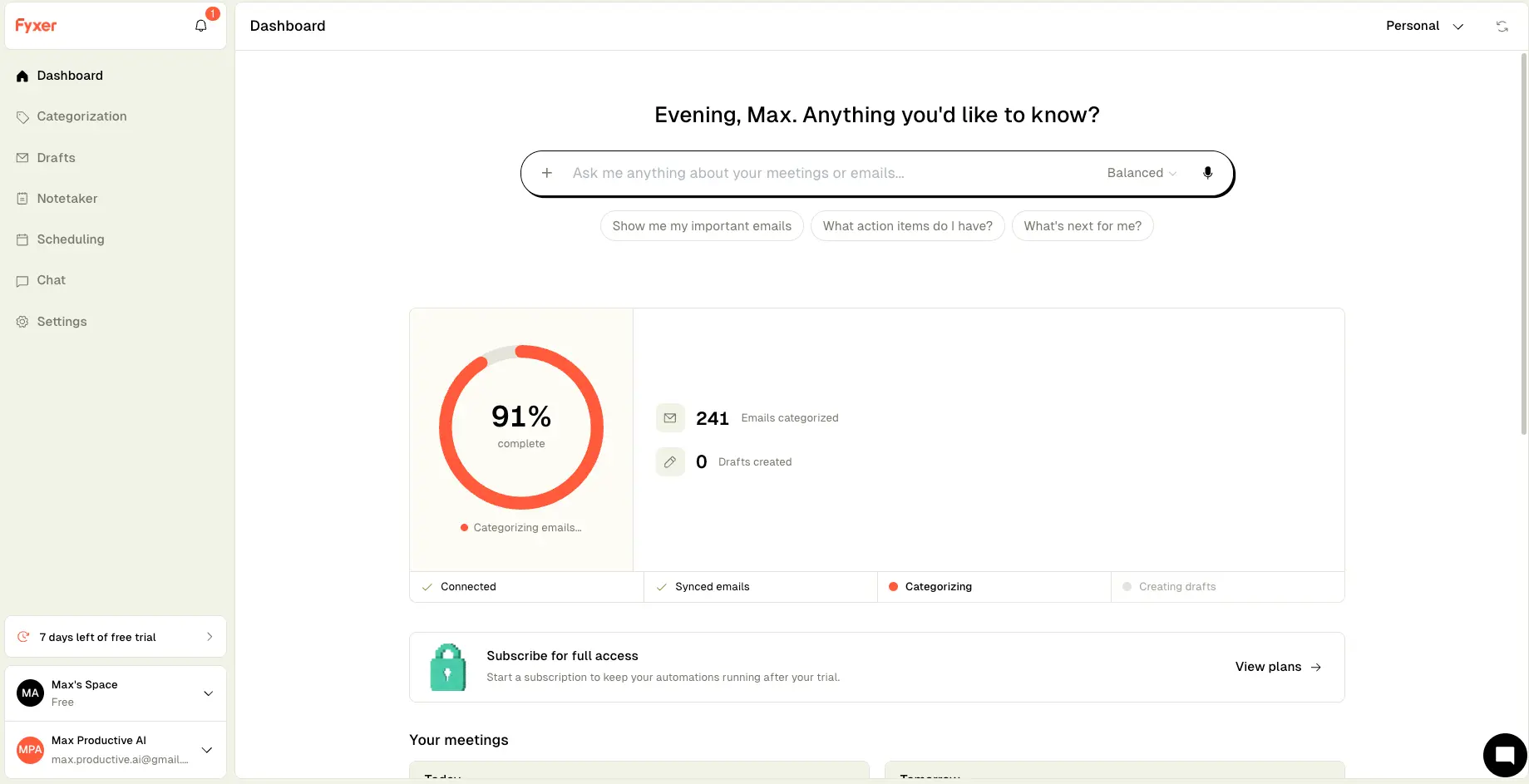
An AI Layer for Gmail & Outlook
That Sorts, Drafts, and Takes Notes
Fyxer keeps things simple: connect your Gmail or Outlook account and it starts sorting, drafting, and note-taking inside the inbox you already use—no new app, no migration. In our own test, it organized a couple hundred emails within the first hour and correctly told us most of them didn't need attention. Routine drafts sound convincingly like you; complex threads still need your edits. For professionals living in email and meetings, $22.50–$50 a month buys back real time.
✓ What We Love
- Works inside Gmail & Outlook—nothing new to learn
- Drafts replies in your tone, learned from your sent mail
- Meeting notetaker included on every plan
- Triage that works with zero configuration
! Could Be Better
- Category set is fixed—expect the occasional misfile
- Complex or sensitive drafts need real editing
- Outlook version trails the Gmail experience
What Is Fyxer AI?
Where it came from, what it does day to day, and how it differs from the other email tools you've heard of.
Fyxer is an AI email assistant that connects to Gmail or Outlook and does three jobs inside the inbox you already use: it sorts incoming mail into categories, writes draft replies in your own tone, and sends an AI notetaker into your video calls. Founded in the UK in 2023, the company has raised $43M—including a $30M Series B led by Madrona, with backing from Salesforce founder Marc Benioff—and counts enterprise customers like AT&T, Knight Frank, and eXp Realty alongside a large base of solo professionals.
It helps to know where Fyxer sits, because AI email tools get lumped together when they solve very different problems. Filter services like SaneBox quiet your inbox but never write a word. Cleanup tools like Clean Email are built for clearing years of backlog, not daily triage. And AI-native clients like Superhuman or Shortwave ask you to abandon Gmail's interface entirely. Fyxer takes a different path: it's an assistant layer that stays invisible inside your existing inbox. Connect your account, and labels, drafts, and meeting notes simply start appearing. Disconnect, and everything reverts. That low switching cost is a bigger deal than it sounds—especially for teams allergic to new software.
The drafting is where it gets interesting. When you connect an account, Fyxer analyzes roughly your 300 most recent sent emails to learn how you write—your greetings, your level of formality, your sign-offs. From then on, replies to incoming mail appear in your drafts folder, written in that voice. One firm rule: Fyxer never sends anything itself. Every draft waits for you to review and hit send. Some will find that an extra step; we'd call it the right call for a tool with this much access.
Set expectations honestly, though. In our hands-on test—we connected Fyxer to one of our own Gmail inboxes, and every screenshot below comes from that account—the triage was the standout: fast, mostly accurate, zero setup. User feedback tells a consistent story, with Fyxer holding around 4.1/5 on Trustpilot across several hundred reviews, and the sorting and meeting notes drawing most of the praise. Drafts are strongest on routine replies; anything nuanced or sensitive still needs your rewrite. It's an assistant, not a replacement.
Who Is Fyxer Best For?
High-volume, client-facing professionals on Gmail or Outlook—recruiters, brokers, consultants, founders, executives—handling dozens of emails a day alongside a heavy meeting schedule. That's the profile where triage, drafting, and meeting notes stack up to hours saved weekly. If your inbox is quiet or your pain is mostly backlog, cheaper single-purpose tools will serve you better.
See Fyxer in Action
Real screenshots from our own Fyxer account, taken while testing on a connected Gmail inbox.
Dashboard Overview
Setup progress, categorization stats, and the ask-anything bar in one view
This is what you see right after connecting. Fyxer worked through our existing inbox on its own—no rules to write, no folders to build—moving through four visible stages: Connected, Synced emails, Categorizing, Creating drafts. The suggested prompts ("Show me my important emails," "What action items do I have?") hint at the chat layer underneath. It's a clean, uncluttered start.
Inbox Categorization Settings
Decide which categories stay in your inbox and which get moved out
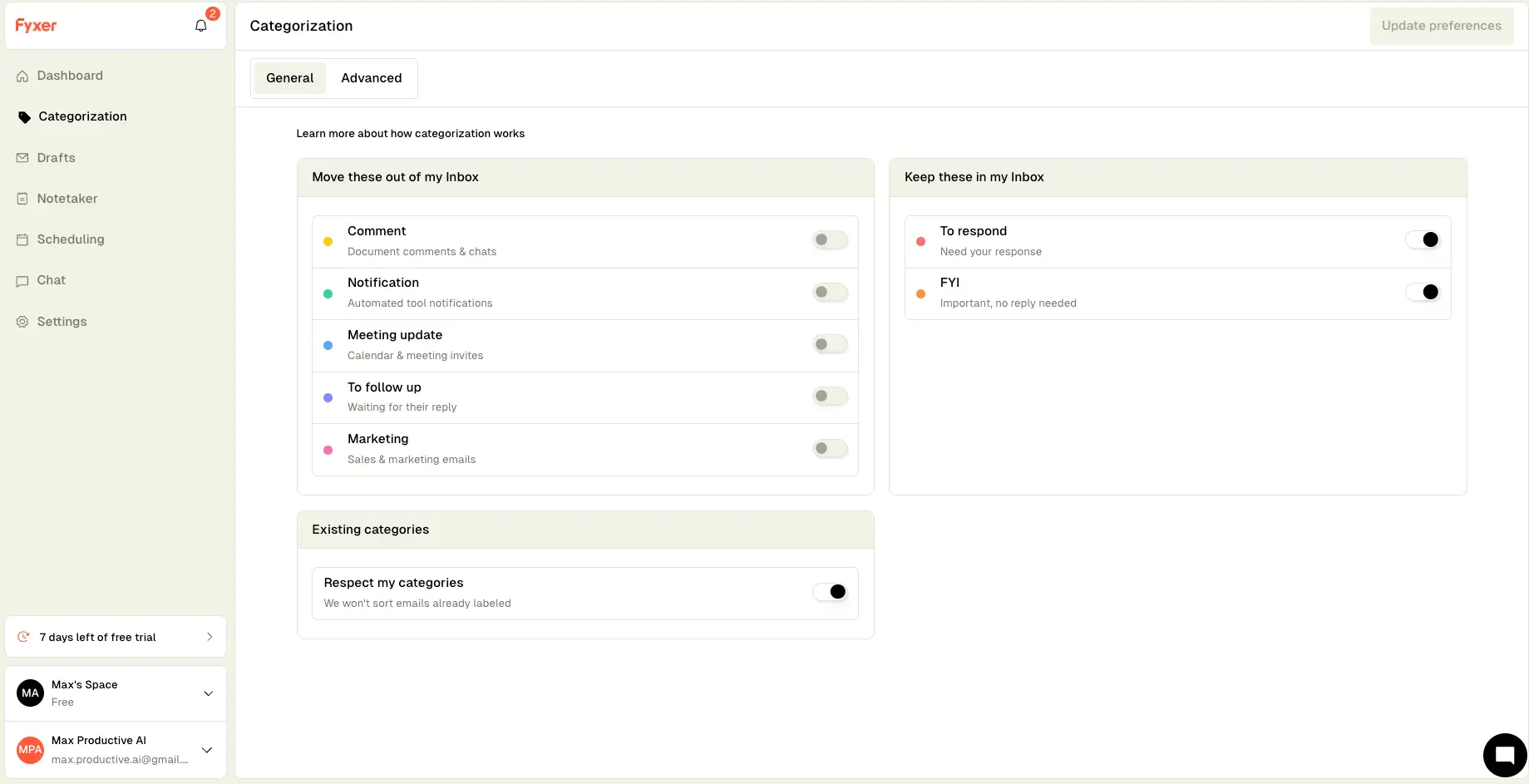
The default split is sensible: emails needing your response or attention stay put, while comments, tool notifications, meeting updates, follow-ups, and marketing get filed out of sight. Each toggle is independent, so you can keep meeting updates front and center if that's how you work. The "Respect my categories" switch matters if you already run a Gmail label system—Fyxer will leave your existing structure alone.
Categorization Rules
Fine-tune how strict the filtering is and route specific senders yourself
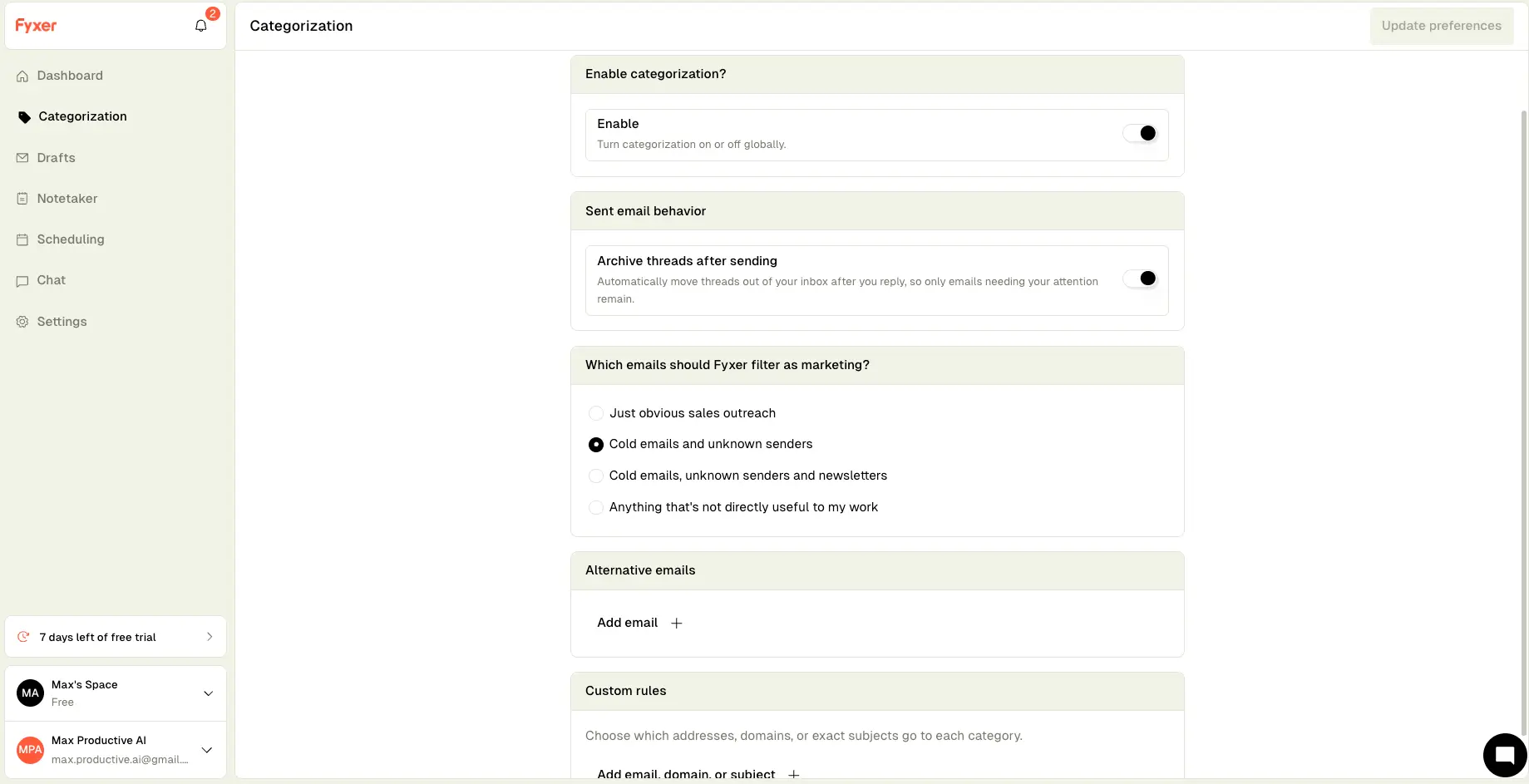
Here's the settings page that answers the most common criticism of tools like this. You can't create brand-new categories (the set is fixed), but you can pick how strictly marketing is filtered (from "just obvious sales outreach" up to "anything that's not directly useful to my work") and write custom rules that send specific addresses, domains, or exact subjects to the category you choose. In practice, that covers most misfiling problems: if an important sender lands in Marketing once, one rule fixes it permanently.
Curious how Fyxer would sort your inbox?
Try Fyxer →Connects to Gmail or Outlook in one click • Nothing to installFyxer Chat
Ask questions about your inbox and meetings in plain English
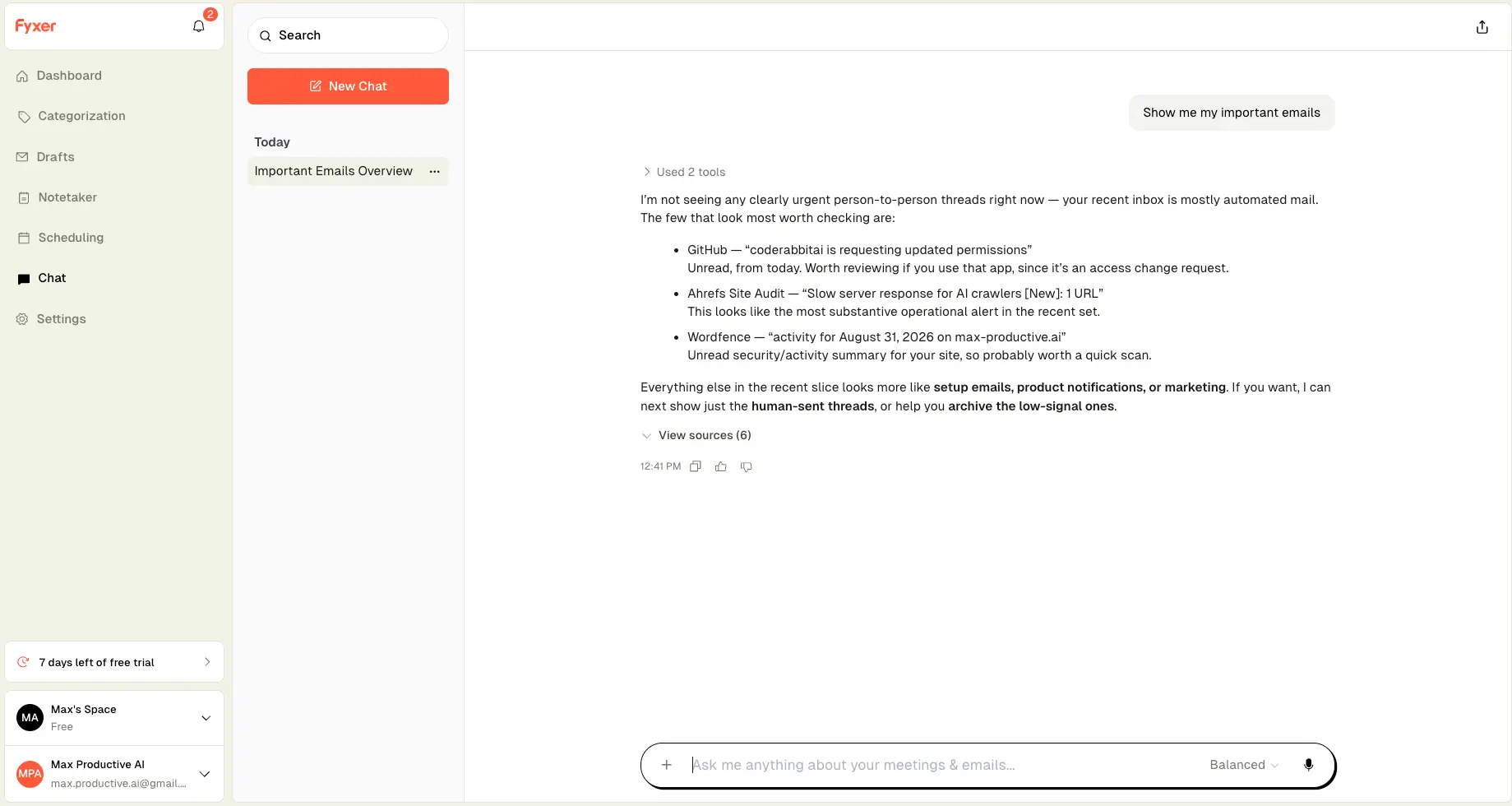
We asked it to show our important emails, and the answer showed real restraint: it told us the recent inbox was mostly automated mail, flagged the three threads worth checking (a GitHub permissions request, an SEO audit alert, a security summary), and offered to filter for human-sent threads next. No invented urgency, and sources cited for every claim. Worth knowing: Chat is a Professional-plan feature, so it disappears if you drop to Starter after the trial.
Scheduling Assistant
Booking links, availability rules, and team scheduling in one place
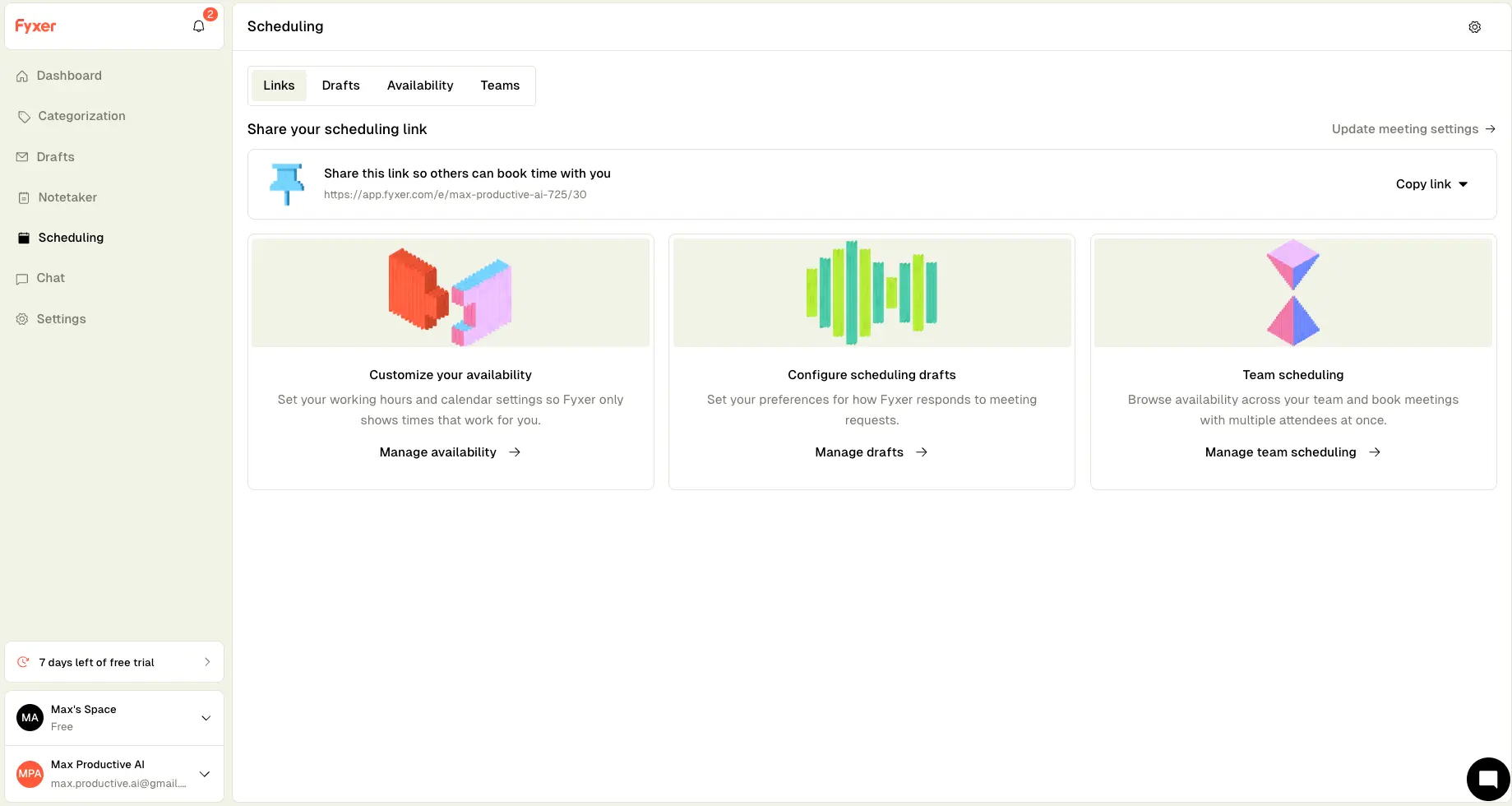
The scheduling module rounds things out: a personal booking link (Calendly-style), availability windows so only workable times get offered, and scheduling drafts that control how Fyxer responds when someone asks for a meeting over email. Team scheduling—pooled availability and distributing calls across colleagues—sits on the Professional plan. Not a reason to buy Fyxer on its own, but worth real money if it replaces a separate scheduling subscription.
How Fyxer Works
From connecting your account to reviewing drafts—here's the full loop.
Connect Gmail or Outlook
There's nothing to install and no interface to learn. You authorize Fyxer against your Google or Microsoft account and it starts syncing immediately—our connection took about a minute before categorization kicked in. If you ever disconnect, your inbox reverts to exactly how it was. That reversibility makes trying it a low-stakes decision.
It Learns Your Voice and Sorts the Backlog
Behind the scenes, Fyxer analyzes your recent sent mail—around 300 messages—to model your tone, then works through the existing inbox, applying its categories as it goes. The initial pass ran while we explored the settings, and by the time we'd finished poking around, most of the backlog was sorted without us touching anything.
Triage Runs Continuously
From then on, every incoming email gets categorized on arrival. Mail needing your response stays in the inbox; noise gets filed into labels you check when you choose. When Fyxer gets one wrong, recategorize it—the correction teaches the system—or write a custom rule so that sender always lands where you want. Expect the accuracy to feel good immediately and get better over the first couple of weeks.
Review Drafts, Notes, and Press Send Yourself
Replies appear in your drafts folder in your voice; you edit and send. For meetings, the notetaker joins your Google Meet, Teams, or Zoom calls, then delivers a transcript, structured notes, and a drafted follow-up email. Nothing goes out without your approval—which is exactly the control you want from a tool sitting this deep in your communication.
Certified, Audited, and Not Training on Your Mail
Fyxer holds SOC 2 Type II and ISO/IEC 27001 certifications, complies with GDPR, and offers HIPAA availability for Enterprise customers. The company states inbox data is never used to train external AI models. Given that the tool needs read and draft-write access to work, this posture is the minimum you should demand—and Fyxer clears the bar more visibly than most in this category.
Corrections Are the Training
Recategorize a misfiled email or edit a draft before sending, and Fyxer treats it as feedback. Both sorting and drafting typically settle into your preferences within a week or two. The practical tip: don't just drag a misfiled email to another folder in Gmail—recategorize it through Fyxer, so the system actually learns.
Key Features
What you actually get for $22.50–$50 a month.
Email Triage & Categorization
The core of the product, and the part that impressed us most. Incoming mail is sorted into a fixed set of categories: To Respond and FYI stay in your inbox, while comments, notifications, meeting updates, follow-ups, and marketing are filed away. Corrections teach it; custom rules lock in exceptions.
Tone-Matched Draft Replies
Fyxer studies your sent mail and writes replies that sound like you—greetings, formality, sign-offs included. Routine responses (scheduling, confirmations, quick answers) come out close to sendable. Negotiations and sensitive threads? Plan to rewrite. Everything lands in drafts for your review.
AI Meeting Notetaker
Sits in on your Meet, Teams, and Zoom calls, then turns them into a transcript, notes, and a follow-up draft waiting in your email. Included even on the cheapest plan. Users often call it their favorite feature, though summaries can miss nuance on messy multi-speaker calls.
Fyxer Chat
A conversational layer across your inboxes and meeting notes. Ask "show me my important emails" or "what did we agree with the supplier?" and get sourced answers. When we tried it, it searched the inbox before answering and cited every claim. Professional plan only.
Scheduling Assistant
Booking links, availability windows, and control over how Fyxer replies to meeting requests. Team scheduling—shared availability, distributing calls across colleagues—comes with Professional. Quietly replaces a standalone scheduling subscription for many users.
Custom Rules & Filter Controls
Route specific addresses, domains, or subject lines to any category, choose from four marketing-filter strictness levels, and auto-archive threads after you reply. The category set is fixed, but these controls handle most real-world exceptions.
Gmail & Outlook Support
Works with both, no client switch required—unlike Superhuman or Shortwave, which replace your email app. One caveat: the Gmail experience is more polished, and features tend to arrive there first. Outlook users should test thoroughly during the trial.
Privacy & Security
Independently audited, GDPR-compliant, HIPAA available on Enterprise—and your inbox data never trains external AI models. Covered in detail above; listed here because for email tools, security is a buying criterion, not a footnote.
Beyond the core features, Fyxer ships fast: recent months added a ChatGPT app integration for voice-matched drafting, meeting-summary translation, larger file uploads for custom AI training on Professional, and automatic thread archiving after replies. HubSpot integration covers the CRM basics for sales teams. The product is moving fast, and with $43M raised, the roadmap risk here is low.
Fyxer Pricing
Two self-serve plans plus Enterprise. Annual billing cuts 25% off.
Starter
- ✓ 1 inbox + 1 calendar
- ✓ AI email categorization
- ✓ Replies drafted in your tone
- ✓ AI meeting notetaker
- ✓ Personal scheduling links
- ✓ $22.50/mo billed annually
Professional
- ✓ Everything in Starter
- ✓ Multiple inboxes & calendars
- ✓ Fyxer Chat across email + meetings
- ✓ Cross-team scheduling
- ✓ HubSpot integration + file uploads
- ✓ $37.50/mo billed annually
Enterprise
- ✓ Everything in Professional
- ✓ 50+ seats minimum
- ✓ Dedicated account manager
- ✓ SSO / SCIM provisioning
- ✓ Custom security controls + HIPAA
Good to know: A seat covers one user; connecting multiple inboxes requires Professional. No permanent free plan.
Pricing last verified September 2026. Visit Fyxer for current rates.
Is Fyxer Worth the Price?
An hour a day is Fyxer's own number—treat it as the optimistic case. But the math is forgiving: at $22.50–$50 a month, the tool pays for itself if it saves you two hours monthly. For someone processing 80+ emails a day with a wall of meetings, the realistic figure sits comfortably above that. For a light inbox, it probably doesn't—and then you shouldn't buy it.
For context: SaneBox starts around $7/month but only filters—no drafting, no meeting notes. Clean Email runs about $9.99/month and is built for cleanup and unsubscribing rather than daily triage. On the client side, Superhuman lands near $25–30/month and Shortwave from $18/month, but both require abandoning your current email interface. Fyxer costs more than the filters and about the same as the clients—the difference is that drafting and meeting notes come bundled, and your email app stays put.
Detailed Pros & Cons
The honest ledger after hands-on testing and a deep read of user feedback.
✓ Pros
Fyxer's biggest structural advantage: it lives inside the Gmail or Outlook you already use. Connect in a minute, and labels and drafts start appearing. Disconnect, and everything reverts. Zero training for teams, zero switching cost. Compare that to asking colleagues to adopt an entirely new email client.
On our account, categorization started within minutes and needed no setup. The default split—response-worthy mail stays, noise gets filed—matches how most people want their inbox to behave. It's the feature users praise most consistently, and we can see why.
Because the model learns from your real sent mail, routine drafts don't read like a template. Scheduling replies, confirmations, quick answers—these often need only a skim before sending. That's where the daily time savings come from.
Transcripts, structured notes, and a drafted follow-up for Meet, Teams, and Zoom, at no extra charge even on Starter. Buying an email assistant and a separate notetaker subscription would cost more than Fyxer's whole plan.
No plan lets Fyxer send email autonomously—every draft waits for approval. For a tool with this level of inbox access, that constraint is exactly right: no AI reply ever goes out half-wrong under your name.
Independent audits (SOC 2 Type II, ISO 27001), GDPR compliance, HIPAA availability for Enterprise—and a shipping cadence of roughly one meaningful update a month since the Series B. Well-funded, clearly investing in the product.
✗ Cons
You can toggle, route, and tune, but you can't create your own categories. Most of the time the defaults cover it; occasionally something important lands in Marketing, and you'll need a custom rule to correct it permanently. If you want fully configurable routing logic, a rules-based tool will frustrate you less.
Routine replies shine; negotiations, sensitive topics, and emotionally loaded threads don't. Users report rewriting a meaningful chunk of drafts on anything non-standard. Budget review time accordingly—this is an assistant that speeds you up, not an autopilot.
The notetaker pulls its weight, but summaries can miss context or mix up speakers on messy calls. If pristine meeting notes are your primary need, dedicated notetakers still do it better; here it's a strong bundled extra rather than the star.
Both providers are supported, but reviewers consistently note the Outlook experience has a reduced feature set and gets updates later. Outlook-first users should validate everything they care about during the trial.
There's no free tier, and pure filtering can be had for around $7/month from SaneBox. Fyxer's price only makes sense if you'll actually use the drafting and meeting features—if you just want a quieter inbox, you're overpaying.
Fyxer labels and drafts, but offers no prioritized task list, no project view, and no shared-inbox workflows for support or sales teams. It's a personal productivity layer, not a team email platform.
Fyxer vs Alternatives
How Fyxer stacks up against the main options in AI email management.
| Feature | Reviewed Fyxer | SaneBox | Clean Email | Superhuman |
|---|---|---|---|---|
| Starting Price | $22.50/mo (annual) | ~$7/mo | ~$9.99/mo | ~$25/mo (annual) |
| Free Option | 7-day trial | 14-day trial | ✓ Free tier (1,000 emails) | No |
| Approach | AI layer inside Gmail/Outlook | Server-level filtering | Bulk cleanup & unsubscribe | Replacement email client |
| AI Drafting | ✓ Tone-matched | — | — | ✓ (top tier) |
| Meeting Notes | ✓ Built-in | — | — | — |
| Works With | Gmail, Outlook | Any email provider | Gmail, Outlook & more | Gmail, Outlook (own app) |
| Unique Strength | Drafts + notes in one layer | Cheapest, most universal | Deep clean of backlog | Speed, keyboard-first |
| Best For | Busy inboxes + heavy meetings | Noise reduction on a budget | Clearing years of clutter | Speed-obsessed executives |
Which Tool Is Right For You?
Fyxer
ReviewedBest for: Gmail or Outlook users drowning in reply-worthy email with a heavy meeting load. The value stacks when you use all three pillars—triage, tone-matched drafting, and the notetaker—which together justify the price where any single feature wouldn't. You stay inside your current inbox, keep full control over sending, and get the biggest payoff at 50+ emails a day.

SaneBox
Top RatedBest for: Cutting inbox noise at the lowest possible cost, on any email provider—Gmail, Outlook, Apple Mail, or any IMAP account. SaneBox filters based on your behavior patterns rather than reading message content, which is also a stronger privacy story. It won't draft a word or take a note, but for pure volume reduction from around $7/month, nothing beats it.

Clean Email
Free Tier AvailableBest for: The one-time deep clean. If your inbox carries years of backlog and hundreds of subscriptions, Clean Email's bulk actions and mass unsubscriber fix that in an afternoon—something Fyxer isn't built for. A free tier covers your first 1,000 emails. A sensible pattern: clean up with this first, then run a daily-triage tool on the fresh slate.

Superhuman
Speed FocusBest for: Executives and sales teams who treat inbox speed as an edge and will happily abandon the native Gmail or Outlook interface to get it. Keyboard-first navigation, AI triage, and auto-drafts on higher tiers—at a similar price to Fyxer, but a much bigger behavioral change than Fyxer asks for.

Shortwave
Gmail OnlyBest for: Committed Gmail users who want AI search across years of email history plus solid drafting, inside a redesigned client. The natural-language search is the big draw—ask for "the invoice from March" and it finds it. No built-in meeting notetaker, and it won't touch an Outlook account.

Spark Mail
Budget PickBest for: Anyone who wants a polished cross-platform email app with AI writing help at a friendlier price than the premium clients. Smart inbox sorting, follow-up reminders, and team comments on threads. Less specialized than Fyxer—no meeting notetaker—but an easy recommendation for lighter inboxes.
Frequently Asked Questions
Should You Try Fyxer?
Fyxer earns its 4.1 by doing the unglamorous things well. The triage genuinely changes how your inbox feels—we watched it happen on our own inbox during testing. The drafts sound like you on the routine mail that fills a busy day. And bundling a meeting notetaker into every plan solves two problems with one subscription. All of it happens without asking you to switch apps—nothing leaves your drafts folder unless you press send.
The trade-offs are clear-eyed ones. You'll edit anything complex. The fixed categories will occasionally file something wrong until you set a rule. Outlook users get the second-best version. And at $22.50–$50 a month, it's priced for people who live in email—if that's not you, a $7 filter will do. But for its target user, the value case is straightforward.
Our Recommendation
Use the trial week deliberately. Connect your busiest inbox on day one, let it sort for 48 hours, then judge two things: do the categories match how you think, and do the drafts sound like you on routine replies? Send a few real drafts, sit through two meetings with the notetaker, and check the follow-up quality. If those hold up, the time savings are real. If your needs run toward shared inboxes or project workflows, look elsewhere—this is a personal assistant, not a team platform.