GoEnhance AI
Browser-based all-in-one AI video and image platform that aggregates 20+ leading AI models (Kling, Sora 2, Veo 3.1, Runway, Pika) and pairs them with the strongest anime video-to-video stylization on the market, plus upscaling and a deep effects library.
Try GoEnhance AI →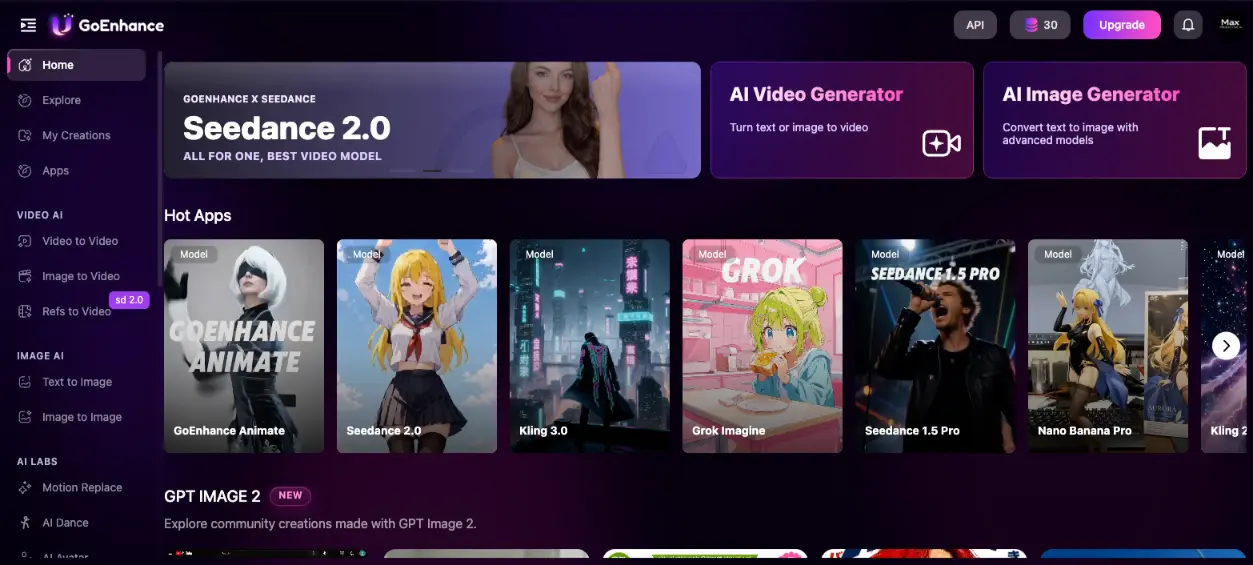
An All-in-One AI Video Studio
for Social-First Creators
GoEnhance AI's pitch—"input reality, output art"—is unusually honest for the AI video space. It's not trying to beat Runway at cinematic generation or Kling at character motion. It's giving you all of them in one tab, then layering on the cleanest anime video-to-video output in the category, near-Topaz upscaling, and a deep effects library. For creators making content for TikTok, Reels, and Shorts, this combination at $9.99–99.99 a month has no real equivalent. The text-to-video output is the weak link (use the bundled Kling or Veo for that), and the lack of any app is a 2026 gap that should've closed by now.
✓ What We Love
- Best anime/cartoon V2V stylization on the market, 30+ styles
- 20+ AI models bundled (Kling, Sora 2, Veo 3.1, Pika, Luma)
- Relax Mode on Standard+ = unlimited generation with patience
- Free tier requires no credit card—a rarity in 2026
! Could Be Better
- Text-to-video is inconsistent—shaky motion, weak faces
- Consistent Character feature fails roughly half the time
- Browser-only—no desktop or mobile app in 2026
- Commercial rights gated to Standard plan ($24.99/mo)
What Is GoEnhance AI?
Who built it, what it actually does, and the use cases where it earns its keep.
GoEnhance AI is a browser-based AI video and image platform founded in June 2023 by Irwin Hua, a former AR/VR developer at Meituan. The company is registered in Sheridan, Wyoming and operates globally through goenhance.ai. By early 2026 the platform was tracking over one million monthly visits with steady month-over-month growth, a useful signal for a category where a lot of tools come and go.
The product's tagline—"Input Reality, Output Art"—captures its philosophy. Instead of asking you to craft elaborate text prompts and hope the model nails your scene, GoEnhance starts from existing footage or images and transforms them. That single design decision sidesteps most of the prompt-engineering pain that defines tools like Runway or pure text-to-video generators.
What it actually contains: a video-to-video stylization engine with 30+ styles (anime, Ghibli, Pixar, claymation, cyberpunk, watercolor), a text-to-video generator with access to over 20 external AI models, an image-to-video animator, 4K video upscaling, face swap, lip-sync, AI dance, motion replace, AI avatar with audio sync, and a library of 40+ novelty effects. The image side adds Flux.1, Seedream 4.0, Recraft, Ideogram, Nano Banana, and Stable Diffusion in a single interface. It's a wide surface area.
Who Is GoEnhance AI Best For?
Social media creators producing short-form video for TikTok, Instagram Reels, and YouTube Shorts. Particularly strong for anyone leaning into anime, cartoon, or stylized aesthetics. Also strong for marketers needing animated brand mascots, UGC-style ad clips, and product teasers; video editors restoring or upscaling old footage; and creators who want to experiment with multiple frontier AI video models without paying for separate subscriptions to each.
The key strategic positioning is what GoEnhance calls "model aggregation." Inside one subscription you can switch between Kling 2.5, Sora 2, Veo 3.1, Runway, Luma AI, Pika 2.5, Wan 2.2, Hailuo, Pixverse, Hunyuan, Seedance 2.0, Grok Imagine, and GoEnhance's own proprietary model. Adding up the standalone subscription cost of just three or four of those would run into hundreds of dollars a month. That said, you don't get the full feature set of each model. Kling 2.6's native audio, for example, lives only on Kling's own platform. But for casual to mid-volume use, the trade-off is heavily in GoEnhance's favor.
Here's the thing—calling it "all-in-one" doesn't mean it's the best at everything. Independent testing across 50+ features rated GoEnhance 9.4/10 for social media suitability and 9.1/10 for ease of use, but only 7/10 for professional or client-grade work. That gap matters. Treat it as a creative studio for social and short-form content, not as a replacement for a cinematic production pipeline.
See GoEnhance AI in Action
Real screenshots from the platform showing the interface, model selection, and the flagship video-to-video stylization workflow.
Dashboard Overview
The home screen, with Seedance 2.0 featured and a row of "Hot Apps" surfacing the most-used models
The left rail gives you the full feature list at a glance: Video to Video, Image to Video, Refs to Video, Text/Image generators, plus the AI Labs tools (Motion Replace, AI Dance, AI Avatar, Head Swap, Face Swap, Video Effects, Virtual Try On, Hair Changer, and the upscalers). It's a lot of surface area, but the layout keeps it scannable. You're not hunting through nested menus.
Video to Video — The Flagship Feature
Upload a clip, pick a style, get an anime-transformed version of your footage
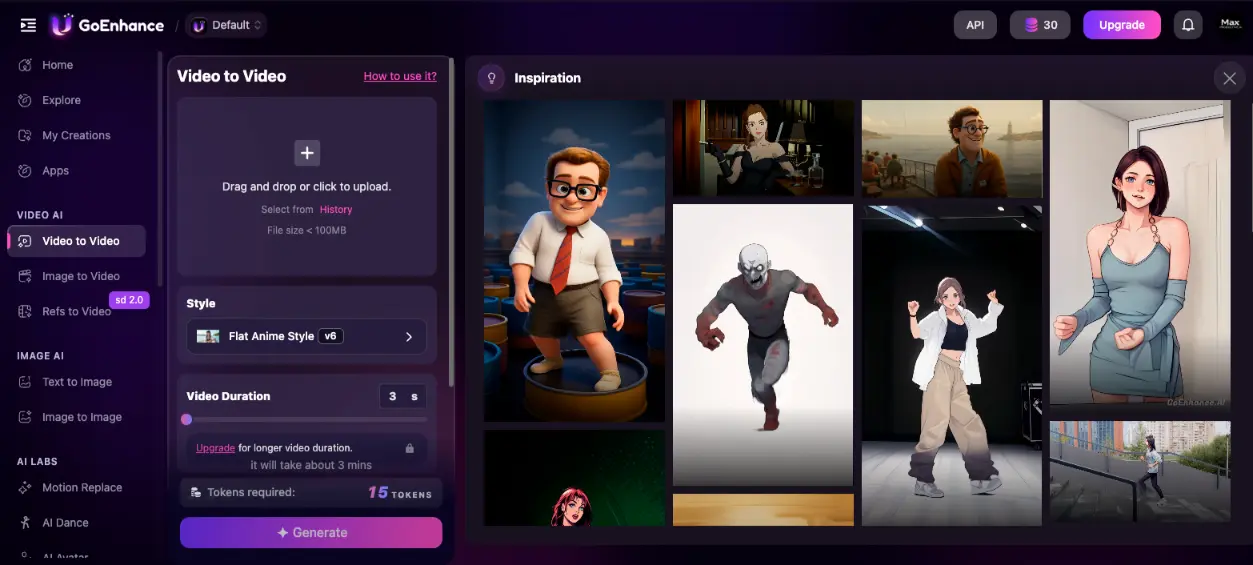
This is where GoEnhance video to video earns its reputation. Drop in a clip under 100MB, pick a style version (the "v6" versioning matters (newer versions handle motion and edges better)), set duration, and hit Generate. The inspiration gallery on the right is genuinely useful for two reasons: it gives you a visual reference for what each style actually produces, and clicking an example pulls up its exact settings. A 2026 Optical Flow update meaningfully reduced the frame-to-frame flickering that plagued earlier anime V2V tools.
Refs to Video — Multi-Model Aggregator in Action
The single feature that justifies the price: switching between frontier video models in one tab
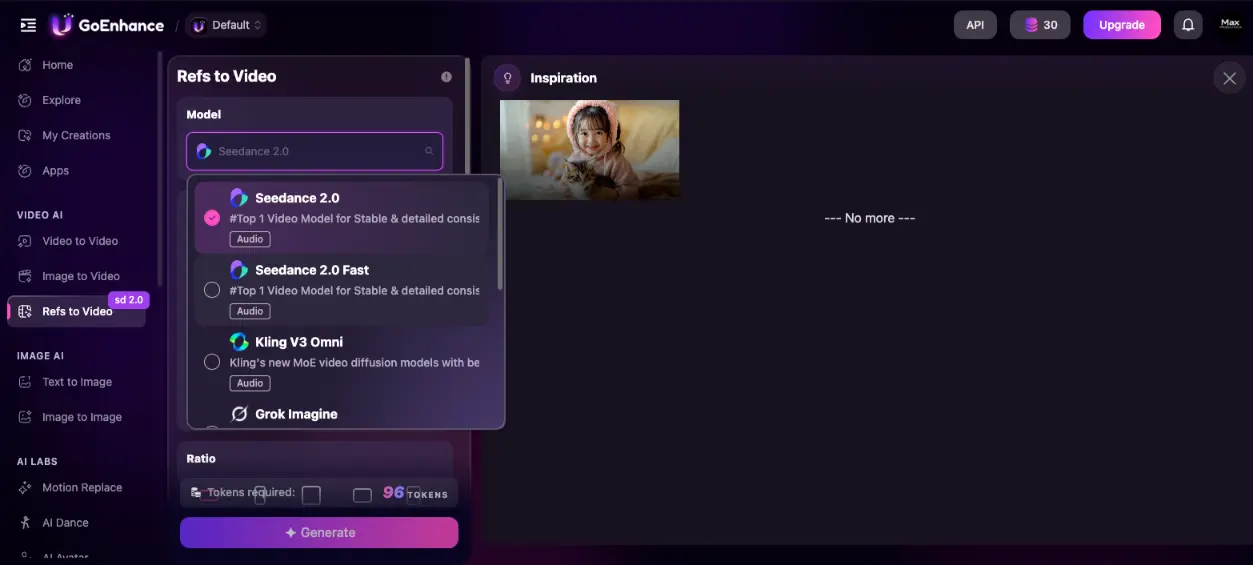
"Refs to Video" lets you use one or more reference images to guide generation across whichever model fits your need: character consistency from Kling, photoreal output from Seedance, or stylized work from Grok Imagine. The token cost varies by model: premium picks like Veo 3.1 and Sora 2 are noticeably more expensive than standard options. This is the screen to bookmark if you're a power user; it's where the model-aggregator pitch becomes tangible.
Curious how the anime stylization handles your own footage?
Try GoEnhance AI →Free tier, no credit card required • 3 credits to testAI Avatar with Audio Sync
Upload a face image and an audio file, get a talking avatar with synced lip movements
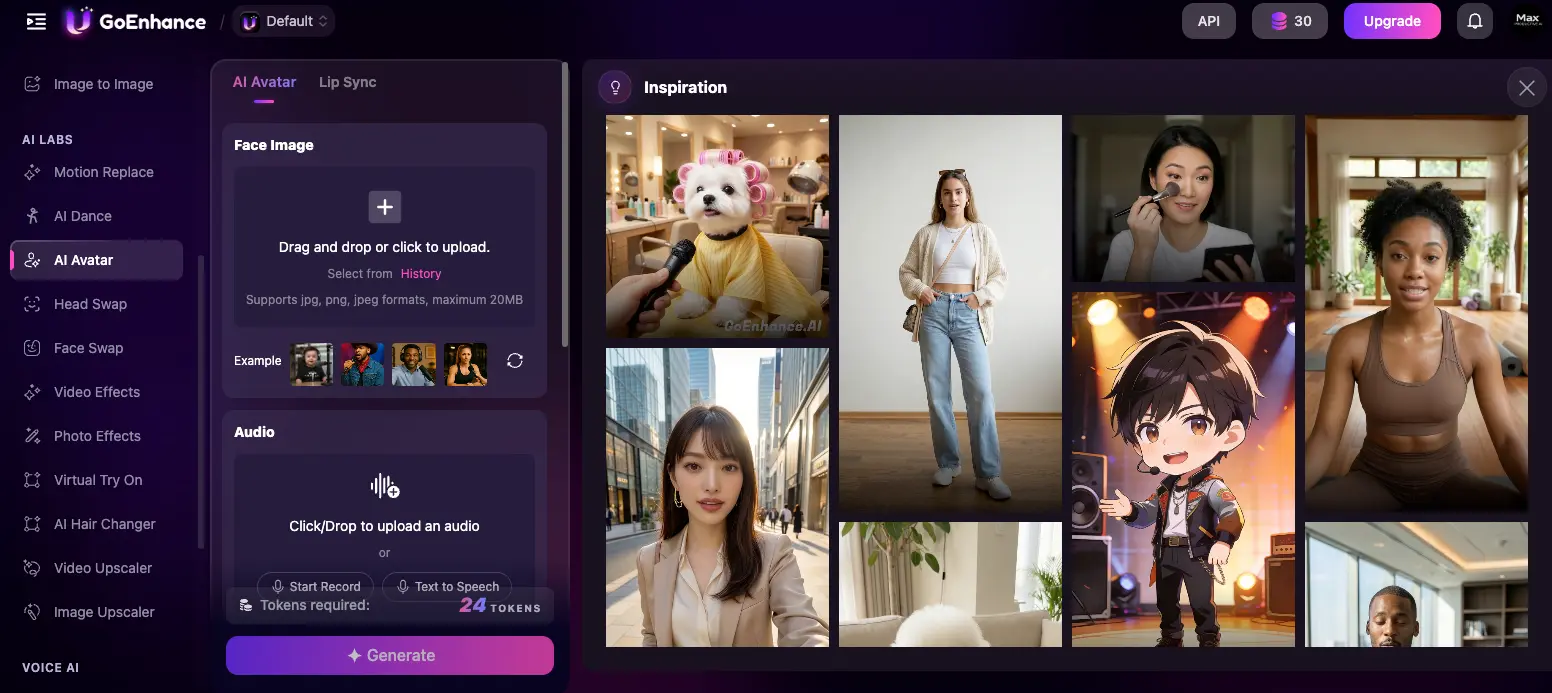
The AI Avatar tool sits at the intersection of GoEnhance's two strengths: face/portrait handling and stylization. Drop in a face image, add audio (or generate it from text), and the system produces a talking-head video with synced mouth movements. Independent testing rated GoEnhance's lip-sync at 8.6/10, which is competitive with dedicated lip-sync tools. The inspiration gallery here is worth scanning before generating. It shows the range from photoreal portraits to anime characters to stylized pets, which is unusual breadth for an avatar feature.
How GoEnhance AI Works
A typical workflow from upload to download. There's no real learning curve.
Pick a Tool or Model
From the dashboard, choose what you're trying to do: stylize existing footage (Video to Video), generate from scratch (AI Video Generator), animate a photo (Image to Video), or use a reference image to guide generation (Refs to Video). If you know the specific model you want (Kling, Sora 2, Veo 3.1), the "Hot Apps" row is the fastest path. If you're not sure, the AI Video Generator landing page lets you compare model strengths side-by-side before picking.
Upload Your Input
Drag and drop your video (MP4, MOV, or WebM, up to 100MB) or image (JPG, PNG, WebP, up to 20MB). For text-to-video workflows, type your prompt instead. There's no rendering pipeline to configure, no codec preferences to set. Everything runs in the browser through GoEnhance's cloud infrastructure. One caveat worth knowing: uploads are processed via cloud, so sensitive or confidential footage shouldn't go through here. Use a separate workflow for anything proprietary.
Configure Parameters and Generate
For Video to Video, you pick a style and duration. For Refs to Video, you choose a model, aspect ratio, and any reference images. For AI Avatar, you add audio. The platform shows the token cost before you commit. You can see exactly what each render will consume, which is helpful for budgeting credits. Hit Generate, and short clips typically complete in 20–45 seconds. Longer or 4K renders can take 40–90 seconds; peak hours can push that into the multi-minute range.
Review, Iterate, and Download
Finished outputs land in My Creations, where you can preview, regenerate with adjusted parameters, or download. There's no direct social media publishing. You'll need to manually upload your video to TikTok, Instagram, or YouTube. That's friction; competitors like Canva or InVideo AI handle this more elegantly. But it's a small price for the model breadth you're getting on the generation side.
Relax Mode: The Hidden Value Multiplier
On the Standard plan and above, Relax Mode lets you generate content without spending tokens at all. Jobs go into a shared queue and may take longer to process. For batch work (end-of-day social content production, A/B style testing, repeat experiments), this effectively turns the $24.99 Standard plan into an unlimited subscription. Save your Fast Mode tokens for urgent, high-priority, or 4K renders.
Privacy Note Worth Reading
All uploads are processed via cloud infrastructure. Payment is via Stripe (Visa, Mastercard, AliPay), which is reassuring on the transaction side. But the platform's terms also explicitly prohibit copyrighted or trademarked input material: celebrities, branded characters, and protected IP are not permitted. This is worth knowing before you start a project meant for commercial release.
Key Features
What you actually get for $9.99–99.99/month, with honest notes on what works and what doesn't.
Video-to-Video Stylization
The platform's strongest feature. GoEnhance video to video transforms existing clips into 30+ styles (anime, Ghibli, Pixar, claymation, cyberpunk, pop art, watercolor) while preserving motion and structure. Anime and cartoon styles outperform every direct competitor we've evaluated. A 2026 Optical Flow update significantly reduced flickering, particularly on fast-motion clips. This is the single feature that justifies a subscription for social-first creators.
Multi-Model AI Video Generation
20+ frontier video models in one interface: Kling 2.5, Veo 3.1, Sora 2, Runway, Luma AI, Pika 2.5, Wan 2.2, Hailuo, Pixverse, Hunyuan, Seedance 2.0, Grok Imagine, plus GoEnhance's proprietary model. Premium models cost more tokens per generation, but accessing them individually elsewhere would run hundreds of dollars per month in subscriptions. The aggregator value is real.
Video Upscaling (Up to 4K)
Near-professional quality upscaling for video and images, with face restoration that holds up well on old or low-resolution footage. Not quite at Topaz Video AI's desktop ceiling for archival film work, but for social-grade upscaling it's competitive, and it works in a browser without dedicated hardware.
Relax Mode (Standard+)
Available on the $24.99/mo Standard plan and above, Relax Mode generates content without spending any tokens. Queue times are slower than Fast Mode, but for non-urgent batch work this turns paid plans into effectively unlimited subscriptions. It's the underrated value lever for high-volume creators.
AI Avatar + Lip-Sync
Upload a face image plus an audio file (or use text-to-speech), and GoEnhance generates a talking avatar with synced lip movements. Lip-sync scored 8.6/10 in independent testing, competitive with dedicated lip-sync tools. Works across realistic portraits, anime characters, and stylized faces. Not as expressive as Hedra's Character-3, but it's bundled at no extra cost.
Face Swap (Video & Image)
AI-powered face replacement on both video clips and still photos. Works well for clean, frontal, well-lit footage. Real limitations show up on profile angles, low-light scenes, skin tone mismatches, and fast motion. Face jitter and eye misalignment are common in these cases. For social content where flaws can be hidden, it's usable. For professional client work, it's not.
Effects Library (40+)
A deep catalog of novelty effects: AI Ghibli filter, AI baby filter, AI action figure, anti-bald filter, AI cartoon, Earth zoom-out, AI kiss/hug, motion replace, AI dance generator, head swap. None of these are essential, but for content creators chasing viral formats, having them all in one subscription beats hunting down a dozen single-purpose tools.
Public API
A documented REST API at docs.goenhance.ai with endpoints for video-to-video, text-to-image, face swap, and video effects. Same token-based pricing as the web platform. Not every web feature is exposed via API. It's narrower than the full surface area, but enough to embed GoEnhance's transformation tools inside your own application. Worth knowing if you're building creator-facing software.
Honest take on what's missing: there's no direct social media publishing, no desktop or mobile app, and the Consistent Character feature (designed to let you generate multiple videos of the same character from a single reference photo) is documented as unreliable. In independent testing of 8 generated clips, character face and hair shifted noticeably in 4 of them. If you're building a multi-clip narrative series, use Kling AI's native platform instead. GoEnhance is for one-off transformations and stylization, not serial character work.
All features available on the free tier for testing:
Try GoEnhance AI →Free tier with no credit card • 20+ AI models in one subscriptionGoEnhance AI Pricing
Five tiers, token-based generation, and one important catch around commercial rights.
Free
- ✓ ~3 video credits/month
- ✓ Access to most tools
- ✓ No credit card required
- ⚠ 720p, watermark
- ⚠ 7-day file storage
- ✗ No commercial use
Standard
- ✓ 1,600 tokens/month
- ✓ Relax Mode (unlimited)
- ✓ Commercial use rights
- ✓ 1080p output, no watermark
- ✓ All models accessible
- ✓ 60-day file storage
Pro
- ✓ 3,500 tokens/month
- ✓ Relax Mode (unlimited)
- ✓ Commercial use rights
- ✓ 4K output, up to 60s V2V
- ✓ Priority queue (Fast Mode)
- ✓ All models accessible
Important catch: Commercial use rights only kick in at the Standard plan ($24.99/mo). If you're using outputs for client work, brand content, or paid promotion, Basic isn't enough.
Pricing last verified May 2026. Visit GoEnhance AI for current rates.
Is It Worth the Money?
Stacking just three of GoEnhance's bundled models as standalone subscriptions (Runway Pro at $28, Kling Standard at $10, and InVideo Plus at $25) runs $63/month, and you still don't get Sora 2, Veo 3.1, or any of the V2V stylization or upscaling tools. The Standard plan at $24.99/mo with Relax Mode is the math that makes GoEnhance hard to argue against for high-volume creators.
Quick context against the closest alternatives: Runway Standard starts at $12/month with credit limits and no stylization or upscaling. Kling AI Standard is $10/month but single-purpose. Pika Labs Standard is $8/month but still watermarks outputs and has no commercial rights until the $28 Pro tier. InVideo AI starts at $25/month and bundles Sora 2 plus Veo 3.1 but lacks any V2V stylization. The closest direct comparison is DomoAI at $6.99/month annually, which beats GoEnhance on entry price but lacks the multi-model access and effects library breadth.
Detailed Pros & Cons
An honest breakdown after researching the platform across independent test reports and hands-on demo walkthroughs.
✓ Pros
Independent feature testing consistently ranks GoEnhance's own V2V model as the cleanest in this category, with stable outlines, soft textures, and better frame-to-frame consistency than Wan 2.1, Seaweed, or Pixverse. The 2026 Optical Flow update meaningfully reduced flickering on fast motion. For anyone making anime or cartoon-style social content, this is the single best tool at any price.
20+ frontier video models in one tab: Kling, Sora 2, Veo 3.1, Runway, Pika, Luma, Wan, Hailuo, Pixverse, Hunyuan, Seedance, Grok Imagine. No competitor matches this breadth at this price. Even accounting for the fact that bundled models don't get every native feature, the aggregator value is real and unmatched.
On Standard ($24.99/mo) and above, Relax Mode bypasses the token system entirely. Queue times are slower than Fast Mode, but for batch work, A/B testing, and non-urgent social content production, this turns the subscription into unlimited generation. It's the underrated lever that makes paid plans punch well above their price.
Video upscaling reaches 4K with face restoration that holds up on low-resolution footage. Not quite at Topaz Video AI's professional desktop ceiling, but competitive in the browser tier. The lip-sync quality lands closer to dedicated lip-sync tools than to general video platforms, which is rare for a feature that's bundled rather than the headline product.
No credit card required. About 3 video credits per month plus image upscales, enough to actually evaluate the V2V stylization on your own footage before committing. In 2026, a free tier that's a real trial (rather than a hostile demo) is increasingly rare.
Independent reviewers rate ease of use at 9.1/10. Drag-drop-generate is genuinely the workflow for most tasks. The interface scales well too: beginners can stay on default settings, prosumers can tweak denoising, motion consistency, and style versions for finer control.
✗ Cons
Despite access to 20+ video models, GoEnhance's own text-to-video output is documented as shaky: blurry motion, weak facial detail, and inconsistent scene coherence. The platform works best as a transformation studio, not a from-scratch generator. If pure T2V is your primary need, use the bundled Kling or Veo 3.1 models rather than GoEnhance's default.
This is the harder one to forgive. In independent testing across 8 generated clips of the same character, hair and face shape shifted noticeably in 4 of them. That's a 50% failure rate on a feature explicitly marketed as enabling narrative series work. If you need consistent characters across multiple videos, use Kling AI's native platform instead.
No desktop app, no mobile app. In 2026, this is genuinely surprising for a platform with over a million monthly visits. It means no offline rendering, no mobile-first workflow for creators who manage social on the go, and no native performance benefits. Competitors like Runway have mobile; Topaz has desktop. GoEnhance has neither.
You finish a video, download it, and manually upload to TikTok, Instagram, or YouTube. That's friction for high-volume creators producing daily content. Tools like Canva and InVideo AI handle this natively. It's not a dealbreaker, but it's the kind of feature gap that becomes annoying at scale.
Works well for clean, frontal, well-lit footage. Falls apart on profile shots, low-light scenes, skin tone mismatches, and fast motion. Eye misalignment and face jitter are common in these cases. Acceptable for social content where flaws can be hidden in motion or styling, but not reliable enough for professional client deliverables.
The $9.99/mo Basic plan is personal use only. To use any GoEnhance output for client work, brand content, paid social, or commercial campaigns, you need the Standard plan or higher. This isn't unusual in the AI tool space, but it's worth knowing before subscribing. The entry-level price isn't actually the working professional's price.
GoEnhance AI vs Alternatives
How GoEnhance stacks up against the main AI video tools competing for the same workflows.
| Feature | Reviewed GoEnhance AI | Runway | Kling AI | Pika Labs |
|---|---|---|---|---|
| Starting Price | $9.99/mo | $12/mo | $10/mo | $8/mo |
| Free Tier | ✓ No card needed | 125 one-time credits | ✓ 66 credits/day | ✓ 80 credits/mo |
| Multi-Model Access | ✓ 20+ models | Runway only | Kling only | Pika only |
| V2V Anime Stylization | ✓ Best-in-class, 30+ | Weak | ✗ | ✗ |
| Character Consistency | ⚠ Unreliable | Limited | ✓ Best | Limited |
| Video Upscaling | ✓ 4K | Limited | ✗ | ✗ |
| Commercial Use From | Standard ($24.99/mo) | Standard ($12/mo) | Standard ($10/mo) | Pro ($28/mo) |
| Best For | Social-first creators, anime | Cinematic ad work | Character motion | Speed, Pikaffects |
Which Tool Is Right For You?
GoEnhance AI
ReviewedBest for: Social media creators and marketers who produce short-form video at volume and want anime/cartoon stylization, upscaling, multi-model generation, and a deep effects library in one subscription. The sweet spot is the Standard plan ($24.99/mo) with Relax Mode for effectively unlimited generation. Particularly strong if you're chasing viral anime or cartoon-style formats for TikTok, Reels, and Shorts.
Runway
Cinematic ControlBest for: Professional creators and agencies producing cinematic ads, music videos, or short films. Runway's directorial controls (keyframes, Motion Brush, camera motion terms, the Act-One/Act-Two performance system) are unmatched for precise shot steering. Where GoEnhance is a fast transformation studio, Runway is a slower but more precise creative tool. Anime stylization is weak; raw Gen-4 quality has been criticized in independent testing, but for controllable cinematic work it's still the leader.

Kling AI
Character ConsistencyBest for: Creators producing video series, narratives, or content requiring the same character across multiple clips. Kling's character consistency and realistic human motion are the best in the category, and they're what GoEnhance's own Consistent Character feature can't reliably match. Worth noting: GoEnhance bundles Kling 2.5 as a selectable model, but for high-volume Kling-specific work, the native subscription offers better credit efficiency and access to Kling 2.6's native audio.

Hedra AI
Character AvatarsBest for: Creators building character-driven talking-head content with expressive micro-expressions and phoneme-aligned lip-sync. Hedra's Character-3 model produces noticeably more lifelike avatar animation than GoEnhance's AI Avatar feature, with automatic eye blinks, eyebrow movements, and gaze shifts. Also functions as a multi-model aggregator on the generation side (Veo 3.1, Sora 2, Kling). If avatar quality is your priority, Hedra wins; if breadth and stylization matter more, GoEnhance wins.

InVideo AI
End-to-End ProductionBest for: Content marketers who want a complete prompt-to-finished-video pipeline. InVideo bundles Sora 2 and Veo 3.1 access starting at $25/month, a major value proposition if those models are central to your workflow. Where GoEnhance asks you to bring footage and transform it, InVideo generates a full video (script, footage, voiceover, music) from a text prompt. Different philosophies entirely. InVideo for end-to-end production; GoEnhance for transformation and stylization.
HeyGen
AI SpokespersonBest for: Teams producing scripted spokesperson videos, training content, or multilingual marketing at scale. HeyGen's Avatar IV is the most polished AI presenter on the market, with translation and lip-sync across 175+ languages. There's almost no overlap with GoEnhance's use case. If you need a digital spokesperson, choose HeyGen; if you need creative stylization, choose GoEnhance. Both can live in the same stack.
Frequently Asked Questions
Should You Try GoEnhance AI?
GoEnhance AI is the rare AI video tool that genuinely earns its "all-in-one" label without overpromising. The anime and cartoon video-to-video stylization outperforms every comparable tool, the model aggregator (Kling, Sora 2, Veo 3.1, Pika, Runway, Luma, and 15+ others in one tab) has no real equivalent at this price, and Relax Mode on the Standard plan effectively delivers unlimited generation. For social-first creators, marketers chasing viral formats, and anyone making short-form video at volume, the math is straightforward: this is the strongest pick in 2026.
The weaknesses are real and worth weighing. Text-to-video generation is inconsistent, the Consistent Character feature fails roughly half the time, the platform is browser-only with no apps, and commercial use rights are gated to the $24.99 Standard plan. None of these are dealbreakers for the right user, but they do mean GoEnhance isn't a replacement for tools like Runway (cinematic), Kling (character work), or HeyGen (avatar spokesperson). Treat it as a creative transformation studio, not a professional production pipeline.
Our Recommendation
Start on the free tier (no credit card required) and test the V2V anime stylization on your own footage in your first session. If the output matches your aesthetic, jump to Standard ($24.99/mo). The Relax Mode unlock and commercial rights make it the genuine sweet spot. Skip Basic at $9.99 unless your work is strictly personal; the missing commercial rights make it a false economy. For high-volume creators or anyone doing 4K work, Pro at $49.99 pays for itself quickly.