Monday.com
AI-powered work operating system transforming how teams manage projects, workflows, and collaboration. Combines visual project tracking with intelligent automation, serving 250,000+ customers globally. Features AI agents, customizable workflows, and comprehensive integrations for marketing, sales, development, and operations teams.
30-Second Summary
Bottom Line: Monday.com delivers exceptional value for teams seeking visual work management combined with powerful automation and AI capabilities. The platform excels at customization with intuitive drag-and-drop interfaces, serving 250,000+ customers globally with proven results including 346% ROI and 40% faster production times.
Best For
- Marketing and creative teams managing campaigns
- Project managers needing visual workflows
- Growing businesses requiring scalability
- Teams wanting powerful automation capabilities
Skip If
- Very small teams under 3 people with tight budgets
- Teams needing simple Kanban-only tracking
- Organizations requiring built-in chat/video
- Freelancers managing personal projects only
Monday.com at a Glance
What Exactly is Monday.com?
Monday.com is a cloud-based work operating system that enables teams to build customized workflow applications without coding—essentially replacing disconnected spreadsheets, emails, and multiple tools with a unified visual workspace.
Founded in 2012 by Roy Mann and Eran Zinman, the platform has evolved from a simple team collaboration tool into a comprehensive multi-product ecosystem publicly traded on NASDAQ since 2021. The platform serves over 250,000 customers globally across 200+ industries, from solo entrepreneurs to Fortune 500 companies including Coca-Cola, Adobe, and Universal Music Group.
What Makes Monday.com Different
Unlike traditional project management software that forces teams into rigid workflows, Monday.com provides a flexible building-block approach where any team can create custom solutions matching their unique processes. The platform combines visual boards, powerful automation, AI capabilities, and real-time collaboration into a single ecosystem that adapts to your needs rather than forcing you to adapt to the software.
The Monday.com ecosystem includes specialized products for different use cases: Work Management for project tracking and team collaboration, Sales CRM with $100 million annual recurring revenue, Dev for software development teams, Service for IT and customer support, WorkForms for custom data collection, and WorkCanvas for visual brainstorming. This comprehensive approach allows organizations to consolidate multiple tools into one platform while maintaining department-specific functionality.
Recent recognition as a Gartner Magic Quadrant Leader for the third consecutive year in Collaborative Work Management validates Monday.com's market position as both visionary and capable of execution in the competitive project management software landscape.
Core Features and Capabilities
Visual Work Management and Multiple Views
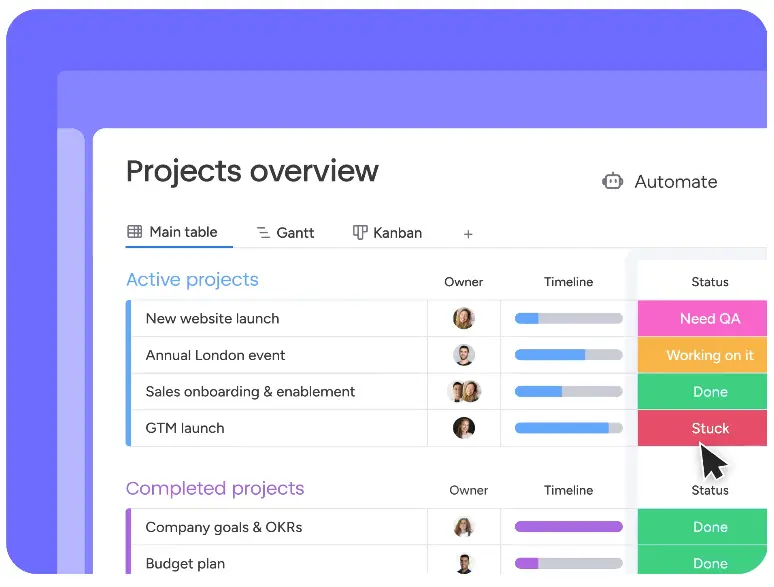
Monday.com's visual work management system transforms complex data into intuitive, color-coded boards that anyone can understand at a glance. The platform offers eight distinct view types to accommodate different team preferences and project requirements.
The Kanban view provides drag-and-drop cards perfect for agile workflows and marketing campaigns. Timeline and Gantt views visualize project schedules with task dependencies and critical path tracking, essential for complex project management. Calendar view integrates deadlines with your existing calendar tools, while Workload view helps managers balance team capacity and prevent burnout by visualizing resource allocation across projects.
Customization Power: Every board starts as a blank canvas where you can add 20+ column types including status tracking, timelines, people assignment, files, numbers, formulas, and custom fields. Teams typically set up functional boards within hours rather than days, with immediate visibility into project progress through color-coded status indicators and real-time updates.
The Map view displays location-based data for field teams and logistics, Chart view transforms board data into visual analytics, and the simple List view offers traditional spreadsheet-style organization. This view flexibility ensures teams can work in their preferred style while maintaining a single source of truth across the organization.
AI-Powered Automation and Workflows
Monday.com's automation capabilities represent one of its strongest differentiators, with users reporting an average of 3 hours saved per employee per week through automated workflows. The platform provides over 250 pre-built automation recipes alongside a visual automation builder for custom workflows.
Automation recipes cover common scenarios like automatically notifying stakeholders when status changes, creating recurring tasks on schedules, assigning work based on specific triggers, and moving items between boards when conditions are met. The visual builder uses simple when-this-happens-do-that logic accessible to non-technical users.
Automation Capabilities by Plan
Standard Plan
- 250 automation actions per month
- Pre-built recipe library access
- Basic trigger and action combinations
- Suitable for small team workflows
Pro & Enterprise Plans
- 25,000+ automation actions monthly
- Advanced conditional logic
- Multi-step automation sequences
- Integration automations with external tools
Recent AI Innovation (2025)
Monday.com launched AI-suggested automations that analyze your board usage and recommend relevant automation recipes. The system learns from patterns across 250,000+ customers to suggest workflows that similar teams find valuable, dramatically reducing the time needed to configure effective automation.
Groundbreaking AI Capabilities
Throughout 2025, Monday.com has aggressively integrated AI across the platform, positioning itself as an AI-first work operating system with capabilities that significantly reduce manual work and enhance decision-making.
AI Blocks provide ready-made AI actions accessible to all users for automated text summarization, content classification, sentiment analysis, and data extraction without complex setup. These blocks can summarize project updates, categorize incoming requests, analyze customer feedback sentiment, and extract key information from unstructured text.
AI Form Builder: Create sophisticated forms through conversational prompts. Simply describe what information you need to collect, and the AI generates complete forms with appropriate question types, helpful descriptions, conditional logic, and required field validations in minutes. This feature transforms form creation from a 30-minute task into a 2-minute conversation.
Monday Magic: AI-Powered Workflow Creation
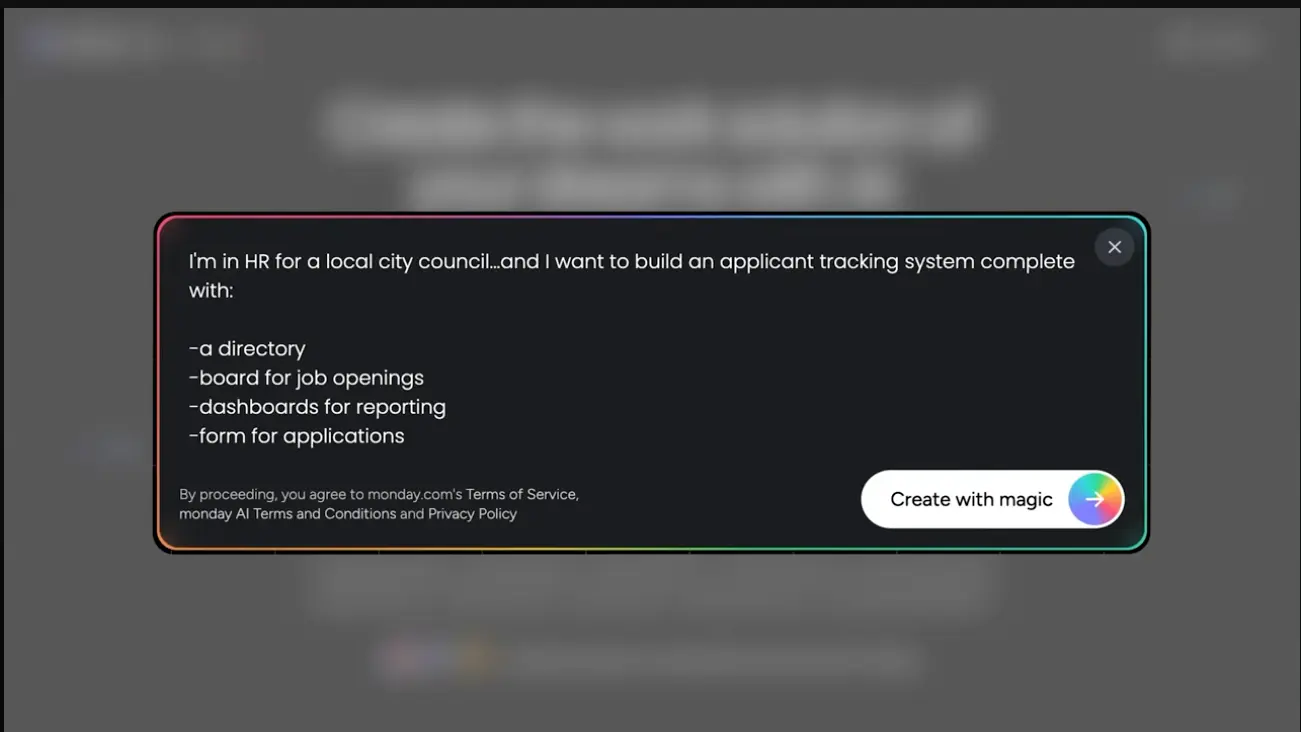
Monday Magic represents a groundbreaking advancement in workflow automation, enabling users to build complete custom workflows and workspaces through simple conversational prompts. Rather than spending hours manually configuring boards, columns, automations, and integrations, teams can describe their needs in plain language and watch as Monday Magic generates fully functional solutions in minutes.
How Monday Magic Works
The AI analyzes your prompt to understand workflow requirements, automatically creating boards with appropriate columns, views, and structure. It configures relevant automations based on your described processes, suggests and implements integrations with tools you mention, and sets up dashboards and reporting aligned with your goals. The entire process transforms what traditionally requires extensive configuration time into a conversation taking just minutes.
Use cases span departments and industries. HR teams create applicant tracking systems by describing their recruitment workflow. Marketing departments generate campaign management boards with content calendars and approval processes. Sales teams build CRM pipelines customized to their specific sales methodology. Project managers construct complex project tracking systems with dependencies and resource allocation. The AI understands context from your prompt, creating workflows that match your specific requirements rather than generic templates.
Example in Action: An HR manager can prompt "Create an applicant tracking system for our hiring process with stages for application review, phone screening, technical interview, final interview, and offer" and Monday Magic generates a complete board with appropriate columns, status tracking, candidate information fields, and automated notifications for stage transitions.
The feature dramatically reduces implementation time from hours or days to minutes, lowers the barrier to entry for non-technical users who can describe workflows without understanding board configuration, ensures consistency by applying best practices automatically, and accelerates iteration as teams can quickly refine workflows by re-prompting with adjustments. Organizations report that Monday Magic enables teams to deploy functional systems the same day they recognize a need, rather than waiting for administrator availability or extensive training.
Monday Notetaker joins Zoom, Google Meet, or Microsoft Teams calls to automatically record meetings, generate accurate transcriptions, create concise summaries, and extract action items with assigned owners. Teams report saving 15-20 minutes per meeting on note-taking and follow-up task creation.
AI Agent Connectivity (October 2025 Launch)
Monday.com now enables external AI agents to connect directly to your account, manage boards, assign tasks, update statuses, and generate insights while maintaining Monday.com as your single source of truth. This groundbreaking capability allows AI assistants to autonomously execute work management tasks, representing a major evolution toward AI-driven workflow automation.
Monday Agents launching 2026: The platform will introduce purpose-built AI agents that execute multi-step workflows autonomously, including an SDR Agent for continuous lead qualification in multiple languages, operating 24/7 without human intervention.
Risk Analyzer uses AI to identify potential project risks in real-time by analyzing task dependencies, deadline patterns, team capacity, and historical data. According to Monday.com, this feature reduces project delays by 30% through early risk detection and proactive mitigation recommendations.
AI Column Suggestions analyze your board usage and workflow patterns to recommend which column types to add next based on what you're trying to accomplish. Deal Insights in Monday Sales CRM provides AI-powered analytics identifying trends, opportunities, and at-risk deals. AI Document Search enables searching through all document content across your account rather than just file names, dramatically improving information discovery.
Dashboards and Real-Time Reporting
Monday.com's dashboard capabilities transform scattered project data into executive-level insights through customizable widgets and cross-board reporting. Dashboards consolidate information from multiple boards into unified views, providing real-time visibility into organizational performance.
The platform offers over 30 widget types including charts showing task distribution and progress, battery widgets displaying numerical targets versus actuals, timeline widgets visualizing project schedules, workload widgets showing team capacity, and custom widgets pulling specific metrics. Each widget updates in real-time as underlying data changes, ensuring stakeholders always see current information.
Dashboard Capabilities
Standard Plan
- Dashboard combining up to 5 boards
- 10+ essential widget types
- Basic filtering and grouping
- Share with team members
Pro & Enterprise Plans
- Combine up to 50 boards per dashboard
- All 30+ widget types available
- Advanced filtering and formulas
- Share publicly or embed externally
Formula columns enable advanced calculations and data manipulation directly within boards. Teams can calculate project profitability, track budget utilization, compute weighted scores, and create custom metrics using Excel-like functions. While not as sophisticated as specialized tools like Smartsheet, formula capabilities handle most common business calculations effectively.
Comprehensive Integration Ecosystem
Monday.com connects with over 200 tools through native integrations and marketplace apps, enabling teams to centralize work management while maintaining existing tool investments. The integration strategy focuses on bidirectional data flow, ensuring information stays synchronized across platforms.
Communication integrations with Slack and Microsoft Teams send notifications, status updates, and alerts directly to team channels. File storage connections sync with Google Drive, Dropbox, OneDrive, and Box for seamless document management. CRM integrations connect Salesforce, HubSpot, and Pipedrive for customer data synchronization between sales and project teams.
Development Platform Integrations: Software teams benefit from deep integrations with GitHub, GitLab, and Jira plus a VS Code extension announced October 2025. Developers can manage Monday Dev tasks directly within Visual Studio Code without context switching, while GitLab integration provides two-way sync for merge requests, approvals, and updates in real-time.
Marketing tool connections include Mailchimp for email campaigns, Hootsuite for social media management, Google Ads for advertising tracking, and Meta Conversions API added in 2025 for improved ad targeting and lead tracking. Business intelligence integrations with Power BI, Tableau, and Google Analytics enable advanced reporting beyond Monday.com's native capabilities.
Automation platform connections via Zapier and Make.com unlock thousands of additional integration possibilities, enabling Monday.com to connect with virtually any software supporting API access. Integration limits vary by plan tier, with Standard offering 250 combined actions monthly, Pro providing 25,000, and Enterprise delivering 250,000+ actions.
Template Library and Quick Deployment
Monday.com provides over 200 pre-built templates spanning industries and use cases, dramatically reducing time-to-value for new users. Templates range from simple task tracking to sophisticated multi-board workflows for complex processes.
Marketing teams access templates for campaign management, content calendars, social media planning, creative requests, and event coordination. Project management templates cover agile sprints, waterfall projects, product launches, roadmap planning, and resource management. Sales templates include CRM pipelines, lead tracking, sales forecasting, and account management.
Industry-Specific Solutions
Monday.com offers specialized templates for construction project management, real estate development, software development sprints, HR recruitment, nonprofit grant tracking, education course planning, and manufacturing production schedules. These templates include pre-configured columns, automations, and integrations tailored to industry-specific workflows, enabling teams to deploy functional systems within hours.
Workspace templates announced in 2025 bundle multiple related boards together, providing complete departmental solutions. A marketing workspace might include boards for campaigns, content calendar, asset library, budget tracking, and team capacity—all pre-connected with automations and dashboards. This approach reduces setup time from weeks to hours for comprehensive implementations.
Real-Time Collaboration and Communication
Monday.com facilitates team collaboration through real-time updates, contextual communication, and shared visibility into work progress. While the platform doesn't include native chat or video conferencing, it provides robust asynchronous collaboration features integrated directly into work items.
Updates and comments attach directly to tasks, projects, or specific board items, ensuring discussions stay contextual rather than scattered across email threads. Team members receive notifications when mentioned using @ symbols, when items assigned to them change status, or when deadlines approach. File sharing and version control keep all project documents centralized and accessible.
Workdocs: Monday.com's documentation feature provides collaborative document creation within the platform, though users note it's less sophisticated than dedicated tools like Notion or Confluence. Workdocs work well for project briefs, meeting notes, and process documentation directly linked to relevant boards and tasks.
WorkCanvas launched in 2024 provides digital whiteboard capabilities for brainstorming, process mapping, and visual collaboration. Teams can create diagrams, flowcharts, wireframes, and mind maps with built-in icon libraries. Recent October 2025 updates added data layers displaying board information directly on canvases, AWS and Google Cloud shape libraries for architecture diagrams, and the ability to convert canvas elements into board items for seamless workflow transitions.
Guest access on Pro and Enterprise plans enables external stakeholders like clients, contractors, or partners to access specific boards without full platform licenses. This capability proves particularly valuable for agencies collaborating with clients and consulting firms coordinating with external partners.
Monday Sales CRM
Monday Sales CRM extends the core work management platform with sales-specific features, achieving $100 million in annual recurring revenue and serving as a testament to Monday.com's multi-product strategy. The CRM leverages the same visual board interface but optimizes it for sales pipeline management.
Sales teams track leads, opportunities, contacts, and accounts through customizable pipelines reflecting their specific sales process. Deal tracking includes probability scoring, revenue forecasting, activity logging, and email integration with Gmail and Outlook. The system provides visibility into pipeline health, conversion rates by stage, sales velocity metrics, and individual rep performance.
Monday Sales CRM Features
Core Capabilities
- Visual sales pipeline management
- Contact and account tracking
- Email integration and automation
- Activity and communication logging
AI-Enhanced Features
- Deal Insights for trend identification
- Round Robin lead distribution
- AI-powered forecasting
- Automated lead qualification (SDR Agent coming 2026)
AI-powered Deal Insights analyze pipeline data to identify patterns, highlight at-risk deals, suggest next best actions, and predict close probabilities. Round Robin automation added in September 2025 automatically distributes incoming leads evenly among sales team members, ensuring fair opportunity allocation and faster response times. The upcoming SDR Agent announced for 2026 will autonomously qualify leads continuously in multiple languages.
Monday Dev for Software Teams
Monday Dev provides specialized capabilities for software development teams managing sprints, bugs, releases, and product roadmaps. The product launched to address developers' unique needs while maintaining Monday.com's signature visual approach and ease of use.
Sprint planning features include backlog management, story point estimation, sprint velocity tracking, and burndown charts. Bug tracking capabilities organize issues by severity, priority, component, and assignment with custom workflows matching team processes. Product roadmap views visualize feature planning across quarters and releases.
Developer Experience Enhancements (October 2025)
Monday Dev introduced a VS Code extension allowing developers to manage tasks directly within Visual Studio Code without leaving their coding environment. This integration provides AI with richer context for more accurate code suggestions while reducing context-switching friction that developers cite as a major productivity barrier.
Enhanced GitLab integration announced October 2025 delivers two-way sync between Monday Dev and GitLab, tracking merge requests, approvals, and updates in real-time. GitLab On-Premise connection supports enterprise teams requiring full data control with secure, on-premises GitLab installations.
The new Capacity Planner provides data-driven views of workload, velocity, and team availability to balance resources and maintain realistic delivery commitments, addressing a common pain point in software project management.
GitHub and Jira integrations sync commits, pull requests, issues, and milestones bidirectionally. Development teams report Monday Dev reduces context switching between project management and code repositories while providing non-technical stakeholders with accessible visibility into development progress.
Enterprise Security and Compliance
Monday.com implements comprehensive security measures critical for enterprise adoption, though some users have raised concerns about potential vulnerabilities warranting careful evaluation for highly sensitive use cases.
Data encryption includes 256-bit encryption via TLS 1.2 using FIPS 140-2 certified protocols for all data in transit between users and servers. Data hosting occurs on Amazon Web Services infrastructure distributed across multiple US data centers with geographic redundancy. Critical data receives backups every 5 minutes, enabling rapid recovery from any issues.
Compliance Certifications
Industry Standards
- SOC 2 Type II certification verifying security controls
- ISO/IEC 27001:2022 information security management
- GDPR compliance for European data protection
- Regular third-party security audits and penetration testing
Access Controls (Plan-Dependent)
- Two-factor authentication (Pro plan and above)
- Single sign-on SSO (Enterprise only)
- Multi-level permissions and access controls
- IP restrictions (Enterprise only)
Enterprise security features available only on higher-tier plans include advanced audit logs tracking all user actions, IP restrictions limiting access to approved networks, session management controlling timeout periods and concurrent sessions, and dedicated security reviews for large implementations.
The 99.9% uptime SLA for Enterprise customers includes committed response times and service credits for any violations. Security practices involve continuous monitoring for threats, regular external security audits by reputable firms, and participation in responsible disclosure programs for vulnerability reporting.
Security Considerations: While Monday.com maintains industry-standard certifications, some user reviews cite security concerns with a 5/10 rating noting potential loopholes. Organizations in highly regulated industries like healthcare, financial services, or government should conduct thorough security assessments and potentially engage with Monday.com's Enterprise team for enhanced security configurations before deployment.
Getting Started with Monday.com
Monday.com's onboarding process balances powerful capabilities with accessibility, enabling teams to become productive within days rather than months required by more complex platforms.
Sign Up and Choose Your Path
Create your Monday.com account using email, Google, or Microsoft credentials. Select whether to start with a template matching your use case or build from scratch. The platform offers guided setup asking about team size, primary use case, and department to recommend relevant templates and configurations.
Build Your First Board
Start with a template or create a custom board from scratch. Add columns for the information you need to track—status, deadlines, assignees, priority, files, or custom fields. The drag-and-drop interface makes board creation intuitive, with tooltips explaining each column type's purpose and capabilities.
Add Your Team and Data
Invite team members via email, assign roles and permissions, and begin populating your board with tasks, projects, or items. Import existing data from spreadsheets or other tools using CSV import functionality. Set up views that match how different team members prefer to work—some may want Kanban while others prefer Timeline views.
Automate and Integrate
Browse automation recipes for workflows you want to eliminate, such as automatic notifications when items change status or recurring task creation. Connect tools you already use through native integrations or marketplace apps. Monday.com's AI may suggest relevant automations and integrations based on your board structure and usage patterns.
Create Dashboards and Refine
Build dashboards consolidating key metrics from your boards for leadership visibility. Add widgets showing progress, bottlenecks, upcoming deadlines, and team workload. Refine your setup based on team feedback, adjusting views, automations, and workflows as you learn what works best for your specific needs.
Learning Resources
Monday.com provides extensive learning resources including video tutorials, help documentation, webinars, and a community forum. The platform's Academy offers certification programs for power users and administrators. Most teams report reaching comfortable proficiency within 1-2 weeks, significantly faster than competing platforms requiring 4-6 weeks of ramp-up time.
Pricing Plans and Value Analysis
Monday.com operates on a per-seat pricing model with tiered plans offering progressively more features, automation capacity, and advanced capabilities. Understanding the pricing structure and feature limitations helps teams select the appropriate tier for their needs and budget.
| Plan | Monthly Price | Annual Price | Key Features | Best For |
|---|---|---|---|---|
| Free (Individual) | $0 | $0 | 2 users, 3 boards, 500MB storage | Solo users, testing the platform |
| Basic | $13/user | $9/user | Unlimited items, 5GB storage, iOS/Android apps | Small teams with simple needs |
| Standard | $17/user | $12/user | 250 automations, Timeline & Gantt, integrations | Growing teams needing automation |
| Pro | $28/user | $19/user | 25,000 automations, time tracking, private boards, Chart view | Established teams, advanced features |
| Enterprise | Custom | Custom | 250,000+ automations, advanced security, dedicated support | Large organizations, compliance needs |
Is Monday.com Worth The Cost?
Traditional Tool Stack
- Project management: $10-15/user/month
- Time tracking: $8-12/user/month
- Team collaboration: $6-10/user/month
- CRM (if needed): $50-75/user/month
- Automation tool: $20-30/month base
- Total: $44-107+/user/month
Monday.com All-in-One
- Work management: Included
- Time tracking: Included (Pro plan)
- Collaboration features: Included
- CRM capability: Included or separate CRM product
- Native automation: Included
- Total: $12-28/user/month
Verdict: Monday.com delivers significant cost savings when consolidating multiple tools, though the free plan's limitations and minimum user requirements on paid plans can increase costs for very small teams. Organizations report 346% ROI over three years and 40% faster production times, suggesting strong value despite higher per-seat costs compared to some competitors. The automation capabilities alone save teams an average of 3 hours per employee per week, worth approximately $75-150 weekly at typical wage rates.
Understanding Plan Limitations
The free Individual plan serves primarily as a trial, accommodating only 2 users with 3 boards maximum and 500MB storage. This configuration proves impractical for most teams beyond solo entrepreneurs or pairs testing the platform. The 3-board limit exhausts quickly as different projects or departments typically require separate boards.
Basic plan at $9-13 per user requires a minimum 3-seat purchase, resulting in $27-39 minimum monthly spend even for 2-person teams. This tier provides unlimited boards and items, 5GB storage, mobile apps, and basic integrations but excludes automation, Timeline views, Chart views, time tracking, guest access, and formula columns. Most functional teams quickly discover these missing capabilities necessitate upgrades.
Standard plan at $12-17 per user adds critical features including 250 automation and integration actions monthly, Timeline and Gantt views for project planning, Calendar view, and the ability to combine 5 boards into dashboards. The 250-action limit can exhaust quickly for active teams running multiple automations, requiring careful monitoring or upgrades to Pro.
Feature Availability by Tier
Basic Plan Excludes
- Automation (available Standard+)
- Timeline and Gantt views (Standard+)
- Time tracking (Pro+)
- Guest access (Pro+)
- Private boards (Pro+)
- Chart view (Pro+)
- Formula columns (Pro+)
Enterprise-Only Features
- 250,000+ automation actions
- Advanced security controls
- Multi-level permissions
- Dedicated customer success manager
- Advanced analytics and reporting
- Audit logs and compliance features
- Tailored onboarding and training
Pro plan at $19-28 per user unlocks 25,000 automation and integration actions monthly, time tracking for billable hours, Chart view for data visualization, formula columns for advanced calculations, private boards for sensitive information, and the ability to combine up to 10 boards in dashboards. This tier represents the sweet spot for most established teams needing full platform capabilities without enterprise-level requirements.
Enterprise plan pricing varies based on team size, required features, and contract length. Organizations typically negotiate custom pricing starting around 500 users, with volume discounts increasing for larger deployments. According to third-party data, customers successfully negotiate 18-28% discounts on multi-year commitments. Enterprise benefits include 250,000+ automation actions, advanced security features, priority support, dedicated customer success management, custom training and onboarding, and advanced compliance capabilities.
Hidden Costs and Considerations
Beyond base subscription costs, teams should budget for potential additional expenses. User minimums of 3-5 seats on paid plans force small teams to pay for unused licenses. Exceeding automation limits triggers notifications to upgrade rather than immediate service disruption, but teams find themselves constantly monitoring action counts or upgrading to higher tiers.
Implementation costs vary widely depending on complexity. Simple setups may require just hours of internal time, while comprehensive multi-department implementations might warrant consulting services or dedicated administrators. Training time represents another investment, though Monday.com's relatively quick 1-2 week proficiency timeline minimizes productivity loss compared to more complex alternatives.
Integration costs can accumulate if connecting tools require premium API access or third-party middleware. Some marketplace integrations carry additional licensing fees beyond Monday.com's subscription. Migration expenses from existing systems may include data cleanup, process redesign, and temporary dual-system operation during transitions.
Start Your Monday.com Journey
All paid plans include visual work management, powerful automation, comprehensive integrations, and AI capabilities. Start with the free plan or try paid features risk-free.
Explore Monday.com PlansHonest Assessment: Pros and Cons
What Works Well
- Intuitive visual interface with minimal learning curve Color-coded boards and drag-and-drop functionality enable teams to reach productivity within 1-2 weeks compared to months with competing platforms
- Exceptional customization and flexibility Building-block approach adapts to any workflow without forcing teams into rigid processes, with 20+ column types and multiple view options
- Powerful automation capabilities save significant time 250+ pre-built recipes plus custom automation builder deliver average 3 hours saved per employee weekly through eliminated manual work
- Leading AI innovation in work management AI Blocks, Form Builder, Notetaker, Risk Analyzer, and groundbreaking AI agent connectivity position Monday.com at industry forefront
- Comprehensive integration ecosystem 200+ native integrations plus Zapier and Make.com connections enable seamless workflows with existing tool investments
- Strong customer support with quick response times 24/7 live chat, email, and phone support consistently rated 9/10 by users for responsiveness and helpfulness
- Extensive template library accelerates deployment 200+ templates spanning industries enable functional systems within hours rather than weeks of custom configuration
- Proven ROI and business results Organizations report 346% ROI over three years, 40% faster production times, and measurable productivity improvements
Significant Limitations
- Expensive for small teams and startups Minimum 3-seat purchases on paid plans and limited free tier force small teams to pay $27-39+ monthly even with 2 members
- Critical features locked behind higher-tier plans Time tracking, Chart view, private boards, guest access, and meaningful automation available only on Pro plan at $19-28 per user
- Steep learning curve despite intuitive interface Feature abundance overwhelms new users requiring 2-4 weeks for full comfort, though still faster than competing complex platforms
- Automation limits can exhaust quickly Standard plan's 250 actions monthly proves insufficient for active teams, forcing constant monitoring or expensive upgrades to Pro
- Performance issues with large datasets Boards containing thousands of items experience slow load times, lagging, and occasional system sluggishness reported by enterprise users
- No native communication features Absence of built-in chat or video conferencing requires external tool integrations with Slack or Microsoft Teams for real-time communication
- Mobile app limitations and bugs Users consistently report mobile experience lags desktop functionality with occasional performance issues and limited feature availability
- Concerning billing practices reported by some users Multiple complaints on BBB and TrustPilot cite unexpected charges, difficult cancellation processes, and aggressive auto-renewal behaviors
- Security concerns for highly regulated industries Some reviews note potential security loopholes with 5/10 ratings, warranting careful evaluation for healthcare, finance, or government use cases
- Formula capabilities less sophisticated than alternatives Calculation features work for basic needs but fall short of specialized tools like Smartsheet or Airtable for advanced data manipulation
Who Should Use Monday.com?
Monday.com serves specific user segments exceptionally well while proving less suitable for others. Understanding whether your needs align with the platform's strengths versus its limitations helps determine if it's the right work management solution for your situation.
✅ Ideal Users
Marketing and Creative Teams
Marketing departments and creative agencies find Monday.com particularly valuable for managing campaigns, content calendars, asset production workflows, and creative approval processes. The visual board interface makes campaign planning intuitive, while automation handles repetitive tasks like status updates and approval routing. Over 200 templates specifically target marketing use cases including social media planning, email campaigns, content production, and event management.
Perfect if: You manage multiple campaigns simultaneously, need cross-team visibility into marketing initiatives, require visual content calendars, or coordinate creative approvals with stakeholders.
Project Management Offices and Operations Teams
PMOs and operations teams benefit from Monday.com's comprehensive project tracking, resource management, dashboard visibility, and cross-functional coordination capabilities. The platform scales from individual project tracking to portfolio-level management, with Timeline and Gantt views for dependency management and Workload views for capacity planning. Dashboards consolidate metrics from multiple projects for executive reporting.
Perfect if: You manage complex multi-stakeholder projects, need visual project tracking across departments, require executive dashboards, or coordinate resources across multiple initiatives.
Growing Businesses Needing Scalability
Companies experiencing growth appreciate Monday.com's ability to scale from small team use cases to enterprise-wide deployments. The platform accommodates increasing complexity without forcing system changes, with tiered plans supporting growth from Basic to Enterprise. Multi-product offerings allow departments to adopt specialized solutions like Sales CRM or Monday Dev while maintaining unified data.
Perfect if: You're rapidly hiring and need systems that scale with growth, want to consolidate disparate tools into one platform, or require department-specific functionality within a unified ecosystem.
Software Development Teams
Development teams leveraging Monday Dev benefit from specialized features including sprint planning, backlog management, bug tracking, and integrations with GitHub, GitLab, and Jira. The October 2025 VS Code extension enables developers to manage tasks without leaving their coding environment, while GitLab two-way sync provides real-time merge request visibility. The visual interface provides non-technical stakeholders with accessible development progress visibility.
Perfect if: You need agile project management tools developers actually use, want GitLab or GitHub integration, require visibility for non-technical stakeholders, or manage product roadmaps alongside development work.
Sales Teams and Customer-Facing Organizations
Sales departments using Monday Sales CRM leverage visual pipeline management, AI-powered deal insights, and email automation to track opportunities and accelerate deals. The CRM achieved $100 million in annual recurring revenue, validating its effectiveness for sales use cases. Round Robin lead distribution, activity tracking, and forecasting capabilities support comprehensive sales operations.
Perfect if: You want visual CRM with sales-specific features, need pipeline visibility for managers, require AI-powered deal insights, or prefer integrated work management with CRM rather than separate systems.
Organizations Prioritizing Automation
Teams seeking to eliminate manual repetitive work benefit significantly from Monday.com's automation capabilities, with users saving an average of 3 hours per employee per week. The 250+ pre-built recipes plus custom automation builder address common workflow scenarios without requiring technical skills, while AI suggestions recommend relevant automations based on usage patterns.
Perfect if: Manual status updates consume significant time, you need automated notifications and task assignments, recurring workflows follow predictable patterns, or you want to reduce human error in repetitive processes.
❌ Better Alternatives Exist For
Very Small Teams and Solo Entrepreneurs
The free plan's 2-user and 3-board limitations combined with minimum 3-seat requirements on paid plans make Monday.com expensive and impractical for solo users or pairs. Budget-conscious micro-teams under 5 people find better value with alternatives.
Try instead: Trello offers unlimited users on free plans, ClickUp provides more generous free tiers, or Asana supports up to 10 free users with robust features.
Teams Needing Simple Kanban-Only Tracking
Organizations with straightforward task management needs who primarily use Kanban boards without requiring multiple views, advanced automation, or complex workflows pay for capabilities they won't use.
Try instead: Trello provides excellent Kanban at lower cost, or consider simpler alternatives focused specifically on visual task boards.
Organizations Requiring Robust Native Communication
The absence of built-in chat, video conferencing, or messaging capabilities requires integration with external communication tools, adding complexity and potential costs.
Better fit: Platforms with integrated communication like Basecamp (built-in message boards and chat) or tools focusing on unified communication and project management.
Agencies Requiring Built-In Time Tracking and Invoicing
While Monday.com offers time tracking on Pro plans, it lacks native invoicing capabilities. Agencies billing clients based on tracked hours need separate invoicing tools or integrations.
Better fit: Teamwork includes built-in invoicing and time tracking on base plans, specifically designed for client-facing agency work.
Teams Needing Advanced Spreadsheet Functionality
Organizations heavily reliant on complex formulas, pivot tables, advanced calculations, and spreadsheet-style interfaces find Monday.com's formula columns less sophisticated than specialized alternatives.
Better fit: Smartsheet provides Excel-level formula capabilities, or Airtable offers powerful database functionality with spreadsheet familiarity.
Highly Regulated Industries with Stringent Security Requirements
Some users report security concerns with 5/10 ratings noting potential vulnerabilities. Healthcare, financial services, and government organizations with strict compliance requirements should carefully evaluate security capabilities.
Better fit: Conduct thorough security assessments or consider platforms with stronger regulatory compliance focus and on-premises deployment options if required.
Decision Framework: Is Monday.com Right for You?
Choose Monday.com If
- Your team has 5+ members
- Visual workflows and intuitive interfaces matter
- You need powerful automation capabilities
- Budget allows $12-28 per user monthly
- Cross-functional visibility is essential
- You value leading AI innovation
- Fast team adoption is critical
Consider Alternatives If
- Your team has under 5 members
- Budget is extremely limited
- You need only simple Kanban tracking
- Built-in communication is essential
- Native invoicing is required
- Advanced formulas are critical
- You prefer traditional PM structure
Real-World Results and User Feedback
Rather than conducting artificial tests, we've analyzed documented results from actual Monday.com customers, independent reviews, and verified user testimonials to understand how the platform performs in real-world scenarios across different industries and team sizes.
Documented Customer Results
Organizations implementing Monday.com across various industries report measurable improvements in productivity, collaboration, and operational efficiency. A comprehensive ROI study found customers achieving 346% return on investment over three years through reduced tool costs, improved productivity, and faster project completion times.
Production teams specifically cite 40% faster production times after implementing Monday.com, attributed to improved visibility into project status, automated workflow handoffs between departments, and reduced time spent in status meetings. The automation capabilities deliver an average of 3 hours saved per employee per week by eliminating repetitive manual tasks like status updates, notification sending, and task assignment.
User Satisfaction Metrics
Aggregated ratings from independent review platforms provide insight into user satisfaction across different aspects of the platform. Users rate the overall platform 8 out of 10, with particularly strong scores for user interface and ease of use at 9 out of 10, indicating the visual design and intuitive nature successfully resonate with teams.
User Rating Breakdown
Strengths (8-9/10)
- User interface and visual design: 9/10
- Customer support responsiveness: 9/10
- Integration ecosystem quality: 9/10
- Features and capabilities: 8/10
- Overall satisfaction: 8/10
Concerns (5-7/10)
- Pricing value for small teams: 7/10
- Mobile app functionality: 6/10
- Security and compliance: 5/10
- Performance with large datasets: 6/10
- Free plan generosity: 4/10
Integration capabilities receive high marks at 9 out of 10, with users praising both the quantity and quality of native integrations. Customer support earns strong ratings at 9 out of 10 for 24/7 availability and responsive assistance. However, security scores lower at 5 out of 10, with some users expressing concerns about potential vulnerabilities requiring careful evaluation for regulated industries.
Industry-Specific Feedback
Marketing and creative teams consistently report the highest satisfaction, citing Monday.com's visual campaign tracking, content calendar capabilities, and creative approval workflows as particularly valuable. One marketing team noted that Monday.com provides the visibility to get everyone on the same page and track all moving parts of multi-channel campaigns.
Software development teams appreciate Monday Dev's sprint planning and GitLab integration, though some developers note the platform feels less technical than specialized tools like Jira. Service teams using Monday Service report impressive results, with one team achieving 98% automatic ticket categorization and assignment by AI, resolving each ticket 6-7 minutes faster on average.
Sales teams highlight the visual CRM pipeline and AI-powered Deal Insights, though some note the CRM lacks depth compared to specialized sales platforms like Salesforce for complex enterprise sales processes. Agencies report mixed experiences, appreciating the visual interface but missing native invoicing and more robust time tracking on lower-tier plans.
Common User Praise
Verified user testimonials consistently highlight several platform strengths. Many appreciate how the dashboard feature brings data from different boards together for campaign performance comparison and cross-team visibility. Users frequently mention the ability to connect many different work environment elements like projects and tasks, creating a unified source of truth.
The automation capabilities receive particularly strong praise, with teams noting how status changes automatically trigger appropriate notifications and task assignments without manual intervention. The visual color-coding and drag-and-drop interface reduce friction for non-technical users who historically struggled with traditional project management software.
Common User Criticisms
Critical feedback centers on several recurring themes. Pricing concerns dominate negative reviews, with users noting that increasing costs feel disconnected from value delivered and questioning whether the focus has shifted from creating value to maximizing revenue from existing customers. The requirement to purchase user licenses in blocks rather than per individual frustrates small teams paying for unused seats.
Integration complexity presents challenges for some users, with one reviewer noting there are tons of integrations which can be confusing, and expressing frustration that sorting out integrations takes far too much time and effort, with templates too basic to have significant impact.
Billing practices draw particular criticism, with multiple users on Better Business Bureau and TrustPilot reporting unexpected charges, difficult cancellation processes, and what they characterize as predatory practices where seat increases automatically charge but decreases require manual intervention. These complaints warrant careful attention to billing terms and cancellation processes.
Performance at Scale
Enterprise users with large implementations report varying experiences with performance. Organizations managing dozens of boards with thousands of items note occasional slow load times and system lagging, particularly when filtering or searching large datasets. However, Monday.com's October 2025 introduction of mondayDB 2.0 supports 10x more items on boards, suggesting ongoing investment in performance optimization.
Large teams appreciate the Enterprise plan's advanced security, dedicated customer success management, and priority support, though some enterprise customers note challenges reaching specialized sales teams for complex technical questions. The platform scales well from small team usage to enterprise-wide deployments when properly architected with appropriate board structure and automation design.
Monday.com vs Popular Alternatives
Understanding how Monday.com compares to leading alternatives helps teams select the platform that best aligns with their specific needs, budget, and workflow preferences. We've analyzed Monday.com against five popular competitors to provide an objective comparison.
Monday.com vs ClickUp
ClickUp positions itself as an all-in-one productivity platform designed to replace multiple tools, while Monday.com focuses on visual work operating systems with deep customization. ClickUp offers 15+ views including List, Board, Box, Gantt, Timeline, Calendar, and Mind Maps compared to Monday.com's 8-10 core views, providing more visualization variety.
From a pricing perspective, ClickUp proves more affordable at $7 per user monthly for the Unlimited plan versus Monday.com's $9-13 per user Basic plan. ClickUp's free plan supports unlimited users versus Monday.com's restrictive 2-user limit, making ClickUp significantly more accessible for small teams and startups. ClickUp provides 1,000 automations monthly on the Basic plan and 10,000 on Business, while Monday.com offers 250 actions on Standard and 25,000 on Pro, giving ClickUp better automation value at lower price points.
Key Differences
ClickUp Advantages
- More affordable starting at $7/user
- Generous free plan with unlimited users
- Native Docs feature (Notion-style)
- 15+ view types for diverse preferences
- Better automation value at entry level
Monday.com Advantages
- More intuitive interface, faster adoption
- Superior visual design and polish
- Better customer support (9.0 vs 8.9/10)
- Leading AI innovation with agent connectivity
- Higher quality native integrations
However, Monday.com delivers superior ease of use with users rating it 9.1 out of 10 versus ClickUp's 8.6, requiring 1-2 weeks to proficiency compared to ClickUp's 2-4 weeks due to feature density. Monday.com's colorful, drag-and-drop interface proves more engaging and intuitive, while ClickUp's interface can feel overwhelming with dense feature menus. Both platforms score 4.7 out of 5 stars on major review platforms with thousands of reviews each.
Choose ClickUp if: Budget constraints are primary concern, your team is technically savvy and values maximum features, you need robust native documentation, or you want an all-in-one platform to consolidate multiple tools.
Choose Monday.com if: Visual simplicity and rapid team adoption matter more than cost, you value polished interfaces and excellent support, you want leading AI capabilities including agent connectivity, or you prefer quality over quantity in features and integrations.
For detailed comparison: ClickUp vs Monday.com: Complete 2025 Comparison
Monday.com vs Asana
Asana focuses on structured task management with a minimalist design philosophy, emphasizing traditional project management methodologies. Asana provides a cleaner, simpler interface prioritizing focus over visual richness, while Monday.com offers more colorful, visually engaging boards with extensive customization options.
Asana includes native Goals features integrated throughout the platform for tracking objectives at multiple levels, while Monday.com requires manual dashboard configuration for goal management. However, Monday.com provides more view variety including Map, Chart, and Workload views beyond Asana's List, Board, Timeline, and Calendar options. Asana's Timeline view offers more sophisticated dependency management for traditional project management, while Monday.com's visual approach proves more flexible for non-traditional workflows.
Pricing Comparison
Asana's free plan supports up to 10 users versus Monday.com's 2 users, providing better access for small teams exploring the platform. Asana's Premium tier costs $10.99 per user monthly compared to Monday.com's $9 Basic plan, but Asana locks critical features like Timeline behind the paywall while Monday.com includes Gantt on the Standard plan at $12 per user.
Choose Asana if: You follow established project management methodologies, goal tracking and portfolio management are critical, you prefer minimalist distraction-free interfaces, or your team needs structured task hierarchies.
Choose Monday.com if: Visual project tracking is priority, you need extensive dashboard customization, cross-functional workflows don't fit traditional structures, or automation ease-of-use matters more than workflow depth.
Monday.com vs Notion
Notion is a flexible all-in-one workspace combining docs, databases, wikis, and tasks, while Monday.com is purpose-built for structured project management and operational workflows. Notion excels at content creation and knowledge management with full wiki capabilities, bidirectional linking, and nested pages, while Monday.com focuses on work management with superior automation and project tracking.
Notion requires more setup time with its blank canvas approach potentially overwhelming new users, while Monday.com's guided templates and point-and-click builder enable faster deployment. For project management, Monday.com provides pre-built Kanban, Gantt, Timeline, and Workload views natively connected, whereas Notion requires manual construction of project views using databases.
Automation represents a significant differentiator, with Monday.com offering 250-25,000+ native automation actions depending on plan tier, while Notion provides limited native automation requiring Zapier or Make.com for complex workflows. However, Notion delivers superior knowledge base and documentation capabilities that Monday.com's Workdocs cannot match.
Choose Notion if: Documentation, wikis, and knowledge bases are central to your work, you need an all-in-one workspace for notes and tasks, your team values writing and content creation, or you want strong personal productivity features.
Choose Monday.com if: Structured project tracking and team coordination are priorities, you need powerful native automations, cross-departmental work management is essential, or onboarding speed matters more than blank-slate flexibility.
Monday.com vs Trello
Trello is a simple, Kanban-focused tool ideal for individuals and small teams, while Monday.com is a comprehensive work management platform for complex multi-team projects. Trello primarily provides Kanban boards with Calendar, Timeline, and Table views available on paid plans but feeling secondary to the core board experience.
Trello's extreme simplicity enables users to pick up the platform in minutes with virtually no learning curve, while Monday.com requires more setup and 1-2 weeks for comfortable proficiency. However, this simplicity comes with significant feature limitations—Trello's customization, automation, and reporting capabilities pale compared to Monday.com's comprehensive functionality.
When to Choose Each Platform
Trello's Sweet Spot
- Simple Kanban workflows only
- Teams of 1-5 people
- Extremely limited budgets
- Personal project management
- Minimal feature requirements
Monday.com's Sweet Spot
- Complex multi-team projects
- Teams of 5+ people
- Need for multiple view types
- Advanced automation requirements
- Cross-functional visibility essential
Trello costs significantly less with Standard plan at $5 per user monthly versus Monday.com's $9-13 Basic plan, and Trello's free plan proves much more generous with unlimited cards and 10 boards per workspace. However, teams quickly outgrow Trello's capabilities as projects increase in complexity, requiring upgrades to platforms like Monday.com for scalability.
Choose Trello if: You need only simple Kanban boards, your team is 1-5 people with basic needs, budget is extremely limited, or visual clutter and feature overload frustrate your team.
Choose Monday.com if: You manage complex multi-team projects, need multiple view types and advanced features, require robust automation and reporting, or you're scaling beyond 10 people and need sophisticated capabilities.
Monday.com vs Notion and Other Specialized Tools
Beyond these primary competitors, Monday.com competes with specialized tools in specific categories. Motion AI and Reclaim AI focus specifically on intelligent calendar management and time blocking, offering deeper calendar optimization than Monday.com's project management focus. Taskade provides lightweight collaboration with real-time co-editing, while Sunsama and BeforeSunset AI target individual productivity and daily planning rather than team coordination.
For teams deciding between Monday.com and alternatives, the choice ultimately depends on your specific priorities: budget constraints and feature maximization favor ClickUp, traditional project management methodologies align with Asana, documentation and knowledge management point to Notion, and simple Kanban needs suit Trello. Monday.com occupies the middle ground excelling at visual work management with intuitive interfaces, powerful automation, and comprehensive capabilities for teams prioritizing ease of use and rapid adoption over lowest cost or maximum features.
Frequently Asked Questions
What is Monday.com and what does it do?
Monday.com is a cloud-based work operating system (Work OS) that enables teams to build customized workflow applications without coding. Founded in 2012 and publicly traded on NASDAQ since 2021, it serves over 250,000 customers globally across industries. The platform functions as a central hub for managing projects, tasks, workflows, and team collaboration through visual boards, automation, and real-time dashboards. Monday.com offers multiple products including Work Management for project tracking, Sales CRM for customer relationships, Dev for software development, Service for IT management, WorkForms for custom forms, and WorkCanvas for digital whiteboarding. Teams use it to replace spreadsheets, emails, and disconnected tools with a unified visual workspace.
How much does Monday.com cost in 2025?
Monday.com operates on a per-seat pricing model with four paid tiers plus a free option. The Free plan supports up to 2 users with 3 boards and 500MB storage. The Basic plan costs $9-13 per user per month (billed annually) with a 3-seat minimum, offering unlimited items and 5GB storage. The Standard plan costs $12-17 per user per month, adding 250 automation actions monthly, Timeline and Gantt views, and calendar integration. The Pro plan costs $19-28 per user per month, including 25,000 automation actions, private boards, time tracking, and Chart view. The Enterprise plan has custom pricing offering 250,000+ automation actions, advanced security, and dedicated customer success management. Annual billing provides 18-20% discounts, and customers can negotiate up to 28% discounts on multi-year commitments.
What are Monday.com's main features?
Monday.com provides comprehensive work management capabilities including 8+ view types (Kanban, Gantt, Timeline, Calendar, Chart, Map, Workload, List), task dependencies and critical path tracking, and resource allocation. Automation capabilities offer 250+ pre-built recipes and visual automation builder. Collaboration tools include real-time updates, file sharing, Workdocs, and WorkCanvas for visual brainstorming. Dashboard and reporting features provide 30+ customizable widgets, cross-board analytics, and real-time KPI tracking. AI capabilities include AI Blocks for automated summaries, AI Form Builder, Monday Notetaker for meeting transcription, Risk Analyzer, and AI agent connectivity. Integration options span 200+ tools including Slack, Microsoft Teams, GitHub, GitLab, Salesforce, and HubSpot. The platform also offers 200+ templates across industries and multiple specialized products including Sales CRM, Monday Dev, and Monday Service.
Is Monday.com good for small businesses?
Monday.com can work for small businesses but has significant limitations affecting affordability. The free plan supports only 2 users with 3 boards, making it impractical beyond solo entrepreneurs or pairs. Small businesses typically need the Basic plan with a 3-seat minimum at $27-39 monthly even for 2-person teams. The Basic plan lacks critical features like time tracking, Chart view, advanced automations (only on Pro at $19-28 per user), and guest access. For a 5-person team, costs range from $45-65 monthly for Basic to $95-140 monthly for Pro. Compared to alternatives, Trello offers more generous free plans and ClickUp provides better value at $7 per user. Monday.com's strength for small businesses lies in its visual interface and rapid adoption, with teams productive within 1-2 weeks. Budget-conscious teams under 5 people may find better value elsewhere, but small businesses able to justify the cost benefit from the intuitive workflows.
What's the difference between Monday.com and Asana?
Monday.com and Asana differ fundamentally in philosophy and features. Interface design: Monday.com features a colorful, highly visual interface with extensive customization, while Asana offers a cleaner, minimalist design emphasizing simplicity. Project views: Monday.com provides 8+ views including Map, Chart, and Workload, whereas Asana offers List, Board, Timeline, and Calendar with more sophisticated dependency management. Customization: Monday.com excels at board-level flexibility, while Asana provides more structured task hierarchies. Goal tracking: Asana includes native Goals features integrated throughout the platform, while Monday.com requires manual dashboard configuration. Automation: Both limit automations on lower tiers to 250 monthly actions, but Monday.com's visual recipe builder is more user-friendly. Pricing: Asana's free plan supports up to 10 users versus Monday.com's 2 users, but Asana's Premium tier locks Timeline behind paywall. Choose Monday.com for visual project tracking and extensive customization; choose Asana for traditional project management methodologies and goal tracking.
Does Monday.com have AI features?
Yes, Monday.com has extensively integrated AI throughout 2025. AI Blocks provide ready-made AI actions for automated summaries, text classification, sentiment analysis, and data extraction. AI Form Builder creates complex forms through conversational prompts, automatically generating questions and required fields. Monday Notetaker joins Zoom, Google Meet, or Teams calls to record meetings, generate transcriptions, create summaries, and extract action items automatically. Risk Analyzer uses AI to identify potential project risks in real-time, reducing project delays by 30%. AI Column Suggestions analyzes board usage and recommends columns to add. Deal Insights provides AI-powered CRM analytics for sales teams. AI Document Search enables searching through all document content across accounts. AI agent connectivity (announced October 2025) allows external AI agents to connect to Monday.com accounts, manage boards, assign tasks, and generate insights. Monday Agents (rolling out 2026) will execute multi-step workflows autonomously, including an SDR Agent for lead qualification operating continuously in multiple languages.
Can Monday.com integrate with other tools?
Yes, Monday.com offers extensive integration capabilities with over 200 tools across multiple categories. Communication integrations include Slack, Microsoft Teams, and Zoom. File storage connections sync with Google Drive, Dropbox, OneDrive, and Box. CRM integrations connect to Salesforce, HubSpot, and Pipedrive. Marketing tool connections include Mailchimp, Hootsuite, Google Ads, and Meta Conversions API. Development platform integrations sync with GitHub, GitLab (including on-premise), Jira, and include a VS Code extension. Business intelligence connections link to Power BI, Tableau, and Google Analytics. Automation platforms include native Zapier and Make.com connections enabling thousands of additional possibilities. Email integrations sync with Gmail and Outlook. Time tracking tools connect to Harvest, Toggl, and Everhour. Integration limits vary by plan: Standard plan offers 250 combined automation and integration actions monthly, Pro plan provides 25,000 actions, and Enterprise offers 250,000+ actions.
What industries use Monday.com?
Monday.com serves diverse industries with customized solutions. Marketing and creative agencies use it for campaign planning, content calendars, and creative approval processes. Software and technology companies leverage Monday Dev for sprint planning, bug tracking, and product roadmaps with GitHub and GitLab integration. Professional services and consulting firms manage client projects, resource allocation, and deliverables tracking. Sales and business development teams utilize Monday Sales CRM for lead management and pipeline tracking. Construction and real estate organizations track project timelines and contractor coordination. Manufacturing and logistics operations manage supply chains and production schedules. Healthcare and life sciences teams coordinate clinical trials and regulatory compliance. Education institutions use it for course planning and student progress tracking. Nonprofit organizations manage grant tracking and donor relations. Human resources departments handle recruitment pipelines and onboarding processes. IT and operations teams track service requests and incident management using Monday Service. The platform's 200+ templates span these industries with pre-built workflows.
Is Monday.com secure and compliant?
Yes, Monday.com implements robust security measures and maintains multiple compliance certifications. Encryption standards include 256-bit encryption via TLS 1.2 (FIPS 140-2 certified) for data in transit. Data hosting occurs on Amazon Web Services infrastructure across multiple US data centers with geographic redundancy, and critical data is backed up every 5 minutes. Compliance certifications include SOC 2 Type II certification, ISO/IEC 27001:2022 certification, and GDPR compliance. Security practices involve regular external security audits, penetration testing, and continuous monitoring. Access controls include two-factor authentication (Pro plan and above), single sign-on for Enterprise customers, and multi-level permissions. Data privacy ensures customers retain ownership with data portability and deletion capabilities. Uptime commitment includes a 99.9% uptime SLA for Enterprise customers. Enterprise security features include advanced audit logs, IP restrictions, and session management. However, some users report security concerns with potential loopholes, and data is primarily stored in US data centers which may not meet all international residency requirements. Organizations in highly regulated industries should verify Monday.com's security meets their specific compliance requirements.
What are the main disadvantages of Monday.com?
Monday.com has several notable drawbacks. High cost for small teams: The requirement for minimum user blocks (typically 3-5 seats) and per-seat pricing makes it expensive for small businesses, with the Basic plan too limited and forcing upgrades to Pro at $19-28 per user. Steep learning curve: Despite an intuitive interface, the vast feature array overwhelms new users, requiring 2 weeks to a month for full comfort. Limited features on lower tiers: Critical capabilities like time tracking, guest access, Chart view, and advanced automations are locked behind Pro or Enterprise plans. Automation limits: Standard plan's 250 actions per month can be quickly exhausted by active teams. Performance issues with large datasets: Teams managing boards with thousands of items report slow load times and lagging. No native communication tools: Unlike competitors, Monday.com lacks built-in chat or video conferencing. Mobile app problems: Users consistently report bugs, lag, and limited functionality. Billing concerns: Multiple complaints cite unexpected charges, difficulty canceling subscriptions, and aggressive auto-renewals. Complex pricing model: The per-seat structure with varying limits confuses users. Weak formulas: Formula capabilities are less sophisticated than Smartsheet or Airtable. No native invoicing for agencies.
How does Monday.com compare to ClickUp?
Monday.com and ClickUp differ significantly in philosophy and features. Views: ClickUp offers 15+ views including Mind Maps, while Monday.com provides 8-10 core views. Pricing: ClickUp is more affordable at $7 per user monthly for Unlimited plan versus Monday.com's $9 per user Basic plan, and ClickUp's free plan supports unlimited users versus Monday.com's 2-user limit. Automation: ClickUp provides 1,000 automations monthly on Basic and 10,000 on Business, while Monday.com offers 250 actions on Standard and 25,000 on Pro, making ClickUp better value at lower tiers. Documentation: ClickUp includes native Docs feature with real-time collaboration, while Monday.com's Workdocs are less comprehensive. Customization: Both are highly customizable, but ClickUp's hierarchical structure offers more organizational flexibility at the cost of complexity. Ease of use: Monday.com scores 9.1 out of 10 for user-friendliness with 1-2 weeks to proficiency, while ClickUp scores 8.6 requiring 2-4 weeks. Interface: Monday.com features colorful, visual boards that are engaging, whereas ClickUp's interface can feel overwhelming. Customer support: Monday.com rates 9.0 versus ClickUp's 8.9. Both platforms score 4.7 out of 5 stars overall. Choose ClickUp for budget constraints and maximum features; choose Monday.com for ease of use and faster team onboarding.
Can you use Monday.com for free?
Yes, Monday.com offers a limited free plan called the Individual plan that supports up to 2 users with significant restrictions. Free plan features include 3 boards maximum, unlimited items within those boards, 500MB total storage (10MB per file), over 20 column types, iOS and Android mobile apps, and basic integrations. Free plan limitations exclude automation recipes, Timeline and Gantt views, Calendar view, Chart view, guest access, time tracking, formula columns, private boards, dashboards combining multiple boards, priority customer support, and advanced security features. The 3-board limit makes the free plan suitable only for individuals, freelancers managing simple projects, or pairs testing the platform. Most teams exhaust the 3-board limit quickly as different projects or departments require separate boards. Storage constraints of 500MB fill rapidly with file attachments. No automation means manual status updates that paid plans handle automatically. Teams serious about using Monday.com typically need at minimum the Basic plan ($9-13 per user monthly, 3-seat minimum) for unlimited boards, though this still lacks automations and essential views. Most functional teams require Standard plan ($12-17 per user) or Pro plan ($19-28 per user). Compared to competitors, ClickUp offers unlimited users on free plan, Trello provides 10 boards per workspace, and Asana supports up to 10 free users.
Final Verdict: Should You Choose Monday.com?
The Bottom Line
After comprehensive analysis of Monday.com's capabilities, pricing, user feedback, and competitive positioning, the platform emerges as one of the leading work management solutions for teams of 5+ members prioritizing visual workflows, powerful automation, and intuitive interfaces. The combination of 250,000+ global customers, proven 346% ROI, and recognition as a Gartner Magic Quadrant Leader for three consecutive years validates Monday.com's market position.
The Tradeoffs
However, Monday.com's value proposition weakens significantly for very small teams and budget-conscious organizations. The restrictive free plan, minimum seat requirements on paid tiers, and critical features locked behind Pro plans at $19-28 per user create substantial barriers for teams under 5 people or startups with limited budgets. Users must also accept the absence of native communication features, potential performance issues with large datasets, and reported billing concerns that warrant careful attention to contract terms.
Where Monday.com Excels
The platform particularly shines for marketing teams managing campaigns, project managers coordinating cross-functional work, operations teams automating workflows, software development teams leveraging GitLab and VS Code integration, and growing businesses needing scalability. The leading AI innovation including agent connectivity, Risk Analyzer, and AI Blocks positions Monday.com at the industry forefront, while the visual interface and 1-2 week learning curve enable faster team adoption than competing platforms requiring months of training.
Our Recommendation
Start with the free plan or a paid trial to evaluate Monday.com with your actual workflows. Test automation capabilities, dashboard creation, and team adoption speed with real projects rather than placeholder data to determine if the platform justifies the investment for your specific situation.
- Your team has 5+ members with budget for $12-28 per user monthly
- Visual workflows and intuitive interfaces significantly improve team adoption
- Automation capabilities can save 3+ hours per employee weekly
- Cross-functional visibility into projects matters for your organization
- You value leading AI innovation and comprehensive integration ecosystem
- Rapid team onboarding (1-2 weeks) provides competitive advantage
Consider alternatives if:
- Your team has under 5 people with tight budgets → Try ClickUp ($7/user), Trello ($5/user), or Asana (10 free users)
- You need only simple Kanban tracking → Consider Trello for focused simplicity
- Documentation and knowledge bases are central → Explore Notion for superior wiki capabilities
- Traditional project management methodologies are required → Evaluate Asana for structured workflows
- Native chat and communication features are essential → Look at platforms with integrated messaging
- Built-in invoicing for client work matters → Consider agency-focused alternatives
Free plan available • No credit card required
Ready to Start?
- Free plan available
- 250K+ customers globally
- 346% reported ROI
Quick Specifications
- Founded
- 2012
- Customers
- 250,000+
- Integrations
- 200+
- Starting Price
- $9/user/month
- Free Plan
- 2 users, 3 boards
- Platform
- Web, Mobile

ClickUp
All-in-one productivity platform with 15+ views, native docs, and unlimited free users. More affordable than Monday.com at $7/user but steeper learning curve and less polished interface.
Motion AI
Intelligent calendar and task management with AI-powered scheduling. Automatically plans your day optimizing for deadlines and priorities, complementing rather than replacing Monday.com.

Asana
Structured project management with minimalist design and native goal tracking. Better for traditional PM methodologies but less visual flexibility than Monday.com's customizable boards.
Notion
All-in-one workspace combining wikis, databases, and tasks. Superior documentation capabilities but weaker automation and project management compared to Monday.com's workflow focus.