
Bolt.new
StackBlitz's AI app builder turns a plain-language prompt into a live, full-stack web app: real code, running in your browser, fully yours to export whenever you want.
Try Bolt.new →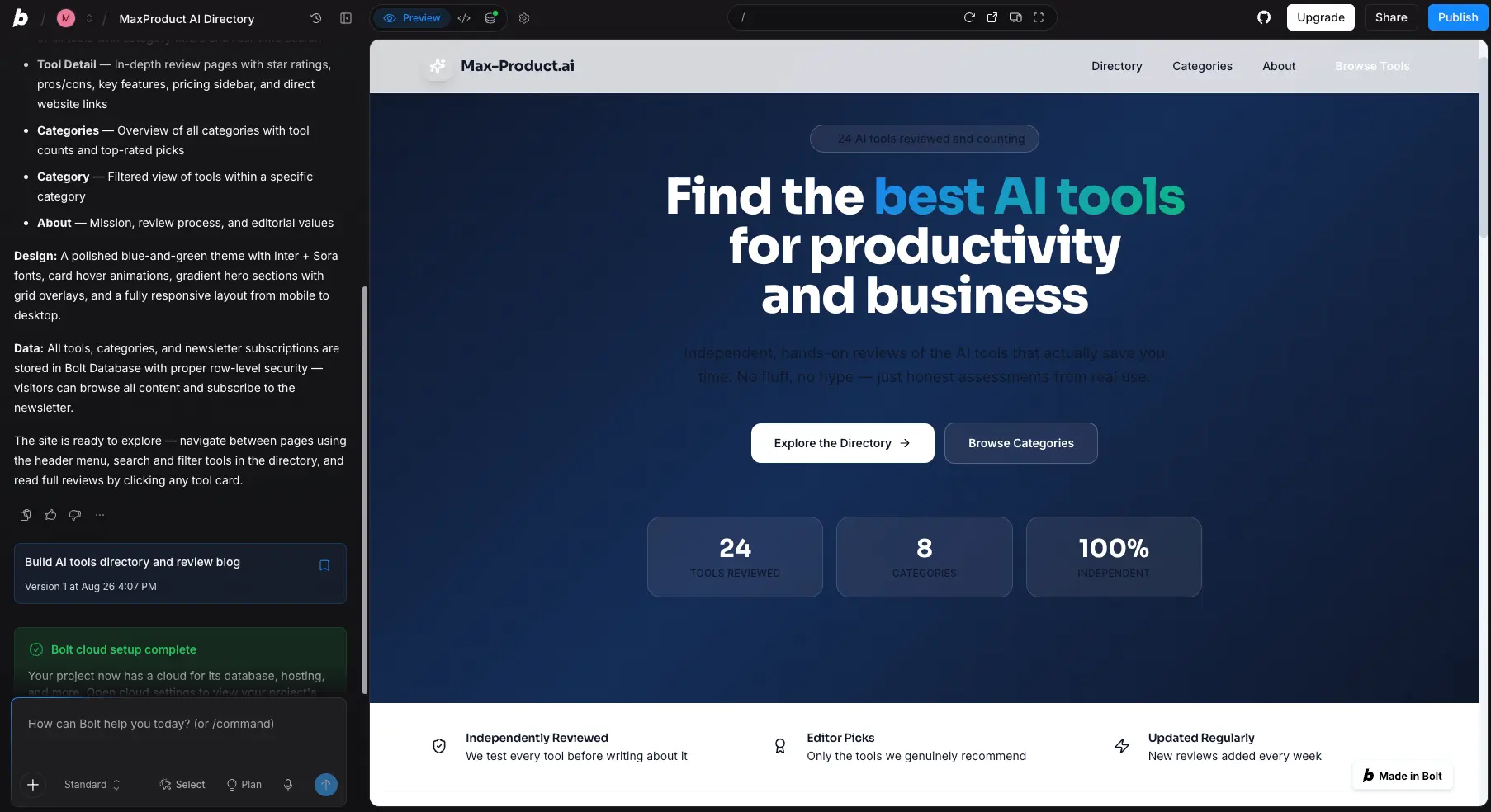
Real Code, Running Live,
Built at Prompt Speed
Bolt.new does something most AI app builders still can't: it runs your app—actually runs it—while it's being built. A real Node.js environment executes in your browser tab, any JavaScript framework works, and the code is fully yours to export when you're done. Expect to roll up your sleeves when it's time to ship to production, but for pure speed from prompt to working prototype, nothing in this category moves faster.
✓ What We Love
- Real running apps, not static previews (WebContainers)
- Full code ownership—export and GitHub sync
- Works with React, Vue, Svelte, Next.js, Astro, and more
- Free tier generous enough to build something real
! Could Be Better
- Token use climbs during long debugging sessions
- Design polish out of the box trails Lovable
- Getting from preview to production can need manual fixes
What Is Bolt.new?
A look at who built it, what makes it technically different, and whether it's the right fit for you.
Bolt.new is an AI app builder from StackBlitz, the company that spent years building in-browser development technology before AI coding went mainstream. That pedigree matters. Bolt's defining trick—running a full Node.js environment directly inside your browser tab via WebContainers—isn't something a wrapper startup can copy overnight. You type a prompt describing the app you want, and Bolt writes the code, installs the packages, boots a dev server, and shows you the app actually working. More than 5 million people have used it, and a Microsoft partnership announced in May 2026 brought Bolt to Azure and Microsoft 365 for enterprise buyers.
Here's the distinction that separates it from the rest of the category: most AI builders generate code and show you a rendering of it. Bolt executes it. When something breaks, the error shows up in the terminal the moment it happens, and you can fix it right there. Tools like Lovable pair AI generation with a fixed stack (React plus Supabase) and optimize for out-of-the-box polish; Bolt optimizes for control: any JavaScript framework you like, visible code, and a working dev environment you never had to configure.
Since its V2 evolution, Bolt.new has grown into a full-blown cloud IDE. There's a file tree, a code editor, a terminal, and an element selector that lets you click any part of the preview and tell the AI exactly what to change. You can pick which AI model does the generating—Claude, GPT, or Gemini—and switch between them mid-project. A templates gallery and a skills system (reusable instruction sets for things like SEO and design guidelines) round out the workflow.
Who Is Bolt.new Best For?
Developers, technical founders, and product teams who want to go from idea to working prototype in minutes while keeping full ownership of the code. Also a strong fit for agencies prototyping client concepts, and for enterprises on Azure since the Microsoft integration. Non-coders can use it too—just expect to learn a little as you go.
Our Testing
We tested Bolt.new hands-on by building a working AI tools directory—home page, category pages, review pages with star ratings and pros/cons, plus a newsletter signup—on the free tier. Our first prompt ("Build AI tools directory and review blog") came back as a multi-page React site with a database behind it, row-level security already configured, and a publishable .bolt.host URL. The screenshots below are from that session.
What can you build with it? The honest answer is: most web things. SaaS MVPs, dashboards, internal tools, landing pages, ecommerce storefronts, content sites. The templates gallery covers all of these as working starting points. Mobile output is possible through the Expo integration, though direct App Store publishing isn't part of the package. And when a project outgrows the browser, one-click deploys to Bolt Hosting, Netlify, or Vercel—plus GitHub sync—mean you're never boxed in.
See Bolt.new in Action
Real screenshots from our own test session showing the interface, the workflow, and what one prompt can produce.
Templates Gallery
Working starting points for portfolios, SaaS, blogs, internal tools, and ecommerce
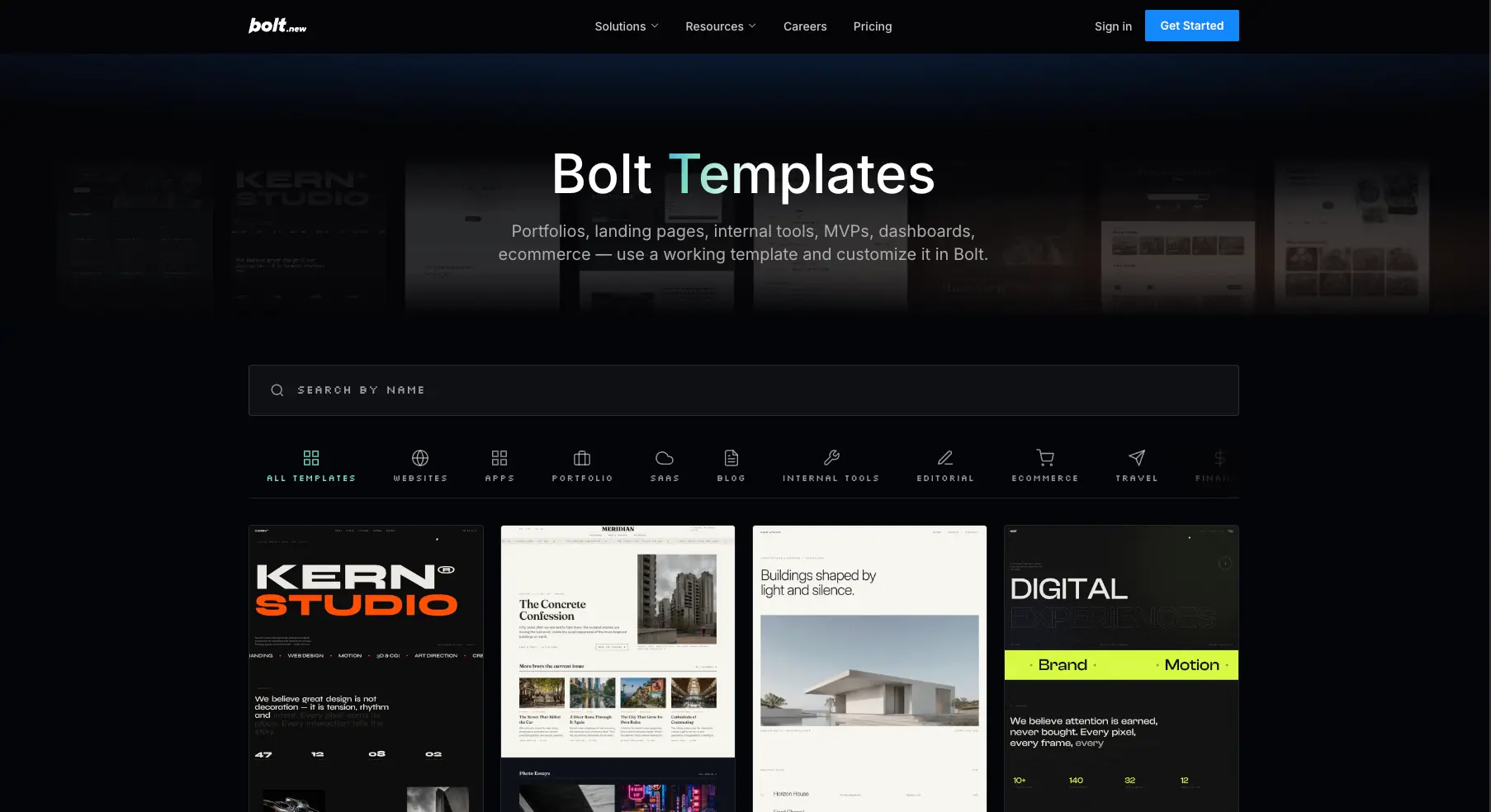
Instead of starting from a blank prompt, you can open a working template—portfolio, dashboard, MVP, ecommerce store—and reshape it conversationally. These aren't static design files; each one is a functioning app you customize in the editor. For anyone worried about burning tokens on basic scaffolding, starting from a template is the smart move.
Skills Settings Panel
Reusable instruction sets Bolt applies automatically when relevant
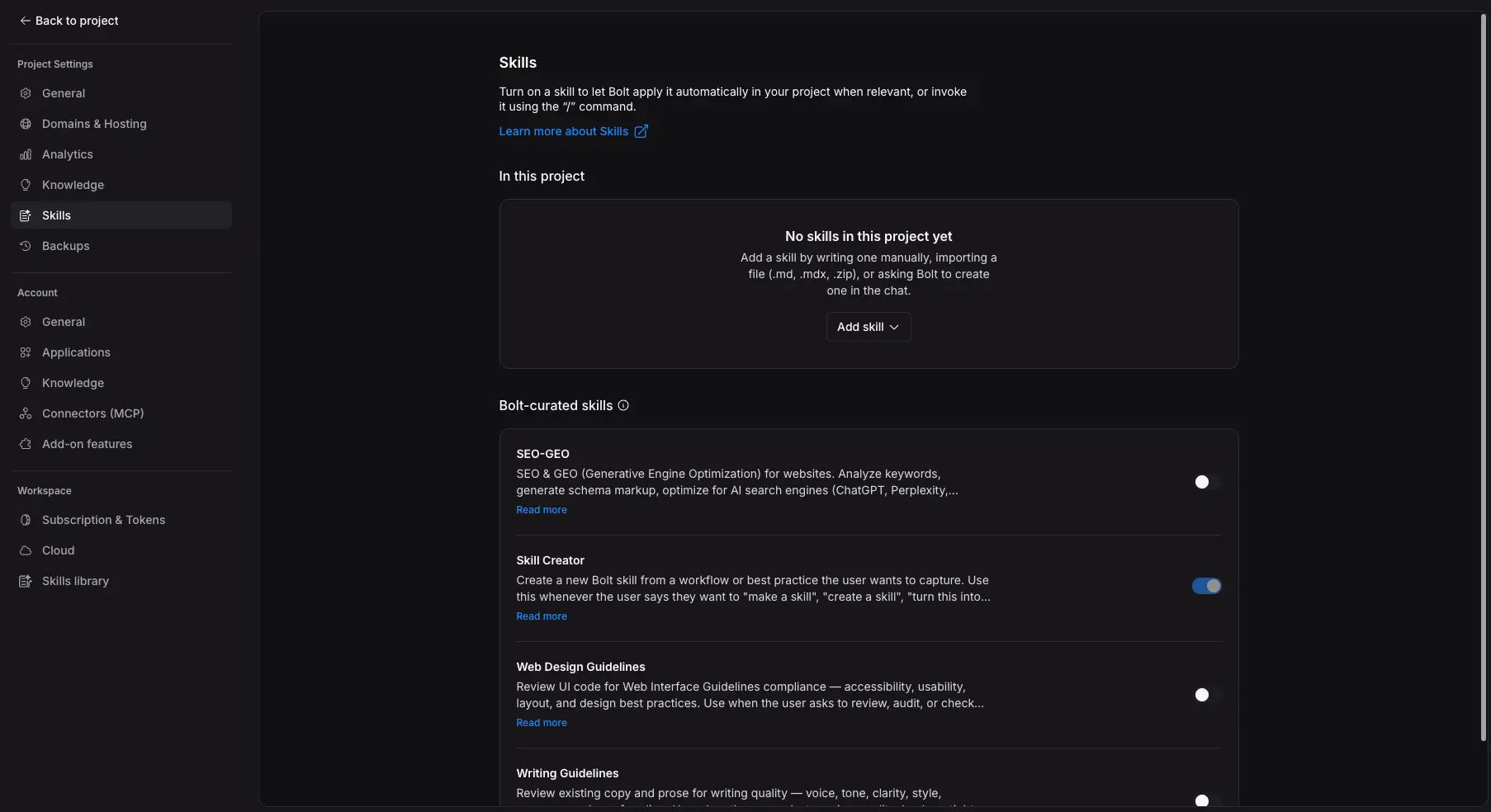
Skills are one of Bolt's smarter recent additions. Toggle on a curated skill—SEO and generative engine optimization, web design guidelines, writing quality review—and Bolt applies it automatically across the project when relevant. You can also write your own skills or ask Bolt to create one from a workflow you want to repeat. It's a practical answer to the "AI forgets my standards" problem.
Code Editor and Terminal
The full project is right there: file tree, editable code, and a real terminal
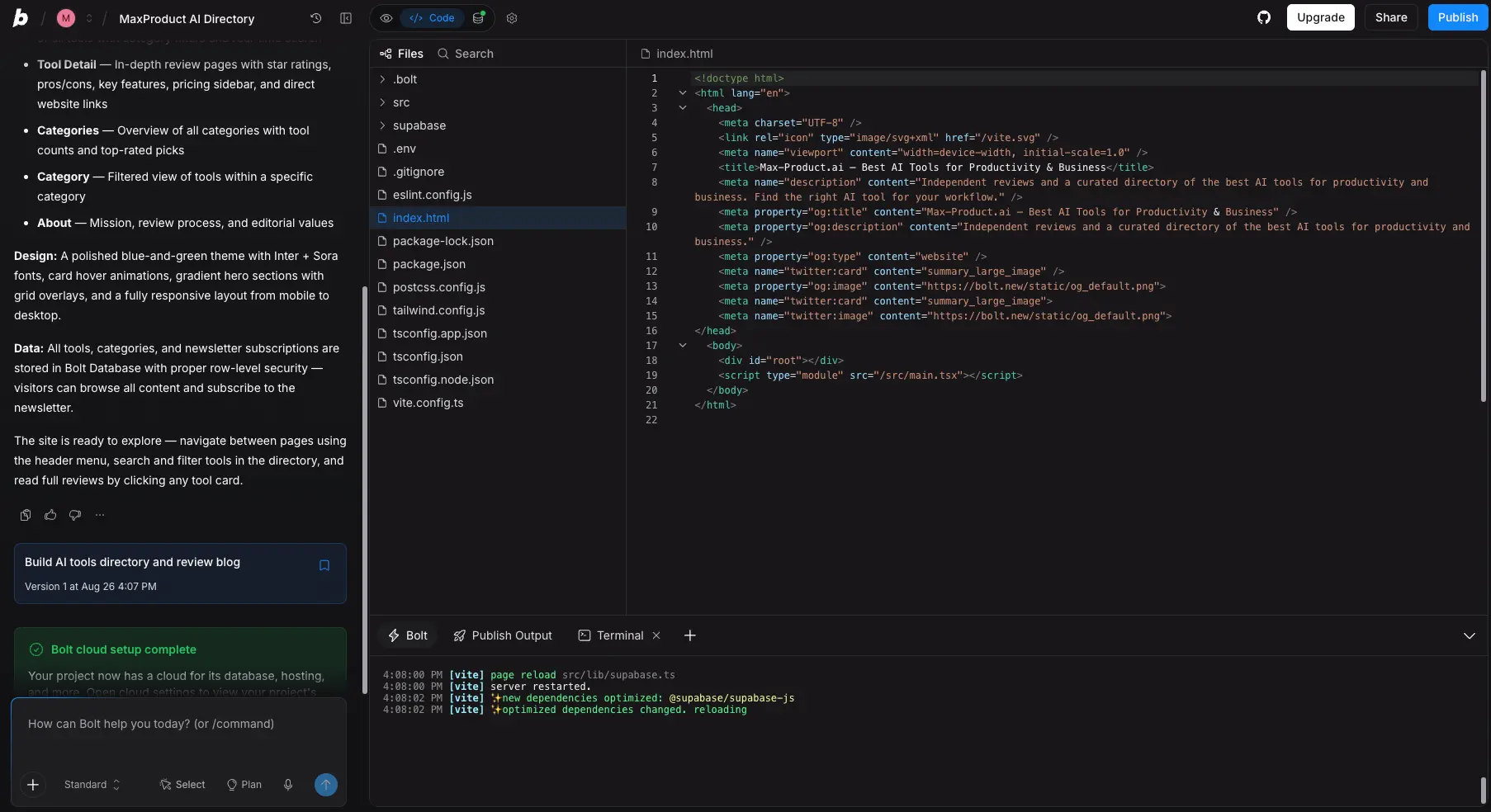
Flip from Preview to Code and you're looking at the actual project: config files, source, package.json, everything. The terminal below shows the Vite dev server restarting as dependencies change. This is a live environment, not a simulation. For developers, this transparency is the whole argument for Bolt over more closed builders: you can always see exactly what the AI did and correct it by hand.
Want to see what one prompt produces for your idea?
Try Bolt.new →Free tier • Builds run live in your browserOne Prompt, One Working Site
The directory homepage Bolt built for us—hero, stats, and database included
This is version 1 of our test project, straight from the first prompt: a responsive homepage with a gradient hero, stat blocks, category navigation, and working page routing. Notice the "Bolt cloud setup complete" confirmation in the sidebar—the database, hosting, and backend were provisioned without us asking. Is the design award-winning? No. Is it a legitimately usable v1 that took minutes instead of days? Absolutely.
Element Selector and Publishing
Click any element in the preview to target it, then publish to a live URL
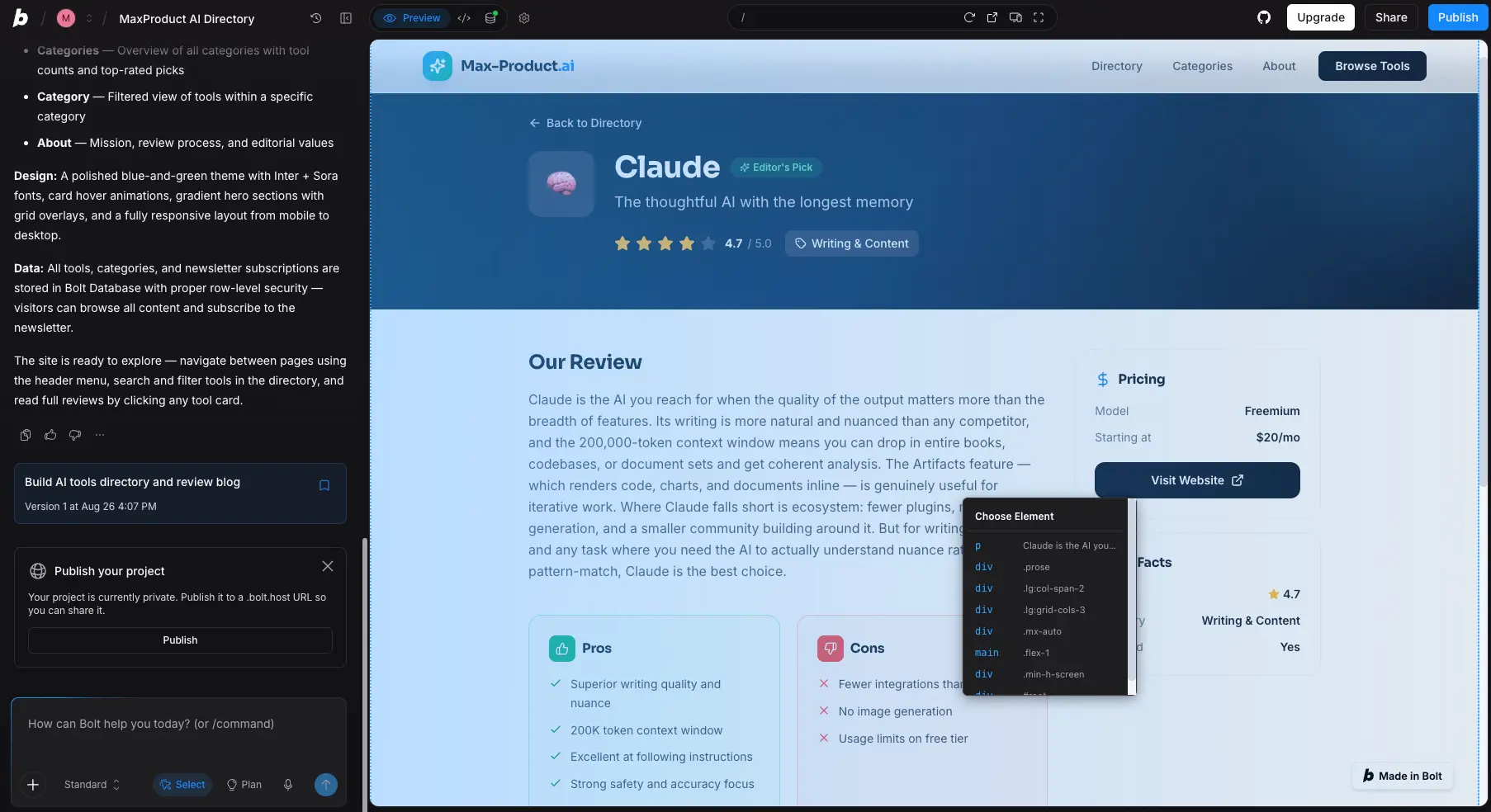
The review pages Bolt generated came with star ratings, pros/cons boxes, pricing sidebars—structure we never specified in detail. When we wanted changes, the Select mode let us click the exact element and describe the edit, which is far more precise than hoping the AI guesses which "button" you mean. From there, publishing to a shareable .bolt.host URL is one click. Free-tier projects carry the "Made in Bolt" badge; Pro removes it.
How Bolt.new Works
From prompt to deployed app in four steps—with the app running the entire time.
Describe What You Want
Type a plain-language description of your app—or open a template and describe what to change. Specific prompts produce better first versions: "a booking app for a yoga studio with class schedules and Stripe payments" beats "make me an app." There's no environment setup, no repo to clone, no dependencies to install. The prompt is the starting line.
Watch It Build—and Run
This is where WebContainers earns its reputation. Bolt writes the code, installs packages, and spins up a live dev server inside your browser tab, so the preview you're watching is the actual app executing—not a rendering of what the code should look like. Errors surface immediately in the terminal instead of hiding until deployment. Independent testers report going from prompt to a working full-stack preview in under two minutes.
Refine However You Like
Three ways to iterate, and you can mix them freely: chat with the AI ("make the pricing cards three columns"), click an element in Select mode to target it precisely, or open the code editor and change things yourself. Skills apply your standards automatically in the background. This flexibility is Bolt's quiet advantage: non-coders stay in chat, developers drop into the code, and neither workflow blocks the other.
Deploy and Take the Code With You
Publish to a .bolt.host URL in one click, or deploy to Netlify or Vercel. Pro plans add custom domains. And whenever you want the code, it's yours: sync the project to GitHub or export it outright and keep developing in any IDE. One caveat: apps that run cleanly in preview sometimes need manual adjustments before they're production-stable, so budget a debugging pass before launch day.
How Tokens Work
Every generation and AI edit consumes tokens. Free-tier allowances reset daily; Pro raises the ceiling to 10M+ per month with unused tokens rolling over. Practical tip from our testing: clear, specific requests and template starts burn far fewer tokens than vague prompts followed by repeated "fix it" loops.
Enterprise-Ready via Microsoft
Since May 2026, Bolt.new has been part of a formal Microsoft partnership: Azure deployment, Microsoft 365 and Teams integration, and procurement through the Microsoft Marketplace. Combined with SSO and audit logs on the Enterprise plan, it's one of the few tools in this category with a credible answer for corporate IT departments.
Key Features
The Bolt.new features that matter most—and notes on where each one stands.
WebContainers Runtime
The foundation everything else stands on: a full Node.js environment executing inside your browser tab. Apps run live as they're generated, errors appear in real time, and there's zero local setup. No other mainstream AI app builder works this way.
Any JavaScript Framework
React, Vue, Svelte, Next.js, Astro—your pick. Where Lovable and v0 commit you to their preferred stack, Bolt adapts to yours, which makes it the natural choice for teams with existing conventions.
Multi-Model AI
Choose Claude, GPT, or Gemini for code generation, and switch mid-project. Useful for matching the model to the task or to your token budget, and a hedge against any single model's off days.
Full Code Export & GitHub Sync
The generated codebase is yours: download it or sync to GitHub and keep building in any IDE. This is the sharpest contrast with Bubble (no export) and Base44 (frontend only). With Bolt, outgrowing the tool doesn't mean rebuilding.
One-Click Deploy
Publish to Bolt Hosting instantly, or push to Netlify or Vercel. Custom domains come with Pro. From our testing: prototype to shareable live URL really is one click; the friction shows up later, when hardening an app for production traffic.
Templates Gallery
Working templates for portfolios, landing pages, SaaS dashboards, internal tools, blogs, and ecommerce. Each opens as a functioning app you reshape conversationally—a token-efficient alternative to prompting from zero.
Skills
Reusable instruction sets—SEO guidelines, design standards, writing rules—that Bolt applies automatically when relevant or on demand via "/" commands. You can import your own or have Bolt create one from a workflow. Quietly one of the most useful additions of 2026.
Mobile Output via Expo
Mobile apps are possible through the Expo integration, but there's no direct App Store or Google Play publishing the way Base44 and Bubble offer it. Fine for PWAs and web-first products; a limitation if native mobile is your main channel.
Beyond the headline features, paid tiers include unlimited databases with a choice of database provider, AI image editing, and Bolt Cloud—which, in our test, provisioned a database with row-level security without being asked. Add the Azure and Microsoft 365 integrations from the enterprise side, and the feature set covers a wider span than most rivals: solo prototyping on one end, corporate procurement on the other.
Every feature above is available to test on the free tier:
Try Bolt.new →Start free • Upgrade only when you need toBolt.new Pricing Plans
Token-based pricing with a real free tier. Here's what each plan actually gets you.
Free
- ✓ 300K tokens/day (1M/month)
- ✓ Full editor, terminal, and preview
- ✓ Publish to .bolt.host URLs
- ✓ Templates and skills included
- ✓ GitHub sync and code export
- – "Made in Bolt" branding on projects
Pro
- ✓ 10M+ tokens/month, no daily cap
- ✓ Unused tokens roll over
- ✓ No Bolt branding
- ✓ Custom domains
- ✓ Unlimited databases, choice of provider
- ✓ Everything in Free
Teams
- ✓ Everything in Pro
- ✓ Centralized billing
- ✓ Admin controls
- ✓ Shared team projects
- ✓ Built for small product teams
Good to know: Annual billing saves up to 28% • Usage is metered in tokens, so heavy iteration costs more than plan-hopping
Pricing last verified August 2026. Visit Bolt.new for current rates.
Is It Worth the Money?
The free tier means testing whether Bolt fits your workflow costs nothing but an afternoon. And once you're serious, a $25 Pro month costs less than a single hour of freelance development almost anywhere, even if your builds take longer than the reviewer-reported two minutes once revisions start (ours did).
For context on the category: Lovable starts around $25/month on a credit system, Bubble's entry plan is $29/month metered in Workload Units, Base44 runs $16–20/month with a dual credit system, Softr starts at $49/month priced per end-user, and Hostinger's AI Builder is the cheapest entry, bundled with hosting. Bolt's free tier plus a flat $25 Pro makes it one of the lowest-risk ways to start. Just keep an eye on token consumption if you iterate heavily.
Detailed Pros & Cons
An honest breakdown based on our own test build and the wider pattern in independent reviews.
✓ Pros
WebContainers executes actual Node.js in your browser tab, so what you're looking at is the app working—or failing, visibly, in a real terminal. That shortens the feedback loop dramatically compared to generate-then-deploy tools, and it's the single biggest reason developers gravitate to Bolt.
Full export plus GitHub sync means the project is genuinely portable. Prototype in Bolt, then hand the repo to your dev team or keep building in VS Code—no rebuild, no ransom. In a category where lock-in is the norm, that matters.
Any JavaScript framework works: React, Vue, Svelte, Next.js, Astro. Teams with established conventions don't have to bend their stack around the tool, and side projects can match whatever you're learning.
Claude, GPT, or Gemini—switchable mid-project. When one model struggles with a specific problem, trying another often unblocks it. Most competitors give you exactly one brain; Bolt gives you three.
The daily allowance covers more than you'd expect; our entire multi-page directory test ran on the free tier. Compare that with Bubble, where the free plan is learning-only and can't publish at all.
The Microsoft partnership brings Azure deployment, Microsoft 365 and Teams integration, and Marketplace procurement, with SSO and audit logs on Enterprise. Unusual maturity for this category, and a meaningful signal about where StackBlitz is taking the product.
✗ Cons
Long debugging loops and design-heavy revisions consume tokens faster than you'd expect, and that's the most consistent complaint across user feedback. Pro's rollover softens it, and disciplined prompting helps a lot. But if you're a "try 40 variations" builder, budget accordingly.
Apps that run cleanly in preview sometimes need manual fixes before they're stable in production—environment variables, edge cases, deployment quirks. Technically comfortable users clear this in a debugging pass; complete beginners can find it discouraging. Plan a hardening step before any real launch.
Bolt's outputs are functional and clean, but side-by-side reviews keep ranking Lovable's visual output ahead of Bolt's defaults. You can close much of the gap with specific design prompts and skills. Out of the box, though, Lovable wins on looks.
Bolt Cloud has improved things considerably—our test project got a database with row-level security automatically—but auth flows and third-party services still involve more choices than Lovable's everything-is-Supabase approach or Base44's fully built-in stack. Flexibility for developers; extra homework for beginners.
Free and Pro users lean on documentation, community, and AI-assisted support; human help is largely an Enterprise perk. Fine when things work, frustrating when they don't. Factor this in if you're non-technical and likely to need a hand.
User sentiment splits sharply by audience: developers rate Bolt highly, while some non-technical users hit a complexity wall when debugging is needed. Beginners can absolutely use Bolt; they should just expect to learn as they go, or pick a more hands-off tool.
Bolt.new vs Alternatives
The best Bolt.new alternatives compared, and how each stacks up against it. For the full category deep-dive, see our 9 Best Lovable Alternatives comparison.
| Feature | Reviewed Bolt.new | Lovable | Bubble | Base44 |
|---|---|---|---|---|
| Starting Price | Free / $25 Pro | ~$25/mo | $29/mo | $16–20/mo |
| Free Tier | ✓ 1M tokens/mo | ✓ Limited daily credits | Learning only | ✓ Limited credits |
| Code Export | ✓ Full + GitHub | ✓ Full (React) | ✗ None | Frontend only |
| Approach | AI codegen, in-browser runtime | AI codegen + Supabase | Visual no-code + AI Agent | Conversational all-in-one |
| Native Mobile | Via Expo | ✗ Web only | ✓ Since 2025 | ✓ Direct publish |
| Unique Strength | Speed + code control | Design polish | Deepest logic engine | Everything built in |
| Best For | Developers, technical founders | Polished SaaS MVPs | Complex, logic-heavy apps | Non-coders |
Which Tool Is Right For You?
Bolt.new
ReviewedBest for: Developers and technically comfortable founders who want the fastest path from prompt to a real, running app—with the code fully theirs at the end. The free tier makes it the lowest-risk way to test whether AI app building fits your workflow, and framework flexibility means it slots into existing projects rather than replacing them.

Lovable
Top RatedBest for: Founders who want the most polished-looking SaaS MVP with minimal back-and-forth. Lovable's native Supabase pairing means auth and database come pre-wired, and its design output leads this category. The trade-off is a fixed stack and less code visibility while you build. Our highest-rated app builder at 4.7.
Bubble
No-Code VeteranBest for: Complex, logic-heavy products—marketplaces, multi-role SaaS, B2B tools—where a visual workflow engine matters more than owning code. Mature since 2012, with 2,000+ plugins and native mobile publishing. Just know there's no code export: committing to Bubble means committing to the platform. See how it compares in our Lovable vs Bubble breakdown.

Base44
All-in-OneBest for: Non-coders who want everything—auth, database, hosting, even native mobile publishing—in one subscription with zero external services to configure. Acquired by Wix, it's the simplest all-in-one in this lineup. Costs are harder to predict under its dual credit system, and backend logic stays on the platform.

Hostinger Horizons
Budget PickBest for: Beginners and freelancers who want a simple business site or lightweight app bundled with inexpensive hosting. Merged into the unified Hostinger AI Builder in August 2026, gaining a real backend in the process. It's not built for complex apps, but at the entry level the price is hard to argue with.

Softr
Data PortalsBest for: Teams whose data already lives in Airtable, Google Sheets, or SQL and who need a client portal or internal tool fast. Priced per end-user rather than per builder seat, which suits agencies well. Output is web/PWA only, and some important features sit in the higher tiers.

Emergent
Agent-PoweredBest for: Builders curious about a more agentic approach, where the AI plans and executes multi-step builds with less prompting from you. We haven't published a full review yet, but it's earning attention in the vibe-coding space and is worth a look alongside the tools above.
Frequently Asked Questions
Should You Try Bolt.new?
As of August 2026, Bolt.new is the strongest developer-oriented pick in the AI app builder category, earning a 4.6 out of 5 in our review. The core experience—describe an app, watch real code execute live in your browser, then export it as your own—is something no direct competitor fully matches. Our own test produced a working multi-page site with a database from a single prompt, and the wider pattern in independent reviews backs up the speed claims. Framework flexibility, model choice, and the Microsoft enterprise path add depth most rivals lack.
The honest counterweights: token consumption needs watching if you iterate heavily, visual polish out of the box sits behind Lovable, and moving from a working preview to a production-stable launch usually takes a hands-on pass. None of these are dealbreakers for the right user, but they explain why we recommend Bolt most confidently to developers and technically curious founders, and point pure non-coders toward gentler tools.
Our Recommendation
Start on the free tier and build something real—not a toy. Use a template or a specific, detailed prompt, push the project through a few revision rounds, and watch how quickly you burn tokens. If the workflow clicks and you're hitting the daily cap, the $25 Pro plan with rollover is an easy upgrade. And since the code exports fully, nothing you build is ever stranded. Low risk, high ceiling.