monday.com review
monday.com is a visual work platform where teams plan projects on colorful boards, now with AI that can read those boards, build apps and run agents. It suits teams that want to get going fast. Solo users should note the 3-seat minimum.
Free plan for up to 2 seats. New accounts start with a 14-day Pro trial, no credit card needed.
This review contains affiliate links. We may earn a commission at no extra cost to you.
Verdict: easy boards, and AI that read our work accurately
As of October 2026, monday.com is a work platform teams pick up quickly, and its AI is now a solid reason to choose it. We tested the Pro plan through its free trial. Sidekick, an AI column and a Vibe app all read our six-item editorial board, and we found no wrong count or status in what we checked. The trade-offs are seats and credits. You pay for at least 3 seats, from $9 a seat a month on yearly billing, and AI runs on a monthly pool of 1,000 to 3,000 credits. There's no AI on the Free plan.
What we like
- Quick to learn and pleasant to use
- AI that reads your board accurately
- AI included with every paid plan
Best for. Small and mid-sized teams that want clear, visual project tracking from day one and will pay for at least 3 seats. Also teams that want AI to report on their boards and build simple internal apps.
Try monday.com freeWhat we don't
- Paid plans start at 3 seats
- A small Free plan, with no AI
- AI credit use takes some watching
Not for you if. You work alone or want a generous free plan. ClickUp has no member cap on its free plan, and Trello is cheaper for simple boards.
Compare alternativesHow we tested monday.com
- Method
- Hands-on use, October 2026
- Access
- The Pro plan, through monday's 14-day free trial, with its AI credits
- Scope
- Board, Kanban, dashboard, Sidekick, an AI column, an agent and a Vibe app
- Not tested
- Running the agent, applying an AI-built workspace, publishing apps, automations, integrations, mobile apps, Basic and Standard plans
We tested monday.com on October 15, 2026, with real work: the six reviews in our editorial pipeline. A new account gets the full Pro plan, with its AI credits, free for 14 days, so we tested Pro, the top plan with a public price. We built a board with owners, statuses, due dates, priorities and notes, and left some fields empty on purpose so we could check the AI against known facts. Then we moved a card in Kanban, built a dashboard, asked Sidekick about blocked work and filled an AI column. We also asked for a preview-only solution plan, created a custom agent and built a Vibe app. Prices and limits come from monday's pricing page and help center. User opinion comes from Reddit, monday's community, Trustpilot, app store reviews and tech press.
We didn't give the agent access to our board, so we never ran it. We didn't apply the AI-built plan, publish the Vibe app or use its buttons that write to the board. We also skipped automations, integrations, inviting teammates and the mobile apps, so those parts rely on monday's documentation. Everything we tested is a Pro plan feature. Basic and Standard include fewer AI tools and smaller credit pools, and the Free plan has no AI, so check the pricing table for your plan.
What changed since our last review
- July 2026
- monday.com let outside AI agents work inside the platform with their own permissions, and added MCP access and open APIs.
- May 2026
- monday.com relaunched as an AI work platform, with built-in AI agents and connectors for Claude, ChatGPT and Copilot. Each paid plan now comes with a monthly pool of AI credits. See pricing
- January 2026
- Sidekick left beta and became the main way to use AI in monday.com, with access to your boards and docs, plus Gmail, Outlook and Slack.
monday.com
Our rating: 4.5 / 5
Free plan for 2 seats, then from $9 a seat a month, billed yearly.
Try monday.com freeWhat is monday.com?
monday.com is a work management platform built around visual boards. Each board is a table of items, with columns for owners, statuses, dates, priorities and anything else you track. You can see the same items as a table, a Kanban board, a calendar, a timeline or a Gantt chart, and summarize them in dashboards. It runs in the browser, with apps for Mac, Windows, iOS and Android.
In May 2026, monday.com started calling itself an AI work platform, and AI is the biggest change since our last review. Sidekick is an assistant that reads and edits your boards. AI columns fill in a column for every item from a prompt. Agents handle recurring jobs in the background, and Vibe builds small apps on top of your board data. They all draw on one shared pool of AI credits that comes with each paid plan.
Against ClickUp or Asana, monday.com's edge is how quickly a team gets comfortable with it. The boards look like a colorful spreadsheet, so new team members tend to understand them fast. Against Trello, which is simpler and cheaper, its edge is reach: dashboards, automations and AI on the same boards. ClickUp packs in more features overall. The same platform also runs monday CRM and monday dev, which are priced separately.
monday.com hands-on: our editorial board, Sidekick, agents and Vibe
These screenshots come from our monday.com account on the Pro plan, through its free trial, in October 2026, roughly in the order a new user meets each feature. Tap or click any image to open it full size.
Our editorial board
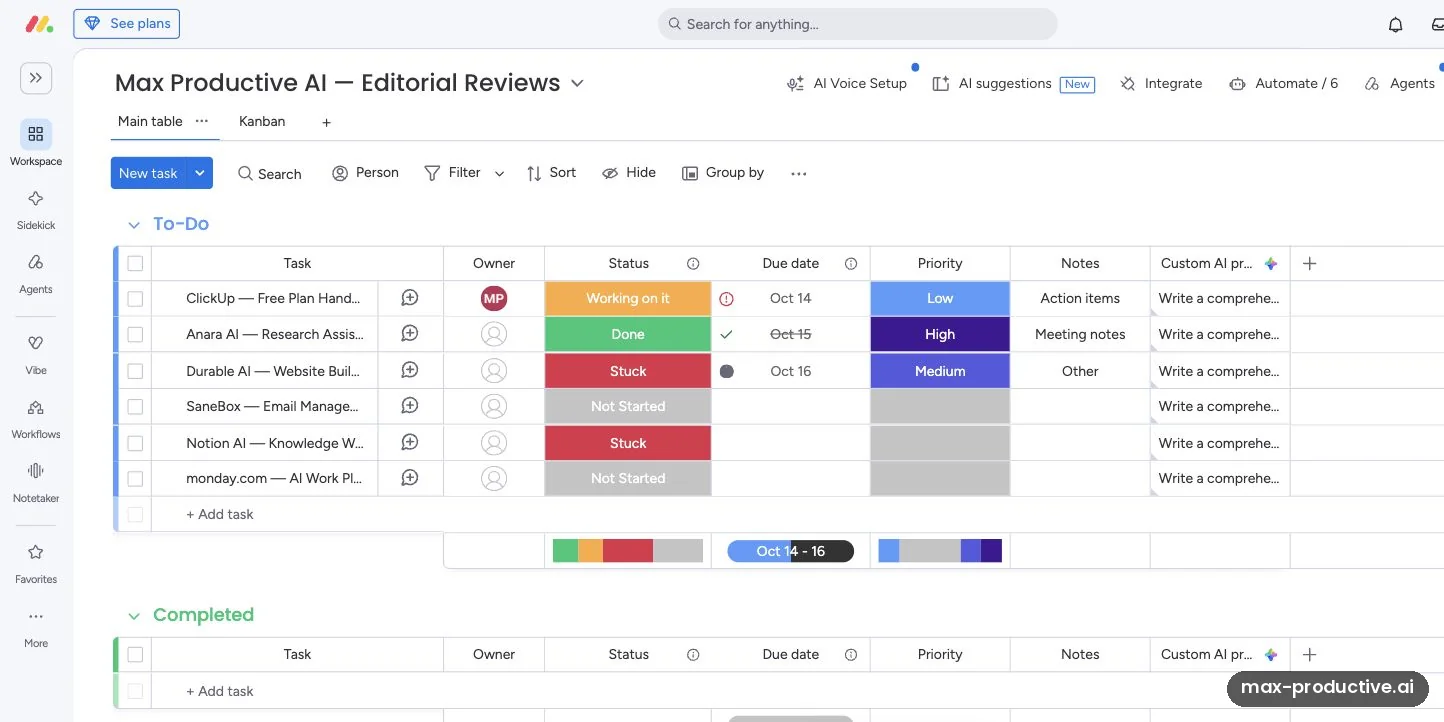
We built an editorial reviews board with six items from our pipeline, and columns for owner, status, due date, priority and notes. We left several owners, dates and priorities empty on purpose and made the ClickUp review overdue, so we'd know exactly what a good AI answer should say. The last column is an AI column: a Custom AI prompt wrote a review brief for every item.
Statuses are colored labels you click to change, which makes the table quick to scan. Our advice: settle your status labels and columns before you add work, because the dashboards and AI features read straight from them.
The Kanban view
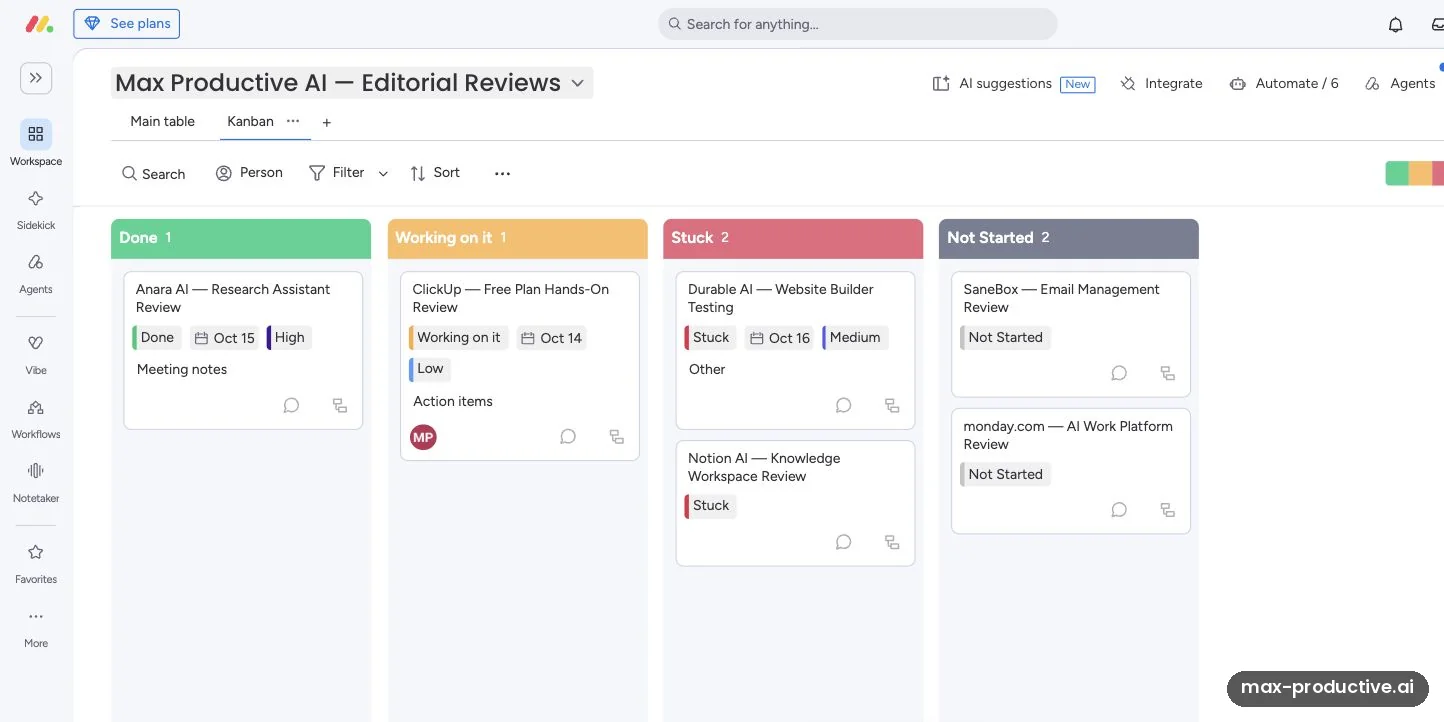
Kanban groups the same items by status: Done, Working on it, Stuck and Not Started. We dragged the Notion AI review from Not Started to Stuck, and the main table changed at the same moment. Cards show the date, priority and notes, so you rarely need to open one.
For an editorial team, this was the clearest view of where work was blocked. Kanban is on the Free plan too.
A dashboard on top of the board
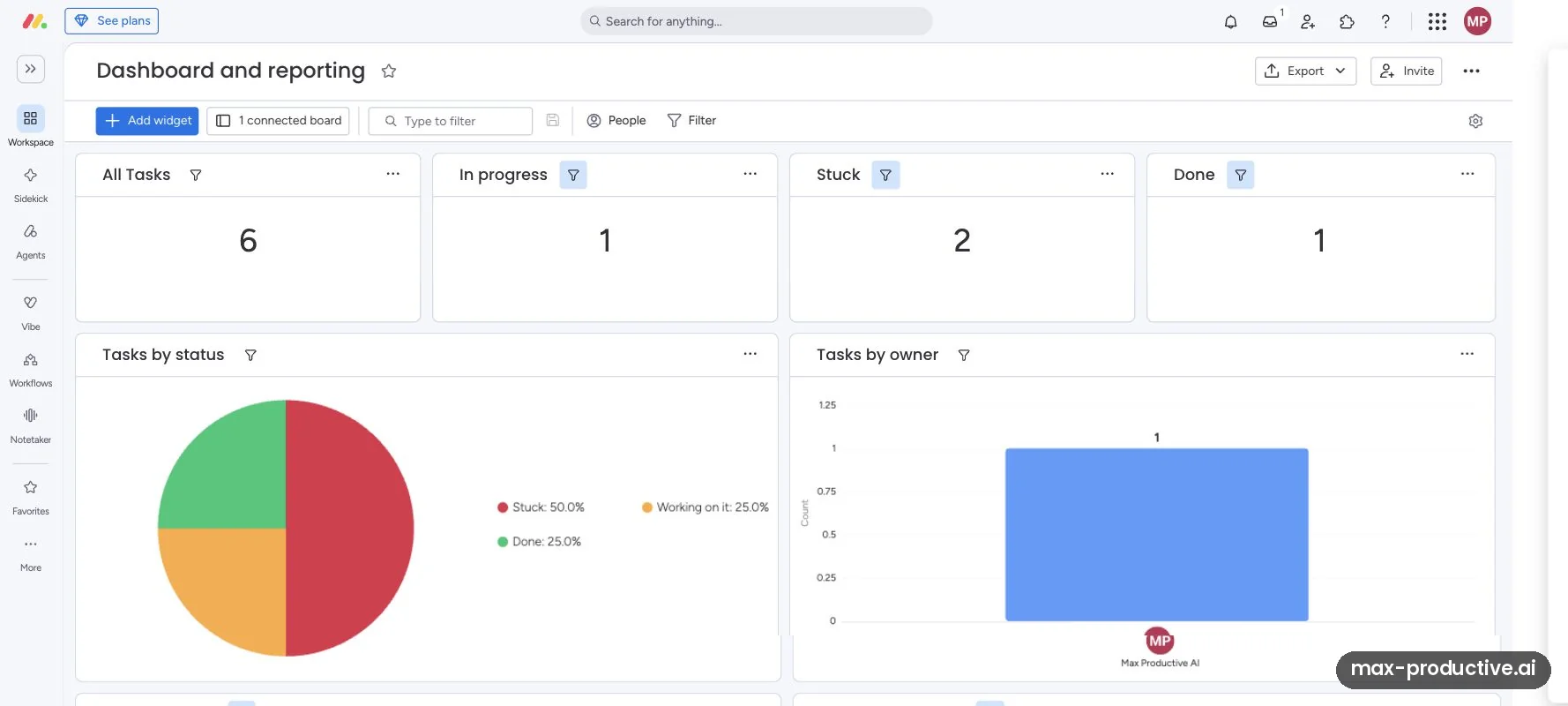
The dashboard counts six tasks, one in progress, two stuck and one done, with charts by status and by owner. After our Kanban move, the counters matched the board. The status pie only counts the four items past Not Started, so read its percentages with that in mind. The owner chart shows a single task with an owner, a quick reminder that five had none.
We built this on the Pro plan. On the Free plan you can still create dashboards, but each one can show data from only one board.
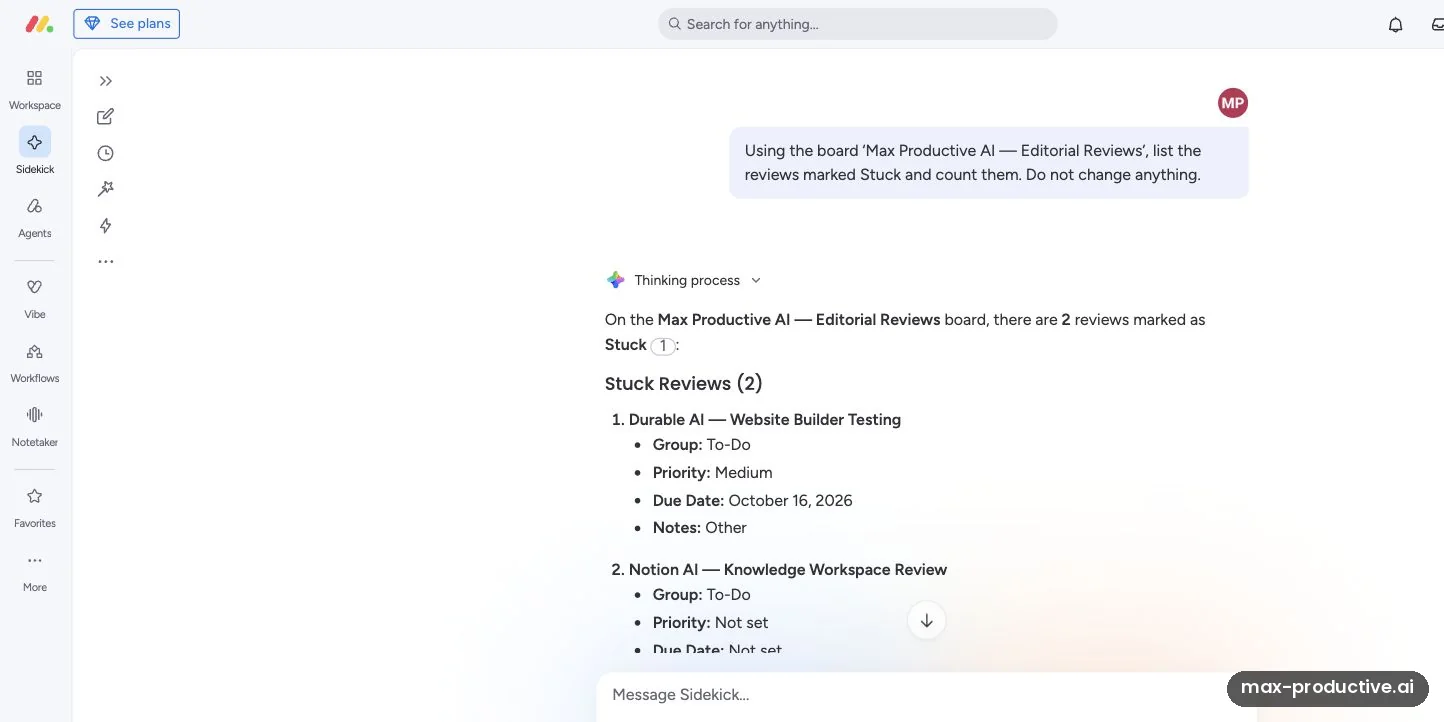
Asking Sidekick about blocked work
Sidekick is monday's AI assistant, one click away in the left sidebar. We asked it to list the reviews marked Stuck on our board, count them and change nothing. It gave the right count, two, and the right items: Durable AI and Notion AI, each with its group, priority and due date. Where a field was empty, it said so instead of guessing.
Speed was the one thing we noticed. Its first analysis of the board took about a minute, so expect a short wait on bigger questions.
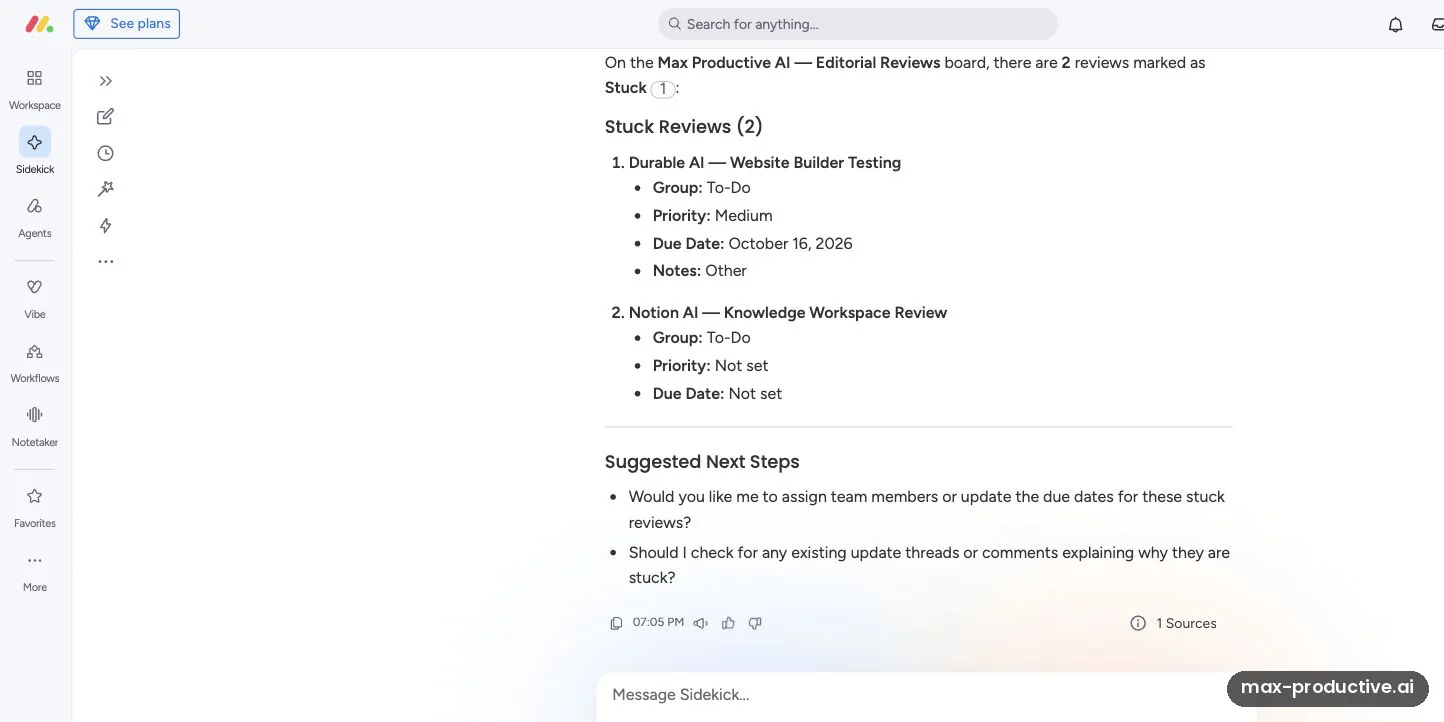
Sidekick's suggested next steps
Under the list, Sidekick offered two next steps: assign owners or update due dates for the stuck reviews, or look for comments that explain the blockers. In a separate board summary, it also flagged the five missing owners, the three missing due dates and the overdue ClickUp review. Every count it gave us matched the board.
Our read: Sidekick was the most useful AI feature in our test, because it turned a status check into one question. Sidekick shows a reminder that AI can make mistakes, and we'd still review its suggestions before letting it edit anything.
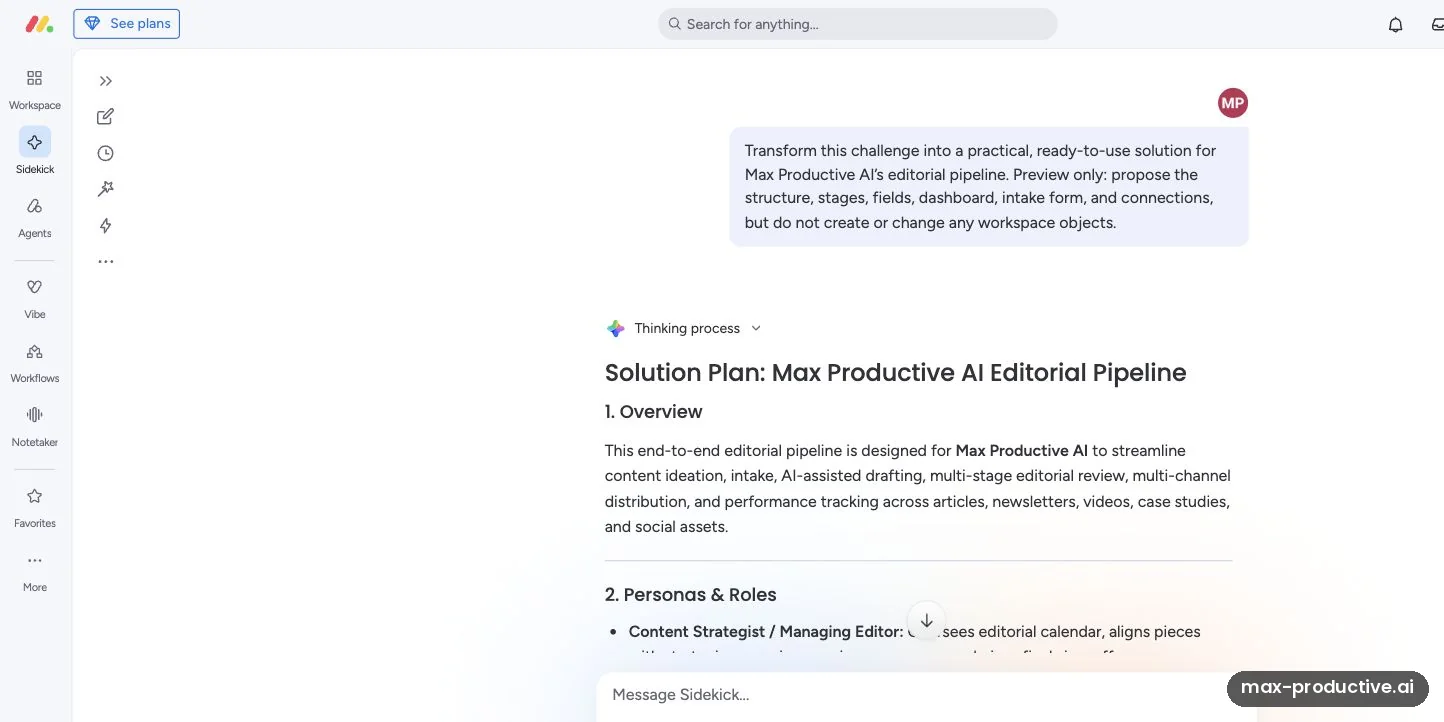
A solution plan from one prompt
The Ask, create, analyze launcher sends requests to Sidekick. We asked for a full editorial pipeline for Max Productive AI, as a preview only, without creating anything. It returned a structured plan: an overview, personas and roles, stages from Research to Published, editor and reviewer fields, dashboard widgets and a seven-field intake form.
The plan went broader than our review pipeline, adding newsletters, videos and social posts. You'd trim those extras before building, and it's a fast way to see how a process could be structured before you build it.
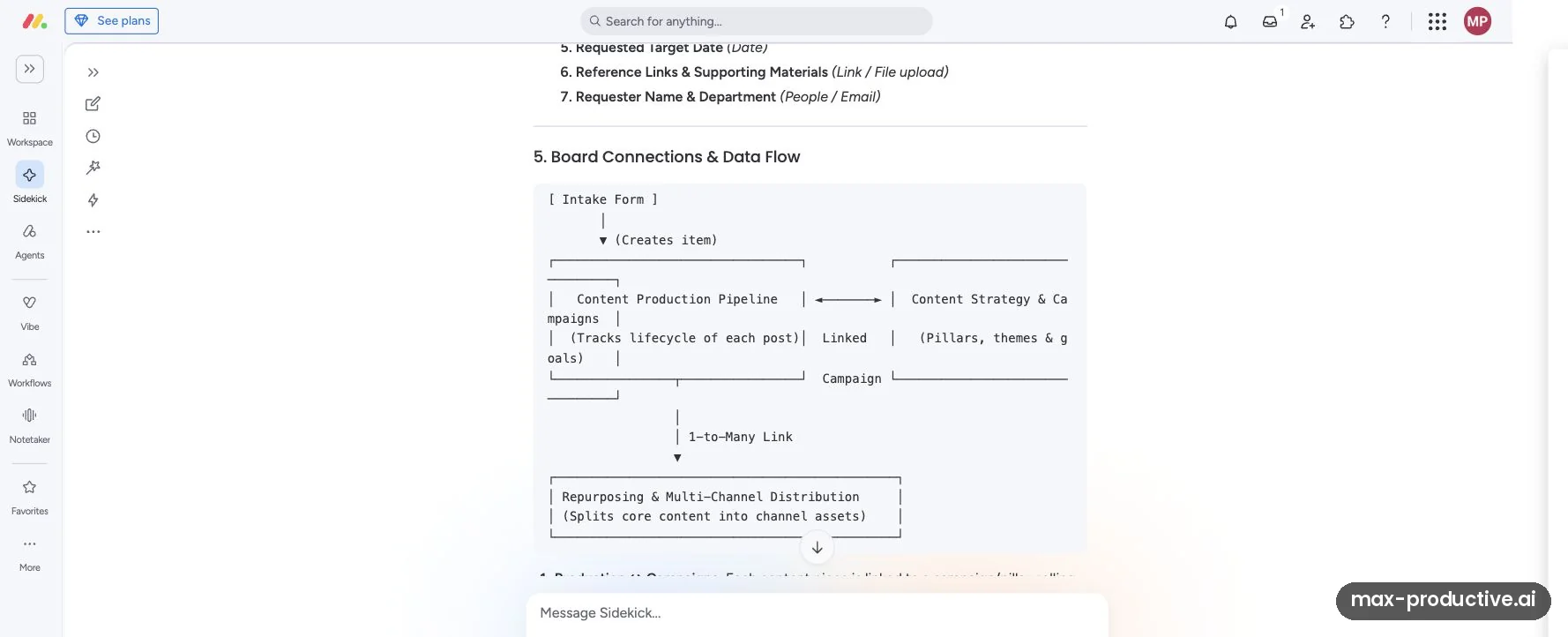
How the boards would connect
Further down, the plan mapped how its boards would link. An intake form creates items on a content production board. That board links both ways to a strategy and campaigns board, and feeds a repurposing board that splits each piece into channel assets.
We stopped at the preview. monday magic is the feature that builds workspaces like this from a prompt, and monday's help center says it's free to use. We didn't apply a solution, so we haven't tested that build step. The help center also notes that built solutions can include Pro or Enterprise features, which need an upgrade after the trial.
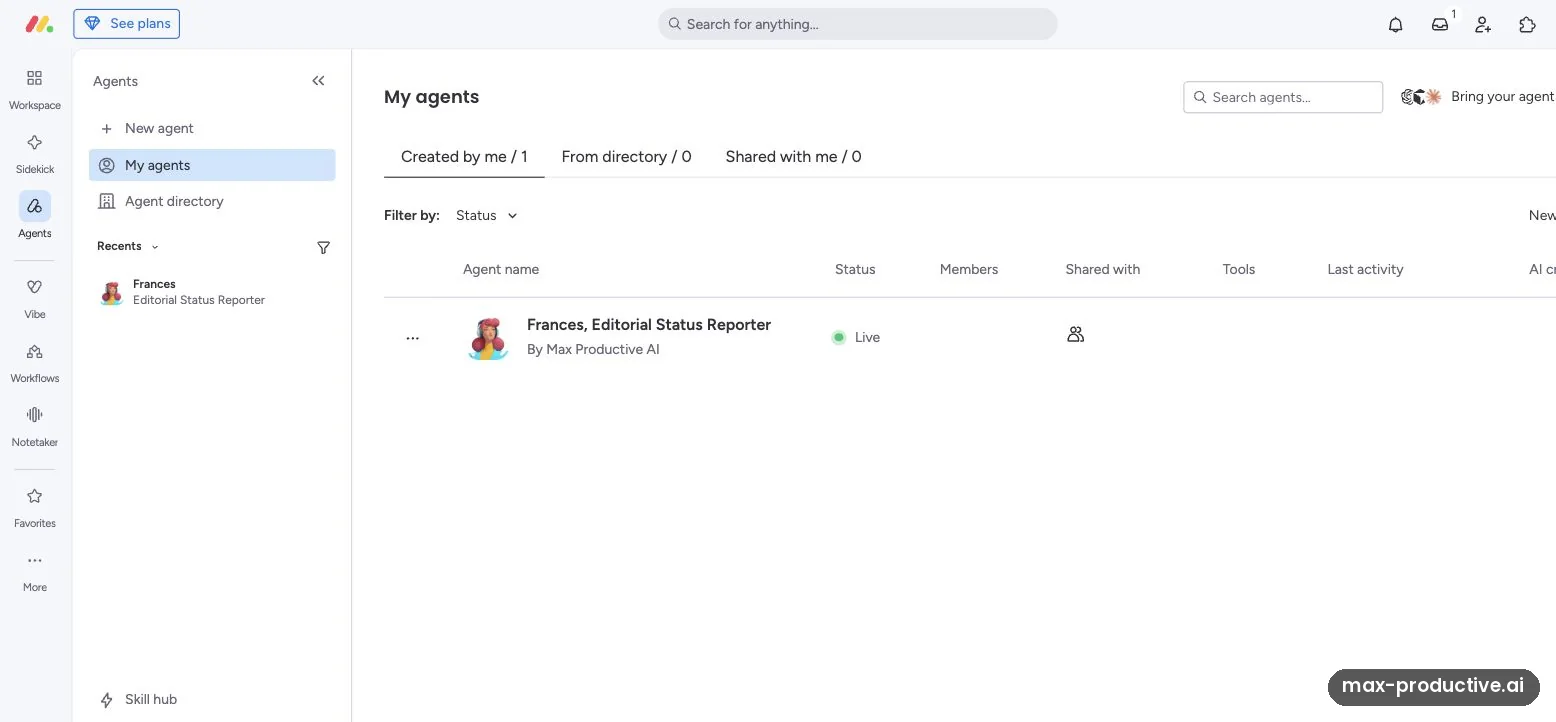
A custom agent, ready but not run
Agents are AI workers for recurring jobs, started by an event, a schedule or a regular cadence. We created a private agent, Frances, Editorial Status Reporter, with read-only instructions: report on the board, and never edit, publish or contact anyone. Setting it up took a short description, and it now shows as Live in our list.
The next step is to give the agent access to a board. That's a permissions change, so we stopped there and didn't run it. Teams should plan for this step: monday's help center says agents only access what their creator can access, and only admins can create or manage them.
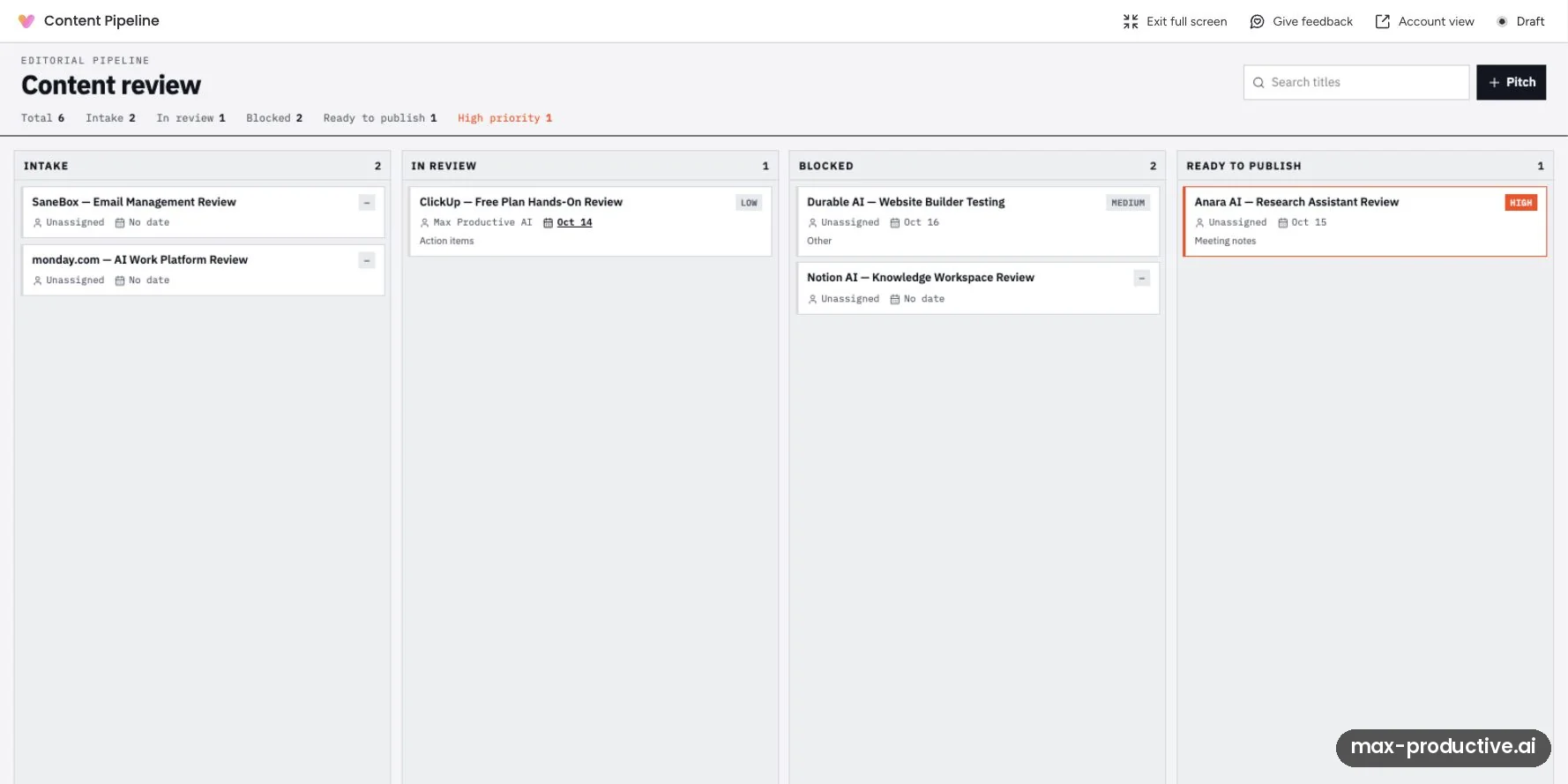
A Vibe app built from our board
Vibe is monday's AI app builder. We asked it to turn our board into a content pipeline app, and it built a private draft called Content Pipeline. Vibe gave the stages its own names, so Not Started became Intake and Done became Ready to publish. The counts still match the board: 6 in total, 2 in intake, 1 in review, 2 blocked, 1 ready to publish and 1 high priority. Each card kept its owner, date, priority and notes. The build used 39 AI credits.
This was the most impressive result in our test. Two things to know: the app's Pitch button and card moves write back to the board, so we left them alone, and sharing a published app needs a separate Vibe app package. In May 2026, monday's blog listed that at $100 a month for 10 published apps.
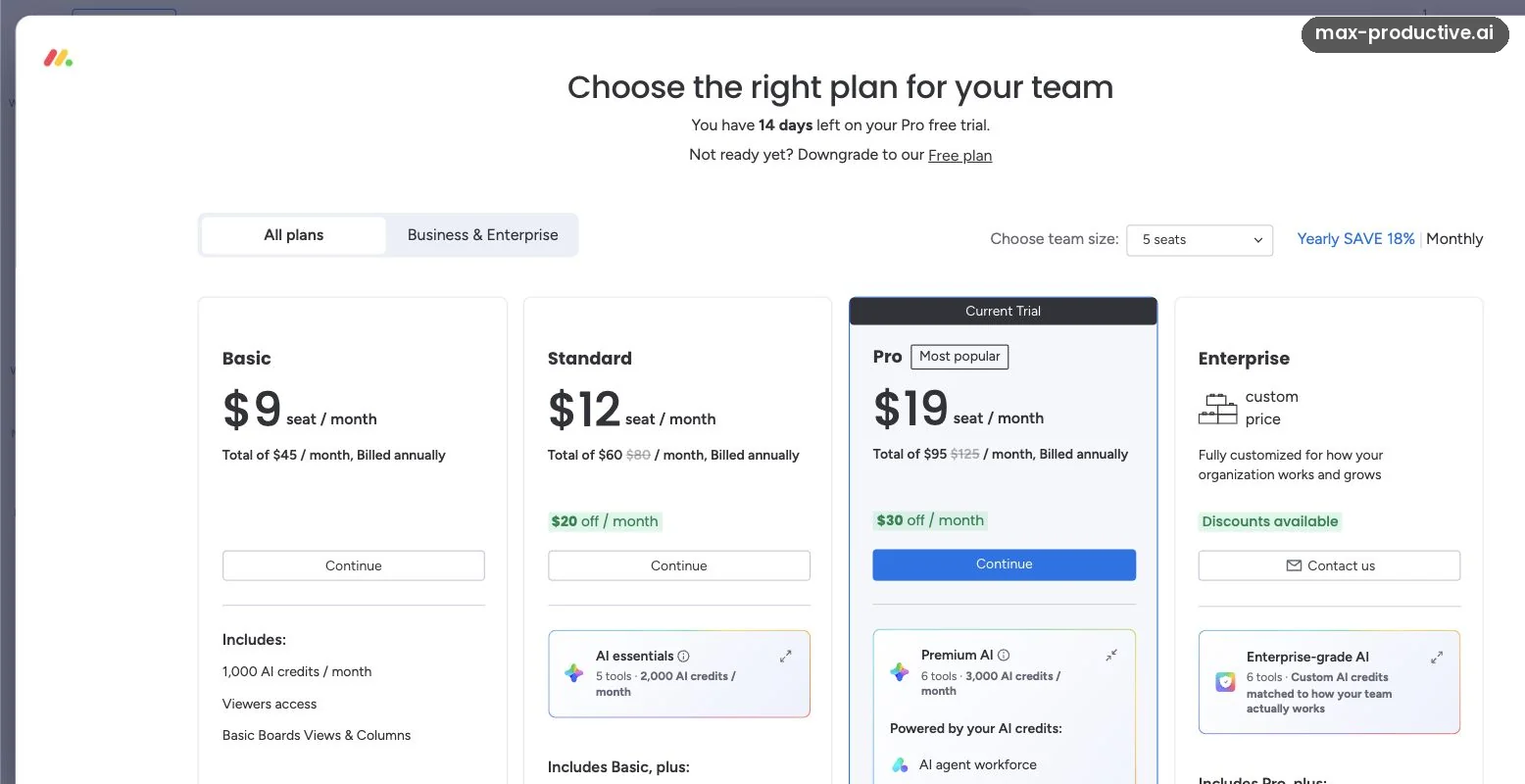
The plan screen in our Pro account
Our account showed 14 days left on the Pro trial, with Pro marked as the current trial and a link to move to the Free plan instead. For 5 seats on yearly billing, the screen listed Basic at $45 a month in total, Standard at $60 and Pro at $95, along with the AI credits each plan includes.
Our advice: run your real AI tasks during the trial, then pick the plan whose credit pool fits. The full lineup is in the pricing section below.
monday.com key features
Here's what matters most and where each feature's limits sit. Where a feature goes beyond what we tested, we rely on monday's documentation.
-
Boards and views
Every board works as a table, and you can switch the same items to Kanban, Calendar, Timeline or Gantt, or collect new ones through a form. Kanban and Forms are on the Free plan. Calendar, Timeline and Gantt start on Standard, and private boards on Pro.
-
Dashboards
Dashboards turn board data into counters, charts and tables that update as the board changes. On the Free plan, each dashboard can show one board only, so check the plan comparison if you want one dashboard across several projects.
-
Sidekick
From Basicmonday's AI assistant works at the account, board and item level. It answers questions from your board data, creates and edits items, groups and columns, researches the web and makes charts. It also connects to Gmail, Outlook, Google Calendar and Slack. A simple message uses roughly 10 to 30 credits, and the most complex ones 150 or more.
-
AI columns
Uses AI creditsAI columns run an AI action on every item in a board: summarize, translate, assign labels, extract details, write, improve text or follow your own prompt. Each action uses 8 credits, so a column across 100 items costs about 800. The pricing page lists AI columns from the Standard plan. Our custom prompt wrote useful briefs, though long ones.
-
AI agents
Limited on BasicAgents run recurring jobs in the background, on a trigger, a schedule or a cadence. You describe one in plain words or start from a template, then limit it to specific boards. monday's help center says only admins can create agents, and a run uses roughly 10 to 250 or more credits. The pricing page marks agents as limited on Basic without saying how.
-
Vibe app builder
Publishing costs extraVibe builds small apps on top of your boards from a prompt, such as a pipeline view, a tracker or an intake tool. Building uses AI credits, from about 10 to 500 per request depending on the model, and our build used 39. Drafts stay private. Sharing a published app needs a Vibe app package.
-
monday magic
Free to useMagic builds a whole workspace from a description, with boards, columns, dashboards and forms you preview before adding. monday's help center says it's free with no usage limits, but the solutions it builds can include Pro or Enterprise features. We previewed a plan through Sidekick and didn't use Magic's build step.
-
Automations and integrations
From StandardAutomations handle routine steps, such as notifying an owner when a status changes, and integrations connect boards to tools like Slack, Outlook, Zoom and Jira. They start on Standard, with 250 automation actions and 250 integration actions a month, and Pro raises both to 25,000.
Our read: boards, views and dashboards are monday.com's mature core, and they're why teams adopt it quickly. The AI layer is newer and changed a lot in 2026. Sidekick handled our questions well, but monday's help center still calls it early-stage, so check its answers. We'd try agents and Vibe on one real workflow before you rely on them across the team.
Security and compliance
monday.com's trust center lists SOC 2 Type II and ISO 27001 certifications, along with ISO 27017, 27018 and 27701 and CSA STAR. It supports GDPR, and a HIPAA business associate agreement is available on Enterprise. Enterprise also adds enterprise-grade security and governance and multi-level permissions. For AI, monday's help center says agents only access what their creator is allowed to access.
monday.com pricing
As of October 2026, monday.com has a Free plan for 2 seats and three paid plans. Basic costs $9, Standard $12 and Pro $19 a seat a month on yearly billing. Each paid plan includes a monthly pool of AI credits, and Enterprise is priced on request.
| Plan detail | Free | Basic | Standard | Pro | Enterprise |
|---|---|---|---|---|---|
| Billed yearly | $0 | $9/seat/mo | $12/seat/mo | $19/seat/mo | Custom |
| Billed monthly | $0 | $12/seat/mo | $14/seat/mo | $24/seat/mo | Custom |
| Seats | Up to 2 | From 3 | From 3 | From 3 | Custom |
| AI credits a month | None | 1,000 | 2,000 | 3,000 | Custom |
| AI tools | None | Sidekick, Vibe, agents (limited) | Adds AI columns | Adds AI workflow builder | All AI tools |
| Items | 200 | Unlimited | Unlimited | Unlimited | Unlimited |
| Automations and integrations | None | None | 250 actions a month each | 25,000 actions a month each | Enterprise scale |
| Also worth knowing | 3 boards, 500MB storage, no guests, one board per dashboard | Unlimited free viewers | Calendar, Timeline and Gantt views, guest access | Private boards and docs, time tracking, advanced columns | Portfolio and resource management, multi-level permissions |
Swipe sideways to see every plan.
Prices and plan features come from monday.com's pricing page, checked with yearly and monthly billing on October 15, 2026. Prices exclude tax and can vary with your billing country. Free plan limits come from monday's help center, updated September 17, 2026.
For seat groups, AI credits and what a team really pays, see our full monday.com pricing guide. monday CRM is priced separately, from $12 a seat a month on yearly billing: our monday CRM pricing guide covers its plans.
Start with the 14-day Pro trial, then pick the plan that fits your team.
Try monday.com freeHow monday.com seats work
Every paid plan starts at 3 seats, and monday's help center says seats then go up in multiples of 5. A team of 4 pays for 5 seats, and a team of 6 pays for 10. monday puts the yearly saving at 18%, and a yearly plan is paid upfront. From the listed prices, the saving works out at 25% on Basic, about 14% on Standard and about 21% on Pro (our math). If you cancel a yearly plan within 30 days, monday refunds the remaining balance.
What monday.com AI costs
Each paid plan comes with one pool of AI credits for the whole account, and the pool doesn't grow with seats. Credits pay for Sidekick messages, AI column actions, agent runs and Vibe builds. monday says a typical 3-person team uses about 800 to 1,200 credits a month. If you need more, an admin can move to a bigger pool without adding seats.
On the pricing page, monday values each credit at one cent. For yearly Standard and Pro, a special offer currently takes that amount off the total, so you pay the seat price alone. Credit rates can change, so check the credit usage page in Administration during your first month.
Which monday.com plan should you choose?
Start on Free if you're one or two people tracking a small project and don't need AI or automations. Basic adds unlimited items, free viewers and AI for small teams that mostly want Sidekick. Standard is where most teams should start, with automations, integrations, timeline and calendar views, guest access and AI columns. Pro is for teams that need time tracking, private boards, the AI workflow builder or far more automations. Enterprise adds portfolio and resource management and stricter governance.
Is monday.com worth the money?
For a team that wants visual tracking everyone understands, yes. On yearly billing, a five-person team pays $60 a month for Standard or $95 for Pro, each with its own credit pool. Standard is where the value sits, because it adds automations and integrations. It's a weaker deal for one or two people, who still pay for 3 seats on any paid plan.
Free plan limits in brief
On the Free plan you get 2 seats, 3 boards and 200 items, with 100 more items for each account you refer, up to 8 referrals. It includes 500MB of storage, Kanban and Forms views, and docs. It has no AI, automations, integrations, guests or viewers, and each dashboard shows one board.
When the trial ends
The Pro trial lasts 14 days, and monday's help center says it can't be extended. Before it ends, choose a paid plan or move to the Free plan, which needs 2 users or fewer. Data above the Free limits stays readable, but you can't add to it until you upgrade, and AI features stop.
monday.com pros and cons
Pros
Quick to learn and pleasant to use
The boards look like a colorful spreadsheet, so new team members tend to pick them up fast. In our test, a drag in Kanban updated the main table at once, and the dashboard we built matched the board. Ease of use is a common theme in praise on Reddit and in recent tech press reviews.
AI that reads your board accurately
Sidekick, an AI column and a Vibe app all worked from our real board data, and we found no wrong count, status or date in the outputs we checked. In a board summary, Sidekick also spotted missing owners, missing dates and an overdue review.
AI included with every paid plan
Each paid plan comes with a shared monthly pool of AI credits, and the pool grows with the plan. There's no per-seat AI add-on to buy, and admins can move to a bigger pool without paying for more seats.
Vibe turns a board into an app
From our request, Vibe built a draft pipeline app on our board, with correct counts and cards, for 39 credits. For teams that want a custom view without a developer, it's a quick way to get one.
Flexible enough for most teams
Columns, statuses, views and dashboards adapt to marketing, operations, HR and development work without code. Users on Reddit and in tech press reviews often mention this flexibility.
A wide set of connections
monday lists 850+ integrations and apps, plus official connectors for Claude, ChatGPT and Copilot and an MCP server. Desktop apps for Mac and Windows and mobile apps cover the rest.
Cons
Paid plans start at 3 seats
monday sells seats in buckets: 3, then multiples of 5. A solo user pays for 3 seats, and a team of 6 pays for 10. Freelancers have asked for a single-seat plan in monday's community, so small teams should price the bucket they'll actually need.
A small Free plan, with no AI
Free covers 2 seats, 3 boards and 200 items, with no automations, integrations or AI. It works for trying the boards, but every AI feature we tested is a paid feature, and we used Pro.
AI credit use takes some watching
Credit use depends on the task, from about 10 credits for a simple Sidekick message to 150 or more for the most complex ones. A few users in monday's community have asked for clearer reporting, such as credits per Sidekick request. Check the credit usage page during your first month.
Automations are tight on Standard
Standard includes 250 automation actions a month, and some users on Reddit and in tech press find that runs out quickly. Pro raises the limit to 25,000. If you plan to automate a lot, budget for Pro.
Some AI steps need extra setup
Agents need an admin and board access before they run, and sharing a Vibe app needs a separate app package. In our test, Sidekick's first analysis took about a minute, and the AI column wrote long briefs we'd trim before daily use.
Test the mobile apps before you commit
We didn't test the mobile apps. Some 2025 and 2026 app store reviews say they lack detail the web app has, such as fuller calendar views. monday redesigned its mobile app in May 2026, so recent versions may differ. If your team works mostly on phones, try the app during the trial.
monday.com alternatives
Most of the tools below are in our time management tools directory. The table compares monday.com with four project tools it's often compared with.
| Compared on | monday.com Reviewed | ClickUp | Asana | Trello | Notion |
|---|---|---|---|---|---|
| Free plan | Up to 2 seats and 3 boards | Unlimited members | Up to 2 users | Up to 10 collaborators and 10 boards | Free for individuals, with a block limit for teams |
| Entry paid plan | $9 a seat a month, billed yearly, 3 seats minimum | $9 a user a month, billed yearly, for new workspaces | $10.99 a user a month, billed yearly | $5 a user a month, billed yearly | $10 a seat a month, billed yearly |
| AI | Credit pool on every paid plan | Credits on paid plans, full Brain² from Business | AI Teammates on paid plans | Included from Standard | Full Notion AI from Business |
| Built in | Boards, dashboards, docs, apps | Tasks, Docs, wikis, chat, whiteboards | Projects, portfolios, goals | Boards and cards | Docs, wikis, databases |
| Setup effort | Low | High | Medium | Low | Medium |
| Best for | Teams that want fast onboarding | Teams consolidating tools | Cross-team project planning | Simple boards for small teams | Knowledge-heavy teams |
Swipe sideways to see every tool.
Competitor prices come from each company's pricing page, checked October 15, 2026.
monday.com vs ClickUp
ClickUp packs more into one workspace: built-in chat, Docs and wikis, more views and a free plan with no member cap. Setup is quicker in monday.com, and its boards feel polished from the first day. Both now have AI that acts on your work, and both include AI credits with paid plans. ClickUp's full Brain² assistant is included from its new Business plan, at $17 a user a month billed yearly. Choose monday.com for fast onboarding, and ClickUp if you want one tool to replace several. Cost depends on team size: ClickUp bills per person, while monday.com sells seats in groups. In our math, a team of 6 pays $120 a month on monday.com Standard and $54 on ClickUp Core, both billed yearly. Our ClickUp vs monday.com comparison runs the same project in both tools.
monday.com vs Asana
Asana is calmer and more structured, and it's very good at cross-team projects, goals and portfolios. monday's boards are more visual and easier to shape around work that isn't a classic project, such as content pipelines, requests or client tracking. Asana's free plan covers 2 users, like monday's. Its Starter plan costs $10.99 a user a month on yearly billing, with a 2-seat minimum instead of 3.
Which alternative fits you?
-

ClickUpOur rating: 4.6 / 5
Best for: Teams that want tasks, docs, chat and AI in one workspace, with a free plan that has no member cap.
ClickUp covers more ground than monday.com, with built-in chat, Docs and whiteboards, and it takes longer to set up. New workspaces are offered Core at $9 a user a month on yearly billing, and full Brain² AI starts on Business.
-

Reclaim AIOur rating: 4.8 / 5
Best for: People whose real problem is finding time in the calendar rather than tracking projects.
Reclaim schedules focus time, habits and tasks around your meetings. It's a calendar tool, so many teams use it alongside a project board rather than instead of one. There's a free Lite plan, and Starter costs $10 a seat a month on yearly billing.
-

TaskadeOur rating: 4.5 / 5
Best for: Small teams that want tasks, notes and AI agents in a lighter workspace.
Taskade's Pro plan costs $10 a month on yearly billing and covers up to 10 users, which suits a small team on a budget. It's simpler than monday.com and leans into AI agents and generated apps.
-
TodoistOur rating: 4.3 / 5
Best for: Individuals and small teams who want a fast, focused task list.
Todoist does one job very well: capturing and organizing tasks. Pro costs $5 a month on yearly billing, and the free plan covers 5 personal projects. It's the better fit if you don't need boards and dashboards.
-

SuperlistOur rating: 4.1 / 5
Best for: People who want tasks and notes together in a clean, modern app.
Superlist blends lists, notes and AI meeting notes. Its free plan covers 5 private and 5 shared lists, and Basic costs $59 a year. It suits personal and small-team planning more than multi-team projects.
-

AsanaOur rating: 4.4 / 5
Best for: Teams running many cross-functional projects who value structure and clarity.
Asana is strong on project and portfolio planning, with a calm, structured interface. Starter costs $10.99 a user a month on yearly billing, with a 2-seat minimum, and the free Personal plan is for 2 users.
-
TrelloOur rating: 4.3 / 5
Best for: Small teams and individuals who want simple Kanban boards.
Trello is one of the easiest board tools to pick up, and it costs less than monday.com. Standard costs $5 a user a month on yearly billing, and the free plan allows up to 10 collaborators. It stays simple by design, with lighter reporting than monday's dashboards.
monday.com FAQ
Is monday.com free?
Yes, monday.com has a Free plan that never expires, for up to 2 seats. It includes 3 boards, 200 items, 500MB of storage, and Kanban and Forms views. It doesn't include AI, automations, integrations or guests, and each dashboard can show one board. New accounts also start with a 14-day Pro trial.
How much does monday.com cost?
As of October 2026, monday.com costs $9, $12 and $19 a seat a month for Basic, Standard and Pro on yearly billing, or $12, $14 and $24 billed monthly. You buy at least 3 seats, and then seats come in buckets, so a team of 6 pays for 10. Enterprise is priced on request. Our monday.com pricing guide works out what your team pays.
Does monday.com include AI?
monday.com includes AI on every paid plan, but not on the Free plan. Basic comes with 1,000 AI credits a month for the whole account, Standard with 2,000 and Pro with 3,000. Credits pay for Sidekick, AI columns, agents and Vibe. We tested the AI on the Pro plan, through monday's 14-day free trial.
What are monday.com AI credits?
monday.com AI credits are a shared monthly allowance that pays for AI work across your account. Each task uses credits based on its complexity. An AI column action uses 8, a simple Sidekick message about 10 to 30, and an agent run from about 10 to 250 or more. monday says a typical 3-person team uses 800 to 1,200 credits a month.
What is monday Sidekick?
monday Sidekick is the AI assistant built into monday.com. It answers questions from your boards, creates and edits items, researches the web, makes charts and connects to Gmail, Outlook and Slack. In our test, it listed our stuck reviews correctly and flagged missing owners and due dates. It's available from the Basic plan.
What is monday vibe?
monday vibe is the AI app builder in monday.com. You describe an app, and Vibe builds it on top of your boards, such as a pipeline view or a tracker. Building uses AI credits, and our draft app used 39. Sharing a published app needs a separate Vibe app package, so check the current price in your account.
Is monday.com good for one person?
monday.com's Free plan works for one or two people with simple projects. A solo user who needs automations or AI still pays for 3 seats on any paid plan. If you work alone, Todoist or Trello may give you more for less. monday.com makes more sense once a team of three or more shares the work.
Is monday.com better than ClickUp?
monday.com suits teams that want a tool they learn quickly, with polished boards and AI credits on every paid plan. ClickUp offers more features for a similar entry price, including built-in chat, Docs and a free plan with no member cap. ClickUp usually costs less for a team, because it bills per person while monday.com sells seats in groups. Choose monday.com for fast onboarding, and ClickUp if you want one tool to replace several.
Does monday.com have a free trial?
Yes, every new monday.com account starts with a 14-day trial of the Pro plan, with no credit card needed. monday's help center says the trial can't be extended. Before it ends, choose a paid plan or move to the Free plan, which allows up to 2 seats. The trial gave us the full Pro plan with its AI credits, so we could test Sidekick, an AI column and Vibe, and create an agent.
Is monday.com secure?
monday.com's trust center lists SOC 2 Type II, ISO 27001, ISO 27017, ISO 27018 and ISO 27701 certifications, and it supports GDPR. A HIPAA business associate agreement is available on Enterprise, which also adds enterprise-grade security, governance and multi-level permissions. Agents only access what their creator is allowed to access.
Should you try monday.com?
Teams pick up monday.com quickly, and its 2026 AI layer read our board accurately, from Sidekick's answers to a Vibe app. The costs are the 3-seat minimum and an AI credit pool you'll want to watch. If you work alone, Todoist or Trello may suit you better, and ClickUp has the more generous free plan. For a team that wants clear, visual tracking with useful AI on top, monday.com earns its 4.5.
What we'd do. Start the 14-day Pro trial and rebuild one real project as a board, with your statuses agreed upfront. After a week of real work in Kanban and a dashboard, ask Sidekick what's blocked or overdue, as we did. Try one AI column and one small Vibe app, and note the credits each uses. Before the trial ends, pick the plan whose seat bucket and credit pool fit your team, or move to the Free plan.
Our rating: 4.5 / 5
Excellent
About this review
Based on hands-on use of the monday.com Pro plan, through its 14-day free trial, in October 2026, plus monday.com's pricing page, help center and trust center, and public user feedback. First published 25 June 2025. Last updated 21 October 2026.
Sources checked
- Pricing and plan limits. monday.com pricing page and help center pages on plans and seats, the Free plan and AI pricing, checked October 15, 2026, with the pricing page read again on October 21, 2026.
- AI features. Help center pages on AI credits, Sidekick, AI agents, Vibe and monday magic.
- Security. monday.com trust center.
- User feedback. Reddit's r/mondaydotcom, the monday community, Trustpilot, app store reviews and tech press such as TechZeeno.
Ratings are our overall editorial judgment on a 5-point scale: 4.5 and up is Excellent, 4.0 to 4.4 Very good, 3.5 to 3.9 Good, 3.0 to 3.4 Fair. We do not use sub-scores.
This review contains affiliate links, so we may earn a commission at no extra cost to you. Our ratings and editorial opinions remain independent.