
Omnisend
Email, SMS, and web push marketing for online stores, in one automation editor. Built for Shopify, WooCommerce, and BigCommerce, with pre-built workflows you can switch on the day you connect your store and pricing that stays well under Klaviyo's as your list grows.
Try Omnisend →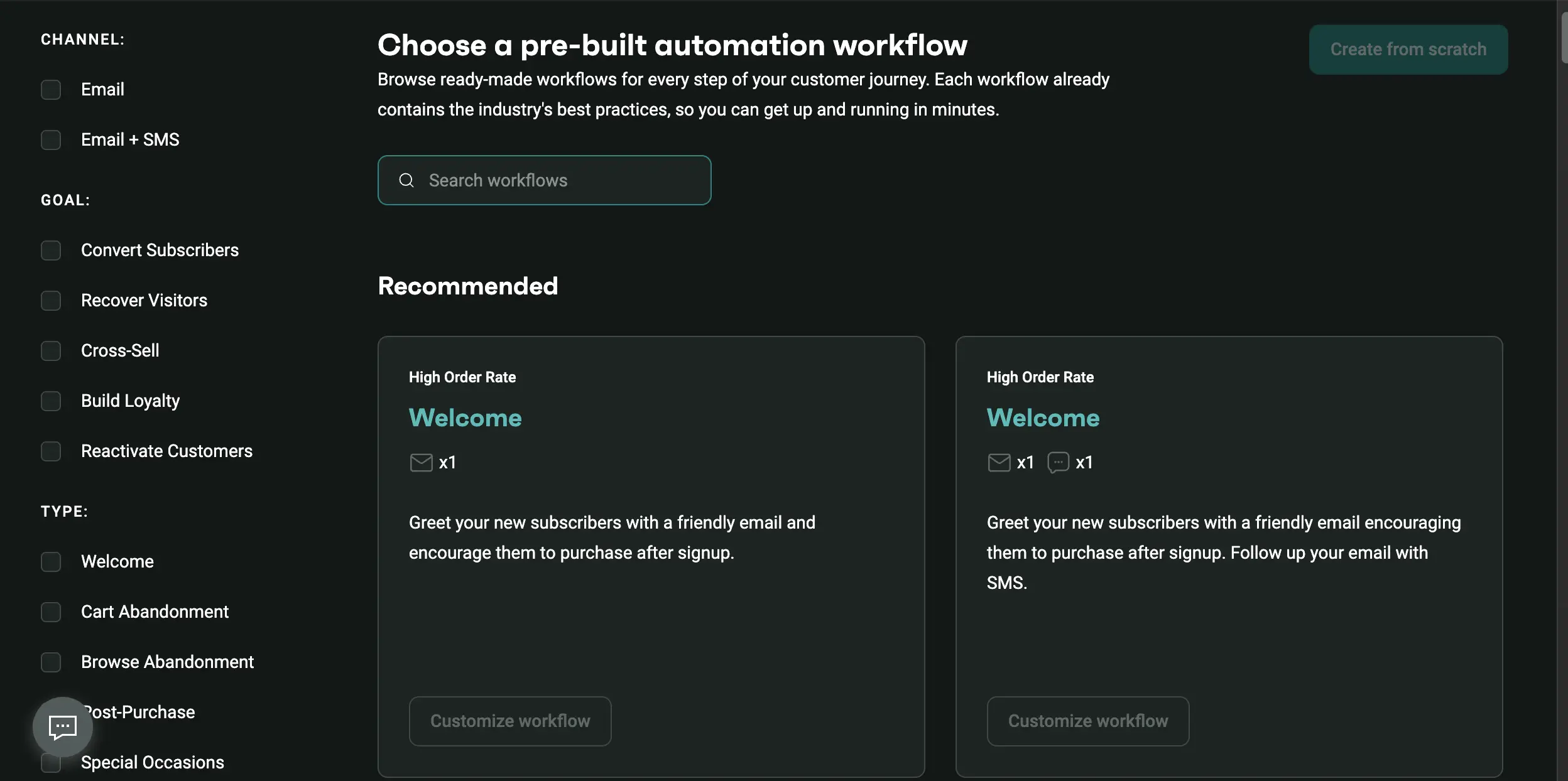
The Sensible Ecommerce Pick
When Klaviyo Feels Like Overkill
As of August 2026, Omnisend is the platform we'd point most small and mid-size online stores to first. It runs email, SMS, and web push from one automation editor, ships with store-specific workflows you can switch on in minutes, and costs roughly a third to half less than Klaviyo at the same list size. It isn't the deepest analytics tool in this category, and the May 2026 decision to move SMS to the Pro plan for new accounts stings. But for stores under a few million in revenue, the value is hard to argue with.
✓ What We Love
- Free plan includes automation, segmentation, and AI tools
- Pre-built cart, browse, welcome, and post-purchase workflows
- Email, SMS, and push share one workflow editor
- Pricing stays well below Klaviyo as your list grows
! Could Be Better
- Reporting is lighter than Klaviyo's
- SMS is now Pro-only for new accounts
- Independent deliverability tests are mixed on Outlook and Yahoo
What Is Omnisend?
Where it came from, what it's built to do, and the kind of store it fits.
Omnisend is an ecommerce marketing automation platform that handles email, SMS, and web push notifications from a single dashboard. It started in 2014 in Lithuania as an email tool called Soundest, founded by Rytis Lauris and Justas Kriukas, and took the Omnisend name in November 2017 when it expanded into multichannel messaging. The company is still headquartered in Vilnius, with offices in Kaunas and Charleston, South Carolina, and it now serves more than 150,000 online stores. Its deepest integrations are Shopify, WooCommerce, and BigCommerce, which tells you exactly who the product is for.
For this Omnisend review, the most useful place to put it is next to Klaviyo, because that's the comparison nearly every store ends up making. Both do the same job. Klaviyo goes deeper on data, with a built-in customer data platform and predictive models, and charges accordingly. Omnisend covers the flows that produce most of a store's retention revenue, namely abandoned cart, browse abandonment, welcome series, post-purchase, and back-in-stock, with less configuration and a smaller invoice. On the other side of it sits Mailchimp, a general-purpose tool that also serves bloggers and service businesses and feels generic by comparison once you're inside a store.
What's changed since we first published this page is the AI layer. By mid-2026 Omnisend had an AI writer for copy and subject lines in the email editor, an AI Segment Builder that builds audiences from plain-language prompts, a Forms AI Assistant, a chat-style Reports AI, Send Time Optimization (added in August 2026), and a connection to Claude and other assistants through MCP so you can manage campaigns conversationally. Not all of it is equally mature, though. Reports AI still wears a Beta badge in our account, and the app itself warns that it can make mistakes.
Our Testing
We run an Omnisend account for Max Productive AI on the free plan. The screenshots on this page are from that account, and we used it to work through the campaign builder, the template gallery, the automation library, and the AI tools. We haven't pushed a high-volume store through it, so the findings on deliverability at scale and on pricing at 10,000+ contacts come from Omnisend's published pricing, independent benchmarks, and user reports, not from our own sends.
Who Is Omnisend Best For?
Small and mid-size online stores, roughly under $3 million in annual revenue, on Shopify, WooCommerce, or BigCommerce. It suits teams without a dedicated data analyst who want cart recovery, welcome flows, and post-purchase messaging live this week, plus SMS and push from the same editor. It's a weak fit for B2B, service businesses, publishers, and brands that need pixel-level control over email design.
The free plan also deserves an early mention because it's unusually complete. It includes the automation workflows, segmentation, and the AI tools, capped at 250 contacts and 500 emails a month with Omnisend branding on the footer. Most stores outgrow it within weeks, but it means you can build every flow and see the editor before paying anything. That's more than Mailchimp's free tier offers, which leaves automation out entirely.
See Omnisend in Action
Screenshots from our own Omnisend account showing the automation library, template gallery, and Reports AI.
Pre-Built Automation Workflow Library
Where most stores will spend their first hour
This library is the product's strongest argument. Every workflow comes with its trigger, delays, and messages already wired, and the filters map to what a store owner actually thinks about: recover visitors, reactivate customers, cart abandonment, browse abandonment, post-purchase, special occasions. The "High Order Rate" tag on the Welcome flows is Omnisend's own performance label, so don't read too much into it. You can customize any template or start from scratch, but in practice most merchants take a template and edit the copy.
Email Template Gallery
Step two of the campaign wizard, filtered by goal and theme
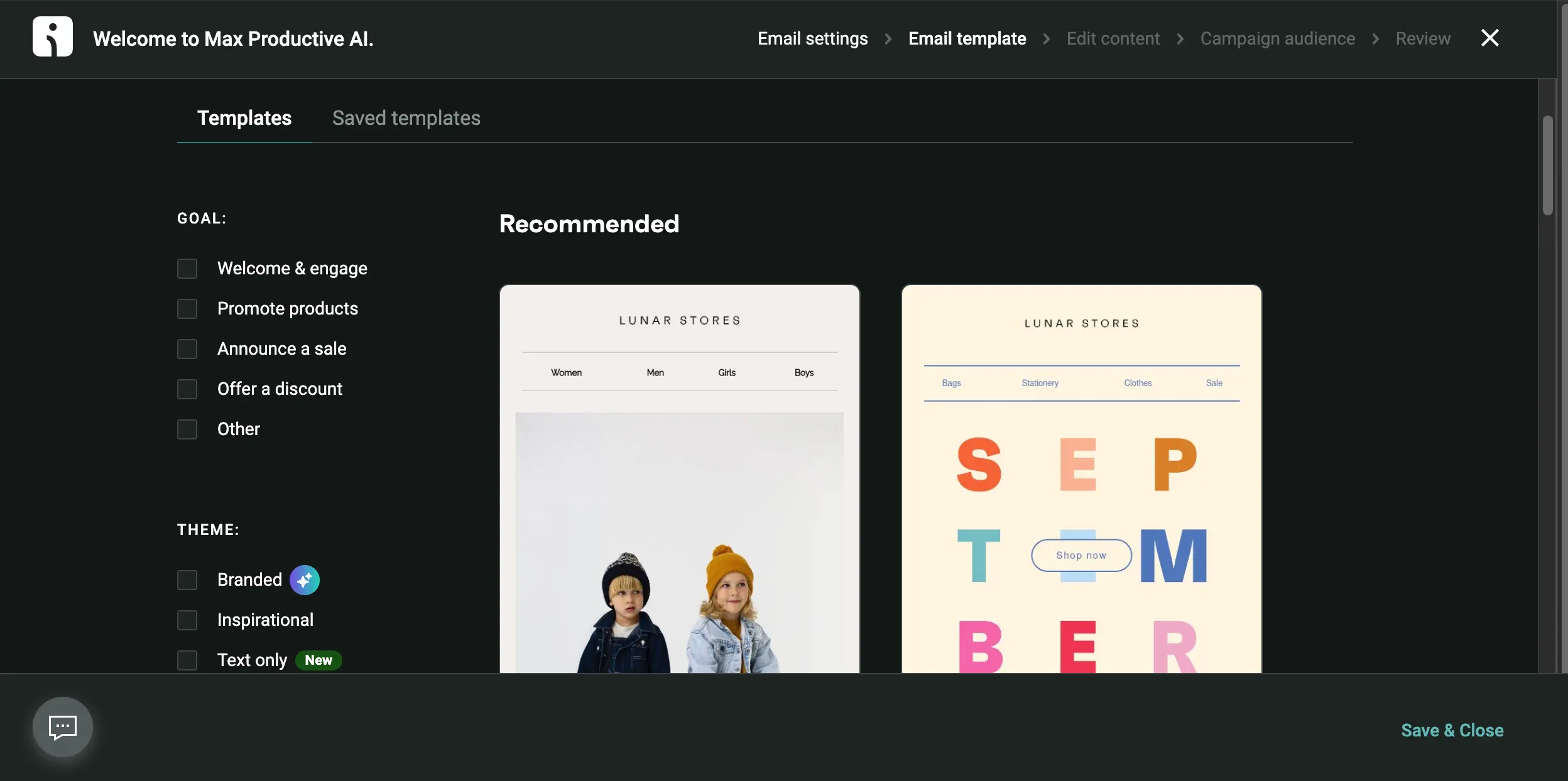
The campaign builder walks you through five steps (settings, template, content, audience, review), and this is the template step. The "Branded" theme is the AI-assisted option that applies your store's visual identity to the layouts, and the newer "Text only" theme is a nice addition for founder-style emails that don't need a design. The templates themselves are clean and ecommerce-shaped, with product grids and navigation bars baked in. The flip side, which we'll come back to, is that design-led brands tend to find the builder limiting once they want to deviate from these layouts.
Want to see how the workflows look connected to your own store?
Try Omnisend →Start on the free plan • Shopify, WooCommerce & BigCommerce appsReports AI (Beta)
Ask questions about your stats instead of building reports
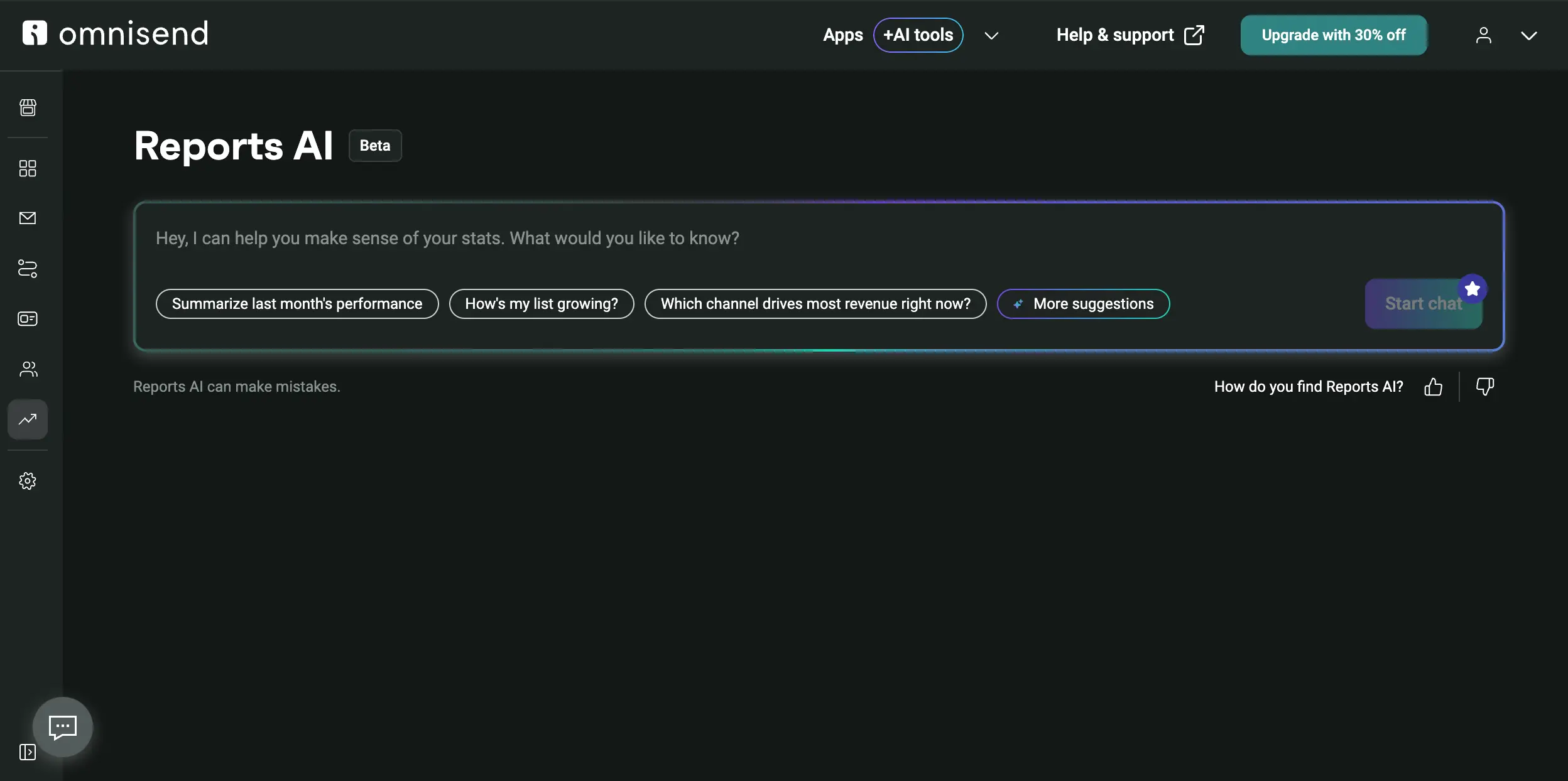
Reports AI is a chat box sitting on top of your account data. The suggested questions ("Summarize last month's performance," "Which channel drives most revenue right now?") show the intended use: a quick answer for a store owner who doesn't want to dig through dashboards. It's a sensible response to the most common complaint about Omnisend, which is that its reporting is thinner than Klaviyo's. It doesn't close that gap on its own, and the Beta disclaimer is there for a reason, but it does make the data you do have easier to reach.
How Omnisend Works
From store connection to the first automated revenue, in four steps.
Connect Your Store
Install the Shopify, WooCommerce, or BigCommerce app (Wix and around 200 other integrations are available too) and Omnisend syncs your products, orders, and customers. That order data is what makes the rest of the platform work: it powers the triggers for cart and browse abandonment, the product recommender, and the RFM grouping that sorts customers by recency, frequency, and spend. Shopify is the smoothest path. WooCommerce works, though it's where we see the most user complaints about connection bugs.
Capture Subscribers
Signup forms, popups, landing pages, and multi-step forms collect email and SMS consent together, which matters because SMS compliance is stricter than email. The Forms AI Assistant will build a popup or promo form from a one-line prompt if you don't want to design one. Landing pages are the weak link. They can't sit on a custom domain, so they work for a quick giveaway page and not as a permanent part of your site.
Switch On the Workflows
Pick a pre-built workflow, choose the email-only or email-plus-SMS version, edit the copy, and activate it. Welcome, cart abandonment, browse abandonment, post-purchase, and special occasions cover the essentials, and each one already contains Omnisend's recommended timing. Here's the thing: for a typical small store, this step is the whole product. Get the cart flow and the welcome series live and you've captured most of what any platform in this category can do for you.
Send Campaigns and Read the Results
One-off campaigns go through the five-step wizard with the template gallery and AI writer. Send Time Optimization, new in August 2026, picks a send time per contact based on when they've opened, clicked, or bought before. Then Reports AI and the standard dashboards show you revenue by campaign and automation. The standard reports are fine for a small team; a data-heavy brand will miss Klaviyo's per-flow attribution depth.
Manage It from an AI Assistant
Omnisend exposes your account to Claude and other LLMs through the Model Context Protocol. In practice that means you can ask an assistant to pull campaign results, draft a segment, or adjust an automation without opening the app. It's early, and you'll still want to check what the assistant changed, but it's further along than most email platforms have gone with agent access.
Check the SMS Rules Before You Commit
In May 2026 Omnisend moved SMS to the Pro plan for new subscribers. If you sign up today and want text messages in your cart flow, you need Pro ($59/month entry), not Standard. Existing Standard customers from before that date keep SMS. If SMS is a side channel for you, the Standard plan plus web push still covers a lot; if it's central, budget for Pro from the start.
Key Omnisend Features
What you're working with, and where each feature sits on the maturity curve.
Pre-Built Ecommerce Automations
Welcome, cart abandonment, browse abandonment, post-purchase, back-in-stock, order confirmations, and occasion flows, each shipped with triggers and timing already set. This is the feature the whole platform is organized around, and it's why setup takes an afternoon instead of a few weeks.
Email, SMS, and Web Push in One Editor
All three channels live in the same workflow canvas, so a cart flow can send an email, wait, then follow up by SMS or push. Web push is included at every tier. Klaviyo bills SMS through a separate credit pool; Omnisend folds it into the Pro plan with per-message rates from about $0.007.
Segmentation and RFM
Segments built on purchase and browsing behavior, plus automatic RFM grouping into buckets like loyal, at-risk, and lapsed. The AI Segment Builder lets you describe an audience in plain English. There is one gap users run into. You can't filter by how much someone spent inside a specific date range, so a clean "VIPs this quarter" segment is harder to build than it should be.
Email Editor, Templates, and AI Writer
Drag-and-drop editor with product blocks, discount blocks, and a template gallery filtered by goal and theme. The AI writer drafts body copy, subject lines, and preheaders in place, and a Canva integration syncs designs across. Good enough for most stores; restrictive if you have a designer who wants full layout control.
Forms, Popups, and Landing Pages
Popups, embedded forms, multi-step forms that collect email and SMS consent in one go, spin-to-win style promos, and simple landing pages. The Forms AI Assistant generates a form from a prompt. The landing pages can't use a custom domain, which is the main reason we'd keep them for short campaigns.
Reports AI
A chat assistant over your sales, campaign, and automation data. Ask which channel drove the most revenue last month and it answers in a sentence. Useful for owners who don't live in dashboards. It's still in Beta, and it can only summarize data Omnisend already collects, so it doesn't add the per-flow attribution depth larger brands ask for.
Send Time Optimization
Added in August 2026. Instead of one send time for the whole campaign, each contact gets the email at the hour they've historically opened, clicked, or bought. Klaviyo and Brevo have had similar features for a while, so Omnisend is catching up here, not leading. Still a welcome addition.
AI Assistant Access via MCP
Connect Claude or another LLM to your account and manage campaigns, segments, and automations through conversation. Few email platforms offer this yet. It's a power-user feature for now, handy for pulling numbers and making small changes, and you'll want to review anything it edits before it goes live.
Beyond the grid, you get a product recommender that drops personalized picks into emails based on browsing and purchase history, A/B testing on campaigns, and a customer profile view that shows every touchpoint. None of this is unique on its own. What sets Omnisend apart is that all of it comes pre-wired for a store and works on the free plan, which is a different proposition from stitching together an email tool, an SMS app, and a push service yourself.
Every feature above is available to test on the free plan:
Try Omnisend →250 contacts • 500 emails/month • No upgrade needed to build workflowsOmnisend Pricing Plans
Three plans, priced by contacts rather than send volume. Prices below are the entry point for each tier.
Free
- ✓ Up to 250 contacts
- ✓ 500 emails per month
- ✓ 500 web push notifications
- ✓ One-time 60 SMS trial
- ✓ Automation, segmentation, AI tools
- ✓ Omnisend branding on emails
Standard
- ✓ From 500 contacts, scales with list
- ✓ Email credits = contacts × 12 per month
- ✓ Unlimited web push
- ✓ Branding removed
- ✓ 24/7 live chat support
- ✓ $11.20/mo with 3-month prepay
Pro
- ✓ Unlimited emails
- ✓ SMS included, billed per message
- ✓ SMS sending to 200+ countries
- ✓ Full AI feature set
- ✓ Unlimited web push
- ✓ Account expert at $400+/mo spend
Important: accounts created on or after May 4, 2026 get SMS on Pro only. Earlier Standard subscribers keep it.
Pricing last verified August 2026. Visit Omnisend for current rates and the full contact-tier calculator.
Is It Worth the Money?
Independent comparisons put Klaviyo at around $240 a month for 10,000 contacts against Omnisend's Standard rate, and the gap widens on email-plus-SMS bundles at 50,000 contacts. That money buys you a lighter reporting layer and shallower segmentation, so the saving comes with a trade-off. For a store that mainly needs the core flows running well, it's one worth making.
Against the rest of the category, Omnisend pricing sits in the middle. Mailchimp starts at $13/month but leaves automation off its free plan; Brevo starts at $9/month and charges per email sent rather than per contact, which makes it far cheaper for large lists you email rarely; ActiveCampaign starts at $15–19/month with no free plan and lands near $149/month at 10,000 contacts; and Klaviyo starts at $20/month and is 35–55% more expensive at comparable tiers. Omnisend isn't the cheapest option on that list, but it's the cheapest one built specifically for a store.
Detailed Pros & Cons
What holds up after using the platform and reading through the user feedback.
✓ Pros
Contact-based pricing that stays well under Klaviyo's at every tier we checked, with a prepay discount on Standard and unlimited emails on Pro. Klaviyo's 2025 switch to billing on active profiles pushed a lot of stores to look around; Omnisend is where many of them landed.
Automation, segmentation, forms, and the AI tools all work on the free tier. The limits are on volume, not on features. That makes it a proper evaluation environment: connect a store, build the flows, and decide from your own screens instead of a feature comparison chart.
Email, SMS, and web push in the same canvas, with a push channel included at every tier. You don't need a separate SMS app or a push service, and you don't need to keep contact lists in sync across tools. For a small team, that's fewer logins and fewer things to break.
The automation library is the best onboarding we've seen in an ecommerce email tool at this price. Filters by goal and type, email-only or email-plus-SMS variants, and timing already set. A store owner with no marketing background can have cart recovery live before lunch.
Reviewers consistently score ease of use around 4.6 to 5 out of 5, and that matches our experience. The campaign wizard is linear, the editor is forgiving, and nothing requires you to understand data modeling. You'll get further, faster, with less expertise than Klaviyo asks for.
AI writer, segment builder, forms assistant, Reports AI, Send Time Optimization, and MCP access all arrived within roughly a year. Not every piece is finished, but the direction is clear and the features are aimed at things a store owner does every week, not at demos.
✗ Cons
Every trigger, block, and report assumes a storefront. If you sell services, run a B2B pipeline, or publish a newsletter, you'll be fighting the product. ActiveCampaign, Brevo, or Beehiiv are better homes for those businesses, and no amount of workaround turns Omnisend into one.
Multiple independent reviews flag the same thing: analytics are lighter than Klaviyo's, with no predictive lifetime value, no churn modeling, and per-flow revenue attribution that isn't as granular. Reports AI makes existing data easier to ask about, but it doesn't add data that isn't there.
The headline miss is filtering contacts by spend inside a chosen date window. That makes quarterly VIP segments awkward. The RFM buckets cover a lot of ground, but brands that live on behavioral segmentation will notice the ceiling.
Omnisend's own Q1 2026 benchmark claims an inbox rate near 98%. Independent tests tell a different story, with one scorer finding weak placement on Microsoft-hosted domains and Reddit threads reporting spam-folder issues on Outlook and Yahoo. We can't settle this from a free account. Test with your own domain and a seed list before migrating.
For anyone who signed up after the May 2026 change, SMS is Pro-only. That turns a $16 entry point into a $59 one if texting matters to you. Before the accompanying per-message price cut, one comparison also found Omnisend's SMS costs at high volume ran well above Klaviyo's, so check the rate card at your expected volume.
The email builder is fast because it's opinionated. Design-led brands find it restrictive once they want layouts the templates don't anticipate, and landing pages can't run on your own domain. Add in chat-and-email-only support with no phone line, plus recurring WooCommerce integration complaints, and you have the reasons this isn't a five-star review.
Omnisend vs Klaviyo and Other Alternatives
How Omnisend stacks up against the platforms stores most often shortlist alongside it.
| Feature | Reviewed Omnisend | Klaviyo | Mailchimp | Brevo |
|---|---|---|---|---|
| Starting Price | $16/mo | $20/mo | $13/mo | $9/mo |
| Free Plan | ✓ 250 contacts, automations included | ✓ 250 contacts | ✓ 500 contacts, no automation | ✓ 300 emails/day |
| Pricing Model | Per contact | Per active profile | Per contact | Per email sent |
| Built-in SMS | ✓ Pro plan (new accounts) | Separate credit pool | Paid add-on | Pay-as-you-go credits |
| Channels | Email, SMS, web push | Email, SMS, mobile push, WhatsApp | Email, SMS add-on | Email, SMS, WhatsApp, live chat |
| Ecommerce Automations | Pre-built store workflows | Pre-built, deeper data | Generic, paid plans only | Basic store flows |
| Customer Data | Profiles + RFM | CDP + predictive models | Audience dashboard | Sales pipeline CRM |
| Best For | Stores under ~$3M revenue | $3M+ DTC brands | General small business | Large lists, infrequent sends |
Which Tool Is Right For You?
Omnisend
ReviewedBest for: Shopify, WooCommerce, and BigCommerce stores that want email, SMS, and push from one tool without a data team or a Klaviyo-sized bill. The sweet spot is a store doing under a few million a year that needs cart recovery, welcome, and post-purchase flows live fast, and that values a working free plan over predictive analytics it won't use yet.

Klaviyo
Closest RivalBest for: DTC brands that have outgrown the mid-market and need a customer data platform, predictive lifetime value and churn scores, and segmentation that goes several layers deeper than Omnisend's. You pay for it, usually a third to a half more at the same list size, and the learning curve is steeper. It's the Omnisend vs Klaviyo decision most growing stores eventually face. See our seven-difference comparison →

Mailchimp
General PurposeBest for: Businesses that aren't purely a store, or that need Mailchimp's wider integration catalog (it lists well over 300 apps) more than store-specific automation. Its free plan excludes automation and SMS is a paid add-on, which is why independent head-to-heads tend to favor Omnisend for ecommerce. Mailchimp does have one thing going for it here, which is that at least one independent deliverability test put it clearly ahead.
Brevo
Budget + CRMBest for: Large lists you email infrequently, since Brevo charges per email sent with unlimited contacts, and teams that want a sales pipeline CRM bundled in. It adds WhatsApp and live chat as channels. Its ecommerce automation is basic next to Omnisend's, so pick Brevo when the cost structure fits and store-specific flows are a secondary need.

ActiveCampaign
B2B AutomationBest for: B2B, SaaS, and service businesses, or hybrid brands with a sales team, that need a built-in CRM, lead scoring, and multi-branch automation logic beyond what ecommerce templates cover. Its automation engine is the most capable on this page. There's no free plan (14-day trial instead), SMS is a paid add-on, and at 10,000 contacts it costs a little more than Omnisend.

GetResponse
Webinars & FunnelsBest for: Marketers who sell courses, coaching, or lead-gen offers alongside products and want webinars, sales funnels, and a broader AI suite (including a website builder) in the same subscription. None of that exists in Omnisend. For a pure store, GetResponse's ecommerce flows are more generic and SMS sits on higher tiers, so Omnisend deploys faster.

Moosend
Budget EcommerceBest for: Small stores and lean teams that want ecommerce AI features (product recommendations, predictive audiences) at one of the lowest price points in the category, and don't need SMS or push. Moosend is email-only, so you're trading a smaller bill for a single channel. Worth a look if Omnisend's Pro plan is more than you want to spend.
Two situations the table doesn't cover. If SMS is already a quarter or more of your retention revenue and someone owns it full-time, a Shopify SMS specialist like Postscript (from $99/month, US and Canada only, no email) can out-earn a bundled tool despite the higher base fee; below that threshold, Omnisend's bundled SMS pays back better. And if you're a creator or publisher rather than a store, Beehiiv is built for newsletters in a way none of the ecommerce platforms are.
Frequently Asked Questions
Should You Try Omnisend?
For most small and mid-size online stores, yes. Omnisend does the job stores hire this kind of tool for: cart recovery, welcome, and post-purchase messaging across email, SMS, and push, live within a day, no consultant needed, at a price that leaves room in the budget. The free plan lets you confirm that with your own store connected before you spend anything, and the 2026 AI additions are useful day to day rather than press-release material.
The caveats deserve a careful read. Reporting and segmentation have a ceiling that larger brands will hit. Deliverability results from independent testers don't match Omnisend's own benchmarks, so run your own test. And the SMS-to-Pro change means the true entry price for a texting-heavy store is $59, not $16. If you're B2B, a service business, or a publisher, this isn't your platform at all.
Our Recommendation
Connect your store on the free plan, switch on the cart abandonment and welcome workflows from the library, and send a test campaign to a seed list that includes Gmail, Outlook, and Yahoo addresses. If the flows fit and the inbox placement holds, move to Standard (or Pro if you need SMS) and run it alongside your current tool for a month before cutting over. Low risk, and you'll know within weeks whether the Klaviyo premium is something you'd miss.