

Superlist
The spiritual successor to Wunderlist—a beautifully designed task management and note-taking app with AI meeting notes, real-time collaboration, and infinite subtask nesting. Built by the same team, reimagined for 2026.
Try Superlist Free →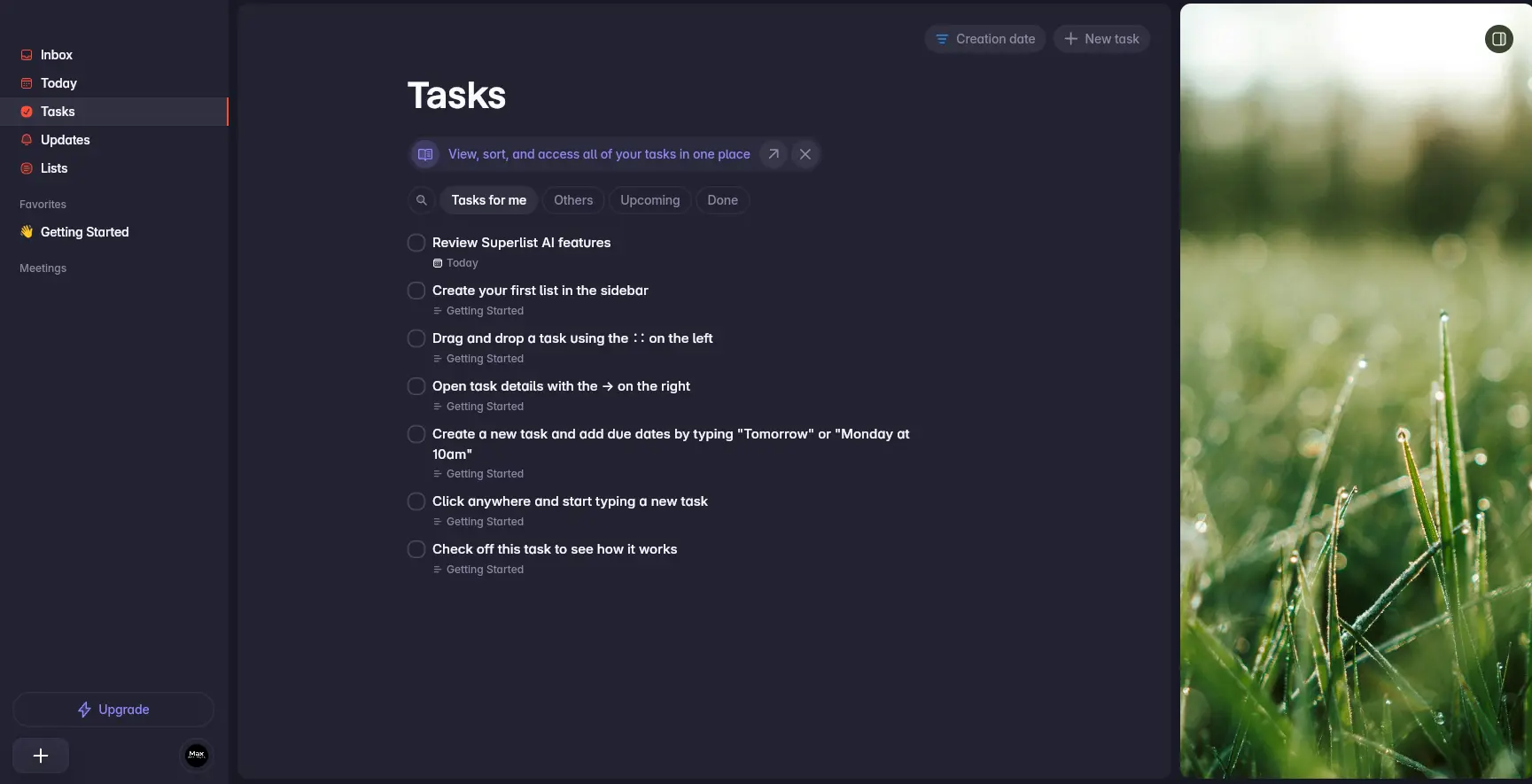
Best-Designed Task App
with Innovative AI Meeting Notes
Superlist is the most visually impressive task management app on the market in 2026, built by the same team behind the beloved Wunderlist. Its AI Meeting Notes feature—which records calls without a bot and auto-generates tasks—is a genuine differentiator that no direct competitor in the to-do app space matches. While the app is still maturing in some areas, its generous free tier and thoughtful design make it a compelling choice for individuals and small teams.
✓ What We Love
- Stunning, best-in-class interface design
- AI Meeting Notes with bot-free recording
- Generous free plan—unlimited tasks & notes
- Infinite subtask nesting for complex projects
! Could Be Better
- Occasional sync inconsistencies reported
- No native Windows desktop app
- Missing calendar view & advanced filters
What Is Superlist?
A comprehensive overview of the app, its origins, and who it's built for.
Superlist is a modern task management and note-taking app created by Christian Reber—the original founder of Wunderlist, the beloved to-do app that Microsoft acquired in 2015 for an estimated $100–200 million and eventually discontinued in 2020. After unsuccessfully trying to buy Wunderlist back from Microsoft, Reber founded Superlist Software GmbH in Berlin in 2020 to build its spiritual successor. After years of development (including being showcased at Google I/O 2022 as a Flutter-built app), Superlist officially launched its v1.0 on February 12, 2024.
The Superlist app positions itself as "the home for all your lists"—bridging the gap between lightweight personal to-do apps (like Apple Reminders or Google Tasks) and heavier project management tools (like Asana or ClickUp). It's designed for people who want something more capable than basic reminders but don't need the complexity of enterprise project management software. The company has raised approximately $13 million in funding from investors including EQT Ventures, Cherry Ventures, and WndrCo.
What makes the Superlist app genuinely stand out is its design. Multiple independent reviewers—including TechRadar, Efficient App, and Product Hunt users—have praised it as having the best interface in the task management category. Thoughtful micro-interactions like satisfying completion sounds, hand-drawn squiggle dividers, and smooth animations make everyday task management feel genuinely enjoyable rather than purely functional.
Beyond design, Superlist's most innovative feature is its AI Meeting Notes capability, launched in May 2025. Unlike other to-do apps, Superlist can record your Zoom, Google Meet, Teams, or Slack meetings without adding a visible bot, transcribe conversations in real time, and automatically generate actionable tasks with assigned owners and due dates. This transforms it from a simple task manager into a meeting-to-action pipeline—a unique proposition in the to-do app category.
Who Is Superlist Best For?
Superlist is ideal for freelancers and solopreneurs who want a beautiful all-in-one tasks + notes app, couples and families sharing grocery lists and travel plans, small teams (2–10 people) needing lightweight collaboration, former Wunderlist users looking for a modern successor, and individuals managing both personal and professional tasks who want them elegantly separated in one place.
As of February 2026, Superlist maintains a 4.5/5 rating on the Apple App Store (379+ ratings) and 4.2/5 on Google Play (1,100+ reviews). It's available natively on macOS, iOS (including iPad and Apple Vision Pro), Android, and as a web app. The app supports full offline mode and includes integrations with Gmail, Google Calendar, Slack, GitHub, Linear, Figma, and Microsoft To Do.
See Superlist in Action
Real screenshots from the platform showing key views and the task management workflow.
Tasks View & Management
Your central hub for viewing, sorting, and managing all tasks
The Tasks view provides a clean overview of all your tasks across every list. Filter tabs let you quickly switch between tasks assigned to you, tasks for others, upcoming deadlines, and completed items. The sidebar navigation gives instant access to Inbox, Today, Tasks, Updates, and Lists—keeping everything one click away. Notice the gorgeous nature wallpaper on the right, one of Superlist's signature design touches.
Today View & Task Creation
Plan your day and create new tasks with rich detail panels

The Today view focuses on what needs your attention right now. When you click on a task, a detail panel slides open on the right showing due date, assignee, priority level, labels, and a content area where you can add subtasks or notes. The calendar integration prompt at the top lets you connect Google Calendar so your meetings appear alongside tasks—turning the Today view into a true daily planner.
Inbox View
Capture everything quickly—organize later

The Inbox is your default dumping ground for new tasks and ideas. Following the GTD (Getting Things Done) methodology, you capture everything here first, then organize later—moving tasks to specific lists, adding due dates, or assigning them to team members. The tip banner at the top explains that the Inbox is for managing all new and incoming tasks: create, move, schedule, and more. This approach keeps you in flow without the friction of choosing where to file things immediately.
Lists Dashboard
Organize everything into dedicated lists with favorites and meetings

The Lists dashboard shows all your lists in one place. Star important lists to pin them as favorites in the sidebar for quick access. The tab filter lets you switch between All lists and Meeting notes. You can create new standard lists or dedicated meeting note lists from the top toolbar. This is also where you manage shared lists with team members—each list can be shared with specific people for real-time collaboration.
AI Meeting Notes (macOS)
Record, transcribe, and turn meetings into actionable tasks—without a bot

Superlist's AI Meeting Notes feature is currently available exclusively on macOS, where the native app can capture both microphone and system audio for optimal transcription quality. Once a meeting is scheduled and recorded, the AI transcribes the conversation, generates a summary, and creates actionable tasks with assigned owners and due dates. The meeting transcript appears directly within the meeting list, making it easy to reference decisions alongside your tasks. You can also chat with the AI about the transcript to generate executive summaries or clarify specific discussion points.
Ready to experience the most beautifully designed task app available?
Try Superlist Free →Free plan available • No credit card requiredHow Superlist Works
From download to organized productivity in four simple steps.
Create Your Account & Download
Sign up at superlist.com or download the native app from the Mac App Store, iOS App Store, or Google Play. You can start using the free plan immediately—no credit card required. The free tier includes unlimited tasks and notes, up to 5 private and shared lists, and 500MB of storage. Log in with email, Google, or Apple SSO, and you're ready to go in under a minute.
Capture Everything in the Inbox
Superlist follows the GTD principle: capture first, organize later. Use the Inbox as your default dumping ground for all tasks and ideas. Type naturally—"Dentist Friday at 2pm"—and Superlist's natural language parsing automatically extracts the due date. On mobile, use Quick Add widgets on your home or lock screen to capture tasks in seconds. You can also forward emails to task@mail.superlist.com to create tasks from your inbox.
Organize into Lists & Assign
Move tasks from your Inbox into dedicated lists—one for each project, area of life, or team. Lists support infinite nesting of subtasks, allowing you to break complex projects into deep hierarchies. Add due dates, assign tasks to team members, attach notes and images, and use labels to categorize. The personal/work toggle lets you separate professional tasks from personal ones, so you can disconnect on weekends without losing context.
Meet, Collaborate & Complete
On the Super plan, AI Meeting Notes records your Zoom, Google Meet, or Teams calls without a bot, transcribes them, and auto-generates tasks with owners and deadlines. Collaborate in real-time on shared lists—see changes instantly, chat within tasks, and share read-only views with stakeholders. Use the Today view each morning to focus on what matters, check off tasks with satisfying completion sounds, and let Superlist learn your workflow over time.
Privacy & Security
As a German company, Superlist is subject to strict GDPR regulations. All data transmission uses SSL encryption (HTTPS), and the platform is compliant with the EU-US Data Privacy Framework. Personal data is stored only as long as necessary, and accounts are fully erased 30 days after deletion. Users can request data access, rectification, or deletion at any time under GDPR.
Active Monthly Development
Superlist ships meaningful updates every month. Recent additions include CSV data export (January 2026), custom app icon badges (November 2025), daily planning notifications, Google Calendar sync in Today View, and the headline AI Meeting Notes feature (May 2025). The team's consistent development pace signals a strong commitment to closing feature gaps.
Key Features
Everything Superlist offers for managing tasks, notes, meetings, and team collaboration.
Infinite Subtask Nesting
Break complex projects into deep hierarchies with unlimited levels of subtasks. Unlike Todoist or TickTick (which limit nesting to one level), Superlist lets you mirror the natural structure of any project—no matter how complex.
Embedded Notes & Content
Rich notes live directly inside tasks—bulleted lists, numbered lists, images, and attachments. Create tasks within notes, blending task management and note-taking into a single seamless experience without switching apps.
AI Meeting Notes
Records Zoom, Google Meet, Teams, Discord, and Slack meetings without adding a bot. AI transcribes in real time, generates summaries, and creates actionable tasks with assigned owners and due dates. Currently macOS only.
Voice AI (Talk AI)
Dictate tasks by voice and let AI parse your natural language into structured tasks with due dates and details. Say "Call the dentist next Friday at 2pm" and the task is created automatically. Available on the Basic plan and above.
Real-Time Collaboration
Share lists with team members for real-time task collaboration. Assign tasks, set due dates, chat within tasks for contextual communication, and share read-only views with stakeholders. Personal/work toggle separates professional and personal life.
Make AI (List Generation)
Type a prompt like "plan a birthday party" or "prepare for a job interview" and Superlist's AI generates a complete structured task list for you. Perfect for brainstorming and breaking complex goals into actionable steps.
Email & Slack Summarization
AI reads your Gmail emails and Slack messages, extracts action items, and creates tasks automatically. Stop manually copying action items from long email threads—let the AI surface what actually needs doing.
Cross-Platform & Offline
Native apps on macOS, iOS (including iPad and Apple Vision Pro), and Android, plus a web app for any browser. Full offline mode lets you work without internet—changes sync automatically when you reconnect. Built with Flutter for fast, consistent performance.
Beyond these headline features, Superlist includes natural language date parsing ("tomorrow at 3pm"), recurring tasks for habits and routines, Quick Add widgets for iOS and Android, push notifications across devices, Google Calendar sync in the Today View, and integrations with Gmail, Slack, GitHub, Linear, Figma, and Microsoft To Do. Email forwarding to task@mail.superlist.com lets you turn any email into a task.
Experience all these features—start free, no credit card required:
Try Superlist Free →Free plan includes unlimited tasks & notesSuperlist Pricing Plans
Simple three-tier pricing with a generous free plan—no hidden limits on tasks or notes.
Free
Basic
Super
Payment methods: Credit card, PayPal, iDEAL, Apple App Store, Google Play
How Does Superlist Pricing Compare?
Superlist Basic at $5/month undercuts Todoist Pro ($7/month) while offering unlimited lists, Voice AI, and all integrations. TickTick Premium ($2.80/month) remains the budget leader but lacks AI features. The Super plan at $21/month is only justified if you heavily use AI Meeting Notes—otherwise, the Basic plan covers most needs.
Detailed Pros & Cons
An honest, balanced assessment based on extensive research and independent user feedback.
✓ Pros
Widely praised as the most beautiful task management app available. Thoughtful micro-interactions—satisfying completion sounds, hand-drawn squiggle dividers, nature wallpapers—make daily task management genuinely enjoyable. TechRadar called it the best interface they tested in the category.
Records Zoom, Meet, Teams, and Slack meetings without a visible bot, transcribes conversations, and auto-generates tasks with owners and deadlines. No other pure to-do app offers anything comparable. The AI Chat feature lets you query meeting transcripts for summaries and decisions.
Unlimited tasks and notes for free—no artificial caps on the fundamentals. Up to 5 lists and 5 shared collaborators per list, plus reminders and repeating tasks. Many competitors restrict core features like reminders to paid tiers.
The concept of "lists all the way down" with unlimited nesting makes Superlist adaptable to everything from grocery lists to complex project breakdowns. Todoist and TickTick limit subtasks to just one level—a significant limitation for project-heavy workflows.
Built by the same visionary team that created one of the most popular to-do apps ever. Monthly updates throughout 2025-2026 show consistent improvement—CSV export, Google Calendar sync, daily planning notifications, and more ship regularly.
A thoughtful feature that lets you switch between personal and team views. Disconnect from work tasks on weekends without losing context. This simple toggle addresses a real need for people managing both personal and professional life in one app.
✗ Cons
Some users have reported occasional sync inconsistencies between devices—tasks not appearing immediately or conflicts when editing on multiple devices simultaneously. The team has acknowledged this area is still being refined and ships regular improvements, but it's worth being aware of for mission-critical task management.
Windows users are limited to the web app, which—while functional—doesn't match the native experience on macOS. In a world where many professionals work on Windows machines, this is a notable gap. Linux users face the same limitation.
There's no built-in calendar or timeline view for visualizing tasks across days, weeks, or months. Tasks with due dates appear in the Today view and can sync to Google Calendar, but many users want a native calendar view. Competitors like TickTick, Todoist, and Any.do all offer this.
Advanced filters, labels, and search capabilities aren't as robust as established competitors like Todoist or TickTick. Power users who rely on complex filtered views or tag-based organization may find Superlist's options more basic than expected.
The app currently supports only English and German. For a globally available tool, the lack of broader language support means non-English/German speakers may encounter an interface that's not localized for their language.
With approximately 10 native integrations and no public API, Zapier, or IFTTT connection, Superlist's automation options are limited compared to Todoist (90+ integrations, 8,000+ Zapier connections). Power users who need their task manager to be the central hub of a complex workflow may find this limiting.
Superlist vs Alternatives
How Superlist compares to popular task management and meeting notes tools in 2026.
| Feature | Superlist | Todoist | TickTick | Notion |
|---|---|---|---|---|
| Starting Price | Free / $5/mo | Free / $7/mo | Free / $2.80/mo | Free / $10/mo |
| AI Meeting Notes | ✓ Bot-free (Super) | ✗ | ✗ | ✓ (Business $20/mo) |
| Subtask Nesting | Infinite levels | 1 level | 1 level | Unlimited (database) |
| Calendar View | ✗ (Google Cal sync) | ✓ (Pro plan) | ✓ (Premium) | ✓ |
| Native Windows App | ✗ (Web only) | ✓ | ✓ | ✓ |
| Integrations | ~10 native | 90+ native | ~15 native | 50+ native |
| Voice AI Input | ✓ (Basic) | ✗ | ✗ | ✗ |
| Best For | Design lovers, meeting-heavy teams | Power users, reliability | Budget-conscious, all-in-one | Teams needing docs + tasks |
Which Tool Is Right For You?
Superlist
Best DesignBest for: Freelancers, couples, and small teams who value beautiful design, want AI-powered meeting notes that auto-generate tasks, and need a hybrid tasks + notes app. Ideal if you care about aesthetics, run frequent meetings, and want a modern Wunderlist successor. The generous free plan lets you evaluate without commitment.
Todoist
Most ReliableBest for: Power users who need rock-solid sync reliability across every platform (including Windows, Linux, and Apple Watch), 90+ integrations, and advanced features like priority levels, filters, labels, and calendar views. Todoist has been refined since 2007 and is the most mature option. Pro plan at $7/month ($60/year).

Fathom
Free Tier AvailableBest for: Teams focused primarily on meeting transcription and note-taking rather than task management. Fathom offers AI-powered meeting recording, transcription, and summaries with a generous free tier. If your main need is capturing meeting insights rather than managing daily to-dos, Fathom is purpose-built for that workflow.

Fireflies AI
Enterprise Meeting AIBest for: Larger teams and organizations that need comprehensive meeting intelligence—transcription, search across all meetings, topic tracking, sentiment analysis, and CRM integration. Fireflies integrates with 50+ apps and offers advanced analytics that go beyond Superlist's meeting features.

Granola
AI NotepadBest for: Professionals who want an AI-enhanced meeting notepad that combines your own notes with meeting transcription. Granola takes a different approach—you write notes during the meeting, and AI fills in the gaps from the transcript. Ideal for people who like taking their own notes but want AI backup.
MeetGeek
Free Tier AvailableBest for: Teams that want automated meeting recording, transcription, and AI-generated summaries with strong integration into project management tools. MeetGeek focuses entirely on turning meetings into actionable outcomes with automatic highlights and follow-up tracking.
Frequently Asked Questions
Should You Try Superlist?
Superlist is the most beautifully designed task management app available in 2026, and its AI Meeting Notes feature is a genuine innovation that no direct competitor in the to-do space matches. The Wunderlist DNA shines through in every interaction—from the satisfying task completion sounds to the thoughtful personal/work toggle. The generous free plan means you can evaluate it thoroughly without any financial commitment.
The app is still relatively young (v1.0 launched in February 2024) and continues to mature in areas like sync reliability, advanced filtering, and its integration ecosystem. These are real considerations, but the team ships meaningful updates monthly and has the vision, funding, and pedigree to close the gaps. If reliability is your absolute top priority today, Todoist remains the safer choice. But if you value design, innovation, and a forward-thinking approach to productivity, Superlist deserves a place on your home screen.
Our Recommendation
Start with the free plan—it includes unlimited tasks and notes, which is enough for a thorough evaluation. Focus on the core task management experience first: create lists, test subtask nesting, try the natural language input, and sync across your devices. If you run frequent meetings, the Super plan's AI Meeting Notes is worth a trial. Superlist is at its best for personal productivity and small team collaboration where design and enjoyment matter as much as raw feature count.
Ready to Try the Most Beautiful Task App in 2026?
Join thousands of users managing tasks, notes, and meetings with Superlist—from the creators of Wunderlist