Notta
Notta records your Zoom, Teams, Google Meet and Webex calls, transcribes audio and video in 58 languages, and turns the transcript into summaries, slides and infographics. If your meetings don't all happen in English, it's the first tool to look at.
Try Notta →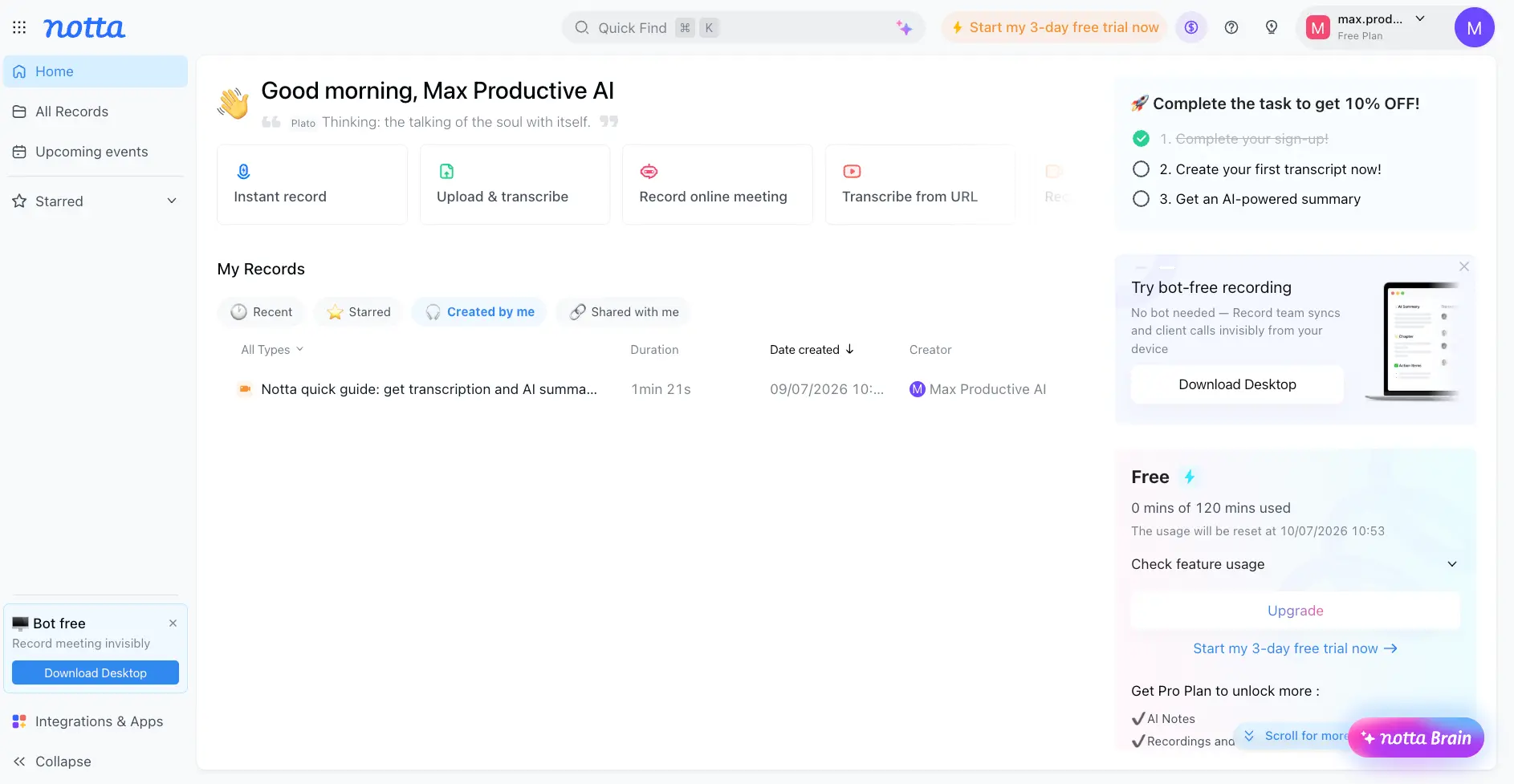
The Multilingual Note-Taker,
Held Back by a Tight Free Plan
Notta gets one thing right that almost nobody else in this category does: languages. Fifty-eight of them for transcription, bilingual transcripts shown side by side, and live translation while the call is happening. Otter AI handles six. Transcription on clean audio is quick and accurate, and Pro at $8.17 a month costs less than most of the competition. The catch is the free plan. It cuts every recording off at three minutes, so you'll need the 3-day trial or a paid plan to find out if it works for you.
✓ What We Love
- Widest language coverage in the category, with bilingual transcripts
- Quick, accurate transcription, about 5 minutes per hour of audio
- Notta Brain turns a transcript into slides, an infographic or a mind map
- Cheaper than Otter AI and Fathom on paid plans
! Could Be Better
- Free plan cuts every recording off at 3 minutes
- AI summaries are average; the transcript is the strength, not the notes
- Billing complaints from users, and translation costs extra
What Is Notta?
A transcription tool first and a meeting assistant second. That order matters for who it suits.
Notta is an AI transcription and meeting notes tool. It takes in speech from three places: live meetings on Zoom, Microsoft Teams, Google Meet and Webex; audio and video files you upload or link to from YouTube, Google Drive or Dropbox; and in-person conversations captured with the mobile app, the Chrome extension or a small hardware recorder called Notta Memo. Whatever the source, you end up with a searchable transcript with speaker labels and timestamps, plus a set of AI tools to do something useful with it.
Most tools in this space started life as English-language Zoom bots. Otter AI, Fathom, Fireflies AI. Other languages came later, and it shows. Notta went the other way round. Its whole pitch has always been language coverage: transcription in nearly 60 languages, bilingual transcripts that put two languages next to each other, and translation while the meeting is still going. If your team is split between Tokyo, Paris and Dubai, that's the feature list you actually need, and it's why Notta keeps turning up in independent reviews as the pick for global teams.
The AI side is called Notta Brain. It lives in a panel next to the transcript, answers questions about this recording or any recording you've ever made, and produces whatever format you ask for: key takeaways, action items, meeting notes, a list of risks, a slide deck, an infographic, a mind map. That's a wider menu than most rivals offer. Are the summaries themselves better than the competition's? Not from what I've seen, and reviewers who've tested it next to Fathom and MeetGeek say the same. The transcript is the strong part. The notes are fine.
How We Evaluated Notta
I set up a free Notta account, went through onboarding, transcribed a sample recording, walked through the meeting bot setup for a Google Meet call, and tried Notta Brain's summary and infographic outputs. Pricing comes from Notta's own plans page. The accuracy numbers and the user-sentiment picture come from independent hands-on reviews and public user feedback, not from a lab test. As far as I can tell, nobody has run a properly controlled accuracy benchmark across these tools, so treat accuracy figures as Notta's claims backed up by reviewer experience.
So who is it for? Consultants, agencies and distributed teams who record calls in more than one language, and anyone who transcribes a lot of files rather than just meetings: interviews, podcasts, lectures, YouTube videos. The SRT export makes it a decent subtitle tool as well. If you only work in English and have a light meeting load, a competitor's free plan will serve you better. And if you want talk-time analytics or sales coaching, Fireflies AI or tl;dv go a lot deeper.
See Notta in Action
Screenshots from our test account, from onboarding through to Notta Brain outputs.
Dashboard Overview
Four capture modes up top, your records below, plan usage on the right
The home screen is tidy. Four capture options in a row, your recordings underneath, and a panel on the right showing exactly where you stand on the free plan, reset date included. Two things caught my eye. The "Try bot-free recording" box points to the desktop app, which records calls from your machine with no Notta Bot joining. And the "Start my 3-day free trial" link shows up three times on a single screen, which tells you how keen Notta is to move you off the free tier. I'll get to why in the pricing section.
Upload & Transcribe Options
The onboarding screen lays out every way to get audio into Notta
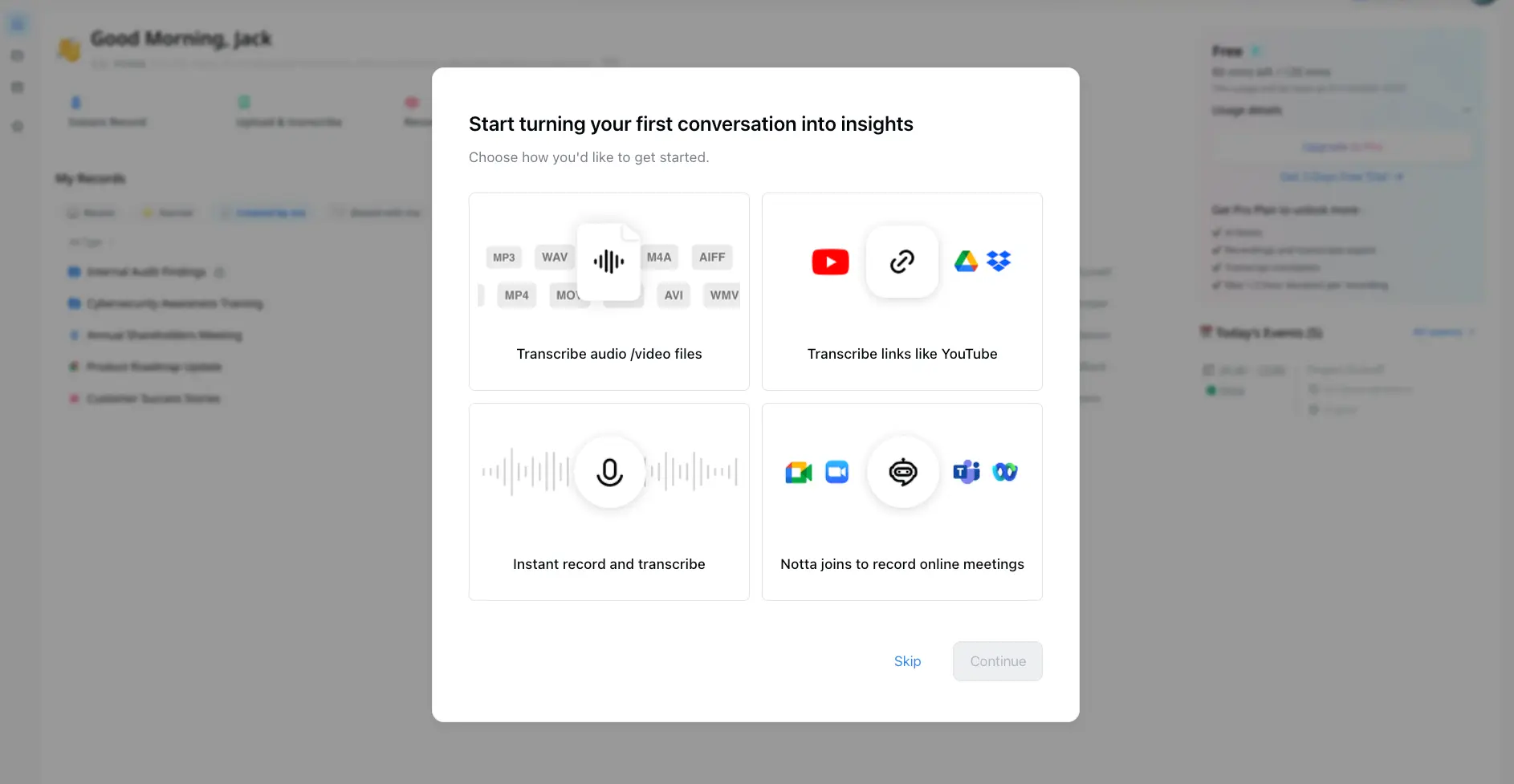
This screen explains why Notta competes with transcription services like HappyScribe as much as with meeting bots. Half of it is about files and links, not calls. Paste a YouTube URL and you get a transcript without downloading a thing. The format list covers the usual suspects. One detail worth knowing: the free plan gives you 50 uploads a month, Pro doubles that to 100, and the 3-minute cap on free-plan conversations applies to uploaded files too.
Record Online Meeting Setup
Paste a meeting link, pick a language, configure the bot, go
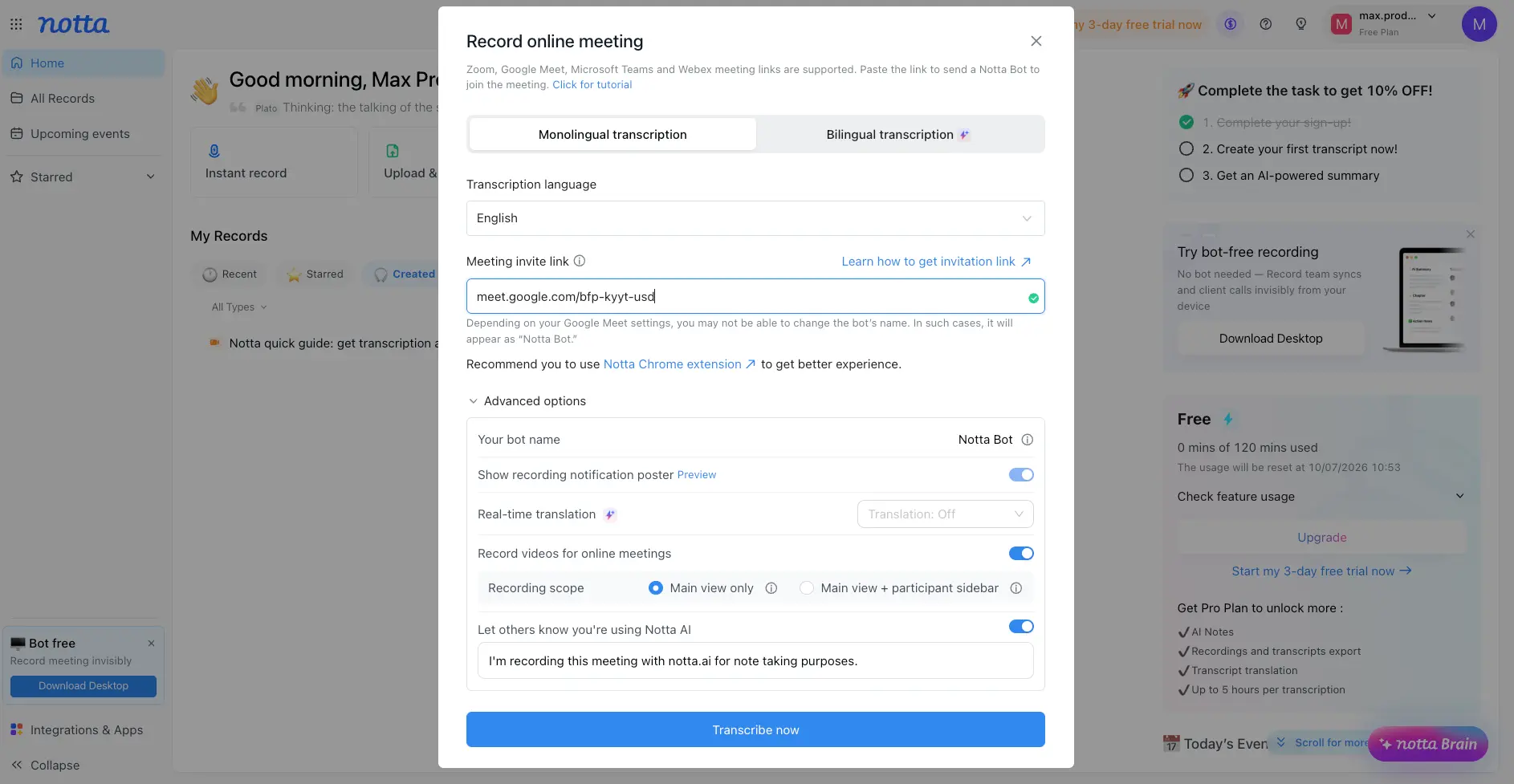
The bot setup gives you more control than most. Pick the transcription language or flip to bilingual mode, rename the bot, toggle a recording-notice poster, switch on live translation, and choose whether to record video and how much of the screen. There's a ready-made disclosure line the bot posts in chat: "I'm recording this meeting with notta.ai for note taking purposes." Small thing, but it handles the consent etiquette for you. Notta also nudges you toward its Chrome extension for a "better experience", which I read as a quiet admission that the web-only bot flow isn't the best version of the product.
Want to see how Notta handles your language mix?
Try Notta →Free plan available • Paid plans from $8.17/moTranscript View with Notta Brain
Timestamped transcript on the left, AI assistant on the right
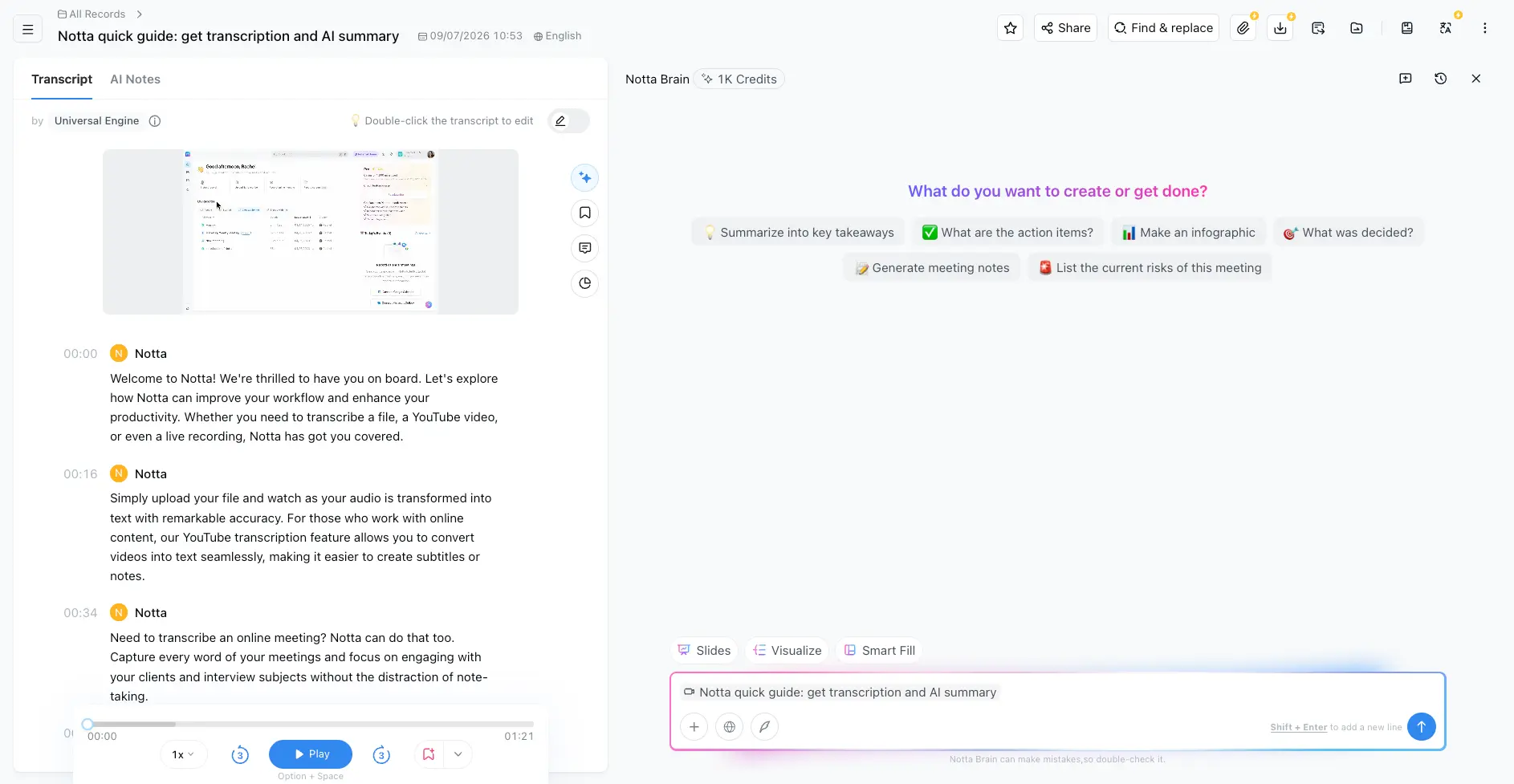
The transcript looks the way you'd hope. Speaker labels, timestamps, an audio player pinned to the bottom, and double-click on any line to edit it. Find & replace sits up top, which is handy when the engine has misheard a client's name twenty times. The Notta Brain panel opens with prompt chips (summarize into key takeaways, list action items, what was decided, list the risks) and buttons for Slides, Visualize and Smart Fill. Note the credit counter next to the name. Notta Brain isn't unlimited. It draws on an allowance, and Notta's own footer reminds you it can get things wrong.
AI Infographic Generator
One click from transcript to a shareable visual summary
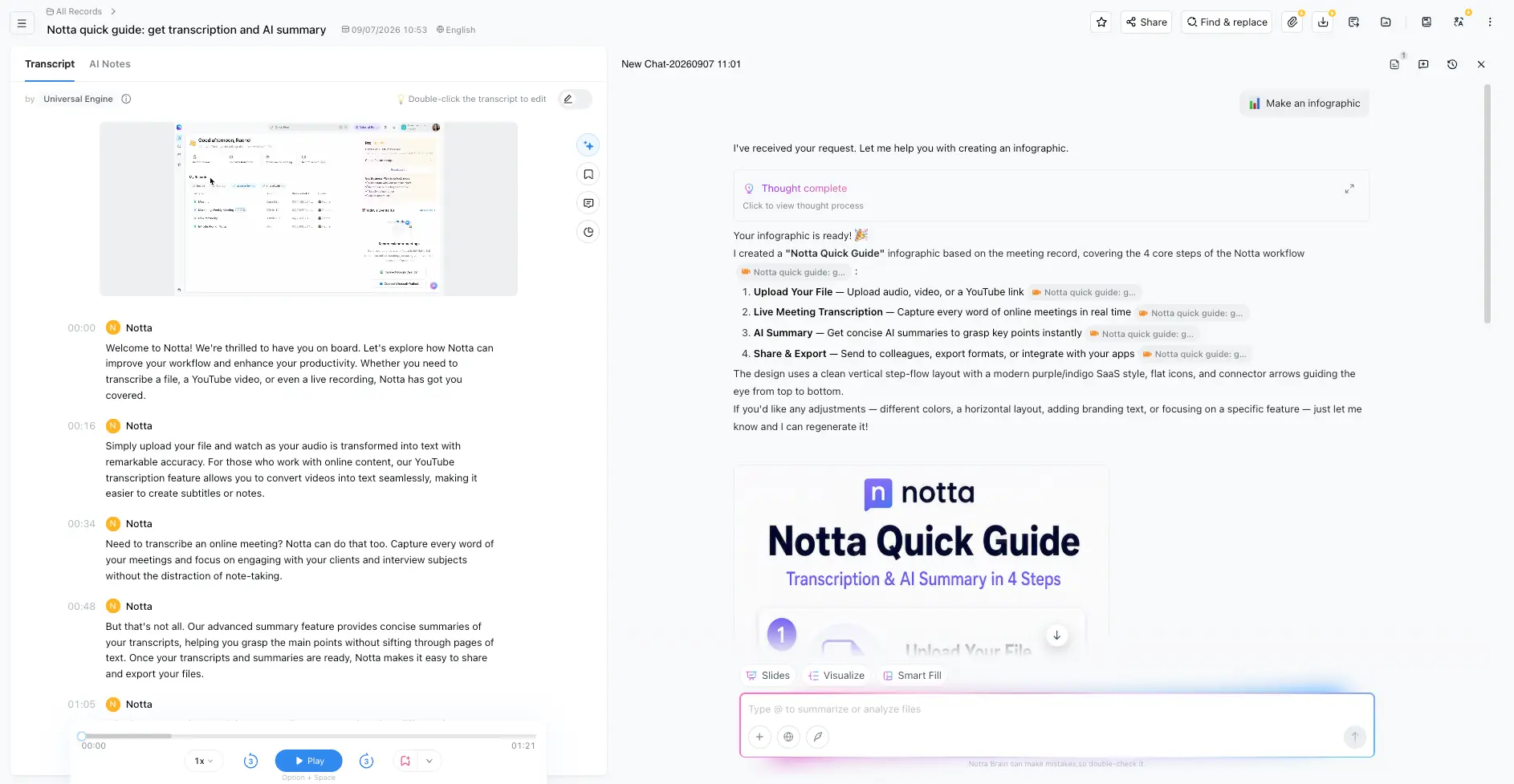
I asked Notta Brain for an infographic from a short recording. It came back with a clean four-step vertical layout in a purple SaaS style, and every step is cited back to the transcript segment it came from. That citation trail is the useful bit, because you can check each claim in the visual against what was actually said. The design itself is generic, and I'd restyle it before showing a client, but as a first draft pulled straight from a transcript it's more than most note-takers even attempt. Slides and mind maps work the same way.
How Notta Works
From audio to a shareable output in four steps, whichever way the audio gets in.
Choose How to Capture
Pick your source. Paste a Zoom, Google Meet, Teams or Webex link and a Notta Bot joins the call. Upload an audio or video file, or drop in a YouTube, Drive or Dropbox link. Hit Instant record to capture from your microphone in the browser or the mobile app. Or install the desktop app and record calls with nothing joining the meeting. The bot is the default. The desktop app is what you reach for when a client gets twitchy about an extra participant.
Set Language and Recording Options
Choose the transcription language from the list, or switch to bilingual mode if two languages will be spoken. This is the step Notta gets right and most competitors skip. With Otter, you're mostly assuming English. Bot users can rename the bot, turn on a recording notice, enable live translation and decide whether to record video. Custom vocabulary (Pro and up) lets you pre-load product names and jargon so the engine stops guessing at them.
Review and Edit the Transcript
Transcripts come back quickly. Reviewers report around five minutes of processing for an hour of audio, and short files are near instant. You get speaker labels, timestamps and a synced player. Double-click to fix errors, use find & replace for repeat offenders, and star or bookmark the moments that matter. Speaker identification is the weak spot. It's reliable with the meeting bot and less so with microphone or screen recordings where voices overlap.
Generate, Export, Share
Open Notta Brain and pick an output: takeaways, action items, meeting notes, slides, infographic, mind map. Ask follow-up questions about this recording or your whole library. Then export as TXT, PDF, DOCX, SRT or XLSX (Pro and up), share a link, or push it to Notion, Slack or your CRM (Business). This is where the plan tiers bite. On the free plan you can read your transcript but not export it, and that's usually the moment people decide whether to pay.
Bot or No Bot?
Notta gives you both. The web app sends a visible Notta Bot into the meeting, which is transparent for participants but can feel intrusive on sensitive client calls. The desktop app records from your device with nothing joining. Granola built its entire product around the bot-free idea; Notta treats it as one option among several, which is the more flexible position to be in.
Compliance Notes
Notta offers a HIPAA Business Associate Agreement for teams handling health data, and the Enterprise tier adds SSO and audit logs. If compliance is a hard requirement, ask Notta which plan the BAA is attached to before you buy. The public pricing page doesn't make it clear.
Key Features
What's in the box, and which parts cost extra.
Multilingual Transcription
The headline feature, and the reason to pick Notta over anything else on this page. Nearly 60 transcription languages, against six for Otter AI and around ten for Granola. If your meetings mix English with Japanese, Arabic or Spanish, this is the difference between a usable transcript and a mess.
Bilingual Transcripts & Live Translation
Side-by-side transcription in 23 language pairs, live translation during a call, and transcript translation afterwards. Excellent for cross-border client work. The catch: these are paid add-ons on top of your plan, not part of Pro. Budget for it.
Meeting Bot for Zoom, Teams, Meet, Webex
Paste a link and the bot joins. You control its name, whether it announces itself, and whether it records video. Webex support is rarer than you'd expect in this category. Calendar sync takes care of recurring meetings.
File & URL Transcription
Upload MP3, WAV, M4A, MP4, MOV and more, or paste a YouTube, Drive or Dropbox link. Pro handles recordings up to five hours long. This is where Notta pulls ahead of the pure meeting bots. It's a proper transcription tool, not just something that sits in your calls.
Notta Brain
Chat with one recording or your whole library. Ask what was decided, who owns which action, or what a client said about pricing three calls ago. Same idea as Otter's AI Chat, with a broader set of one-click outputs. It runs on credits, so heavy users will hit the ceiling.
Slides, Infographics & Mind Maps
One click from transcript to a PowerPoint deck, an infographic or a mind map, with each point cited back to its source segment. Polished design? No. Expect to restyle before it goes near a client. But as a way to turn a rambling call into something structured in thirty seconds, it earns its place.
Exports & Integrations
Export to TXT, PDF, DOCX, SRT and XLSX from Pro upward, and SRT makes it a subtitle tool. Business unlocks Notion, Slack, Salesforce, HubSpot, Zendesk Sell, Zoho CRM, Pipedrive and Zapier. Five CRM connectors is more than most rivals, although Fireflies AI does more with the data once it lands in the CRM.
Mobile, Chrome Extension & Notta Memo
iOS and Android apps for in-person recording, a Chrome extension for browser calls, a desktop app for bot-free capture, and a small hardware recorder (Notta Memo) for offline interviews and fieldwork. Few competitors bother with hardware. Whether you need it depends on how often you record away from a laptop.
Two things to keep in mind. First, the feature list is spread across plan tiers more aggressively than the marketing suggests. Export needs Pro, integrations need Business, translation needs an add-on. Second, the AI summary quality, while perfectly serviceable, isn't what you're paying for. Reviewers who've tested Notta against MeetGeek and Fathom tend to call the meeting notes average and the transcript excellent. Buy it for the transcript.
See which features come with each plan:
Check Notta's pricing →Free plan • Pro from $8.17/mo billed annuallyNotta Pricing
A free plan, two paid tiers, and an Enterprise option. Read the limits before the prices.
Free
- ✓ 120 transcription minutes/month
- ✓ 3 minutes max per conversation
- ✓ 50 file uploads/month
- ✓ 10 AI summaries/month
- ✓ Meeting bot for Zoom, Meet, Teams, Webex
- ✗ No transcript export or translation
Pro
- ✓ 1,800 minutes/month
- ✓ Up to 5 hours per recording
- ✓ 100 file uploads/month
- ✓ AI Notes & Notta Brain
- ✓ Export to TXT, PDF, DOCX, SRT, XLSX
- ✓ Transcript translation & custom vocabulary
Business
- ✓ Unlimited transcription
- ✓ Meeting video recording
- ✓ CRM & Zapier integrations
- ✓ Team workspace & usage reports
- ✓ Everything in Pro
- ✓ Priority support
Add-ons: Monolingual translation from about $6-10/mo; bilingual transcription and translation from about $9-15/mo
Enterprise: Custom pricing for 51+ seats with SSO, audit logs and unlimited usage. Contact Notta for a quote
Pricing last verified September 2026. Visit Notta for current rates.
Is It Worth the Money?
At $8.17 a month for 30 hours of transcription, Pro works out to about 27 cents an hour if you use the full allowance. A human transcriber charges $1 to $2 a minute. Even at a fraction of the allowance, one hour of note-taking you no longer have to do covers the month. The maths only breaks if you pay monthly and forget to use it.
Here's the thing about the free plan: it isn't really a trial. Three minutes per conversation is enough to confirm the engine copes with your accent, and nothing more. You can't run a real meeting through it. Notta knows this, which is why the 3-day trial of the paid plans is pushed so hard inside the app. That trial is the one to use if you want a fair look at the product. Set a reminder to cancel if it doesn't stick. User reviews contain enough billing complaints that you don't want to learn that lesson the expensive way.
Against the competition, Pro is well priced. Otter AI Pro is $8.33 a month on annual billing and gets you six languages. Fathom Premium runs $16 to $19. Fireflies Pro is $10, MeetGeek Pro is $9.99, tl;dv Pro is $18. At the Business tier, Notta's $16.67 sits under Otter Business ($19.99) and Fireflies Business ($19), and a long way under tl;dv Business ($59). Where Notta loses is the free tier. Fathom records without limits for nothing, and MeetGeek's free plan includes unlimited AI summaries. If you're paying, Notta is competitive. If you're not, look elsewhere.
Detailed Pros & Cons
The full picture, including the parts Notta's own site leaves out.
✓ Pros
Nearly 60 transcription languages, bilingual side-by-side transcripts and live translation. For a consultant running calls across Europe, the Gulf and Asia, this isn't a nice-to-have. It decides whether the tool works at all. Otter covers six languages. Granola covers about ten. Only MeetGeek and HappyScribe come close on raw language count, and neither does bilingual transcripts the way Notta does.
On clean audio in a supported language, Notta claims accuracy close to 99%, and independent tests back that up as competitive with or better than Otter. Turnaround is about five minutes per hour of audio. For file-heavy work (interviews, podcasts, lectures) this is the part that matters most, and Notta gets it right.
Meeting bot, bot-free desktop recording, browser instant record, file upload, YouTube links, mobile app, Chrome extension, and a hardware recorder. Most competitors offer two or three of these. Notta offers the lot, so one subscription covers meetings, in-person interviews and archive transcription.
Slides, infographics and mind maps generated from a transcript, with each point cited back to the moment it was said. The designs are template-grade, but the citation trail makes them trustworthy first drafts. It's more than the summary-and-action-items menu most note-takers stop at.
Pro at $8.17 and Business at $16.67 on annual billing come in under Otter, Fathom Premium, Fireflies and tl;dv at the equivalent tiers. Pro's 1,800 monthly minutes and five-hour recording cap are generous for one person.
SRT export turns transcripts into subtitles; XLSX and DOCX cover documentation. A HIPAA BAA is available for healthcare teams, and Enterprise adds SSO and audit logs. Those are boxes that matter if you work with regulated clients.
✗ Cons
Three minutes per conversation, 120 minutes a month, no export. Nearly every independent review flags this, and they're right to. You can't evaluate a meeting tool on three-minute recordings. Next to Fathom's unlimited free recording or Otter's 300 minutes, Notta's free tier is the least useful in the category.
The transcript is excellent. The meeting notes built on top of it are average: accurate enough, but generic in structure and no better than what Fathom or MeetGeek produce for less money. If your main goal is a polished set of notes you can forward without touching, Notta isn't the best at that particular job.
User sentiment on Notta splits sharply by platform. It's solid on business-software review sites and poor on consumer review platforms, and the bad reviews cluster around billing: unexpected renewals, refund friction, and plan packaging one reviewer called "aggressive". I didn't run into any of this myself, but the volume is high enough to mention. Use a card you can keep an eye on and note your renewal date.
The features that make Notta special, bilingual transcription and real-time translation, are add-ons priced on top of Pro or Business. A multilingual user's real monthly cost is closer to $15 to $25 than the $8.17 headline. Still reasonable, but not what the pricing page leads with.
Monthly billing costs around 70% more than annual. That's a steep gap, and it pushes new users into a year-long commitment before they've had a full month with the product. MeetGeek, for comparison, keeps monthly and annual pricing much closer together.
The AI assistant draws on a credit allowance rather than being unlimited. My free account showed 1,000 credits. If you plan to generate slides and infographics from every call, check how far that stretches on your plan before you rely on it.
Notta vs Alternatives
How Notta compares with the note-takers most people shortlist alongside it.
| Feature | Reviewed Notta | Otter AI | Fathom | MeetGeek | Fireflies AI |
|---|---|---|---|---|---|
| Entry Paid Plan (annual) | $8.17/mo | $8.33/mo | $16-19/mo | $9.99/mo | $10/mo |
| Free Plan | 120 min/mo, 3 min/conversation | 300 min/mo, 30 min/conversation | Unlimited recording, 5 advanced summaries | 3 hrs/mo, unlimited summaries | Unlimited transcription, 400 min storage |
| Languages | 58 + bilingual | 6 | 38+ | 100+ | Multiple |
| Bot-Free Recording | ✓ Desktop app | ✓ Desktop (new) | Beta | ✓ | ✗ |
| File / URL Upload | ✓ Extensive | 3 lifetime imports on free | Limited | ✓ | ✓ |
| Standout Strength | Translation & bilingual transcripts | AI Chat over meeting history | Unlimited free tier | Value + monthly billing | CRM sync & analytics |
| Best For | Multilingual teams, transcription-heavy work | English-first teams | Individuals, freelancers | Small teams on a budget | Sales teams |
Notta vs Otter AI: The Short Version
This is the comparison most people are actually making. Notta wins on languages (58 against 6), bilingual transcription, translation, and price at both paid tiers. Otter wins on the free plan, where 300 minutes a month with 30 minutes per conversation is a real trial and Notta's isn't, and on native live captions inside Zoom. On accuracy, no independent test has found a clear winner. Both are good on clean English audio. So it comes down to one question: do your meetings happen in more than one language? If yes, Notta. If no, Otter's free plan and its head start in English make it the safer place to begin. Our Otter AI alternatives guide goes into more detail.
Which Tool Is Right For You?
Notta
ReviewedBest for: Multilingual teams, consultants working across regions, and anyone whose workload is as much uploaded files as live meetings. The bilingual transcripts and translation add-ons are the reason to choose it. The quick transcription engine and the range of capture options are the reasons you'll keep it. Skip the free plan and use the 3-day trial to make up your mind.
Otter AI
Closest RivalBest for: English-only teams that want the most established name and a free plan generous enough to actually try. Otter's AI Chat across meeting history is mature, and its Zoom live captions are native. Language support is narrow and the free plan allows only three file imports ever, so it's a poor fit for transcription-heavy or multilingual work.

Fathom
Best Free TierBest for: Individuals and freelancers who want unlimited recording and transcription at no cost. Fathom's free plan has no minute cap, and its summaries are among the best rated in the category. The trade-offs are a shorter language list (38), a bot-free mode still in beta, and Premium pricing that climbed to $16 to $19 a month in 2026. See how it compares with MeetGeek →
MeetGeek
Budget PickBest for: Small teams that want broad language support (100+), unlimited AI summaries even on the free plan, and monthly billing that doesn't punish you for skipping the annual commitment. MeetGeek's meeting notes are rated higher than Notta's. It lacks Notta's bilingual transcripts and hardware recorder, and free-tier recording caps are tighter.
Fireflies AI
CRM FocusBest for: Sales and customer-facing teams that want transcripts pushed into a CRM with talk-time, sentiment and topic analytics on top. Pro at $10 a month is close to Notta's price, but Fireflies does far more with the data once it's in Salesforce or HubSpot. Less suitable for multilingual or file-transcription work.
tl;dv
Sales CoachingBest for: Teams that treat meetings as a searchable video library (clip a moment, timestamp it, share it) and sales managers who want playbook tracking and coaching. Pricier than Notta at $18 for Pro and $59 for Business, and the free plan meters AI notes after the first ten meetings. Language coverage is decent at 30 to 40 but well short of Notta's.

Granola
Bot-FreeBest for: People who already type notes during calls and want AI to polish them, with no bot in the meeting and audio deleted straight after transcription. Business is $14 a month. The model only works if you actively take notes, and roughly ten supported languages rule it out for the audience Notta serves best.
Frequently Asked Questions
Should You Try Notta?
Notta is a very good transcription engine wrapped in an average meeting assistant. If you record calls or files in more than one language, that's a trade worth making. Nothing else on this page comes close on language coverage, bilingual transcripts or translation, and the paid plans cost less than Otter, Fathom or tl;dv at the same level. Add the capture options, the quick turnaround and the SRT export, and it's as useful for interviews, podcasts and archive transcription as it is for meetings.
The reservations are real. The free plan is too restricted to count as a trial. The AI notes won't impress anyone who has used Fathom. Translation costs extra. And there are enough billing complaints from users that I'd keep an eye on renewals. English-only users with light needs should start with a competitor's free tier. For consultants, agencies and distributed teams working across languages, though, Notta is one of the strongest options around in 2026.
Our Recommendation
Skip the free plan and start the 3-day Pro trial. Upload a real recording in your hardest language, run one live meeting through the bot, and generate a summary and a slide deck. If the transcript holds up, subscribe annually, because the monthly price isn't worth it. If you need bilingual transcripts, price the add-on first so the real monthly cost doesn't catch you out. And put the renewal date in your calendar.