9 Best Motion Alternatives in 2026: Simpler Pricing, Real Auto-Scheduling, Calmer Planning
Motion now calls itself an AI SuperApp, prices seats at $19 to $29 a month on monthly billing, and meters its AI features with credits, a model that takes some math to budget for. Meanwhile Clockwise, the other big auto-scheduler, shut down in March 2026 and sent its users looking for a new home. We compared nine alternatives on pricing verified September 1, 2026, we hold our own accounts on five of them, and we kept the advice simple: match the tool to the reason you are leaving.
The short answer, as of September 2026: Reclaim.ai is where most Motion leavers should look first. It auto-schedules tasks, habits, and focus time the same hands-off way Motion does, its free plan is real, and paid starts at $10 per seat on annual billing instead of $19 to $29 with credit meters. If budget is the whole story, FlowSavvy auto-schedules on a genuinely free plan and its Pro tier costs $10 a month. Teams that used Motion for project management do well on the combination people keep describing in the forums: ClickUp for the work itself, synced into Reclaim for the scheduling, an integration Reclaim officially supports. And if what you actually wanted all along was a calm daily plan rather than an algorithm moving your day around, Sunsama is the deliberate, manual opposite.
Best overall escape: Reclaim.ai
Reclaim is the only tool in this lineup that replaces Motion's core trick one for one: you feed it tasks, habits, and meeting rules, and it builds and rebuilds your calendar on its own. The free Lite plan works without a card, Starter is $10 per seat per month on annual billing, and there is no credit system anywhere. It even offers a 20% discount for six months to anyone switching from Motion, Clockwise, or Calendly. The honest trade: Reclaim still has no native mobile apps, so on your phone you work through the mobile web app or your calendar.
Best for teams: ClickUp + Reclaim
ClickUp replaces the project management half of Motion, with a Free Forever plan and paid tiers from $7 per user on annual billing. The pattern that keeps appearing in threads from people who actually left: run projects in ClickUp, then let Reclaim's official ClickUp integration pull the tasks onto the calendar and do the auto-scheduling Motion used to do. Two transparent per-seat prices instead of one credit-metered one.
| Tool | Built For | Entry Price | Rating |
|---|---|---|---|
| Reclaim.ai | Hands-off auto-scheduling, Motion-style | Free; from $10/seat/mo | 4.8 / 5 |
| FlowSavvy | Auto-scheduling on a budget | Free; Pro $10/mo | — |
| Sunsama | Calm, deliberate daily planning | From $17/mo, no free plan | 4.3 / 5 |
| Akiflow | Pulling tasks from everywhere into one inbox | From $19/mo, no free plan | — |
| Morgen | Multi-calendar management with AI planning | Pro from $15/mo | — |
| ClickUp | The project management half of Motion | Free; from $7/user/mo | 4.6 / 5 |
| Todoist | Task-first simplicity, syncs into Reclaim | Free; Pro $5/mo | 4.3 / 5 |
| TickTick | Tasks plus calendar for under $5/month | Free; $49.99/year | — |
| Google Calendar + Gemini | The scheduler you may already pay for | Workspace from $14/user/mo | — |
Prices verified September 1, 2026 against each tool's live pricing page. Motion's figures reflect monthly billing, because its annual per-seat dollar amounts are not published on the public pricing page. Confirm your exact price at checkout.
One thing worth knowing upfront: some tools in this guide pay this site a commission and several pay nothing at all, and the rankings were set on merit before we checked which was which. Every tool here links to our full, free review, so you can check our reasoning tool by tool.
Search for Motion alternatives and look at who is answering. Morgen's "12 Motion App Alternatives" puts Morgen first. Saner's "We Tested 14" puts Saner first. FlowSavvy, Ellie, and AdManage each publish a version with themselves on top, Reclaim runs a paid ad on the query, and the most useful result on the whole first page is a three-year-old Reddit thread. Even the pricing claims contradict each other: one ranking page says Motion costs $34 a month, another says the entry point is $250. We don't sell a scheduler. We run an independent AI tools review site, we hold our own accounts on Reclaim, ClickUp, Todoist, Cal.com, and Superlist, and the dashboard screenshots below are ours.
Why People Are Leaving Motion in 2026
Motion is not a failing product. It raised $60 million across three rounds, the majority in a $38 million Series C led by Scale Venture Partners, at a valuation the company puts at $550 million, per its own announcement of September 2025. It ships constantly, and its homepage now positions it as "The AI Powered SuperApp for Work": projects, docs, meetings, and a fleet of AI Employees in one product. Nobody is leaving because Motion stopped working.
Most of the movement is about the business model. As of September 2026, Motion's public pricing page shows two tiers, Pro AI at $19 per seat per month and Business AI at $29 per seat per month on monthly billing, with annual billing advertised at 33% less but no annual dollar figures shown on the page itself. Each seat comes with a monthly allowance of AI credits, 7,500 on Pro AI and 15,000 on Business AI, and additional credits cost 25 cents or 19 cents per 100. One thing we could not find anywhere on Motion's site is a table saying what one credit buys: how many credits an AI chat message, a generated doc, or a scheduling operation consumes. We looked. For anyone trying to budget precisely, that gap does a lot of the work of explaining why people comparison shop.
The shift from simple seats to metered credits landed differently for different users. In community threads through 2025, plenty of subscribers said the new structure took real effort to understand, and Motion responded in its own forum that existing subscriptions would keep their original terms, a reassuring detail for long-time customers even if we can only source it to the thread itself. There is no free plan; the trial takes a card with a $1 verification hold, and purchases are handled under a no-refund policy. None of that is unusual for premium software. It does mean Motion now asks for more commitment upfront than most tools in this category, and commitment is exactly what people research before giving. Hence this article.
Worth saying clearly before the list: our own Motion review scores it 4.8 out of 5, the joint highest rating in this category on our site. This is a guide for people whose needs have drifted away from where Motion is heading, not a case against the product, and the who-should-stay section near the end is written just as seriously as the rankings.
What Happened to Clockwise, and Where Its Users Went
If you arrived here as a Clockwise user rather than a Motion user, here is the situation, plainly. Clockwise announced in March 2026 that its team was joining Salesforce to work on agentic AI, and the product shut down on March 27, 2026. Salesforce did not acquire the product or its technology; the team moved, and the app closed. Per Clockwise's own FAQ, Smart Holds were removed from calendars, Scheduling Links stopped working, prepaid subscriptions past the shutdown date were refunded on a prorated basis, and user data was deleted rather than transferred. It was a real loss: Clockwise served around 40,000 organizations, including teams at Uber, Netflix, and Atlassian.
Clockwise itself pointed its customers at Reclaim, formalized in a partnership that included migration support, and Reclaim still runs a standing 20% discount for six months for anyone switching from Clockwise, Motion, or Calendly. The discussion threads from the shutdown week, on Hacker News and Reddit, point the same direction. If Clockwise's focus-time protection was what you valued, Reclaim's Habits and focus scheduling are the closest living equivalent, and everything in the Reclaim section below applies to you doubled.
The 9 Motion Alternatives at a Glance
| Tool | Free plan | Entry price (annual billing) | Auto-schedules tasks? | Our rating |
|---|---|---|---|---|
| Reclaim.ai | Yes, Lite plan, 1 user | $10/seat/mo (Starter) | Yes, fully automatic | 4.8 / 5 |
| FlowSavvy | Yes, free forever | $10/mo (Pro) | Yes, fully automatic | — |
| Sunsama | No, 14-day trial, no card | $17/mo | No, guided manual planning | 4.3 / 5 |
| Akiflow | No, 7-day trial | $19/mo | Partly, you stay in control | — |
| Morgen | No, 14-day trial, no card | $15/mo (Pro) | Partly, AI-assisted planning | — |
| ClickUp | Yes, Free Forever | $7/user/mo (Unlimited) | No, pair it with Reclaim | 4.6 / 5 |
| Todoist | Yes, Beginner plan | $5/mo (Pro) | No, pair it with Reclaim | 4.3 / 5 |
| TickTick | Yes | $49.99/year (Premium) | No, manual calendar planning | — |
| Google Calendar + Gemini | Calendar yes; Gemini scheduling no | $14/user/mo (Workspace Business Standard) | No, meeting help only | — |
1. Reclaim.ai — The Direct Replacement, Without the Meter
Reclaim pays us a commission, and it tops this list because it is the one tool here that does Motion's signature job the same hands-off way: you define tasks with deadlines and durations, habits you want protected, and meeting preferences, and Reclaim places and re-places everything on your calendar as the week shifts. In our own account, that is exactly how it behaves: focus blocks defend themselves, tasks land before their deadlines, and when a meeting bulldozes the afternoon, the plan rebuilds without us touching it. Lunch even reschedules itself.
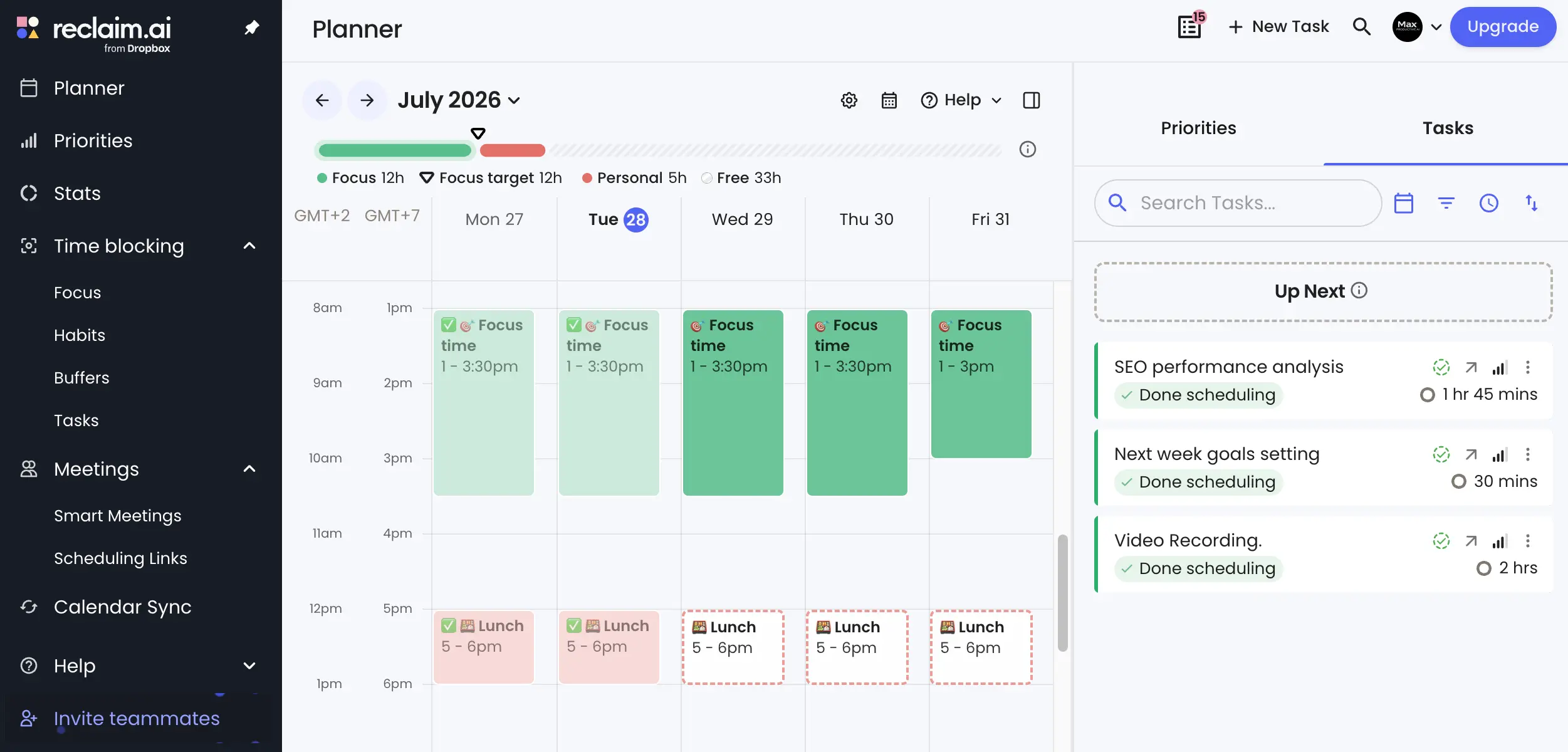
The pricing is the relief after Motion's. The free Lite plan exists without a card: 1 user, 5 AI Agents, a 1-week scheduling range, 1 calendar sync, and 1 scheduling link, which is enough to feel the product properly. Starter is $10 per seat per month and Business is $15 on annual billing, monthly billing costs about 20% more, there are no seat minimums on either, and there are no credits anywhere in the product. A 14-day trial unlocks the paid features, and the standing switcher discount takes 20% off for six months if you arrive from Motion, Clockwise, or Calendly. Ownership is stable: Dropbox completed its acquisition of Reclaim in July 2024, per Dropbox's own investor filing, and the product has kept shipping since, including official Todoist and ClickUp task integrations that matter later in this article.
Two honest limitations. There is no Motion importer, so tasks come over manually or through those integrations. And Reclaim still has no native iOS or Android apps as of its own help pages this summer; the mobile web app and your regular calendar apps carry the phone experience, which is workable but not equal to Motion's mobile apps. Our Reclaim review (4.8/5, our highest rating in this category) covers the full feature map.
Choose Reclaim over Motion if: auto-scheduling is the feature you actually use, you want a real free plan and per-seat prices with no meter, and mobile web is an acceptable phone experience. Try Reclaim free.
2. FlowSavvy — Auto-Scheduling for $10, or Free
FlowSavvy pays us nothing, and it is the budget answer to the exact question this article exists for. It genuinely auto-schedules: give tasks a deadline and a time estimate and FlowSavvy places them on your calendar and reshuffles automatically when things slip, the same core loop Motion charges $19 to $29 per seat for. The free Basic plan is free forever and includes unlimited auto-rescheduling within a shorter planning window, and Pro costs $10 a month on annual billing or $14 monthly, with a 7-day trial. There are iOS and Android apps.
The catch is scope. FlowSavvy is a personal scheduler, not a work platform: no projects and docs layer, no meeting assistant, no team features to speak of. That is also why it belongs at number two, because a large share of Motion refugees discover that the auto-scheduling was the only part they used, and paying a SuperApp price for one feature is how they ended up reading articles like this one.
Choose FlowSavvy over Motion if: you want the auto-scheduling loop for a tenth of the money, alone rather than in a team, and you can live without the project management wrapper. Details at flowsavvy.app.
3. Sunsama — The Calm, Deliberate Opposite
Sunsama is in this list for the people whose real complaint about Motion was never the price. Some users leave auto-schedulers because being auto-scheduled feels like working for the algorithm. Sunsama is built on the opposite idea: a guided daily planning ritual where you pull in tasks from your other tools, estimate them, and place them on today deliberately, with the app nudging you to keep the day realistic. In the threads comparing the two, that is precisely the trade people describe, less automation, more intention.
Pricing is simple and honest: $17 per month billed yearly or $22 billed monthly, per Sunsama's own pricing and billing pages, with a 14-day trial that requires no card and simply ends if you do nothing, which is the gentlest trial design in this article. There is no free plan. Mobile apps exist for iOS and Android. Our Sunsama review scores it 4.3/5, and if the planning-first style appeals but the price does not, our BeforeSunset AI review (also 4.3/5) covers a close neighbor worth a look.
Choose Sunsama over Motion if: you want to plan your day rather than have it planned for you, a calm interface matters more than raw automation, and $17 a month buys enough deliberateness to be worth it. Try Sunsama free.
4. Akiflow — One Inbox for Every Task Source
Akiflow is another no-commission pick, here on merit. Its pitch is consolidation: a command bar and universal inbox that pulls tasks out of Slack, email, Notion, and the rest of your stack, then time-blocks them onto your calendar at speed. A dated comparison thread from Motion's own subreddit put the difference well: unlike Motion's automatic rescheduling, Akiflow keeps you in the driver's seat, planning is fast but it is yours to do. AI assists rather than decides.
Pricing, from Akiflow's own page: $19 per month billed yearly or a steep $34 billed monthly, with a 7-day trial and no free plan. One practical note for readers outside the US: Akiflow shows regional purchasing-power pricing in some countries, so the number you see may differ from the US price quoted here. iOS and Android apps are official.
Choose Akiflow over Motion if: your tasks are scattered across five tools and capturing them is the bottleneck, you like time-blocking but want to stay in control of it, and annual billing is acceptable, because the monthly rate is hard to justify. Details at akiflow.com.
5. Morgen — Multi-Calendar Order With AI Planning
Morgen, also commission-free for us, is the pick for the person juggling several calendars across accounts and platforms. Morgen unifies Google, Outlook, iCloud, and more into one interface, layers task time-blocking on top, and adds AI planning suggestions that propose where work should go rather than silently moving it. It is less autonomous than Motion by design, and its own comparison material is upfront about that positioning.
Pricing from Morgen's page: Pro at $15 per month billed yearly or $30 monthly, and a Team plan at $25 per seat monthly with a 2-seat minimum. The trial is 14 days with no card required. Morgen also markets its own switching discount aimed at people arriving from Motion, Reclaim, Fantastical, or Sunsama, a small sign of how much movement there is between these tools right now. Mobile apps for iOS and Android are official.
Choose Morgen over Motion if: multiple calendars are your daily reality, you want suggestions rather than an autopilot, and desktop-plus-mobile polish matters. Details at morgen.so.
6. ClickUp — The Project Half of Motion, and the Stack That Replaces All of It
ClickUp, another affiliate partner of ours, answers the team-shaped half of the Motion question. If your workspace used Motion for projects, sprints, and docs as much as for scheduling, ClickUp covers that ground with more depth: lists, boards, Gantt views, docs, whiteboards, and its own AI layer. In our own workspace, it is where the actual work lives, and the Free Forever plan is unusually real: unlimited tasks, unlimited members, 60MB of storage, which is enough for a small team to run properly before paying anything. Paid starts at $7 per user per month on annual billing for Unlimited and $12 for Business ($10 and $19 monthly), and ClickUp backs purchases with a 30-day money-back guarantee, which reads very differently from Motion's non-refundable policy.
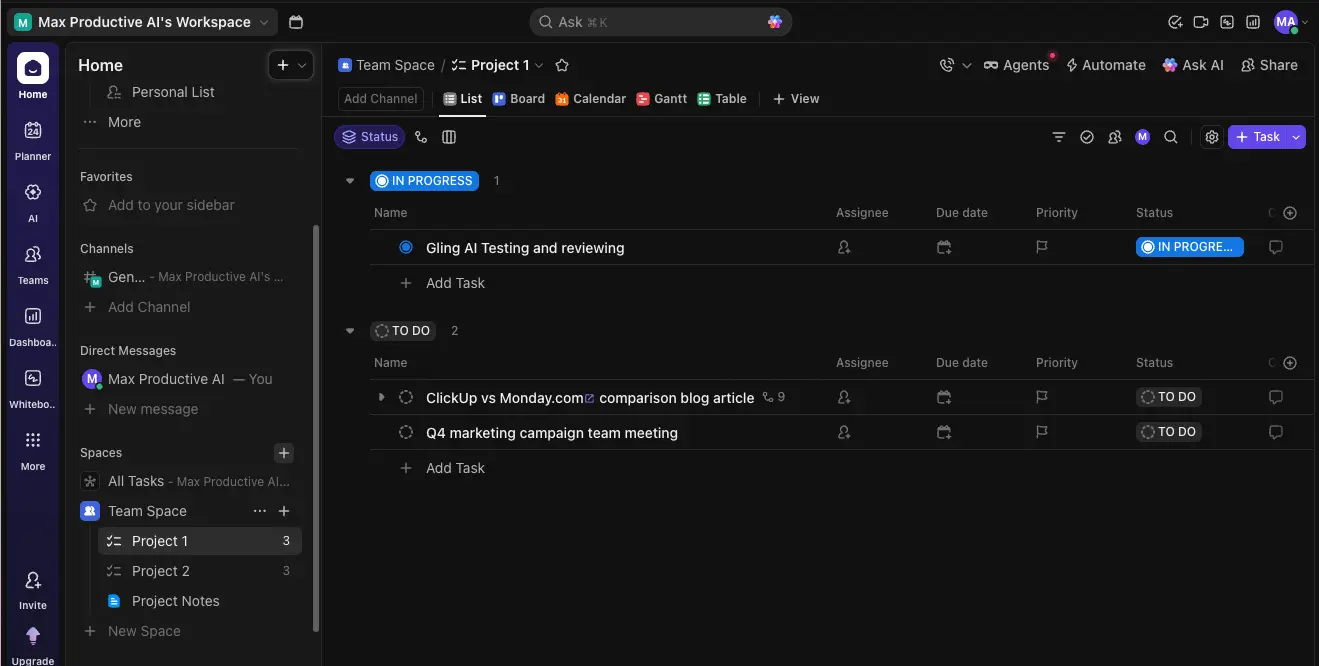
ClickUp does not auto-schedule your personal calendar the way Motion does, and pretending otherwise is how vendor comparisons lose readers. The fix is the stack that Motion leavers keep describing in dated threads: manage the work in ClickUp, connect Reclaim's official ClickUp integration, and let Reclaim place the task time on your calendar automatically. One user put it simply: tasks sync from ClickUp to Reclaim, and Reclaim does the auto-scheduling. Two transparent subscriptions, each doing the thing it is best at, and both cheaper together than Motion's Business AI tier. If you are weighing ClickUp against its big rival instead, our ClickUp vs Monday.com comparison covers that decision, and our Motion vs ClickUp vs Monday piece compares all three directly. Our ClickUp review scores it 4.6/5.
Choose ClickUp over Motion if: the project management mattered as much as the scheduling, your team wants a real free plan to start on, and the ClickUp-plus-Reclaim pairing sounds like the best of both. Try ClickUp free.
7. Todoist — Task-First Simplicity That Still Reaches Your Calendar
Todoist, also an affiliate partner, is the answer when Motion made you realize you wanted less software, not more. Todoist is a task manager first: fast natural-language capture, projects, labels, and filters, wrapped in two decades of refinement. The free Beginner plan covers 5 active projects with 3 filter views and 5MB uploads, Pro is $5 per month billed yearly, and Business is $8 per user, per Todoist's pricing page, some of the least dramatic pricing in this whole category.

Todoist plans your work; it does not auto-schedule it. But the same bridge from the ClickUp section exists here: Reclaim's official Todoist integration pulls your Todoist tasks onto the calendar and time-blocks them automatically, which turns a $5 task manager into the front end of a Motion-style system. If you are shopping in this task-first corner more broadly, our reviews of Superlist and Taskade cover the two most interesting neighbors. Our Todoist review scores it 4.3/5.
Choose Todoist over Motion if: a fast, simple task list is the actual need, five dollars a month is the right budget, and the Reclaim integration covers your calendar ambitions. Try Todoist free.
8. TickTick — Tasks and Calendar for Under $50 a Year
TickTick is the value pick that keeps coming up when people list what they actually moved to, and one more entry that earns us nothing. It combines a capable task manager with a built-in calendar view, habit tracking, and a Pomodoro timer, and its Premium plan costs $49.99 for a full year, per its upgrade page, which works out to less than $4.20 a month. The free plan is enough to test the shape of it, with caps on lists and tasks that light personal use rarely hits.
Like Todoist, TickTick does not auto-schedule; you drag tasks onto the calendar yourself. It also lacks an official Reclaim integration, so the automation bridge the previous two sections lean on is not available here. What you get instead is the widest feature set per dollar in this article, on every platform. If your Motion exit is mostly about the bill, TickTick is the softest landing.
Choose TickTick over Motion if: you want tasks, calendar, and habits in one inexpensive app, manual planning is fine, and one $50 annual charge beats any per-seat subscription. Details at ticktick.com.
9. Google Calendar + Gemini — The Scheduler You May Already Pay For
Google certainly does not pay us, and this section exists because the honest answer for some readers is: use what you already have. Google Calendar itself is free and excellent. The Gemini scheduling features are a different story, and the gating matters: "Help me schedule," which finds meeting times from the context of your Gmail and calendar, is a Workspace feature on Business Standard ($14 per user per month) and Business Plus ($22) plans, not something a free consumer account gets. Free personal accounts do get one appointment booking page, but the AI layer sits behind the Workspace paywall.
So the decision rule is the same one we give in every category where the platforms bundle AI: if your organization already pays for Workspace Business Standard or above, spend a week using Gemini's scheduling help and one appointment page before buying anything in this article. If it covers you, you are done, and this article cost you nothing. What Google will not do, on any plan, is Motion-style auto-scheduling of your task list; nothing in the Workspace bundle continuously plans and replans your work blocks. That specific job still belongs to Reclaim and FlowSavvy above.
Stay inside Google if: meetings, not tasks, are your scheduling problem, and you already hold a Business Standard or better license.
The Real Cost at Your Team Size
Ranking pages love a single "from" price. Real bills depend on seats, billing cycles, and meters, so here is the math laid out at three team sizes, using each vendor's published per-seat prices. One asymmetry to keep in mind while you read it: Motion's figures below are its monthly-billing prices, because its annual dollar amounts are not published on the public page, only an advertised 33% saving. Every other paid figure is the annual-billing rate. And Motion's numbers carry the credit asterisk: 7,500 or 15,000 credits per seat per month, then 25 or 19 cents per additional 100, for AI usage that has no published conversion table.
| Tool | Just you | Team of 3 | Team of 10 | What eventually forces an upgrade |
|---|---|---|---|---|
| Motion Pro AI (monthly billing) | $19/mo | $57/mo | $190/mo | Credit overages; Business AI features like Gantt and time tracking |
| Motion Business AI (monthly billing) | $29/mo | $87/mo | $290/mo | Credit overages at 19¢ per 100 beyond 15,000/seat |
| Reclaim Starter | $10/mo | $30/mo | $100/mo | Business ($15) for 100 seats, longer horizons, team OOO tools |
| ClickUp Unlimited + Reclaim Starter | $17/mo | $51/mo | $170/mo | ClickUp Business ($12) for advanced automation and dashboards |
| Sunsama | $17/mo | $51/mo | $170/mo | Nothing; one plan, per person |
| FlowSavvy Pro | $10/mo | $30/mo | $100/mo | Nothing team-shaped; it is a personal tool at any size |
| Todoist Pro / Business | $5/mo | $24/mo (Business) | $80/mo (Business) | Very little; limits are generous at every tier |
Two things stand out. A ten-person team on Motion Business AI pays $290 a month before a single credit overage; the same team on ClickUp plus Reclaim pays $170 with no meter, and on Reclaim alone, $100. And at the solo end, the gap between Motion's $19 and FlowSavvy's $10 or Todoist's $5 is the price of the SuperApp wrapper, which is worth paying only if you use the wrapper.
If Motion Was Mostly Your Booking-Link Tool
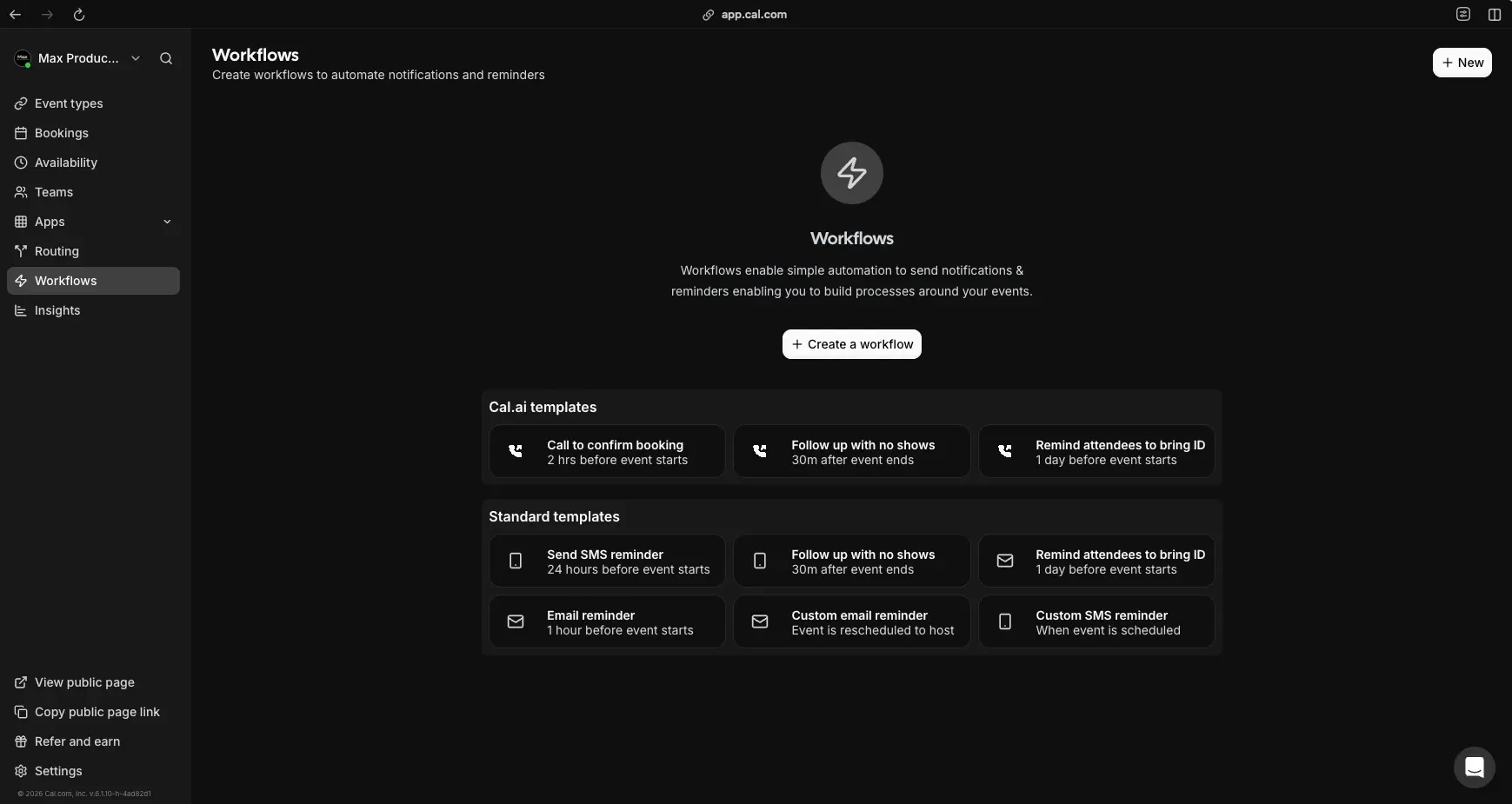
A minority of Motion users mainly used its meeting booking pages, and for them the whole auto-scheduling debate above is beside the point. The cleanest specialist is Cal.com, an affiliate partner of ours: an open-source scheduling platform whose free individual plan includes unlimited event types, calendar connections, and workflow automations for reminders and follow-ups, with Teams at $12 per user per month. In our own workspace, the workflow builder below handles confirmation calls and reminder emails that Motion's booking feature never touched. Our Cal.com review (4.5/5) has the details, or try Cal.com free.
A Note on What Ranks for This Search
Worth naming what you are wading through when you research this topic. Nearly every article ranking for "Motion alternatives" is written by a company that sells one: Morgen ranks Morgen first, Saner ranks Saner first, FlowSavvy, Ellie, and the rest follow the same script, and the AI summary at the top of the results page is assembled mostly from those vendor pages plus one Reddit thread. That is normal marketing rather than deception, but it does leave the refereeing to you. For the record on our side: some tools in this guide pay us a commission and several, including FlowSavvy, Akiflow, Morgen, TickTick, and Google, pay us nothing and earned their places anyway. The order was locked before we looked at any of that, and every rating on this page links to a full review you can check.
Who Should Stay on Motion
An honest alternatives article owes you the other side, and Motion has one. Stay if you genuinely use the whole SuperApp: when projects, docs, meeting scheduling, and task auto-planning all live in one product, one $19 to $29 seat can undercut a stack of three subscriptions, and no tool in this article matches that breadth alone. Stay if you are grandfathered: Motion stated in its own community that existing subscriptions keep their old terms, and an old plan at an old price may be better than anything on the current public page, so check your billing screen before you check anything else. And stay if the mobile experience is where you live, because Motion's native apps remain ahead of Reclaim's mobile web approach, a gap even committed Reclaim users acknowledge. The long-term users who write the calmer threads describe a product that fits how they think, two years in. If that is you, the switching math rarely works, and there is nothing wrong with that answer: Motion holds a 4.8/5 in our Motion review for a reason, and our deep dive on Motion's AI Employees tracks where the product is heading. If the all-in-one shape is exactly what you want, start with Motion's trial and skip the rest of this page with our blessing.
How to Choose Your Motion Alternative
Match the tool to the reason you are leaving, not to feature lists. Leaving over the credit meter: Reclaim or FlowSavvy, the two real auto-schedulers with flat prices. Leaving over total cost: Todoist at $5, FlowSavvy or Reclaim at $10, TickTick at $49.99 a year. Leaving but your team needs project management: ClickUp, ideally paired with Reclaim's integration for the scheduling half. Leaving because the automation itself stressed you out: Sunsama for guided manual planning, Akiflow if speed of capture is the point, Morgen if multiple calendars are the mess. Only used the booking links: Cal.com. Your company already pays for Google Workspace Business: test Gemini's scheduling help before spending anything. And if none of the complaints are yours: staying on Motion, especially on a grandfathered plan, is a legitimate call.
Final Verdict — The Best Motion Alternatives in 2026
| Best overall escape | Reclaim.ai (true auto-scheduling, free plan, from $10/seat, our 4.8/5) |
| Best on a budget | FlowSavvy (auto-schedules free, Pro at $10/mo) |
| Best for teams | ClickUp + Reclaim (projects plus auto-scheduling, from $17/seat combined, our 4.6/5 + 4.8/5) |
| Calm manual planning | Sunsama (guided daily ritual, $17/mo, no-card trial, our 4.3/5) |
| Fastest capture | Akiflow (universal inbox and command bar, $19/mo annual) |
| Multi-calendar order | Morgen (unified calendars with AI suggestions, Pro $15/mo) |
| Task-first simplicity | Todoist (Pro at $5/mo, syncs into Reclaim, our 4.3/5) |
| Best value per dollar | TickTick (tasks, calendar, habits at $49.99/year) |
| Already in your stack | Google Calendar + Gemini (Workspace Business Standard and up) |
| Booking links only | Cal.com (free unlimited event types, our 4.5/5) |
Bottom line: Motion is a capable, well-funded product whose pricing moved from simple seats to metered credits, and every complaint that shift created now has a specialized fix. Reclaim replaces the auto-scheduling with flat pricing and a real free plan, FlowSavvy does it for less, ClickUp plus Reclaim rebuilds the whole system from transparent parts, Sunsama and Akiflow hand the steering wheel back to you, and Todoist and TickTick cover the people who wanted less software all along. Before you commit anywhere, run the two-week test: put the same real week of work into your two finalists, let each plan it, and see which calendar you actually followed. That test answers more than any article can, including this one.