
Fathom vs MeetGeek: Which AI Meeting Assistant Is Worth It in 2026?
Two top-rated AI meeting assistants with very different strengths. One offers the best free plan in the market; the other gives you more ways to record, analyze, and act on every conversation.

Choose Fathom
If you want the best free plan with unlimited recordings, a minimalist interface, and structured sales coaching with AI Scorecards and Deal View for HubSpot/Salesforce teams.
Choose MeetGeek
If you need bot-free recording, in-person meeting capture via mobile, 60+ language support, broader integrations, and AI Voice Agents for meeting automation.
| Feature | Fathom | MeetGeek |
|---|---|---|
| Best For | Sales teams, budget-conscious users | Global teams, automation-heavy workflows |
| Starting Price | Free (unlimited) / $15/mo | Free (3 hrs) / $9.99/mo |
| Key Strength | Unmatched free plan + sales coaching | Bot-free recording + 60+ languages |
| G2 Rating | 5.0/5 (4,697+ reviews) | 4.6/5 (478+ reviews) |
AI meeting assistants have become essential tools for anyone spending significant time in virtual meetings. Instead of manually taking notes, these tools auto-join your calls, record, transcribe, and generate AI-powered summaries — letting you stay fully present in conversations while the AI handles the documentation.
In this comprehensive comparison of Fathom vs MeetGeek, we break down pricing, AI features, transcription accuracy, integrations, and real-world use cases based on hands-on testing to help you choose the best AI meeting assistant for your workflow in 2026. Both platforms are excellent — Fathom holds a remarkable 5.0/5 rating on G2 from 4,697+ reviews, while MeetGeek scores a strong 4.6/5 from 478 reviews and is trusted by over 30,000 teams worldwide.
The core difference comes down to philosophy: Fathom leans into simplicity and an industry-leading free plan, while MeetGeek goes wider with flexibility, more recording methods, and deeper automation capabilities. After testing both platforms extensively, here's everything you need to make the right decision.
What Is Fathom?
Fathom is an AI-powered meeting assistant that automatically records, transcribes, and summarizes your Zoom, Google Meet, and Microsoft Teams meetings. It's widely recognized for offering the most generous free plan in the AI meeting assistant space — unlimited recordings, unlimited transcriptions, and unlimited storage at zero cost.
Fathom delivers AI summaries in approximately 23 seconds after a call ends, making it one of the fastest tools for post-meeting intelligence. The platform has built a loyal following among sales teams in particular, thanks to its CRM integrations with HubSpot and Salesforce, AI Scorecards for call coaching, and a Deal View that consolidates insights across all conversations related to a single opportunity.
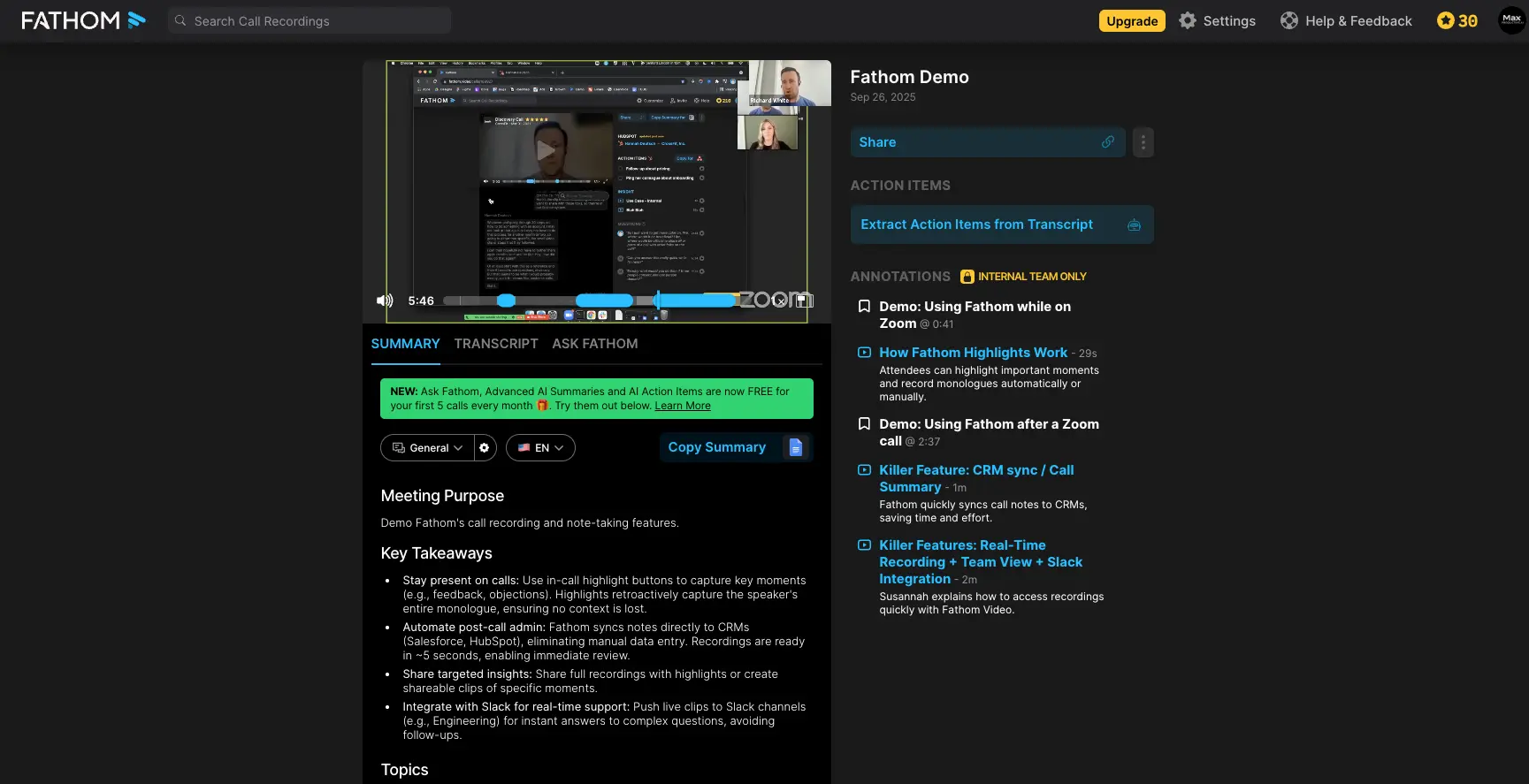
The interface is clean and minimalist. As shown above, after each meeting you get a structured summary with key takeaways, a full transcript, and an annotations panel on the right where you can bookmark important moments and extract action items. The learning curve is minimal — most users are productive within minutes of signing up.
Fathom currently records using a visible bot participant ("Fathom Notetaker") that joins your meetings. Bot-free recording and a mobile iOS app have been announced as "coming soon," but as of February 2026 neither has launched yet. This means Fathom is currently desktop-only and limited to online meetings.
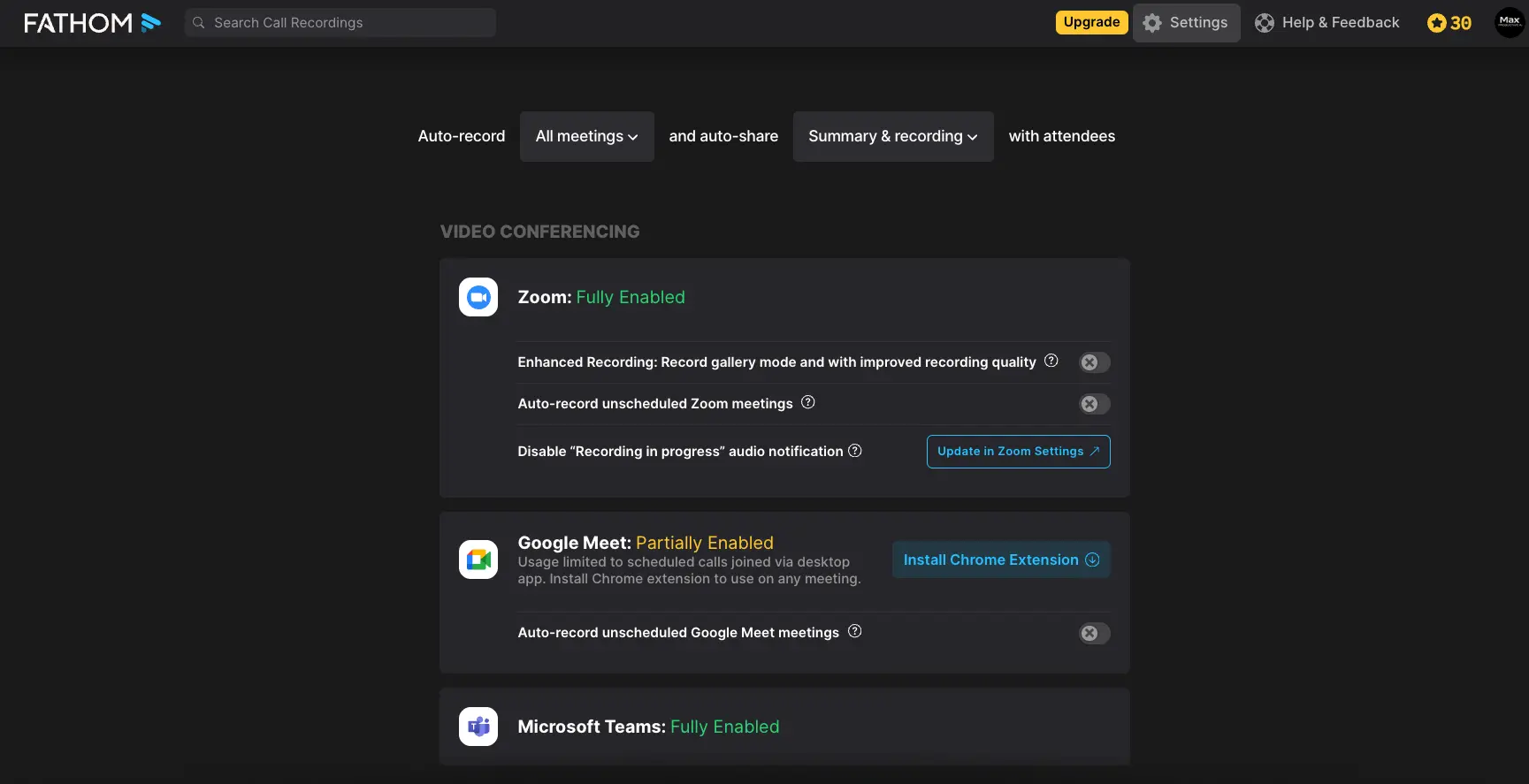
Platform support: As visible in our Fathom settings panel, Zoom and Microsoft Teams are fully enabled, while Google Meet requires the Chrome Extension or desktop app for full functionality.
What Is MeetGeek?
MeetGeek is a versatile AI meeting assistant trusted by over 30,000 teams worldwide that goes beyond standard recording and transcription. It offers three distinct recording methods — a traditional bot, a bot-free Chrome Extension, and a mobile app for in-person meetings — giving it the broadest capture flexibility in the category.
MeetGeek upgraded its AI engine to GPT-5 capabilities in August 2025, significantly improving the depth of its meeting summaries, AI Chat accuracy, and custom summary quality. The platform supports over 60 languages with automatic language detection, making it a strong choice for multilingual and globally distributed teams.

The MeetGeek dashboard provides a clear overview of upcoming meetings with options to configure email summaries, set transcription language (with auto-detect), and even add ad-hoc meetings by pasting a conference link. The right panel also shows the connected calendar status and a Voice Agent option — a feature unique to MeetGeek.
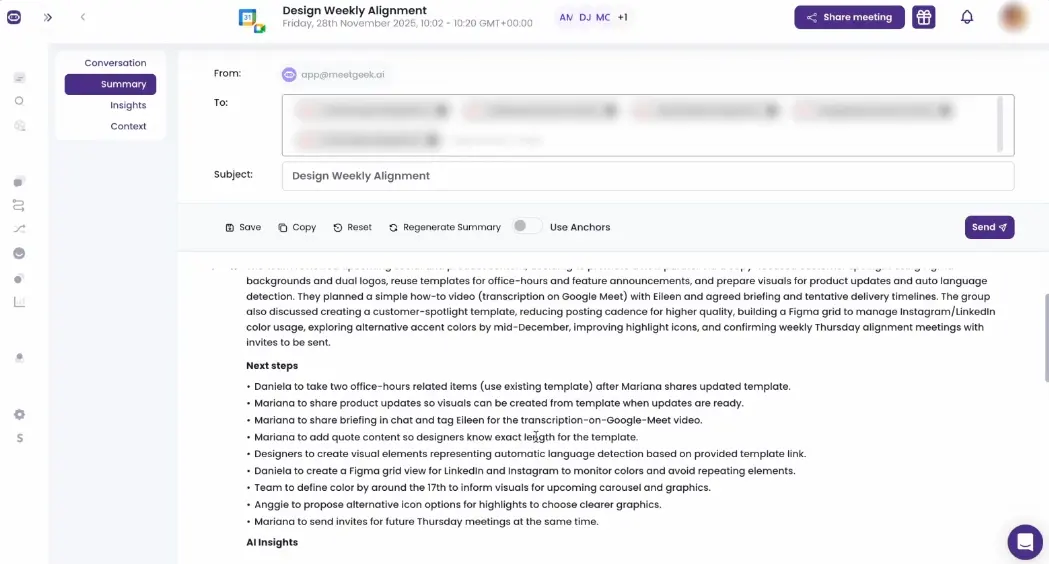
MeetGeek's summary emails are ready to share directly with participants. As shown above, the summary includes detailed next steps with clear ownership (who needs to do what), AI-generated insights, and action items — all in an email-ready format that can be sent directly from the platform.

The Voice Agent setup includes pre-built templates for common use cases — AI Meeting Copilot, AI Screening Recruiter, AI Customer Success Agent, and AI Lead Discovery Agent — plus the option to create a custom agent from scratch. Each agent can be given specific instructions, a voice profile, and optionally added to all upcoming meetings automatically.
Security: MeetGeek is SOC 2 Type II, HIPAA, GDPR, and CCPA compliant, with encryption (256-bit AES + SSL/TLS) and the option to choose between EU and US data hosting.
Feature-by-Feature Comparison
Recording Methods & Platform Support
This is one of the biggest practical differences between the two tools — and often the deciding factor for teams choosing between them.
| Recording Feature | Fathom | MeetGeek | Winner |
|---|---|---|---|
| Bot-based recording | Visible "Fathom Notetaker" bot | Auto-joining bot | Tie |
| Bot-free recording | Announced, not yet launched | Chrome Extension (available now) | MeetGeek |
| Mobile / in-person | Not available (coming soon) | iOS + Android app | MeetGeek |
| Platforms supported | Zoom, Google Meet, Teams | Zoom, Meet, Teams + Webex, Discord, WhatsApp, Slack Huddles, GoTo, Zoho | MeetGeek |
| Attend without you | Bot records when you join | Bot or Voice Agent attends on your behalf | MeetGeek |
MeetGeek's Chrome Extension records directly in-browser without adding a visible bot participant — a significant advantage for client-facing calls where a visible recording bot may create friction. Fathom announced bot-free recording in October 2025, but as of February 2026 it has not yet launched.
Transcription Accuracy & Language Support
| Feature | Fathom | MeetGeek | Winner |
|---|---|---|---|
| Accuracy (standard) | 85–90% | 95%+ | MeetGeek |
| Accuracy (ideal audio) | 94–96% | 95–96% | Tie |
| Languages | 38 languages | 60+ languages | MeetGeek |
| Auto language detection | No (manual selection) | Yes (automatic) | MeetGeek |
| Translated summaries | 7 languages | 60+ languages | MeetGeek |
| Custom dictionary | Not available | Business plan and above | MeetGeek |
Fathom supports transcription in 38 languages with translated summaries in 7 languages (English, Spanish, French, Portuguese, German, Italian, Dutch). MeetGeek supports over 60 languages with automatic language detection — no manual selection required. For multilingual teams, MeetGeek provides a clear practical advantage.
AI Summaries & Meeting Intelligence
| Feature | Fathom | MeetGeek | Winner |
|---|---|---|---|
| Summary speed | ~23 seconds post-call | Minutes post-call | Fathom |
| Summary depth | Structured, professional | Topic-based with tags (Task, Decision, Idea, Fact) | MeetGeek |
| Summary templates | 14 pre-built types (Team+) | Custom templates (Pro+) | Tie |
| Conversation intelligence | Basic talk time metrics | Sentiment analysis, talk ratio, silence rate, punctuality | MeetGeek |
| Shareable summary email | Yes | Yes (polished email format) | MeetGeek |
| AI engine | Proprietary | GPT-5 (since Aug 2025) | MeetGeek |
Fathom excels at speed — summaries arrive in roughly 23 seconds, which is useful for rapid post-call follow-ups. MeetGeek's summaries are more granular, with topic-based breakdowns, tagged key moments (Tasks, Decisions, Ideas, Facts), and a visual highlight timeline. Independent reviewers consistently rate MeetGeek's AI summaries as more detailed and structured.
AI Chat & Ask Features

Ask Fathom works as a conversational AI assistant within each recording. You can query individual meetings with questions like "What were the top objections?" or "Write a follow-up email." The interface provides helpful prompts such as "Why was this meeting scheduled?" and "What would help make progress?" Account-wide search across all meetings is being rolled out for Team and Business plans.

MeetGeek AI Chat has evolved beyond a Q&A interface into an execution layer. Beyond querying meetings, you can trigger actions directly from the chat: send summaries to Slack, create tasks in Notion (beta), draft and send emails via Gmail, and more. MeetGeek also launched a Model Context Protocol (MCP) Server — allowing external AI tools like Claude and Cursor to access your meeting data programmatically.
Sales-Specific Features
| Sales Feature | Fathom | MeetGeek | Winner |
|---|---|---|---|
| AI Scorecards | MEDDPICC, SPICED, custom | Not available | Fathom |
| Deal View | Cross-call deal insights | Deal health analysis | Fathom |
| Objection detection | Not available | Real-time detection | MeetGeek |
| Competitor tracking | Not available | Mention tracking | MeetGeek |
| CRM field sync | HubSpot, Salesforce, Close | HubSpot, Salesforce, Pipedrive, Attio | MeetGeek (breadth) |
| Performance coaching | Trend charts, timestamped notes | Talk ratio, behavior metrics | Fathom |
Both platforms serve sales teams well, but with different strengths. Fathom's AI Scorecards with pre-built methodologies (MEDDPICC, SPICED) and Deal View create a structured coaching loop ideal for sales managers. MeetGeek's Sales Mode AI focuses on real-time intelligence — detecting objections, tracking competitor mentions, and identifying deal signals during live calls — which is more useful for individual reps wanting pattern recognition.
Integrations Ecosystem

Fathom's integration page shows a focused set of connections: Zapier (free for all plans since August 2025), Slack, Salesforce, HubSpot, and a Task Manager connector supporting Asana and other project management tools. The Public API launched in October 2025 extends this to custom workflows.

MeetGeek's integration ecosystem is significantly broader. As visible in the screenshot, native connections include HubSpot, Pipedrive, Salesforce, Attio, Trello, ClickUp, Asana, Jira, Monday, Notion, Slack, Google Drive, Zapier, Make, and n8n — plus a Public API and MCP Server for AI tool integration. The total ecosystem reaches over 10,000 connected apps when including Zapier, Make, and n8n automations.
Pricing Comparison (February 2026)
Fathom Pricing
| Plan | Monthly | Annual | Key Features |
|---|---|---|---|
| Free | $0 | $0 | Unlimited recordings/transcription, 5 AI summaries/mo |
| Premium | $19/mo | $15/mo | Unlimited AI summaries, action items, custom bot name |
| Team | $29/mo | $19/mo | Folders, playlists, meeting templates, global search (min 2 users) |
| Business | $39/mo | $29/mo | CRM field sync, Deal View, AI Scorecards, coaching (min 2 users) |
Fathom's free plan includes unlimited meeting recordings, unlimited transcriptions, and unlimited storage across all supported platforms — no time limit or expiration. Advanced AI features (summaries, action items, follow-up emails) are limited to 5 meetings per month on free. Fathom's founder has stated this free tier is designed to be permanent.
MeetGeek Pricing
| Plan | Monthly | Annual | Key Features |
|---|---|---|---|
| Basic (Free) | $0 | $0 | 3 hrs/mo, 3-month storage, AI summaries, mobile app |
| Pro | $19/mo | $9.99/mo | 20 hrs/mo, 1-year storage, templates, Zapier/Make/n8n |
| Business | $39/mo | $17/mo | 100 hrs/mo, unlimited storage, team analytics, custom dictionary |
| Enterprise | Custom | Custom | Unlimited everything, branded emails, custom speech models, private hosting |
MeetGeek's free plan is more restrictive than Fathom's — just 3 hours of transcription per month with 3-month storage and no video recording storage. However, MeetGeek's paid plans offer strong value at annual pricing: the Pro plan at $9.99/month and Business at $17/month undercut Fathom's equivalent tiers significantly. MeetGeek uses a credit system where you generate unlimited variations but credits are consumed on export/download.
Pros and Cons
Fathom
Pros
- Best free plan in the market — unlimited recordings, transcription, and storage
- 5.0/5 G2 rating from 4,697+ verified reviews
- AI summaries delivered in ~23 seconds after calls end
- Structured sales coaching with AI Scorecards (MEDDPICC, SPICED)
- Deal View consolidates insights across all calls per opportunity
- Clean, minimalist interface with very short learning curve
- Zapier integration free for all plans (since August 2025)
- SOC 2 Type II + HIPAA compliant, Net Zero certified
Cons
- Visible bot participant may cause friction in client-facing meetings
- No mobile app or in-person recording capability yet
- Bot-free recording announced but not yet launched (as of Feb 2026)
- 38 languages vs MeetGeek's 60+ — narrower multilingual support
- Fewer native integrations — limited project management connections
- Meeting templates locked behind Team plan ($19+/mo)
- Summaries can feel formal and may miss emotional nuance in creative discussions
MeetGeek
Pros
- Three recording methods: bot, Chrome Extension (bot-free), and mobile app
- 60+ languages with automatic language detection
- GPT-5 powered AI summaries with topic-based breakdowns and tagged highlights
- AI Voice Agents can attend meetings on your behalf (Beta)
- Broadest integration ecosystem: Zapier + Make + n8n + MCP Server
- AI Chat triggers real actions (Slack, Notion, Gmail)
- Paid plans are more affordable annually ($9.99/mo Pro, $17/mo Business)
- EU/US data hosting choice, SOC 2 + HIPAA + GDPR + CCPA compliant
- Trusted by 30,000+ teams worldwide
Cons
- Free plan limited to 3 hours/month — restrictive for regular use
- Some users report recordings deleted due to automated retention on Pro plan
- Dashboard can feel overwhelming for users wanting simple notes only
- AI Voice Agents still in Beta — not yet fully reliable for production
- Chrome Extension recording quality depends on browser/tab stability
- Transcription accuracy can struggle with heavy accents (reported on G2)
- 4.6/5 G2 rating — strong but lower than Fathom's 5.0
Security & Compliance
| Standard | Fathom | MeetGeek |
|---|---|---|
| SOC 2 Type II | ✅ | ✅ |
| HIPAA | ✅ | ✅ |
| GDPR | ✅ | ✅ |
| CCPA | — | ✅ |
| End-to-end encryption | ✅ | ✅ (256-bit AES + SSL/TLS) |
| Data residency choice | US only | EU or US hosting |
| No AI training on data | ✅ | ✅ |
| Net Zero certified | ✅ | — |
Both tools meet enterprise-grade security requirements. MeetGeek offers more granular compliance controls, particularly the EU/US data residency choice and CCPA compliance — important for organizations with European data sovereignty requirements. Fathom stands out with its Net Zero environmental certification.
Who Should Choose Each Tool?
Choose Fathom If You Are:
- Budget-conscious individuals or teams who need unlimited free recordings and transcriptions
- Sales teams deeply integrated with HubSpot or Salesforce who need CRM field sync and Deal View
- Sales managers wanting structured coaching frameworks (MEDDPICC, SPICED) with AI Scorecards
- Users who value simplicity — minimal learning curve and fast AI summary delivery (~23 seconds)
- Teams primarily using Zoom, Google Meet, or Microsoft Teams for online-only meetings
- Anyone who wants a generous free plan to test before committing to paid
Use case example: A B2B SaaS sales team of 5 reps using HubSpot CRM who need every call recorded, summarized, and scored against MEDDPICC methodology — with Deal View showing deal progression across multiple calls.
Choose MeetGeek If You Are:
- Multilingual or global teams needing 60+ languages with automatic detection
- Hybrid or in-person meeting teams who need mobile recording via iOS/Android
- Privacy-conscious teams wanting bot-free Chrome Extension recording available now
- Automation-heavy workflows using Zapier + Make + n8n + MCP Server
- Customer success and analytics teams needing sentiment analysis and engagement metrics
- Teams who want AI Voice Agents that can attend meetings independently
- Enterprise organizations needing EU data residency, CCPA compliance, or custom speech models
Use case example: A customer success team distributed across Europe and Asia that needs in-person meeting capture, automatic language detection, bot-free recording for client calls, and meeting insights pushed to Slack, Notion, and HubSpot automatically.
Exploring Other Options?
If neither Fathom nor MeetGeek is the perfect fit, the AI meeting assistant space has several strong alternatives. Fireflies AI (4.2/5 rating) offers excellent transcription and team collaboration features. Otter AI is popular for real-time transcription during meetings. Granola takes a unique approach as a privacy-first AI notepad. Notta excels at multilingual transcription. For voice-to-text note-taking outside of meetings, Talknotes and HappyScribe are worth exploring. Browse our complete AI note-taking and meeting assistant directory to find the solution that matches your specific needs.
Can You Use Both Together?
Yes — and it's more practical than you might think. Since Fathom's free plan offers unlimited recordings, you can use it as your baseline recording and transcription layer for every meeting at zero cost. Then add MeetGeek's Pro plan ($9.99/month annual) for specific use cases where you need bot-free recording, in-person meeting capture, deeper conversation analytics, or broader automation workflows.
Combined cost: $0–10/month (Fathom Free + MeetGeek Pro annual), giving you the broadest possible meeting intelligence coverage. Use Fathom for CRM-connected sales calls with AI Scorecards, and MeetGeek for client-facing calls (bot-free), in-person meetings (mobile), and cross-tool automation.
Final Verdict: Fathom vs MeetGeek
| Best free plan | Fathom (unlimited recordings/transcription) |
| Best paid value | MeetGeek ($9.99/mo Pro annual) |
| Higher transcription accuracy | MeetGeek (95%+ vs 85–90%) |
| Better AI summaries | MeetGeek (topic-based, GPT-5) |
| Faster summaries | Fathom (~23 seconds) |
| Sales coaching | Fathom (AI Scorecards, Deal View) |
| Sales intelligence | MeetGeek (objection/competitor detection) |
| More integrations | MeetGeek (Zapier + Make + n8n + MCP) |
| Bot-free recording | MeetGeek (available now) |
| Mobile / in-person | MeetGeek (iOS + Android app) |
| Language support | MeetGeek (60+ vs 38) |
| Simpler interface | Fathom |
| Best G2 rating | Fathom (5.0 vs 4.6) |
| Enterprise compliance | MeetGeek (EU/US residency, CCPA) |
Bottom line: Both are excellent tools that will dramatically improve how you capture and act on meeting insights.
- Fathom = Best free plan + sales coaching depth. Unlimited recordings at $0, blazing-fast AI summaries, and the most structured coaching framework in the market with AI Scorecards and Deal View.
- MeetGeek = Most versatile + feature-rich. Three recording methods (bot, bot-free, mobile), 60+ languages, deeper AI intelligence, broader integrations, and AI Voice Agents that can attend meetings on your behalf.
The right choice depends on whether you prioritize budget and simplicity (Fathom) or flexibility and depth (MeetGeek).
Frequently Asked Questions
Learn more about other AI meeting assistants and note-taking tools in our comprehensive directory. For deeper analysis, read our full Fathom review or MeetGeek review.