Gamma Pricing in 2026: What Each Plan Costs and What Credits Buy
Gamma is free to start, and its paid plans run from $9 to $90 a seat a month on yearly billing. The biggest difference between the plans is how many AI credits refill each month.
This article contains affiliate links. We may earn a commission at no extra cost to you.
The free plan needs no credit card.

Quick answer: how much does Gamma cost?
As of October 2026, Gamma pricing starts with a free plan that costs $0 and gives you 400 AI credits once. In the US, Plus costs $9 a seat a month billed yearly or $12 billed monthly, Pro costs $18 or $25, and Ultra costs $90 or $100. Paid plans refill every month: 1,500 credits on Plus, 4,000 on Pro and 20,000 on Ultra. Teams can choose Business at $40 a seat a month, billed yearly, with 10,000 credits per seat.
The free plan is enough if
- You want to try Gamma on one or two real decks
- A Made with Gamma badge on your exports doesn't bother you
The trade. The starting credits never refill, and each prompt makes up to 10 slides.
Try Gamma freeA paid plan pays off if
- You build decks for clients or your team every week
- You need exports without Gamma branding
- You want longer decks from a single prompt
The trade. Plus suits many individuals. Pro adds custom branding, analytics and premium image models.
Compare the plansGamma pricing at a glance
| Plan | Billed yearly | Billed monthly | AI credits | Main additions |
|---|---|---|---|---|
| Free | $0 | $0 | 400 once | Up to 10 slides per prompt, badge on PDF and PowerPoint exports |
| Plus | $9 | $12 | 1,500 a month | No Gamma branding, up to 100 slides per prompt |
| Pro | $18 | $25 | 4,000 a month | Custom branding, analytics, 10 custom domains |
| Ultra | $90 | $100 | 20,000 a month | Most advanced models, 100 custom domains |
| Business | $40 | Yearly only | 10,000 per seat | SSO, shared workspace credits, data controls |
| Enterprise | Custom | Yearly agreement | Custom | SCIM, admin controls, purchase orders |
Swipe sideways to see every column.
Prices are per seat, per month, in US dollars and before tax: Gamma's US list prices as recorded in early October 2026. Credits as listed on Gamma's pricing page on October 30, 2026. Gamma shows local prices in many countries, so its page may show another currency where you are. See every source
Gamma AI pricing has two parts. The plan sets the features, and credits pay for the AI work: generating slides, creating images and editing with the Agent. When a paid plan runs out of credits, Gamma's help center says manual editing and the other non-AI features keep working.
We built our Gamma review on the free plan, using Gamma 5, Gamma's latest major release. This guide covers what a credit buys, what each plan adds, what teams pay and the ways to pay less.
How we checked
- Sources
- Gamma's pricing page, help center, developer documentation and changelog
- Date checked
- 30 October 2026
- Our account
- Our own Gamma account on the free plan, used with Gamma 5 in October 2026
- Not tested
- Paid plans, buying extra credits, the refund process and the API
The plans, credits and limits in this guide come from Gamma's own pricing page, help center and developer documentation, read between October 24 and 30, 2026. Gamma shows prices in the visitor's local currency, and our browser was shown another currency. The US dollar prices are Gamma's US list prices as recorded in early October 2026, in our own Gamma review and in a published capture of Gamma's US page. Where two Gamma pages disagree, we show both.
The screenshots come from our own Gamma account on the free plan, captured with Gamma 5 in early October 2026 for our Gamma review. We haven't paid for Plus, Pro, Ultra or Business, bought extra credits, asked for a refund or used the API, so for those we rely on Gamma's documentation.
 Gamma
Our rating: 4.6 / 5
Free to start, with paid plans that refill AI credits every month.
Try Gamma free4.6 is our score for Gamma as a whole. Read the Gamma review.
How Gamma Credits Work, and What They Cost
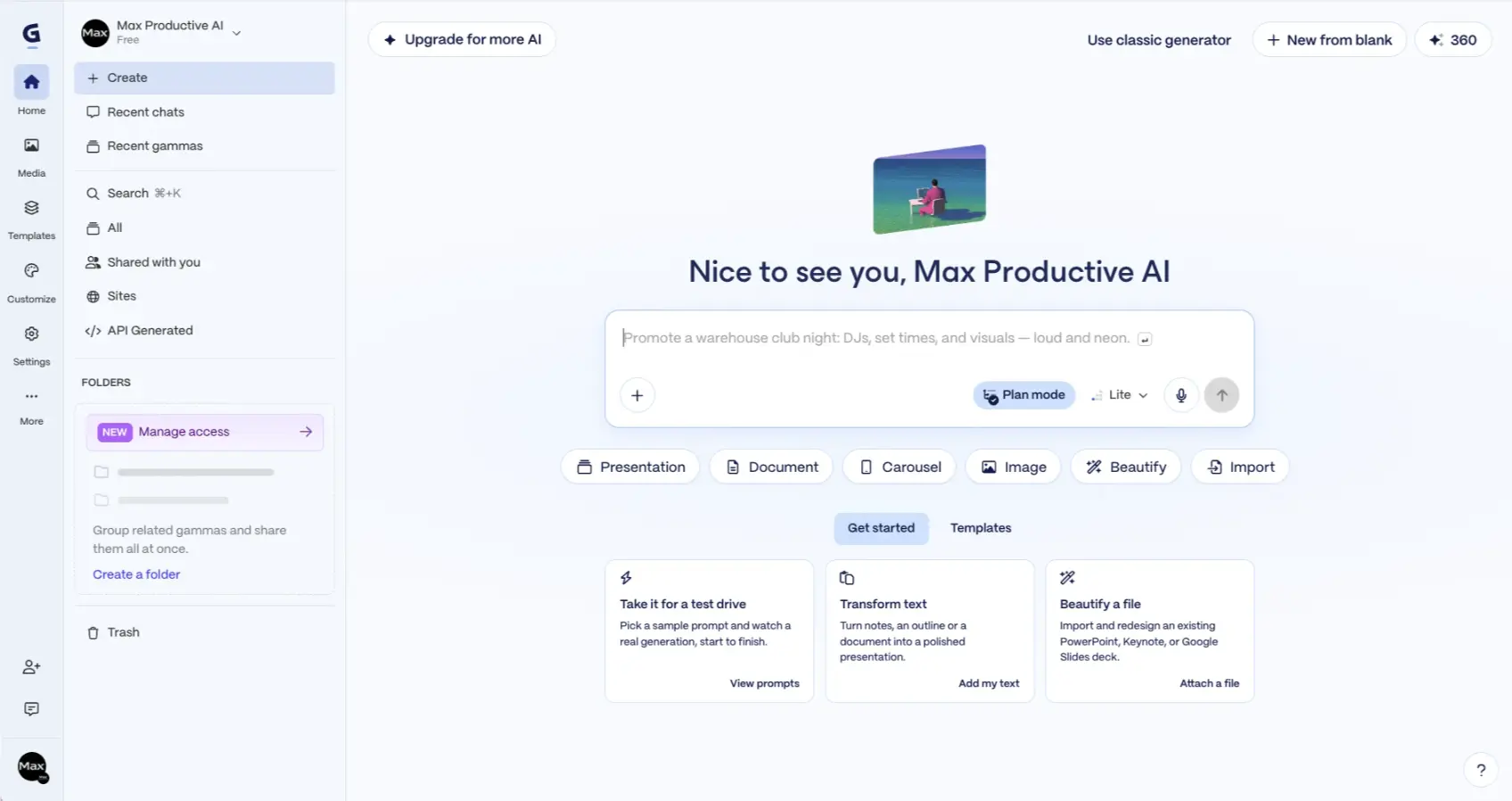
Credits are the core of Gamma pricing: every plan runs on them. Free accounts get a one-time allowance at signup, and paid plans refill every month on the billing date, including plans billed yearly.
Gamma meters AI work per slide and per image. Its help center says longer generations and more advanced models use more credits, and that an image's cost is shown before you create it. You aren't charged when an action fails or when the Agent stops to ask you a question.
| Action | Credits |
|---|---|
| Each card (slide) in a generation | 1 to 3 |
| Standard image | 2 to 15 |
| Advanced image | 20 to 33 |
| Premium image | 34 to 75 |
| Ultra image | 30 to 125 |
| Agent generations and edits | Depends on the work and the quality setting |
Ranges from Gamma's developer documentation, which prices generations made through the API, checked October 30, 2026. Gamma's help center says the app also meters per slide and per image, without listing per-action numbers, so treat these as a guide. Both say rates can change.
Sources: Gamma's developer documentation and 2 help center articles, checked October 30, 2026
Using those API rates as a guide (our math), a 10-card deck costs 10 to 30 credits for the cards. Add one standard image per card and you add another 20 to 150. On Plus, a month's credits would cover at least eight decks like that, and far more if you go easy on images. Premium images and Agent sessions use the allowance faster.
-
Unused credits roll over
On paid plans, unused plan credits carry into the next month, up to twice your monthly amount. On Plus, that means up to 3,000 plan credits.
-
You can buy more
Paid subscribers can buy extra credits, from $6 for 1,500, or turn on auto-recharge. Bought credits don't expire while you're subscribed, and Gamma uses your monthly plan credits first.
-
Running out isn't a lockout
When a paid plan's credits run out, you can keep editing by hand. Only the AI actions wait for the next refill or a top-up.
-
Free credits don't refill
The starting allowance is all a free account gets, apart from 200 credits for each friend who joins through your referral link.
We'd watch the image costs first. A deck built mostly from your own text uses far fewer credits, because each card costs only a few.
Is Gamma Free? What the Free Plan Includes
Yes. Gamma's free plan costs $0, needs no credit card and isn't a time-limited trial. You get the starting credits, up to 10 slides per prompt, and you can make presentations, documents, websites, social posts and images.
Imports and exports are included. You can bring in PDF and PowerPoint files, and export to PDF, PowerPoint, PNG and Google Slides. On the free plan, PDF and PowerPoint exports carry a Made with Gamma badge, and any paid plan removes it from future exports.
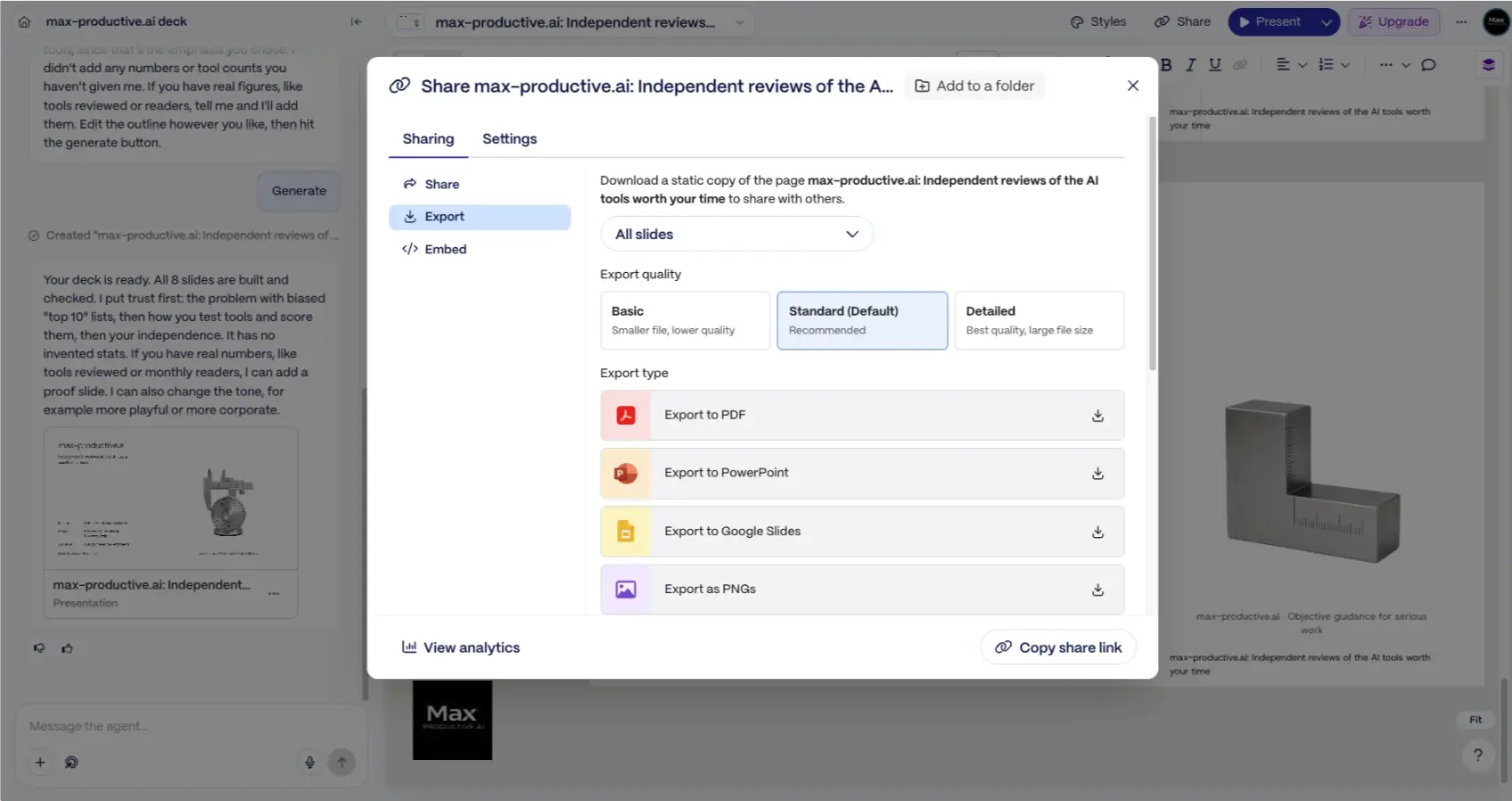
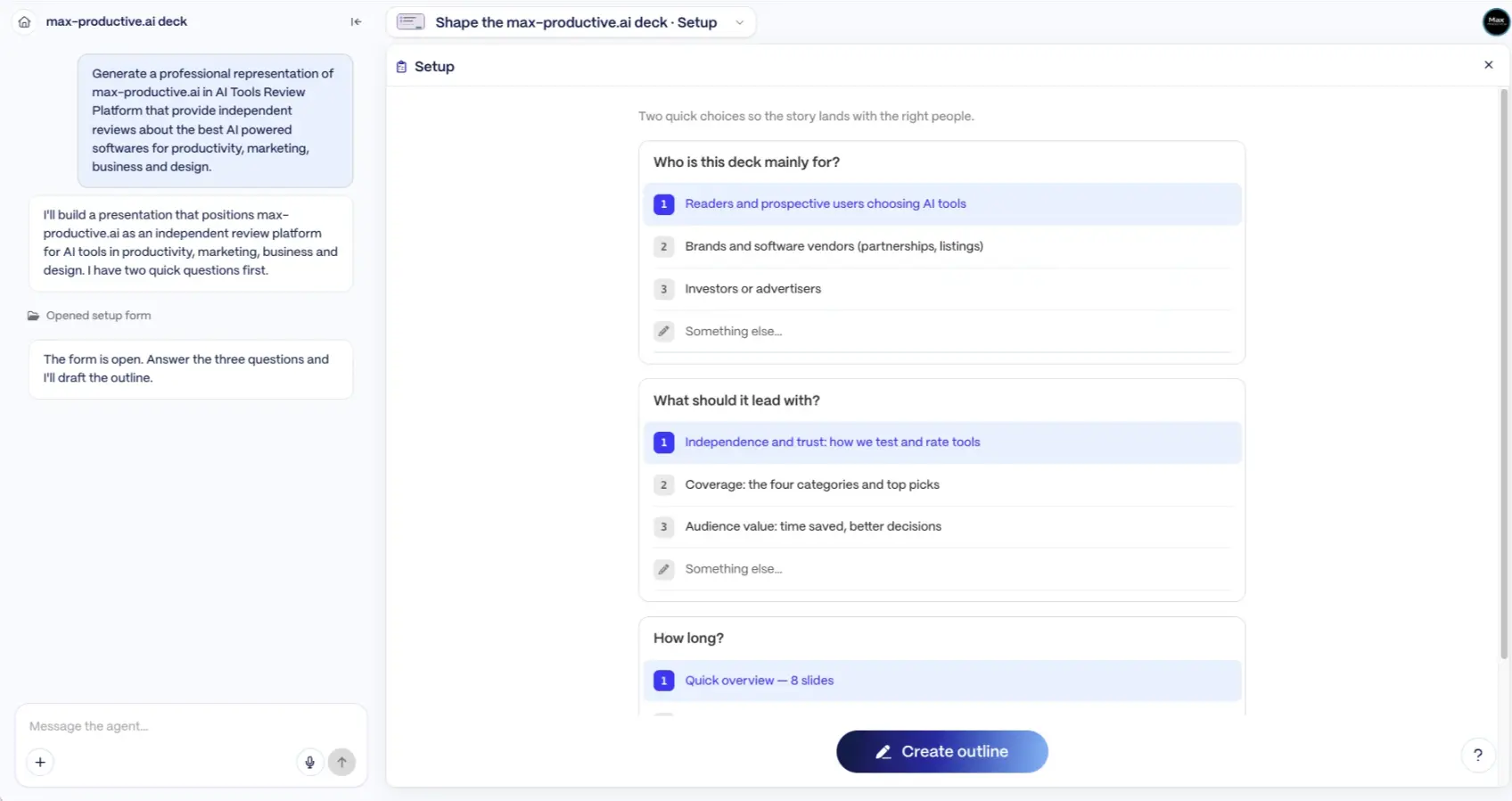
We built our Gamma review on the free plan with Gamma 5, starting from a one-paragraph brief. In our test, the Agent asked who the deck was for, what it should lead with and how long it should be. It then drafted an eight-slide outline before generating the deck. The export screen offered all four formats, at Basic, Standard or Detailed quality.
The limits show up in three places. The starting credits never refill, each prompt has a slide cap, and free accounts can't buy extra credits. Referrals are the one way to add more, and a free account can hold up to 2,000 referral credits.
Our advice: use the free plan to test one real project. If you like the result and want to keep going, Plus is the cheapest way to remove the badge and raise the slide cap from 10 to 100 per prompt.
Start on the free plan and upgrade only when the credits or the slide cap get in your way.
Try Gamma freeGamma Plus vs Pro vs Ultra: What Each Plan Adds
Gamma pricing for individuals has three paid plans, which differ in credits, image models and publishing features. Each step up includes everything in the plan below it.
-
Plus
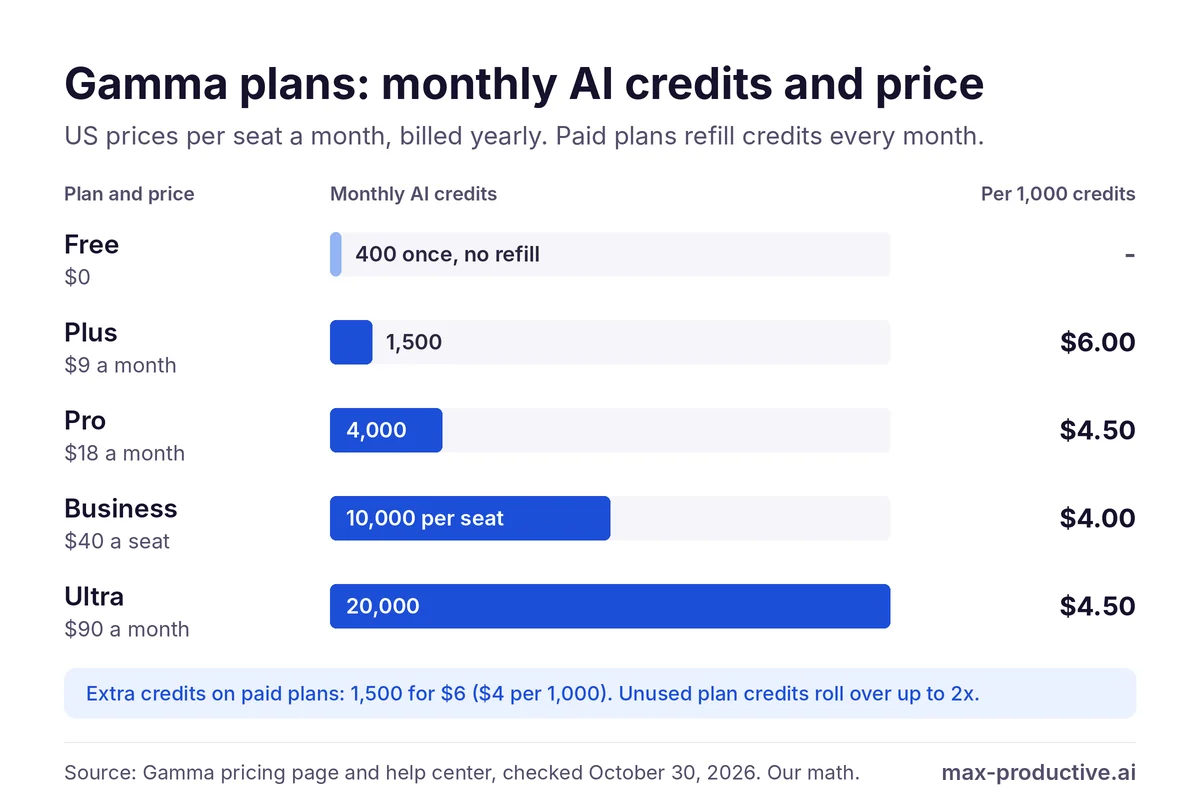
For most individuals1,500 credits a month (up from 1,000 until late October 2026), up to 100 slides per prompt, advanced AI image models, and no Gamma branding on your decks or exports. It suits people who present regularly and want clean files.
-
Pro
Labelled Most popular by Gamma4,000 credits a month, premium image models, custom branding, detailed analytics, advanced sharing, and up to 10 custom domains for the websites you build in Gamma.
-
Ultra
For heavy AI use20,000 credits a month, Gamma's most advanced text, image and video models, up to 100 custom domains, and early access to new features.
On yearly billing, Pro gives about 2.7 times the credits of Plus for twice the price, so each Pro credit costs a quarter less: $4.50 per 1,000 against $6.00 (our math). If you'd regularly need around 4,000 credits a month, Pro also beats Plus with top-ups on yearly billing, at $216 a year against about $228.
On monthly billing it goes the other way: Plus with top-ups stays cheaper, at about $264 a year against $300 for Pro (our math). Ultra's credits cost the same per 1,000 as Pro's, so what you pay for is the volume and the most advanced models.
Our read: Plus is the right start for most solo users. Move to Pro when your brand, your analytics or your Gamma websites matter to clients, and save Ultra for people who generate decks and images all day.
Gamma's pricing page shows the individual plans with a monthly and yearly toggle, in local currency where it's available.
See Gamma plansGamma Pricing: Monthly vs Annual Billing
Paying yearly lowers the monthly price of every individual plan, though not by the same amount. On US prices, the saving ranges from 10% on Ultra to 28% on Pro (our math).
| Plan | 12 monthly payments | Billed yearly | You save |
|---|---|---|---|
| Plus | $144 | $108 | $36 (25%) |
| Pro | $300 | $216 | $84 (28%) |
| Ultra | $1,200 | $1,080 | $120 (10%) |
Swipe sideways to see every column.
One seat, US list prices from October 2026, before tax (our math). Business is sold on yearly billing only.
Gamma's pages describe yearly billing differently
Gamma's pricing page says you can save up to 30% with annual billing, and it now offers Ultra on yearly billing. Its help center article on plans still describes a 28% discount and says Ultra is monthly only. The toggle on the pricing page shows the current price in your currency.
Gamma app pricing is per seat on every paid plan. On Plus, Pro and Ultra, each person you invite adds a seat once they accept. Upgrades apply straight away, with a prorated charge for the rest of the cycle, while downgrades wait for the next billing date.
We'd start monthly if you're not sure. Yearly billing pays off once you know you'll use Gamma every month, and Gamma's refund window is short, as the refund section below explains.
Gamma Business and Enterprise: Pricing for Teams
As of October 2026, Gamma pricing for company workspaces centers on Business at $40 a seat a month, billed yearly. Enterprise is priced on request.
Business gives each seat 10,000 credits a month, plus shared workspace credits for extra use. It adds single sign-on (SSO) for people with a verified company email, SOC 2 documentation on request, the most advanced AI models and stronger data controls. Gamma's help center says the AI training opt-out is locked for the whole workspace, and a Business workspace can publish up to 100 custom domains.
Business is billed per member on a yearly subscription. Each member you invite takes a seat, and members added later are billed as they join. Everyone in the workspace is on the same plan, and paying by direct bank transfer (ACH) needs at least 25 licenses.
Enterprise adds custom credits for your organization, advanced admin controls, SCIM provisioning, governance for connectors and the API, purchase orders with payment terms, and dedicated onboarding.
For a small team that mainly shares decks, we'd start on Plus or Pro and pay per seat. Business makes sense once your company needs SSO, centralized billing and locked data settings.
Extra Credits, Refunds and Cancelling Gamma
If a paid plan runs low, you can buy extra credits from $6 for 1,500, at the same rate however many you buy. Workspace admins can also turn on auto-recharge, which buys more whenever the balance drops below a level you set. Gamma never switches it on for you. In a workspace with several members on Plus, Pro or Ultra, auto-recharge is the only way to buy. Bought credits are used after your monthly plan credits, and they expire one year after you cancel.
Refunds: a three-day window
As of October 30, 2026, Gamma's refund policy allows refunds only within three days of subscribing, on monthly or yearly plans. You also need to have used fewer credits than a set limit, and you have to ask support: cancelling alone doesn't trigger a refund.
| Plan | Refund possible if you've used fewer than |
|---|---|
| Plus | 300 credits |
| Pro | 600 credits |
| Business | 1,000 credits |
| Ultra | 2,000 credits |
From Gamma's refund policy, checked October 30, 2026. Local consumer law can give you more rights.
What happens when you cancel
You can cancel any time from Settings > Billing. Paid features and credits last until the end of the billing period, then the account moves to the free plan and its starting allowance. Your decks stay in your account, though some advanced features may be limited.
Timing matters on renewals. Gamma's help article on cancelling asks you to cancel at least 30 days before your renewal date to avoid the next charge. Its article on one-month subscriptions says a monthly plan can be cancelled any time before the next billing date. On yearly billing, we'd set a reminder a month before renewal.
Sources: Gamma's pricing page FAQ (October 27) and 5 help center articles (October 30, 2026)
Gamma Discounts: Yearly Billing, Promo Codes and Education
Gamma has no free trial of its paid plans, so the free plan is the way to try it. These are the ways to pay less as of October 2026.
-
Yearly billing
The biggest saving for most people: 10% to 28% on US prices depending on the plan (our math), and up to 30% according to Gamma's pricing page.
-
Education pricing
As of October 30, 2026, we couldn't find a student or educator discount on Gamma's site. Its help center page on educator pricing, which offered reduced prices to educators at accredited schools on request, no longer loads. If you teach, it's worth asking Gamma's support before you subscribe.
-
Referral credits
Free accounts earn 200 credits for each friend who joins through their link.
-
Promo codes
Gamma's help center says promo codes only work on a first upgrade from the free plan to a paid one.
From Gamma's help center, checked October 30, 2026: How can I upgrade my Gamma subscription? (promo codes) and How do credits work in Gamma? (referrals).
Is Gamma Worth Paying For?
For many people who make decks often, yes. Our Gamma review rates it 4.6 out of 5 overall. In our test, it turned a one-paragraph brief into a structured eight-slide deck, and Gamma 5's Agent asked useful questions before it designed anything. Plus is priced for individuals rather than companies.
It's a less natural fit for teams whose decks have to live as PowerPoint or Google Slides files. Gamma exports to both, with editable tables and embedded fonts, though its AI and editing tools work inside Gamma itself. If your company works inside PowerPoint or Google Slides all day, Plus AI (4.4) adds AI inside those apps. Our Gamma vs Plus AI comparison goes through the trade-offs.
If you want layouts that adjust themselves to stay consistent and on-brand, Beautiful.ai (4.1) is the closer match, as our Gamma vs Beautiful.ai comparison explains. For more options, see our guide to Gamma alternatives.
Our read: start free, and upgrade the month the badge or the credit counter starts getting in your way.
Which Gamma Plan Should You Choose?
-
Free
Pick it to try Gamma on one or two real projects. Expect a badge on PDF and PowerPoint exports, and no more AI generations once the starting credits run out, unless you earn referral credits.
-
Plus
Pick it if you present regularly and want clean exports. By our estimate, a month's credits cover several decks with images.
-
Pro
Pick it if you publish branded decks or Gamma websites, want detailed analytics, or keep running out of credits on Plus.
-
Ultra
Pick it if you generate all day or need Gamma's most advanced text, image and video models.
-
Business
Pick it when your company needs SSO, shared credits and centralized billing for the whole team.
Whichever you choose, check the price on Gamma's pricing page, and read the refund rules before you commit to a year.
The bottom line on Gamma pricing
As of October 2026, Gamma costs $0 on the free plan, which gives you 400 credits once. In the US, Plus costs $9 a seat a month on yearly billing, Pro $18 and Ultra $90, or $12, $25 and $100 billed monthly. Paid plans refill 1,500, 4,000 or 20,000 credits a month, and teams pay per seat on Business, billed yearly.
What we'd do. Start on the free plan with one real deck. If you hit the slide cap or want the badge gone, Plus on monthly billing is a low-risk next step. Switch to yearly once Gamma is part of your weekly routine.
Our Gamma rating: 4.6 / 5
Our Gamma rating
Gamma pricing FAQ
How much does Gamma cost?
Gamma costs $0 on its free plan. As of October 2026, US prices per seat are $12 a month for Plus, $25 for Pro and $100 for Ultra on monthly billing. On yearly billing they drop to $9, $18 and $90 a month. Business costs $40 a seat a month, billed yearly, and Enterprise is priced on request. Gamma shows local prices in many countries, and tax depends on where you live.
Is Gamma free?
Yes, Gamma has a free plan that costs $0 and needs no credit card. It gives you 400 AI credits once, up to 10 slides per prompt, and exports to PDF, PowerPoint, PNG and Google Slides. The credits never refill, and PDF and PowerPoint exports carry a Made with Gamma badge until you upgrade.
How many credits do you get on each Gamma plan?
Gamma's free plan gives 400 credits at signup, with no refill. Plus gives 1,500 credits a month, Pro 4,000, Ultra 20,000 and Business 10,000 per seat. Paid plans refill every month on the billing date, even on yearly billing, and unused credits roll over up to twice the monthly amount.
What happens when you run out of Gamma credits?
When you run out of Gamma credits on a paid plan, you can keep editing by hand, and only the AI actions stop until the next monthly refill. Paid subscribers can also buy 1,500 extra credits for $6 or turn on auto-recharge. Free accounts can't buy credits and have to upgrade or earn referral credits.
Is Gamma cheaper if you pay yearly?
Yes, Gamma costs less on yearly billing. On US prices, the saving is 25% on Plus, 28% on Pro and 10% on Ultra, compared with twelve monthly payments (our math). Gamma's pricing page advertises savings of up to 30%, and Business is sold on yearly billing only.
Does Gamma have a free trial?
No, Gamma doesn't offer a time-limited trial of its paid plans. New accounts start on the free plan with 400 credits and no credit card, which works as the trial. If you upgrade and change your mind, Gamma's refund policy allows a refund within three days, as long as your credit use is below a set limit.
Can you get a refund from Gamma?
Yes, but only within three days of subscribing, according to Gamma's refund policy as of October 30, 2026. You must contact support, and your credit use must be below a limit: 300 credits on Plus, 600 on Pro, 1,000 on Business and 2,000 on Ultra. After three days, Gamma doesn't refund, except where local law requires it.
Does Gamma offer a student or education discount?
Not one we could find: as of October 30, 2026, Gamma doesn't list a student or education discount on its site. Its help center page on educator pricing, which offered reduced prices to educators at accredited schools by email, no longer loads, and students weren't eligible for that offer. If you teach, ask Gamma's support before you subscribe. For everyone else, yearly billing is the biggest published saving.
Is the Gamma API free to use?
Yes, you can use the Gamma API on every plan, including Free, since October 22, 2026, according to Gamma's developer changelog. Every generation uses AI credits, though, and the free plan is capped at 10 cards per generation and two agent jobs at a time. Gamma's help article on plans still lists API access as a Pro and Ultra feature.
Read next
Tools in this article


About this guide
Based on Gamma's pricing page, help center, developer documentation and changelog, read between October 24 and 30, 2026, and on our own use of Gamma's free plan. First published 30 October 2026. Last updated 30 October 2026.
Sources checked
- Plans and prices. Gamma's pricing page (Individual and Business tabs, and its FAQ), checked October 27 and 30, 2026, and its help article How can I upgrade my Gamma subscription?, checked October 30, 2026. US yearly prices as recorded in our Gamma review on October 5, 2026; US monthly prices from a published capture of Gamma's US pricing page dated October 1, 2026.
- Credits. Gamma help center: How do credits work in Gamma? and How do I purchase more credits?; Gamma developer docs: Access and pricing.
- Teams. Gamma help center: What options does Gamma offer for business?
- Refunds and cancelling. Gamma help center: What is Gamma's refund policy?, How do I manage or cancel my Gamma subscription? and Is there a one-month subscription option available?
- Exports. Gamma help center: What's the easiest way to export my Gamma?
- API and product updates. Gamma developer changelog: API access on every plan (October 22, 2026); Gamma's announcement Introducing Gamma 5 (October 6, 2026).
Update log
- 30 October 2026. First published.
Scores next to tool names are the overall ratings from our own reviews, on a 5-point scale.