Otter AI Alternatives: 9 Tools Worth Switching to in 2026 (and Who Should Stay)
Otter's free plan stops at 300 minutes a month with a 30-minute cap per conversation, its Pro plan quietly lost most of its monthly minutes, and in August 2026 a federal privacy lawsuit against it cleared its first hurdle. The top result for this search is a Reddit thread titled "Can't afford Otter.AI anymore." We compared nine alternatives on live pricing checked August 26, 2026, hold our own accounts on four of them, and tell you plainly which tools pay us and which don't.
The short answer, as of August 2026: Fathom is where most Otter leavers should look first, because its free plan includes unlimited recording, transcription, and storage, which retires the minute-counting that starts this search. Fireflies.ai is the team pick and our highest-rated tool in this category, with unlimited free transcription in 100+ languages where Otter's own documentation lists five or six. If the real problem is that you never wanted a bot in your meetings at all, Granola takes notes from your own device with nothing joining the call. And if you want the lowest-drama privacy setup for under ten dollars, MeetGeek pairs a real free tier with a no-training policy and a choice of EU or US data storage.
Best overall escape: Fathom
Fathom attacks Otter's weakest point head on. The free plan records and transcribes without minute caps, per-call limits, or import counting, and you choose between a visible bot and a bot-free capture mode (beta, on Mac). What free doesn't include is the advanced AI layer: deeper summaries and cross-call AI chat are metered until you pay, with Premium at $16/month billed annually. The trade: a US-only storage location and a HIPAA agreement that only exists on the Enterprise plan.
Best for teams: Fireflies.ai
Fireflies is the deepest team tool in the lineup: unlimited free transcription, meeting capture with or without a bot, channels and integrations everywhere your pipeline lives, and a written policy that meeting content isn't used to train AI models. Paid starts at $10/user/month billed annually. The trade: free storage is capped at 400 minutes per team, so the free tier is a rolling window, not an archive.
| Tool | Built For | Entry Price | Rating |
|---|---|---|---|
| Fathom | Unlimited free recording for individuals | Free; paid from $16/mo | 4.7 / 5 |
| Fireflies.ai | Teams, 100+ languages, integrations | Free; from $10/mo | 4.9 / 5 |
| Granola | Botless notes on your own device | Free; $14/mo | 4.2 / 5 |
| MeetGeek | Budget pick with privacy controls | Free; from $9.99/mo | 4.8 / 5 |
| Notta | File transcription plus meeting bot | Free; from $8.17/mo | 4.7 / 5 |
| tl;dv | Free recording vault (confirm limits) | Free; paid ~$18/mo | — |
| Krisp | Bot-free capture plus noise cancellation | 7-day trial; from $8/mo | 4.7 / 5 |
| Fellow | Privacy-forward meeting management | Free (5 notes); from $7/mo | — |
| MacWhisper | Local, private transcription on Mac | Free; ~€59 one-time | — |
Prices verified August 26, 2026 against live pricing pages, with one exception: tl;dv's own pricing page wouldn't load during our checks, so its numbers come from third-party trackers. Confirm your exact price at checkout.
One thing worth knowing upfront: seven of the nine tools below pay this site a commission. Fellow and MacWhisper pay us nothing and made the list anyway. And Otter pays us nothing whether you stay or leave, which should make the "who should stay" section easier to trust.
Search for Otter AI alternatives and look at who's answering. Read AI's ranking article puts Read AI first. Fellow's "Top 15" opens with Fellow. Notta and HappyScribe publish their own versions, and Google's AI Overview for this query currently cites two vendors as its main sources. The best-informed result on the whole first page is a Reddit thread started by a journalist who couldn't afford Otter anymore. We don't sell a notetaker. We run an independent AI tools review site, we hold our own accounts on Fathom, Fireflies, Granola, and MeetGeek, and the dashboard screenshots below are ours.
Why People Are Leaving Otter in 2026
Otter is not a product in decline. It remains the best-known name in meeting transcription, its live captions inside Zoom, Google Meet, and Microsoft Teams are still a reference point, and its free plan is real. Nobody is leaving because Otter stopped working.
They're leaving over the math. Otter's free Basic plan, per its own pricing page, includes 300 transcription minutes a month shared across live meetings and file imports, a 30-minute cap per conversation, 3 file imports for the lifetime of the account, and a history that keeps only your 25 most recent conversations. Pro costs $16.99/month, or $8.33 billed annually, and now includes 1,200 monthly minutes. Multiple independent pricing trackers document that this allowance used to be 6,000 minutes at the same price, and we could not find any announcement from Otter acknowledging the change. That is the backdrop to the thread that ranks first for this search, where a journalist wrote that Otter had become unaffordable for basic transcription work, and 140+ replies traded destinations.
The second reason is language support, and it's stranger than it looks. Otter's pricing page advertises transcription in six languages. Its own help center lists five, without German or Chinese, and notes you can only transcribe one language at a time, set in advance. Either number is a problem for international teams when several rivals in this article claim 99 or 100+.
The third reason is the consent climate. A putative class action over how Otter's bot joins and records meetings survived its first major test in August 2026, and "Is Otter.ai being sued?" now appears in Google's own People Also Ask box for this search. We cover what's actually established, and what is still just an allegation, in the consent and privacy section below, along with the recording-law basics that apply to every tool here. And hovering over all of it is the bundled-AI question: Zoom, Microsoft, Google, and Notion all ship meeting notes inside products you may already pay for. We take that seriously in its own section too.
One fairness note before the list. For live captions during a call, a genuinely useful education discount, and quick collaborative notes, Otter still holds its own, and the last section covers who should stay.
The 9 Otter Alternatives at a Glance
| Tool | Free plan | Entry price (annual billing) | How it records | Our rating |
|---|---|---|---|---|
| Fathom | Yes, unlimited recording and transcription | $16/mo (Premium) | Bot, or bot-free (beta, Mac) | 4.7 / 5 |
| Fireflies.ai | Yes, unlimited transcription, 400 min team storage | $10/mo (Pro) | Bot, or extension/desktop without bot | 4.9 / 5 |
| Granola | Yes, limited meeting history | $14/mo (Business) | No bot, your device's audio | 4.2 / 5 |
| MeetGeek | Yes, 3 hours/month | $9.99/mo (Pro) | Bot, or no-bot recording | 4.8 / 5 |
| Notta | Yes, 120 min/month, 3-min cap per recording | $8.17/mo (Pro) | Bot, plus file uploads | 4.7 / 5 |
| tl;dv | Reported: unlimited recording, ~10 AI-note meetings lifetime | ~$18/mo, confirm on tldv.io | Bot | — |
| Krisp | No, 7-day trial | $8/mo (Core) | No bot, works from your device | 4.7 / 5 |
| Fellow | Yes, 5 AI notes lifetime | $7/mo (Team) | Bot with meeting-management layer | — |
| MacWhisper | Yes, smaller local models | ~€59 one-time (Pro) | Local system audio, nothing leaves your Mac | — |
1. Fathom — Unlimited Free Recording, the Direct Fix
Fathom pays us a commission, and it tops this list because it removes the exact meter that drives people off Otter. The free plan includes unlimited recordings, transcriptions, and call storage, with no per-conversation cap and no import counting, for Zoom, Google Meet, and Microsoft Teams. You pick how it captures: a visible bot that joins by name, or a bot-free mode, currently in beta on Mac, that records without anything appearing in the participant list. In our own account, the pattern is consistent: the recording and the transcript are simply there after the call, with a usable instant summary, and nothing counting down.

What free doesn't include is the advanced AI layer: deeper summary formats, AI action items, and the cross-call assistant are metered until you upgrade. Pricing as of August 26, 2026: Premium at $20/month, or $16 billed annually, for individuals; Team at $15/month annually with a 2-user minimum; Business at $25 annually with CRM sync and coaching features. On data: Fathom's help center states its AI sub-processors are contractually barred from training on user data, while Fathom itself uses de-identified data to improve its own models, with an opt-out in your settings and an org-wide opt-out on team plans. Data is stored in the US, and a signed HIPAA agreement exists only on the Enterprise plan, which matters if compliance brought you here. Our Fathom review (4.7/5) has the full picture.
Choose Fathom over Otter if: minute caps are the whole problem, you want the recording and transcript free forever, and you can live with paid tiers gating the fancier AI. Try Fathom free.
2. Fireflies.ai — The Team Pick, and Our Highest Rating in This Category
Fireflies pays us a commission, and at 4.9/5 it's the strongest all-round tool we've reviewed in this category. The free plan includes unlimited transcription and unlimited AI summaries, and capture works three ways: the familiar bot for Zoom, Meet, Teams, and other platforms, a Chrome extension, and a desktop app that records without any bot in the meeting. Transcription runs in 100+ languages per its pricing page, which is the bluntest possible answer to Otter's five-or-six. In our own account, the AskFred assistant and the integration catalog are where it pulls ahead: notes flow into CRMs, Slack, and task tools without manual export.
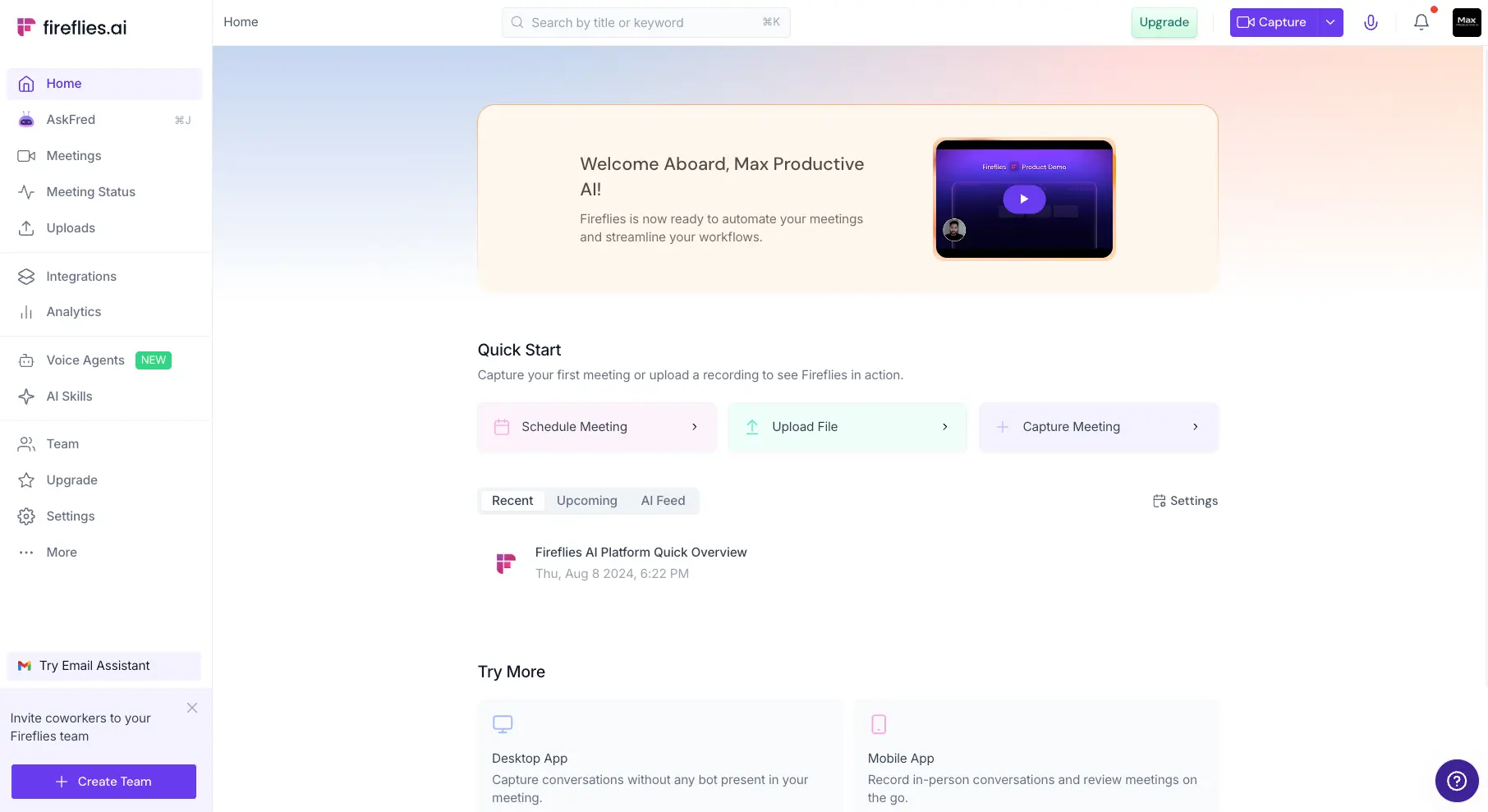
The free tier's real limit is storage: 400 minutes per team, per the current pricing page, so free Fireflies works as a rolling window rather than an archive. One transparency note: an older Fireflies help article still says 800 minutes per seat; treat the live pricing page's 400-per-team as the operative number. Paid pricing as of August 26, 2026: Pro at $10/user/month billed annually ($18 monthly), Business at $19 ($29 monthly), Enterprise at $39 annual-only. On data: Fireflies' privacy policy states personal information isn't used for AI model training and describes a zero-data-retention rule for meeting content with its vendors; enterprise buyers should still read the DPA, as with any tool handling meeting audio. Our Fireflies review goes deeper.
Choose Fireflies over Otter if: you run meetings in more than one language, your notes need to land in a CRM or Slack automatically, and unlimited transcription with a storage window beats capped minutes with history limits. Start free on Fireflies.
3. Granola — Notes Without a Bot in the Room
Granola pays us a commission, and it's the philosophical opposite of Otter. Nothing joins your meeting. The app listens to your device's audio while you jot rough notes, then blends what you typed with what was said into a clean, structured note after the call. Attendees see nothing in the participant list, there's no "recording" banner from a third-party bot, and in our own account that's exactly why it works for sensitive conversations where a bot would change the room's temperature. The flip side is a real responsibility: because nothing announces itself, telling people you're capturing the call is entirely on you, and we cover why that matters in the consent section below.

Granola runs on Mac, Windows, and iOS, with no Android app, and it doesn't transcribe uploaded files, so treat it as a live-meeting tool. Pricing as of August 26, 2026: Basic is free with what Granola calls limited meeting history, the exact window isn't published on its pricing page, so check inside the app; Business at $14/user/month unlocks unlimited notes and history plus integrations; Enterprise at $35 adds SSO and admin enforcement. On data: Granola's policy pages state third parties never receive your data for training, its own training uses de-identified data with an opt-out in settings, and Enterprise workspaces are opted out by default. The company raised $125 million at a reported $1.5 billion valuation in March 2026, so vendor risk is low for the category. Our Granola review (4.2/5) covers where the minimalism helps and where it limits.
Choose Granola over Otter if: the bot itself is the problem, you take rough notes anyway and want AI to finish them, and your meetings happen live rather than as files to transcribe. Try Granola.
4. MeetGeek — The Budget Pick With Grown-Up Privacy Controls
MeetGeek pays us a commission, and it quietly offers the best privacy-per-dollar in this article. The free plan includes 3 hours of transcription a month with a 2-hour cap per meeting, 3 months of transcript storage, and a month of audio storage, and it records either with a bot in Zoom, Meet, and Teams or without one via the browser extension and desktop recorder. In our own account, the automations are the surprise: summaries and highlights arrive by email after each call without anyone opening the app, which is exactly what a team that won't adopt new software needs.
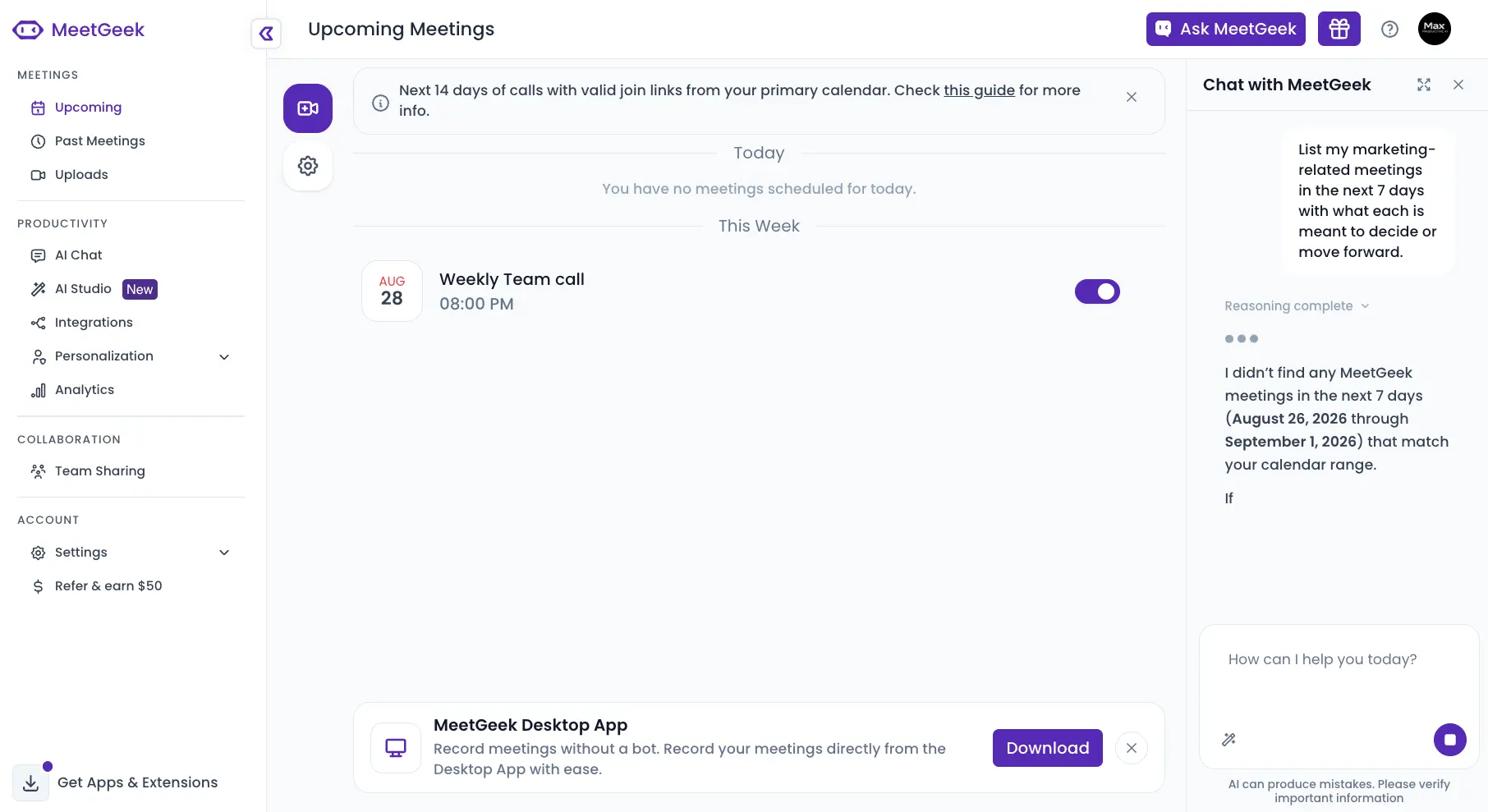
The privacy grid is where it stands apart at this price. MeetGeek's pricing page lists zero-data-training across tiers, meaning your recordings aren't used to train external models, plus a choice of EU or US data storage, and SOC 2, GDPR, and HIPAA compliance claims. Recording consent notifications, which tell attendees a recording is happening, come in from the Business tier. Transcription covers 100+ languages per the same page. Pricing as of August 26, 2026: Pro at $9.99/user/month billed annually ($15.99 monthly), Business at $17 ($27 monthly). Our MeetGeek review (4.8/5) covers the template system that most reviews skip. And if your shortlist comes down to MeetGeek or Fathom, our Fathom vs MeetGeek comparison settles that head-to-head in detail.
Choose MeetGeek over Otter if: you want European data residency or a written no-training stance without Enterprise pricing, and email-first summaries fit how your team actually works. Try MeetGeek free.
5. Notta — The Transcription Bridge, at the Lowest Annual Entry
Notta pays us a commission, and it's the closest thing here to Otter's original job: transcription first, meetings second. It sends a bot into Zoom, Teams, Meet, and Webex, and it also transcribes uploaded audio and video files, records your screen, and clips from the browser, which makes it the natural pick if a chunk of your Otter use was actually interviews, voice memos, and files rather than live calls. It holds a 4.7 in our Notta review.
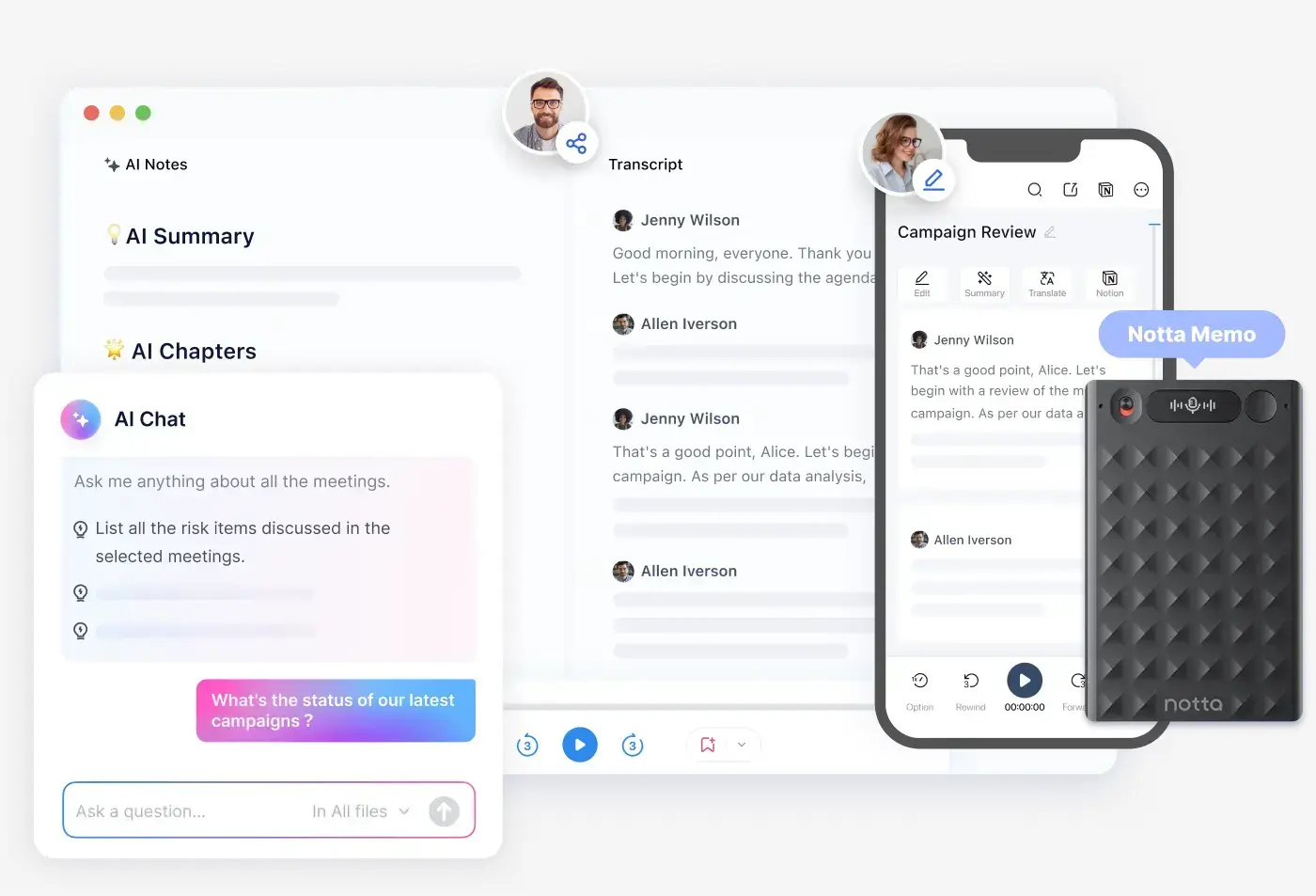
Be clear-eyed about the free tier: 120 minutes a month sounds fine until you hit the 3-minute cap per conversation, which makes free Notta a demo for testing accuracy, not a plan you live on. The paid fix is the cheapest annual entry in this lineup: Pro at $8.17/month billed annually ($97.99/year) with 1,800 minutes a month and 5-hour recordings, and Business at $16.67/month annually with unlimited transcription. On data: Notta publishes SOC 2 Type II and ISO 27001 certifications and hosts on AWS, but its pages don't spell out an AI-training stance as plainly as Fireflies, MeetGeek, or Granola do, so ask before an enterprise rollout, and we've flagged it in the comparison table below.
Choose Notta over Otter if: file transcription is half your workload, you want a real per-month allowance for around eight dollars, and the 3-minute free cap doesn't scare you off testing it first. See Notta's plans.
6. tl;dv — The Free Recording Vault, With Homework Attached
tl;dv pays us a commission, and this is the section where we make you do some checking, because tl;dv's own pricing page refused to load during our verification pass, and we won't quote third-party numbers as if they were gospel. As reported by the trackers we cross-checked: the free plan includes unlimited video recordings and unlimited transcripts in 30+ languages, which as a pure recording vault is genuinely strong, but AI-generated notes are reportedly capped at about 10 meetings for the lifetime of the account, with roughly 5 file uploads, a 3-hour recording limit, and data retention around 3 months. Paid reportedly starts near $18/user/month billed annually.
Why include it anyway? Because the shape of the offer, free unlimited recording with AI as the paid layer, is the mirror image of Otter's capped-everything free plan, and tl;dv's product has a strong reputation in exactly the remote-team crowd that's leaving Otter. But every number in the paragraph above carries the same instruction: open tldv.io/pricing on your own screen before deciding anything. If the lifetime AI-note cap is real, free tl;dv is a recorder, not a notetaker.
Choose tl;dv over Otter if: what you mostly need is a searchable archive of recorded calls, and you'll confirm the current AI-note limits yourself before committing. Check tl;dv's current plans.
7. Krisp — Bot-Free Notes From the Noise-Cancellation People
Krisp pays us a commission. It arrived at note-taking from the opposite direction: it was the microphone noise-cancellation tool your remote-work setup may already know, and it now layers bot-free meeting notes on top. Nothing joins your call; Krisp sits on your device, works across any meeting app, and produces transcripts, summaries, and action items while still cleaning up your audio, which no one else in this article does. It connects to your Google or Outlook calendar by default to know when meetings happen, and a zero-calendar-permissions route exists via sales for stricter environments. Transcripts and summaries cover 16 named languages per its pricing page, and the same page states your meeting data is never used to train Krisp's models, alongside SOC 2, GDPR, HIPAA, and PCI claims.
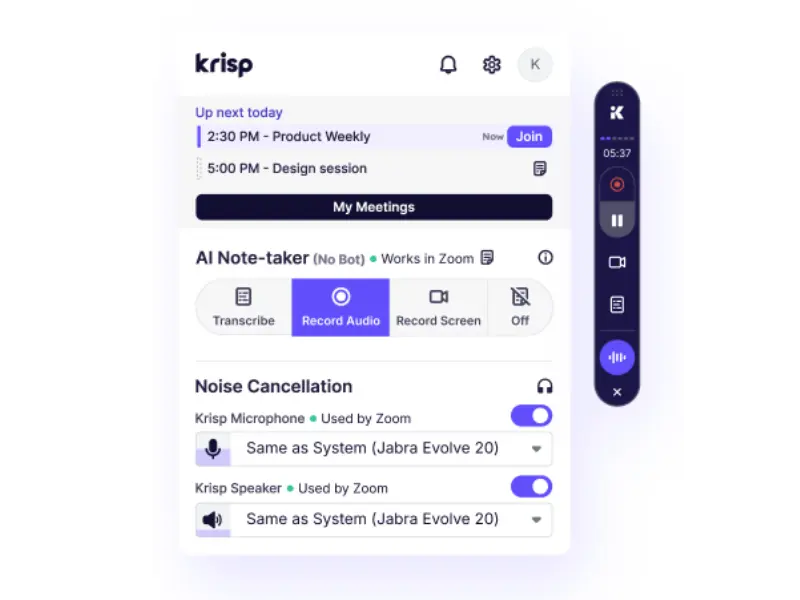
The structural difference from everything else here: Krisp has no free plan. There's a 7-day trial with unlimited use and no card required, then Core at $16/month, or $8 billed annually, and Advanced at $15 annually. If a forever-free tier is a requirement, Krisp isn't your tool; if a week is enough to know, the annual price undercuts most of the list. Our Krisp review (4.7/5) covers how the noise cancellation and the notes interact in practice.
Choose Krisp over Otter if: you want botless capture across every meeting app plus cleaner audio in the same subscription, and a trial-then-pay model doesn't bother you. Start the Krisp trial.
8. Fellow — The Privacy-Forward Pick That Pays Us Nothing
Fellow pays us nothing, and it belongs here because it's the tool Google's own AI Overview reaches for when the question is security and privacy controls. Fellow is a meeting-management platform with a notetaker inside: agendas, action items, and meeting workflows first, with AI recording, transcription in 99 languages per its pricing page, and summaries wired into that structure. For teams whose real problem is meetings themselves, not just notes, it's a different and often better-fitting answer, and features like transcript redaction on Business plans point at buyers who care what happens to the record afterward.
The honest caveat sits in the free tier: 5 AI notes and 5 AI recordings for the lifetime of the account, which is a demo, not a plan. Paid pricing as of August 26, 2026 is the cheapest in this lineup: Team at $7/user/month billed annually ($11 monthly), Business at $15 ($23 monthly), Enterprise at $25 annually from 10 users. One thing we couldn't verify: a plainly worded AI-training policy statement like Fireflies' or Granola's; ask Fellow directly if that's a gating question for you. And since Fellow's own "Otter alternatives" article ranks on this search with Fellow in first place, consider this section the second opinion: it's a good product whose free tier undersells it.
Choose Fellow over Otter if: your team needs agendas, action items, and accountability around the notes, privacy controls matter, and seven dollars a seat is the budget. Details at fellow.app.
9. MacWhisper — The Local Option the Forums Keep Landing On
MacWhisper pays us nothing, and it's here because the freshest discussions on this search, journalists transcribing interviews, tinkerers replacing Otter with self-hosted setups, keep arriving at the same place: run the open Whisper model locally and stop uploading your conversations anywhere. MacWhisper packages that idea for people who don't want a command line. It's a Mac app that transcribes audio files and records system audio from Zoom, Teams, and Webex directly on your machine. Nothing leaves your laptop, there's no account, no cloud, and no per-minute meter, which makes it the most private tool in this article by construction.
The free version runs smaller Whisper models; Pro, a one-time purchase around €59, unlocks the larger, more accurate models and the system-audio recording that makes it a meeting tool. The trades are real: Mac only, transcription rather than a meeting assistant, and summaries are yours to make by pasting the transcript into whatever AI you already use. Windows users can assemble a similar local pipeline with more setup, and open-source projects like Meetily target self-hosters, though we'd verify their current maintenance before relying on one. For confidential work, the pitch writes itself: the most private notetaker is the one that never phones home. Details at the MacWhisper site.
Choose MacWhisper over Otter if: you're on a Mac, privacy beats convenience, and a one-time payment for local transcription sounds better than another subscription.
The Free-Tier Reality: What $0 Actually Gets You
Free plans in this category sort into three groups, and the labels on the pricing pages won't tell you which is which. Genuinely free workhorses: Fathom's unlimited recording and transcription, Fireflies' unlimited transcription behind a 400-minute team storage window, and MeetGeek's 3 hours a month. Demos wearing free-plan costumes: Notta's 3-minute cap per recording, Fellow's 5 lifetime notes, tl;dv's reported 10 lifetime AI-note meetings, and Granola's unpublished history window. Not free at all: Krisp's 7-day trial, stated plainly on its own pricing page. Otter's 300 minutes with a 30-minute cap sits in the middle: honestly usable for a few short calls a week, exhausted in days by anyone who lives in meetings, which is usually the moment this search begins.
| Tool | What the free tier actually includes (verified Aug 26, 2026) |
|---|---|
| Otter | 300 min/month shared with imports, 30-min cap per conversation, 3 lifetime file imports, 25-conversation history |
| Fathom | Unlimited recordings, transcription, and storage; advanced AI features metered |
| Fireflies.ai | Unlimited transcription and summaries, 400 min storage per team, 2-hr per recording, 20 AI credits |
| Granola | Free notes with limited meeting history; exact window not published, check in-app |
| MeetGeek | 3 hours transcription/month, 2-hr per meeting, 3-month transcript storage |
| Notta | 120 min/month, 3-min cap per recording, 50 uploads, 10 AI summaries |
| tl;dv | Reported: unlimited recording/transcripts, ~10 AI-note meetings lifetime; confirm on tldv.io |
| Krisp | No free plan; 7-day unlimited trial, no card required |
| Fellow | 5 AI notes and 5 recordings, lifetime |
| MacWhisper | Free local transcription with smaller models; system-audio recording in Pro (~€59 one-time) |
The Consent and Privacy Reality Nobody Prints
This is the section the vendor articles skip, and in 2026 it decides more switches than pricing does. Start with the law, in practical terms rather than legal advice: in the US, federal law and most states allow recording a conversation with one participant's consent, but roughly a dozen states, including California, Florida, and Washington, require everyone's consent. A visible bot does part of the disclosure work for you, because people see it join. A botless tool announces nothing, so with Granola, Krisp, or MacWhisper the duty to tell people lands entirely on you. Whatever you pick, say you're recording at the top of the call. It's one sentence, and it makes every tool on this list legally boring.
Now the lawsuit, because Google's People Also Ask box raises it and you deserve a straight answer. A putative class action, In re Otter.AI Privacy Litigation, is pending in federal court in California. On August 13, 2026 the judge allowed the core privacy claims, brought under California's and Illinois' privacy statutes and the federal wiretap law, to proceed, while dismissing several others. That ruling only means the claims were plausibly pleaded; the underlying allegations, that Otter's bot joined and recorded meetings without everyone's consent and that recordings fed model training, remain allegations, with nothing decided on the merits and no trial date reported. Worth one more dated line for context: Canadian reporting by The Globe and Mail described an Otter bot that recorded a 2024 hospital meeting its owner didn't even attend and then emailed the transcript link to 65 people. Auto-join and auto-share defaults are where this category's real accidents happen, whichever vendor's name is on the bot.
| Tool | How it records, and what attendees see | Data and training stance (official pages, Aug 26, 2026) |
|---|---|---|
| Otter | OtterPilot bot joins Zoom, Teams, and Meet; visible participant | US-based; training practices are contested in active litigation; recording-disclaimer emails on paid tiers |
| Fathom | Visible bot, or bot-free beta on Mac (nothing appears) | US storage; sub-processors barred from training; de-identified data improves Fathom's own models, opt-out in settings |
| Fireflies.ai | Visible bot, or extension/desktop capture without a bot | No personal data used for model training; zero-data-retention rule for meeting content with vendors, per its privacy policy |
| Granola | No bot; captures your device's audio, attendees see nothing | Third parties never receive data for training; own training uses de-identified data with opt-out; Enterprise opted out by default |
| MeetGeek | Visible bot, or no-bot recording; consent notifications from Business tier | Zero-data-training across tiers; choice of EU or US storage region |
| Notta | Visible bot, plus file uploads and screen recording | SOC 2 Type II and ISO 27001, AWS hosting; no plainly published training stance, ask before enterprise use |
| tl;dv | Bot-based recording (as reported) | Policy pages not verifiable in our pass; confirm on tldv.io |
| Krisp | No bot; runs on your device, needs calendar access by default | Meeting data never used to train Krisp's models, per its pricing FAQ; SOC 2, GDPR, HIPAA, PCI claims |
| Fellow | Bot within a meeting-management platform; transcript redaction on Business+ | SOC 2 and GDPR claims; no published training-policy statement we could verify |
| MacWhisper | Local system-audio capture; nothing joins, nothing uploads | Everything stays on your Mac; there is no vendor cloud to have a policy about |
If you're the admin doing the choosing, three questions sort this table fast: where is the data stored and can you pick the region, is there a written no-training statement or an enforceable org-wide opt-out, and who gets notified when recording starts. MeetGeek and Granola answer all three cheaply; Fathom and Fireflies answer them well; the rest need a conversation.
Zoom AI, Copilot, and Gemini: The Notetakers You May Already Pay For
Before subscribing to anything above, check what your existing licenses include, because all four platform vendors moved recently and none of them moved loudly. Zoom retired the "AI Companion" name in mid-2026: the built-in meeting summaries and notes now ship as Zoom AI, included with paid Zoom Workplace plans, while free accounts get small monthly allowances, and a separate paid agent tier called ZoomMate starts around $20/user/month. Microsoft keeps meeting recap behind a license: you need either the Teams Premium add-on or a full Microsoft 365 Copilot seat, listed at $30/user/month for enterprise, and the Premium add-on's current price hides inside Microsoft's pricing widget, so check your admin console rather than an article. Google went the generous direction: "take notes for me" in Meet ships with Workspace Business Standard, listed at $14/user/month, and above, and Google expanded it to in-person meetings in August 2026. Notion's AI Meeting Notes captures system audio on desktop but requires the $20/member/month Business plan; the older $10 AI add-on is gone for new customers.
The decision rule is simple: if your organization already pays for one of these, record one real meeting with it before spending anything here. If the notes are good enough, you're done, and this article cost you nothing. If they're not, you'll know exactly which gap a specialist is closing for you, usually accuracy, action items, cross-meeting search, or a free tier that Zoom, Microsoft, and Notion simply don't offer to individuals.
A Note on What Ranks for This Search
Worth naming what you're wading through when you research this topic. Read AI's "10 Top Picks" ranks Read AI first. Fellow's "Top 15" opens with Fellow. Notta's guide recommends Notta, HappyScribe's recommends HappyScribe, and Google's AI Overview, having mostly vendor pages to read, currently cites two of those vendors as its sources. None of these pages is lying, exactly; they're marketing. The one genuinely independent voice on page one is a Reddit thread, which is also where you'll find the most honest data point on this whole subject: working journalists comparing notes on which tools they can still afford. Our scorecard, for the record: seven of the nine tools above pay us, two pay us nothing, Otter pays us nothing either way, and every ranking decision here was made before we checked which was which.
Who Should Stay on Otter
An honest alternatives article owes you the other side, and here it's easy to give because Otter pays us nothing whether you stay or go. Stay if live captions during the call are the job: Otter's real-time transcription inside Zoom, Meet, and Teams, with in-meeting highlights and collaborative notes, is still the most mature version of that specific experience. Stay if you're a student or teacher: the 20% education discount on Pro brings it to about $6.67/month billed annually, and nothing else in this lineup offers an education price at all. And stay if your usage genuinely fits inside 300 minutes of short calls a month, because a free plan you don't outgrow needs no replacement. Watch the lawsuit if the consent questions matter to your organization, but remember that nothing has been decided on the merits. Our Otter review (4.6/5) tracks its plans and limits in detail.
How to Choose Your Otter Alternative
Match the tool to the reason you're leaving, not to feature lists. Leaving over minute caps: Fathom, whose free plan simply doesn't have them. Leaving over languages: Fireflies at 100+, MeetGeek at 100+, Fellow at 99, against Otter's documented five or six. Leaving because of the bot: Granola or Krisp, with MacWhisper as the fully local extreme, and remember the disclosure duty that comes with silence. Leaving over privacy and data policy: MeetGeek for EU storage and no-training on every tier, MacWhisper for never uploading at all. Leaving over price: Fellow at $7, Krisp at $8, Notta at $8.17, MeetGeek at $9.99, all annual. Transcribing files, not just meetings: Notta, or MacWhisper if the files can stay on your machine. Your company already pays Microsoft, Google, Zoom, or Notion: test the bundled notetaker first. And if none of the complaints are yours: staying on Otter is a legitimate call, especially at the education price.
Final Verdict — The Best Otter AI Alternatives in 2026
| Best overall escape | Fathom (unlimited free recording and transcription, our 4.7/5) |
| Best for teams | Fireflies.ai (100+ languages, from $10/mo, our 4.9/5) |
| Botless pick | Granola (device-audio notes, nothing joins the call, our 4.2/5) |
| Budget + privacy controls | MeetGeek (EU/US storage choice, no-training, our 4.8/5) |
| Files and multilingual work | Notta (cheapest annual entry at $8.17/mo, our 4.7/5) |
| Free recording vault | tl;dv (confirm current limits on tldv.io first) |
| Bot-free + clean audio | Krisp (7-day trial, then from $8/mo, our 4.7/5) |
| Privacy-forward, pays us nothing | Fellow (meeting management with AI, from $7/mo) |
| Fully local and private | MacWhisper (one-time purchase, nothing leaves your Mac) |
| Already in your stack | Zoom AI, Copilot, Gemini, or Notion (check your licenses first) |
Bottom line: Otter is a capable product whose free plan runs out fast, whose paid allowance shrank without an announcement, and whose consent questions are now being tested in court, and in 2026 every one of those problems has a specialized fix. Fathom for unlimited free recording, Fireflies for teams and languages, Granola and Krisp for meetings without a bot, MeetGeek for privacy on a budget, Notta for files, MacWhisper for work that should never leave your laptop, and the AI bundled into Zoom, Microsoft 365, Workspace, or Notion for people who'd rather not add a subscription at all. Before you commit anywhere, run the one-week test: record the same real meeting in your two finalists, read both notes the next morning, and check where the recording actually went. That test answers more than any article can, including this one.