
HappyScribe
AI-powered notetaker, transcription, subtitles, and translation in 120+ languages. Auto-join Zoom, Teams & Meet calls or upload recordings for professional-grade captions.
Try HappyScribe Free →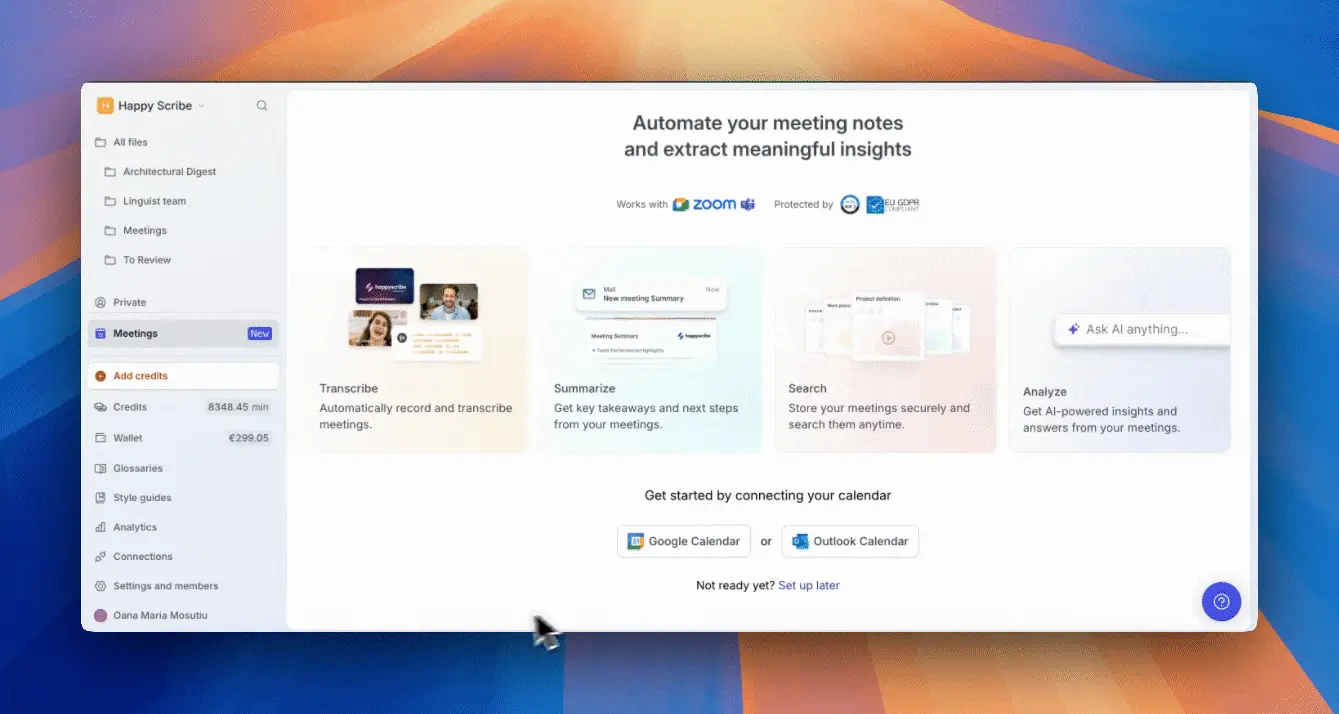
Best for Multilingual
Transcription & Subtitles
HappyScribe combines AI meeting notes, transcription, subtitles, and translation in one platform supporting 120+ languages. It's the strongest option for creators and teams who need professional subtitles and multilingual content—though AI accuracy can drop with noisy audio.
✓ What We Love
- 120+ languages—broadest coverage available
- Pro-grade subtitle editor with many export formats
- Human transcription option for 99% accuracy
- AI meeting bot for Zoom, Teams, Meet
! Could Be Better
- AI accuracy drops with accents/noise
- Human transcription expensive at scale
- No native mobile app
See HappyScribe in Action
Real screenshots from the HappyScribe platform.
Meetings Dashboard
Connect your calendar and let AI handle meeting notes automatically
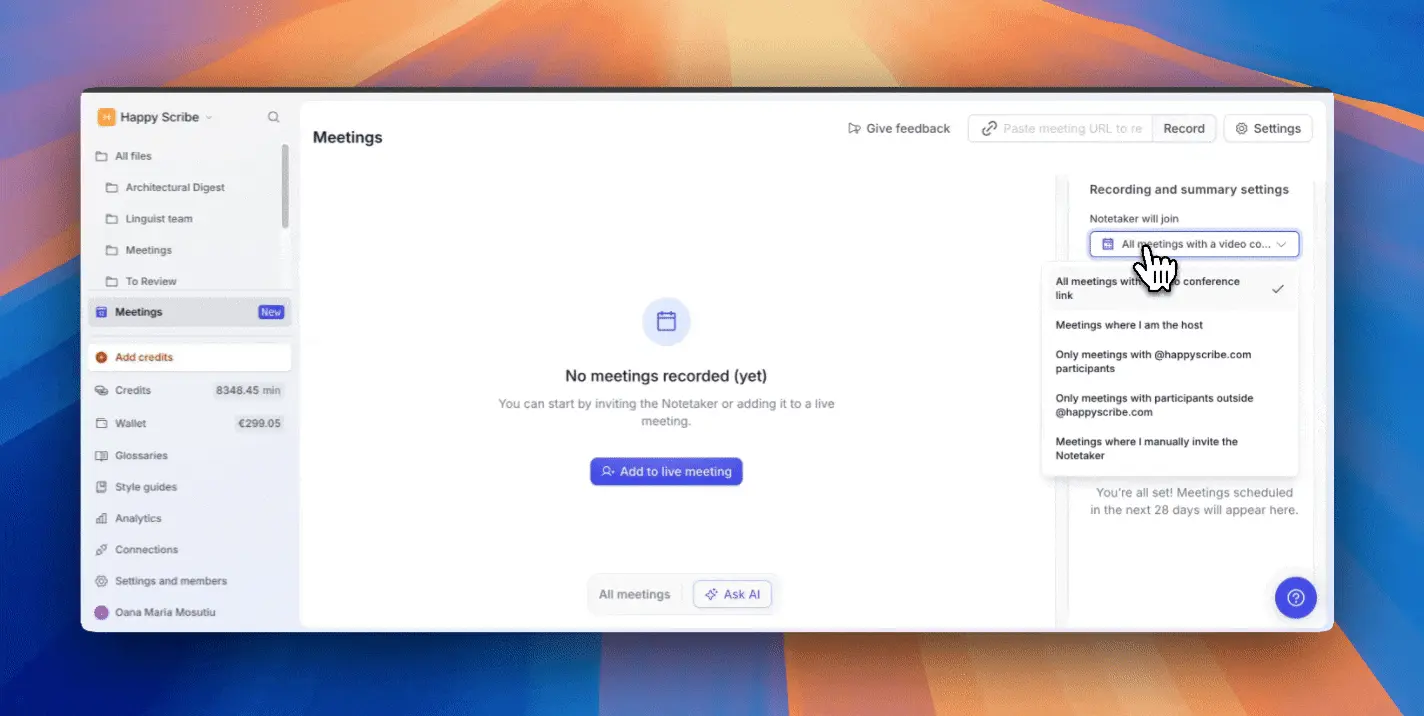
Flexible Meeting Settings
Control which meetings the AI notetaker joins automatically
AI Notetaker in Google Meet
The bot joins your call and records with participant consent

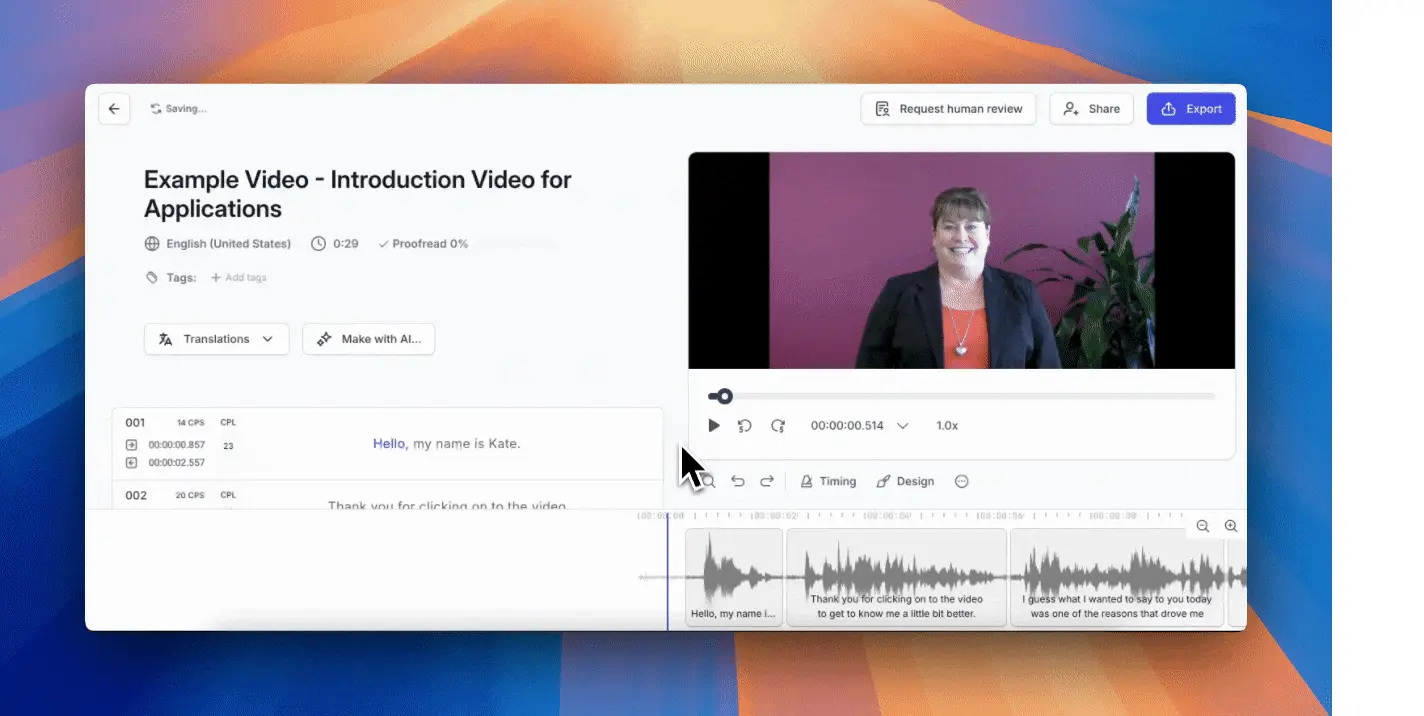
Professional Subtitle Editor
Fine-tune timing, translations, and export in multiple formats
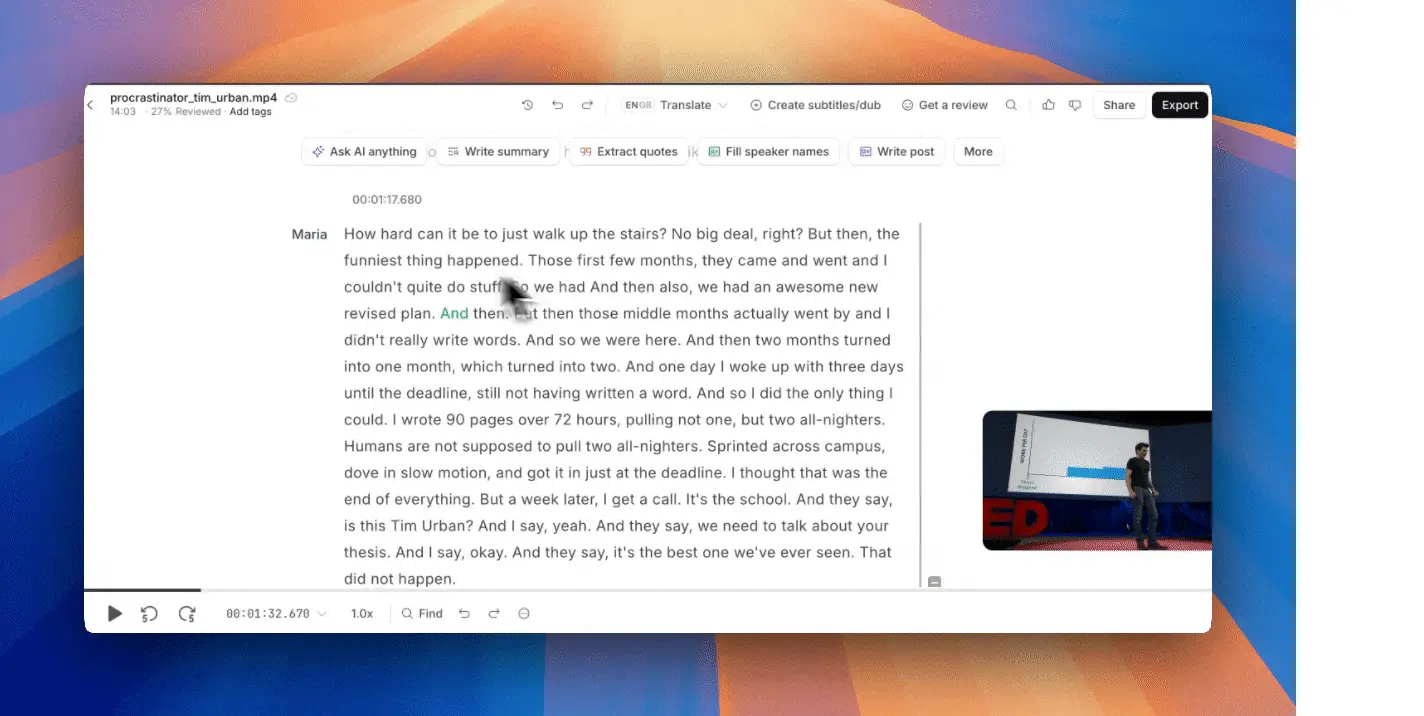
Transcript Editor with AI Tools
Edit transcripts, extract quotes, and repurpose content
Ready to automate your meeting notes and subtitles?
Try HappyScribe Free →Free tier available • No credit card requiredHow HappyScribe Works
Connect Your Calendar or Upload Files
Link Google Calendar or Outlook for automatic meeting capture, or upload audio/video files directly. Supports MP3, MP4, WAV, MOV, and most common formats.
AI Transcribes in 120+ Languages
HappyScribe's AI processes your audio and generates time-coded transcripts with speaker labels. Select from 120+ languages and regional dialects for optimal accuracy.
Edit, Translate & Export
Use the online editor to correct text, adjust timing, and add translations. Export as DOCX, TXT, SRT, VTT, or burned-in subtitles for YouTube and social media.
Optional Human Proofreading
For critical accuracy (legal, medical, broadcast), add human transcription for 99% accuracy. Turnaround is typically 12-24 hours depending on length.
Enterprise-Ready Security
HappyScribe is GDPR compliant and SOC 2 Type II certified. Team workspaces include SSO, role permissions, and dedicated account management on higher tiers.
Key Features
AI Meeting Notetaker
Auto-joins Zoom, Teams & Meet calls to record, transcribe, and summarize with action items.
120+ Language Support
Transcribe and translate in over 120 languages including regional variants like US vs UK English.
Subtitle Generator
Create time-synced subtitles with professional editor. Export SRT, VTT, STL, or burn directly into video.
AI Translation
Translate transcripts and subtitles into multiple languages directly in the platform.
Human Transcription
Professional transcribers for 99% accuracy. Ideal for legal, medical, and broadcast content.
Ask AI Anything
Query your transcripts and meetings. Extract quotes, write summaries, or create social posts.
Team Workspaces
Shared projects, role permissions, glossaries, style guides, and usage analytics.
Integrations
Connect with YouTube, Google Drive, Dropbox, Zapier, and more. API available for custom workflows.
Pricing Plans
AI subscriptions plus optional human transcription.
Pro
Business
Annual billing: Save up to 20% on all paid plans
When to Choose Human Transcription
Use AI for drafts and internal content. Choose human transcription for legal, medical, or broadcast where errors are costly.
Detailed Pros & Cons
✓ Pros
120+ languages and regional variants—more than Otter (4), Fireflies (100+), or MeetGeek (70+).
Pro-grade timing controls, CPS metrics, and export to SRT, VTT, STL, XML, FCPXML, and burn-in.
When AI isn't enough, professional transcribers deliver 99% accuracy for critical content.
Works with Zoom, Teams, Meet, YouTube, Vimeo, Google Drive, Dropbox, and Zapier.
GDPR compliant and SOC 2 Type II certified. SSO and team permissions on higher tiers.
✗ Cons
Drops to 80-85% with heavy accents, background noise, or overlapping speakers. Manual editing often needed.
At ~€1.70-2.00/minute, long-form content gets expensive quickly.
Browser-only workflow. No dedicated iOS or Android app for on-the-go recording.
Some users report inconsistent speaker identification, especially with similar-sounding voices.
Occasional timing issues with videos that have long silences or unusual pacing.
HappyScribe vs Alternatives
How does HappyScribe compare to other AI notetakers and transcription tools?
| Feature | HappyScribe | Otter.ai | Fireflies | Notta |
|---|---|---|---|---|
| Starting Price | $9/mo | $16.99/mo | $18/mo | $13.49/mo |
| Free Tier | ✓ 10 min | ✓ Limited | ✓ Limited | ✓ Limited |
| Languages | 120+ | 4 | 100+ | 58+ |
| Live Meeting Bot | ✓ | ✓ | ✓ | ✓ |
| Subtitles/Captions | Excellent | Basic | Basic | Basic |
| Human Option | ✓ 99% | ✗ | ✗ | ✗ |
| Best For | Multilingual content | English meetings | Sales/CRM | Simple notes |
Which Tool Is Right For You?
HappyScribe
Best for SubtitlesBest for: Content creators, podcasters, and global teams who need professional subtitles, translations, and multilingual transcription. The strongest choice when you publish video content in multiple languages.

Otter.ai
Free TierBest for: English-only meetings with real-time transcription needs. Excellent for collaboration and live note-sharing, but limited to 4 languages.
Fireflies.ai
Sales TeamsBest for: Sales and customer success teams who need deep CRM integrations (HubSpot, Salesforce) and automated follow-ups from call notes.
Notta
Simple & FastBest for: Users who want straightforward meeting transcription without complexity. Good Google Meet integration and clean interface.

Fathom
Free for ZoomBest for: Zoom-heavy users who want generous free meeting summaries. Limited language support but excellent free tier.

Submagic
Short-Form VideoBest for: TikTok, Reels, and Shorts creators who need viral-style kinetic captions. More styling options than HappyScribe for social clips.

Granola
Mac-NativeBest for: Mac users who want a lightweight, privacy-focused AI notetaker that runs locally. Clean interface with minimal setup required.
Frequently Asked Questions
Should You Try HappyScribe?
HappyScribe is the strongest choice for multilingual content creators, podcasters, and global teams who need professional subtitles and translations. Its 120+ language support is unmatched, and the combination of AI speed with optional human accuracy makes it versatile for different quality needs.
If you primarily run English-only internal meetings, simpler tools like Otter or Fathom may be more cost-effective. But for anyone publishing video content internationally or needing broadcast-quality subtitles, HappyScribe delivers.
Our Recommendation
Start with the free tier to test AI accuracy on your specific audio. If you need subtitles for YouTube or multilingual content, HappyScribe will likely become your primary tool.
Ready to Automate Your Transcription & Subtitles?
Join thousands of creators using HappyScribe for meeting notes, transcripts, and multilingual content