
Synthesia
The AI video platform built for enterprise. Turn a script into a polished, presenter-led video in minutes — with 230+ realistic avatars, 160+ languages, and the security stack Fortune 100 IT departments actually approve.
Try Synthesia →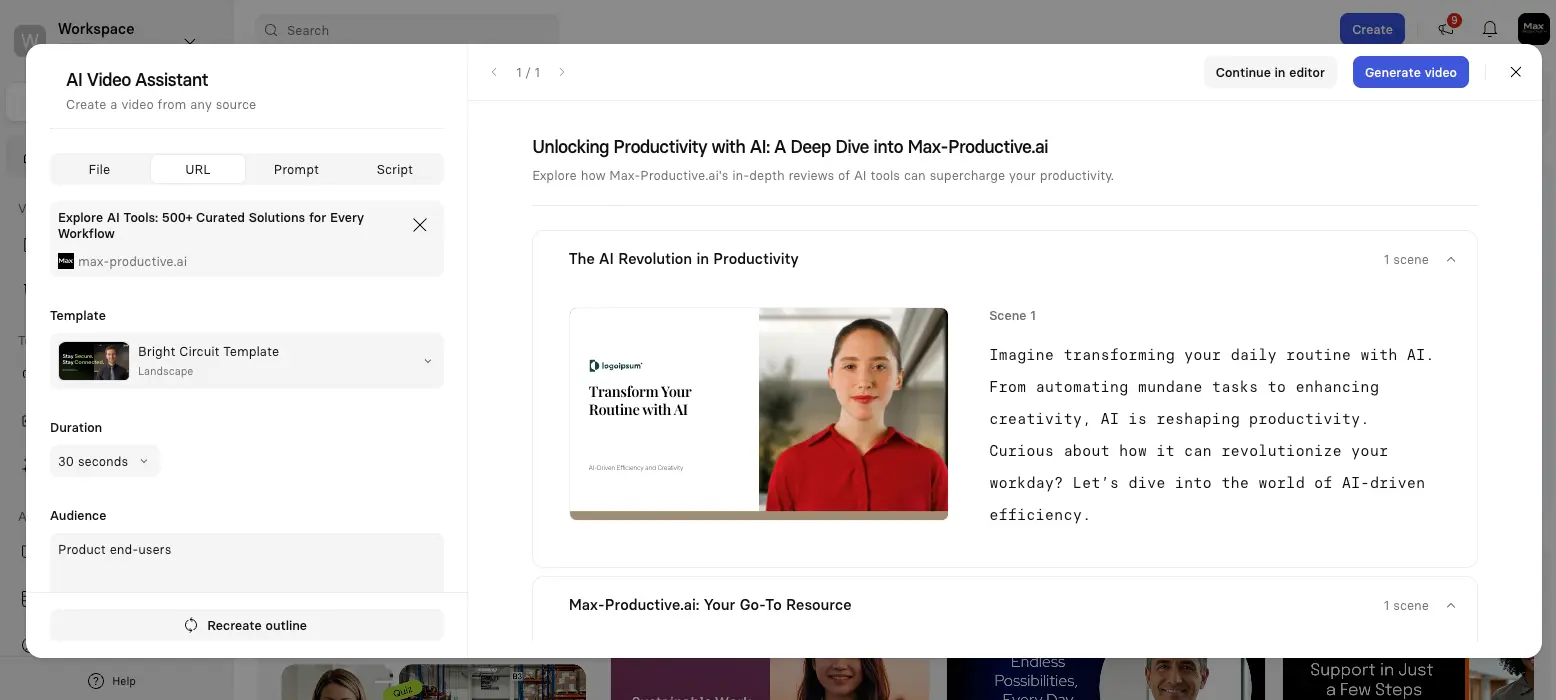
The Enterprise Standard for
AI Avatar Video — At a Price
Synthesia isn't trying to be the prettiest AI avatar tool — it's trying to be the one your IT and legal teams actually sign off on. And it succeeds. The Express-2 engine and embedded Sora 2 access (via Synthesia 3.0) closed most of the realism gap with HeyGen, while the SOC 2 + ISO 42001 + GDPR security stack remains genuinely unmatched in the category. The trade-off? Pricing-per-minute is steep, and the content moderation system can be a real headache for healthcare and biotech teams. Worth it for the right buyer; overkill for solo creators.
✓ What We Love
- The full enterprise security stack — SOC 2 + ISO 42001 + GDPR
- 230+ avatars and 160+ languages — broadest coverage in the category
- Express-2 full-body avatars are a genuine quality leap
- Embedded Sora 2 and Veo 3.1 via the AI Playground
! Could Be Better
- Content moderation flags legitimate medical & biotech content
- 10 min/month Starter cap is tight; Creator triples the price
- SCORM, Video Agents, and bulk dubbing all gated to Enterprise
What Is Synthesia?
The category-defining enterprise AI avatar platform — and how it got there.
Synthesia is a London-based AI video generation platform founded in 2017 by Victor Riparbelli, Steffen Tjerrild, Matthias Niessner, and Lourdes Agapito — a team of academic researchers from UCL, TU Munich, and Stanford. The premise is simple: type a script, pick an AI avatar, and Synthesia produces a polished 1080p video with no camera, no studio, and no actors. What started as a research curiosity in 2017 is now the dominant enterprise platform in its category, with 60,000+ businesses on board including over 90% of the Fortune 100.
The numbers behind it are serious. Synthesia crossed $100M in annual recurring revenue in April 2025, reached $150M+ ARR by early 2026, and in January 2026 closed a $200M Series E led by Google Ventures (with Nvidia's NVentures participating) at a $4 billion valuation — nearly double its previous valuation a year earlier. That's not a side project. It's a category-defining piece of infrastructure for corporate Learning & Development teams.
Here's what genuinely separates Synthesia from competitors like HeyGen or Hedra: it's built for the enterprise procurement process, not the creator economy. SOC 2 Type II, ISO 27001, ISO 42001 (one of the few platforms certified for AI management systems), and GDPR with EU data residency — that combination is what gets a video tool past the IT and legal review at a Fortune 500. HeyGen produces more visually striking output. Hedra has better lip-sync at a fraction of the price. But neither has the certification stack Synthesia does, and that's the gap.
Who Is Synthesia Best For?
Mid-to-large enterprises with active L&D, internal communications, or compliance functions. Particularly strong fits: global companies needing the same training in 10+ languages, organizations using Salesforce, Docebo, SAP Litmos, or Articulate 360, and any team where IT requires a SOC 2 + GDPR-certified vendor. Less suitable for solo creators, social media producers, or anyone whose content regularly involves medical or pharmaceutical topics — more on that in the cons section.
The October 2025 release of Synthesia 3.0 was a turning point for the platform. The Express-2 avatar engine moved Synthesia from "talking head" presenters to full-body performers with natural hand gestures and micro-expressions at 1080p/30fps — closing most of the realism gap that HeyGen's Avatar IV had opened up earlier in the year. At the same time, Synthesia rolled out Video Agents (AI avatars that hold real-time conversations with viewers), Interactivity 2.0 (quizzes and hotspots embedded in videos), and the AI Playground — which embeds OpenAI's Sora 2 and Google's Veo 3.1 directly inside the editor for cinematic B-roll. That last one matters: Synthesia is one of the few platforms where you can pull from the most advanced generative video models without leaving the workflow.
One thing worth being upfront about — we have not personally tested Synthesia across enterprise deployments. This review draws on public documentation, the platform's own demo walkthroughs, independent G2/Capterra/Trustpilot data, Reddit threads from instructional designers, and the technical specs published by Synthesia and competing platforms. Where we share opinions, they're informed analysis, not "we tested it for 6 months" claims.
See Synthesia in Action
Seven screenshots from the platform showing the core workflow — from script to multilingual output.
AI Video Assistant — URL to Video
Paste any URL and Synthesia generates a structured video outline
This is where most users start. Drop in a webpage URL, a PDF, or a few lines of prompt — and Synthesia generates a full video outline with scene-by-scene narration, avatar selection, and template styling. The "Recreate outline" button lets you iterate on the structure before committing to render. It's the fastest path from "I have an idea" to "I have a draft video" of any platform we looked at.
Video Editor — Avatar Selection
Browse 230+ avatars across professional, casual, and diverse styles
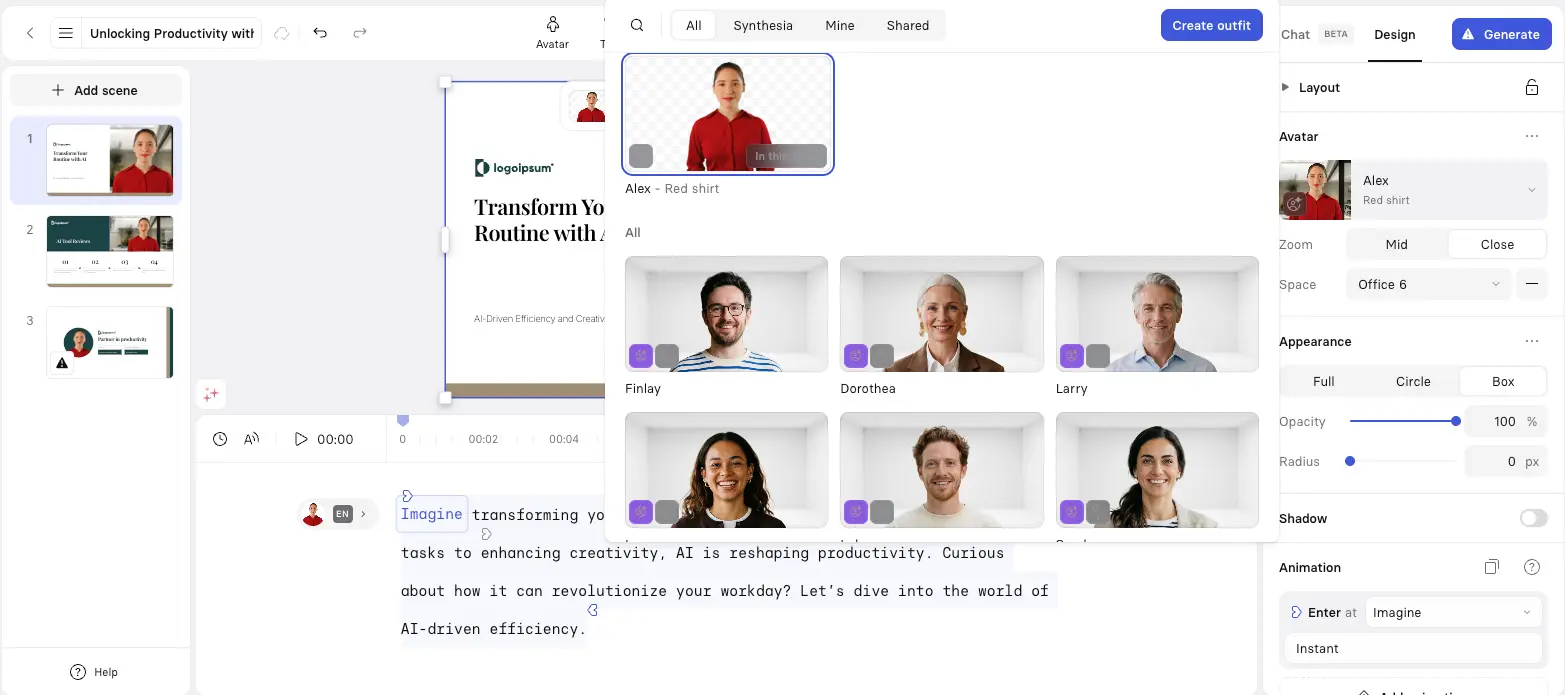
The editor pairs the avatar library with full layout, animation, and zoom controls in a single panel. You can swap an avatar mid-script, change the office "space," and adjust framing without re-rendering — though changing the script itself does require a fresh render. The avatar diversity is genuinely good across age, ethnicity, and presentation style; this is one of the areas where the 230+ library size pays off versus competitors with smaller catalogues.
Create Outfit — AI Avatar Customization
Generate custom outfits for your avatar from a text prompt
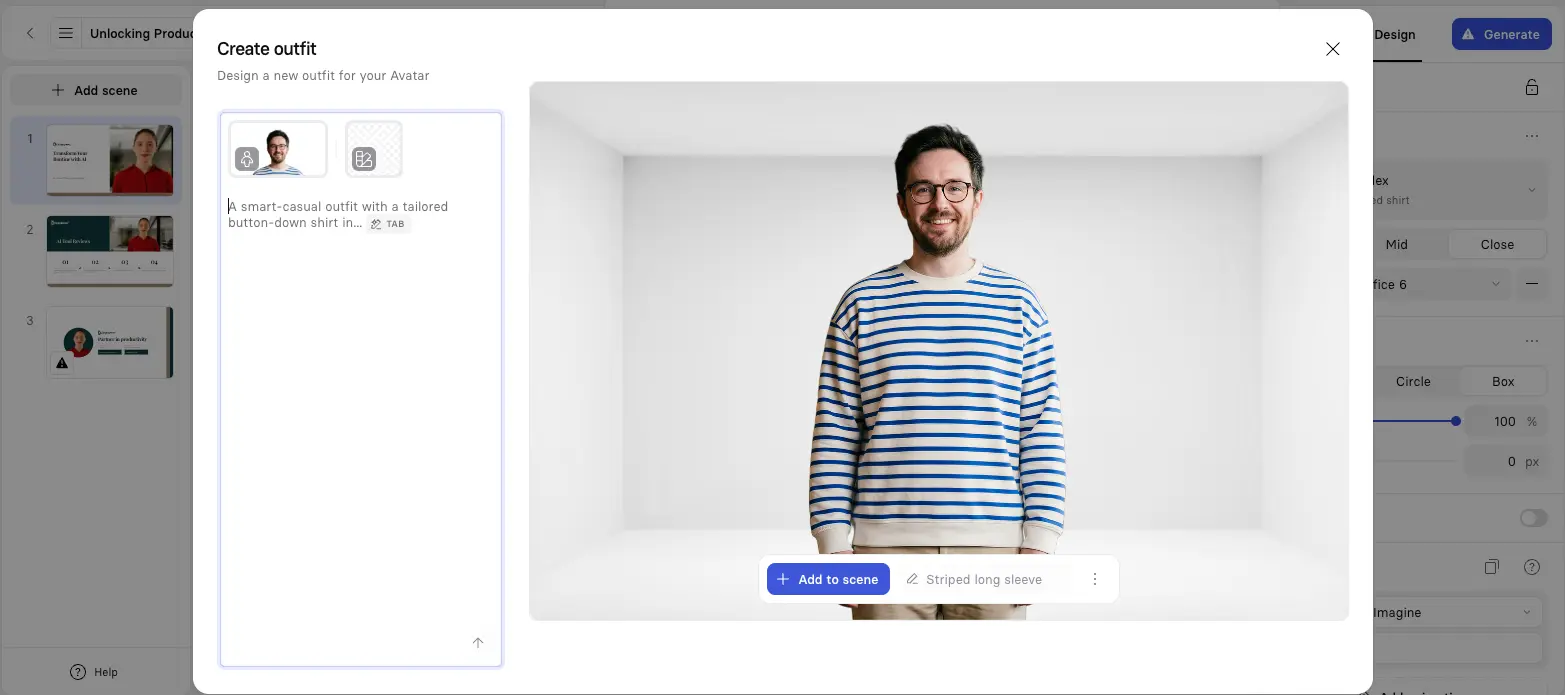
A small but useful Synthesia 3.0 feature: type something like "smart-casual button-down shirt in navy" and the AI generates a custom outfit on your selected avatar. It's not a defining feature of the platform, but it removes a real friction point — if you're producing seasonal training content or want to keep avatar styling consistent with brand guidelines, this beats picking from a fixed wardrobe.
Want to test the avatar quality with your own brand voice?
Try Synthesia →Free plan available • 3 minutes per month, 9 avatars, no credit cardAI Dubbing — Multilingual Translation
Translate any video into 130+ languages with frame-accurate lip sync
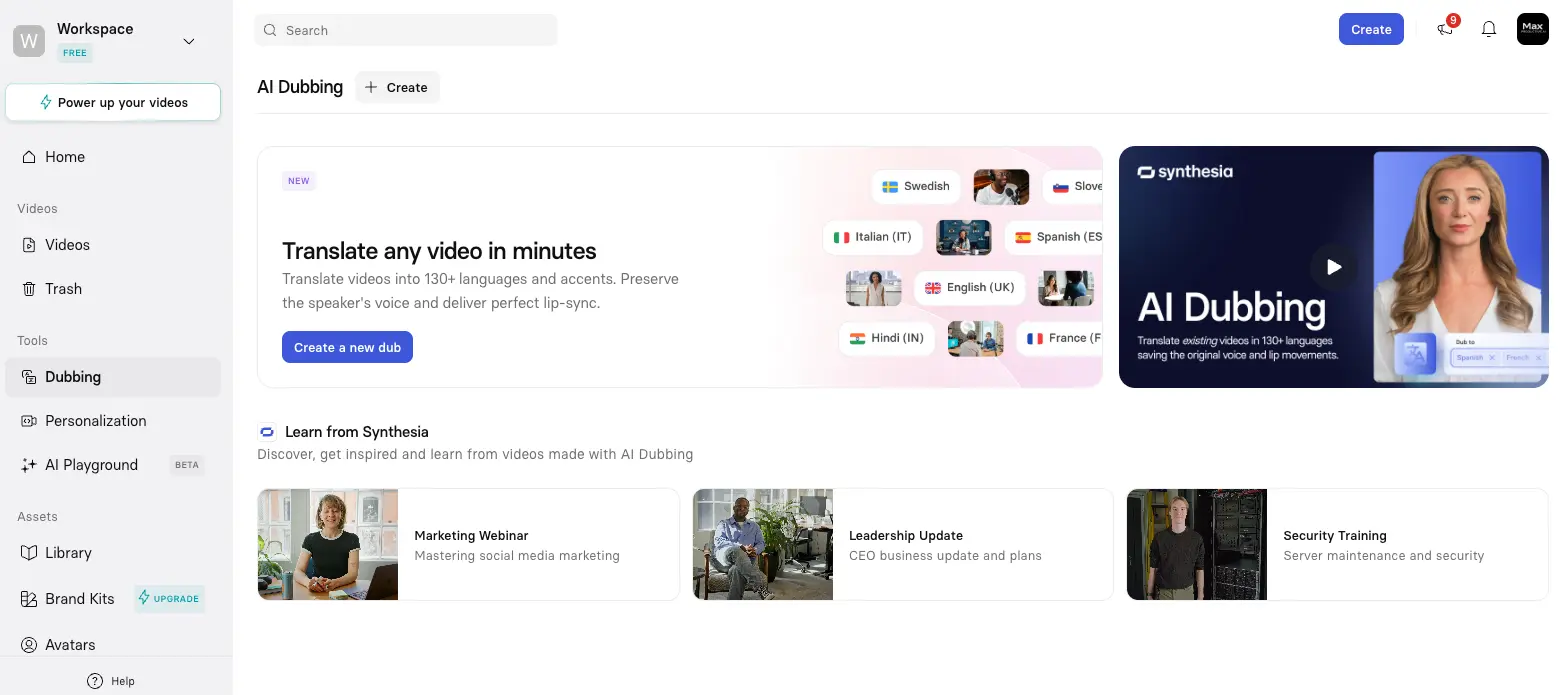
Honestly, this is the feature that justifies the Enterprise price tag for a lot of buyers. Upload an existing video — even one filmed with a real human — and AI Dubbing translates it into 130+ languages while preserving the original speaker's voice and matching lip movement to the new language. For global L&D teams that previously paid voice actors and re-recorded videos for each market, the ROI is straightforward and significant. The Secure Editing mode lets you manually correct translations before publishing, which matters for legal, medical, and compliance content where a mistranslation isn't just embarrassing.
AI Playground — Sora 2 Video Generation
Generate cinematic B-roll using Sora 2 and Veo 3.1 inside Synthesia
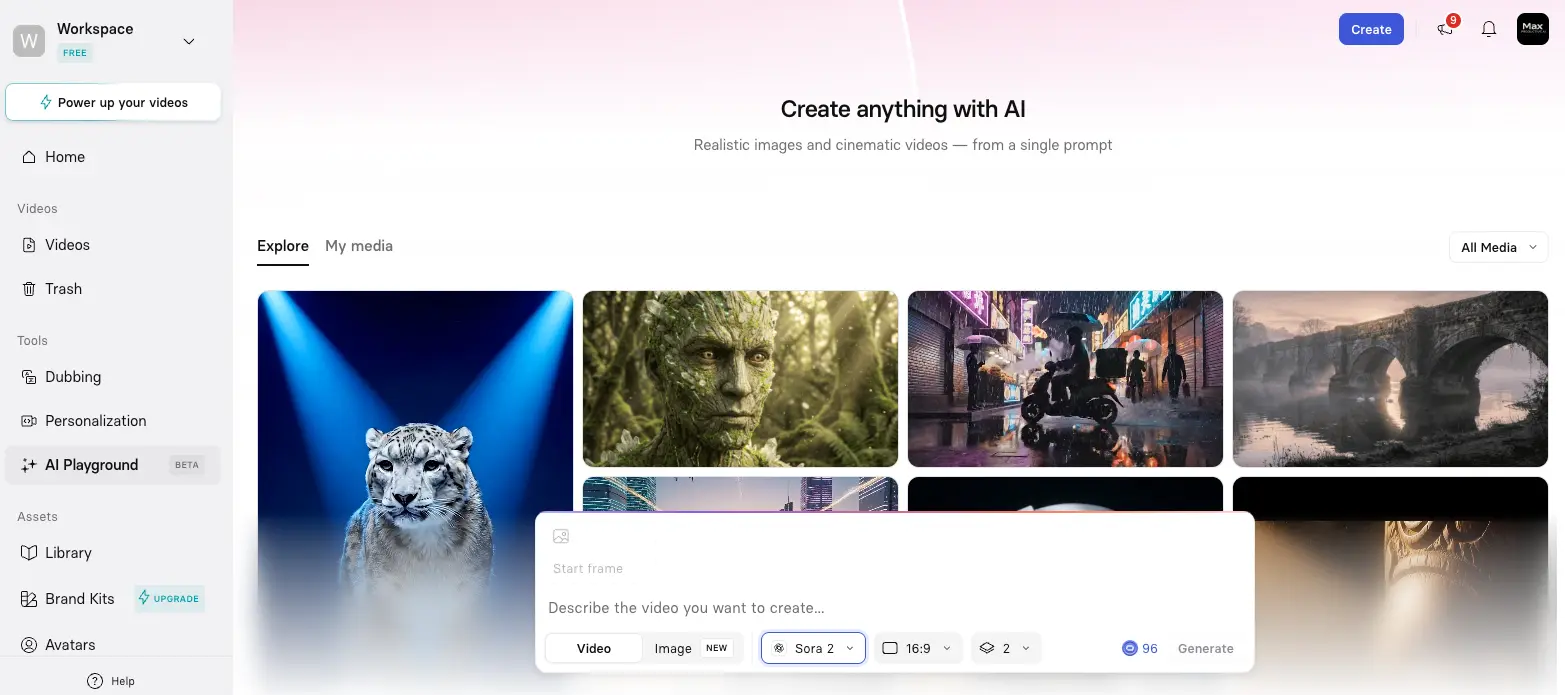
The AI Playground is genuinely a standout feature. You get Sora 2 and Veo 3.1 — currently the two most powerful generative video models on the market — embedded directly in the Synthesia editor. No tab-switching, no separate subscriptions, no API juggling. Drop a prompt, pick the model, set the ratio, and the generated clip lands in your video timeline next to your avatar. For brands that need cinematic B-roll alongside presenter content, this is the kind of integration that's hard to replicate with stitched-together tools.
Voice Cloning — Custom AI Voices
Clone your own voice and pair it with any avatar
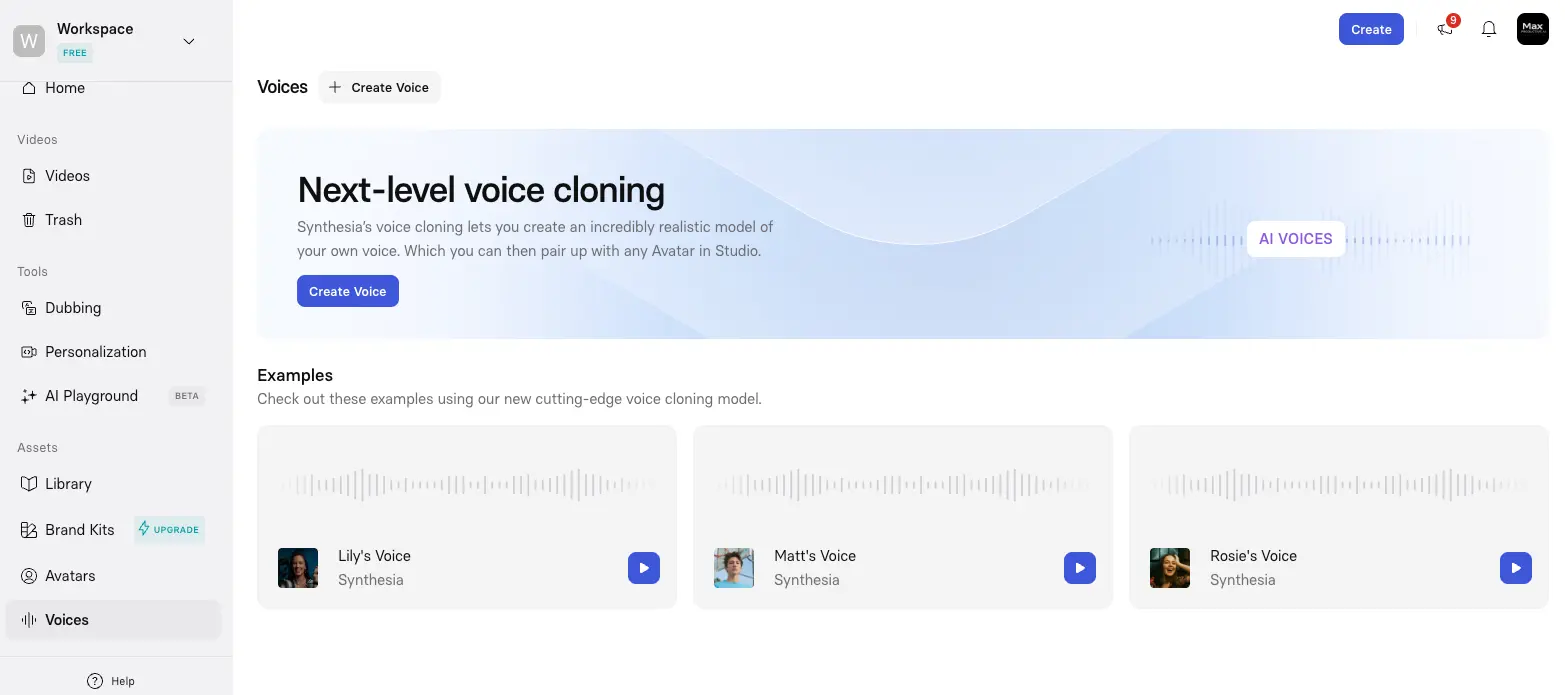
Voice cloning is one of Synthesia's weaker areas relative to HeyGen, which offers instant voice cloning on entry-level paid plans. Synthesia gates the higher-quality voice cloning behind Enterprise, and the cloning quality is described as "basic" in independent reviews. The pre-built examples (Lily, Matt, Rosie) give you a sense of the baseline quality — it's solid for corporate use but doesn't match HeyGen's cloned voices for emotional range or naturalism.
Video Player & Analytics Dashboard
Distribute videos with built-in analytics and team review tools
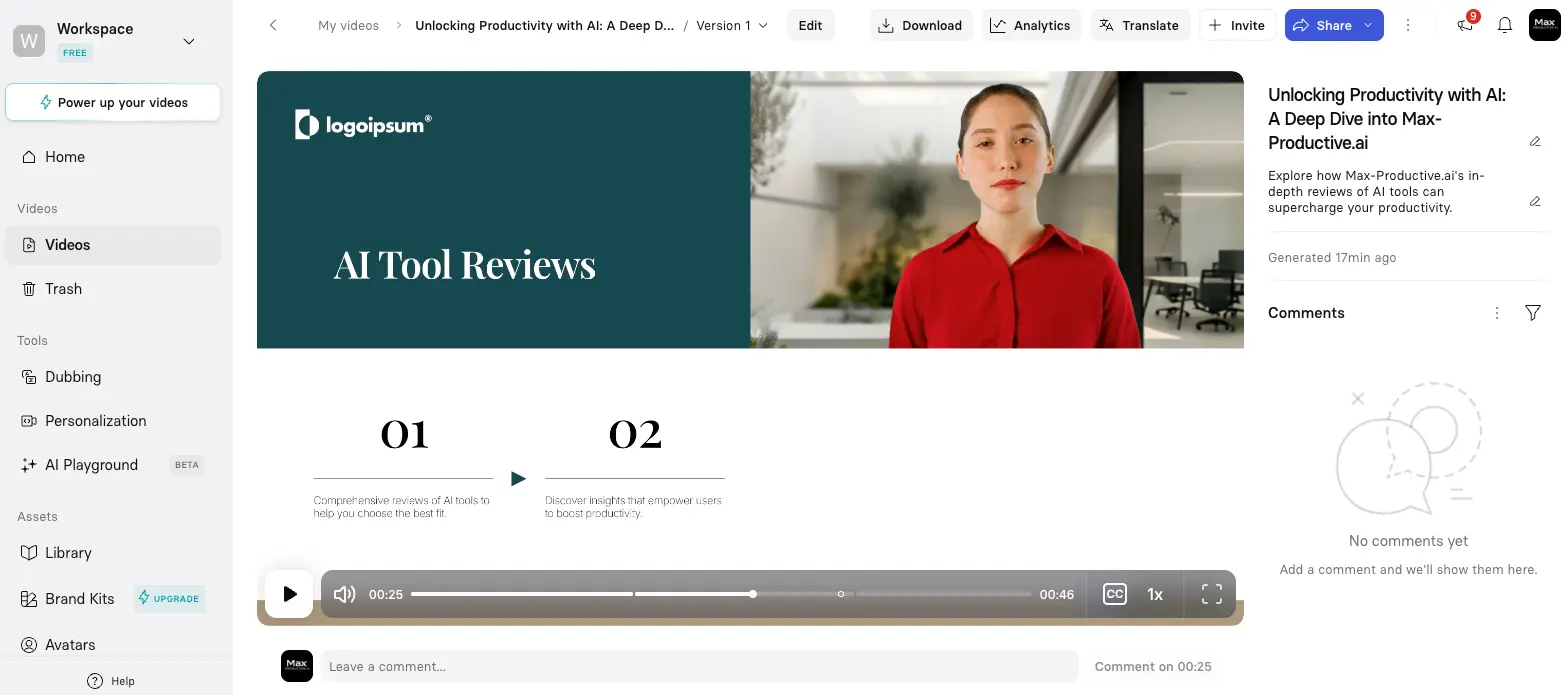
Once a video is rendered, the player view becomes your distribution hub. Download in standard formats, view analytics, push to a translation pipeline, or invite team members to leave time-stamped comments at specific frames. The collaboration layer here is closer to enterprise tools like Frame.io than to creator-focused video platforms — it's clearly designed for teams reviewing training content, not solo creators publishing once and moving on.
How Synthesia Works
From blank page to multilingual training video in four steps.
Choose Your Input
Synthesia accepts more input formats than most competitors: a typed script, a pasted URL, a PowerPoint deck, a PDF document, or just a text prompt. The AI Video Assistant takes whatever you give it and produces a structured outline with scenes, narration, and avatar suggestions. If you're starting from a webpage, this step is genuinely fast — under a minute from URL to draft outline.
Pick an Avatar & Customize the Scene
Browse the 230+ avatar library or use a Personal Avatar (your own digital clone, created from a single photo or a 5–10 minute consent video). Choose framing, background "space," outfit (now AI-generated from text prompts), and animation style. This is where you'll spend the most time on the first video — but second and third videos go faster as you settle into preferred avatars and templates.
Generate the Video
Hit "Generate" and the render queue takes over. A typical 2-minute video renders in 8–12 minutes. Longer videos scale proportionally. Here's the catch — and it's a real one — any change to the script after generation requires a full re-render. Even a single word swap means another 8–12 minutes of waiting. For teams that iterate heavily on copy, this is the workflow's biggest friction point.
Translate, Distribute, and Track
Once you're happy with the English version, AI Dubbing translates the video into 30+ languages with frame-accurate lip sync — no manual re-recording. From the player view, you can download in standard formats, push to your LMS via SCORM (Enterprise only), generate analytics on viewer engagement, and invite team members to leave frame-level comments. For multilingual teams, this distribution stage is where Synthesia's price tag starts paying for itself.
Privacy & Consent Architecture
Personal Avatar creation requires a biometric consent video with a unique passcode — Synthesia enforces this as a platform policy, not just a recommendation. All data is encrypted at rest with AES-256 via AWS KMS, and EU data residency is available for GDPR-sensitive customers. This consent-first approach is what enables Synthesia's content moderation system to operate; it's also part of why the moderation occasionally over-flags legitimate content (more on that below).
The Re-Render Problem
It's worth flagging again because this affects daily workflows: minor script edits force a full re-generation. Adding a comma, fixing a typo, swapping a word — all require ~8–12 minutes for a typical video. Heavy iteration cycles can chew through a Starter plan's 10-minute monthly cap quickly. Plan to lock copy before generating, not after.
Key Features
What you actually get across the four pricing tiers — and where the gates are.
230+ AI Avatars (Express-2)
The biggest stock library in the category. Express-2 is the engine that matters — full-body movement, hand gestures, and micro-expressions at 1080p/30fps with no length cap. Lower tiers see fewer avatars (9 on Free, 125+ on Starter), so check what's available at your plan before signing up.
160+ Languages & AI Dubbing
Industry-leading multilingual support, with frame-accurate lip sync that works on dubbed video — not just synthetic avatars. The Secure Editing mode lets you fix translations before publishing. AI Dubbing at scale is gated to Enterprise.
Video Agents
Synthesia 3.0's flagship innovation. Embed an avatar in a video that holds a real two-way conversation with viewers, drawing on connected knowledge bases (SharePoint, Google Drive, CRM). Use cases: training role-plays, candidate screening, interactive onboarding. Enterprise-only, rolling out through 2026.
AI Playground (Sora 2 + Veo 3.1)
Embedded access to OpenAI's Sora 2 and Google's Veo 3.1 generative video models, plus FLUX.2 for images — all inside the Synthesia editor. Generate cinematic B-roll without leaving the workflow or paying separate API fees. Genuinely a differentiator versus most competitors.
Personal Avatar (From Photo)
Upload a single portrait photo (Synthesia 3.0) or record a 5–10 minute consent video, and Synthesia generates a digital clone of yourself. The photo-based version is ready in minutes; the video-based version takes about a business day. Studio Avatar add-on (~$1,000/year) for premium-quality clones.
SOC 2 + ISO 42001 + GDPR
The certification stack that gets Synthesia past enterprise procurement. ISO 42001 (AI management systems) is rare in this category — most competitors don't have it. Combined with EU data residency and SAML/OIDC SSO, this is what makes Synthesia the go-to for healthcare, finance, and government buyers.
SCORM + LMS Integrations
SCORM 1.2 and SCORM 2004 export for Docebo, Moodle, SAP Litmos, 360Learning, Cornerstone, Articulate 360, and more. SCORM packages are dynamic — update the video in Synthesia and the change propagates to deployed packages without re-uploading. The most extensive LMS connector list in the category.
Interactivity 2.0 & Courses
Embed quizzes, polls, hotspots, and forms inside videos. The Courses feature combines avatars, Video Agents, and interactivity with analytics — extending Synthesia into eLearning territory. Useful, though dedicated authoring tools like InVideo AI still win for short-form social content.
Beyond these headliners, the platform includes solid supporting features: a Copilot AI editing assistant for script writing, native Salesforce CRM integration for personalized sales videos, brand kit management on Enterprise, and a developer API on Creator+. The integration story is genuinely strong — if you're already in the Salesforce, Docebo, or SAP ecosystem, Synthesia plugs in cleanly.
The Free plan includes 9 avatars and 3 minutes per month — enough to test fit:
Try Synthesia →No credit card required • Upgrade only when you need morePricing Plans
Four tiers, with significant feature gates between them. Annual billing saves up to 38%.
Free
- ✓ 3 minutes of video per month
- ✓ 9 AI avatars
- ✓ 140+ languages and voices
- ✓ 60+ templates
- ✓ No credit card required
- ✗ Watermarked output, no downloads
Creator
- ✓ 30 minutes of video per month
- ✓ 180+ AI avatars
- ✓ 5 personal avatars
- ✓ Interactive video features
- ✓ API access
- ✓ No watermark, full downloads
Enterprise
- ✓ Unlimited minutes
- ✓ 230+ avatars, unlimited personal
- ✓ SAML/OIDC SSO
- ✓ SCORM 1.2 + SCORM 2004 export
- ✓ Brand kit, dedicated support
- ✓ Video Agents + bulk AI Dubbing
Important: SCORM export, SSO, Video Agents, and AI Dubbing at scale are Enterprise-only features. Enterprise contracts typically start in the low five figures per year.
Pricing last verified April 27, 2026. Visit Synthesia for current rates.
Is It Worth the Money?
Maryville University reported a 35% time reduction versus their previous AI video workflow. For enterprise L&D teams producing dozens of multilingual training videos a year, the AI Dubbing feature alone (replacing voice actors and re-shoots in 10+ languages) usually justifies the Enterprise contract. For solo creators making one video a month? The math doesn't work.
Pricing context matters here. At ~$22/month annual on Starter, Synthesia sits at the same entry-level as HeyGen ($24/mo annual) but gives you only 10 minutes per month versus HeyGen's "unlimited" tier (which has hidden Premium Credit caps). Hedra undercuts both at $8/month annual, though without enterprise security or SCORM. Fliki offers a different proposition — text-to-video with stock footage rather than avatars — at lower entry pricing. The honest verdict: Synthesia is among the most expensive per-minute in the category at entry level, but the only one that ships with the full enterprise security stack.
Detailed Pros & Cons
An honest breakdown after analyzing platform documentation, independent reviews, and Reddit threads from instructional designers.
✓ Pros
SOC 2 Type II + ISO 27001 + ISO 42001 + GDPR with EU data residency + SAML/OIDC SSO. No competitor combines all of these as of April 2026 — HeyGen's SOC 2 is still in progress, Hedra and DeepBrain AI have no enterprise certifications. If your IT or legal team is the buyer, this is often the deciding factor.
230+ avatars and 160+ languages exceeds every direct competitor. Frame-accurate AI Dubbing on existing videos (not just AI-generated content) is a feature genuinely few platforms ship at this quality. For global teams localizing training libraries, this single capability often justifies the price.
The October 2025 Express-2 release closed most of the visual gap with HeyGen's Avatar IV. Full-body movement, natural co-speech gestures, and micro-expressions at 1080p/30fps with no length cap. Still not perfect on emotionally complex content — but the era of "Synthesia avatars look stiff" is largely over.
The AI Playground gives you OpenAI's Sora 2 and Google's Veo 3.1 inside the Synthesia editor — no separate API subscriptions, no tab-switching. For brands needing cinematic B-roll alongside avatar narration, this kind of integration is rare. Combined with FLUX.2 for images, you've got generative video, image, and avatar production in one workflow.
Both SCORM 1.2 and SCORM 2004 export, with dynamic packages that auto-update when you edit the source video. Direct connectors for Docebo, Moodle, SAP Litmos, 360Learning, Cornerstone, Articulate 360. If you're an L&D buyer already in one of those ecosystems, the integration alone saves weeks of deployment work.
Bosch, Merck, SAP, Zoom, Heineken, Mondelez — that level of enterprise penetration matters for procurement. It signals reliability, support depth, and contract terms that smaller competitors can't match. For risk-averse buyers, this social proof reduces friction in approval cycles.
✗ Cons
This shows up everywhere — G2, Trustpilot, Reddit, Capterra. The pre-publication AI moderation system flags legitimate business content in healthcare, biotech, pharma, and compliance with no clear criteria and no transparent appeal process. If your content regularly touches medical or pharmaceutical topics, this could be a deal-breaker. AutoPosting.ai explicitly flags it as such for regulated industries.
10 min/month on Starter is genuinely tight — one moderate-length training video and you're done. The jump to Creator triples the price for 30 min/month. Heavy users effectively need Enterprise, where pricing starts in the low five figures. The middle is uncomfortable, and that's where most SMB buyers actually live.
Change a single word and you wait 8–12 minutes for a fresh render. For teams that iterate on copy collaboratively, this is a real workflow tax. Lock your script before generating, not after — and budget extra render minutes for the inevitable late-stage edit cycle.
I'd have liked to see Synthesia close this gap, but voice cloning quality lags HeyGen noticeably — and the higher-quality versions are gated to Enterprise. If voice cloning is a core requirement, HeyGen or Hedra deliver better results at lower price points.
G2 and Trustpilot reviewers consistently flag inconsistent pronunciation, especially on industry-specific terms and non-English languages. The platform supports phonetic overrides, but you have to apply them manually — and re-render to verify. Annoying for technical, medical, or legal content.
Synthesia is optimized for structured, presenter-led corporate video — training, onboarding, internal comms. If you need cinematic brand storytelling, dramatic narrative content, or anything with significant emotional range, the avatars will feel constraining. Pair it with Sora 2 / Veo 3.1 in the AI Playground for B-roll, or just use a different tool for those use cases.
Synthesia vs Alternatives
How Synthesia stacks up against the most relevant competitors in AI avatar and AI video generation.
| Feature | Reviewed Synthesia | HeyGen | Hedra | Fliki |
|---|---|---|---|---|
| Starting Price (annual) | $22/mo | $24/mo | $8/mo | ~$28/mo |
| Free Plan | ✓ 3 min/month | ✓ 3 videos | ✓ Watermarked | ✓ Limited |
| Stock Avatars | 230+ | 100+ | Image-based | Limited |
| Languages | 160+ | 175+ | Multilingual TTS | 80+ |
| Voice Cloning | Basic (Enterprise) | ✓ Instant | ✓ Basic+ | ✓ Premium |
| SCORM Export | ✓ Enterprise | ✗ | ✗ | ✗ |
| SOC 2 + ISO 42001 | ✓ Both | In progress | ✗ | ✗ |
| Sora 2 / Veo 3.1 Access | ✓ AI Playground | ✗ | ✓ Multi-model | ✗ |
| Best For | Enterprise L&D, compliance | Marketing, social, creators | Creators on a budget | Text-to-video, podcasts |
Which Tool Is Right For You?
Synthesia
ReviewedBest for: Enterprise L&D, compliance training, internal comms, and any team where IT/legal require a SOC 2 + GDPR + ISO-certified vendor. The right pick if you need 230+ avatars, 160+ languages with frame-accurate AI Dubbing, native SCORM export, and embedded access to Sora 2 + Veo 3.1. Less ideal for solo creators on tight budgets or content that regularly touches medical/biotech topics.

HeyGen
Direct CompetitorBest for: Marketing teams, creators, and agencies producing customer-facing or social video. HeyGen's Avatar IV is widely considered the most photorealistic engine on the market, with instant voice cloning, real-time live avatars, and 175+ languages. The catch: SOC 2 certification still in progress, "unlimited" plans hide Premium Credit caps, and Trustpilot scores 2.3/5 due to widespread billing complaints. Better product, weaker enterprise infrastructure than Synthesia.

Hedra
Best ValueBest for: Creators, marketers, and developers who want top-tier facial lip-sync at the lowest entry price ($8/month annual). Hedra's Character-3 engine matches or beats HeyGen on raw lip-sync precision, and its multi-model studio gives you Veo 3.1, Kling, Sora, MiniMax, and Grok Video in one UI. The trade-off: no SCORM, no LMS integration, no SOC 2 — Hedra is a creator/developer tool, not an enterprise platform.

Fliki
Text-to-VideoBest for: Creators and SMBs who need stock-footage-driven text-to-video rather than avatar presentation. Fliki excels at podcast-to-video, blog-to-video, and quick social content with AI voiceovers. Different category from Synthesia — pick Fliki if you don't actually need an avatar in the frame and would rather pair narration with stock visuals.

InVideo AI
AI Video MakerBest for: Marketers and content creators producing short-form social media video at scale. InVideo AI takes a prompt or topic and generates a finished video with stock footage, AI voiceover, captions, and music — much faster than Synthesia for social-first formats. It's not an avatar platform, so don't pick it if you need a presenter on screen, but for TikTok, Reels, and YouTube Shorts production it's faster and cheaper.
Veed.io
Video EditorBest for: Browser-based video editing, captioning, subtitling, and translating existing video. Veed.io is fundamentally a video editor with AI features bolted on — its avatar capabilities are basic and not competitive with any dedicated avatar platform. Use it alongside Synthesia for post-production work (captions, social repurposing) rather than as a replacement.
Frequently Asked Questions
Should You Try Synthesia?
Synthesia is the right answer to a specific question: "What AI video platform will my IT and legal teams actually approve?" If that's your question, the answer is here. The combination of SOC 2 Type II, ISO 42001, ISO 27001, GDPR with EU residency, native SCORM export, and Fortune 100 social proof is genuinely unmatched in 2026. Add the Express-2 engine, embedded Sora 2 + Veo 3.1, and 160+ language AI Dubbing, and you've got a platform that earns its premium price for the right buyer.
For solo creators, SMBs, or anyone whose content regularly touches medical and biotech topics? It's harder to recommend. The per-minute cost is steep, content moderation is unpredictable, and key features stay locked behind Enterprise tiers most small teams can't justify. Hedra at $8/month annual gives you better lip-sync at a fraction of the cost. HeyGen ships better avatars for marketing and social. Synthesia's value really clicks when you have multilingual L&D scale, compliance requirements, and an LMS already in production.
Our Recommendation
Start with the Free plan — it's a no-risk way to test avatar quality, voice handling, and whether the workflow matches how your team works. If you're producing at scale, jump to Creator ($67/month annual) for 30 minutes per month, 5 personal avatars, and the API. If your IT team is asking for SOC 2 or you need SCORM/LMS integration, that's the signal to talk to Synthesia Sales about Enterprise. The math on Enterprise really only works above ~10 hours of video output per year — below that, Creator is the smart cap.