

HeyGen
Turn a 15-second recording into a studio-quality digital twin. Write a script in any of 175+ languages and HeyGen renders a presenter video with full lip-sync. No camera. No studio. No editing crew.
Try HeyGen →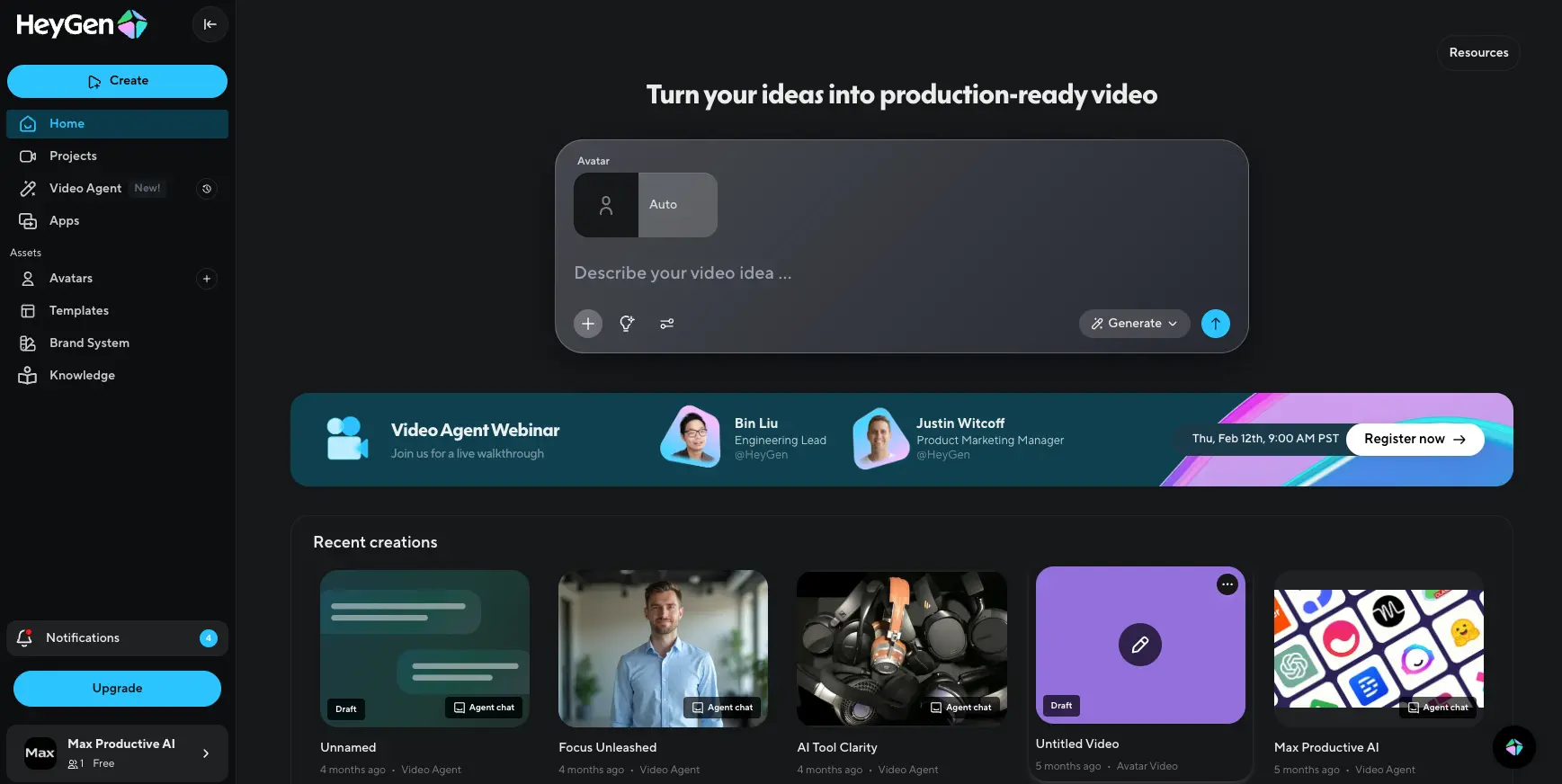
The Most Capable AI Avatar Platform —
If You Read the Credit Documentation
HeyGen has been on a tear. April 2026 alone shipped 15 feature launches, and Avatar V is the standout from that batch: it currently ranks first in independent blind tests for identity stability and lip-sync. For most international teams, though, the deciding feature isn't an avatar at all. It's lip-synced translation in 175+ languages, included on every paid plan from $24/month (Synthesia gates the same capability behind Enterprise pricing). There's one thing to know before signing up. HeyGen markets unlimited videos, but the features people actually want run on Premium Credits: Avatar IV, Avatar V, lip-synced translation, Video Agent with b-roll. The credits drain faster than most subscribers expect, and that single mismatch is behind almost every negative review. Read the credit page before you commit. With that caveat, HeyGen is still the strongest AI video platform you can buy in May 2026.
✓ What We Love
- Avatar V — record yourself once for 15 seconds, render unlimited looks
- Lip-synced translation in 175+ languages, every paid plan
- Native apps inside ChatGPT, Claude, and Cursor
- Free plan: 3 videos a month, no card
- 15 feature launches shipped in April 2026 — pace nobody matches
! Could Be Better
- "Unlimited" plan label hides credit caps on the features people actually pay for
- 4K export only on Pro at $79/mo — three times the cost of Creator
- Trustpilot sits at 3.2/5; non-Enterprise billing support is slow
- No built-in licensed music library
What Is HeyGen?
Where the company started, what it does today, and how the product actually breaks down.
HeyGen produces studio-quality presenter videos without anyone touching a camera. Write a script — or one prompt — pick an avatar, and the platform renders in a few minutes. Founded as Surreal in Shenzhen in 2020. Relocated to Los Angeles in 2022. Rebranded. Reached roughly $100M ARR by late 2025, growing from $1M three years earlier. Close to 200,000 paying customers today, more than 35,000 of them businesses, valued around $500M.
The product has changed shape dramatically in 18 months. The original HeyGen was a talking-head generator. The 2026 version is a full video stack: Seedance 2.0 for cinematic generation, Video Agent for prompt-to-video, LiveAvatar for real-time conversations, HyperFrames as an open-source HTML-to-video framework, plus native apps inside ChatGPT, Claude, and Cursor. April 2026 alone shipped 15 feature launches — a pace that's harder to find precedent for in any category, not just AI video.
Four workflows do most of the work. Avatar videos: write a script, render a presenter. Video translation: upload any video, get it relipped in 175+ languages. Prompt-to-video via Video Agent: one prompt becomes a full edited video. Real-time interactive avatars via LiveAvatar: two-way conversations embedded in a site or app. Each is competitive on its own. Together they cover more of the AI video category than any single competitor — and that's the real story of HeyGen in 2026.
Who Is HeyGen Best For?
Marketing teams producing high-volume product and social video, content creators scaling a personal brand without filming every script, L&D and HR teams localizing training across global offices, agencies managing multilingual content for clients, and developers building AI-native video workflows through the API, Claude MCP, or HyperFrames. Less of a fit for teams chasing authentic UGC aesthetics on TikTok or for heavily regulated industries that need the very strongest enterprise compliance posture.
What separates HeyGen from a general AI tool like ChatGPT — or from scene-first generators like Runway and Kling AI — is the avatar engine. Identity-consistent digital humans have been HeyGen's long-running R&D bet, and Avatar V, shipped April 8, 2026, is the visible payoff. It splits static identity (face geometry, skin texture) from dynamic performance (rhythm, gestures, head movement) and recombines them at render time. The defining test is the 10-minute video: earlier models, including Avatar IV, show identity drift past the 3–4 minute mark — subtle facial shifts, expression mismatches, eye movements that drift from the speech pattern. Avatar V holds together for the full ten. Blind tests rank it first for face similarity and lip-sync against every public alternative.
Translation is the other workflow worth its own pitch. Lip-synced dubbing in 175+ languages, included on every paid plan from $24/month up — Swiss German distinct from High German, Brazilian Portuguese distinct from European, regional accents preserved through voice cloning. Synthesia gates the equivalent behind Enterprise pricing. The Würth case study (80% cost reduction, 50% production time saved) reads like a vendor slide, but the math holds up: a 30-minute corporate training video translated by a localization agency typically runs €3,000–€8,000 per language. HeyGen processes the same file in roughly 20 minutes at $2/minute via the API, or for Premium Credits on a Pro subscription.
See HeyGen in Action
Real screenshots from the platform showing the dashboard, Avatar V, the AI Studio editor, and the Video Agent workflow.
Dashboard — Production-Ready Video From One Prompt
The new home screen centers the prompt box. Type an idea, get a video.
Early 2026 brought a dashboard redesign built around the Video Agent. The prompt box owns the page — "Describe your video idea" — and everything else collapses into the sidebar. The design intent is hard to miss: HeyGen wants you treating this as a video assistant, not a video editor. Recent creations show as thumbnail cards, most carrying an "Agent chat" badge confirming they came from a prompt rather than a manual build. A useful tell of where the team thinks the product is heading.
Avatar V — Generate Yourself in Any Outfit or Setting
Record once. Generate unlimited looks.
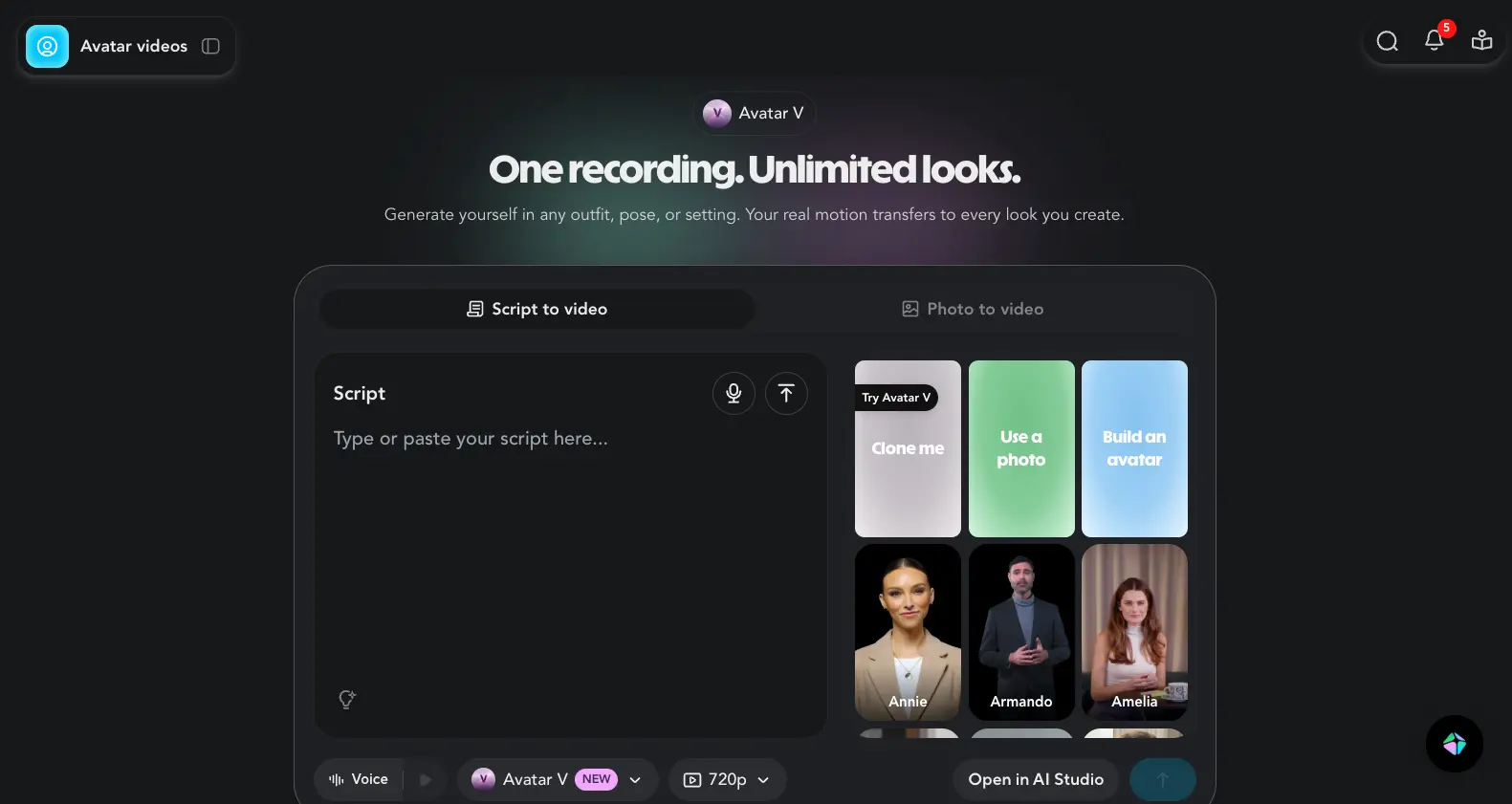
This is the Avatar V interface and the most consequential launch HeyGen made in the last 12 months. The tagline — "One recording. Unlimited looks." — captures the architectural shift. Your real motion data transfers to every look you generate, so a single 15-second clip becomes a library of presenters in different outfits, lighting, and settings. Annie, Armando, Amelia and a handful of others ship as Avatar V presets you can try before recording your own face.
Avatar Selection Gallery
200+ public avatars before you record your own
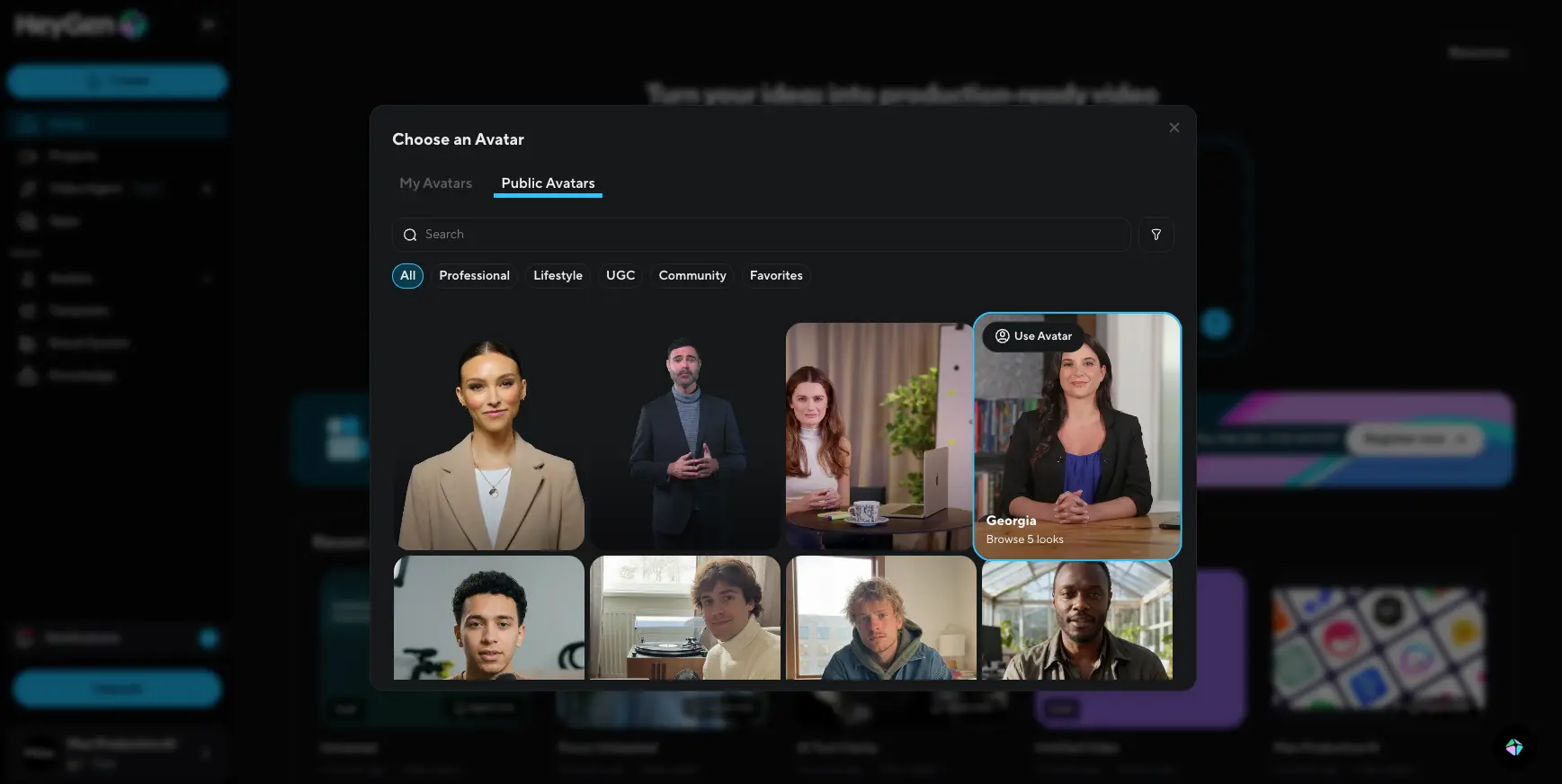
If you're not ready to clone yourself, the public avatar library covers most use cases. Categories run from Professional (business presenter, corporate explainer) through Lifestyle (kitchen, home office, garden setting) and UGC (selfie-style, phone-shot aesthetic). Each avatar typically ships with multiple "looks" — same person, different outfits and locations — which solves the same-face-everywhere problem that plagued earlier AI video tools.
See how Avatar V handles your own face — record a 15-second clip and try it free:
Try HeyGen →Free plan • 3 videos per month • No card requiredAI Studio — Script-Based Editor with Templates
Edit scenes, swap templates, layer captions and music
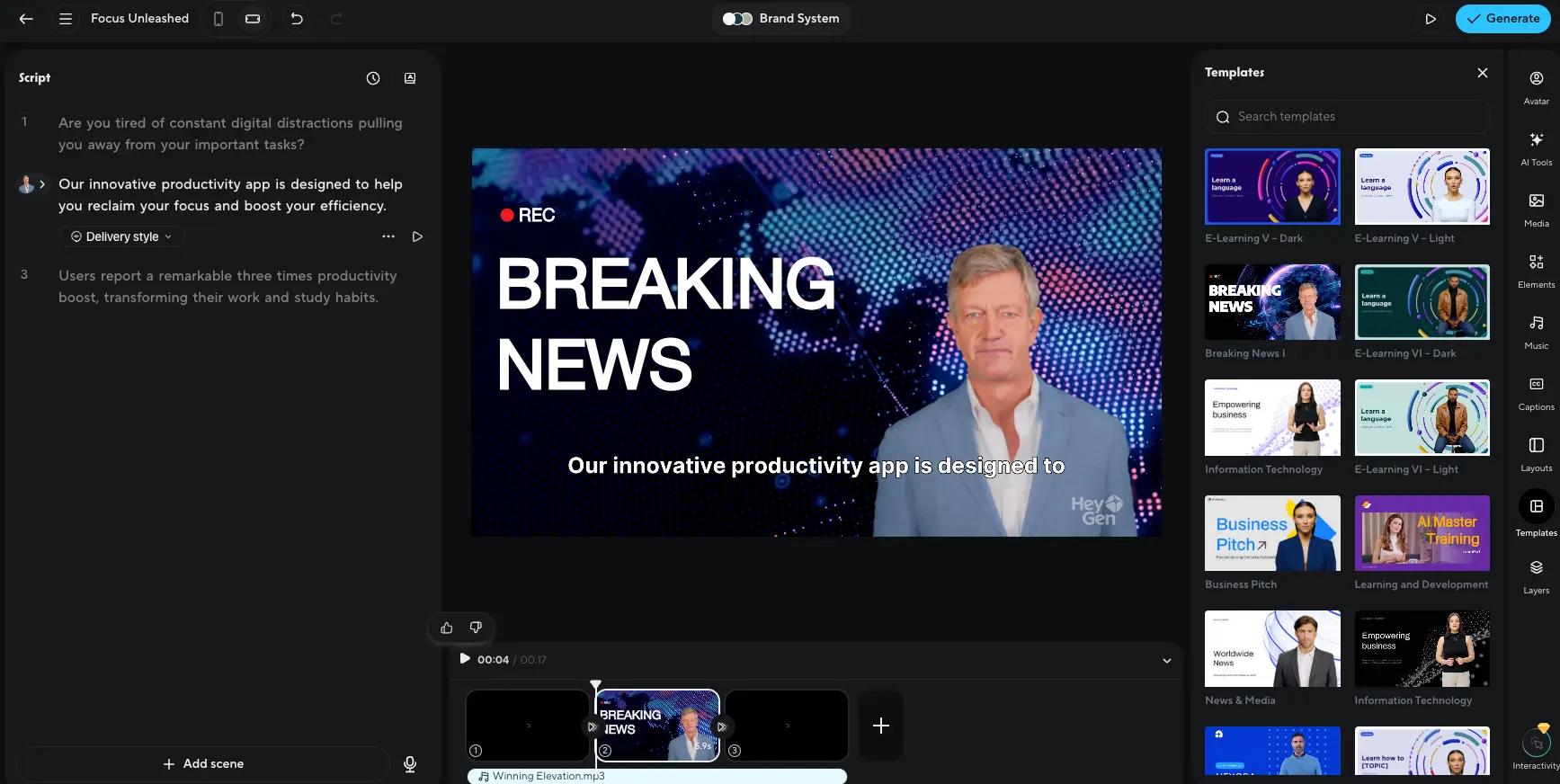
If you'd rather build manually, AI Studio is the full editor. The interface is split three ways: scenes and script on the left, video preview in the center, and tool panels (Avatar, AI Tools, Media, Music, Captions, Layouts, Templates, Layers, Interactivity) docked on the right. Templates cover the common use cases — Business Pitch, Breaking News, E-Learning, Information Technology — and the new Brand System toggle at the top forces all rendered scenes to use your captured logo, fonts, and colors.
AI Tools Panel — Script Writer, Motion Designer, Generators
Built-in AI helpers for every part of the pipeline
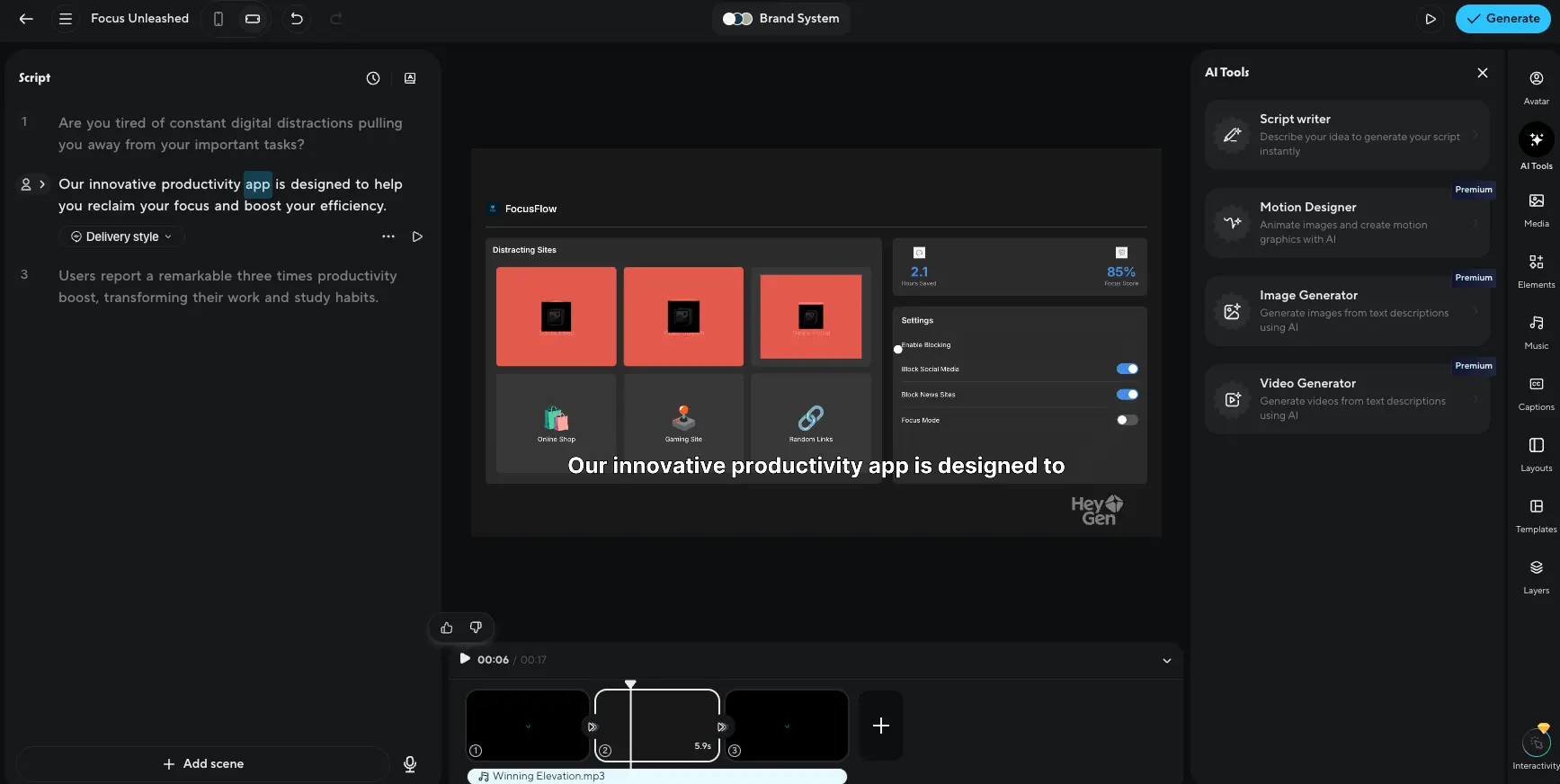
The AI Tools tab is where the recent feature stack lives. Script Writer drafts a script from a one-line idea. Motion Designer animates static images and layers motion graphics. Image Generator and Video Generator handle b-roll from text prompts — Image Generator usually routes through Nano Banana–class models, Video Generator routes through Sora 2 and Veo 3.1 under the hood. The "Premium" tags everywhere are honest in their own way: these are the features that consume Premium Credits and push the real-world bill above the headline subscription. Whether that bothers you is the central buying question for HeyGen in 2026.
Video Agent — Plan, Preview, Generate
A prompt becomes a structured production plan before rendering
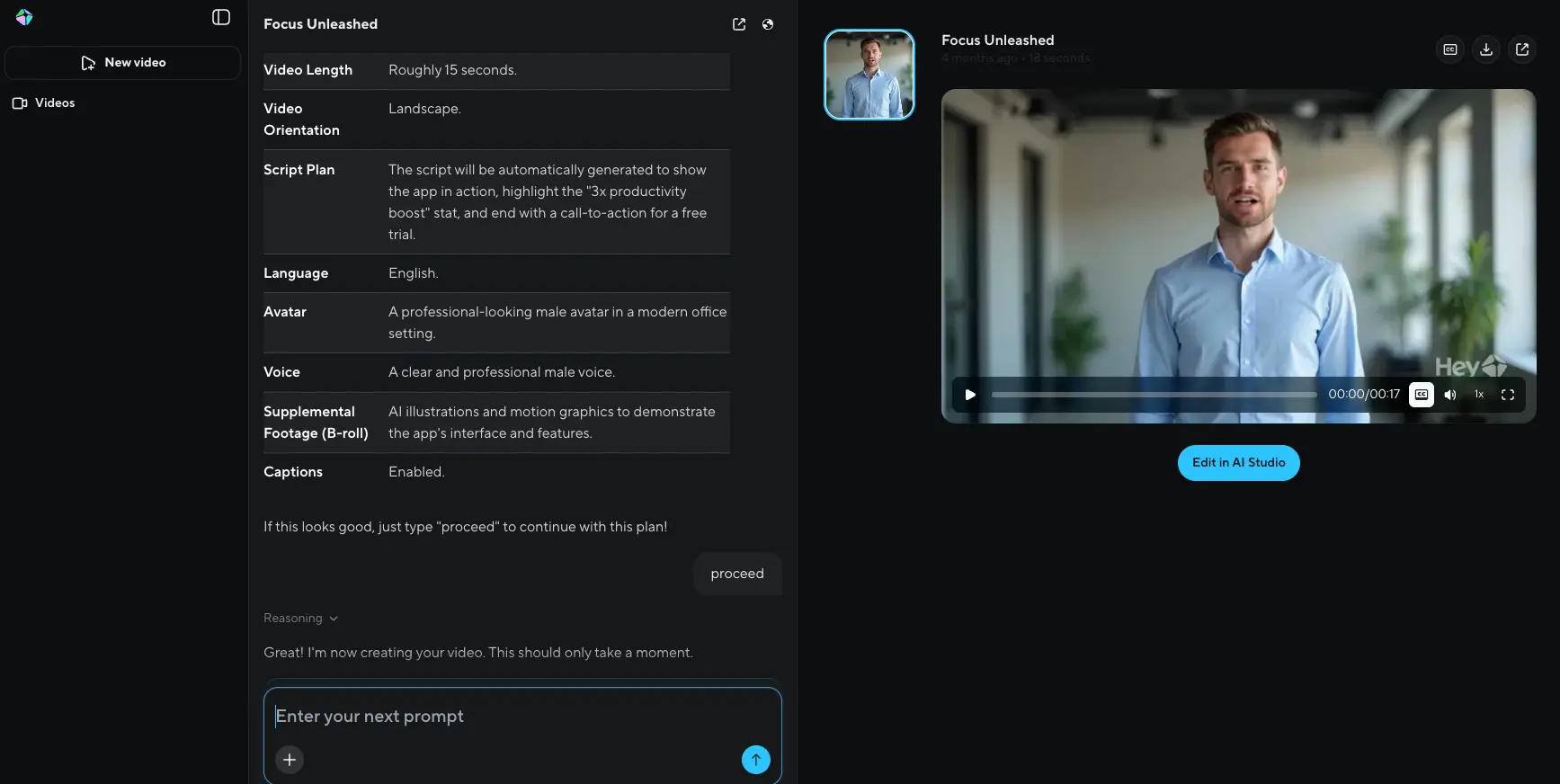
This is the Video Agent workflow that ships natively inside ChatGPT and runs through Claude MCP. Your prompt becomes a structured production plan — video length, orientation, script outline, language, avatar choice, voice, supplemental footage, captions — and the agent waits for you to type "proceed" before rendering. It's a meaningfully better pattern than the type-and-pray flow most prompt-to-video tools default to. You get a chance to course-correct before burning credits on a render that misses the brief. Small UX choice, big impact on bill.
How HeyGen Works
From idea to finished video in four steps — or one prompt, if you use Video Agent.
Pick or Build Your Avatar
Start with a public avatar (200+ to choose from across Professional, Lifestyle, and UGC categories) or build your own. For a custom avatar, Avatar V needs a 15-second video clip — that's it. The model captures your facial geometry, skin texture, voice, and natural micro-expressions in that short recording and stores it as a reusable identity profile. From there you can generate unlimited "looks" of yourself in different outfits, settings, and angles without re-recording anything.
Write a Script — Or a Prompt
Two paths from here, depending on how hands-on you want to be. Script-to-video is the classic flow: paste your script (or generate one with Script Writer), pick a voice, and HeyGen renders the avatar speaking it. Prompt-to-video uses Video Agent: type something like "Create a 60-second product explainer for our marketing automation tool, end with a CTA to book a demo" and the agent plans the structure, picks visuals, and waits for your approval before rendering.
Refine in AI Studio
If you want to edit, AI Studio is the full editor: per-scene script editing, template swaps, supplemental b-roll, captions, music, layouts, motion graphics, and interactive elements like quizzes or CTA buttons. The Brand System toggle at the top forces every scene to use your captured logo, fonts, and color palette — a meaningful time-saver for anyone producing in volume across a campaign. For short videos the agent's output is usually publishable as-is. AI Studio matters more once you're producing longer-form content where pacing, scene cuts, and music decisions add up.
Translate, Export, or Embed
Once a video exists, you can translate it. Upload a HeyGen-generated video (or any video you have) and HeyGen transcribes it, translates the script, clones the speaker's voice in the new language, and re-syncs the avatar's lips to the new audio. Export options run from 720p (Creator) up to 4K (Pro+) with frame interpolation to 60–120fps if you want it. Business and Enterprise plans add SCORM export for LMS integration, plus embed code for interactive video with quizzes and branching paths.
Privacy and Consent Are Baked In
Custom avatar creation requires verified consent — you can only clone someone whose explicit authorization you've captured. Enterprise users are automatically opted out of AI model training; any other user can opt out by emailing support. HeyGen runs on AWS in the US with encryption at rest and in transit, holds SOC 2 Type II, GDPR, CCPA, and EU-US Data Privacy Framework certifications, and is preparing for EU AI Act transparency requirements that take effect August 2, 2026.
It Lives Inside the Tools You Already Use
You don't have to live in the HeyGen UI. The Video Agent ships natively inside ChatGPT — a HeyGen app you can install in your ChatGPT account and use directly from any conversation thread. Claude and Cursor users can invoke the agent through Model Context Protocol. HeyGen Skills lets you trigger video generation from Claude Code with a single command (npx skills add heygen-com/*), useful for CI/CD pipelines and bots. For everyone else there's a REST API with pay-as-you-go pricing.
Key Features
The full feature stack as of May 2026 — eight that matter most for buying decisions.
Avatar V (April 2026)
15-second recording becomes a studio-quality digital twin with identity stability across angles, outfits, and 10-minute-plus videos. Rated #1 in independent blind tests for face similarity and lip-sync. Consumes Premium Credits — not unlimited on any paid plan, including Pro.
Video Translation — 175+ Languages
Upload any video and get it relipped in 175+ languages with voice cloning. Available on every paid plan (unlike Synthesia, which gates this to Enterprise). Audio dubbing without lip-sync is unlimited; full lip-synced translation consumes Premium Credits or $2/minute via API.
Video Agent — Prompt to Finished Video
One prompt → script, avatar, b-roll, motion graphics, captions, transitions. 100+ curated visual styles. Native apps inside ChatGPT, Claude MCP, and Cursor. Essential mode is unlimited; full Video Agent with AI-generated b-roll consumes Premium Credits.
LiveAvatar — Real-Time Conversations
Two-way conversational AI avatar with lip-sync and gestures during live interaction. Knowledge-base integration means the avatar answers from your docs. Built for customer service, sales demos, interactive training. Competes directly with Synthesia Video Agents and D-ID Visual AI Agents.
Seedance 2.0 Cinematic Video
HeyGen is the only platform where Seedance 2.0 works with real, verified human faces — Seedance's public API doesn't permit them. Physics-accurate motion, director-level camera control, dynamic lighting. Multi-avatar support means up to three identities in one scene. Available across Avatar Shots, Video Agent, and Digital Twin surfaces.
Brand Systems
Paste your company URL and HeyGen automatically extracts logo, typography, and color palette. The Brand System applies across Templates, AI Studio, and Video Agent with one toggle. Agencies juggling four or five client identities at once get the most out of this — switch the active brand, render, switch back.
Interactive Video + SCORM Export
In-video quizzes, branching narrative paths, and CTA buttons that respond to viewer input. SCORM 1.2 and 2004 export drops finished videos into Cornerstone, Docebo, Moodle, and other LMS platforms. Business plan ($149/month) unlocks this — useful to know since Synthesia gates equivalent SCORM behind Enterprise pricing.
HyperFrames — Open-Source HTML-to-Video
Apache 2.0 framework that lets AI agents render HTML, CSS, and JavaScript directly to MP4, MOV, or WebM. Works with GSAP, Lottie, Three.js, D3, Google Fonts. April 2026 added a visual Timeline editor, HDR rendering, a Studio canvas for designers, and a Claude Design bridge. Install with npx skills add heygen-com/hyperframes.
The eight above are what most buying decisions hinge on, but the April 2026 release stack ran deeper: Instant Highlights v2 (long-form-to-shorts automation with face-tracking reframe, captions, translation, and 4K upscale in one workflow), Granola integration (meeting notes → recap video), Gamma integration (deck → video), Grain integration (meeting recordings → AI summary videos), Topaz Starlight Precise 2.5 driving 4K upscaling, and frame interpolation up to 120fps. Roughly twelve months of typical SaaS roadmap compressed into a single month. The release cadence has held for most of 2025–2026, which matters more than any individual feature when you're betting on a tool you'll still be using in two years.
Free plan available — generate three videos before you commit:
Try HeyGen →3 videos/month • 720p • No card requiredPricing Plans
Four paid tiers plus a free plan. The advertised numbers tell half the story — the other half is Premium Credits.
Creator
- ✓ Unlimited videos, 1080p
- ✓ 200 Premium Credits/month
- ✓ 3 Instant Avatars
- ✓ 175+ languages translation
- ✓ Audio dubbing unlimited
- ✓ Voice cloning
Pro
- ✓ Everything in Creator
- ✓ 4K export
- ✓ 2,000 Premium Credits/month
- ✓ Translation proofreading
- ✓ Frame interpolation to 120fps
- ✓ Priority rendering
Business
- ✓ 5 custom avatars
- ✓ 60-minute max video length
- ✓ SSO + team workspace
- ✓ 1,000 shared Premium Credits
- ✓ SCORM/LMS export
- ✓ Interactive video
Add-ons: Extra Premium Credits at $15/month for 300 credits • Custom Voice Clone at $99/year • Extra avatar slots at $29/month • API at $0.99/credit (Pro) or $0.50/credit (Scale)
Pricing last verified May 2026. Visit HeyGen for current rates.
What Does It Actually Cost in Practice?
This is the part that catches people out. A Creator subscriber generating 10 professional videos a month with Avatar IV and faster processing realistically pays closer to $59 than the headline $29. The Business plan at $229/month for 5 seats costs more than five Creator accounts combined ($120/month) — but it adds team collaboration, 4K, double the maximum video length, and a shared credit pool that usually pays for itself once team size hits four people. Build a monthly estimate before you subscribe; HeyGen's per-feature credit costs are documented, but you have to actually read them.
For context across the Video Generators category: Synthesia Starter is $18/month annual, but video translation is locked to Enterprise pricing. Hedra Creator is $30/month with a hard 90-second cap on video length. Runway Standard is $12/month for cinematic generation, though it doesn't do avatar presenters at all. HeyGen Creator is competitive on subscription price; the variable to model is Premium Credit consumption. Heavy Avatar IV/V, lip-synced translation, or Video Agent b-roll usage will push the real monthly cost up by $15–60.
Detailed Pros & Cons
An honest breakdown after working through the research, the launch notes, and real user feedback across multiple sources.
✓ Pros
The April 2026 model is the first to hold identity stable across angles, outfits, and 10-minute videos from a single 15-second recording. Independent blind tests put it first against every public alternative for face similarity and lip-sync. If avatar realism is the deciding factor, the answer in May 2026 is HeyGen — Synthesia's Express-2 is close but loses on identity stability at length.
175+ languages with lip-synced dubbing on every paid plan. Voice cloning preserved. Regional dialect handling that distinguishes Swiss German from High German, Brazilian Portuguese from European. Würth cut translation costs 80% and production time 50% on the documented case. Most competitors either don't support translation (Hedra, Runway) or lock it behind Enterprise pricing (Synthesia).
Native Video Agent app inside ChatGPT since February 2026. Claude MCP integration. Cursor integration. HeyGen Skills CLI for Claude Code. HyperFrames open-source HTML-to-video framework that lets agents write video the same way they write web pages. Most competitors still treat the platform as a closed SaaS surface. HeyGen is positioning itself as infrastructure.
15 feature launches in April 2026: Avatar V, Seedance 2.0 multi-avatar, HyperFrames Timeline, HDR rendering, Granola integration, Instant Highlights v2, HeyGen Skills. The pace has been steady across 2025 and 2026. Teams that don't want to find themselves on stale features in 18 months should weigh this — it's harder to measure than feature lists but it compounds.
Three videos per month at 720p with a watermark. No card required. Limited, but enough to test avatar quality, the script-to-video flow, and the dashboard before paying anything. Most of this category demands payment upfront with refund policies that include strings — HeyGen does not.
The $149/month Business plan unlocks SCORM 1.2 and 2004 export plus interactive video with quizzes and branching. Synthesia's equivalent capabilities are Enterprise-only with custom pricing — typically a five-figure annual contract. For mid-market L&D teams, this single difference often makes the decision between the two platforms.
✗ Cons
Paid plans market unlimited video generation, but Avatar IV, Avatar V, lip-synced translation, and full Video Agent with AI b-roll all consume Premium Credits — and those are the features most people actually pay for. HeyGen overhauled the labeling in early 2026 (features clearly marked Premium, cost estimates surface before rendering), which helped. The gap between marketing copy and what credits actually cover is still the single most common complaint in user reviews.
Trustpilot sits at 3.2/5 across 1,600+ reviews. The negative ones cluster on one pattern: signed up, hit the credit ceiling faster than expected, opened a ticket, waited multiple days for a response that came back automated. Priority support is locked behind Enterprise pricing. Mid-subscription price increases and credits deducted for failed jobs (without auto-refund) round out the most-cited grievances.
4K export is gated at Pro — $99/month, $79 annual. That's roughly 3x the Creator price for nothing but a resolution bump. YouTube creators, brand video producers, and anyone delivering to 4K displays usually end up on Pro for this reason alone. Hedra and InVideo AI both offer 4K at lower price points if resolution is the only constraint.
In 2026, this is a strange omission. Fliki ships with a licensed YouTube music library at $21/month annual. HeyGen doesn't — you'll source music separately through Epidemic Sound, Artlist, or similar. Minor friction for most users; meaningful for teams producing high volumes of social video where music selection is part of the workflow.
HeyGen avatars look professional. That's exactly what works against algorithm performance on TikTok and Instagram Reels, where authentic phone-shot UGC reliably outperforms produced video. The UGC avatar category in the public gallery helps. If your social strategy depends on looking unscripted, HeyGen isn't always the right tool — choose Hedra or shoot the video yourself.
HeyGen holds SOC 2 Type II and GDPR certifications — solid by most standards. Synthesia holds ISO/IEC 42001 (the AI management system standard) plus AWS Marketplace listing and stronger GDPR audit documentation. For Fortune 500 procurement, pharma, finance, or government, Synthesia is currently the safer pick on the procurement checklist. The gap isn't huge, but it's real and it shows up in vendor reviews.
HeyGen vs Alternatives
How HeyGen stacks up against the main AI video generators in May 2026.
| Feature | Reviewed HeyGen | Synthesia | Hedra | Runway |
|---|---|---|---|---|
| Starting Price (annual) | $24/mo | $18/mo | $15/mo | $12/mo |
| Free Plan | ✓ 3 videos/mo | ✓ 3 min/mo | ✓ 400 credits/mo | ✓ 125 credits (one-time) |
| Category | Avatar-first + cinematic | Avatar-first | Avatar-first | Cinematic scenes |
| Best Avatar Model | Avatar V — #1 in blind tests | Express-2 | Character-3 HD | Not avatar-focused |
| Custom Avatar from Video | ✓ 15-second clip | ✓ Webcam/phone | ✓ Image input | Not supported |
| Video Translation | 175+ languages, all paid plans | 160+, Enterprise only | Not supported | Not supported |
| Cinematic Models | Seedance 2.0 with verified faces | Veo 3 (Playground) | Not available | Veo 3.1, Seedance 2.0, Kling 3.0 |
| Real-Time Interactive Avatar | ✓ LiveAvatar | ✓ Video Agents | Not available | Not applicable |
| SCORM / LMS Export | ✓ Business ($149/mo) | Enterprise only | Not available | Not available |
| ChatGPT / Claude Integration | ✓ Native apps | Coming via Copilot | Not available | Not available |
| Best For | Marketers, creators, L&D, agencies | Fortune 500 enterprise L&D | Budget creators, character content | Filmmakers, brand video, music videos |
Which Tool Is Right For You?
HeyGen
ReviewedBest for: Marketing teams, content creators, L&D departments, and agencies that need the broadest feature surface in AI video — particularly anyone producing multilingual content. The sweet spot is if you value avatar realism, multi-language reach, and shipping pace over absolute lowest cost or strictest enterprise compliance. Creator ($24/month annual) is the realistic entry; Pro ($79/month annual) is the right tier if 4K matters; Business ($149/month) unlocks SCORM for L&D.

Synthesia
Enterprise AvatarBest for: Fortune 500 enterprises running L&D, compliance training, and internal communications at scale — particularly when GDPR audit documentation, ISO/IEC 42001 certification, or AWS Marketplace procurement are part of the requirement list. Express-2 avatars match Avatar V on quality. The 240+ stock avatar library is the largest anywhere. Video Agents goes head-to-head with HeyGen LiveAvatar. The trade-offs: 1-click translation and SCORM live on Enterprise (custom pricing), and the custom avatar add-on runs $1,000/year on top of subscription. Pick Synthesia if compliance drives the buying decision. Pick HeyGen if creative flexibility and translation reach do.

Hedra
Budget CreatorBest for: Creators who want serious avatar capability without enterprise pricing, plus the one trick HeyGen and Synthesia don't offer: singing and rapping characters. Character-3 HD handles full-body animation with audio-synced lip-sync at 4K/60fps in single passes up to 90 seconds. Plans run from $15 to $75/month with credit rollover on paid packs. Real limits: the 90-second hard cap holds across every plan, there's no video translation workflow, no SCORM, no prompt-to-video pipeline. Hedra wins on short-form character content. HeyGen wins on long-form business video.
Runway
Cinematic ScenesBest for: Filmmakers, creative directors, music video producers, and brand-film teams generating cinematic scenes from text or image prompts — not avatar presenters. Gen-4.5 leads the cinematic category on motion physics and world consistency, and Runway now integrates Veo 3.1, Seedance 2.0, and Kling 3.0 Pro into Standard+ plans. The Explore Mode on Unlimited ($76/month) is the best value for heavy creative work. Clips cap at 10 seconds per generation, and there's no avatar or presenter workflow at all. Choose Runway when the aesthetic matters more than a human face. Choose HeyGen when a person needs to deliver the message.

InVideo AI
Multi-ModelBest for: Marketing teams and social creators producing high-volume video powered by the latest foundation models, without paying for three separate subscriptions. The v4 Agent generates up to 30 minutes from a single prompt, with native access to Sora 2 Pro, Veo 3.1, Kling 3.0, and ElevenLabs music in one dashboard. Stock library spans 8–10 million assets via iStock and Storyblocks. Trade-offs to know: credits drain fast (one video can run 10–15+ credits), avatar variety is narrower than HeyGen, and the platform is stronger for scene-based content than presenter videos. A genuine companion tool if you need both avatar and cinematic output.

Kling AI
Budget CinematicBest for: Budget-conscious creators producing cinematic clips with realistic human motion at a fraction of Runway's cost. Video 3.0 Omni handles multi-scene control and visual-vocal identity binding, generates audio natively alongside video, and supports up to 3-minute video extension. The free tier refreshes daily with no hard credit cap — the best free tier in the cinematic segment. Caveats: developed by Kuaishou (China), which raises data residency questions for some enterprise buyers, and there's no avatar or training workflow. Choose Kling for short cinematic content; choose HeyGen when you need a presenter.
Frequently Asked Questions
Should You Try HeyGen?
HeyGen in May 2026 is the most capable AI video platform on the market. That's not a small claim in a category moving this fast, and it's not loose talk either. Avatar V is the reason: the first model that holds a single identity stable across angles, outfits, and 10-minute videos from 15 seconds of recording, ranked first in independent blind tests. Stack that with 175+ language translation on every paid plan, native ChatGPT and Claude integration, and a shipping pace that put 15 feature launches into a single month, and the gap to the nearest competitor is real.
The weaknesses are real too, and worth weighing before you commit. Premium Credits open a meaningful gap between "unlimited" marketing and actual feature caps — heavy Avatar IV/V or lip-synced translation use will push real-world cost well above the headline subscription. Billing support is poor outside Enterprise, which shows up as a 3.2 Trustpilot average across 1,600+ reviews. 4K export jumps from $24 to $79 with nothing in between. None of this is dealbreaking — but you should know it going in.
Our Recommendation
Start on the free plan and test Avatar V against your own face. If the identity capture works for your brand, the rest of the platform follows. From there: Creator ($24/month annual) is the right entry for solo creators producing fewer than ten videos a month. Pro ($79/month annual) is the upgrade if 4K matters or you regularly use translation, Avatar IV/V, and Video Agent b-roll — the extra credits more than offset the price step. Business ($149/month) makes sense for teams of four or more, especially L&D departments that need SCORM. Read the Premium Credit documentation before subscribing. That single hour of reading prevents the billing surprise that drives most of the negative reviews.