
SaneBox vs Gmail's AI Inbox: Do You Still Need SaneBox in 2026?
SaneBox vs Gmail's AI Inbox is less of a fight than it looks. Gmail's AI Inbox is a Gemini-powered briefing that sits next to your regular inbox and turns messages in your Primary tab into to-dos and topic summaries. SaneBox is a filter that moves low-priority mail out of your inbox before you see it, in Gmail, Outlook, Apple Mail or any IMAP app. We run SaneBox on our own Gmail account and checked every AI Inbox detail against Google's Help Center in the last week of September 2026. Our answer: yes, most people still need SaneBox, because the two do different jobs.
The short answer, as of September 30, 2026: SaneBox is still the tool to get if you want a lighter inbox. It moves newsletters and low-priority mail into folders automatically, works with almost any email provider, and is available worldwide. Gmail's AI Inbox is a smart daily briefing for people who already pay for a Google AI plan in the US. It reads your Primary tab and pulls out to-dos, deadlines and topics, but it doesn't move or remove a single email. They don't replace each other. If you qualify for both, they can share the same Gmail account: SaneBox trims the inbox, and AI Inbox briefs you on what's left.
Best for a lighter inbox: SaneBox
SaneBox holds our 4.7 out of 5 rating, the highest in our email management category. It files mail into @SaneLater, @SaneNews and other folders that show up in every mail app, and its daily Digest lets you pull back anything misfiled in one click. The trade: it's a paid subscription once the free week ends, and it doesn't write replies or summarize threads.
Best AI briefing inside Gmail: AI Inbox
Gmail's AI Inbox turns your Primary tab into suggested to-dos and topics to catch up on, and since May 2026 it can also draft replies and link the Doc or Sheet a task needs. The trade: it needs a Google AI Plus, Pro or Ultra plan, it's limited to the US and English for now, and it only sees mail in your Primary tab.
| Tool | Best For | Works With | Price | Available In |
|---|---|---|---|---|
| SaneBox | Moving low-priority mail out of your inbox | Gmail, Microsoft 365, iCloud, Yahoo and most IMAP accounts | Under $5/mo on a two-year plan, 7-day free trial with no card | Worldwide |
| Gmail AI Inbox | A daily AI briefing of to-dos and topics | Gmail only | Included with Google AI Plus, Pro or Ultra | US, English only |
SaneBox prices and trial terms checked on its website in late September 2026. AI Inbox plans and availability checked against Google's Gmail Help Center the same week. Google has announced a wider rollout, so check your own Gmail settings if you're outside the US.
If you pay for SaneBox, or you've been meaning to try it, Google's AI news this year raised a fair question. Gmail now has an AI Inbox that picks out what matters for you. Does that make a dedicated email filter redundant? We looked at what each tool does, where it works and what it reads, and the answer is more useful than a simple yes or no.
Here's the short version. Gmail's AI Inbox changes how you read your inbox. SaneBox changes what lands in it. One is a briefing, the other is a filter. Once you see that difference, the SaneBox vs Gmail question mostly answers itself, and it also shows when running both makes sense. If you're planning a year-end inbox reset, we finish with a simple SaneBox setup you can do this week.
SaneBox vs Gmail AI Inbox at a Glance
| What we compared | SaneBox | Gmail AI Inbox |
|---|---|---|
| What it is | A mail filter that works on your email account itself | A Gemini-powered view inside Gmail |
| What it does with mail | Moves low-priority messages into folders such as @SaneLater and @SaneNews | Leaves your inbox as it is and builds a briefing of to-dos and topics |
| Email accounts | Gmail, Microsoft 365, Exchange, iCloud, Yahoo, AOL, Fastmail and other IMAP accounts | Gmail only |
| Mail apps | Folders appear in any app: Gmail, Apple Mail, Outlook and more | Inside Gmail only |
| What it reads | Mainly headers: sender, subject and how you handle that sender | Message content in your Primary tab, to find tasks and priorities |
| What it leaves out | POP accounts aren't supported | Social and Promotions tabs, archived, snoozed and muted mail, attachments, encrypted email |
| Extras | SaneBlackHole, reply tracking, Reminders, a daily Digest, attachment saving | Draft replies, links to Docs and Sheets, one-click "mark done" |
| Price | Snack, Lunch or Dinner plans, after a free trial with no card needed | Included with Google AI Plus, Pro or Ultra |
| Where it's available | Worldwide | US, English only (end of September 2026) |
| Our rating | 4.7 / 5 | Not rated: we couldn't test it |
What Gmail's AI Inbox Actually Does
Google announced AI Inbox on January 8, 2026, as part of what it called Gmail's Gemini era. It's a separate view that sits above your regular Inbox in Gmail's left panel. Your normal inbox doesn't change. AI Inbox reads the messages in your Primary tab and turns them into a personal briefing with two parts.
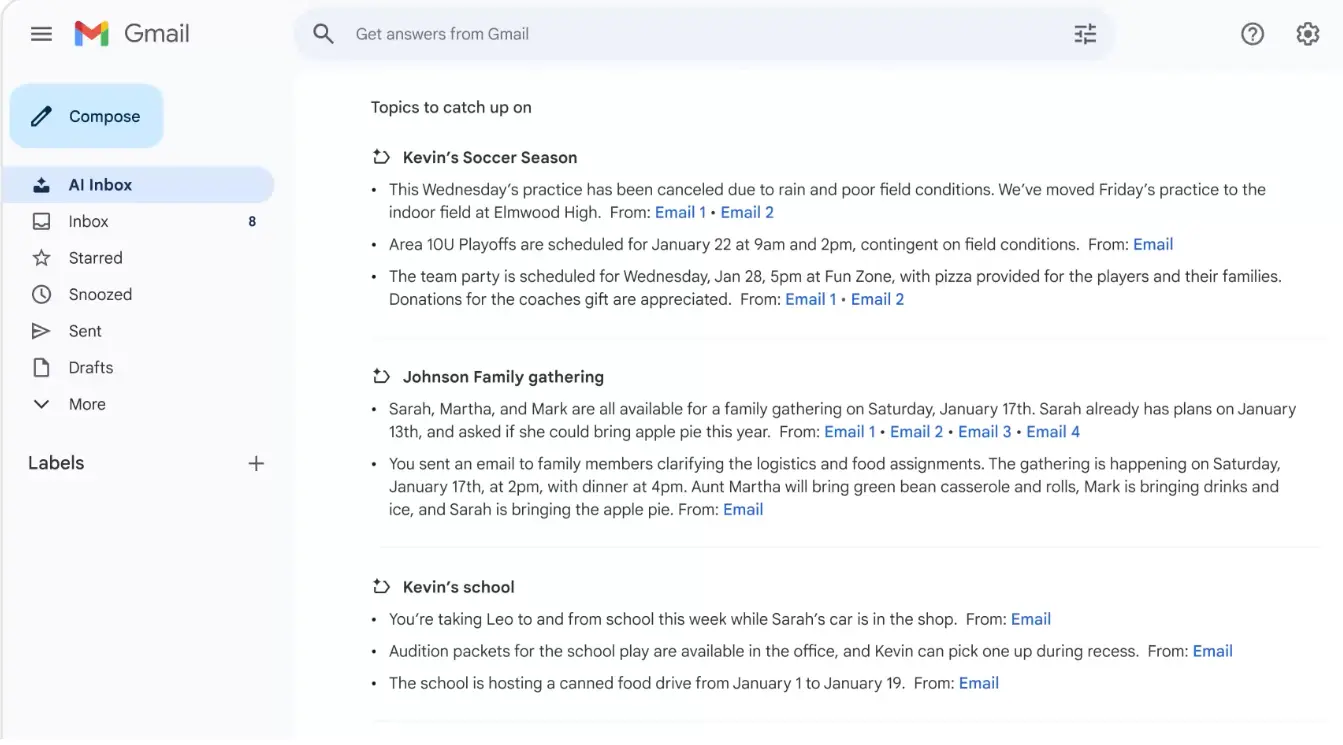
Suggested to-dos pulls out things you need to act on, such as a bill due tomorrow or an appointment to confirm, with the action or due date in bold. Topics to catch up on groups related updates from several emails, like a trip, a delivery or a school event, into a few short summaries, each linked to the emails it came from. To decide what matters, Google says AI Inbox looks at the people you email often, your contacts, and relationships it infers from message content.
Google's own screenshot below shows the Topics view. Each summary line links back to its source emails, so you can open the original in one click. (Image: Google, from its January 2026 announcement.)
At Google I/O on May 19, 2026, Google added more actions. AI Inbox can now draft a reply using context from several threads, show a link to the relevant Doc, Sheet or Slides file next to a to-do, and let you mark a task done, dismiss a suggestion or mark a whole topic as read in one click. Hands-on reporters also describe it appearing as an extra tab in the Gmail mobile app.
Google is also clear about the limits. According to its Gmail Help Center, AI Inbox only uses messages in the Primary tab. It leaves out Social and Promotions, and it skips spam and anything archived, deleted, muted or snoozed. Attachments, delegated inboxes and encrypted email aren't supported. Keep that Primary-only rule in mind, because it matters when we look at using both tools together.
What SaneBox Actually Does
SaneBox takes the opposite approach. Instead of summarizing your inbox, it keeps most mail out of it. It connects to your email account, decides which messages deserve your attention, and moves the rest into folders. Because it works on the account itself rather than inside one app, those folders show up everywhere: in Gmail on the web, in the Gmail app, in Apple Mail or in Outlook. SaneBox supports Gmail, Microsoft 365, Exchange, iCloud, Yahoo, AOL, Fastmail and other IMAP or Exchange accounts. POP accounts are the one exception.
In Gmail, SaneBox folders appear as ordinary labels. Here's our sidebar. When we took the screenshot, @SaneNews held 522 unread emails and @SaneLater 249, all filed away automatically instead of piling up in the inbox.
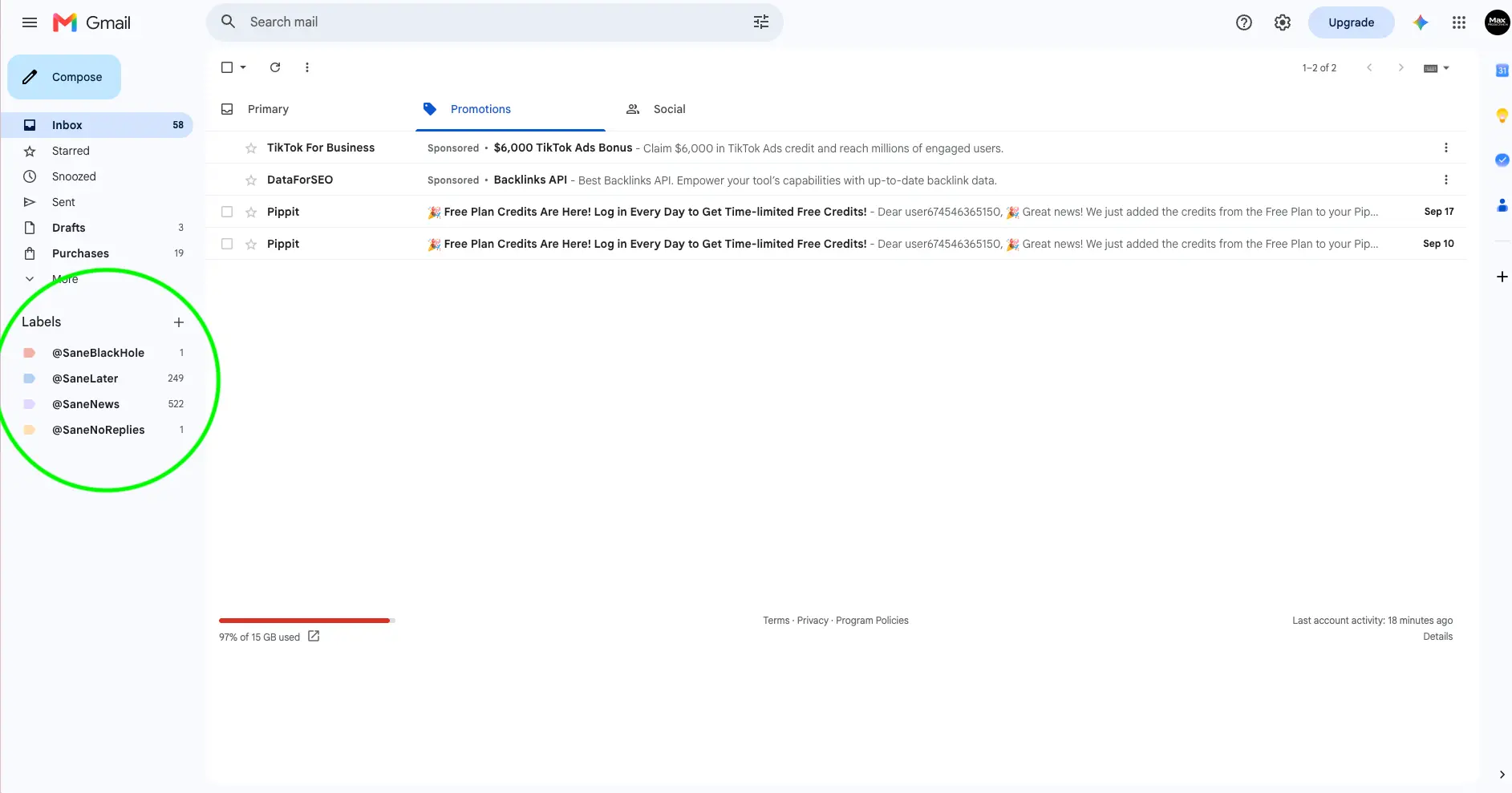
Each folder does one job. @SaneLater holds mail that can wait. @SaneNews collects newsletters and mailing lists. @SaneBlackHole is for senders you never want to hear from: drag one email there, and future messages from that sender go straight in, where they sit for seven days before SaneBox moves them to the trash. @SaneNoReplies tracks emails you've sent that are still waiting for an answer. You can also create your own folders for receipts, bills or anything else.
SaneBox learns by watching where you move things. Its folder settings put it plainly: moving an email between these folders creates a training. Drag a newsletter from your inbox into @SaneNews once, and that sender stays there. You can also train SaneBox by subject line or by whole domain.
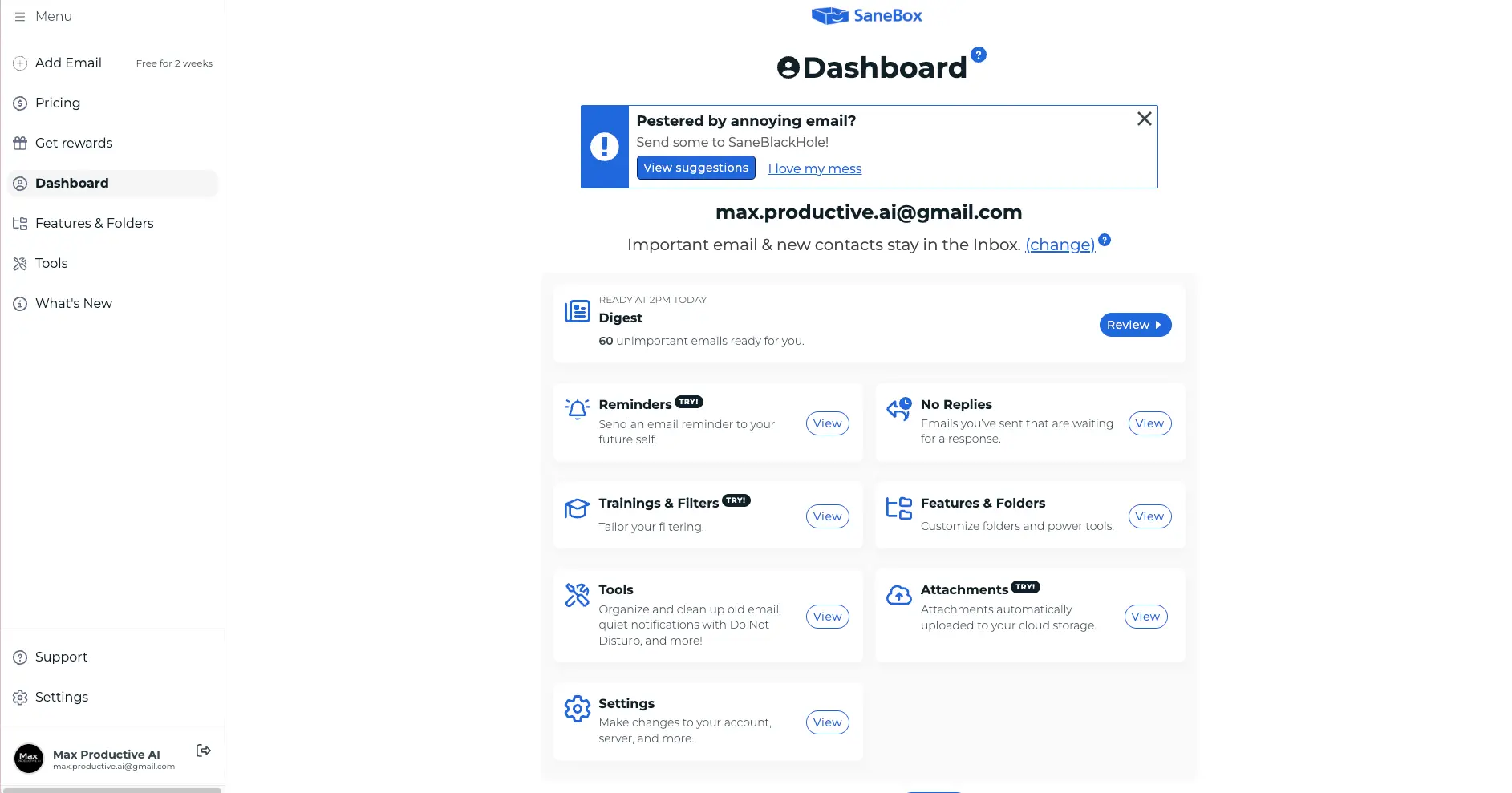
The SaneBox dashboard ties it all together. Ours shows the next Digest ready at 2 p.m. with 60 low-priority emails to review, plus Reminders, No Replies, Trainings & Filters, and an Attachments feature that saves email attachments to your cloud storage.
Reminders are handy too. You send, forward or CC an email to a SaneBox reminder address, and it comes back to your inbox when you asked it to, with an optional calendar sync through an iCal feed. In September 2026, SaneBox also launched an Android app to join its iPhone app, so you can review your Digest, snooze messages and manage reminders from your phone. The easiest way to see all this on your own mail is to start a SaneBox free trial. It's free for a week with no card needed, and it begins filing new mail as soon as you connect your account.
The SaneBox Digest: Why Nothing Gets Lost
The first worry most people have about any filter is simple: what if it hides something important? SaneBox's answer is the Digest, a daily summary of everything it filed away. You can scan it in a minute or two, and anything that belongs in your inbox goes back with one click.
Here's our Digest from Thursday, September 24, at 2:02 p.m. The @SaneLater section grouped 13 emails from six senders, including a sub-processor update from Softr, a privacy policy notice from tl;dv, a GitHub permissions request, finished playbooks from Search Atlas and a feedback request from QuillBot. Every row has the same buttons: Inbox, Move, Train, Archive and Remove.
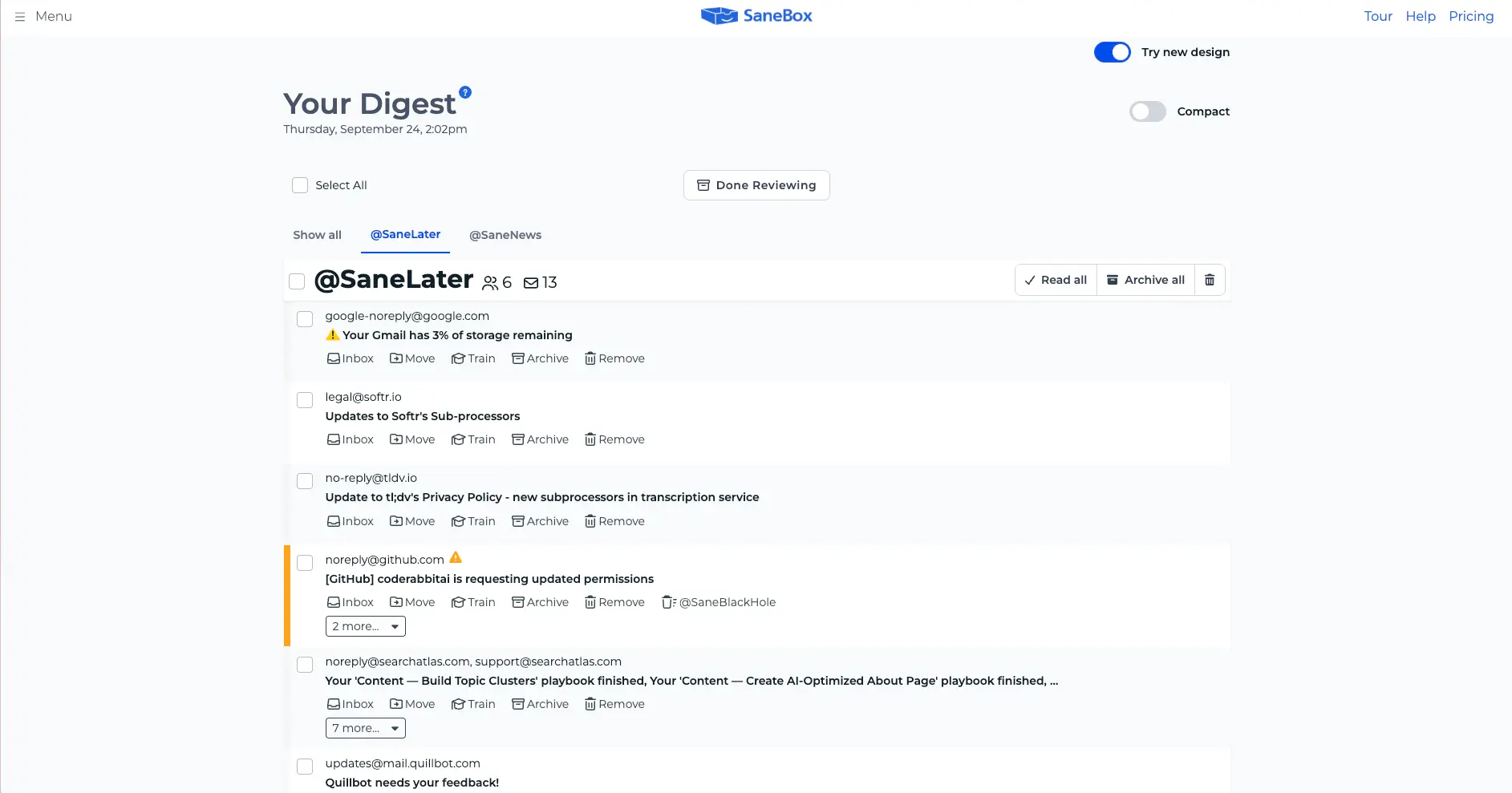
One item shows why the Digest matters. Google's warning that our Gmail storage was nearly full landed in @SaneLater. That's a message we'd rather see sooner. One click on Inbox moves it back, and Train tells SaneBox where Google's no-reply alerts should go next time. That's the honest trade with any filter. It gets most things right from the start, it learns from every correction, and the Digest is where you make them. Read it daily for the first week, and the corrections get rarer as SaneBox learns your habits.
Briefing vs Filter: The Real Difference Between SaneBox and Gmail AI Inbox
Put the two side by side and the difference comes down to where each one works. AI Inbox works inside Gmail's interface. It reads, summarizes and suggests, but it doesn't move messages, apply labels or archive anything on its own. Close the AI Inbox view and your regular inbox is exactly as full as before. Open your Gmail account in Apple Mail or Outlook and you won't see AI Inbox at all, because it's a Gmail view rather than a folder.
SaneBox works on your mailbox itself. When it files a newsletter into @SaneNews, that email is gone from your inbox in every app you use. That's why SaneBox helps people who read email in more than one place, and why it works the same way for a Gmail account, a Microsoft 365 account or an iCloud address.
This gives you a simple way to decide. If your problem is too much email arriving, you want a filter. If your problem is too much to read in the emails that matter, a briefing helps. Plenty of people have both problems, which is why the two tools can live side by side. In one line: Gmail's AI Inbox summarizes your inbox, and SaneBox shrinks it.
| The job | SaneBox | Gmail AI Inbox |
|---|---|---|
| Removes low-priority mail from your inbox | Yes, into @SaneLater and other folders | No, your inbox stays as it is |
| Summarizes what's important | A daily Digest of the mail it filed | AI summaries of to-dos and topics |
| Drafts replies | No | Yes, added in May 2026 |
| Tracks emails waiting for a reply | Yes, in @SaneNoReplies | No dedicated feature |
| Handles senders you never want | SaneBlackHole, trashed after a week | Gmail's standard Block and spam tools |
| Works outside Gmail | Yes, with most providers and mail apps | No |
| Learns from | Where you move mail | Your contacts, who you email and message content |
Can You Use SaneBox and Gmail AI Inbox Together?
Yes, and for eligible Gmail users it may well be the best setup. The two work at different levels, so nothing stops them from sharing an account. There's one detail worth knowing first.
Remember the Primary-only rule. Google says AI Inbox only reads messages in the Primary tab and leaves out anything archived. When SaneBox moves an email out of your inbox and into @SaneLater or @SaneNews, it's no longer in Primary, so under Google's rules it won't feed your AI briefing. We couldn't confirm this hands-on, since AI Inbox isn't available on our account, but it follows directly from how Google describes the feature.
In practice, that works in your favor. SaneBox clears out newsletters and routine notices first, so AI Inbox briefs you on a smaller, more important set of emails. Just keep two habits. Check the SaneBox Digest each day, because anything filed in @SaneLater won't appear among your AI to-dos. And when an email that needs action lands in @SaneLater, move it to your inbox. That trains SaneBox and puts the email back where AI Inbox can see it.
SaneBox vs Gmail's Free Tools: Tabs, Filters and Priority Inbox
Most people comparing SaneBox and Gmail aren't weighing SaneBox against AI Inbox at all. They're asking whether Gmail's free tools are enough. Gmail gives you a lot at no cost. Category tabs split mail into Primary, Social, Promotions and Updates. Inbox types such as Important first and Priority Inbox put flagged mail at the top. Filters and labels sort mail by rules you write, snooze hides a message until later, and blocking a sender sends future mail to spam. Gmail has also been rolling out a Manage subscriptions page that lists your mailing lists in one place, though it may not have reached every account yet.
For a light inbox, that's often all you need. SaneBox earns its place when rules stop keeping up. You don't write filters, because it learns from where you move mail. Its folders work in every mail app, not just Gmail. And it adds tools Gmail doesn't offer in the same form, like SaneBlackHole, reply tracking in @SaneNoReplies and a daily Digest. Our full SaneBox review walks through each feature.
Gmail's Other AI Features, and Which Ones Are Free
AI Inbox isn't Gmail's only AI feature, and the names are easy to mix up. Here's how they break down at the end of September 2026, according to Google's Gmail Help Center.
AI summaries of long threads are free for personal Gmail accounts in supported languages, including outside the US. Help Me Write and Suggested Replies are free for personal accounts in the US; elsewhere they come with a paid Google AI plan. AI Overviews in Gmail search answer questions about your inbox in plain language, like the example below from Google. It's a paid feature, and on September 15, 2026, Google widened it to AI subscribers in most countries. (Image: Google.)
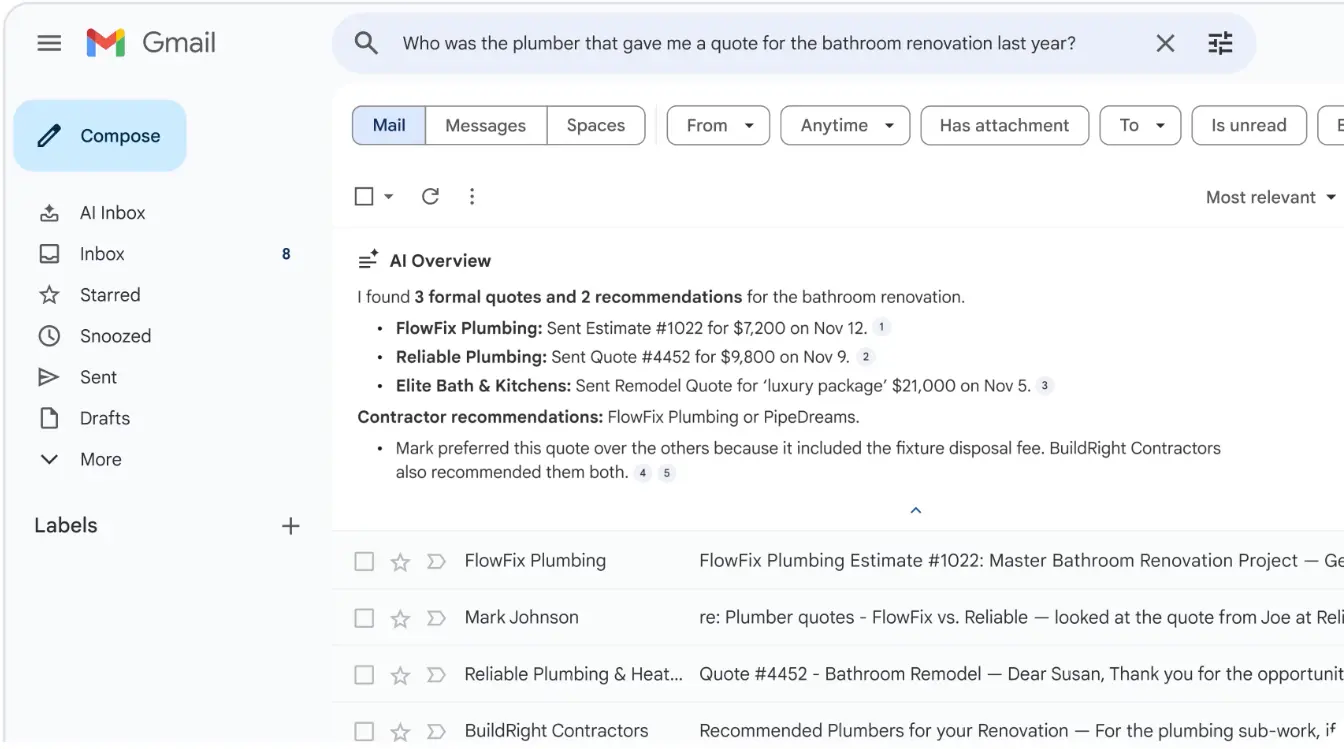
None of these features move or filter mail, so they sit comfortably alongside SaneBox. Thread summaries pair especially well with it: SaneBox decides what reaches your inbox, and Gmail helps you get through the long threads that do.
Who Can Use Gmail AI Inbox Right Now?
This is where many readers' decision gets made for them. According to Google's Gmail Help Center, checked at the end of September 2026, AI Inbox is only available in the US and in English. It comes with three personal plans: Google AI Plus, Google AI Pro and Google AI Ultra. For businesses, it's in beta on Google Workspace Enterprise Plus, and only when an administrator turns on Gemini Beta. Free Gmail accounts don't get it.
Google has signaled more to come. When it expanded AI Inbox to Plus and Pro subscribers at I/O in May 2026, it said a global rollout to Pro and Ultra subscribers would follow over the summer. At the time of writing, the Help Center still lists the feature as US-only, so if you're reading from London, Paris or Singapore, check your own account rather than assuming either way. Open Gmail settings, choose See all settings, go to the Inbox tab and look for a Show AI Inbox checkbox. The feature also needs Gmail's smart features turned on, and Google says the first useful briefing can take up to a week to build.
SaneBox has no such limits. It works with any supported provider in any country, which makes it the default answer for everyone outside the US, on free Gmail or on Outlook.
Privacy: What Each One Reads
Both companies put real work into email privacy, and they approach it differently.
SaneBox's core filtering is built on email headers: who sent a message, the subject line, and how you've treated that sender before. Its security page says it analyzes only headers to decide what's important. A few optional features go further. Saving attachments to cloud storage, forwarding, and the AI-powered Smarter reply tracking in SaneNoReplies, which reads the intent of emails you send, all work with message content, and SaneBox says it doesn't store message bodies. SaneBox also says it passes Google's annual security assessment for apps with access to Gmail.
Gmail's AI Inbox has to read your messages to do its job, since pulling a deadline out of an email means understanding the email. Google says that content isn't used to train its Gemini models, and its April 2026 post on privacy in Gmail with Gemini explains how inbox information is processed for the task at hand. AI Inbox also depends on Gmail's smart features, which you can switch off in settings. Security specialists interviewed by HuffPost in July 2026 offered sensible advice for any AI summary: treat it as a starting point, and open the original email before acting on anything important.
If you'd rather keep AI away from the content of your email, SaneBox with its optional features left off is the lighter touch. If you're already comfortable with Google's AI, AI Inbox's deeper reading is exactly what makes its to-dos possible.
Pricing: SaneBox Plans vs Google AI Plans
SaneBox is a standalone subscription with three plans, named after meals. The prices below are the monthly equivalents on the two-year plan, the cheapest way to pay, as listed on SaneBox's pricing page on September 25, 2026. Monthly and annual billing cost more per month.
| Plan | Email accounts | Features | Two-year plan | Best for |
|---|---|---|---|---|
| Snack | 1 | 2 of your choice | $4.54/mo | One inbox with one main problem |
| Lunch | 2 | 6 per account | $7.46/mo | A work and a personal account |
| Dinner | 4 | All features, plus phone support | $22.04/mo | Heavy email users with several accounts |
| SaneBox for Business | Unlimited users | All features, plus admin tools and company-wide rules | Contact sales | Teams of roughly 5 to 10 people or more |
On Snack, pick your two features with care. For most people, SaneLater plus either SaneNews or SaneBlackHole covers the biggest wins. The wider feature list also includes SaneNoReplies, Reminders, SaneCC, Attachments and custom snooze folders.
Every personal plan starts with a 7-day free trial, and you don't need a credit card to start it, so there's nothing to cancel if SaneBox isn't for you. Business accounts get a 14-day trial. You can compare SaneBox's plans and start your trial here.
Gmail's AI Inbox isn't sold on its own. It comes with Google's AI plans, which also include Gemini features across Google's apps and extra cloud storage. Google AI Plus is the entry plan, Google AI Pro costs $19.99 a month in the US, and Google AI Ultra starts at about $100 a month after Google's I/O 2026 pricing changes. If you already pay for one of those in the US, AI Inbox comes at no extra cost. If you'd only subscribe to get it, SaneBox Snack costs a fraction of AI Pro and works outside the US too.
What About Outlook and Microsoft 365?
AI Inbox only exists in Gmail, so if your email runs on Microsoft 365, the comparison changes. Outlook's free Focused Inbox splits mail into Focused and Other based on who you talk to and whether a message looks automated, and you retrain it by moving messages between the two. Copilot in Outlook goes further. Its Prioritize my inbox feature marks new messages as high, normal or low priority with a short explanation, and Copilot can summarize long threads. What you get depends on your Microsoft 365 plan.
Like AI Inbox, Copilot's prioritization only looks at mail in the Inbox folder, according to Microsoft's documentation. SaneBox works with Microsoft 365 and Exchange accounts directly, so the same filing happens there. It's also the easy option if you have both a Gmail and an Outlook account: the Lunch plan covers two accounts, and your folders work the same way in each.
What Early AI Inbox Users Report
Because AI Inbox is still in beta, most feedback comes from tech writers with access, and the tone is positive. Android Authority's reviewer got access through Google AI Pro in June 2026, when AI Inbox appeared as a third tab in the Gmail app, and came away pleasantly surprised. A Tom's Guide writer who uses Gmail's AI tools to manage their inbox (August 20, 2026) found them most useful for catching up after time away and spotting deadlines, while noting that priorities aren't always right and summaries can lose nuance.
Two practical points come up again and again. First, the rollout has been gradual: in June and July 2026, some paying US subscribers posted in Google's Gmail community that the option hadn't appeared for them yet. Second, reviewers treat AI Inbox as a second pass rather than a replacement for the inbox, which fits Google's design, since the regular inbox stays right below it. We found no published side-by-side test of AI Inbox and SaneBox on the same mailbox, which is why this article sticks to documented behavior.
Which One Do You Need? A Quick Decision Guide
Find the line that sounds most like you. You use free Gmail: SaneBox, since AI Inbox isn't included with free accounts. You live outside the US: SaneBox, at least until Google's announced global rollout reaches your account. You pay for Google AI Plus, Pro or Ultra in the US: switch on AI Inbox first, then add SaneBox if newsletters and notifications still bury the emails that matter. You read email in Apple Mail, Outlook or more than one app: SaneBox, because its folders follow you everywhere. You have a work and a personal account: SaneBox Lunch, which covers two. You mostly want help writing replies: AI Inbox's draft replies, or Fyxer if you work in Outlook. You'd rather AI stayed out of your message content: SaneBox, with its optional content features left off. Your inbox is already calm: Gmail's free tabs and filters may be all you need for now.
Is SaneBox Worth It in 2026?
For the right person, yes. SaneBox pays off when the problem is volume. If you start each morning clearing newsletters, notifications and receipts before you reach the emails that matter, that's exactly the work it takes over, in every app and on every account you connect. It's also one of the few inbox tools that helps with email without an AI reading every message.
It's less essential if your inbox is already calm. If you get a few dozen emails a day and Gmail's tabs and filters keep up, you may not feel much difference. And if you already pay for Google AI in the US and mostly want help reading, AI Inbox may cover you, though SaneBox would still clear the newsletters out first.
The trial is the quickest way to find out. It runs for a week, which gives you exactly a week of Digests to judge it on. Try SaneBox free and decide once you've seen what it filed for you.
How to Set Up SaneBox for a Year-End Inbox Reset
Inboxes tend to get busiest in the last months of the year, which makes now a good time to start. Here's the setup we'd follow.
1. Start the trial and connect your account. Sign up on SaneBox's site and connect Gmail, Outlook or whichever provider you use. SaneBox creates its folders in your account right away, starting with @SaneLater.
2. Give it a day. Leave the settings alone and see how it sorts your mail on its own.
3. Read the Digest daily for the first week. Move anything misfiled back to the inbox or into the right folder. Every move is a training, so the corrections get rarer.
4. Switch on SaneNews and SaneBlackHole. Newsletters get their own folder, and senders you never want to see again go to the black hole with one drag.
5. Add follow-up tools if you chase replies. SaneNoReplies lists sent emails still waiting for an answer, and Reminders bring an email back when you need it.
6. Pick your plan when the week is up. One account and two features: Snack. A work and a personal account: Lunch. Several accounts or every feature: Dinner.
Other Gmail AI Inbox Alternatives Worth a Look
If neither tool fits exactly, here's the rest of our email management category in one pass. Every tool below has a full review in our email management directory.
Clean Email (4.6) is built for bulk cleanup: unsubscribing, clearing old mail by sender and setting up cleanup rules. Our SaneBox vs Clean Email comparison covers how the two differ. Fyxer (4.1) works inside Gmail and Outlook, sorting mail into categories and drafting replies in your tone. Shortwave (4.4) is an AI-first email client built on Gmail, Superhuman (4.3) is a fast premium email client with AI features, and Spark Mail (4.1) is a popular client with a smart inbox and a free plan.
Final Verdict — SaneBox vs Gmail AI Inbox in 2026
| Best for a lighter inbox | SaneBox (moves low-priority mail out of your inbox in every app, our 4.7/5) |
| Best AI briefing inside Gmail | Gmail AI Inbox (to-dos, topics and draft replies for US Google AI subscribers) |
| Outside the US or on free Gmail | SaneBox (AI Inbox isn't available to you yet) |
| Outlook and Microsoft 365 | SaneBox, or Copilot in Outlook if your plan includes it |
| Several email accounts | SaneBox Lunch or Dinner (two or four accounts) |
| If you qualify for both | Use both: SaneBox filters, AI Inbox briefs |
| One-time cleanup of old mail | Clean Email (bulk unsubscribe and delete) |
Bottom line: Gmail's AI Inbox is a welcome step forward for Gmail, and if you're a US Google AI subscriber it's worth switching on. But it's a briefing, not a filter. It doesn't remove a single email, it only works in Gmail, and for now it's limited to the US and English. SaneBox still does the job most people with a crowded inbox actually want: it moves the noise out, in every app and with almost any provider, and it learns from each correction. If you qualify for both, use them together, with SaneBox trimming the inbox and AI Inbox briefing you on what's left. Everyone else can start with SaneBox and a week of Digests.