monday.com Pricing: What Each Plan Costs and What Your Team Pays
monday.com has a Free plan for two people and three paid plans at $9, $12 and $19 a seat a month on yearly billing, from 3 seats. Your bill depends on how monday groups seats, and your AI use on the credits each plan includes.
This article contains affiliate links. We may earn a commission at no extra cost to you.
New accounts start with a 14-day Pro trial, no credit card needed.
Quick answer: how much does monday.com cost?
As of October 2026, monday.com pricing starts with a Free plan for up to 2 seats. The paid plans are Basic at $9, Standard at $12 and Pro at $19 a seat a month on yearly billing, or $12, $14 and $24 billed monthly. Enterprise is priced on request. Paid plans start at 3 seats and then come in groups, so a team of 6 pays for 10. Each paid plan also includes a monthly pool of AI credits: 1,000, 2,000 or 3,000. Our read: most small teams should start on Standard.
Start on the Free plan if
- You work alone or with one other person
- Simple boards are enough, without automations or AI
The trade. The Free plan has no end date. You get 3 boards and 200 items, with no automations, integrations or AI.
Try monday.com freeGo straight to a paid plan if
- Your team has 3 people or more
- You want automations, a Gantt view or AI on your boards
The trade. You pay for at least 3 seats. Standard is where automations, timelines and guest access start, and Pro adds time tracking and private boards.
Find your team's pricemonday.com pricing at a glance
| Plan | Billed yearly | Billed monthly | Seats | AI credits a month |
|---|---|---|---|---|
| Free | $0 | $0 | Up to 2 | None |
| Basic | $9 | $12 | From 3 | 1,000 |
| Standard | $12 | $14 | From 3 | 2,000 |
| Pro | $19 | $24 | From 3 | 3,000 |
| Enterprise | Custom | Custom | Custom | Custom |
Swipe sideways to see every column.
Prices are per seat, per month, in US dollars, for monday work management as monday.com's pricing page showed them on October 15 and 16, 2026. They exclude tax and can depend on your billing country. See every source
The list prices are the easy part of monday.com pricing. Two rules shape what you get for them: seats are sold in groups, and each plan comes with a monthly pool of AI credits for the whole account. monday explains both across its pricing page and several help center articles.
We read them, and checked the plan screen in our own monday.com account during its 14-day Pro trial. This guide puts the answers in one place: what each plan includes, how the seat groups work, what AI credits cover, and how to pick a plan without paying for empty seats.
How we checked
- Sources
- monday.com's pricing pages and help center
- Date checked
- 15 and 16 October 2026
- Our account
- A new monday.com account on the 14-day Pro trial
- Not tested
- Buying a plan or extra credits, the Basic and Standard plans, automations, and the Free plan after a trial
The prices and limits in this guide come from monday.com's own pricing pages and help center, read on October 15 and 16, 2026. Where two monday pages disagree, we show both. We also opened a new monday.com account on October 15, 2026 for our monday.com review, and the plan screen and AI screenshots in this guide come from its 14-day Pro trial.
We haven't bought a paid plan or extra AI credits. We haven't used the Basic or Standard plans, set up automations or integrations, published a Vibe app, or used the Free plan after a trial ends. When we describe billing, refunds or what happens when credits run out, we're relying on monday's documentation. You can read more about how we test tools.
 monday.com
Our rating: 4.5 / 5
monday.com
Our rating: 4.5 / 5
Free plan at $0 for up to 2 seats. Paid plans start at $9 a seat a month, billed yearly, from 3 seats.
Try monday.com free4.5 is our score for monday.com as a whole. Read the monday.com review.
monday.com Pricing Plans: What Each One Includes
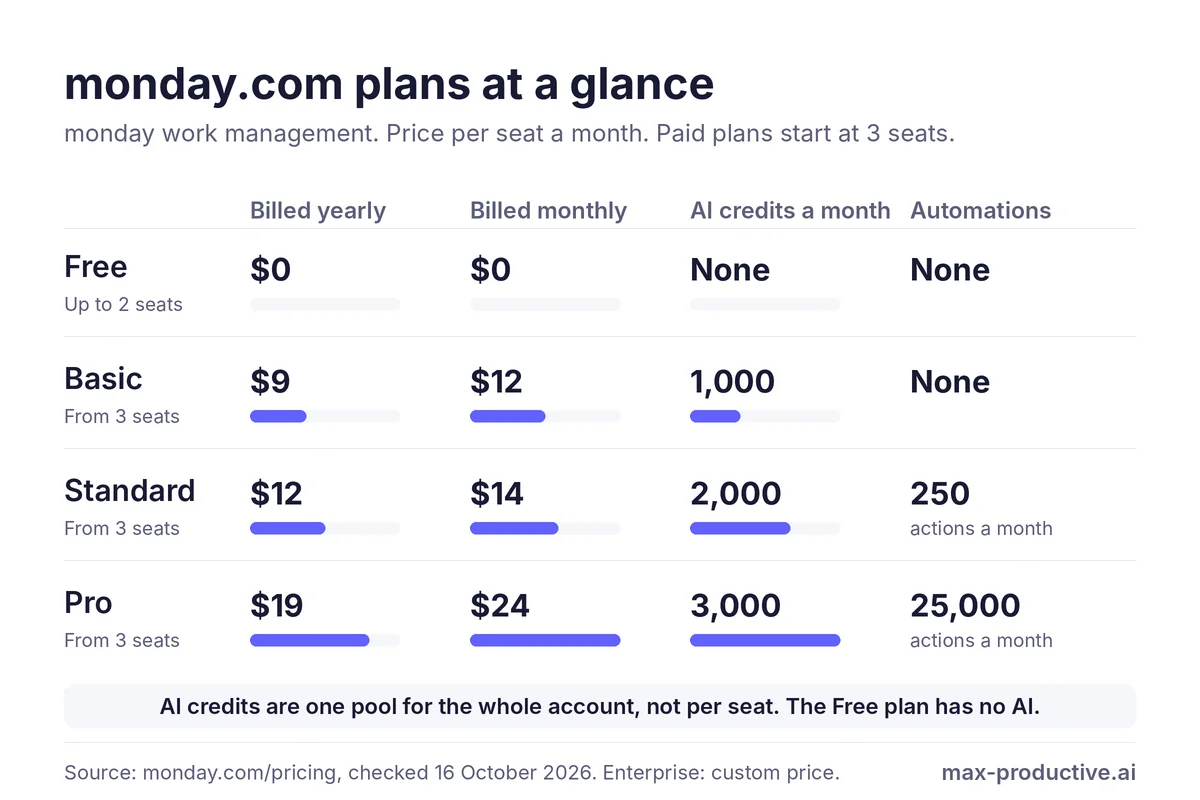
monday.com sells its main product, monday work management, in five plans. The Free plan is for one or two people. The three paid plans have public prices per seat, and Enterprise is quoted by monday's sales team.
-
Free: $0
1 or 2 peopleUp to 2 seats, 3 boards, 3 Docs and 200 items, with Kanban, form and file views and the mobile apps. There are no automations, integrations or AI. It has no end date, so it suits a freelancer or a pair who want simple boards.
-
Basic: $9 a seat a month billed yearly, $12 billed monthly
Simple trackingUnlimited items, unlimited free viewers and 1,000 AI credits a month for the account, with Sidekick, monday's AI assistant, and Vibe, its AI app builder. Basic has no automations or integrations. It fits a small team that tracks work on boards and shares them with people who only need to look.
-
Standard: $12 a seat a month billed yearly, $14 billed monthly
Most small teamsAdds Timeline, Gantt and Calendar views, guest access, and 250 automation actions and 250 integration actions a month. The AI pool doubles to 2,000 credits, and the pricing page lists AI columns from this plan. Our read: with automations and timelines, this is the plan most small teams need.
-
Pro: $19 a seat a month billed yearly, $24 billed monthly
Heavier useAdds private boards and docs, time tracking, advanced columns and views, and 25,000 automation and integration actions a month each. The AI pool grows to 3,000 credits and adds the AI workflow builder. The pricing page lists monday's AI agent workforce on Pro, and as limited on Basic. monday labels Pro Most popular.
-
Enterprise: custom price
Large organizationsEnterprise-grade security and governance, multi-level permissions, portfolio and resource management, and an AI credit allowance set for the account. The price comes from monday's sales team.
The full comparison
| What you get | Free | Basic | Standard | Pro |
|---|---|---|---|---|
| Price, billed yearly | $0 | $9 | $12 | $19 |
| Price, billed monthly | $0 | $12 | $14 | $24 |
| Seats | Up to 2 | From 3 | From 3 | From 3 |
| Items | 200 | Unlimited | Unlimited | Unlimited |
| Free viewers | No | Unlimited | Unlimited | Unlimited |
| AI credits a month | None | 1,000 | 2,000 | 3,000 |
| Automation actions a month | None | None | 250 | 25,000 |
| Integration actions a month | None | None | 250 | 25,000 |
| Timeline, Gantt and Calendar views | No | No | Yes | Yes |
| Guest access | No | No | Yes | Yes |
| Time tracking | No | No | No | Yes |
| Private boards and docs | No | No | No | Yes |
Swipe sideways to see every column.
Source: monday.com's pricing page and help center, checked October 15 and 16, 2026. Prices are per seat, per month. Enterprise is priced on request.
One detail to check if meeting notes matter to you. The pricing page lists the AI meeting notetaker from Standard, while monday's notetaker page describes it as an add-on for Pro and Enterprise. Ask monday which applies before you choose a plan for it.
How monday.com Seat Pricing Works: Seats Come in Groups
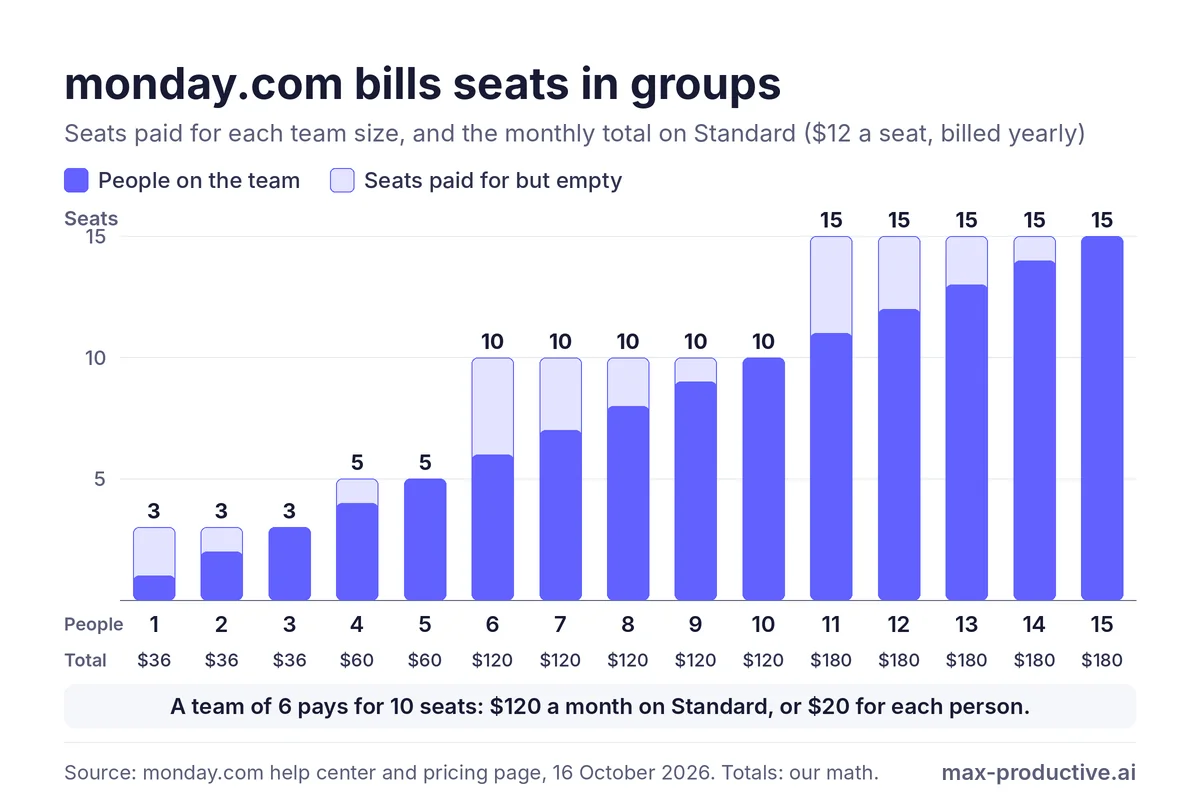
Seat groups are the part of monday.com pricing to understand first. Paid plans start at 3 seats and then go up in groups. In the words of monday's help center, its plans "start at a minimum of 3 seats, and then ascend in multiples of 5".
So you don't pay for the exact number of people on your team. You pay for the group that fits them. A team of 4 buys the 5-seat option, and a team of 6 needs the 10-seat plan, which is monday's own example. Teams of more than 40 can ask monday for a quote.
| Team size | Seats you pay for | Basic | Standard | Pro |
|---|---|---|---|---|
| 1 to 3 people | 3 | $27 | $36 | $57 |
| 4 or 5 people | 5 | $45 | $60 | $95 |
| 6 to 10 people | 10 | $90 | $120 | $190 |
| 11 to 15 people | 15 | $135 | $180 | $285 |
Swipe sideways to see every column.
Totals are our math: seats times monday's yearly price per seat, checked October 15 and 16, 2026. They match our plan screen at 5 seats and monday's pricing page at 10 seats. Billed monthly, 10 seats cost $120 a month on Basic, $140 on Standard and $240 on Pro.
Our read: teams just above a group pay the most for empty seats. A team of 6 pays for 4 seats it doesn't use. By our math, its Standard bill of $120 a month works out to $20 per person instead of the $12 list price.
Two things soften this. From Basic up, viewers are free and unlimited, so people who only need to see boards don't need a seat. And the Free plan covers one or two people at no cost, so the 3-seat minimum only applies once you start paying.
How to avoid paying for empty seats
Count the people who will edit boards, not everyone who needs to see them, and give the rest viewer access. If you land just above a group, such as a team of 6, check whether one person could work as a viewer. Note that the seats you can pick at checkout depend on the users active in your account, according to monday's help center.
Seat groups also come up often in the user feedback we read. In monday's community and on Reddit, solo users ask for a one-seat paid plan, and growing teams mention paying for seats they don't fill yet. It's the main reason we suggest counting editors before you buy.
monday.com AI Credits: What They Are and How Far They Go
Since May 6, 2026, new monday.com accounts pay for seats and get a monthly pool of AI credits with each plan. As of October 2026, Basic includes 1,000 credits a month, Standard 2,000 and Pro 3,000. The Free plan has no AI.
One pool for the whole account. In monday's words, the credits form "one shared pool of credits across all supported AI capabilities". Seats pay for people. Credits pay for what the AI does, from Sidekick answers to AI columns, agents and Vibe apps.
The allowance was the same at 5 and 10 seats. monday's pricing page at 10 seats and the plan screen in our own account at 5 seats show the same 1,000, 2,000 and 3,000 credits. So a bigger team should check whether it needs a bigger credit bucket.
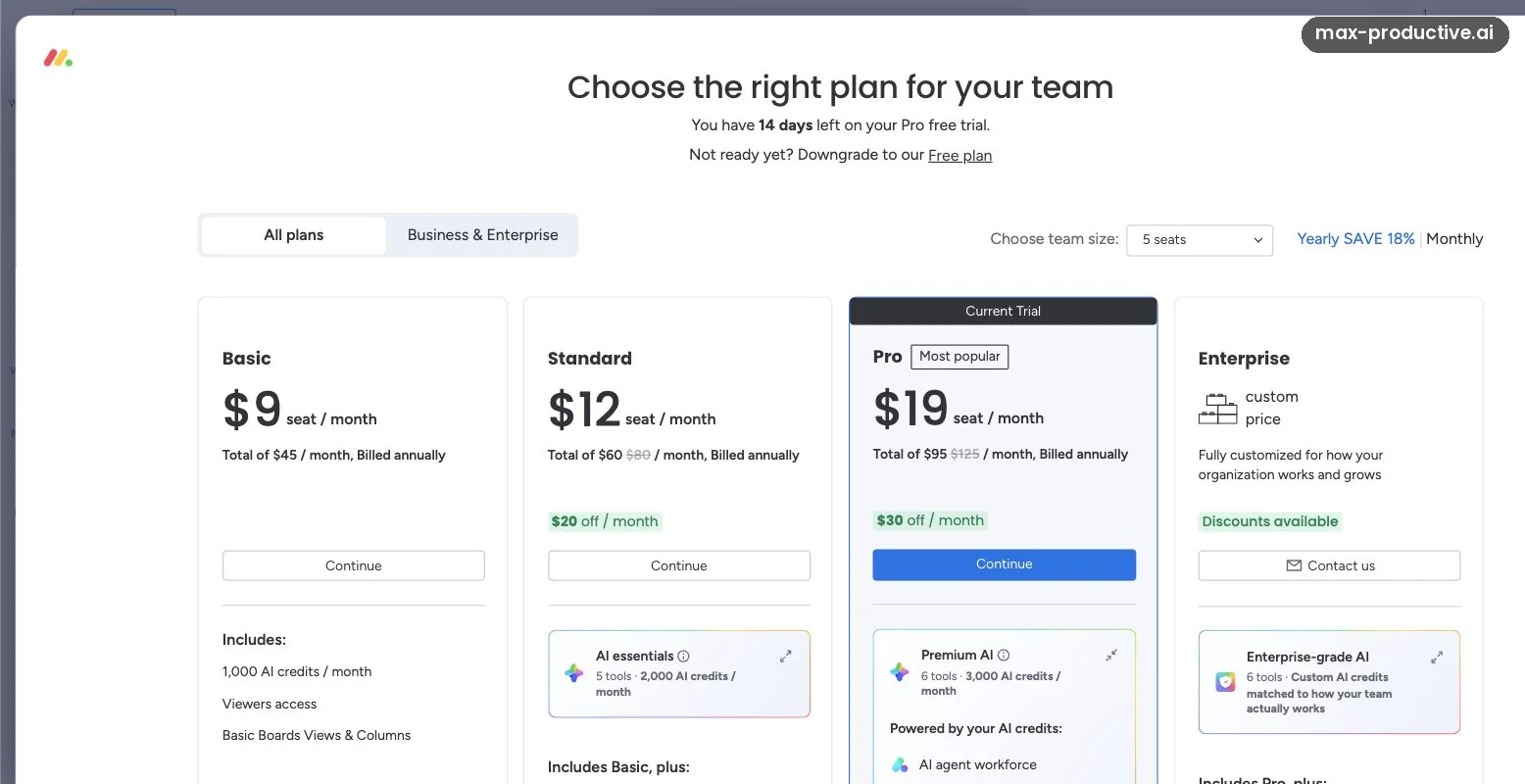
The crossed-out totals on that screen are worth a word. At 5 seats, Standard shows $60 a month next to $80 crossed out and "$20 off". monday shows the included credits as worth $10 per 1,000, then takes that value off, so you pay seats times the seat price. Basic's card shows its total with no crossed-out figure.
What AI features cost in credits
| AI feature | Credits, according to monday |
|---|---|
| AI Blocks, the AI actions behind AI columns and automations | 8 per action. The same item within 24 hours counts once |
| AI Notetaker | 120 per meeting hour |
| Sidekick | About 10 to 30 for a simple message, 150 or more for the most complex |
| AI agents | About 10 to 50 for a simple run, 250 or more for the most complex |
| Building a Vibe app | 10 to 500, depending on the AI model |
Sources: 3 monday.com help center pages and the pricing page, checked October 15 and 16, 2026
- AI Credits
- The pricing model for monday AI portfolio
- monday vibe: permissions and pricing
- monday.com's pricing page
In our trial, building a small Vibe app from our editorial board reported 39 credits. By our math, that's about 4% of Basic's monthly 1,000. We also added a Custom AI prompt column that filled all six items on the board. At monday's published rate of 8 credits per action, that would come to about 48 credits by our math. We didn't see the actual count.
monday's own guide is that "a typical 3-person team thrives on ~800–1,200 credits per month". Its pricing FAQ adds that 1,000 credits cover roughly 5 hours of meeting summaries. By our math, the same 1,000 credits cover 125 AI column actions at 8 credits each. Agents and Vibe apps can use more, so check Credits Usage under Administration, then AI governance, in your first month.
When you run out of AI credits
monday sends notifications at 80% and 100% of the allowance. Its help center says some AI keeps running briefly, then usage may pause until the account has more credits. Admins can move to a bigger credit bucket under Administration, then AI governance, without changing seats. The help center lists bigger buckets for Standard, up to 8,000 a month, and for Pro, up to 20,000.
The price of those bigger buckets isn't listed in the help center, so check it in your account before you plan around it.
Two AI items outside the credit pool
Building Vibe apps uses credits, but publishing them to your team needs a paid app package. A monday blog post from May 12, 2026 put it at $100 a month for 10 published apps, so check the current offer in your admin settings. On the other side, monday magic, which drafts boards from a prompt, is free to use according to monday's help center. The boards it builds can include Pro or Enterprise features, which need an upgrade after the trial.
Is monday.com Free? The Free Plan and the 14-Day Trial
Yes, monday.com has a Free plan with no end date, as of October 2026. It's built for one or two people, and each referral you make adds 100 items to it, up to 1,000 in total.
| Free plan | Limit |
|---|---|
| Seats | 2, with no guests or viewers |
| Boards | 3 |
| Items | 200, plus 100 per referral, up to 1,000 |
| Docs | 3 |
| Storage | 500MB |
| Views | Kanban, Forms and Files |
| Dashboards | Each one shows a single board |
| Automations and integrations | Not included |
| AI | Not included |
Sources: monday.com's pricing page and its help center article Understanding the Free Plan, checked October 15 and 16, 2026.
The monday.com free trial
Every new account starts with a 14-day trial of the Pro plan, and monday's pricing page says no credit card is needed. When we opened the plan screen in our new account, it showed 14 days left and marked Pro as the current trial. Trials can't be extended, according to monday's help center.
When the trial ends, you choose a paid plan or move to the Free plan. To move to Free, the account needs 2 users or fewer. Your data stays, but anything over the Free limits becomes view-only, so a board-heavy trial can feel cramped afterwards.
Our advice for the trial
Use the 14 days to test what you'd pay for. Build one real board, set up an automation, and run the AI on your own work, then check Credits Usage in Administration. That helps you judge whether Standard would be enough or Pro is worth it.
Start with the 14-day Pro trial and test it on one of your own boards.
Try monday.com freemonday.com Yearly vs Monthly Billing, Refunds and Taxes
monday's yearly plans are paid in one installment for the year. monday says yearly billing saves 18%. By our math, the gap differs by plan.
| Plan | Yearly, per seat a month | Monthly, per seat | Yearly saves | 10 seats, paid for the year |
|---|---|---|---|---|
| Basic | $9 | $12 | 25% | $1,080 |
| Standard | $12 | $14 | About 14% | $1,440 |
| Pro | $19 | $24 | About 21% | $2,280 |
Swipe sideways to see every column.
Prices from monday.com's pricing page, checked October 15 and 16, 2026. The savings and the yearly totals are our math. monday's pricing page and help center give 18% as the yearly discount.
Refunds. monday's pricing FAQ says that if you paid for a yearly plan in the last 30 days and cancel your account, the remaining balance is refunded automatically when you cancel from Admin. After that window, monday doesn't refund downgrades.
Taxes and currency. Prices exclude tax, and monday says the price depends on your billing country.
A low-risk way to start
Use the full trial first. If you're unsure about team size, start on monthly billing and move to yearly when you're sure of your seat count. The refund window on a yearly plan is 30 days, so decide inside it.
monday CRM, dev and service: Priced Separately
monday.com sells three more products, each with its own plans and prices. None of them has a Free plan, and all start at 3 seats.
| Product | Basic | Standard | Pro | Top plan |
|---|---|---|---|---|
| monday CRM | $12 | $17 | $28 | Ultimate, custom price |
| monday dev | $9 | $12 | $20 | Enterprise, custom price |
| monday service | Not offered | $31 | $45 | Enterprise, custom price |
Swipe sideways to see every column.
Source: monday.com's CRM, dev and service pricing pages, checked October 16, 2026. Prices are per seat a month on yearly billing. monday CRM costs $18, $25 and $41 billed monthly. Its page shows a "Yearly SAVE 33%" badge while its FAQ mentions 18%; by our math, the gap between its own yearly and monthly prices is about a third.
Our read: if your team mainly manages sales deals, look at monday CRM directly rather than adapting work management. On yearly billing, its Basic plan costs $3 a seat more than work management's Basic, and it comes with the same 14-day trial.
monday.com Discounts: Nonprofits, Startups and Students
Beyond yearly billing, monday offers two programs on its own pages, plus advice for students. Its pricing page doesn't list any promo codes.
-
Nonprofits
Eligible nonprofits get 10 free seats, then 70% off additional seats, which come in lots of 5, plus 33% off AI capabilities. The terms ask for a one-year subscription and a yearly eligibility check. Registered charities and nonprofits can apply, and schools go through a separate education program.
-
Startups
monday dev's startup program offers 10 seats at $2 a seat a month for the first year. It's for venture-backed companies founded in the last two years, with up to 50 employees, that don't already pay for a monday product.
-
Students
For students, monday's help center recommends the Free plan, and invites those who need more to contact its support team.
Sources: monday.com's nonprofit page and its eligibility terms, the monday dev startup offer, and the help center article on students, checked October 16, 2026.
Which monday.com Plan Should You Choose?
For most teams, the choice comes down to Standard or Pro. Here's how we'd decide.
-
You work alone or with one partner
FreeTwo seats and three boards cover a simple personal or two-person workflow at no cost. AI starts on Basic and automations on Standard, both from 3 seats.
-
Your team tracks work and shares it with others
BasicUnlimited items and free viewers at $9 a seat a month, billed yearly. Choose it only if you don't need automations, since Basic has none.
-
A small team that wants automations and timelines
StandardTimeline and Gantt views, guest access, 250 automation actions a month and 2,000 AI credits. We'd start most teams of 3 to 10 people here.
-
Busy workflows, time tracking or private boards
Pro25,000 automation actions a month, time tracking and private boards, plus 3,000 AI credits. It's worth the step up if Standard's 250 automation actions run out, which some users on Reddit mention for busier teams.
-
A large organization with security needs
EnterpriseGovernance, multi-level permissions, portfolio management and an AI allowance set for the account. Ask monday's sales team for a quote.
monday.com Pricing vs Other Work Management Tools
Unlike ClickUp, which charges for each member of a Workspace, monday sells seats in groups. Each tool below is the better fit for a particular kind of team. Prices are the entry paid plan on yearly billing, checked October 15, 2026.
| Tool | Free plan | Entry paid plan, billed yearly | Where it fits better |
|---|---|---|---|
| monday.com (4.5) Reviewed | Up to 2 seats | $9 a seat a month (Basic), from 3 seats | Teams that want visual boards, free viewers and AI credits in one plan |
| ClickUp (4.6) Reviewed | Free Forever | $7 a user a month (Unlimited, on its public page) | Teams that want to pay for each person, with a generous free plan |
| Asana (4.4) Reviewed | Personal, up to 2 users | $10.99 a user a month (Starter), 2-seat minimum | Teams that plan around projects, timelines and dependencies |
| Trello (4.3) Reviewed | Up to 10 collaborators | $5 a user a month (Standard) | Simple Kanban boards for small teams |
| Notion (4.8) Reviewed | For individuals | $10 a seat a month (Plus) | Teams that want docs, wikis and light project tracking in one place |
Swipe sideways to see every column.
Sources: each tool's pricing page, checked October 15, 2026. New ClickUp workspaces may be offered its Core plan at $9 a user a month instead. Scores are the overall ratings from our own reviews.
If your team size lands just above one of monday's seat groups, it's worth pricing ClickUp's per-user plans too. ClickUp bills every member of a Workspace, while monday lets people who only view boards join free, so the better deal depends on how many of your people edit. Our ClickUp free plan guide covers what its free plan includes, and our ClickUp vs monday.com comparison puts the two side by side. You'll find every tool in our time management tools directory.
monday.com Pricing Changes in 2026
We found no change to monday.com pricing per seat between April and October 2026. What changed is how the AI is packaged.
| Date | What changed | What it means for you |
|---|---|---|
| January 22, 2026 | Sidekick left beta and became the main way into monday's AI | Sidekick is now the main way to use monday's AI |
| May 6, 2026 | monday.com became an AI Work Platform. New accounts pay for seats plus a monthly pool of AI credits | AI use has its own allowance, shown on each plan |
| May 12, 2026 | A monday blog post priced Vibe publishing at $100 a month for 10 apps | Building apps uses credits, and sharing them costs extra |
Sources: monday's community post on AI in 2026 (January 22, 2026), monday's press release of May 6, 2026, and monday's blog (May 12, 2026), checked October 15, 2026.
Which monday.com plan should you pick?
As of October 2026, monday.com pricing starts at $0 on the Free plan for 2 seats. Basic, Standard and Pro cost $9, $12 or $19 a seat a month on yearly billing, from 3 seats. Seats come in groups, so count the people who edit and give everyone else free viewer access. Each paid plan includes one pool of AI credits for the whole account, from 1,000 to 3,000 a month.
What we'd do. Start the 14-day Pro trial and build one real board. For a team of 3 to 10, Standard is where we'd begin. Move to Pro when you need time tracking, private boards or more than 250 automation actions a month, and move to yearly billing once you're sure of your seat count.
Our monday.com rating: 4.5 / 5
Our monday.com rating
monday.com pricing FAQ
How much does monday.com cost?
monday.com costs $0 on the Free plan for up to 2 seats, as of October 2026. Basic, Standard and Pro cost $9, $12 and $19 a seat a month on yearly billing. Billed monthly, the paid plans cost $12, $14 and $24 a seat. Paid plans start at 3 seats, and Enterprise is priced on request.
Is monday.com free?
Yes, monday.com has a Free plan with no end date for up to 2 seats. It includes 3 boards, 3 Docs, 200 items and 500MB of storage, with Kanban, form and file views. Automations, integrations and AI aren't included. Each referral adds 100 items, up to 1,000.
Does monday.com have a free trial?
Yes, every new monday.com account starts with a 14-day trial of the Pro plan, and monday's pricing page says no credit card is needed. Trials can't be extended, according to its help center. When the trial ends, you choose a paid plan or move to the Free plan if the account has 2 users or fewer.
Why does monday.com charge for 3 seats?
monday.com's paid plans start at a minimum of 3 seats and then go up in groups, according to its help center. A team of 4 buys 5 seats and a team of 6 buys 10. Viewers are free and unlimited from Basic up, so only people who edit need a seat.
How much does monday.com cost for one user?
monday.com is free for one user on the Free plan. A paid plan for one person still bills the 3-seat minimum. By our math, that's $27 a month on Basic, $36 on Standard or $57 on Pro, billed yearly.
What are monday.com AI credits?
monday.com AI credits are a monthly pool that pays for its AI features, shared by the whole account. As of October 2026, Basic includes 1,000 credits a month, Standard 2,000 and Pro 3,000. AI columns use 8 credits per action and the AI Notetaker 120 per meeting hour, according to monday's help center.
What happens when monday.com AI credits run out?
When a monday.com account uses up its AI credits, monday says some AI keeps running briefly and then usage may pause until more credits are added. monday sends notifications at 80% and 100%. Admins can move to a bigger credit bucket in Administration, without changing seats. That price isn't listed in monday's help center.
Is monday.com cheaper if you pay yearly?
Yes, monday.com is cheaper on yearly billing, which monday puts at 18% off. By our math, the gap is 25% on Basic ($9 vs $12 a seat), about 14% on Standard ($12 vs $14) and about 21% on Pro ($19 vs $24). The yearly plan is paid upfront for the year.
Can you get a refund from monday.com?
monday.com refunds the remaining balance of a yearly plan if you cancel within 30 days of paying, according to its pricing FAQ. The refund is automatic when you cancel from Admin. After that window, monday doesn't refund downgrades.
Does monday.com have a nonprofit discount?
Yes, monday.com gives eligible nonprofits 10 free seats, then 70% off additional seats in lots of 5, plus 33% off AI capabilities. The program asks for a one-year subscription and a yearly eligibility check. Schools go through a separate education program.
Is monday.com worth the price?
monday.com is worth it for teams of 3 or more who want visual boards, automations and AI in one place, and who can fill most of their seat group. Standard covers most small teams. Our monday.com review rates it 4.5, and we'd start with the 14-day Pro trial to check the fit.
Read next
Tools in this article




About this guide
Based on monday.com's pricing pages and help center, read on 15 and 16 October 2026, and on our own account during the 14-day Pro trial. First published 16 October 2026. Last updated 16 October 2026.
Sources checked
- Plans and prices. monday.com's pricing page with its yearly and monthly views and its FAQ, checked 16 October 2026.
- Seats and billing. monday.com help center: Plans and pricing for monday.com (updated 9 September 2026).
- AI credits. monday.com help center: AI Credits, The pricing model for monday AI portfolio and monday vibe: permissions and pricing.
- Free plan and trial. monday.com help center: Understanding the Free Plan and monday.com for students.
- Other products. monday.com's CRM, dev and service pricing pages, checked 16 October 2026.
- Discounts. monday.com's nonprofit page, its eligibility terms and the monday dev startup offer.
- Other tools and our account. The pricing pages of ClickUp, Asana, Trello and Notion, checked 15 October 2026, and our own reviews of each. Our screenshots come from a new monday.com account on the 14-day Pro trial, 15 October 2026.
Update log
- 16 October 2026. First published.
Scores next to tool names are the overall ratings from our own reviews, on a 5-point scale.