Wispr Flow Pricing: Is the Free Plan Enough, or Do You Need Pro?
Wispr Flow is free to start, and Pro costs $12 a month billed yearly or $15 billed monthly. The free plan's real limit is a weekly word count, and it works differently on a computer and on a phone.
This article contains affiliate links. We may earn a commission at no extra cost to you.
The free plan needs no credit card.
Quick answer: how much does Wispr Flow cost?
As of October 2026, Wispr Flow pricing starts with a free plan at $0 that needs no credit card. Pro costs $12 a user a month billed yearly, or $15 billed monthly, and removes the weekly word limit. Teams can use Pro or move to Growth at $18 a user a month billed yearly, or $26 with unlimited meeting notes. Enterprise is priced on request. On the free plan, a computer gets 2,000 words a week at full speed, then Flow slows down and stops at 5,000.
The free plan is enough if
- You dictate short replies and notes, a few hundred words a day
- You dictate mostly on a computer, where the free count is largest
The trade. Past 2,000 words, Flow slows down instead of stopping. The hard stop is 5,000 words a week on Mac or Windows.
Try Wispr Flow freePro pays off if
- You write emails, documents or AI prompts by voice every day
- You dictate a lot on your phone, where the free count is smallest
- You want Command Mode to edit text by voice
The trade. Pro costs $144 a year on annual billing, $36 less than twelve monthly payments (our math).
See what Pro addsWispr Flow pricing at a glance
| Plan | Billed yearly | Billed monthly | Dictation | Meeting notes |
|---|---|---|---|---|
| Free | $0 | $0 | 2,000 words a week at full speed on a computer, less on phones | A weekly meeting limit |
| Pro | $12 | $15 | Unlimited | Higher limits, notes kept longer |
| Growth, dictation only | $18 | $23 | Unlimited | Not included |
| Growth with Notetaker | $26 | $33 | Unlimited | Unlimited |
| Enterprise | Custom | Annual only | Unlimited | Added through sales |
Swipe sideways to see every column.
Prices are per user, per month, in US dollars, as Wispr's pricing page and help center listed them on October 23, 2026. Wispr sets fixed local prices in 24 supported currencies. See every source
Wispr Flow's pricing page lists four plans. How the free plan's limit works is explained in its help center instead. There are two weekly numbers on each device, one where Flow slows down and one where it stops, and phones get far fewer words than computers.
We use Wispr Flow every day for our own writing, so we read the pricing page, the help center and the changelog side by side. This guide covers what each plan includes, how the free limits behave, what teams pay, and the ways to pay less.
How we checked
- Sources
- Wispr Flow's pricing page, help center and What's new page
- Date checked
- 23 October 2026
- Our account
- Our own Wispr Flow account on a Mac, used every day for our writing
- Not tested
- Running the free plan to its weekly maximum, Wispr Notetaker, and the Growth and Enterprise plans
Every price and limit in this guide comes from Wispr Flow's own pricing page and help center, read on October 23, 2026. Where two Wispr pages disagree, we show both. The two pricing page screenshots were taken that day. The app screenshots come from our own Wispr Flow account on a Mac, captured in April 2026 during our Pro trial. The interface hasn't changed much since.
We haven't run a free account up to its 5,000-word weekly maximum, and we haven't tested Wispr Notetaker or the Growth and Enterprise plans. When we describe what happens at a limit, we're relying on Wispr's documentation.
 Wispr Flow
Our rating: 4.8 / 5
Wispr Flow
Our rating: 4.8 / 5
Free plan at $0. Pro costs $12 a user a month billed yearly, or $15 monthly.
Try Wispr Flow free4.8 is our score for Wispr Flow as a whole. Read the Wispr Flow review.
Is Wispr Flow Free? What the Free Plan Includes
Yes. Wispr Flow has a free plan for everyone, and Wispr's pricing FAQ says you never need a credit card to start. It covers dictation on Mac, Windows, iPhone and Android, in any app and in more than 100 languages.
What the free plan includes. Most of the everyday tools are there. Flow learns your names and jargon, and you get the dictionary and snippets. You also get limited access to Wispr Notetaker, and you can use your meeting notes in Claude (4.8) and ChatGPT. The help center adds calendar and Slack connections, and the option to stop Wispr from training on your data.
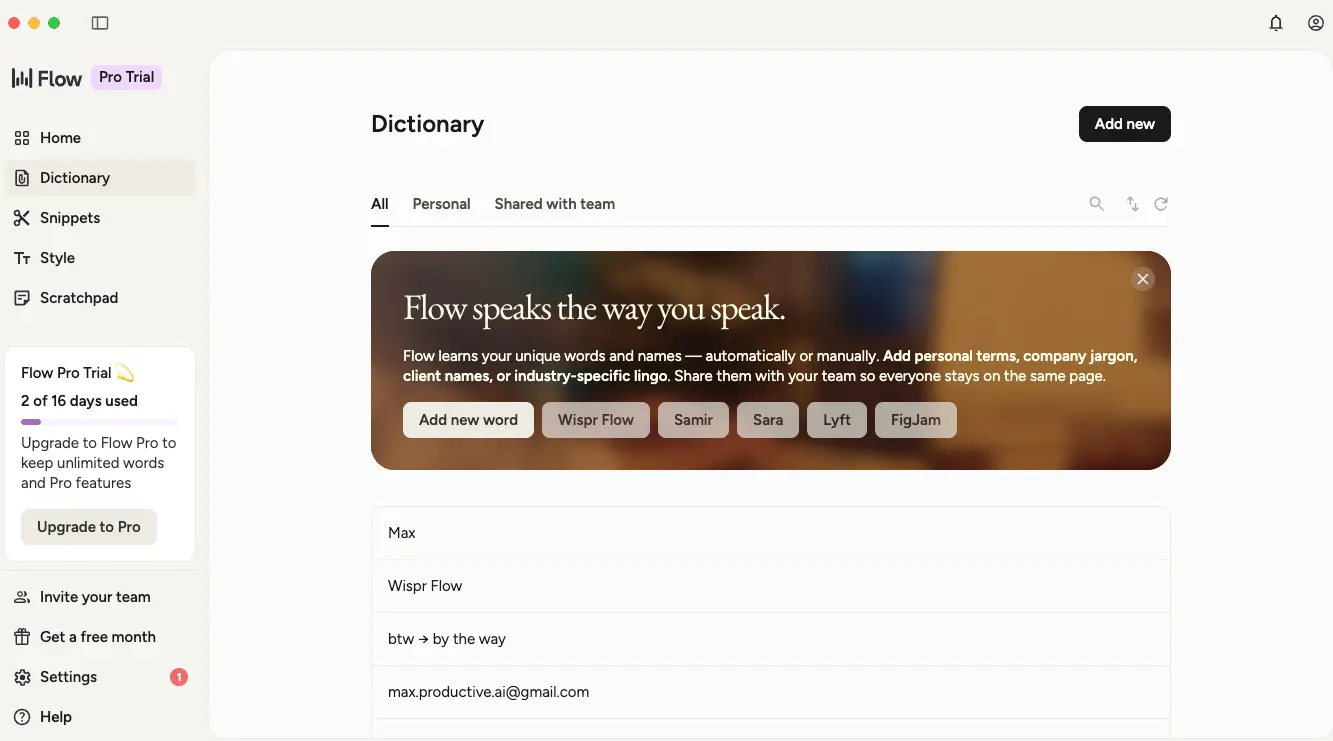
This is the Dictionary in our account. You add names, product terms and email addresses once, and Flow should spell them correctly from then on. The btw → by the way line is a text shortcut. The Shared with team tab only matters on a paid team: sharing a dictionary is a Pro feature.
What the free plan leaves out. The main limit is volume, because free accounts get a weekly word count. Command Mode, which edits selected text or drafts a reply from a spoken instruction, needs Pro or a trial. So do the team features, such as shared snippets and centralized billing.
Wispr Flow Free Plan Limits: How the Weekly Word Count Works
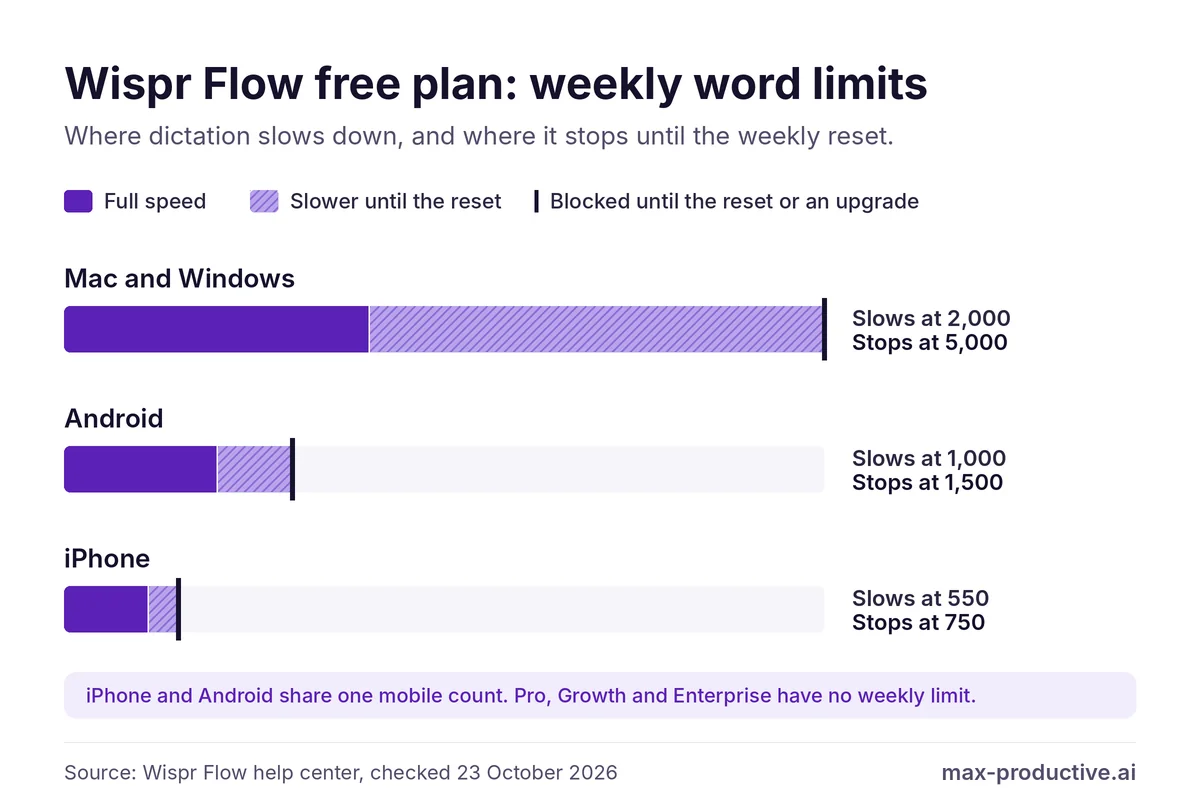
The free plan's limit is a weekly word count, and every device has two numbers. At the first one, which Wispr calls the allowance, Flow keeps working but slows down. At the second, the maximum, new dictations are blocked until the weekly reset or until you upgrade.
| Device | Full speed up to | Blocked after | Count resets |
|---|---|---|---|
| Mac and Windows | 2,000 words | 5,000 words | Every Sunday |
| Android | 1,000 words | 1,500 words | Every Sunday |
| iPhone | 550 words | 750 words | Every Sunday |
Swipe sideways to see every column.
iPhone and Android draw from one shared mobile count. Wispr says your own phone limits can differ and can change without an app update. Its pages disagree on the reset time: the plans article gives Sunday at 12 a.m. PT for computers, while the free plan article says counts reset on Sunday at 23:45 UTC.
Sources: Wispr Flow's pricing page and 2 help center articles, checked October 23, 2026
-
At the allowance
On a computer, Flow shows a "Weekly dictation limit reached" notice after 2,000 words, at most once a day, and carries on more slowly. On a phone, a notice appears and Flow slows down until the reset.
-
At the maximum
New dictations stop until the reset. A dictation you've already started is never cut off, because the limit applies at your next press. On a computer, the limit notice has an Upgrade button that opens Plans and Billing.
-
What counts
Each dictation counts once, whichever device you use. The week is a fixed window for everyone, not a rolling seven days from your first dictation. Unused words don't carry over.
-
What doesn't count
Wispr Notetaker has its own weekly meeting limit, so recording a meeting doesn't use your dictation words.
Spread over a week, 2,000 words is about 285 words a day (our math). That covers quick replies, notes and short messages. Drafting long emails, documents or AI prompts by voice can use up the allowance within a few days. The 5,000-word maximum then gives you room to finish the week at a slower pace.
Older guides quote a different mobile number
When we checked on October 17, 2026, Wispr's pricing page listed 1,000 free words a week on mobile. It now says "limited weekly use on mobile", and the help center gives separate figures: 550 words at full speed on iPhone and 1,000 on Android. A guide that gives one mobile figure most likely predates the change.
Wispr Flow Pro: What You Get for $12 a Month
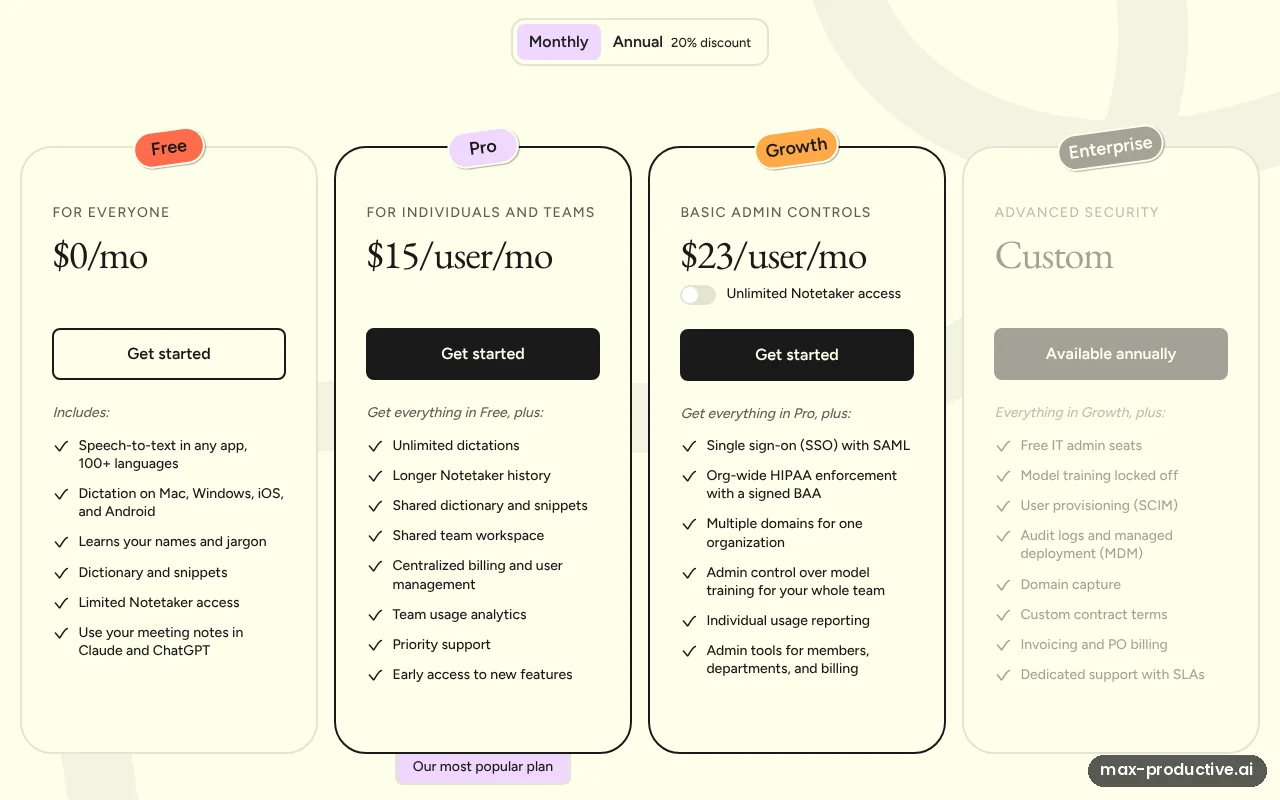
As of October 2026, Wispr Flow Pro costs $12 a user a month billed yearly, which is $144 a year, or $15 billed monthly. It's sold to individuals and to teams, with no seat minimum.
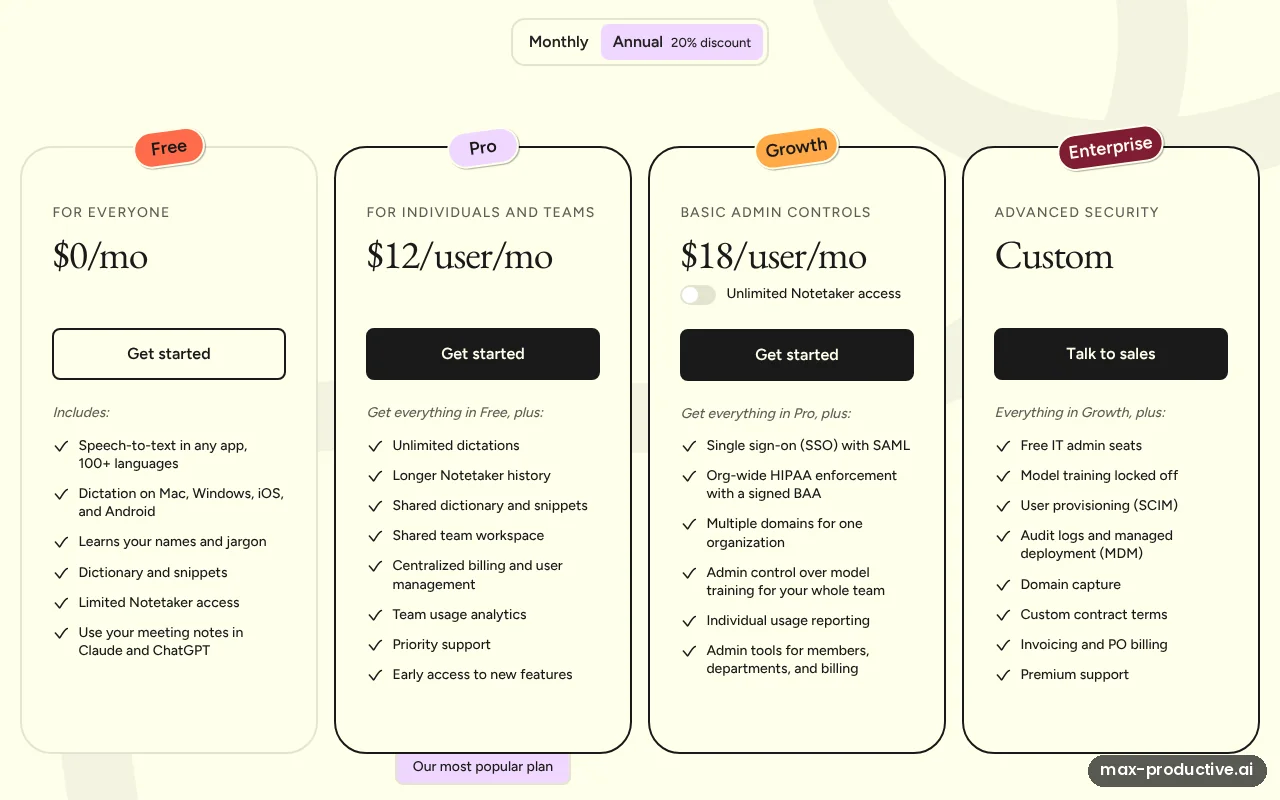
Wispr labels Pro its most popular plan. The Growth card has a toggle for unlimited Notetaker access, which moves its price from $18 to $26.
-
Unlimited dictation
No weekly word count on any device. The pricing page lists no dictation limit on any paid plan.
-
Command Mode
Select text, hold a shortcut and say what you want: shorten it, reply to it, or search for something. It works on Mac and Windows. Wispr's help center says free and lapsed accounts get no response when they press the shortcut.
-
More meeting notes, kept longer
Pro raises Wispr Notetaker's weekly meeting limit and keeps your notes for longer. Wispr says it's rolling Notetaker out to Pro users gradually.
-
Team features
Invite teammates without paying upfront, share one dictionary and one set of snippets, and manage billing in one place. Admins get basic usage dashboards.
-
Priority support and early access
Support moves from standard to priority, and new features reach you first. The Transforms beta, which rewrites text where you're writing, also has two polish rules reserved for Pro.
Some things stay the same on both plans. On a computer, a single dictation can run up to 20 minutes on Free and on Pro. You keep the same dictionary, snippets and 100+ languages, and you can dictate into the same apps.
Our read: if you dictate every day, Pro is the plan to budget for. We use Wispr Flow daily ourselves. You press the shortcut and speak, and the text appears in whatever app is open.
Start on the free plan, then upgrade from Settings when the weekly count gets in your way.
Try Wispr Flow freeWispr Flow Pricing: Monthly vs Annual, Trials and Refunds
Annual billing saves 20% on Pro, and about 22% on Growth (our math). The table shows what twelve months cost each way.
| Plan | 12 monthly payments | Annual billing | Difference |
|---|---|---|---|
| Pro | $180 | $144 | $36 |
| Growth, dictation only | $276 | $216 | $60 |
| Growth with Notetaker | $396 | $312 | $84 |
Swipe sideways to see every column.
Our math from Wispr's US list prices per user, checked October 23, 2026.
Is there a free trial?
Wispr's pricing page doesn't advertise a trial, but its help center says default trials last 14 days, referral trials 30 days and student trials 90 days, where they apply. When a trial ends without payment, you get a three-day grace period. After that, the account returns to the free plan.
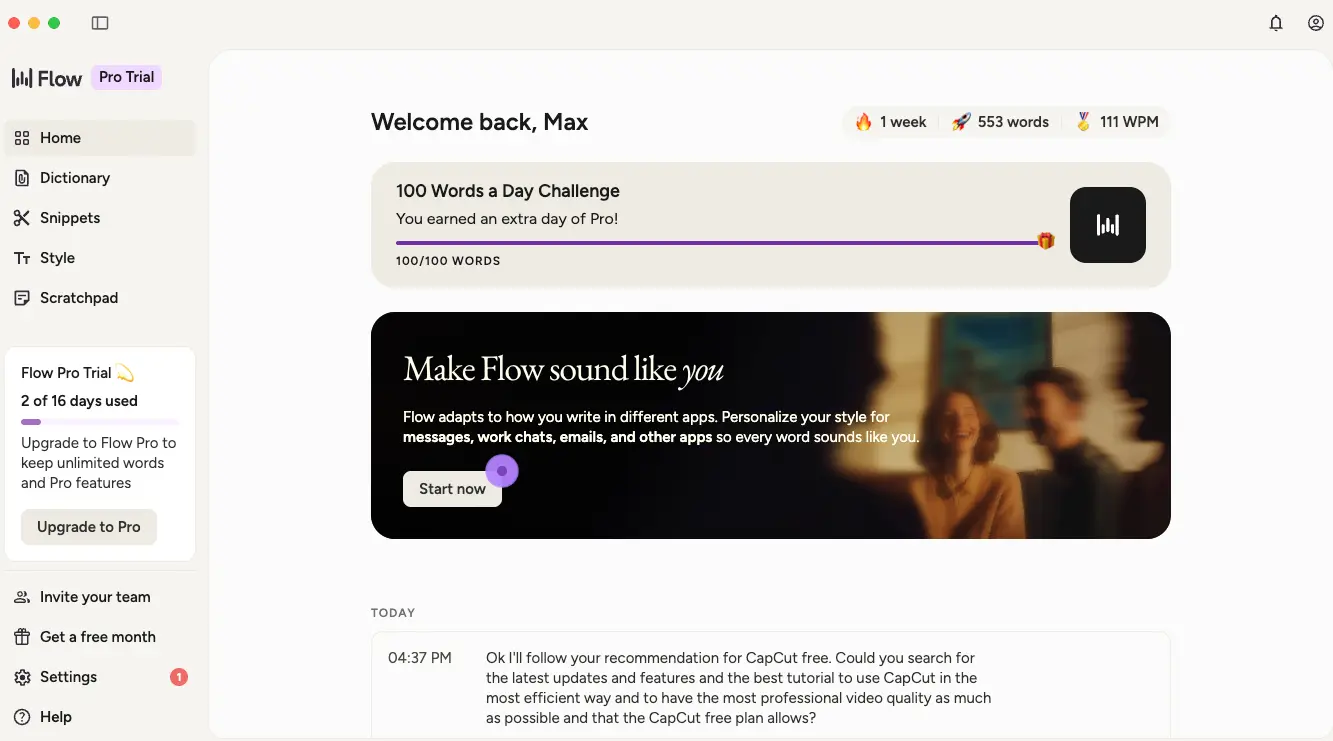
In April 2026, our own account was on a Pro trial. The sidebar showed 2 of 16 days used, longer than the standard 14, and a "100 Words a Day Challenge" card said we'd earned an extra day of Pro. Wispr changes these offers over time, so treat our numbers as an example, not a promise.
Cancelling and refunds
You can cancel at any time. Paid access runs to the end of the period you've paid for, then the account returns to the free plan, and your data stays. Wispr's billing article says there is no automatic prorated refund: you contact support to ask, and Apple handles refunds for App Store purchases.
Before you cancel or switch billing
Deleting your Flow account doesn't cancel an App Store or Google Play subscription, so cancel with Apple or Google first. And a downgrade that also changes your billing period, from annual to monthly for example, can reset the cycle straight away and forfeit prepaid time.
Prices outside the US
The prices in this guide are Wispr's US list prices. Checkout uses your region's currency when it's one of Wispr's 24 supported currencies, and defaults to US dollars otherwise. Each currency has its own fixed price rather than a conversion, so your local price can differ. Wispr adds no VAT or GST at checkout, so the price shown is the final amount. Existing subscribers keep their original price.
Sources: 3 Wispr Flow help center articles, checked October 23, 2026
Wispr Flow Team Plans: Pro, Growth and Enterprise
Wispr no longer sells a plan called Teams. A team can buy Pro, which has no seat minimum, or Growth, a self-serve plan for organizations that launched on August 28, 2026. Enterprise sits above both and is sold through Wispr's sales team.
| What you get | Pro | Growth | Enterprise |
|---|---|---|---|
| Price, billed yearly | $12 a user a month | $18 a user a month, or $26 with Notetaker | Custom |
| Price, billed monthly | $15 | $23, or $33 with Notetaker | Annual agreements only |
| How a team pays | Card | Card | Invoice or purchase order |
| Shared dictionary and snippets | Yes | Yes | Yes |
| Single sign-on (SAML) | No | Yes | Yes |
| Training on your team's data | On by default, each person can turn it off | Always off | Always off |
| Signed HIPAA BAA | No | Yes | Yes |
| Meeting notes | Higher limits | Unlimited on the Notetaker version | Added through sales |
| SCIM, MDM and audit logs | No | No | Yes |
| Support | Priority | Priority | Premium, with a customer success manager |
Swipe sideways to see every column.
Per user, US list prices, checked October 23, 2026. Enterprise is sold for dictation, with Notetaker as an add-on. See every source
Sources: Wispr Flow's pricing page, 2 help center articles and its What's new page, checked October 23, 2026
- Wispr Flow pricing page
- Flow plans and what's included
- Team trials when you join a Wispr Flow team
- What's new (August 21, August 28 and October 2, 2026)
What a team pays. For five people on annual billing, Pro comes to $720 a year, Growth dictation only to $1,080, and Growth with Notetaker to $1,560 (our math). The step from Pro to Growth buys the controls an IT or compliance team tends to ask for: single sign-on, a signed BAA, and training switched off for everyone.
How team trials work. Anyone joining a Wispr Flow team for the first time gets a 14-day Pro trial, even if the team already pays. New members become billed seats when their trial ends, and on annual plans Wispr bills those added seats monthly. Already paying for Pro yourself? Joining a team with billing cancels your personal subscription, and you become one of the team's seats.
Our advice: a small team can start on Pro and invite people as it goes. Move to Growth when someone asks for single sign-on or a BAA. Talk to Wispr's sales team about Enterprise when you need SCIM provisioning, managed deployment or invoices.
Is Wispr Notetaker Included? Meeting Notes by Plan
Wispr Notetaker records meetings on your computer, with no bot joining the call. It came to Mac on August 5, 2026 and to Windows on September 15. Free and Pro include it with different limits, though Wispr is still rolling it out to Pro users. Growth with Notetaker makes it unlimited. Recording a meeting doesn't use your dictation words.
| Plan | Meeting notes |
|---|---|
| Free | A weekly meeting limit. Recordings under five minutes don't count |
| Pro | Higher limits, and notes kept longer |
| Growth, dictation only | Not included |
| Growth with Notetaker | Unlimited |
| Enterprise | Added through sales |
Wispr doesn't publish how many meetings the free plan includes. The Notetaker hub shows how many are left and when the count resets. Checked October 23, 2026.
Notetaker runs on Mac and Windows only for now, and Wispr says mobile is on its roadmap. We haven't tested it. For hands-on looks at meeting assistants, see our Otter AI alternatives roundup, or our reviews of Fathom (4.6) and MeetGeek (4.5) and how the two compare.
Paying for Granola? Wispr's switch offer
Already paying for Granola (4.2)? Then Wispr Flow can cost nothing for up to a year. Wispr's Granola switch offer covers the paid Granola time you have left, plus up to three bonus months, for up to 12 months of Notetaker and dictation in total.
-
Enter your email on the switch page
Open the Granola switch page and submit your email. Wispr gives you 3 free months of Pro straight away.
-
Verify your Granola plan
Follow the instructions Wispr emails you to confirm your paid Granola subscription. Wispr then adds credit for the paid time you have left.
-
Bring your old notes with you
Notetaker can import exported Granola notes, summaries and transcripts, so your meeting history sits in one place.
The offer is for individual paid Granola plans, and the credit depends on how much paid time you have left when it starts. Wispr's page gives no end date, so check it before you plan around it.
Paying for Granola now? Start with 3 free months of Wispr Flow Pro.
Claim the Granola switch offerWispr Flow Discounts: Students, Non-Profits and Other Ways to Pay Less
The simplest saving is annual billing, at 20% off Pro. Beyond that, Wispr has several discount programs, and its help center is clear that the terms are confirmed account by account.
-
Students and educators
50% off ProWispr's pricing page says students and educators with an education email get 50% off Pro. Student plans need a recognized .edu address. At list prices that would be $7.50 a month or $72 a year (our math), and support confirms the exact rate for your account.
-
Non-profits
Discounted rateNon-profits get a discounted Pro rate. Wispr doesn't publish the amount, so you send your registered non-profit details to support.
-
Military, seniors and accessibility
On requestWispr's support form has discount categories for military service, senior citizens and accessibility support.
-
Granola subscribers
Up to 12 months freeSign up through Wispr's Granola switch page and you get 3 free months of Pro right away. Verify your paid Granola plan and Wispr adds credit for the time left on it, up to 12 months in total. How the switch works
Wispr says no discount rate, duration or renewal behavior is universal, so ask support before you pay. Sources: Wispr's pricing page, its discounts article and its Granola switch page, checked October 23, 2026.
Wispr Flow Pricing vs Other Dictation Apps
On yearly billing, Wispr Flow is at the top of this group, level with Typeless. On monthly billing it sits in the middle. The table compares it with three other dictation apps and with the free dictation already on your devices.
| App | Free plan | Paid, billed yearly | Paid, billed monthly |
|---|---|---|---|
| Wispr Flow Reviewed | 2,000 words a week at full speed on a computer, less on phones | $12 a month | $15 a month |
| Superwhisper Reviewed | Unlimited, with on-device models | $84.99 a year, or $249.99 once | $8.49 a month |
| Typeless | A weekly word limit | $12 a month | $30 a month |
| Aqua Voice | 1,000 words | $8 a month | $10 a month |
| Built-in dictation on your phone, computer or AI app | Included | No paid plan | No paid plan |
Swipe sideways to see every column.
Prices for one user, from each app's own pricing page, checked October 23, 2026. Aqua Voice doesn't say whether its 1,000 free words reset, and Typeless doesn't publish its weekly free limit.
Superwhisper (4.6) is the pick if you want dictation that runs on your own device. Its free plan has no word limit on local models, and a one-time license is available. Our Wispr Flow vs Superwhisper comparison goes through the trade-offs, and you can try Superwhisper free.
Aqua Voice Pro costs $8 a month billed yearly or $10 monthly, and a Max tier adds realtime features at $24 a month billed yearly. Typeless also runs on Linux, and its Pro plan matches Wispr Flow's $12 on yearly billing.
Wispr Flow fits best if you want dictation and meeting notes in one app, with a free plan that resets every week on Mac, Windows, iPhone and Android. For occasional dictation, the free mic on your phone or computer may be all you need. You'll find more options in our AI dictation tools directory.
Free or Pro: Which Wispr Flow Plan Fits You?
-
Occasional dictation
FreeA few messages and notes a day fit inside 2,000 words a week on a computer. Stay free and keep an eye on the weekly count.
-
Daily writing by voice
Pro, billed yearlyDrafting emails, documents or AI prompts by voice can use up the free count before the week is out. Pro at $144 a year removes it and adds Command Mode.
-
Mostly on your phone
ProPhones get the smallest free count, 550 words at full speed on iPhone, so regular mobile dictation reaches it quickly.
-
Students and teachers
Pro at 50% offAsk for the education discount before you pay, and check the rate support confirms for your account.
-
Paying for Granola now
Switch offerUse Wispr's Granola switch offer instead of paying for Pro. You get 3 free months right away, and up to 12 months once Wispr verifies your Granola plan.
-
Teams with IT requirements
Growth or EnterpriseGrowth adds single sign-on, a signed BAA and training off for everyone. Enterprise adds SCIM, managed deployment and invoicing.
For how Wispr Flow performs as a dictation tool, from accuracy to app support, read our Wispr Flow review (4.8).
The bottom line on Wispr Flow pricing
As of October 2026, Wispr Flow costs $0 on the free plan and $12 a user a month for Pro on annual billing, or $15 monthly. Teams that need admin controls pay $18 a user a month for Growth, or $26 with unlimited meeting notes, billed yearly. The free plan gives a computer 2,000 words a week at full speed and stops at 5,000, with smaller counts on phones. Pro removes the limit and adds Command Mode.
What we'd do. Start on the free plan and watch your weekly count for two weeks. If you pass 2,000 words before midweek, Pro on annual billing is likely worth it. If you rarely get close, stay free.
Our Wispr Flow rating: 4.8 / 5
Our Wispr Flow rating
Wispr Flow pricing FAQ
How much does Wispr Flow cost?
Wispr Flow costs $0 on its free plan. As of October 2026, Pro costs $12 a user a month billed yearly, or $15 billed monthly. Growth costs $18 a user a month billed yearly for dictation only, or $26 with unlimited Notetaker, and Enterprise is priced on request. These are US list prices, and Wispr sets fixed local prices in 24 supported currencies.
Is Wispr Flow free?
Yes, Wispr Flow has a free plan for everyone that costs $0 and needs no credit card. It includes dictation in any app on Mac, Windows, iPhone and Android, the dictionary and snippets, and limited Notetaker access. The limit is a weekly word count: 2,000 words at full speed on a computer, with a hard stop at 5,000.
What are the Wispr Flow free plan limits?
The Wispr Flow free plan limits dictation by the week. On Mac and Windows, Flow slows down after 2,000 words and stops at 5,000. On Android the numbers are 1,000 and 1,500, and on iPhone 550 and 750, with both phones drawing from one shared count. Counts reset every Sunday, and unused words don't carry over.
What happens when you hit the Wispr Flow weekly limit?
When you pass the weekly allowance, Wispr Flow keeps working but slows down until the reset. At the weekly maximum, new dictations are blocked until the reset or until you upgrade to Pro. A dictation already in progress is never cut off, because the limit applies at your next press.
Does Wispr Flow have a free trial?
Wispr Flow's help center says its default Pro trial lasts 14 days, referral trials 30 days and student trials 90 days, where they apply. The pricing page doesn't advertise a trial, and our own account was on one in April 2026. When a trial ends, the account returns to the free plan after a three-day grace period. Granola subscribers can get 3 free months through Wispr's switch offer.
What does Wispr Flow Pro add over the free plan?
Wispr Flow Pro removes the weekly word count on every device and adds Command Mode, which edits text or drafts a reply from a spoken instruction. It also raises the Notetaker meeting limit and keeps notes longer. For teams, it adds a shared dictionary, shared snippets, centralized billing and priority support.
Does Wispr Flow have a team plan?
Wispr Flow no longer has a plan called Teams. Teams can use Pro, with no seat minimum, at $12 a user a month billed yearly. Growth, at $18 a user a month billed yearly or $26 with Notetaker, adds single sign-on, a signed HIPAA BAA and training off for everyone. Enterprise adds SCIM, managed deployment and invoicing at a custom price.
Is Wispr Notetaker included in Wispr Flow Pro?
Yes, Wispr Notetaker is included in Wispr Flow Pro at no extra cost, with higher meeting limits and longer note history than the free plan. Wispr says it is rolling Notetaker out to Pro users gradually. Notetaker runs on Mac and Windows. Granola subscribers can start with 3 free months of Pro through Wispr's Granola switch offer.
Does Wispr Flow have a student discount?
Yes, Wispr Flow gives students and educators with an education email 50% off Pro, according to its pricing page. Student plans need a recognized .edu address, and support confirms the exact terms for each account. Wispr's help center also mentions 90-day student trials where they apply.
Can you cancel Wispr Flow and get a refund?
You can cancel Wispr Flow at any time, and paid access continues to the end of the billing period before the account returns to the free plan. Wispr doesn't give automatic prorated refunds, so you contact its support to ask. Apple handles refunds for subscriptions bought in the App Store.
Is Wispr Flow cheaper than Superwhisper?
No, Wispr Flow Pro costs more: $144 a year on annual billing, while Superwhisper Pro costs $84.99 a year, $8.49 a month or $249.99 once, as of October 2026. Superwhisper's free plan also has no word limit on its on-device models. Wispr Flow's free plan is limited by the week, but it includes meeting notes.
Read next
Tools in this article




About this guide
Based on Wispr Flow's pricing page, help center and What's new page, read on 23 October 2026, and on our own daily use of Wispr Flow on a Mac. First published 24 October 2026. Last updated 24 October 2026.
Sources checked
- Plans and prices. Wispr Flow's pricing page and its help center article Flow plans and what's included, checked October 23, 2026.
- Free plan limits. Wispr Flow help center: Flow plans and what's included and Free tier weekly dictation limit.
- Pro features. Wispr Flow help center: How to use Command Mode, Transforms and custom prompts and Longer dictation sessions.
- Billing, trials and teams. Wispr Flow help center: Manage billing, invoices and cancellation, VAT, GST and tax on Wispr Flow invoices and Team trials, plus Wispr's What's new page.
- Discounts and offers. Wispr Flow's discounts article and its Switch from Granola page.
- Other dictation apps. The pricing pages of Superwhisper, Typeless and Aqua Voice, checked October 23, 2026.
Update log
- 24 October 2026. First published.
Scores next to tool names are the overall ratings from our own reviews, on a 5-point scale.