
Lindy AI
Lindy is an AI teammate that works inside Slack, your inbox and your calendar. You describe the job in plain language and it does the research, drafts the emails, preps the meetings and runs the recurring reports, then asks before it sends anything.
Visit Lindy →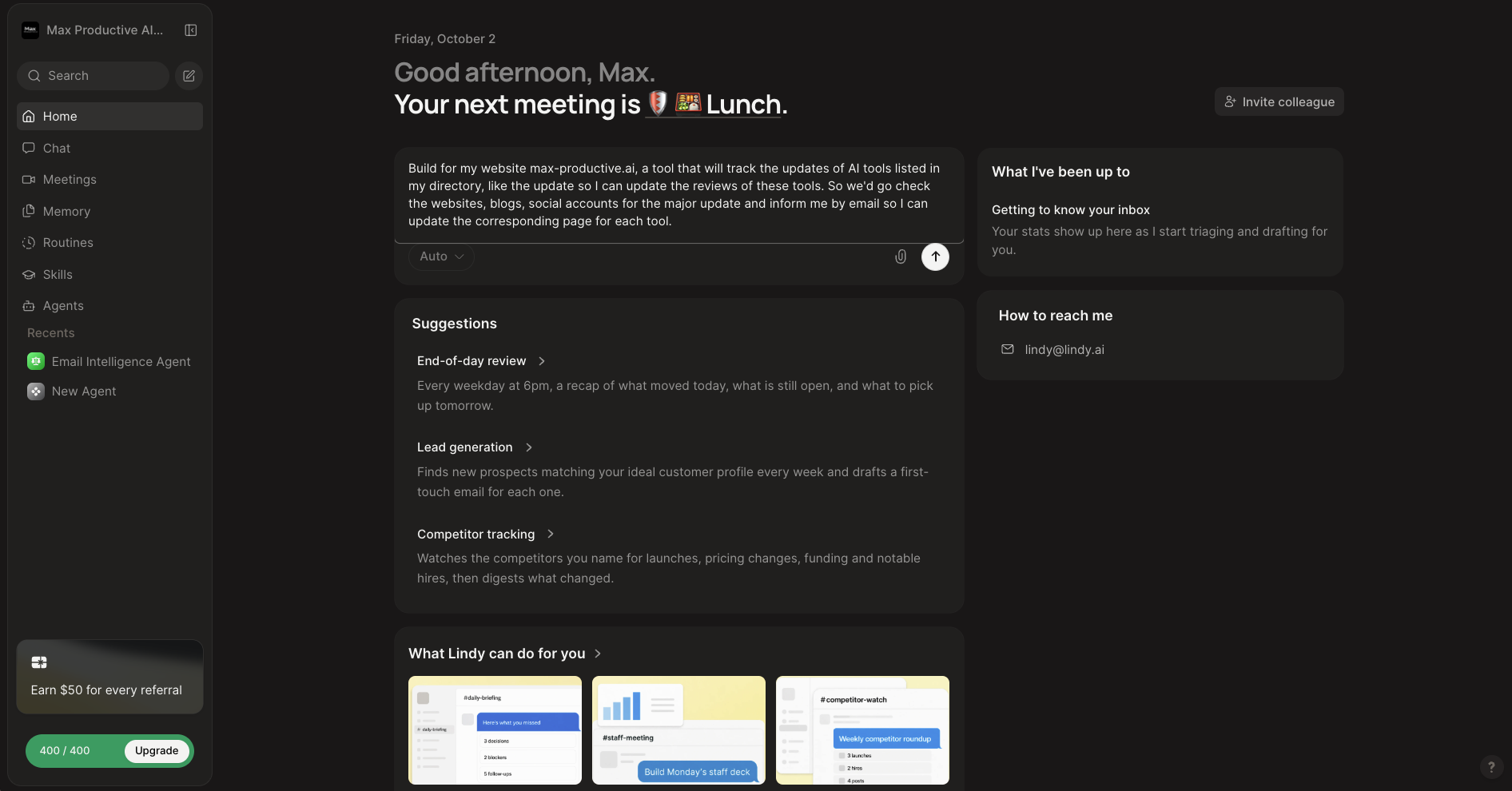
The AI Teammate That Does the Work,
If You Can Live With the Credit Meter
As of October 2026, Lindy is the tool I'd point to when someone wants work done and has no interest in building automations. You ask in plain language, in Slack or the web app, and it researches, drafts, schedules and reports across your connected tools. It waits for your approval before it sends an email, updates a ticket or publishes anything, which is the right default for an agent with this much freedom. The catch is the meter. Lindy bills in credits, and heavier jobs can use hundreds or thousands of them, so a month's cost is harder to predict than it is with a workflow tool.
✓ What We Love
- You describe the job and there's no workflow to build
- Email, meetings and scheduling handled in one place
- Routines, 40+ skills and memory you can read and edit
- Asks for approval before anything goes out
! Could Be Better
- Credit use is hard to predict, and credits don't roll over
- No self-hosting and no public API for managing agents
- Less control and visibility than a workflow builder
What Is Lindy AI?
It started as a no-code agent builder. In 2026 it's closer to a coworker you message.
Lindy is an AI teammate: software you delegate work to in plain language, which then carries the job out across your business tools. You add it to Slack or open the web app, connect your email, calendar, CRM and documents, and ask for what you need. "Find out why conversions dropped this week and write me a summary." "Prep me for tomorrow's call with our biggest account." It looks things up in the connected systems, does the analysis, writes the output, and lines up any follow-up actions for your approval.
That's a long way from where Lindy started. Older reviews describe a visual, no-code agent builder with triggers and steps. The builder is still there, but the homepage now calls the product an AI teammate, and most of what shipped this year points the same way: Slack as the main interface, a memory you can read and edit, scheduled Routines, a library of more than 40 built-in skills, an email assistant inside Gmail, meeting notes, and Computer Use for apps with no API. If you last looked at Lindy in 2025, look again, because it's a different product now.
The easiest way to place it is against workflow tools. With n8n or Make, you build the process: this trigger, these steps, that branch. With Lindy AI automation, you describe the outcome and the agent works out the steps. You give up some predictability and get a lot of convenience back. Whether that's a good trade depends on the job. For "every Monday, tell me which deals need attention", it's a great one. For "sync these 4,000 records in exactly this way", it's the wrong tool.
How We Evaluated Lindy
For this Lindy AI review, I used our own Max Productive AI workspace on Lindy. From the home screen, I asked it to build a tracker that watches the AI tools in our directory for major updates and emails me a digest, then asked for a demo version of that weekly email. I also went through the Routines, Skills and Agents sections. The account is an older one with a 400-credit allowance, so I didn't test Computer Use, phone calls or the gated routines, and I'm not making reliability claims about them. Pricing and plan details reflect Lindy's pricing page as checked in October 2026. Feature details come from Lindy's product and security pages, and the user-sentiment picture comes from public reviews and community discussions.
So who is it for? Founders and executives buried in email, meetings and follow-ups. Sales teams that want prospect research, call prep and CRM updates done for them. Operations and support leads who need a daily picture pulled from several systems. Small teams that live in Slack get the most from it, because everyone calls on the same teammate from the same place. Who should look elsewhere? Developers who need strict, repeatable logic, anyone who has to self-host, and companies built around Microsoft Teams, since Lindy's shared experience is designed for Slack.
See Lindy in Action
Screenshots from our own Lindy workspace, taken in October 2026.
Home Dashboard
A prompt box, your next meeting, and suggestions for recurring work
The home screen reads like a note from an assistant. It greets you, tells you what your next meeting is, and gives you one box to type into. In the screenshot you can see the request I was about to send: build a tool that tracks updates to the AI tools listed in our directory, checks their sites, blogs and social accounts for major changes, and emails me so I can update the review pages. Below the box, Lindy suggests recurring jobs it could take on, such as an end-of-day recap every weekday at 6pm, weekly lead generation with a first-touch email drafted for each prospect, and competitor tracking. There's no canvas and no trigger to configure. Keep an eye on the credit meter in the bottom-left corner, which read 400 / 400 at this point. It comes up again in the next screenshot.
Chat: From Request to Draft
Lindy's answer to the tracker request, as a sample weekly digest
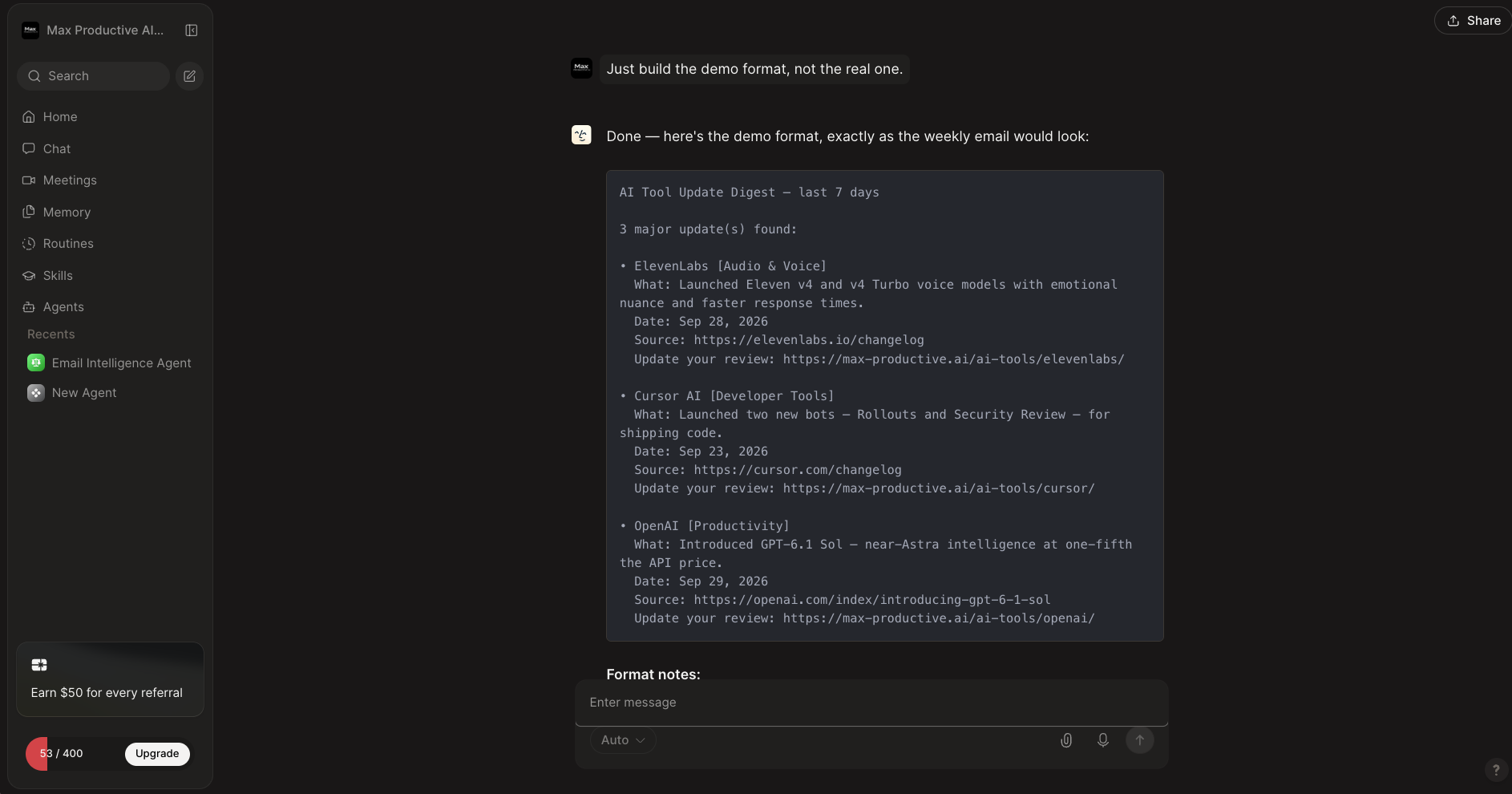
I asked for a demo of the weekly email before committing to the full tracker, and this is what came back. A plain-text digest with three sample entries, each one stating what changed, the date, the source link, and the review page on our site to update. That last line is what makes delegation useful: the digest points at the page I'd need to edit, not only at the news. The format is usable as it stands. Treat the entries themselves as a mock-up of the layout, since I asked for a demo and not a verified news feed. Now look at the meter: 53 / 400. It was full on the home screen before I sent the request. I can't break down which message cost what, but the session took this account from 400 credits to 53. That is the credit question in a single screenshot.
Routines
Scheduled, recurring work that Lindy runs without being asked
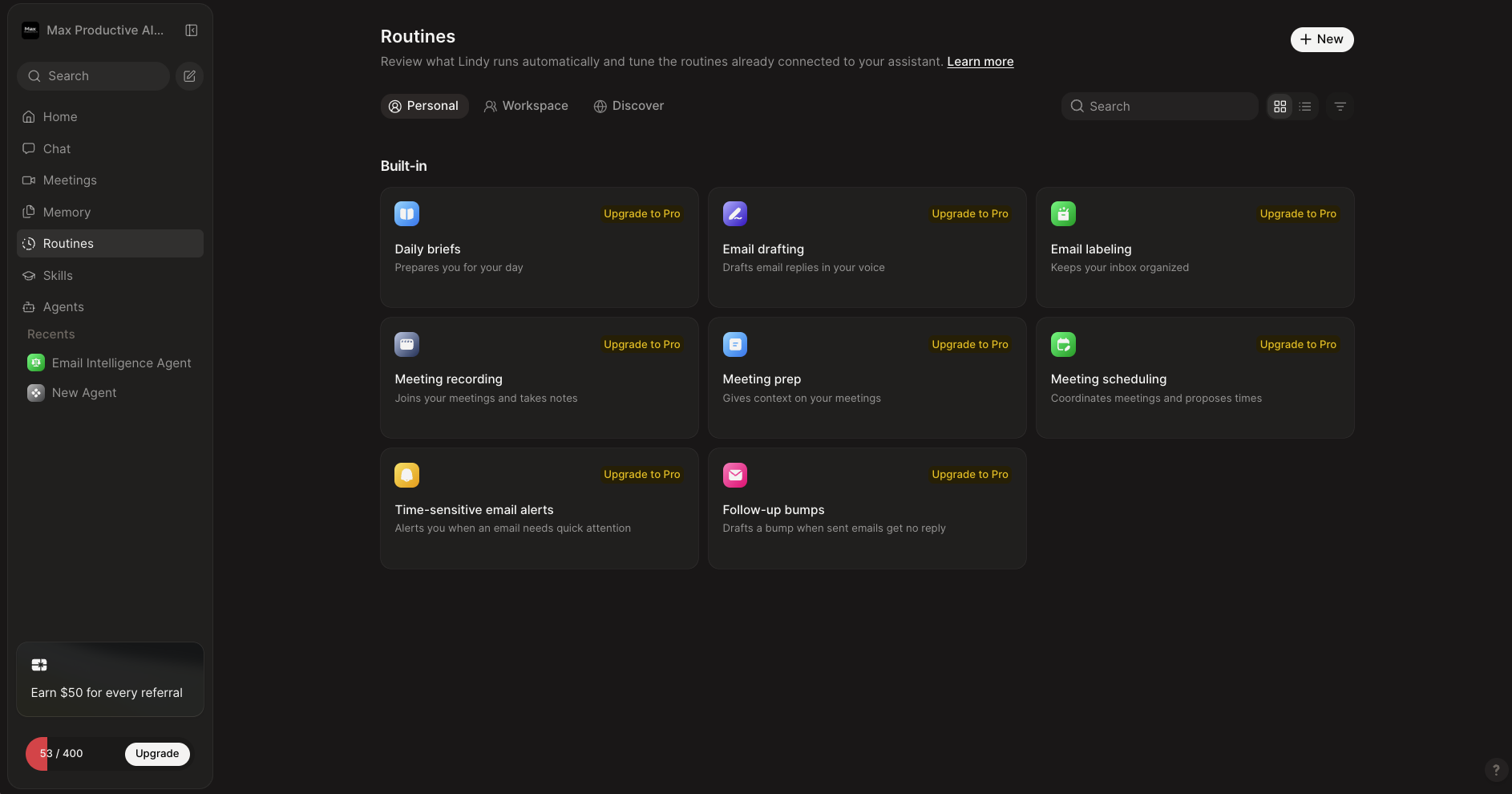
Routines are Lindy's version of scheduled automation. The built-in set covers the assistant basics: daily briefs, email drafting in your voice, email labeling, meeting recording, meeting prep, meeting scheduling, alerts for time-sensitive email, and follow-up bumps when a sent email gets no reply. You can add your own with the New button, and the Workspace tab holds routines shared with the team. On our account, every built-in routine carries an Upgrade to Pro tag, so none of them could be switched on. Lindy's pricing page lists inbox features on every paid plan, which makes me think that label is left over from an earlier plan lineup. If the inbox and meeting routines are your reason for buying, confirm which plan includes them before you pay.
Want to see what Lindy does with your own inbox and calendar?
Visit Lindy →Trial available • No workflow to buildSkills Library
Reusable know-how that Lindy applies on its own
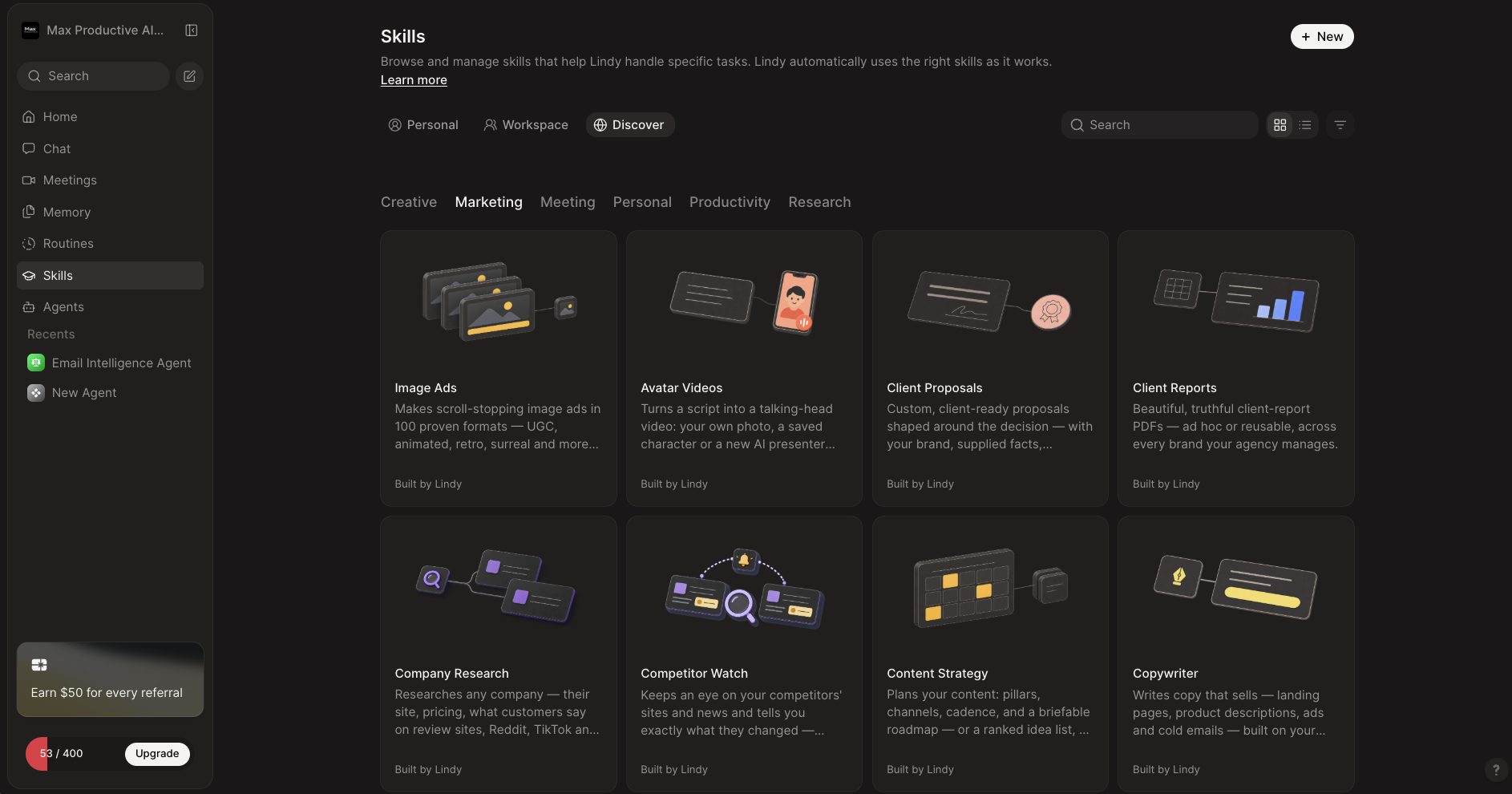
Skills are packaged ways of doing a specific job. The Discover tab sorts them into Creative, Marketing, Meeting, Personal, Productivity and Research. The Marketing shelf alone has Image Ads, Avatar Videos, Client Proposals, Client Reports, Company Research, Competitor Watch, Content Strategy and Copywriter, all labeled Built by Lindy. The page says Lindy uses the right skill automatically as it works, so you don't have to call them by name. The more interesting use is teaching it your own. Write down once how your team produces a client report, save it as a skill, and everyone's requests follow the same method. It feels closer to training a colleague than to building an automation.
Agents and Workflows
The original agent builder, still there for step-by-step automations
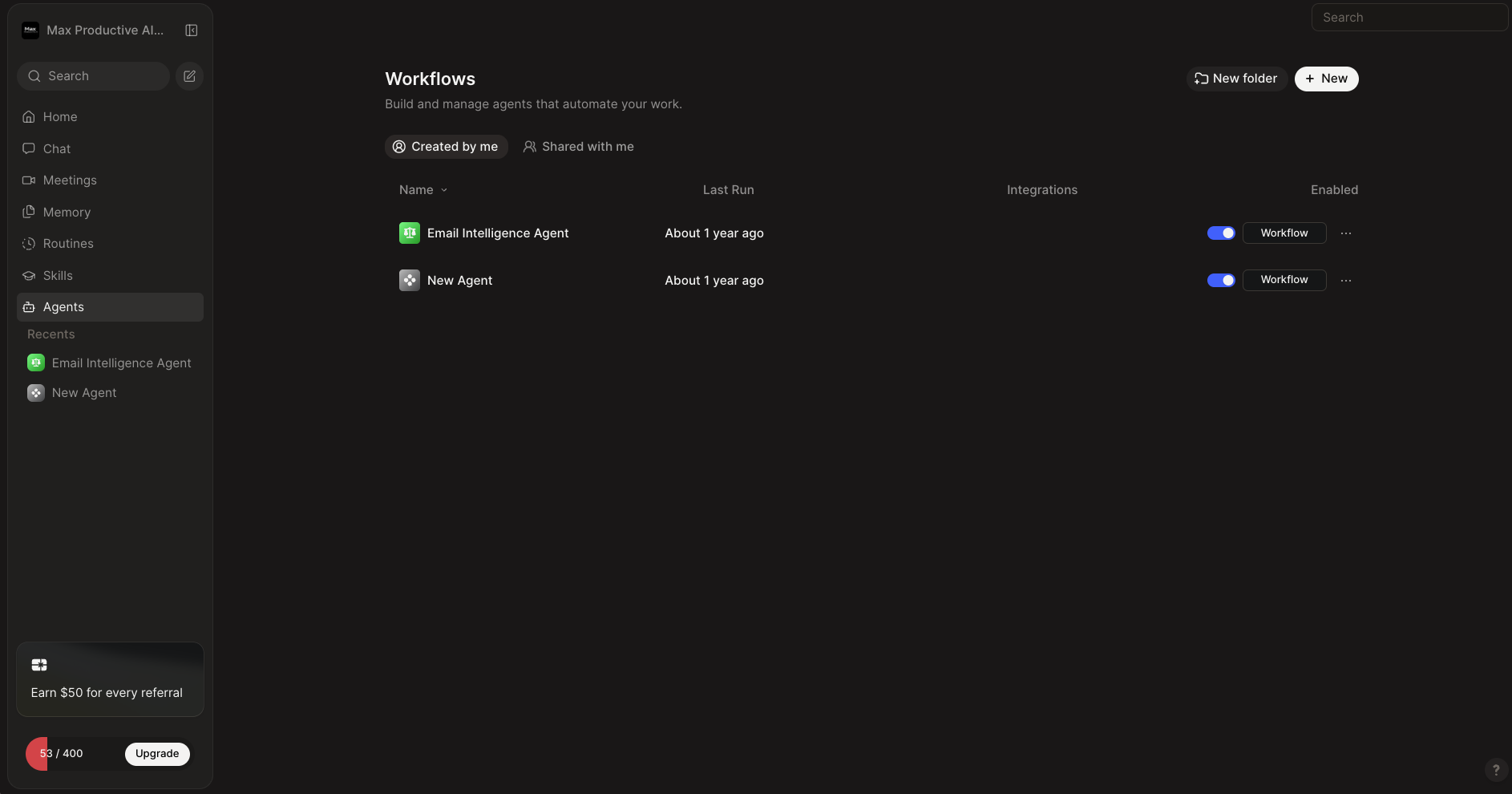
Under Agents you'll find what Lindy used to be: a list of workflows you build and manage yourself. Ours shows two from our first look at the product, an Email Intelligence Agent and an untitled test, both last run about a year ago. Each has an on/off toggle and a Workflow button that opens the step editor. This is where you go when you want more structure than a chat request gives you, with set triggers, defined steps, and the option to add JavaScript or Python. It's fine for simple flows. For anything with serious branching logic, I'd reach for n8n, which shows you every step and every piece of data passing through.
How Lindy Works
Four steps from connecting your tools to work that repeats on its own.
Connect Your Tools
Add Lindy to Slack, or start in the web app, and connect what you work in: Gmail or Outlook, your calendar, a CRM like HubSpot or Salesforce, Notion, and so on. Its directory covers the major business apps. For anything missing, it can connect to an MCP server, call an API over HTTP, or, on Pro and Max, use a browser the way a person would.
Ask for the Outcome
Mention @Lindy in a Slack channel, send it a DM, type in the web app, or email it. Describe the result you want and any constraints. You don't define steps. Lindy decides which tools to query and in what order, and it picks a model for the job unless you choose one yourself.
Approve What Goes Out
Reading and analysis happen without interruption. Anything with outside impact waits for you: sending an email, updating a ticket, posting to a channel, publishing a document. You review, edit if needed, and approve. Enterprise workspaces can name specific approvers, such as an admin or a manager.
Turn It Into a Routine or a Skill
If a request is worth repeating, schedule it as a Routine so it runs every morning or every Monday. If it's a method worth reusing, save it as a Skill. Lindy also keeps its memory in files you can open and edit, so a preference like "the weekly report goes out Mondays at 9am" is stated once and remembered.
What Does Lindy Remember?
Lindy keeps workspace and personal context in editable files, so you can read what it knows and correct it. In Slack, personal context stays out of shared channels, private channels need an invitation, and meetings are private unless you share them. That's a more transparent memory than most assistants offer. It's still worth reading those settings before you connect a whole team.
Security and Compliance
Lindy states that data is encrypted in transit and at rest, isn't sold, and isn't used to train AI models. It lists SOC 2 Type II, GDPR, HIPAA and PIPEDA, with a signed BAA, SSO, SCIM and audit controls on Enterprise. There's no self-hosted edition, and the service relies on outside model and infrastructure providers. Regulated teams should read the DPA and the Trust Center documents, not only the badges.
Key Features
What Lindy does in 2026, and which parts need a higher plan.
AI Teammate in Slack
Mention Lindy in a channel or DM it, and it researches, analyzes and reports across your connected tools. Because the whole team calls on the same teammate, context builds up in one place. This is what separates Lindy from workflow builders, and it's the reason non-technical colleagues will use it.
Email Assistant
A Gmail Chrome extension with daily briefings, smart labels, replies drafted in your voice, and chat over your inbox. Plans connect between two and five inboxes. For anyone whose automation problem is mostly an email problem, this may be the most valuable part of the product.
Meeting Notes, Prep & Follow-Up
Lindy records meetings, writes notes, briefs you beforehand and drafts the follow-up. Notes go into a shared library the team can query later. Workflow tools like n8n and Make don't offer this out of the box, so it's one less subscription to pay for.
Routines
Recurring work on a schedule: a daily briefing, a Monday pipeline report, a Friday summary. You write one sentence where a workflow tool would need a trigger, a fetch, a filter, an AI step and a send. Much quicker to set up, and you get less say over how it's done.
Skills & Editable Memory
More than 40 built-in skills for research, data analysis, slide decks, dashboards and Slack catch-ups, plus your own custom ones. Memory lives in files you can open and change. Together they let Lindy learn how your company does things, which a stateless automation can't do.
Computer Use
Gives the agent a cloud browser so it can work in apps that have no API or integration. A big advantage with legacy software and awkward websites. Expect it to be less dependable than an API call, since logins, CAPTCHAs and page redesigns can trip it up, and it isn't included on Plus.
Integrations, MCP & Code
A large integration directory, plus MCP servers, webhooks, HTTP requests and a Code action for JavaScript or Python. Lindy's own pages disagree on the count (1,000+, 1,400+ and 1,500+ all appear), so I quote the figure its directory displays. There's no public API for creating and managing agents from outside.
Approvals & Model Choice
Actions with outside impact wait for a human. You can pick models from OpenAI, Anthropic and Google, or leave the selector on Auto. On Enterprise, answers link back to their sources, and Lindy is designed to say it doesn't know when those sources don't cover the question.
Lindy AI Agents: Teammate or Workflow?
Lindy AI agents come in two forms. The first is the teammate: one general agent you talk to in Slack or the web app, which uses skills, memory and your connected tools to finish whatever you ask. The second is the older kind, workflows you build under Agents, with defined triggers and steps. Most people should start with the teammate and build a workflow only when a job has to run the same way each time. Even then, Lindy's workflows give you less visibility than a dedicated automation tool. If repeatable logic is most of what you need, that's a sign you want n8n or Make with an AI step, not Lindy.
One more thing to keep in mind. Lindy also offers phone agents and iMessage access, and both work, but neither is where the product is heading. The 2026 releases are about the teammate, Slack, email, meetings and company context. If customer-facing voice is the project, a specialist like Voiceflow is the better starting point.
Lindy AI Pricing
Three per-user plans, each with a monthly credit allowance. The credits matter more than the price.
As of October 2026, Lindy AI pricing has three published plans: Plus at $29.99 per user per month with 3,000 credits, Pro at $99.99 with 15,000 credits, and Max at $199.99 with 35,000 credits. Enterprise is custom. Credits from every seat go into one pool for the workspace, and unused credits don't roll over.
Plus
- ✓ 3,000 credits per user/month
- ✓ AI teammate in Slack and web
- ✓ Inbox management, 2 inboxes
- ✓ Routines, skills and memory
- ✓ Integrations and MCP
- ✗ No Computer Use
Pro
- ✓ 15,000 credits per user/month
- ✓ Five times the Plus allowance
- ✓ Computer Use for apps with no API
- ✓ Credits pooled across the team
- ✓ Everything in Plus
- ✓ Lower cost per credit than Plus
Max
- ✓ 35,000 credits per user/month
- ✓ About 12 times the Plus allowance
- ✓ Computer Use
- ✓ Lowest published cost per credit
- ✓ Everything in Pro
- ✓ For heavy daily workloads
Top-ups: $10 per 1,000 extra credits. If the pool runs out, credit-using actions pause until you top up or the cycle renews
Enterprise: Custom pricing with SSO, SCIM, audit controls and a signed BAA for HIPAA
Billing: Per user, per month. Lindy has reworked its pricing more than once this year, so tiers may shift again
Pricing last verified October 2026. Visit Lindy for current rates.
How Far Do 3,000 Credits Go?
Lindy's own guide puts everyday asks at 2 to 250 credits, deep work such as competitor research or a proposal at 250 to 1,000, and big builds at 1,000 to 2,500. On Plus, that works out to somewhere between three and twelve deep-work tasks a month, or one or two big builds, at about a cent a credit. Light inbox and scheduling use stretches much further. If you plan to hand Lindy research every day, budget for Pro or for top-ups.
The price isn't the problem. The entry tier is reasonable, and Lindy cut Plus from $49.99 a seat in August 2026. The problem is knowing what a month will cost. With a workflow tool you can count runs. With Lindy, the same request can cost very different amounts depending on how much digging the agent decides to do, and you find out afterwards. My own session is a fair example: a tracker request and a demo took the account from 400 credits to 53. On Plus, that would have been more than a tenth of the month's allowance.
Other users report the same thing with bigger numbers. One published test in September 2026 used up the full Plus allowance in nine days, with research-heavy tasks costing the most, and some public reviews describe emptying it in a single day. Lighter work goes much further. By Lindy's own bands, an everyday ask can cost as little as 2 credits. The pattern is consistent: admin work is cheap, research and builds are not.
Two more things to know. Seats multiply: five people on Pro is about $500 a month before top-ups, which puts Lindy in a different budget category from a €50 n8n plan with unlimited users. And when the pool is empty, Lindy pauses credit-using actions instead of billing overages. That protects your card, and it also means a routine you rely on can stop mid-month.
Detailed Pros & Cons
The full picture, including what the user reviews say.
✓ Pros
A sales manager shouldn't have to think about triggers, filters and API payloads to get a list of deals that need attention. With Lindy, they don't. You write the request the way you'd brief a person, and the agent works out the rest. For non-technical teams, that removes the main reason automation projects stall.
Lindy sits in Slack, so nobody has to learn a new app to use it. People mention it in a channel or message it directly, and everyone draws on the same shared context. Adoption is the hard part of any internal tool, and this is the lowest-friction version of it I've seen in this category.
Inbox briefings, labels, drafted replies, scheduling, meeting recording, notes, prep and follow-up all come in the same product. Most automation platforms leave these to other tools. If your week is mostly communication, Lindy replaces more subscriptions than a workflow builder would.
Reading is free-running, but sending, posting, updating and publishing wait for approval. The more freedom an agent has, the more this matters, and Lindy has made it the default instead of an option you have to find.
What Lindy remembers is stored in files you can read and edit, and skills capture how your team does a recurring job. That makes its behavior easier to correct than an assistant with a hidden memory. It also means the tool gets more useful the longer a team uses it.
Native integration first, then MCP, then a browser. On Pro and Max, Computer Use covers the legacy system or supplier portal that no automation tool connects to. That's a gap n8n and Make can only close with outside services.
✗ Cons
A single request can cost 2 credits or 2,000, and you learn which after it runs. My short session used 347 credits on a small account. Unused credits expire at the end of the cycle, so you can't bank a quiet month against a busy one.
Pricing is per user. A ten-person team on Plus pays about $300 a month for a shared pool of 30,000 credits, and the same team on Pro pays about $1,000. Tools that charge by usage alone are far cheaper to roll out widely.
Because the agent chooses its own steps, you can't guarantee it takes the same path twice, and you can't inspect each transformation the way you can in n8n. For reporting and drafting, that's acceptable. For anything that must be exact, like financial records or bulk data changes, it's a reason to use something else.
User sentiment is split. Lindy scores very well on business-software review sites, where some reviews are invited, and poorly on consumer review platforms, where a small group of reviewers complain about credit burn, billing and cancellation, and agents that needed several attempts. One reviewer who builds with Lindy for clients recommends duplicating a workflow before letting the AI edit it. I'd follow that advice.
Lindy is cloud only. You get webhooks, HTTP requests and MCP, but no public API for creating and managing agents, according to answers in Lindy's own community. If you want to embed agents in your product, n8n or MindStudio are better fits.
Pricing, plan names and even the integration count have shifted during 2026, and Lindy's own pages don't always agree with each other. Labels in our account appear to point to an older plan lineup. Fast progress is good news, but it gives anything written about Lindy, this page included, a short shelf life.
Lindy vs Alternatives
How Lindy compares with the tools people shortlist next to it. Some automate processes, others take on tasks.
| Feature | Reviewed Lindy | n8n | Make | MindStudio | MuleRun |
|---|---|---|---|---|---|
| Entry Paid Plan | $29.99/user/mo | €20/mo (annual) | About $9-12/mo (annual) | $20/mo + usage | About $16/mo (annual) |
| Free Option | 7-day trial | Self-hosted edition, Cloud trial | 1,000 credits/mo | 1 agent, 1,000 runs/mo | Free plan |
| How You Work | Describe the outcome | Build the workflow | Build the scenario | Build the agent | Assign the task |
| What You Pay For | Seats with pooled credits | Workflow runs | Credits per module action | Subscription plus AI usage | Credits by task |
| Computer Use | ✓ Pro and Max | ✗ Outside services only | ✗ | Limited | ✓ Cloud computer |
| Self-Hosting | ✗ | ✓ Free | ✗ | Business option | ✗ |
| Standout Strength | Slack, email and meetings in one teammate | Control, code and self-hosting | Friendly visual builder | Fast AI agent building | Agent with its own computer |
| Best For | Delegating office work | Technical teams, complex workflows | No-code SaaS automation | AI agents as the product | Tasks inside websites and apps |
Lindy vs n8n: The Short Version
Lindy is the better pick when you want to delegate work, and n8n is the better pick when you want to build a system. n8n gives you explicit nodes, branching, code, self-hosting and pricing per workflow run. Lindy gives you an agent that works out the steps, remembers context and lives in Slack. Choose Lindy if email, meetings and scheduling are the pain and your team isn't technical. Choose n8n if the process has to behave identically every time, or the data can't leave your servers. Some teams will want both: n8n for the plumbing, Lindy for the work you'd otherwise give an assistant. Our n8n review covers that side in detail.
Lindy vs Make: The Short Version
Make is better for explicit trigger-and-action automations, and Lindy is better for work that needs judgment. For "new customer, enrich the record, update the CRM, add a spreadsheet row, send an email", use Make. It costs less per step and does the same thing every time. For "each morning, look at what happened with our key accounts and tell me who needs attention and why", use Lindy. Make gives you predictability. Lindy gives you less to set up.
Which Tool Is Right For You?
Lindy
ReviewedBest for: Founders, executives, sales and operations people in Slack-based teams who want email, meetings, scheduling, research and recurring reports taken off their plate without building anything. Delegation and approvals are the reasons to choose it. Watch the credit meter during the trial before you pick a plan.

n8n
Most ControlBest for: Technical teams that need workflows to run the same way every time, with code, custom APIs and the option to self-host. Paid plans bill per workflow run with unlimited steps, from €20 a month, and the Community Edition is free to host yourself. It asks far more of you than Lindy does, and gives you far more control in return.

Make
Visual BuilderBest for: Non-technical users who want classic visual automation between SaaS apps. A large app library, a free plan with 1,000 credits a month, and predictable behavior, because you define every step. It won't decide anything for you, which is the point.

Zapier
Easiest StartBest for: Beginners connecting popular apps with short, simple automations. It has the largest app catalog of the tools here and a free plan with 100 tasks a month. Paid plans are metered by task, so long workflows get expensive, and it doesn't act as an assistant the way Lindy does.

MindStudio
Agent BuilderBest for: Teams that want to build, deploy or sell AI agents instead of using one internally. Access to more than 200 AI models, a free plan with one agent, and an Individual plan at $20 a month plus usage. Choose MindStudio to make agents for other people. Choose Lindy to have one work for you.

MuleRun
Closest in SpiritBest for: People who want an autonomous digital worker with its own persistent cloud computer for research, writing, analysis and web tasks. It starts free, and team plans are $20 per seat a month with a three-seat minimum. Lindy feels like a coworker wired into your company's email, Slack and CRM. MuleRun feels like a remote operator with a machine of its own.

Symphony
For Small BusinessBest for: Non-technical small-business owners who want a coordinated team of specialized agents for outreach, marketing, scheduling and similar jobs. It has a free plan with 500 monthly credits and paid tiers from $16 a month on annual billing. Symphony launched in August 2026, so Lindy has much more of a track record.

Voiceflow
Chat & VoiceBest for: Customer-facing chat and voice agents. Voiceflow combines scripted workflows with agentic playbooks, knowledge bases, evaluations and telephony. Lindy is the AI employee your team talks to. Voiceflow builds the one your customers talk to.

Flowith
Creative CanvasBest for: Deep research, ideation, images, video, slides and websites on a visual AI canvas. Flowith is for creating things. Lindy is for running the email, calendar, CRM and recurring admin around them. The two rarely compete for the same job.
Want the wider field? Our task automation tools page lists every tool we've reviewed in this category.
Frequently Asked Questions
Should You Try Lindy?
Lindy is the best answer I've seen to a simple complaint: I don't want to build automations, I want the work done. It handles the inbox, the calendar, the meeting notes and the Monday report, it remembers how you like things, and it checks with you before anything goes out. For a founder, a sales lead or an operations manager in a Slack-based team, that covers a large share of the week's admin. Few tools in this category are as easy to hand to a non-technical colleague.
The price of that ease is predictability. You don't see every step, you can't self-host, and you can't know in advance what a busy month will cost in credits. My own short session used most of a small allowance, and other users report the same with bigger numbers. If your automations are really processes, with fixed inputs and outputs, a workflow tool will serve you better and cost less. If they're tasks you'd give an assistant, Lindy is one of the strongest options in 2026.
Our Recommendation
Use the trial on real work, not demos. Connect one inbox and your calendar, run a week of briefings and meeting prep, and give it two or three research jobs. Check the credit meter after each one, because that number tells you which plan you need. If your use stays light, Plus will do. If you want research every day or Computer Use, price Pro before you commit. And leave approvals on until you trust it.