

Surfer SEO
AI-powered content optimization with live SERP scoring and built-in AI Search visibility tracking. Write articles that rank on Google and get cited by ChatGPT, Perplexity, and Gemini — without leaving your editor.
Try Surfer SEO →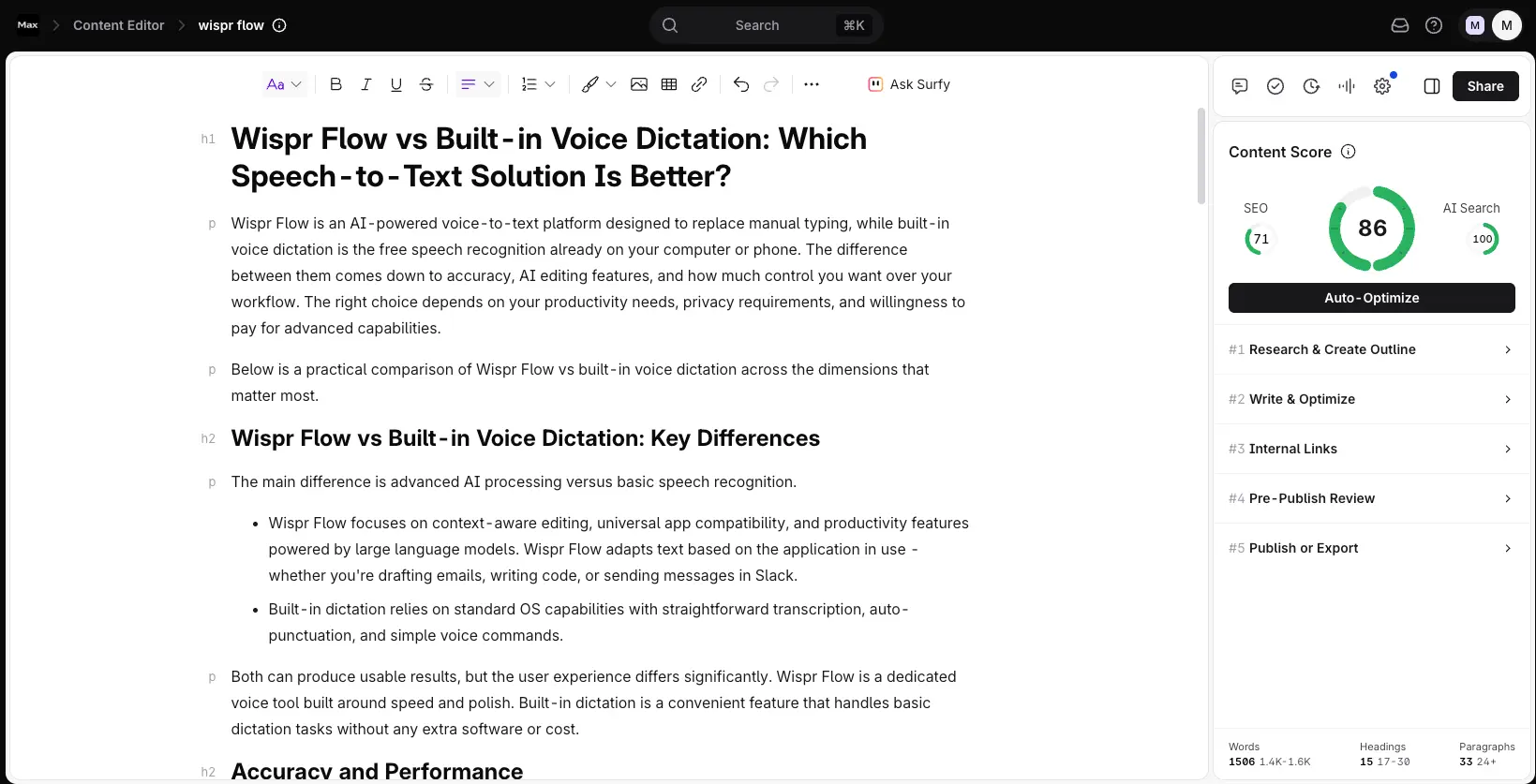
The Content Optimizer That
Now Owns AI Search Too
Surfer SEO has been the reference point for content optimization for years, and in 2026 it pulled off something most of its rivals haven't: it wired AI Search visibility straight into the writing process. The Content Editor still carries the highest published ranking correlation in its category, the Google Docs panel is the rare integration that writers actually keep open, and the AI Visibility Tracker now watches five AI engines at once. It's not cheap once the add-ons stack up, and it's not a full SEO suite — but for teams writing their own content, it's hard to beat.
✓ What We Love
- Best-in-class Content Editor — 0.28 ranking correlation
- AI Tracker covers 5 engines, one-click jump to editor
- Google Docs + WordPress integrations just work
- Topical Map + Grow Flow for systematic authority
! Could Be Better
- No free trial (7-day money-back guarantee only)
- Real cost climbs with SERP Analyzer + AI Tracker add-ons
- No backlinks, technical audit, or rank tracking in base plans
What Is Surfer SEO?
Who built it, what it actually solves, and whether it earns a place in your stack.
Surfer SEO is a content optimization platform built for writers, marketers, and SEO teams who want their articles to rank on Google — and now, to get cited inside AI-generated answers. The core idea is refreshingly concrete: instead of guessing what Google rewards, Surfer pulls the top 10–20 ranking pages for your keyword in real time, works out the signals they share (word count, heading structure, the terms they all cover), and hands you a live score from 0 to 100 that moves as you type.
It was founded in 2017 in Wrocław, Poland, by Lucjan Suski, Michał Suski, and Tomasz Niezgoda, and grew to more than 150,000 users worldwide — notably without outside funding, bootstrapping to a reported $15–16M ARR. In October 2025 it was acquired by Positive Group, a French marketing technology company, with the founding team staying on. If you were worried an acquisition would slow things down, the opposite happened: product velocity actually picked up, with 10+ features shipping in January and February 2026 alone.
Here's the thing worth saying up front, because a lot of reviews bury it — Surfer is not a full SEO suite. There's no backlink analysis, no technical site audit, no Core Web Vitals monitoring, and no real rank tracking in the base plans. If that's what you need, you're looking at Ahrefs or Semrush. What Surfer does is one job, done better than almost anyone: turning a blank document into content that matches what's already winning.
Who Is Surfer SEO Best For?
Content teams and agencies publishing 10+ articles a month, freelance writers who want hard data to justify higher per-article rates, and B2B/SaaS marketing teams building topical authority in competitive niches. It's also a natural fit for any brand that's started taking AI search visibility (AEO/GEO) seriously — Surfer is currently one of the only content tools that bakes that monitoring into the same workflow you write in.
The part that's changed the calculus most in 2026 is the AI Visibility Tracker. Ranking on page one of Google matters less if ChatGPT, Google AI Overviews, Perplexity, and Gemini are quoting a competitor instead of you. Surfer now tracks all of that and — as of an April 2026 update — lets you jump from a visibility gap straight into the Content Editor to fix it. That single connection, from "AI isn't citing me" to "here's the doc to fix it," is the thing no other content optimizer does quite as cleanly.
How We Reviewed This
This review is based on Surfer's official documentation and product roundups, its published Content Score correlation study, current pricing, and analysis of independent user feedback across G2, Capterra, Trustpilot, and practitioner write-ups — cross-checked against the live product as of June 2026. Where the data is genuinely mixed (AI writing quality, the real all-in cost), we've said so plainly rather than smoothing it over.
See Surfer SEO in Action
Real screens from the platform, walking through the Content Editor, the creation workflow, and the AI Visibility tools.
Content Editor & Live Score
The flagship feature — dual SEO and AI Search scoring as you write
This is the reason Surfer built its reputation. Open a document for a target keyword and you get a word-count target, heading and image counts, and a list of important terms pulled from competitor content — with a score that moves live as you write. The example here lands at 86, with the score broken into an SEO component (71) and an AI Search component (100), so you can see at a glance whether your draft is built to rank on Google, to get cited by AI, or both. One honest note: treat the score as a coverage checklist, not a target of 100. Chasing a perfect number is how you end up with stilted, keyword-stuffed copy.
Content Type Templates
Pick a format tuned for traditional or AI search before you write
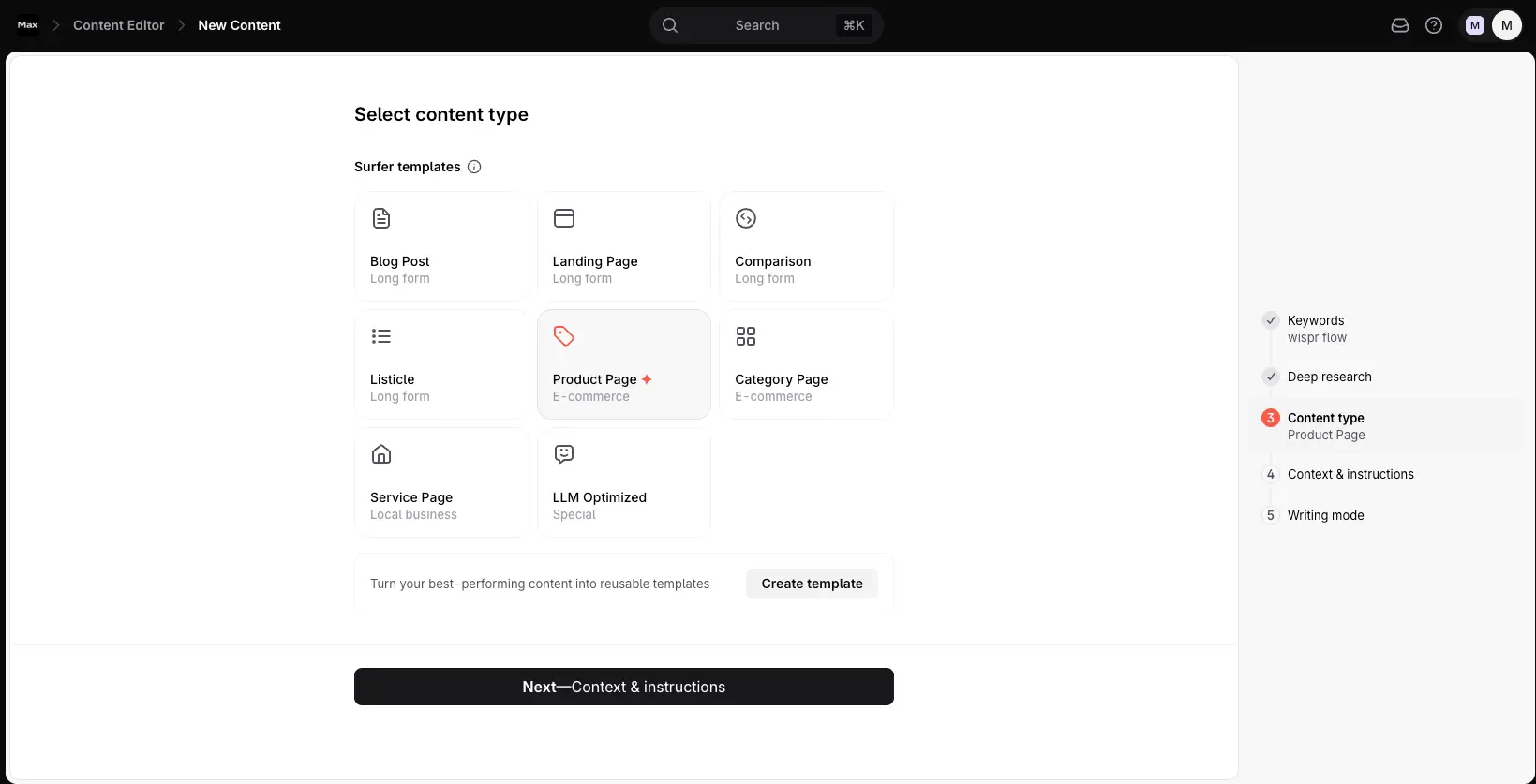
Before drafting, you choose a content type, and Surfer shapes its recommendations around it — a comparison post gets different guidance than a product page or a local service page. The one worth calling out is the dedicated "LLM Optimized" template: a format built specifically to make content easy for AI engines to parse and cite. It's a small step, but picking the right template up front means the structure works with the way each surface ranks content rather than against it.
Content Audit & Recommendations
Where Surfer often delivers its fastest ROI
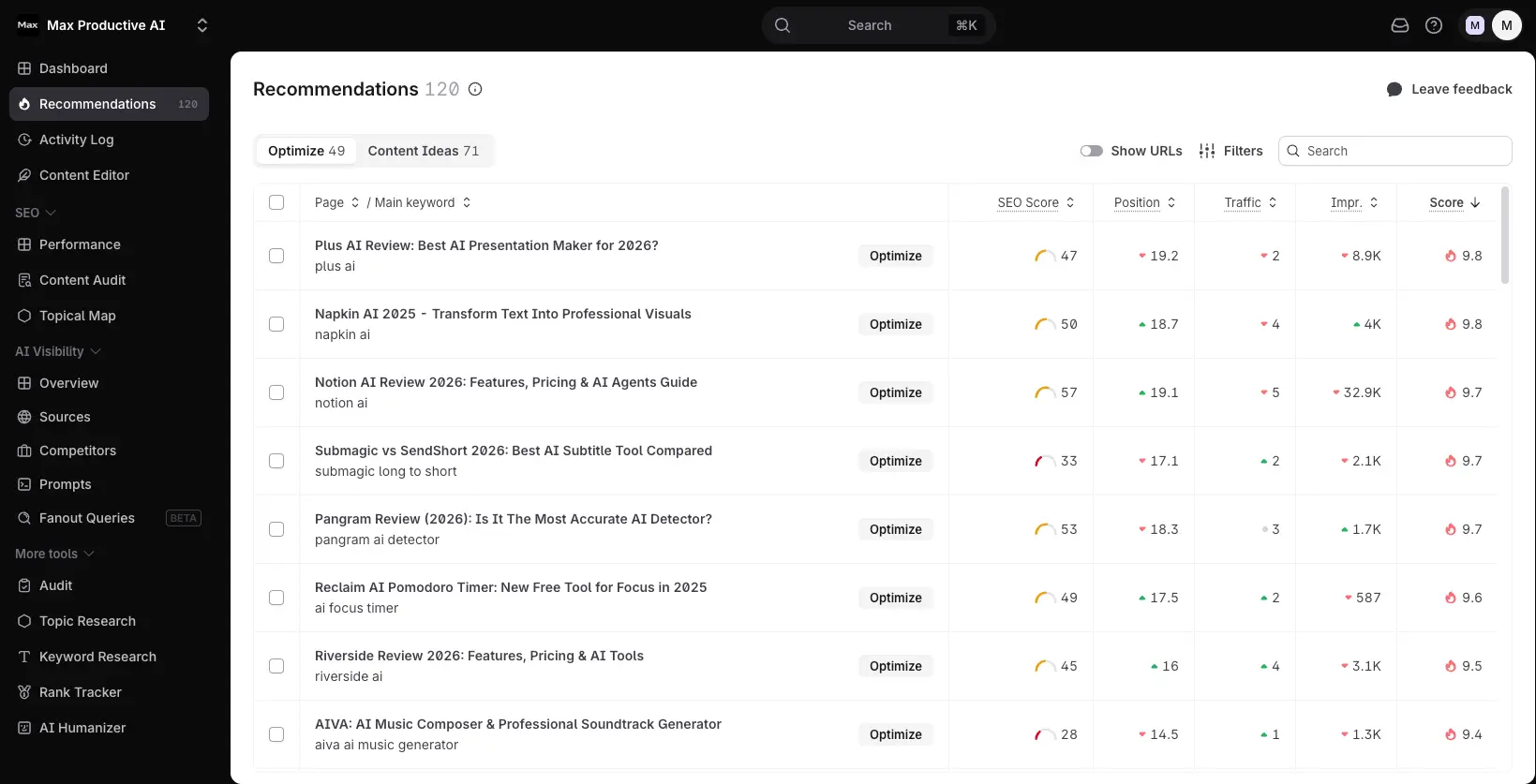
For teams with an existing library, this is frequently where the money is. The audit scores every published page against current SERP benchmarks and ranks your opportunities by impact — each row showing SEO score, position, traffic, and impressions, with an Optimize button to act on it. It's built to surface "content decay," the pages that ranked well six to twelve months ago and have quietly drifted down. Refreshing an already-indexed article is far more efficient than building a new one from scratch, and Surfer lines those targets up for you.
Want to see your own content scored against the live SERP?
Try the Surfer Content Editor →7-day money-back guarantee • Live scoring in Google Docs or WordPressAI Visibility Overview
Your visibility score across the major AI engines, at a glance
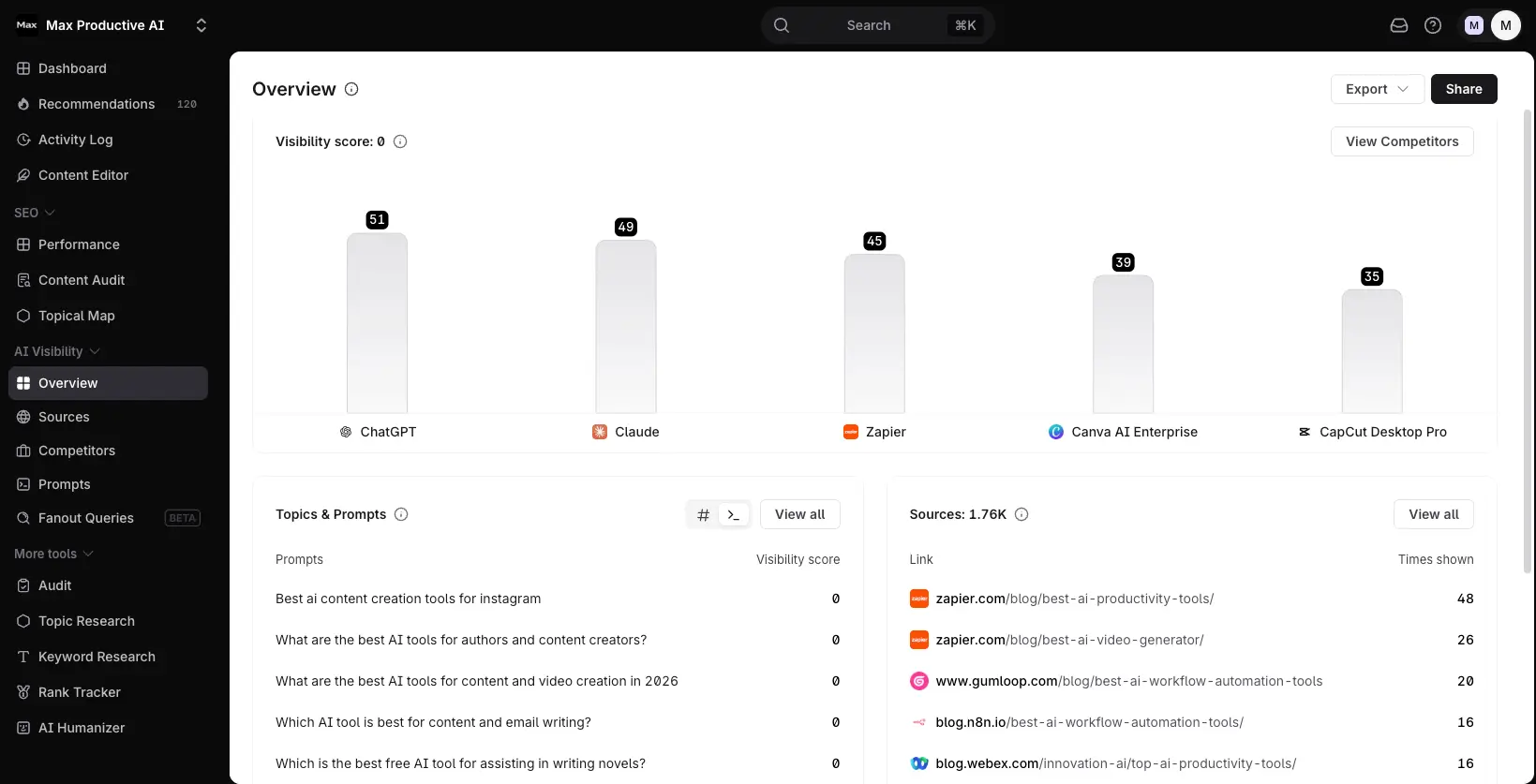
The AI Visibility Overview is where AEO stops being abstract. It pulls together your visibility score, the prompts you're tracking with a score on each, and a running list of the sources LLMs lean on most in your category — all on one screen. Instead of guessing whether AI engines mention you, you get a single dashboard that turns "we should do something about AI search" into a concrete starting point. From here you can drill into competitors, sources, or specific prompts.
Competitor Visibility Scores
Side-by-side ranking against everyone in your space
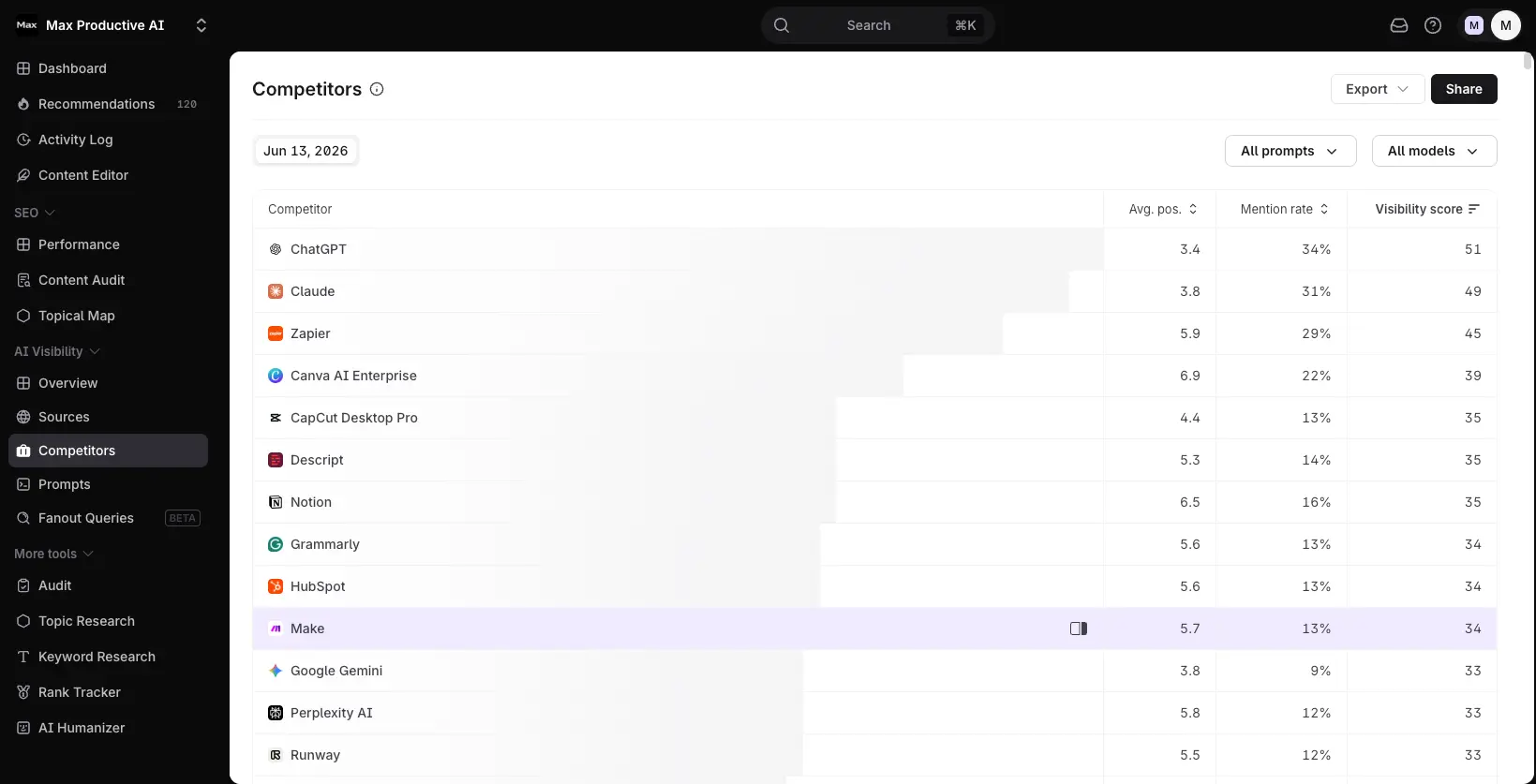
Drill into the competitors view and you get a ranked table — every brand in your space sorted by visibility score, with their average position and mention rate alongside. This is the part that makes the data competitive rather than just informational: you can see exactly who AI engines favour, by how much, and where the gaps are. Tracking a rival's mention rate climbing is often the earliest signal that they've shipped content you need to answer.
Prompt Tracking
Track the exact questions your customers ask AI
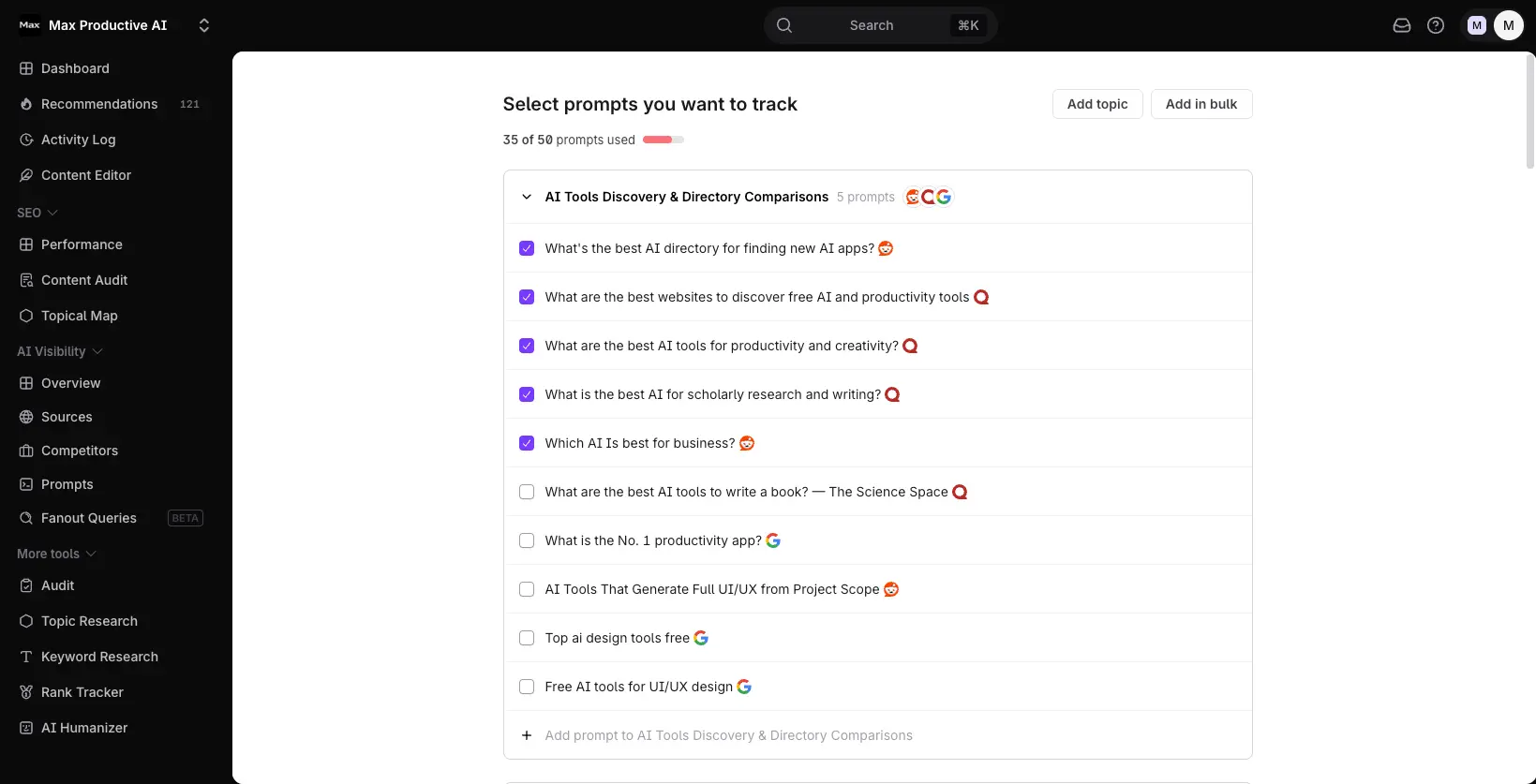
You feed the tracker the prompts your actual customers use when they research a purchase — organized into topic groups, with each prompt tagged by the AI engine it came from. The practical advice here: seed it with how people really ask, not broad category terms, or you'll track visibility on questions no buyer is typing. Tracking the right questions is the difference between data you can act on and a dashboard you ignore.
Fanout Queries (Beta)
How a single prompt expands inside an LLM
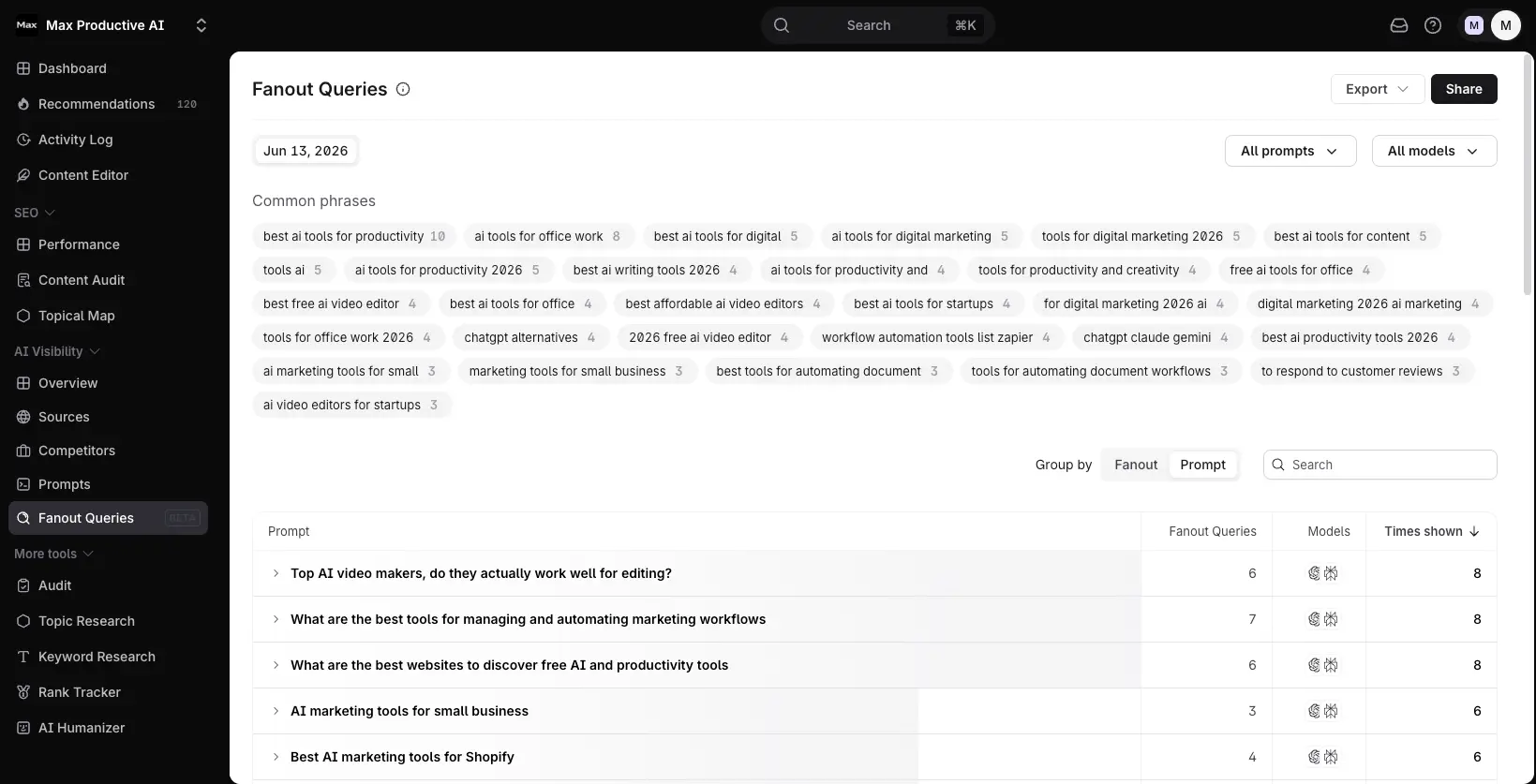
Fanout Queries models something most trackers ignore: AI engines rarely answer your prompt in isolation — they expand it into a cluster of related sub-questions and pull from sources across all of them. This view maps that expansion, showing how many sub-queries each prompt fans out into, plus a cloud of the common phrases driving them. It's flagged beta, so expect it to keep evolving, but it's a smart direction — it pushes you past keyword-level thinking toward how LLMs actually assemble an answer.
Mention Gap & Sources Analysis
The prompts where competitors get cited and you don't
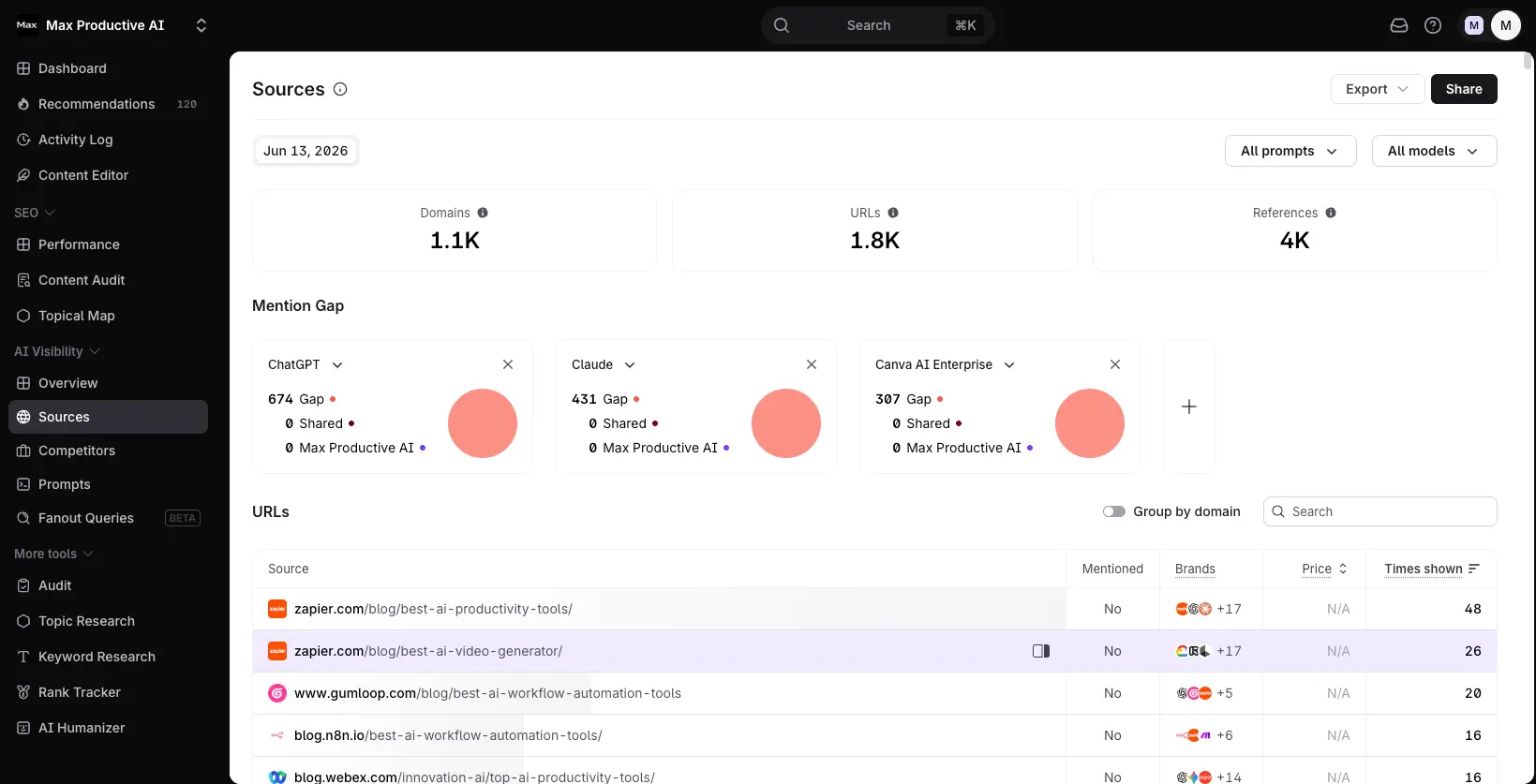
Mention Gap is the most actionable view in the whole AI suite. Broken out per engine, it shows the precise prompts where competitors appear in AI answers and you're absent — which doubles as a ready-made content refresh list. Pair it with the Sources table below, which maps the domains and URLs LLMs cite most for those topics, and you've got both the problem and where the answers are coming from. Combined with the April 2026 one-click jump into the Content Editor, spotting a gap and fixing it happen in the same place — the connective tissue that separates Surfer from standalone trackers.
How Surfer SEO Works
From keyword to optimized, AI-ready draft in four steps — most of it inside the editor you already use.
Enter Your Target Keyword
Start in the Content Editor by entering a specific, well-defined keyword — "best CRM for startups" pulls sharper recommendations than a broad "CRM software." Surfer fetches the top-ranking pages for that query and runs a dual TF-IDF and NLP analysis across all of them at once. You can set your target country and device too, since the SERP looks different on mobile versus desktop. A quick tip from the practitioners: trim obvious outliers from the competitor set before you write — a 9,000-word Wikipedia entry sitting among 1,000-word results will skew every recommendation.
Research with Deep Research & Pick a Content Type
Before drafting, Surfer's research step assembles ranking sources and your brand knowledge — audience, products, competing brands — then lets you choose a content type (review, comparison, guide, and so on) tuned for both traditional and AI search. This is also where you can feed in a handful of reference URLs with context on how to use them. It's a small thing that matters: the more grounded the setup, the less generic the draft.
Write with Live Dual Scoring
Now you write — and the score moves with you. The Content Score updates live from 0 to 100, split into an SEO Score and an AI Search Score so you can balance ranking signals against AI-citation readiness. Surfy, the in-editor assistant (GPT-4o with a 128k-token context window), can rewrite sections or help you cover flagged terms naturally, and Auto-Optimize can insert missing terms in one click. Use that last one surgically, though — fired off indiscriminately, it's exactly how content starts reading like a robot wrote it. Aim for a score of 70–85, and remember the AI Search Score rewards answering the primary question in your opening lines.
Publish, Then Audit and Grow
When the draft's ready, publish straight to WordPress (Gutenberg) or keep working in Google Docs — Surfer's panel rides along in both. After that, the loop continues: Content Audit flags pages losing position, the Topical Map shows gaps to fill, and Grow Flow turns it all into a weekly prioritized to-do list driven by your Google Search Console data. Connect GSC early; it's what makes the recommendations specific to your site rather than generic.
One Workflow, Two Search Worlds
The thing that ties this together in 2026 is the bridge between AI visibility and content action. Spot a Mention Gap where competitors get cited by AI and you don't, click through to the Content Editor, and fix it in the same session. Most tools make you track in one app and write in another — Surfer collapses that into a single move, which is genuinely useful when you're producing content week after week.
Expect to Edit the AI Drafts
Surfer AI produces a stronger first draft than a generic chatbot because it's built around live SERP data, but it's not hands-free. Budget 30–60 minutes of human editing per AI-generated article before publishing. The platform is a force multiplier for a team that already has a keyword strategy and some domain authority — it speeds up good writers, it doesn't replace them.
Key Features
What you're actually paying for, from the Content Editor out to the AI Tracker.
Content Editor & Score
The feature that justifies the product. Real-time NLP and TF-IDF analysis against the top-ranking pages produces a live 0–100 score with word count, heading, and term targets. In 2026 it splits into SEO and AI Search scores. Target 70–85 — not 100 — and use the terms as a coverage checklist, not a stuffing quota.
AI Visibility Tracker
Surfer's most forward-looking feature. Monitors brand mentions across ChatGPT, Google AI Overviews, Google AI Mode, Perplexity, and Gemini — five engines — with Share of Voice, Mention Gap, Sentiment, and Top Sources. The April 2026 one-click jump from a gap into the editor is what no competitor matches. Available as a ~$95/mo add-on or bundled at higher tiers.
Google Docs Integration
A Chrome extension drops a live scoring panel inside any Google Doc, so writers never leave their workflow. It's one of the most praised features in user reviews for a reason — the scoring, term targets, and word count guidance all appear as a sidebar while you type, with nothing to copy back and forth.
Topical Map & Grow Flow
Maps your whole domain against topical authority benchmarks — covered topics in purple, gaps in white — then Grow Flow converts the findings into a weekly, GSC-driven to-do list. It also catches content cannibalization and flags hub-page candidates. No pure AEO tool offers equivalent topical planning.
SERP Analyzer
A pre-writing research tool that deep-dives the top results for a keyword — word count distribution, heading ranges, referring domains, internal links, image and video counts, and historical SERP changes. In 2026 it clusters related queries and flags content decay. Worth knowing: it's a ~$29/mo add-on, not bundled on the Standard plan.
Surfer AI & Surfy
Two distinct things people often conflate. Surfer AI is the one-click full-article generator, pre-populated with NLP terms and built on live SERP data — strong drafts, but plan for 30–60 minutes of editing. Surfy is the in-editor GPT-4o assistant (128k context) that rewrites sections and helps cover terms naturally. Surfer AI is on Pro and above; an add-on on Standard.
Content Audit
Scores every published page against current SERP benchmarks, with rank-drop alerts and content-decay detection in one dashboard. For teams sitting on 50+ posts, this is often where Surfer pays for itself fastest — refreshing indexed content beats writing from scratch. One caveat: rank-drop alerts land on Pro and above.
Keyword Research
Finds related keywords, groups them by topical similarity, and provides volume and difficulty data. Honest take: it's supplemental, not class-leading. Volumes skew high and difficulty is less reliable than Ahrefs or Semrush. Most serious teams pair Surfer with a dedicated keyword tool, which adds $100–200/mo to the stack.
Beyond the headline features, Surfer ships a built-in plagiarism checker, a growing set of integrations (Contentful on Pro+, plus Jasper, Zapier, and a Looker Studio export added in April 2026 for AI visibility reporting), and an AI Humanizer for reworking draft copy. The product moves fast — the January–February 2026 run alone added Workspaces, AI Search Guidelines, Gemini tracking, Mention Gap, and Sentiment Analysis — which is worth weighing if you're choosing a tool you'll grow into.
See how Surfer scores your content against the live SERP and AI answers:
Try Surfer SEO →7-day money-back guarantee • Covers Google and AI searchPricing Plans
Five tiers, plus add-ons that matter. What's shown is annual billing (~17% off monthly).
Discovery
- ✓ 120 documents / month
- ✓ 10 tracked pages
- ✓ Content Editor & Score
- ✓ Google Docs + WordPress
- ✓ Solo bloggers & testing
Standard
- ✓ 360 documents / month
- ✓ 25 AI prompts / week
- ✓ 1 user seat
- ✓ Full Content Editor
- ✓ Freelancers & small teams
Pro
- ✓ 50 AI prompts / day
- ✓ 5 brand workspaces
- ✓ Internal linking
- ✓ Contentful integration
- ✓ Growing content teams
Add-ons to factor in: SERP Analyzer ~$29/mo • AI Visibility Tracker ~$95/mo • Rank Tracker from $8.50/mo
Important: No free trial — all plans carry a 7-day money-back guarantee.
Pricing last verified June 2026. Visit Surfer SEO for current rates.
What's the Real All-In Cost?
Here's the honest math reviewers keep flagging: a Standard user who also wants SERP Analyzer and the AI Visibility Tracker is realistically around $220/month, not $99. That's not a gotcha — it's just the number to budget for the full feature set. For a team publishing 10+ articles a month where one ranking article can drive real pipeline, it still pencils out. For a blogger doing two posts a month, it doesn't.
For context against the field: Clearscope starts higher at $129/mo but includes unlimited users; SE Ranking bundles rank tracking, backlinks, and a content editor from around $52/mo; MarketMuse sits at $149/mo for strategy-led planning; and Semrush One starts near $165/mo for a full suite with AI visibility built in. Surfer isn't the cheapest, and it isn't the broadest — its case rests on having the best content editor and the tightest AI-search-to-writing workflow.
Detailed Pros & Cons
An honest breakdown after weighing the data, the documentation, and a lot of user feedback.
✓ Pros
Surfer's Content Score holds a 0.28 Spearman correlation with Google rankings across a study of a million SERP entries — confirmed by independent research and roughly 2.8× higher than Frase's 0.10. In a system with hundreds of signals, that's a meaningful edge. It won't rank a zero-authority page on its own, but across a real content library, hitting the targets beats ignoring them.
The AI Tracker covers ChatGPT, Google AI Overviews, Google AI Mode, Perplexity, and Gemini — and the April 2026 update lets you jump from a Mention Gap straight into the Content Editor. No other content optimizer connects "AI isn't citing me" to "here's the doc to fix it" in one click. For 2026, that's the standout.
The Google Docs sidebar and WordPress (Gutenberg) plugin let writers stay in the tools they already use, with live scoring riding along. It's the rare integration users actively praise rather than tolerate — and it removes the copy-paste tax that kills a lot of optimization workflows.
The Topical Map plus Grow Flow turns "build authority in this niche" into a visual map of gaps and a weekly, GSC-driven task list. It catches cannibalization and surfaces hub-page candidates too. For teams who want a content plan rather than a pile of one-off articles, this is a real differentiator over pure writing tools.
Content Audit scores every page against current benchmarks and flags decay — the posts that ranked six months ago and slipped. Refreshing an indexed article is far more efficient than building a new one, and Surfer lines those targets up for you. Teams with 50+ posts often see the quickest payback here.
Acquisition usually slows products down; here it didn't. Ten-plus features shipped in January–February 2026 alone (Workspaces, AI Search Guidelines, Gemini tracking, Mention Gap, Sentiment Analysis), with more in April. If you're picking a tool to grow into, momentum counts — and Surfer has it.
✗ Cons
You pay before you know whether it fits your brand. The 7-day money-back guarantee softens it, but it's a return policy, not a trial. Competitors like SE Ranking (14-day trial) and Clearscope aside, the absence of a hands-on test is a real friction point for cautious buyers.
$99/mo Standard sounds reasonable until you add SERP Analyzer (~$29) and the AI Tracker (~$95) — the realistic all-in is closer to $220/mo. Pricing has also climbed 2–3× since 2023 for long-term subscribers, and monthly credits don't roll over. Budget for the full figure, not the sticker.
No backlink analysis, no technical site audit, no Core Web Vitals, and no rank tracking in base plans (it's a paid add-on). If you need those, you're pairing Surfer with Ahrefs or Semrush anyway. Surfer is a content layer, not a one-stop platform — go in expecting that.
It returns far fewer ideas than Ahrefs or Semrush, with volumes that skew high and no historical or CPC data. Surfer is upfront that this is supplemental — but it means a complete stack still needs a dedicated keyword tool, adding $100–200/mo. Don't buy Surfer expecting it to replace your research workflow.
Surfer AI beats a generic chatbot because it's grounded in live SERP data, but plan on 30–60 minutes of human editing per draft. And leaning too hard on the Content Score can produce stilted, keyword-stuffed copy — a risk Surfer's own team flags. The score is a checklist, not an autopilot.
The NLP engine is strongest for English; other languages get thinner term coverage and scoring. For European-language work, NeuronWriter is the stronger option. Also worth noting: the WordPress plugin supports Gutenberg only, so Classic Editor users are stuck with the web interface.
Surfer SEO vs Alternatives
How Surfer stacks up against the main contenders in content optimization and full-suite SEO.
| Feature | Reviewed Surfer SEO | Semrush | Clearscope | SE Ranking |
|---|---|---|---|---|
| Starting Price | $49/mo | ~$165/mo | $129/mo | $52/mo |
| Free Trial | 7-day refund | 7-day | None | ✓ 14-day |
| Content Editor Depth | Best-in-class | Basic (Writing Assistant) | Excellent | Strong |
| Ranking Correlation | 0.28 (published) | N/A (suite) | Not published | Not published |
| AI Visibility Tracking | ✓ 5 engines, → editor | ✓ AI Visibility Toolkit | Limited | Add-on |
| Keyword Research | Supplemental | ✓ Class-leading | None | ✓ Strong |
| Backlinks / Tech Audit | None | ✓ Full | None | ✓ Full |
| Unlimited Users | No (seat-based) | $99/user add-on | ✓ All plans | Limited |
| Best For | Content teams + AEO | Full SEO suite | Enterprise editorial | Bundled value |
Which Tool Is Right For You?
Surfer SEO
ReviewedBest for: Content teams, agencies, and serious freelancers who write their own articles and want the deepest content editor plus native AI search visibility in one place. The sweet spot is publishing 10+ articles a month with some existing domain authority, and caring about both Google rankings and AI citations. It's the only tool that takes you from an AI visibility gap to an optimized draft in one click.

Semrush
Full SuiteBest for: Teams that want one subscription covering keyword research, backlinks, technical audits, rank tracking, and AI visibility. Semrush One bundles the SEO toolkit with an AI Visibility Toolkit and returns vastly more keyword ideas than Surfer. Where it loses is the content editor — its Writing Assistant can't match Surfer's live SERP scoring for teams who live inside article optimization. Many mid-to-large teams run both.

Clearscope
Enterprise EditorialBest for: Large editorial teams (8–30 writers) where unlimited users and minimal friction matter most. Its grade-based scoring (A++ to F) is easier for non-SEO editors, the Google Docs add-on is the smoothest tested, and it edged Surfer on content score accuracy in head-to-head testing (91 vs. 84/100). The trade-offs: it starts at $129/mo, has no AI Tracker depth, and no free trial.

SE Ranking
Bundled ValueBest for: Small-to-medium agencies that want the full SEO stack — rank tracking, backlinks, technical audit, and a content editor — on one bill. Its content editor actually outscored Surfer by two points in independent testing (86 vs. 84/100), and there's a real 14-day free trial. Surfer still wins on editor depth, Topical Map, AI Tracker integration, and how cleanly its Google Docs panel works.

MarketMuse
Content StrategyBest for: Content directors managing 100+ published articles who need portfolio-level strategy rather than article-level optimization. MarketMuse models your domain's authority and uses personalized difficulty scoring instead of a universal benchmark, making it sharper for deciding which pages to update or build next. Surfer wins on live writing assistance, AI tracking, and ease of use.

Ahrefs
Research & BacklinksBest for: Teams whose bottleneck is research, not writing. Ahrefs is the gold standard for backlink data and keyword depth — it returned far more keyword ideas than Surfer in comparative testing — and it's the natural companion to a content tool rather than a replacement. The two solve different problems: Ahrefs tells you what to write and links to chase; Surfer helps you write it well.
More SEO & AI Search Tools Worth a Look
The five tools above are Surfer's closest head-to-head rivals for content optimization. But the category has widened — especially around AI search visibility and automation — so here are other options in our directory that overlap with what Surfer does, each with where it fits best.

Search Atlas
AutomationBest for: Agencies that want technical SEO fixes deployed automatically, not just recommended. Its OTTO agent actually pushes schema, meta tags, internal links, and Core Web Vitals fixes live — something Surfer can't touch — and it bundles content writing, local SEO, and a 5B+ keyword database in one dashboard. Where Surfer wins back ground: the content editor itself is smoother and its NLP scoring is more mature for pure writing.

Rankprompt
Agency AEOBest for: AEO consultants and agencies managing 5–20 client brands who need white-label AI visibility reports as a deliverable. It's credit-based, covers six LLMs, and includes "fan-out" logic that simulates how prompts expand inside AI engines — at an entry price well below Surfer's AI Tracker add-on. Surfer's edge is that its tracking ties straight into a content editor; Rankprompt is reporting-first, built for client-facing PDFs.

OmniSEO
Widest AI CoverageBest for: Mid-to-large brands that want the broadest AI engine coverage for visibility tracking. Built by the agency WebFX, it monitors 10 AI engines — more than Surfer's five — with share-of-voice, citation tracking, and an optional dedicated GEO specialist at the Enterprise tier. The trade-off versus Surfer: it's a standalone monitor with no content editor, so you're acting on the data in a separate tool.

Rankscale
Granular GEOBest for: Technical brand managers and e-commerce teams who want the most granular AI visibility data going. It queries 20+ models, tracks query fan-out, runs bi-hourly checks, and even monitors ChatGPT Shopping buybox recommendations — depth no other tool here matches. If your job is pure AI search monitoring and research, it goes further than Surfer's tracker; if your job is writing content that gets cited, Surfer's workflow integration still wins.

HubSpot AEO
CRM-PoweredBest for: HubSpot Marketing Hub customers who want AEO tracking inside their existing stack. Its standout is CRM-powered prompt intelligence — it generates the prompts to track from your actual buyer data rather than generic category terms, which nothing else here does. It covers three AI engines (ChatGPT, Gemini, Perplexity) and is newer, so the data depth is less proven than Surfer's. Strong if you're already in the HubSpot world.

Alli AI
On-Page AutomationBest for: Teams that want on-page and technical SEO changes applied automatically across a site without touching code. Alli AI focuses on bulk on-page optimization and live deployment — a different job from Surfer's per-article content scoring. They're complementary rather than competing: Alli handles site-wide mechanical fixes, Surfer handles the quality of what's actually written on each page.

Ranked AI
Managed ServiceBest for: Small business owners and non-technical founders who want SEO results without doing the work. This one isn't really a Surfer competitor — it's a managed service, not software. You pay a flat fee and Ranked AI's team handles content, technical fixes, and backlinks for you. Choose it if you have no internal writing team at all; choose Surfer if you (or your writers) want to produce and control the content yourselves.
Frequently Asked Questions
Should You Use Surfer SEO?
Surfer SEO in June 2026 is a mature, specialized, best-in-class content optimizer — and it's now one of the only tools that treats AI search visibility as part of the writing process rather than a separate dashboard. The Content Editor remains unmatched on ranking correlation, the Google Docs and WordPress integrations are the kind writers actually keep open, and the AI Visibility Tracker covers five engines with a one-click path back into the editor. Product velocity has, if anything, accelerated since the acquisition.
The weaknesses are real and worth weighing. There's no free trial, the add-on costs push the honest price well past the headline number, keyword research is supplemental, and it isn't a full SEO suite — no backlinks, no technical audit, no native rank tracking. For a solo blogger doing a couple of posts a month, the math is hard. But for a content team that writes its own articles and cares about both Google and AI answers, this is the strongest tool in its category.
Our Recommendation
If you publish 10+ articles a month and have some domain authority, start on Standard and connect Google Search Console on day one so the Topical Map and audit tools work with your real data. Spend the first week pressure-testing the Content Editor on a few priority pages and checking whether the AI Tracker reflects how your customers actually search. If the workflow clicks, add the SERP Analyzer and AI Tracker and budget for the ~$220 all-in. If it doesn't fit your volume, request the refund inside seven days — low risk, high upside.