
Gamma Review 2026
Gamma turns a prompt, a document or a link into a polished presentation, with an AI agent that plans the story with you before it builds a single slide. For decks you share as a link, it's the strongest AI presentation maker we've reviewed.
Try Gamma →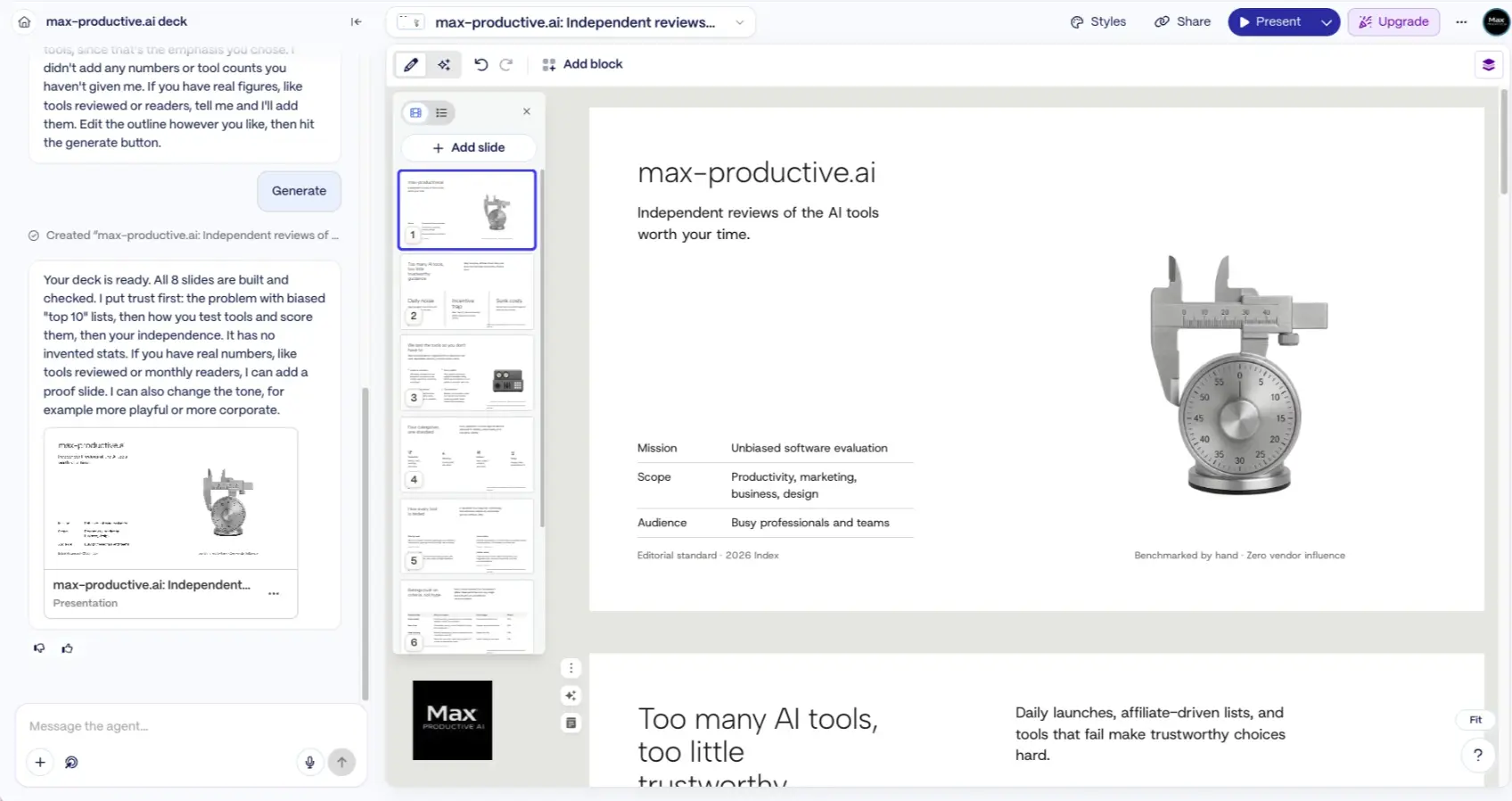
Is Gamma the Best AI Presentation Maker?
For Most People, Yes
As of October 2026, Gamma is the AI presentation maker I'd recommend to most people. Its new Agent asks who the deck is for, shows you a plan, and only then builds, and that planning step produces better first drafts than tools that generate straight from a one-line prompt. Sharing by link, viewer analytics and a usable free plan round it out. The caveat is PowerPoint. Gamma exports to PPTX, but the file isn't the same as a deck built natively in PowerPoint, so teams that work inside company slide templates should test an export before they commit.
✓ What We Love
- The Agent plans the deck with you before it generates
- Polished first drafts with very little layout work
- Link sharing with analytics, plus PPTX, PDF and Google Slides export
- A free plan you can properly test: 400 credits, exports included
! Could Be Better
- PowerPoint exports can need a tidy-up before a corporate handoff
- Free credits are one-time, and credit costs vary by action
- The AI-training setting is on by default for individual plans
What Is Gamma?
An AI presentation maker that behaves more like a web page than a slide deck, and is better for it.
Gamma is an AI tool that creates presentations, documents, websites, social posts and graphics from a prompt or from content you already have. You'll also see it called Gamma AI or the Gamma app, after its address, gamma.app. It comes from Gamma Tech, Inc. in San Francisco, and the company reports more than 100 million users. This Gamma review concentrates on what most people come for, the Gamma presentation maker, and on what it's like to use in October 2026.
The first thing to understand is that a Gamma deck isn't a stack of fixed-size slides. It's a set of responsive cards that grow or shrink with their content and read well on a phone, a laptop or a projector. That's why Gamma decks work so well as links. You send a URL, the viewer scrolls or clicks through, and nothing breaks. If you need a classic 16:9 slide you can set that, but the web-first design is the point.
The second thing is that Gamma has just changed in a big way. Gamma 5, its latest major release, began rolling out in September 2026 and rebuilds the product around an AI Agent. That's the version tested here, and every screenshot on this page comes from it. A review written six months ago describes a noticeably different tool, so here is a short summary of what changed.
What's New in Gamma 5
The older Gamma worked in a straight line: prompt, outline, generated cards. The new version is a conversation. The Agent asks about your audience and goal, proposes a plan, builds the deck once you approve it, and then makes targeted edits when you ask. Import and themes were rebuilt too. The previous Classic generator is still one click away on the home screen, and for now the two sit side by side.
| Area | Gamma 5 | Classic Generator |
|---|---|---|
| How You Create | Chat with the Agent: questions, plan, then build | Prompt, outline, generate |
| PowerPoint Import | Keeps original layouts and structure, stays editable | Brings in the text, not the design |
| Themes | Live on each file, so a change affects only that deck | A theme change updated every deck using it |
| Agent in the Editor | Agent button in the upper left opens the chat panel | Sparkle icon on a selected slide |
| Keeping Your Exact Wording | Tell the Agent to keep the text as written | "Preserve this exact text" option |
| Studio Mode | Not included yet | Available on Pro and higher |
Gamma has kept shipping around the release. The August 28 update brought native iOS and Android apps, a Slack app, tables that stay editable in PowerPoint exports, and Google Sheets sync for charts. In late September Gamma announced an enterprise offering, a Salesforce connector that builds decks from live data, and the Ideogram 4.5 image model. It's a fast-moving product, which is one reason this page carries a verification date.
How We Evaluated Gamma
I used a Gamma account on the Free plan, running the current version, Gamma 5. I asked the Agent for a deck about max-productive.ai, answered its setup questions, reviewed the plan it proposed, generated an 8-slide presentation, and then worked through the editor, the block menu and the export dialog. I did not test paid-only features such as deeper research, analytics, custom domains or the API, and I did not run a file-by-file check of exports in PowerPoint. What this page says about those comes from Gamma's own documentation and public user feedback. Plan features were checked on Gamma's pricing page on October 5, 2026. Gamma shows prices in local currency, so the dollar figures here are its US prices.
So who is it for? Marketers, founders, educators, sales teams, consultants and students who want a good-looking deck quickly and are happy to share it as a link or a PDF. It suits people who'd rather describe what they need than drag text boxes around. It's a weaker fit for anyone whose client or employer expects a PowerPoint file built on a house template. For that, Plus AI or PowerPoint itself is the more natural home.
See Gamma in Action
Screenshots from our own Free-plan account, following one deck from the first prompt to the export dialog.
The Create Dashboard
One prompt box, a Plan mode switch and six things Gamma can make

The home screen is built around a single prompt box. Plan mode is switched on next to it, there's a model selector (set to Lite on my free account) and a microphone for dictation. Underneath sit the formats: Presentation, Document, Carousel, Image, plus Beautify and Import for files you already have. A few details are easy to miss. The credit counter lives in the top right corner and read 360 when I took this screenshot. A "Use classic generator" link takes you back to the older flow. And the left menu already hints at where Gamma is heading, with entries for Sites and API Generated.
The Agent's Setup Questions
Audience, lead message and length, answered in three clicks
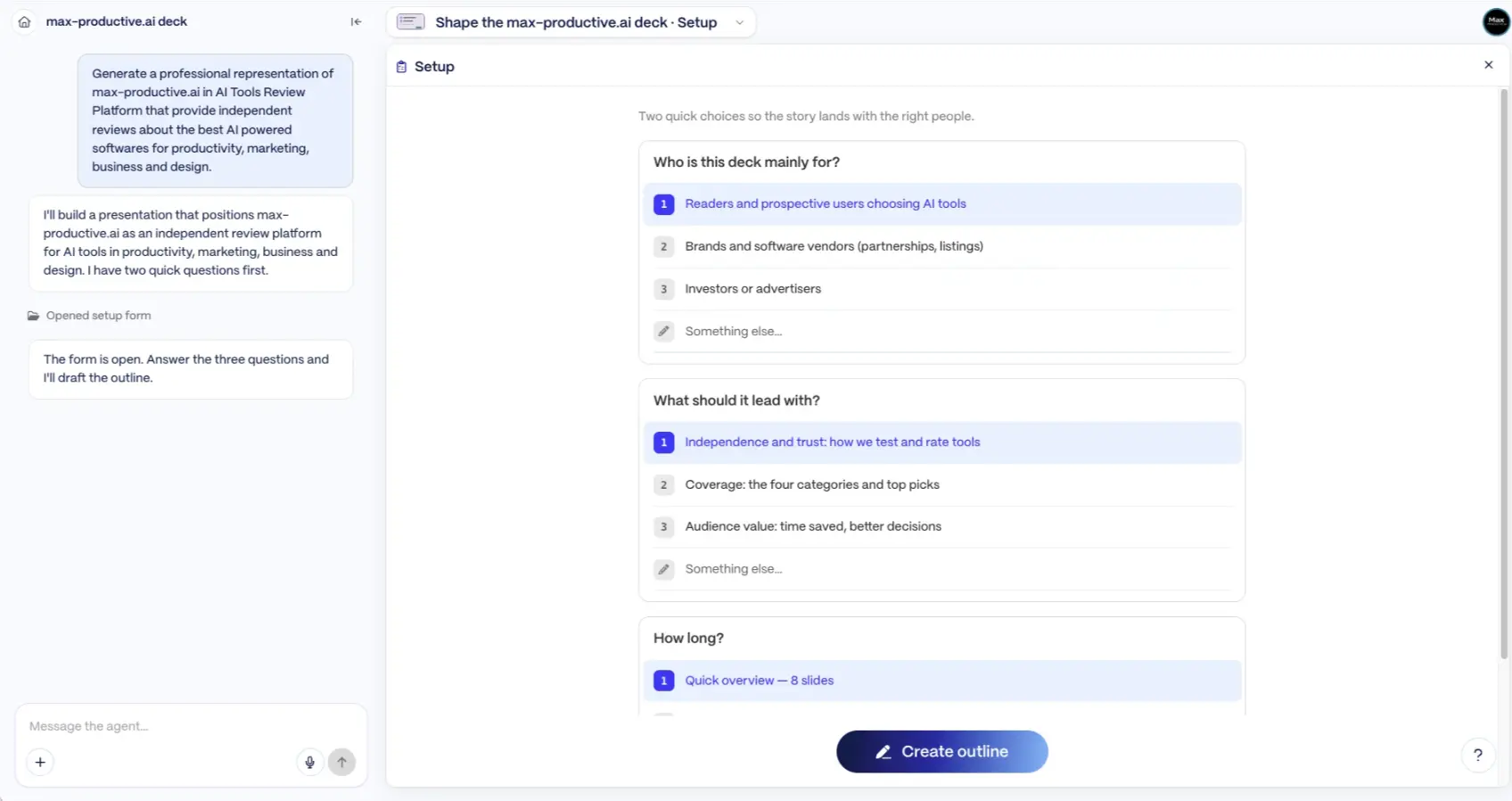
This is where Gamma parts ways with most AI deck tools. I typed a one-paragraph brief and, before writing anything, the Agent opened a short form. Who is this deck mainly for? What should it lead with? How long? Every question came with sensible suggestions drawn from my prompt and a "Something else" option. It takes a few clicks and it changes the result, because a deck for readers choosing AI tools is a different deck from one aimed at advertisers. Most generators guess at this. Gamma asks.
Review the Plan
An editable outline on the left, look and feel on the right
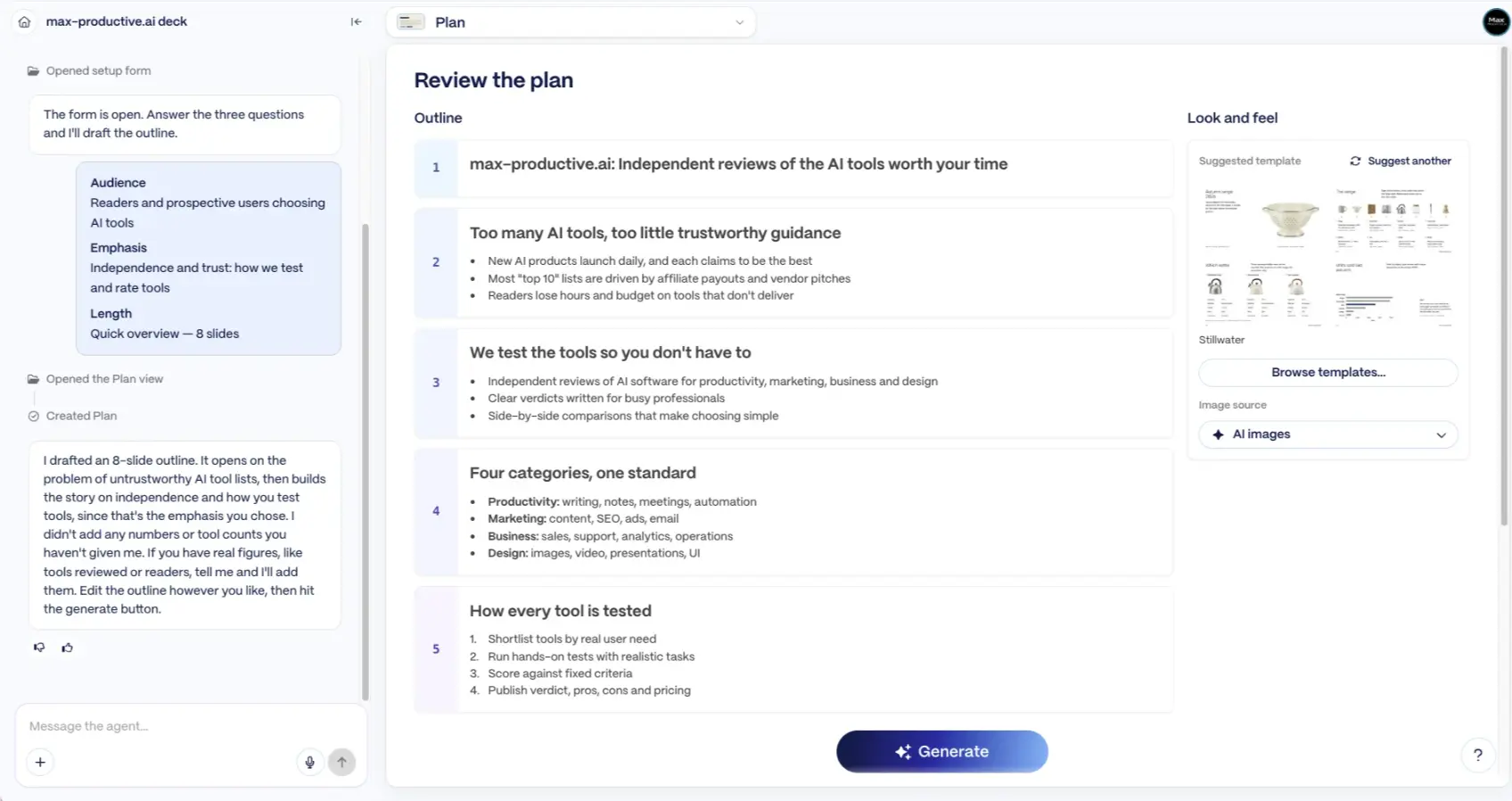
Next came the plan: an 8-slide outline with headlines and bullet points, a suggested template called Stillwater, and a choice of image source. Nothing is built until you press Generate, so this is the cheap moment to fix the story. What I liked most was a line in the chat. The Agent said it hadn't added any numbers or tool counts I hadn't given it, and offered to include them if I supplied the figures. AI-written decks can slip in statistics nobody supplied, so that's the right instinct.
Want to see the plan Gamma would write for your next deck?
Try Gamma →Free plan with 400 credits • No credit card requiredThe Finished Deck in the Editor
Agent chat on the left, slide rail in the middle, the deck on the right
The deck arrived with all eight slides built, and the Agent summarised its choices: trust first, then method, then independence, with no invented stats. The title slide is a fair sample of Gamma's taste. Clean type, a small table for mission, scope and audience, and an AI image of a measuring instrument that suits a review site. It kept its word on numbers. It did add a couple of confident taglines I hadn't supplied, so the copy still deserves a read before it goes anywhere. The chat stays open beside the deck, and that's where edits happen: change the tone, add a proof slide, rework one section.
Content Blocks
Everything you can drop into a card, searchable from one menu
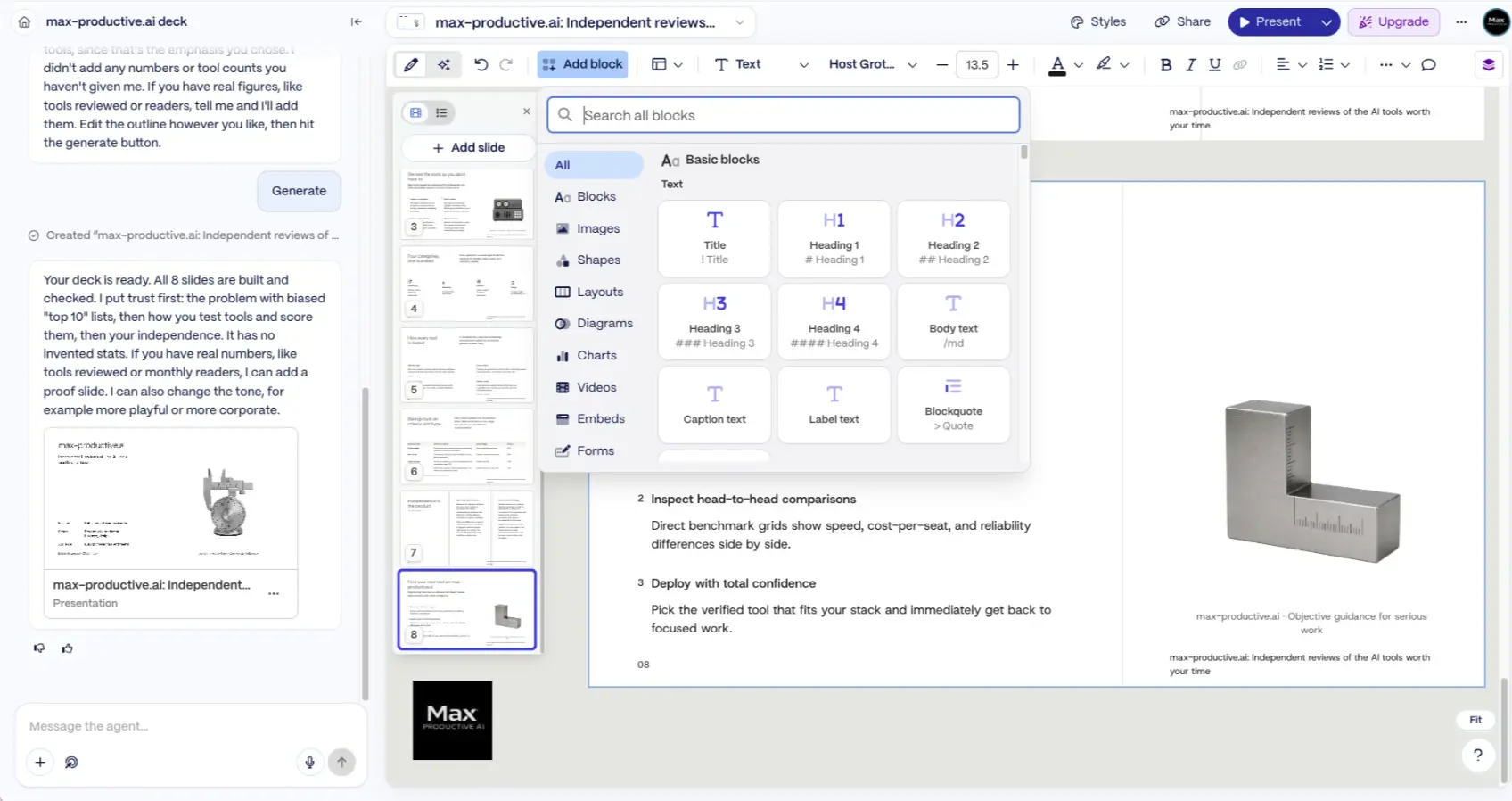
You're not limited to talking to the Agent. The Add block menu holds the manual toolkit: text styles, images, shapes, layouts, diagrams, charts, videos, embeds and forms. Text blocks accept markdown-style shortcuts, so typing a hash gives you a heading and a right-angle bracket gives you a quote. It feels closer to writing in Notion than arranging objects in PowerPoint. The trade-off is that you place blocks, and Gamma handles the spacing. Fast and tidy, with less freedom to nudge things a few pixels.
Export to PowerPoint, PDF and Google Slides
Four formats and three quality levels, all on the Free plan
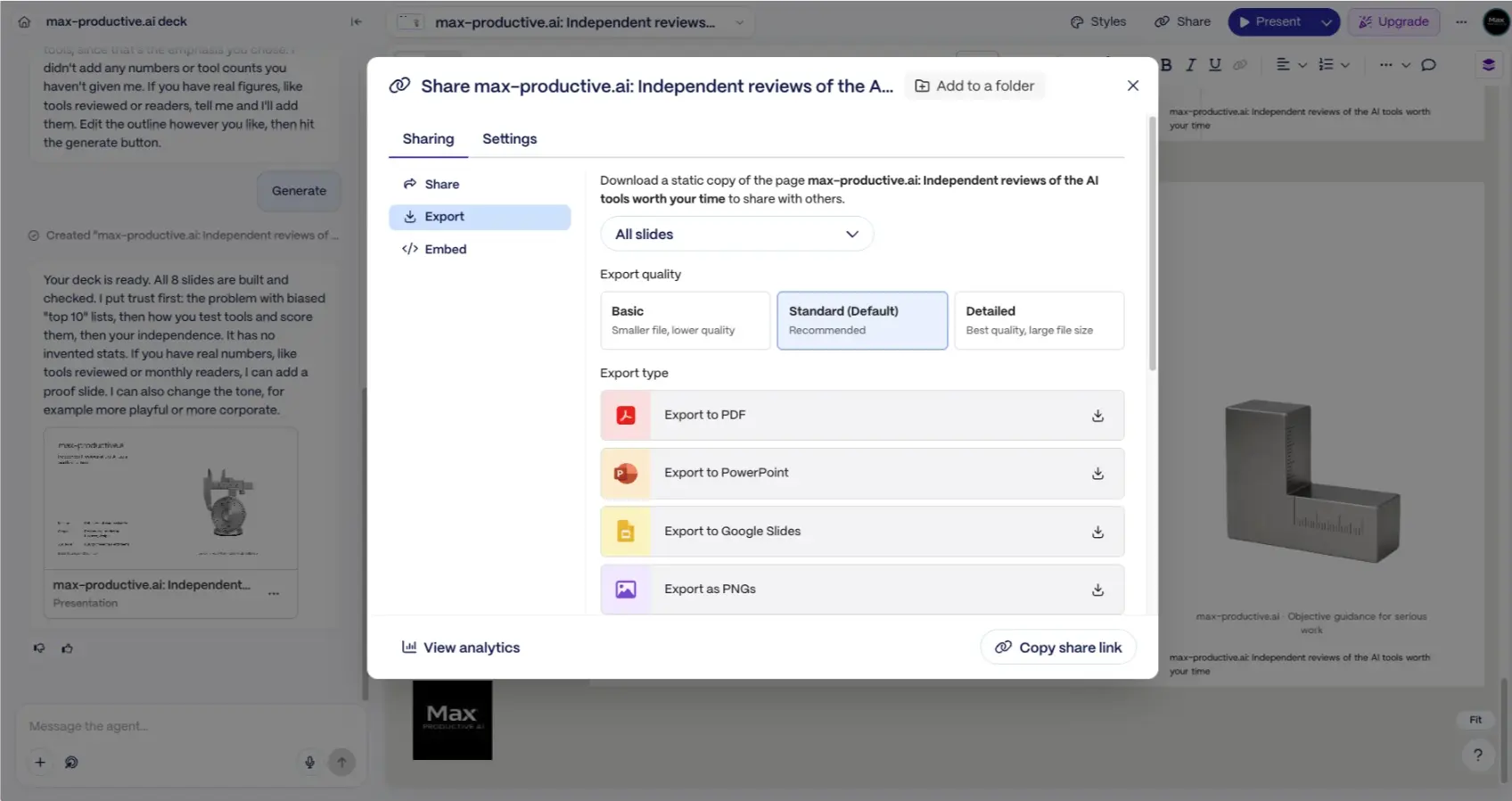
Export sits inside the Share dialog, next to Share and Embed. On my Free account all four formats were available, with a choice of all slides or a selection and three quality levels. Gamma describes the download as "a static copy", and that's an accurate way to think about it. A PDF or a set of PNGs will look like what you see on screen. A PowerPoint file is editable, but Gamma's own documentation says it carries no slide master and that fonts and interactive elements can change on the way out. I cover what that means in practice further down.
How Gamma Works
From a rough brief to a shared deck in four steps, with a checkpoint before any credits are spent on slides.
Start With a Prompt, a File or a Link
Type what you need, or attach source material. Gamma accepts PowerPoint, Word and PDF files, web page URLs, Google Drive content through a connector, and pasted text. A short brief is enough. The Agent is designed to fill the gaps by asking, so you don't need a perfect prompt.
Answer the Agent, Then Approve the Plan
With Plan mode on, the Agent asks a few questions about audience, emphasis and length, then drafts an outline and suggests a template. You can rewrite headlines, reorder slides, swap the template or change the image source. Gamma says the Agent won't start building until you approve the plan, unless you tell it to skip that stage.
Generate, Then Refine
Press Generate and the deck is written, laid out and illustrated. From here you have two ways to edit. Ask the Agent for targeted changes, such as shortening a section, adding three slides or replacing an image, and it works on those parts without regenerating everything. Or edit by hand with blocks. Editing by hand doesn't use AI, so it's the thrifty option when credits are tight.
Share, Present or Export
Copy a share link, present from the browser, embed the deck on a site, or export to PDF, PowerPoint, Google Slides or PNG. On Pro and above you also get viewer analytics, password protection and custom domains. Link sharing is where Gamma is at its best, because the deck stays responsive and you can keep improving it after it's sent.
Following an Older Tutorial?
Most guides and videos online still show the Classic generator. In the current version the Agent opens from a button in the upper left of the editor, where Classic used a sparkle icon on each slide. If a walkthrough doesn't match your screen, that's usually why. You can switch back with the "Use classic generator" link on the home screen, which is also where Studio Mode lives for Pro users.
A Setting Worth Checking: Data Controls
On individual workspaces (Free, Plus, Pro and Ultra), Gamma's default allows your content to be used to improve its AI features. You can opt out at any time under Settings, in the Data Controls tab. Team and Business workspaces are excluded from training automatically. It takes a minute. Do it before you upload anything confidential.
Key Features
What Gamma does well, and which parts sit behind a paid plan.
Gamma Agent
The heart of the current Gamma. It questions, plans, writes and designs, then edits single slides on request while keeping the original goal in mind. It's the feature that separates Gamma from generators that give you one shot at a prompt.
Web Research & Citations
The Agent can search the web and cite what it finds. A higher-effort setting on Pro and above spends longer researching and cross-checking. Helpful for market overviews and proposals. Still check any number you plan to say out loud.
Import & Document to Deck
Feed it a PowerPoint, PDF, Word file, web page or pasted notes. Tell the Agent to keep your wording exactly or to rework it. Free accounts can use up to 50,000 tokens of source material per generation, paid plans up to 100,000, which covers a long report.
Cards, Blocks & Smart Layouts
Columns, timelines, diagrams, charts, tables, callouts, embeds and forms, all spaced automatically. Smart Charts can link to a Google Sheet and refresh from it. Non-designers get tidy results. Designers who want exact coordinates will feel the limits.
AI Images & Gamma Imagine
Gamma draws on several image models and lets you pick stock, web or AI images per deck. Plus opens advanced models and Pro the premium ones. Imagine is a separate workspace for infographics, posters and edits such as background removal.
Sharing, Analytics & Websites
Share by link with view, comment or edit rights. Pro adds detailed analytics, such as how far viewers get and where they linger, plus custom branding and up to 10 custom domains for decks published as sites. Useful for proposals and sales follow-ups.
Export to PPTX, PDF, Slides & PNG
Available on every plan, with Gamma branding on Free. Gamma improved exports during 2026: tables now arrive as editable PowerPoint tables and speaker notes come along. PDF and link sharing are the dependable routes. PPTX is good for presenting. Test it first if the file will be heavily edited.
API, AI Assistants & Slack
A public API creates decks, documents and pages from your own systems, and there are native integrations for Zapier, Make and n8n. Connectors let ChatGPT and Claude build a Gamma for you from a conversation, and a Slack app can turn a thread into a deck.
Around these sit a few useful extras. Themes control fonts, colors, logos and chart styling, and Gamma can build a theme from an existing PowerPoint or Google Slides file. Any Gamma can be saved as a workspace template, including on the Free plan, and Pro adds AI instructions for templates. Gamma works in more than 60 languages. There are native iOS and Android apps, where edits are made through the Agent, and availability depends on your region.
One expectation to set. Gamma gives you a strong first draft quickly, and the Agent is careful about facts you didn't supply. It is still an AI writing on your behalf. Read the copy, check any figures it researched, and look at each slide once before you share. That read-through is quick, and it's a fair price for how little time the deck takes to make.
Gamma Pricing
A free plan and three individual tiers, separated mainly by AI credits, branding and model quality.
Free
- ✓ 400 AI credits, one-time
- ✓ Up to 10 slides per prompt
- ✓ Presentations, docs, websites, social, images
- ✓ Import from PDF & PPTX
- ✓ Export to PDF, PPTX, PNG & Google Slides
- ✗ Gamma branding stays on
Plus
- ✓ 1,000 AI credits/month
- ✓ Up to 100 slides per prompt
- ✓ Gamma branding removed
- ✓ Advanced AI image models
- ✓ Credits roll over up to 2,000
- ✓ Everything in Free
Pro
- ✓ 4,000 AI credits/month
- ✓ Premium AI image models
- ✓ Custom branding
- ✓ Detailed analytics & advanced sharing
- ✓ Up to 10 custom domains
- ✓ API access
Ultra: $90/mo billed annually (about $100 monthly) with 20,000 credits, the most advanced text, image and video models and up to 100 custom domains
Team & Business: Workspace plans with shared billing and admin controls. Business is listed at $40 per member per month on annual billing and includes SSO. Enterprise is custom
Extra credits: Paid users can buy 1,500 credits for $6
Pricing last verified October 5, 2026. Visit Gamma for current rates in your currency.
How Gamma Credits Add Up
Credits pay for AI work: generating slides, creating images, edits made by the Agent. Gamma meters generation per slide and per image, and the cost rises with longer jobs and more advanced models, so there's no single price per deck. Three things soften that. Unused credits roll over up to twice your monthly allowance. You aren't charged when the AI errors or asks a clarifying question. And editing by hand costs nothing. If you run short, a top-up of 1,500 credits is $6.
As of October 2026, Gamma pricing starts at $0, then $9 a month for Plus, $18 for Pro and $90 for Ultra, per user on annual billing. For most individuals the choice is between Plus and Pro. Plus removes the Gamma badge and gives you a monthly credit allowance, which is enough if you make a few decks a month for internal use. Pro is the client-facing plan, because that's where custom branding, analytics, custom domains and the API live. Ultra is for heavy users who want the most advanced models.
Gamma Free Plan and Free Credits
The free plan is generous where it counts. You get 400 credits, up to 10 slides per prompt, imports, and every export format, with no card required. The limit to understand is that those credits are one-time. They don't refresh each month. When they're gone you can keep editing by hand, earn more through referrals, or upgrade. Treat the free plan as a proper trial with no clock on it, and spend the credits on the kind of deck you'd really make.
Is There a Gamma Student Discount?
Gamma doesn't list a student or education discount on its pricing page at the time of writing, although it's a long-standing request on Gamma's public feedback board. For students and teachers the practical options are the free plan, or Plus on annual billing, which is the cheapest paid route. If you do subscribe, note the refund terms. Gamma's policy allows refund requests within three days of purchase and only if credit use is still low, so decide on the free plan first and upgrade once you're sure.
Detailed Pros & Cons
What Gamma gets right, and the trade-offs to weigh before you build your workflow around it.
✓ Pros
The setup questions and the plan review are the best change in the latest version. You catch a wrong angle at the outline stage, when fixing it costs nothing, instead of after eight slides have been written around it.
Gamma handles hierarchy, spacing and imagery for you. My test deck came back with a coherent look from the first slide to the last, and I didn't align a single object. For non-designers that's the main reason to use it.
The Agent told me twice that it hadn't invented any statistics, and offered to add figures if I supplied them. You should still proofread, but it's a more trustworthy starting position than a deck full of plausible numbers.
Responsive cards, browser presenting, embeds, comments and, on Pro, analytics that show how viewers move through the deck. If your presentations are read more often than they're presented live, this is where Gamma pulls ahead.
Four hundred credits, the Agent, imports and all four export formats without entering a card. That's enough to judge the product on a deck of your own, which several rivals only allow through a time-limited trial.
Documents, websites, social carousels and graphics come from the same workspace, and the API, ChatGPT and Claude connectors and Slack app let other tools create Gammas for you. SOC 2 Type II compliance and SSO on Business cover the IT questions.
✗ Cons
The PPTX is editable, and exports improved in 2026, but Gamma's documentation is clear that there's no slide master and that fonts and interactive content can change. Fine for presenting. For a file a team will rework for months, run a test first.
The 400 credits are a one-time allowance. Frequent users will reach the end of them and need a paid plan or referral credits. It's a fair model, as long as you know it going in.
Different actions and models use different amounts, and there's no flat price per deck. Rollover and inexpensive top-ups help. Keep an eye on the counter for your first few projects to learn your own pattern.
Content on Free, Plus, Pro and Ultra can be used to improve Gamma's AI unless you switch the setting off in Data Controls. Team and Business workspaces are excluded automatically. Easy to change, and better known in advance.
The new experience and the Classic generator sit side by side, and a few features, Studio Mode among them, exist in only one. It will settle. For now, expect the odd moment where a guide and your screen disagree.
Gamma's layout system keeps things neat by limiting how freely you can position objects. Dense financial exhibits, complex custom diagrams and exact brand layouts are still easier in PowerPoint.
Gamma vs Alternatives
Each of these tools is built for a different job, so the useful question is which job is yours.
| Feature | Reviewed Gamma | Plus AI | Beautiful.ai | Pitch | Prezi |
|---|---|---|---|---|---|
| Entry Paid Plan (annual) | $9/mo | $10/mo | $12/mo | €10/mo | $7/mo |
| Free Access | Free plan, 400 one-time credits | 7-day trial, card required | Free trial, no free plan | Free plan, 100 one-time AI credits | Free Basic plan |
| Where You Build | Gamma's web editor | Inside PowerPoint & Google Slides | Beautiful.ai editor, plus a PowerPoint add-in | Pitch editor | Prezi canvas |
| PowerPoint Output | PPTX export, no slide master | Native slides, no export | Editable PPTX export | PPTX export on paid plans | PPTX export as static slides |
| Standout Strength | Agent-led first drafts and link sharing | Editing existing decks in place | Smart Slides that enforce layout rules | Collaboration and viewer analytics | Zooming, non-linear storytelling |
| Best For | Fast, visual decks shared by link | PowerPoint and Google Slides workflows | Teams that want design guardrails | Sales and startup teams | Keynotes, training, live talks |
Gamma vs Plus AI: The Short Version
These two are close to opposites, which makes the choice easier than it looks. Gamma gives you a new place to create: its own editor, its own format, and decks that are at their best as links. Plus AI adds AI to the place you already work, building native slides inside PowerPoint and Google Slides. Gamma wins on visual quality, sharing, analytics and free access. Plus AI wins when the deliverable is a PowerPoint file that will be edited again and again. Ask where the deck ends up, and the answer usually follows. We go deeper in our Gamma vs Plus AI comparison, and the Gamma alternatives guide covers the full field.
Which Tool Is Right For You?
Gamma
ReviewedBest for: Anyone who wants a polished deck quickly and shares most of their work as a link or PDF: marketers, founders, educators, sales teams and consultants. The Agent's planning step is the reason to choose it. The free plan is the reason to try it today. Build one deck you'd really use, and test a PowerPoint export if you'll need one.

Plus AI
Native PowerPoint & SlidesBest for: Consultants, analysts and corporate teams whose decks must be PowerPoint or Google Slides files. Plus AI generates and edits native slides inside both apps, so there's no export step, and its Insert, Rewrite and Remix tools are built for revising existing decks. Plans start at $10 a month on annual billing, with a 7-day trial in place of a free plan.

Beautiful.ai
Design GuardrailsBest for: Organizations where consistency matters more than creative range. Smart Slides adjust alignment and spacing automatically as content changes, which keeps a whole team on brand. It also offers a PowerPoint add-in and editable exports. Pro is $12 a month on annual billing, with a trial and no free plan. See our Gamma vs Beautiful.ai comparison →

Pitch
Team CollaborationBest for: Sales and startup teams that build, share and track decks together. Pitch is strong on real-time collaboration, shared templates, pitch rooms and viewer analytics, and it added its own AI agent in 2026. There's a free plan, and Plus starts at €10 a month on annual billing. Gamma generates more for you. Pitch organises the team around the deck.

Prezi
Live StorytellingBest for: Keynotes, training and teaching, where the way you move through the story is part of the show. Prezi's zooming canvas is unlike a slide deck, and Prezi AI can start from a prompt or an uploaded file. It has a free Basic plan and paid plans from $7 a month. Its PowerPoint export turns each frame into a static slide, so the motion stays in Prezi.

Pi
Visual OriginalityBest for: Users who want the AI to design each slide from scratch instead of filling layouts. Pi (Presentation Intelligence) turns text, documents and web pages into visually distinctive decks and exports to PPTX. It's a younger product than Gamma, with a smaller ecosystem around it. A free plan is available, and paid pricing is best confirmed at checkout.

Decktopus
Rehearsal CoachBest for: Presenters who want help with delivery as well as slides. Decktopus builds decks from prompts or files and adds a rehearsal mode that simulates audience questions and gives feedback on pacing and clarity. Pro is $9.99 a month on annual billing with 750 AI credits. See our Gamma vs Decktopus comparison →

Presentations.AI
Free Starter PlanBest for: Business users who want a polished deck from a short brief, built and shared in the browser. The free Starter plan includes 100 credits and decks of up to 20 slides. Pro is $20 a month billed annually and adds 5,000 credits, PowerPoint export, analytics and brand customization. Note that PowerPoint export needs Pro, where Gamma includes it on Free.

Chronicle
Design-LedBest for: Founders, product and marketing teams who want design-led decks that look at home on the web. Chronicle turns notes and documents into polished slides, and its Muse agent edits them from plain-language requests. There's a free plan for up to 10 decks, and Pro is $12 a month on annual billing. Muse and PowerPoint export start on the Plus plan at $25.
Frequently Asked Questions
Should You Try Gamma?
Yes, and the free plan makes that an easy call. Gamma is the AI presentation maker I'd put in front of most people in 2026. The Agent's habit of asking questions and showing a plan before it builds leads to decks that need less fixing, the design quality is high without any effort from you, and sharing by link is among the best in the category. Add documents, sites, graphics, an API and connectors for ChatGPT and Claude, and it's become a broad visual communication tool.
Its limits are specific. A Gamma export is a good PowerPoint file, though it isn't a native one. Free credits are one-time, credit use takes a little learning, and individual users should look at the Data Controls setting. If your work lives in PowerPoint templates, Plus AI is the better match. For everyone who needs a strong deck quickly and shares it on screen, Gamma is the one to beat.
Our Recommendation
Open a free account and switch off AI training in Data Controls if your content is sensitive. Give the Agent a brief for a deck you need this month, answer its questions, and edit the plan before you generate. Share the result as a link, then export it to PowerPoint and open the file to see how it holds up for your needs. If the badge bothers you, Plus is enough. If you send decks to clients, go to Pro for branding and analytics.