
Claude Cowork vs Reclaim AI: Which One Should Run Your Workday?
Anthropic's agentic workspace and Dropbox's calendar AI keep getting compared — but they solve opposite problems. Here's what each one actually does, where each falls short, and the setup that beats picking a side.

The short answer: Claude Cowork and Reclaim AI are not really competitors. Cowork executes your knowledge work on demand; Reclaim automates your calendar continuously in the background. Pick Cowork when producing the work is the problem, Reclaim when finding time for it is — and run both when it's both.
If the work is your bottleneck: Claude Cowork
Claude Cowork executes multi-step knowledge work for you. Describe an outcome, give it access to a folder, and come back to finished research, formatted documents, spreadsheets with working formulas, or a cleaned-up file system. It's included with paid Claude plans rather than sold separately — if you already pay for Claude, you already have it.
If your calendar is the bottleneck: Reclaim AI
Reclaim AI runs your schedule continuously in the background — placing tasks, defending Focus Time, moving flexible habits and meetings when conflicts appear, and rebalancing the week around your priorities without being asked. It's the top-rated tool in our Time Management category, and the free plan is a real free plan, not a trial.
| Tool | Built For | Entry Price (annual) | Rating |
|---|---|---|---|
| Claude Cowork | Agentic execution of file-based knowledge work | Included with Claude Pro, $17/mo | — |
| Reclaim AI | Always-on calendar & Focus Time automation | Free plan; Starter $10/seat/mo | 4.8 / 5 |
Last verified: July 2026
Who should NOT pick between them: if your week is meeting-heavy AND you regularly hand off research, documents, or reporting work, these tools don't overlap — Reclaim decides when work happens, Cowork does the work. Running both is a legitimate answer, not a cop-out. And if your calendar lives entirely in Apple Calendar, Reclaim isn't currently an option at all.
Reclaim.ai now names Claude Cowork directly in its own marketing — there's a full comparison page on their site. That tells you something: enough people are asking whether an AI workspace like Cowork makes a dedicated scheduling tool unnecessary that Reclaim felt the need to answer. It's a fair question. The honest answer is just more useful than either vendor's version of it.
We've been running both. Reclaim AI holds a 4.8 rating in our directory — the highest in its category — and Claude has been part of our daily research and content workflow since long before Cowork existed. This comparison covers what each tool actually is, how they behave day to day, what they cost in July 2026, and the use cases where each one clearly wins.
What Is Claude Cowork?
Claude Cowork is Anthropic's agentic workspace, built into the Claude Desktop app as a mode alongside Chat and Code. It runs on the same architecture that powers Claude Code — Anthropic's developer agent — but points it at everyday knowledge work instead of a terminal. You describe a desired outcome, grant Claude access to a folder, and it works through the job autonomously: reading and writing local files without manual uploads, splitting large tasks into parallel sub-agent workstreams, and producing finished deliverables like Excel spreadsheets with functional formulas, PowerPoint presentations, and formatted documents.
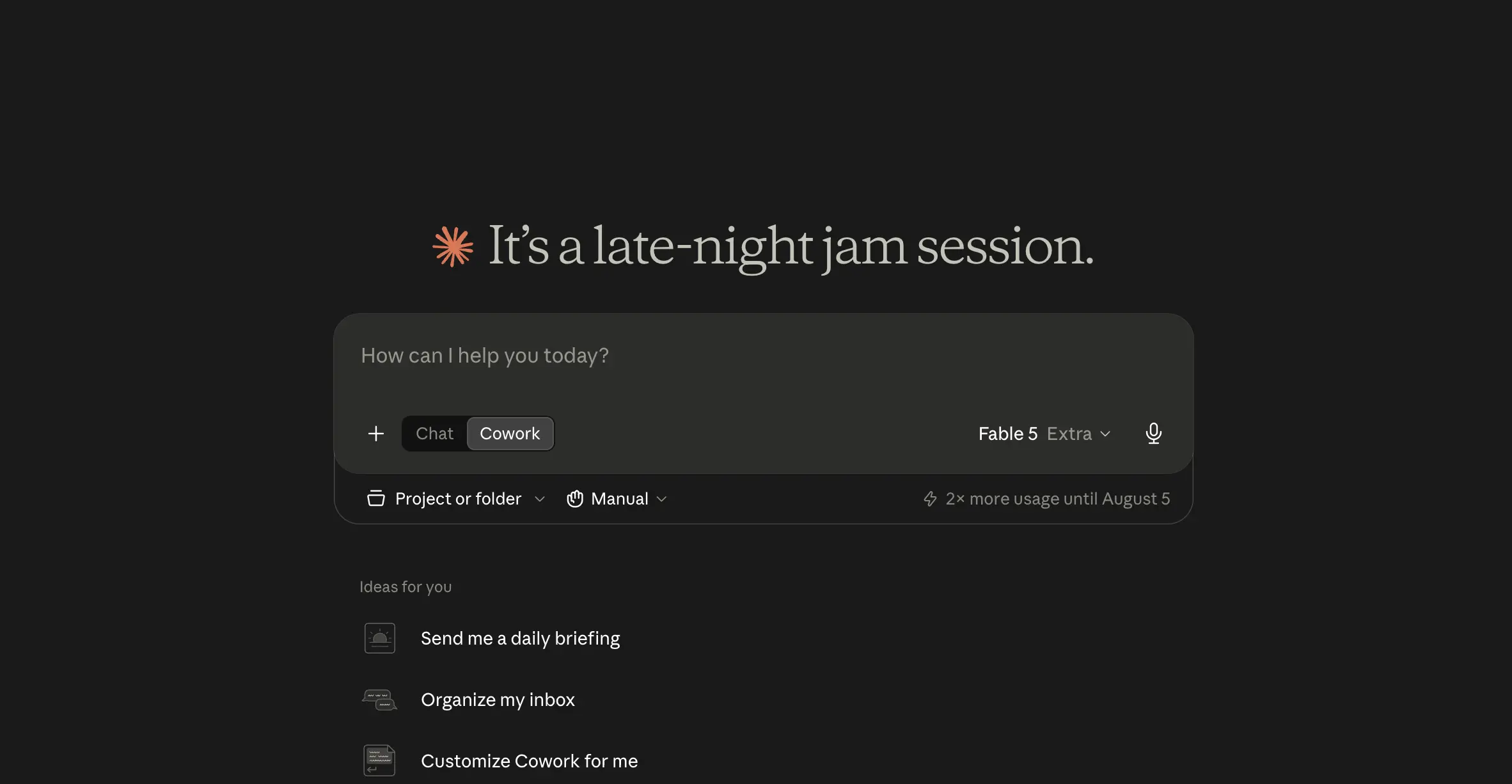
The workspace is extensible in ways that matter for this comparison. Connectors (built on MCP) plug Claude into external tools and data sources — including your calendar and email. Skills teach it reusable workflows, plugins bundle both into shareable packages, and pairing it with Claude in Chrome lets it act on websites directly. Scheduled tasks let recurring jobs run on a fixed cadence — a Monday-morning competitor brief, a weekly inbox digest — and sessions can be started or checked remotely from the Claude mobile app. None of that makes it a calendar system, though, and that distinction is the heart of this article.
What Is Reclaim AI?
Reclaim.ai is an AI calendar automation platform, launched in 2019 and acquired by Dropbox in 2024 — the app now carries a "from Dropbox" badge. It connects to your work calendar and plans it continuously: tasks get placed into open slots based on deadlines and priority, Habits reserve recurring time for things like lunch, exercise, or planning, Smart Meetings find the best slot for recurring meetings across everyone's schedules, and Focus Time blocks are created and actively defended against encroaching meetings. When something conflicts, Reclaim doesn't ask — it moves the flexible pieces to the next best time on its own.
Around that core engine sit task integrations (ClickUp, Todoist, Asana, Jira, Linear, Google Tasks), Scheduling Links for letting others book you, Buffer Time between meetings, and — on Business plans — team analytics and organization-wide scheduling policies. Calendar support covers Google Calendar and Microsoft Outlook, with Google remaining the deepest integration; Apple/iCloud Calendar isn't supported.
Claude Cowork vs Reclaim AI: Quick Comparison
Before the detail, here's the full picture side by side. Read the second row twice — it's the one that decides most buying decisions in this comparison.
| Capability | Claude Cowork | Reclaim AI |
|---|---|---|
| Primary job | Executing multi-step knowledge work (research, documents, files) | Continuous calendar automation and time protection |
| How it acts | On request, or on a fixed schedule you define | Always on — monitors and adjusts in the background |
| Conflict resolution | Can update events when asked via a calendar connector | Detects conflicts and reschedules flexible items automatically |
| Recurring commitments | Fixed recurring events; scheduled background tasks on a set cadence | Flexible Habits and Smart Meetings that move to the best open slot |
| Task integrations | Connectors (MCP), skills, and plugins across many tools | ClickUp, Todoist, Asana, Jira, Linear, Google Tasks → auto-scheduled blocks |
| File & document work | Core strength — spreadsheets, decks, docs, file organization | Not a function |
| Focus Time protection | Can block time if you ask; not enforced afterwards | Created, defended, and rescheduled automatically |
| Team features | Team/Enterprise plans with admin controls and monitoring | Team analytics, meeting policies, org-wide Focus Time defense |
| Platforms | Claude Desktop (macOS/Windows), remote access via mobile app | Web app; Google Calendar and Outlook (no Apple Calendar) |
| Entry price (annual) | Included with Claude Pro at $17/mo | Free Lite plan; Starter at $10/seat/mo |
The Core Difference: On-Demand Execution vs Always-On Automation
Strip away the feature lists and one structural difference explains almost everything: when each tool acts. Claude Cowork is fundamentally on-demand — you start a session, it executes, it finishes. Its scheduled tasks add automation, but they trigger pre-defined jobs at pre-defined times. Reclaim is fundamentally always-on — it watches your calendar and re-optimizes it as reality changes, without a prompt, all week long.
You feel this most with recurring commitments. Ask Claude to put a deep-work block on your calendar every morning and you'll get exactly that: a fixed event that sits where you put it. When a client call lands on top of it, nothing happens — the block just loses. Reclaim treats the same block as a flexible Habit: when the call lands, the habit slides to the next open slot that still fits your rules. That's not a feature Cowork is missing so much as a job it was never built to do.
Reclaim's own comparison page frames this as a contest Reclaim wins, and on scheduling specifically, they're right. But the frame cuts both ways. Reclaim can protect Thursday afternoon for a report; it cannot write the report. Cowork can write the report; it won't notice that Thursday afternoon just got double-booked. One decides when work happens. The other does the work.
Hands-On With Reclaim AI: What Always-On Actually Feels Like
We connected Reclaim's free plan to our own Google Calendar, set a 12-hour weekly Focus Time goal, added a daily lunch habit, and dropped in three real tasks with time estimates — an SEO performance analysis at 1h45, a 30-minute goal-setting session, and a two-hour video recording. Then we did the important part: nothing.
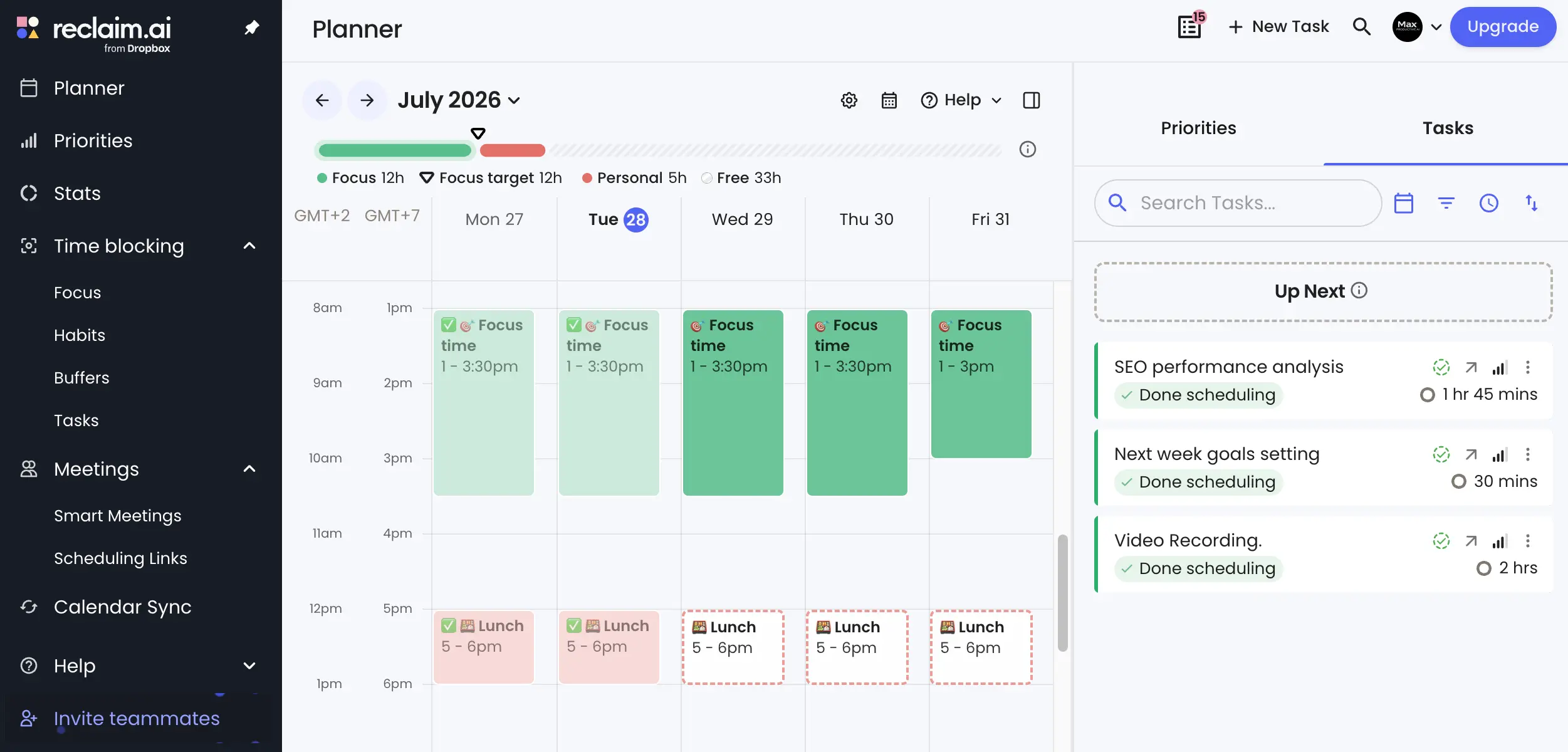
Reclaim laid out the week itself: Focus Time blocks placed across every weekday afternoon, habit blocks reserved daily, and each task marked "Done scheduling" in the sidebar without us picking a single time slot. Completed blocks get checked off as the week progresses, and the planner keeps a running tally of focus hours against the goal. It's a different relationship with a calendar — less "planning your week" and more "reviewing the plan something else made," which takes a few days of trust-building the first time.
Focus Time and the Weekly Goal
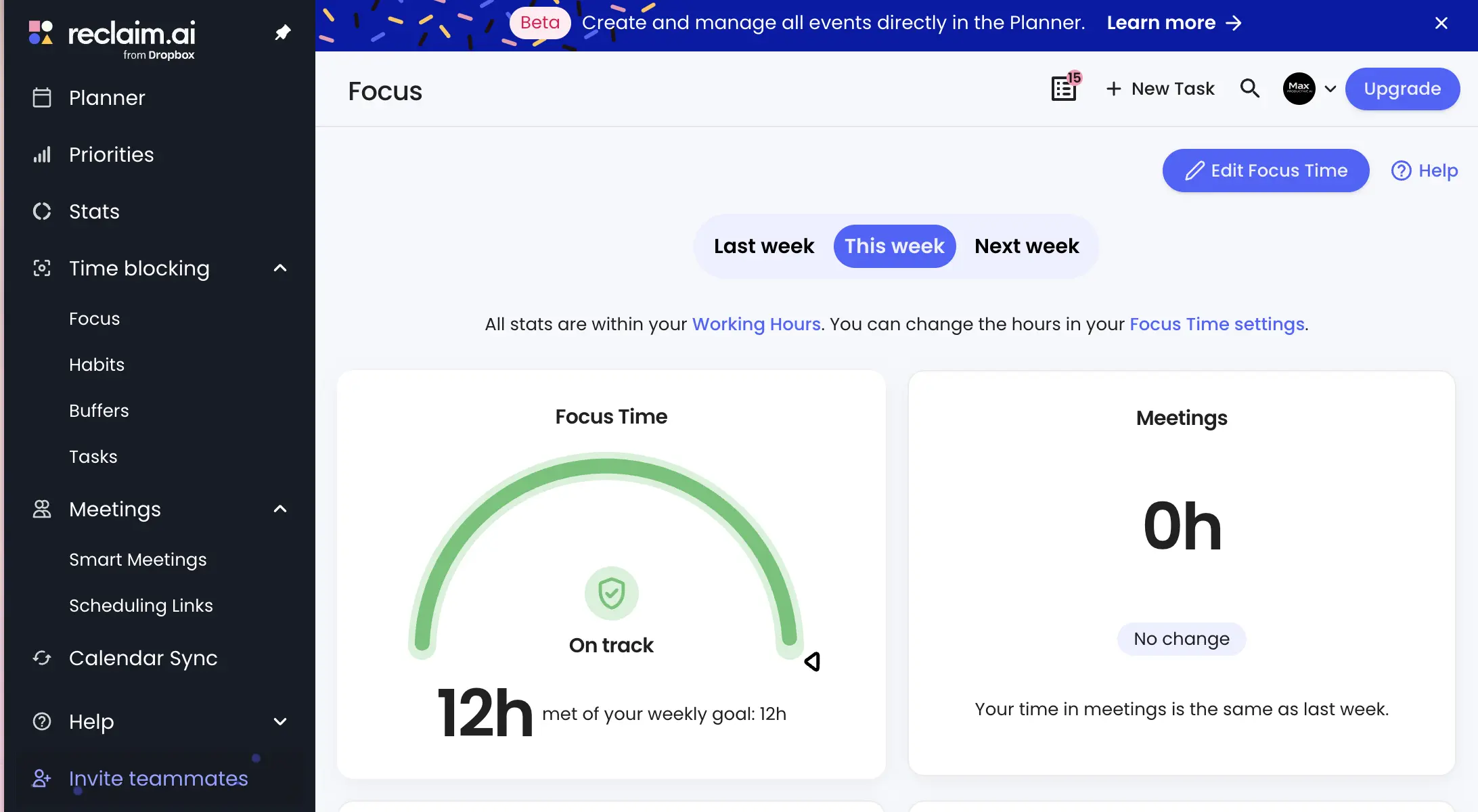
The Focus dashboard tracks the goal like a fitness ring tracks steps — our 12-hour target showed "On track" mid-week with the full 12 hours already met. The useful part isn't the chart; it's what happens underneath it. Focus blocks start as defendable-but-flexible, and as the week fills up, Reclaim decides which ones can move and which ones lock. On a quiet test week that engine has little to do. On a meeting-heavy calendar, this is the entire product.
Smart Meetings and Scheduling Links
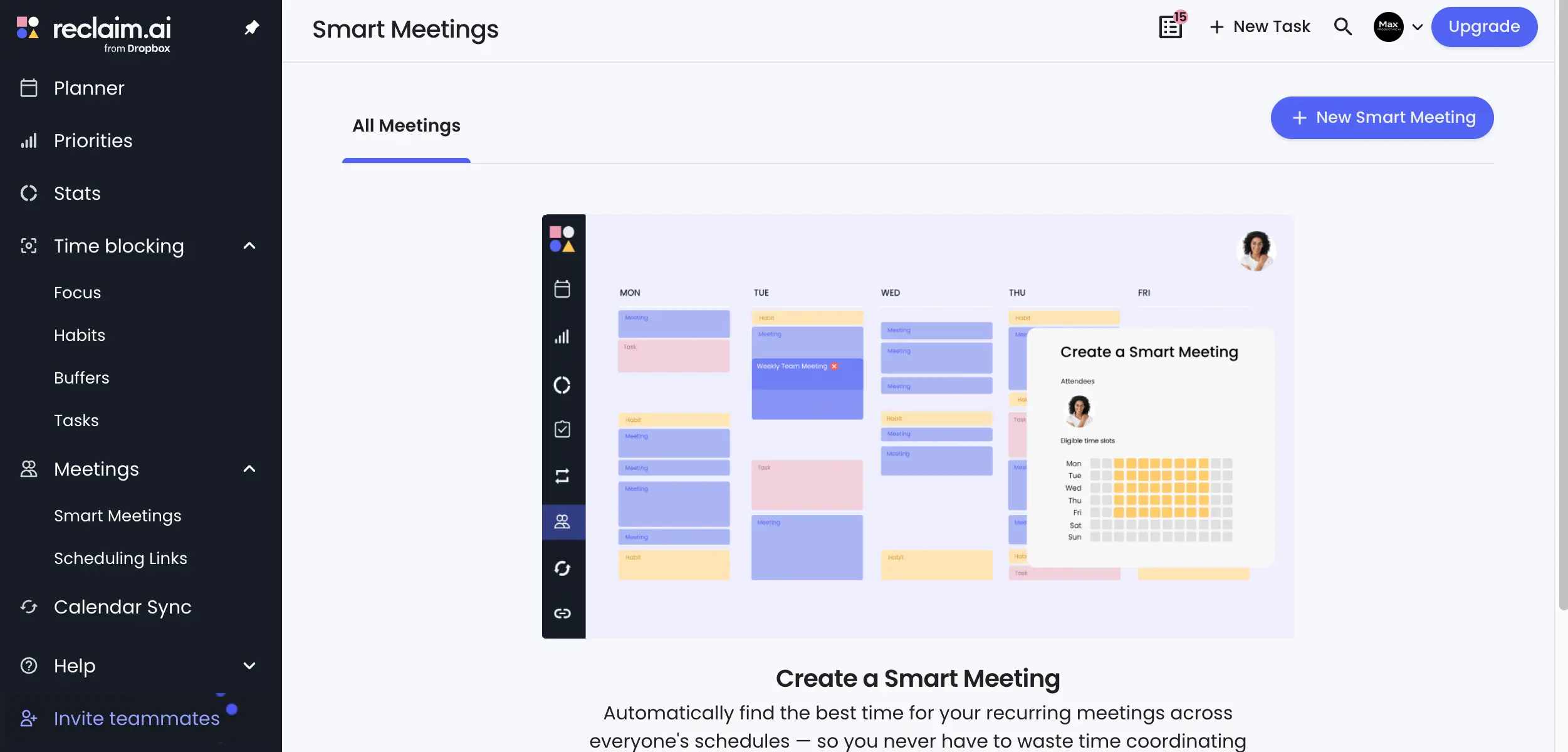
Smart Meetings apply the same flexibility to recurring meetings: define the attendees and eligible time windows once, and Reclaim finds — and keeps re-finding — the best slot as everyone's calendars shift. Scheduling Links handle external booking, and here Reclaim makes its boldest claim: that its AI links surface up to 524% more available meeting times by flexing lower-priority events when appropriate. That figure is Reclaim's own, and we couldn't reproduce the conditions to verify it — but the mechanism behind it is real and observable: because the engine knows which existing events can move, it can offer slots a static booking page would show as busy. If you only need a booking page without the automation engine, Cal.com remains the cleaner standalone pick.
Tasks That Schedule Themselves
The task integrations are where Reclaim quietly earns its keep for anyone already running ClickUp or Todoist: deadlines set in your task manager become calendar blocks that adjust themselves as priorities shift. No copying tasks to the calendar, no time-blocking ritual every morning. Set the estimate and the due date, and the week arranges itself around them.
Pros
- True always-on automation. Reclaim is the only tool in this comparison that acts without being asked — it monitors, detects conflicts, and reschedules flexible items continuously in the background.
- Focus Time is genuinely defended, not just blocked. Blocks move when they must and lock when they matter, and the weekly goal tracking makes the habit stick.
- Task-to-calendar sync removes daily planning. Deadlines in ClickUp, Todoist, Asana, Jira, Linear, or Google Tasks become self-adjusting calendar blocks automatically.
- The free plan is genuinely usable. Focus Time, Habits, Smart Meetings, and a scheduling link on the Lite plan — enough to live with the product before paying.
- Team features address the real organizational pain. Meeting policies, workload analytics, and org-wide Focus Time defense tackle meeting overload where it starts.
Cons
- Google Calendar first, everything else second. Outlook support is newer and less deep, and Apple/iCloud Calendar isn't supported at all — a hard stop for some setups.
- The automation asks for trust before it earns it. Early on, blocks move and it isn't always obvious why. The priority system explains most decisions once you learn it, but expect an adjustment period.
- Light calendars gain less. If your week has few meetings and predictable rhythms, the engine has little to optimize and the setup may outweigh the payoff.
- Per-seat pricing adds up at team scale. The individual price is fair; a large team on Business is a real line item worth comparing against the meeting hours it saves.
- It manages time, not work. Reclaim schedules the block for your report, your analysis, your deck — and contributes nothing to producing any of them.
What Claude Cowork Does Well (And Where the Calendar Story Ends)
Cowork's value shows up in the work Reclaim schedules around. In our own use, the pattern that sticks is the handoff: point it at a folder of source material, describe the deliverable, and let it run while you do something else. It reads and writes files directly — no uploading documents into a chat window one by one — and larger jobs get split across parallel sub-agents, so a research-and-synthesis task that would take an afternoon of tab-juggling comes back assembled. The outputs are the part that surprised us most when we started: real .xlsx files with working formulas, real presentations, formatted documents ready to send after a review pass.
Scheduled Tasks: Automation, With an Asterisk
Scheduled tasks are Cowork's answer to recurring work: define a job — "compile a competitor pricing brief every Monday at 9am" — and it runs on that cadence without you starting it. This is genuine automation, and for recurring production work it's excellent. But it's worth being precise about what it isn't: a schedule trigger fires a pre-defined job at a fixed time. It doesn't watch your calendar between runs, doesn't notice conflicts, and doesn't re-optimize anything. Automated execution and always-on scheduling look similar in a feature list and behave completely differently in a busy week.
So Can It Touch Your Calendar?
Yes — when asked. With a calendar connector enabled, Claude can check availability, create events, and draft invites as part of a task, and it does this competently. The events it creates are ordinary fixed events, though, and every calendar action happens inside a session you initiated. There's no background engine deciding what should move, what should stay, and what deserves the open slot. If your mental model is "Cowork plus a calendar connector equals Reclaim," a busy fortnight will correct it.
Pros
- Executes multi-step work end to end. Research, synthesis, drafting, and file production in one handoff — the category of work no scheduling tool touches.
- Real file outputs, not chat answers. Excel spreadsheets with functional formulas, PowerPoint decks, and formatted documents, written directly to your local folders.
- Sub-agents parallelize big jobs. Large tasks get divided into concurrent workstreams, which shows in turnaround time on research-heavy work.
- Deeply extensible. Connectors, skills, and plugins adapt it to your stack, and pairing with Claude in Chrome extends it to acting on websites.
- No separate subscription. Cowork ships inside paid Claude plans — for existing Claude subscribers the marginal cost is zero.
Cons
- Not an always-on scheduler, and doesn't claim to be. It acts when you start a session or when a scheduled task fires — your calendar isn't monitored in between.
- No conflict-resolution engine. Events it creates are fixed; when meetings collide, resolving it is back on you (or on a tool like Reclaim).
- Outputs deserve a review pass. Agentic output is strong, and it still benefits from a human check before anything ships — plan the review into your workflow.
- Long agentic sessions consume plan usage. Heavy daily handoffs can hit plan usage limits on Pro; power users should look at higher tiers.
- Calendar abilities depend on setup. Useful calendar actions require a connector and an explicit ask — nothing happens by default.
Pricing: Claude Cowork vs Reclaim AI in 2026
The pricing models don't even rhyme, which is itself a clue that these are different products. Reclaim sells per-seat calendar automation; Cowork rides along inside a Claude subscription you may already have.
Reclaim AI Pricing (annual billing, per seat)
| Plan | Price | Key Features |
|---|---|---|
| Lite (Free) | $0 | 1 user, 2 connected calendars, Focus Time, Habits and Smart Meetings (with usage caps), 1 scheduling link, 1-week scheduling range |
| Starter | $10/mo | Unlimited habits and smart meetings, task integrations, longer scheduling range |
| Business | $15/mo | Team analytics, scheduling policies, priority support |
| Enterprise | $22/mo | Advanced admin controls and organization-wide management |
Monthly billing runs higher — $12 for Starter and $18 for Business — and Enterprise is only sold annually, so the annual rates above are the ones to budget against.
Claude Plans That Include Cowork (annual billing)
| Plan | Price | Key Features |
|---|---|---|
| Pro | $17/mo ($20 monthly) | Claude Desktop with Cowork and Claude Code, connectors, more usage than free |
| Max | From $100/mo | Substantially higher usage for heavy agentic workloads |
| Team | $20/seat/mo ($25 monthly) | Central billing, admin controls, SSO; premium seats at $100/seat/mo add 5x usage |
The practical read: an individual can run Reclaim's free Lite plan alongside an existing Claude Pro subscription and cover both jobs — time protection and work execution — for the $17/month they may already be paying. That combination is hard to argue with, and neither vendor will make the argument for you.
Pricing verified July 2026 against reclaim.ai and claude.com. Plans change — check each vendor's pricing page before deciding.
Use Case Decision Matrix — Which Tool Fits Your Situation?
Map your actual bottleneck to the table below. If you recognize yourself in rows from both columns, that's the both-tools scenario, not a tie to break.
| Use Case | Better Fit | Why |
|---|---|---|
| Meeting-heavy week with constant conflicts | Reclaim AI | Automatic conflict detection and rescheduling, all week, unprompted |
| Protecting deep work every single week | Reclaim AI | Focus Time is created, defended, and moved when it must be |
| Turning ClickUp/Todoist deadlines into calendar time | Reclaim AI | Task sync creates self-adjusting blocks from due dates and estimates |
| Research, synthesis, and report writing | Claude Cowork | Multi-step agentic execution with sub-agent parallelism |
| Building spreadsheets, decks, and documents | Claude Cowork | Produces real files with working formulas and formatting |
| Cleaning up a messy folder or file system | Claude Cowork | Direct local file access without manual uploads |
| Recurring production work (weekly briefs, digests) | Claude Cowork | Scheduled tasks run pre-defined jobs on a fixed cadence |
| Understanding where a team's time goes | Reclaim AI | Team analytics, meeting policies, org-wide Focus Time defense |
| Letting clients book time with you | Reclaim AI | Scheduling Links backed by the flexibility engine (or Cal.com standalone) |
| Busy calendar AND heavy knowledge-work output | Both | The tools don't overlap — one protects the block, the other fills it |
Final Verdict — Claude Cowork vs Reclaim AI in July 2026
| Best for calendar automation | Reclaim AI (always-on engine) |
| Best for executing knowledge work | Claude Cowork (agentic handoffs) |
| Best for protecting Focus Time | Reclaim AI |
| Best for documents, spreadsheets & research | Claude Cowork |
| Best free entry point | Reclaim AI (Lite plan, free forever) |
| Best value for existing Claude subscribers | Claude Cowork (already included) |
| Best for teams fighting meeting overload | Reclaim AI |
| Best combined setup | Both — Reclaim protects the time, Cowork does the work |
Bottom line: this comparison has a clean answer because the products barely overlap. If your calendar is the problem — conflicts, meeting creep, deep work that never survives the week — Reclaim AI is the strongest tool we've tested in the category, and its 4.8 rating in our directory reflects that. If the work itself is the problem — the reports, the research, the spreadsheets that eat your evenings — Claude Cowork is the one that actually takes tasks off your plate. And if you recognized both problems, run both: Reclaim's free plan alongside a Claude Pro subscription covers the two halves of a productive week with zero feature overlap between them. Pick by your bottleneck, not by the marketing.
Exploring More Time Management & Productivity Tools?
If neither tool quite fits, browse our full AI time management directory inside the broader Productivity category. For a lighter-touch AI daily planner without an always-on engine, BeforeSunset AI is worth a look — and if you're weighing Reclaim against project-management-native scheduling, our Motion vs ClickUp vs Monday comparison covers that angle.