tl;dv
tl;dv is an AI meeting assistant that records, transcribes, and summarizes Zoom, Google Meet, and Microsoft Teams calls, then turns your whole meeting history into reports, coaching insights, and CRM updates. Recording is free without limits. The AI on top is what you pay for.
Try tl;dv →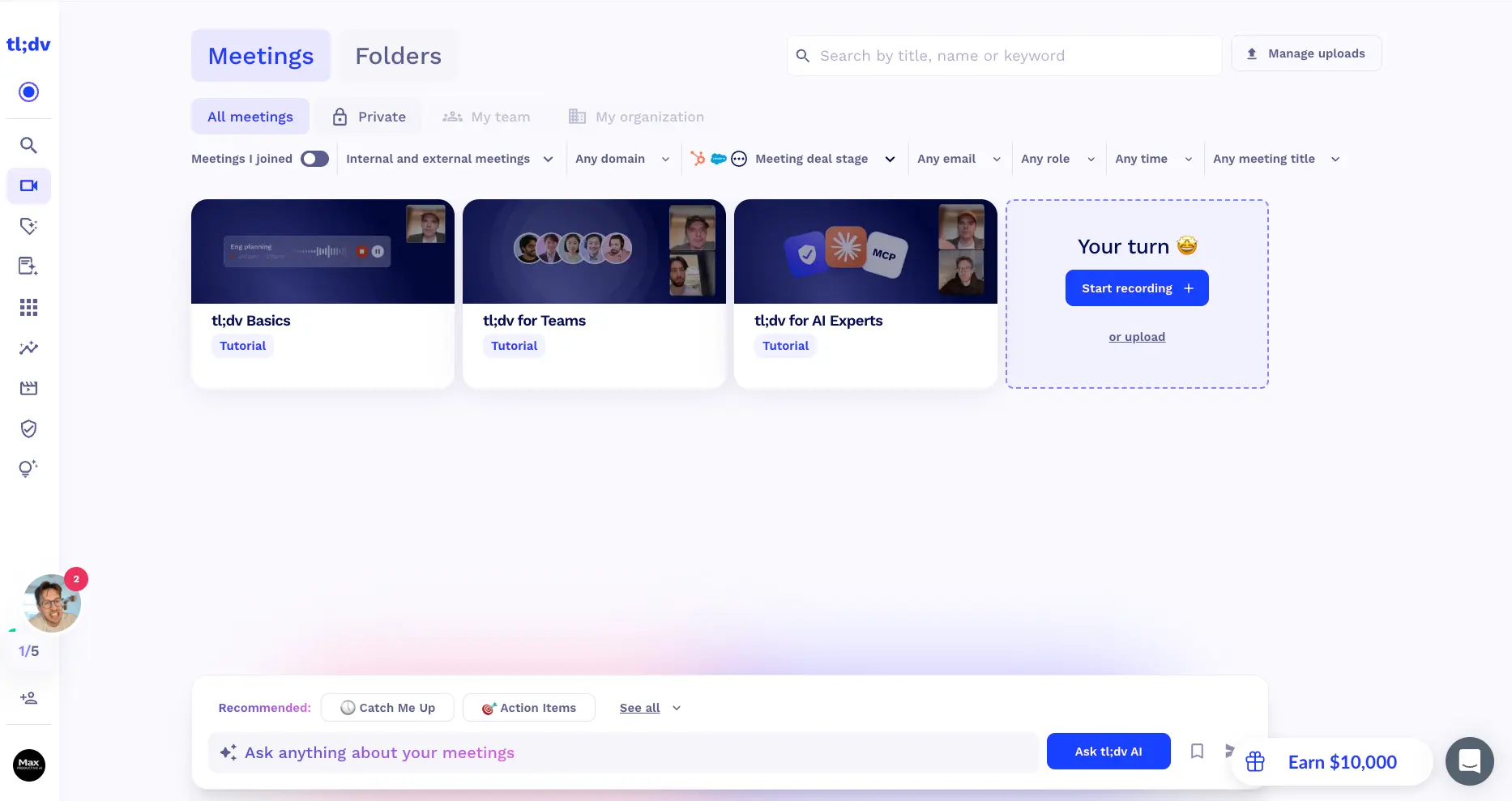
A Free Recorder With a Serious
Sales Brain Behind a Paywall
tl;dv stopped being "just a notetaker" a while ago. You can record and transcribe every call for free, and the AI notes are good. What makes it stand out is the layer above that: reports that read fifty meetings at once, digests that land in Slack every Monday, agents that update your CRM, and coaching built from real calls. For sales and customer success teams, it's one of the most capable tools we've looked at at this price. The trade-off is that the free plan meters AI notes hard, the Business tier costs real money per seat, and a security disclosure in August 2026 deserves a proper read before you roll it out company-wide.
✓ What We Like
- Free plan with unlimited recording and transcription
- Multi-meeting AI reports on a weekly or monthly schedule
- Bot-free recording through the desktop app
- CRM sync and 5,000+ integrations included on Pro
! Could Be Better
- AI notes stop after 10 meetings on the free plan
- Big jump from Pro ($18) to Business ($59) per user
- The August 2026 security disclosure is worth reading first
What Is tl;dv?
Where it came from, what it does in 2026, and how we went about this tl;dv review.
tl;dv is an AI meeting assistant made by a German company founded in 2020. The name stands for "too long; didn't view," and that was the original pitch: it recorded your Google Meet and Zoom calls so the people who skipped the meeting could jump to the parts that mattered. That recorder is still the heart of the product. What's changed is everything built around it. tl;dv now calls itself a meeting intelligence platform, and after spending time inside it, that doesn't feel like marketing inflation.
In day-to-day use it works like this. A notetaker joins your call, or the desktop app records quietly in the background. A few minutes after you hang up, you get a transcript with speaker names, a set of AI notes shaped by a template you've chosen, and timestamped highlights you can share as clips. So far, so familiar. Then you can ask a question across every meeting you've ever recorded, schedule a report that reads a month of customer calls and sends you the patterns, and have the notes land in Slack, HubSpot, Salesforce, or Notion without touching anything. On the Business plan, managers can score sales reps against MEDDIC, BANT, or SPIN using the calls themselves.
How We Evaluated tl;dv
We set up an account and went through the product screen by screen: the recording options, the meetings library, templates, AI reports, the integrations marketplace, and the new AI dashboards. We read tl;dv's own documentation and pricing pages and a lot of user feedback from 2025 and 2026. We didn't run a formal transcription accuracy test, so where we talk about note quality, we're passing on what users consistently report rather than quoting our own numbers.
Is it a lot of product? Yes. If your calendar is mostly internal syncs and one-on-ones, the coaching hub, deal-stage filters, and scheduled reports will feel like furniture you didn't order. Credit where it's due, though: the interface handles this well. The advanced tools live in the sidebar and stay out of the way, and the basic loop (record, read the notes, share them) is as simple as anything in the category. But make no mistake about who this was designed for. The pricing, the templates, and the roadmap all point at teams that spend their days on customer calls.
Who Is tl;dv Best For?
Sales, customer success, and founder-led teams that run a high volume of external calls and want to see patterns across them, not just notes from each one. It also suits anyone recording in several languages, since transcription covers 30+ out of the box. Individuals get a lot from the free plan as a recorder. The paid tiers pay for themselves in proportion to how many customer conversations you have.
Where does it sit among the tools you're probably also considering? Somewhere between the simple notetakers and the big conversation-intelligence platforms that charge enterprise prices. Otter.ai is smoother on live transcription. Fireflies.ai covers more meeting platforms. Fathom is kinder on the free tier. What tl;dv does that few of them match at this price is the multi-meeting layer: reports, dashboards, and AI agents that act on what was said instead of just writing it down.
See tl;dv in Action
Screenshots from our own account, in the order you'll meet these screens.
Recording Options: With a Bot or Without
Paste a link, sync your calendar, or install the desktop app for bot-free capture
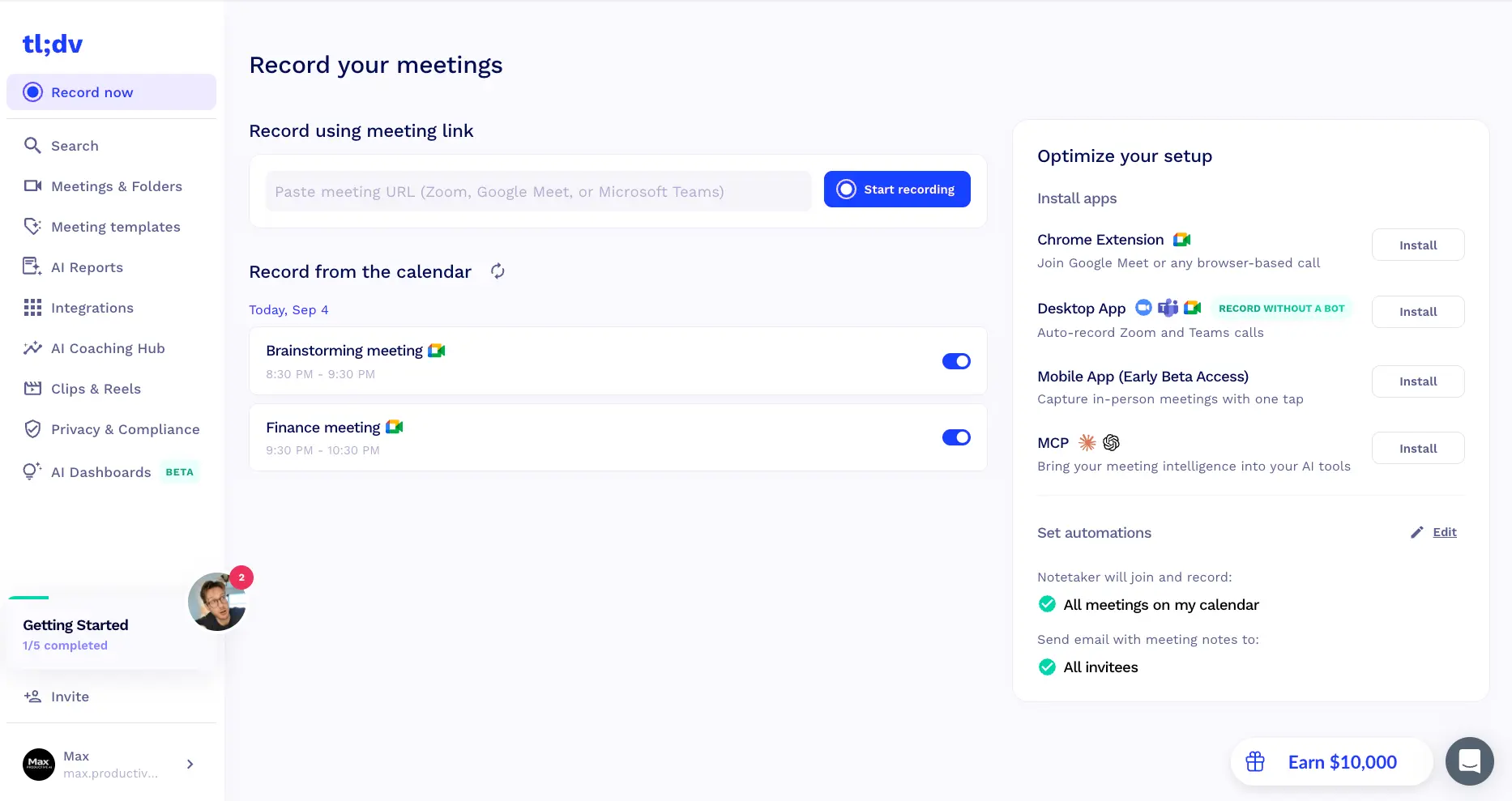
This is the first screen you see, and it lays out your four ways to record: paste a meeting link, let the notetaker join from your calendar, use the Chrome extension for Google Meet and other browser calls, or install the desktop app, which tl;dv labels "record without a bot." A mobile app in early beta handles in-person meetings, and there's an MCP install that connects your meeting data to Claude or ChatGPT. One thing to check on day one, because we nearly missed it: the default automations join every meeting on your calendar and email the notes to all invitees. Great for a sales team. Less great if your next call is a job interview. Switch it off if you'd rather decide meeting by meeting.
Meetings Library and Ask tl;dv AI
Every recording in one place, with filters that go well beyond title and date
The library splits meetings into private, team, and organization views, and the filter row is where tl;dv's sales roots show. You can narrow down by the participant's company domain, their role, and the CRM deal stage at the time of the call. Three short tutorial recordings are waiting there when you first log in, which is a nice touch. The bar at the bottom is the part we kept coming back to. "Catch Me Up" and "Action Items" are one-click shortcuts, or you type a question and get an answer drawn from every recording you have access to. Free accounts get a few of these prompts to try before the upgrade nudge appears.
Meeting Templates by Role
The AI notes follow a structure you pick, and you can rewrite it in plain English
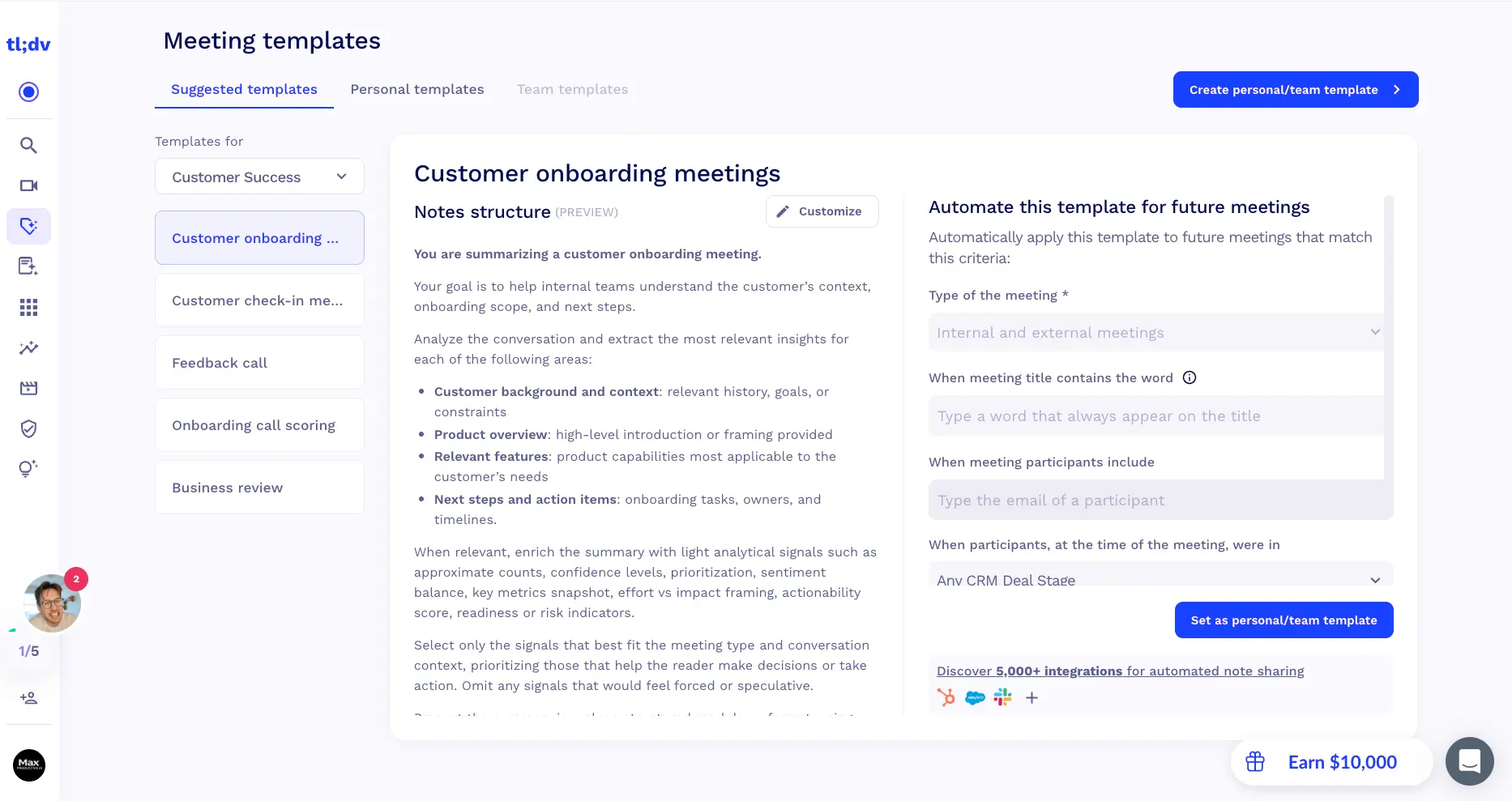
This screen was the pleasant surprise of the walkthrough. Templates are grouped by job (the Customer Success set covers onboarding, check-ins, feedback calls, onboarding call scoring, and business reviews), and when you open one, the "notes structure" is the actual prompt, written out in full. It tells the AI what kind of meeting it's summarizing, what to pull out, and which signals to add only when they're useful. Most tools hide this. Here you can read it, tweak a line, and save it as your own. The panel on the right applies a template automatically whenever a meeting title contains a word, a certain person is invited, or the participant sits at a given deal stage. Set it once and forget it.
Curious what tl;dv makes of your own calls?
Try tl;dv →Free plan • Unlimited recordings and transcriptsScheduled AI Reports Across Meetings
One digest, every week or month, summarizing dozens of calls at once
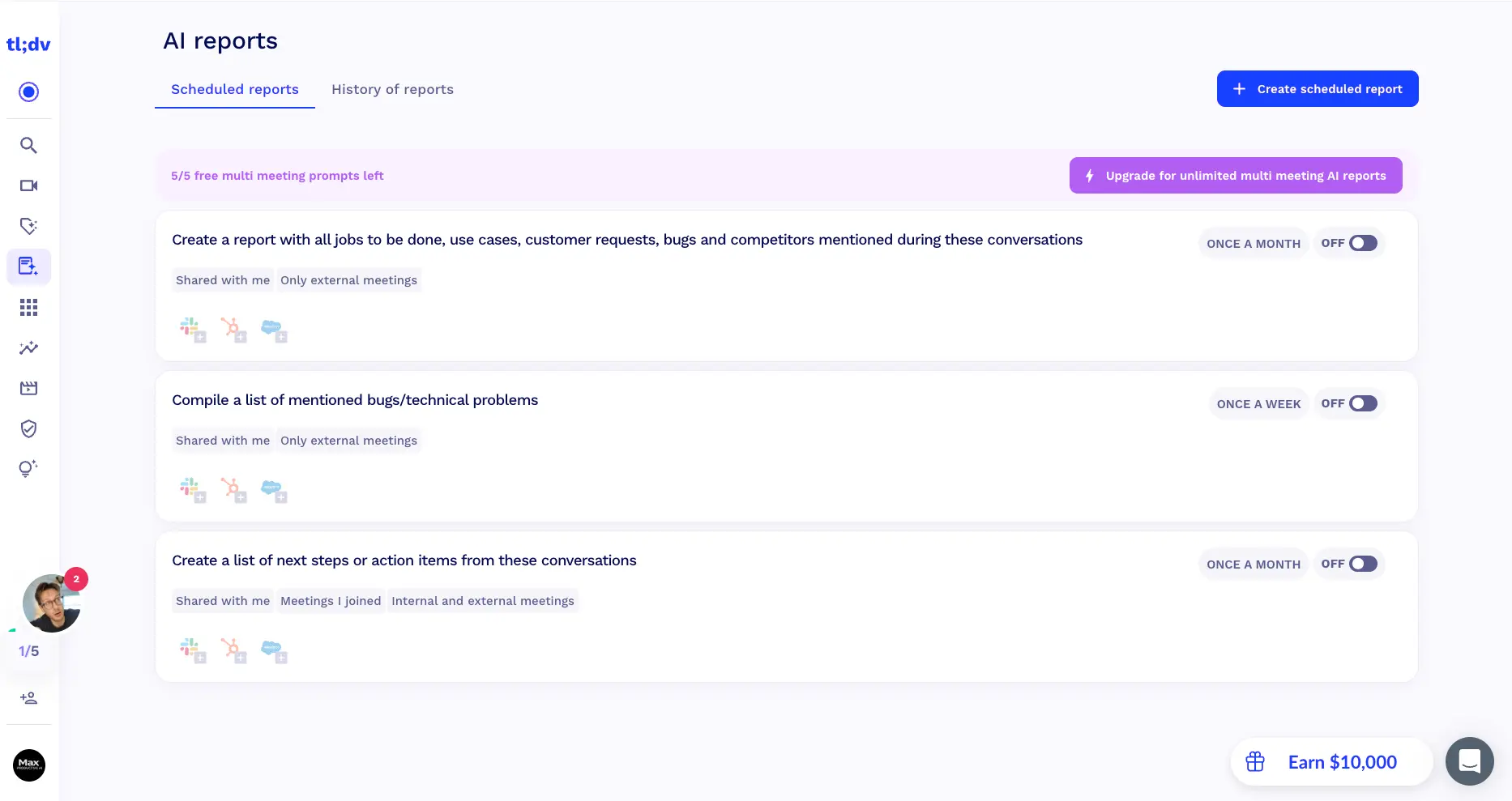
If one feature separates tl;dv from a plain notetaker, it's this one. A scheduled report is a question you ask of many meetings on a timer. The suggested examples say it all: "compile a list of mentioned bugs and technical problems" once a week, or "create a report with all jobs to be done, use cases, customer requests, bugs, and competitors mentioned" once a month. You choose which meetings count, how often it runs, and where the answer lands. For a product manager or a head of sales, that quietly replaces the Friday ritual of re-reading notes. The free plan includes five multi-meeting prompts so you can see whether the idea works for you before paying for unlimited.
Integrations Marketplace
Native connections to the tools your team lives in, with a developer layer underneath
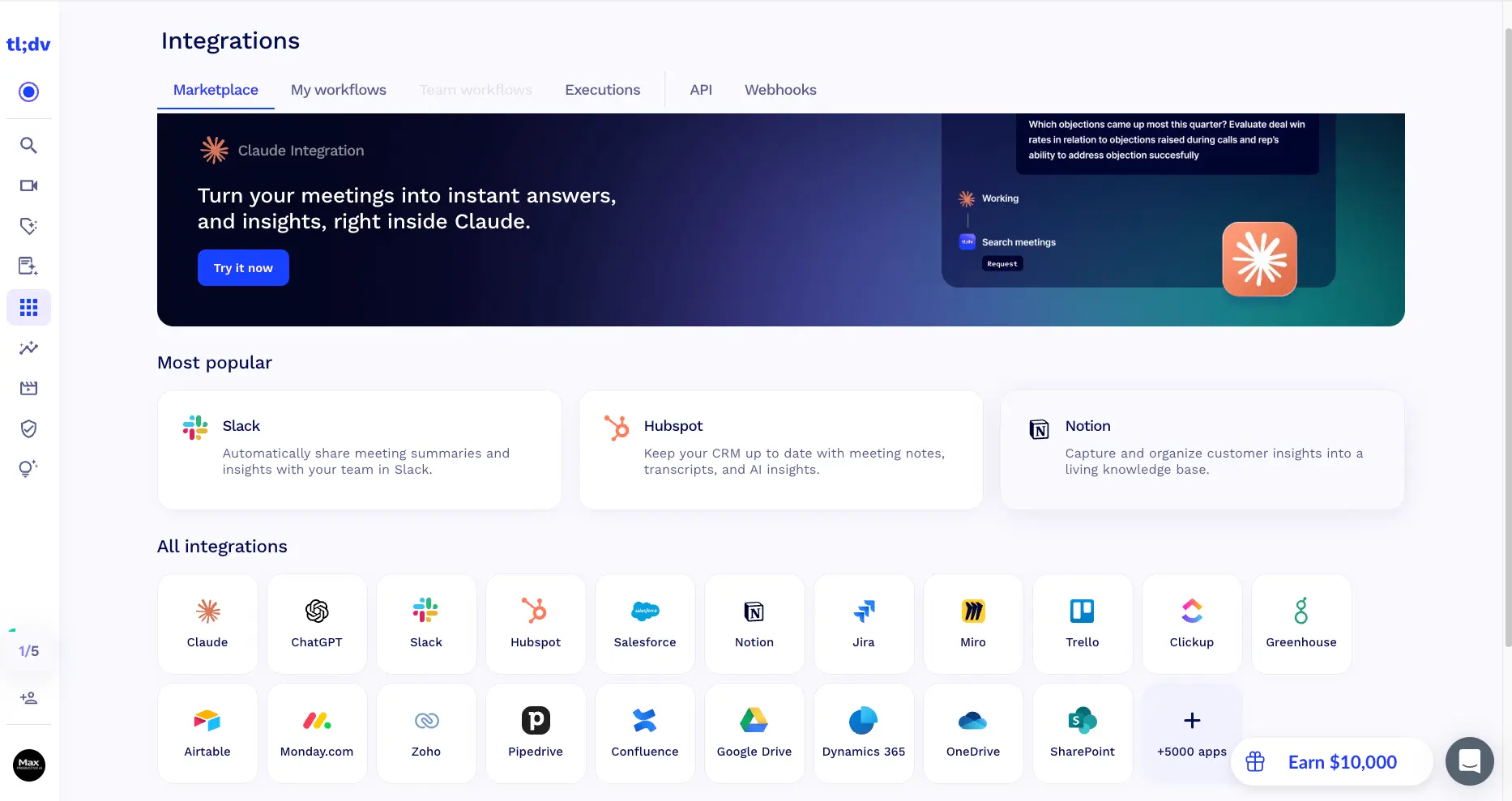
The marketplace lists Slack, HubSpot, Salesforce, Notion, Jira, Miro, Trello, ClickUp, Greenhouse, Airtable, Monday.com, Zoho, Pipedrive, Confluence, Google Drive, Dynamics 365, OneDrive, and SharePoint as first-party integrations, with a "+5,000 apps" tile that opens the Zapier route for the rest. Look at the tabs along the top, though: My workflows, Team workflows, Executions, API, Webhooks. That tells you how tl;dv expects to be used. Not just "send notes to Slack," but conditional workflows that fire after a call, and a log to check when one didn't. The Claude and ChatGPT integrations are new for 2026 and let you query your meetings from inside those assistants.
AI Dashboards (Early Beta)
Live views built from your meetings rather than from CRM fields
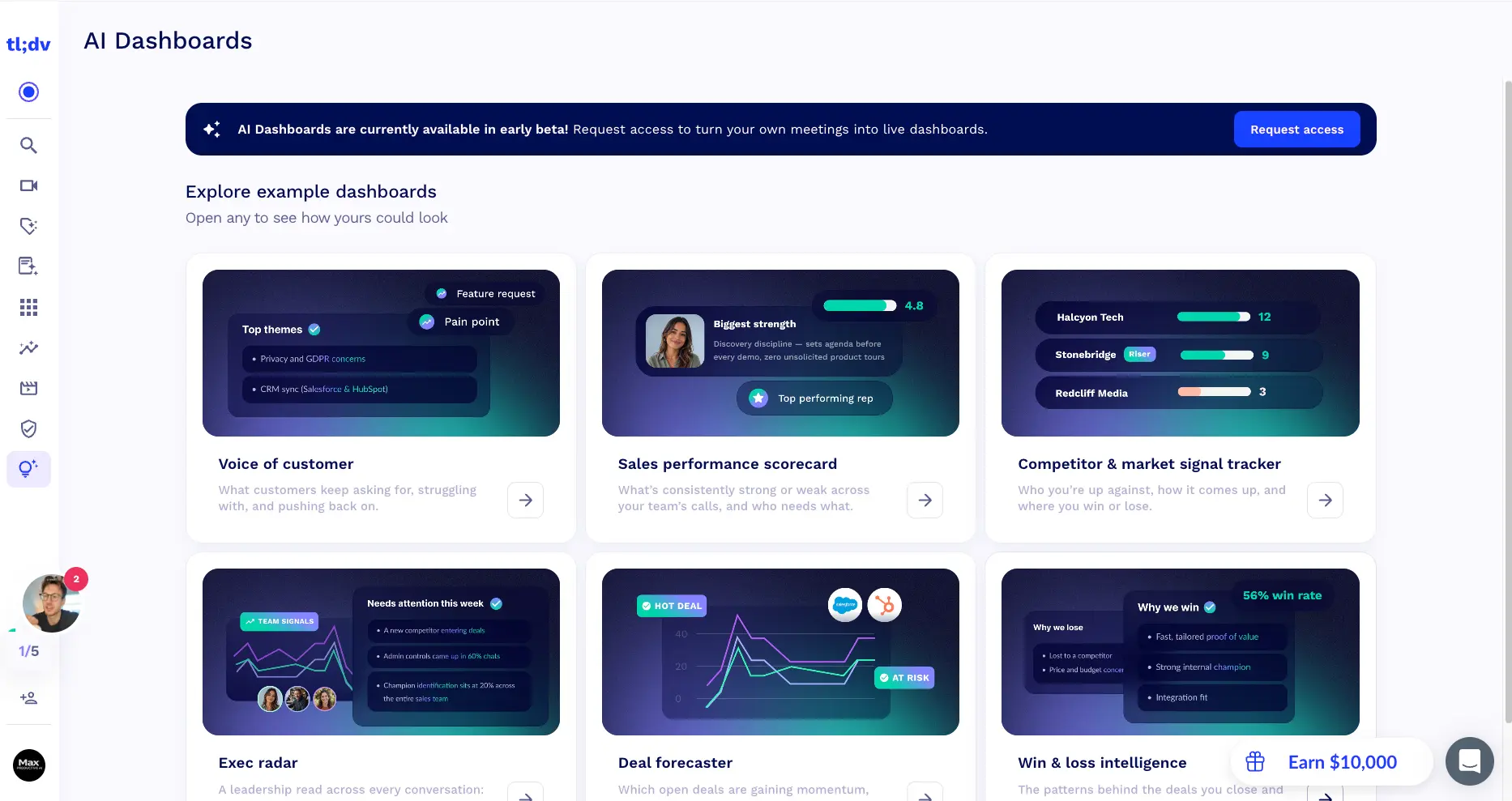
AI Dashboards were still in early beta when we looked, so what you're seeing are example boards: voice of customer, sales performance scorecard, competitor and market signal tracker, exec radar, deal forecaster, and win and loss intelligence. We couldn't fill them with our own data yet, so read this as direction rather than a finished feature. The direction is ambitious, and honestly a little exciting: instead of reps updating fields after each call, the dashboards listen to the calls and update themselves. If it ships the way the examples suggest, the Business price gets a lot easier to justify.
How tl;dv Works
From calendar sync to CRM update in four steps. The first two are easy. The last two are where you decide how much of it you want.
Connect Your Calendar and Choose How to Record
Sign in with Google or Microsoft and tl;dv pulls in your upcoming meetings, each with a toggle to record or skip. Leave the defaults and a notetaker bot joins every call. Want something quieter? The desktop app records Zoom and Teams straight from your machine with no bot in the participant list, and the Chrome extension does the same for Google Meet. For one-off calls you paste a link, and you can upload recordings made elsewhere.
The Call Gets Transcribed and Summarized
Within a few minutes of the meeting ending, tl;dv delivers a transcript with speaker recognition in any of 30+ languages, timestamped highlights, and AI notes shaped by whichever template applied. If you left the automation on, the notes go out by email to everyone invited. Users generally describe the notes as clear and well organized, with the usual caveat for this whole category: on calls with a lot of cross-talk, the AI sometimes credits a point to the wrong person. Skim before you forward anything that matters.
Ask Questions or Set Up Recurring Reports
This is where tl;dv moves beyond note-taking. Ask tl;dv AI lets you question one meeting or your entire archive ("which objections came up most in demos this quarter?"). Scheduled reports run the same kind of question every week or month and deliver the answer to Slack or your CRM. Worth knowing before you get attached: this layer is tightly metered on the free plan. If it's the reason you're here, budget for Pro from the start.
Push It Where Your Team Already Works
Notes and highlights can flow into Slack, Notion, Jira, or your CRM on their own. On paid plans, AI agents take it a step further: drafting the follow-up email, logging the call against the right deal in HubSpot or Salesforce, and creating tasks in Trello or Asana. Business-plan users add coaching on top, with reps scored against MEDDIC, BANT, or SPIN across their calls. Does a six-person startup need all of that? Probably not. For a team of twenty reps, it's the entire point.
Data, Privacy, and the August 2026 Disclosure
tl;dv is headquartered in Germany, works under GDPR, and states that customer meeting content isn't used to train its AI models. In August 2026, a security researcher disclosed that a missing database access rule had let authenticated users query meeting metadata (participant emails, meeting IDs, timestamps) belonging to other accounts. tl;dv said recordings and transcripts weren't reachable unless a user had already set them to public link sharing, and it fixed the specific flaw within 24 hours of the public disclosure. We're not going to pile on. The company responded, and this kind of flaw isn't unique to tl;dv. But a tool that listens to your customer calls has to earn trust, so if your conversations are sensitive, ask about their current security review process before you roll it out across the company.
A Word on Bot Etiquette
In bot mode, everyone on the call sees a "tl;dv" attendee join, and some people find that unsettling, especially prospects who weren't warned. The Pro plan lets you rename and rebrand the bot, which softens things, and the desktop app removes it altogether. Whichever route you take, the good habit is the same: tell people you're recording. Consent rules differ by country and by US state, and tl;dv publishes its own guidance on this, but the software won't ask permission for you.
tl;dv Features
What's in the box, and which plan each piece lives on.
AI Meeting Notes and Templates
Notes, action items, and timestamps after every call, structured by role-based templates you can edit like a prompt and apply automatically by meeting title, participant, or deal stage. This is the feature you'll use every day, and it's done well. Free accounts get it for 10 meetings; after that it's Pro.
Multi-Meeting AI Reports
Ask one question of fifty meetings and have it repeat weekly or monthly. Recurring bugs, feature requests, competitor mentions, next steps, delivered to Slack or your CRM. Few tools at this price do this. Fireflies.ai's AskFred is the closest comparison.
Ask tl;dv AI and Global Search
A chat box over your meeting archive, plus keyword search across every transcript. "Catch Me Up" and "Action Items" shortcuts cover the common cases without typing a word.
Bot-Free Desktop Recording
The desktop app records Zoom and Teams from your own machine with no visible attendee, and the Chrome extension covers Google Meet. Handy for sensitive negotiations and clients who dislike bots. It's a fair answer to Granola's approach, though Granola still leans harder into it.
CRM Sync and AI Agents
Two-way HubSpot and Salesforce integrations that log calls, fill deal fields, and move stages, plus agents that draft follow-up emails and create tasks after each meeting. Set it up once and forget about it. Overkill if your CRM is a spreadsheet.
Sales Coaching and Playbooks
Scores reps against MEDDIC, BANT, or SPIN, tracks objection handling and talk time, and rolls it all up into team analytics. This is what the Business tier is for, and it competes with dedicated coaching platforms. Whether it's worth $59 per rep depends on how many reps you have.
5,000+ Integrations, API, Webhooks, MCP
Native apps for Slack, Notion, Jira, ClickUp, Monday.com, Google Drive, and more, Zapier for everything else, and a developer layer for custom workflows. The MCP server plugs your meetings into Claude and ChatGPT. Full integration access starts on Pro.
Clips, Reels, and Multilingual Transcripts
Cut short shareable clips from any recording (perfect for sending a customer's exact words to the product team) and transcribe in 30+ languages, with notes translated into another language if you need it. Speaker recognition is included. If languages are your main concern, Notta goes wider.
One more thing that doesn't fit in a grid. The meetings library supports team and organization folders, so a manager can browse every customer call without asking anyone for links. Add the deal-stage filters and the archive becomes something you can navigate months later, which is exactly where a lot of notetakers quietly fall apart. And if your home office sounds like a construction site, tl;dv doesn't clean audio the way Krisp does; plenty of people run both.
See the full feature set on your own calls:
Try tl;dv →Free plan • Upgrade only if the AI layer earns ittl;dv Pricing Plans
Four plans, priced per user. Recording is free on all of them. You're paying for the AI.
Free
- ✓ Unlimited recordings and viewers
- ✓ Transcription in 30+ languages
- ✓ AI notes for 10 meetings
- ✓ A few Ask AI and multi-meeting prompts
- ✓ 5 file uploads
- ✓ Recordings kept for 3 months
Pro
- ✓ Unlimited AI notes and Ask AI
- ✓ Unlimited multi-meeting reports
- ✓ Scheduled recurring reports
- ✓ 5,000+ integrations and CRM sync
- ✓ Follow-up email drafter
- ✓ Custom bot name and appearance
- ✓ Unlimited uploads, recordings kept
Business
- ✓ Everything in Pro
- ✓ AI coaching and playbook scoring
- ✓ MEDDIC, BANT, SPIN frameworks
- ✓ Objection tagging and analytics
- ✓ Advanced CRM automation
- ✓ Team-wide reporting
Enterprise: custom pricing with SSO, SCIM provisioning, activity logs, and a dedicated success manager.
Pricing last verified September 2026. Visit tl;dv for current rates.
Is tl;dv Worth the Money?
The math is simple. If you sit in five or more external calls a week, the notes, follow-up drafts, and CRM logging on Pro will save you well over an hour, which pays for the plan several times over. If you have two meetings a week, the free plan does the job and you shouldn't feel pushed to upgrade. Business only makes sense once you're managing reps and want to coach from call data.
How does tl;dv pricing compare? On entry price it's mid-pack. Fireflies.ai starts at $10 per user, Otter.ai at around $8.33, MeetGeek at $9.99, and Granola's full Business tier costs $14. Fathom is the closest match at roughly $19 for Premium after its 2026 price rise. Where tl;dv pulls ahead is the free plan, which records without limits while most rivals meter minutes, and the Pro tier, which already includes scheduled reports and CRM sync that competitors save for higher plans. The jump to $59 for Business is the sore point. It's a fair price next to dedicated revenue-intelligence platforms, and a hard sell for a small team that just wanted coaching for two reps.
tl;dv Pros and Cons
The balanced view, after working through the product and reading a lot of user feedback.
✓ Pros
Most free notetakers meter minutes. tl;dv lets you record and transcribe as many meetings as you like at $0, in 30+ languages, and keeps them for three months. As a pure recorder with a searchable transcript, it's one of the better free options you'll find.
Scheduled reports and Ask tl;dv AI turn an archive into answers. Asking "what did customers complain about this month?" and getting a digest in Slack changes how a team works, not just how it takes notes.
The desktop app records Zoom and Teams without a visible attendee. That matters for client calls, HR conversations, and anyone who has watched a prospect side-eye the "notetaker" in the participant list. Not every bot-based tool offers this yet.
The notes structure is exposed as plain-English instructions, grouped by role, with rules to apply them automatically. A small design decision that gives you real control over output quality instead of hoping the AI guesses the format you wanted.
First-party apps for the main CRMs, project tools, and knowledge bases, Zapier for 5,000+ more, plus API, webhooks, workflow logs, and an MCP server for AI assistants. Pro includes all of it, which is unusual. Several competitors hold CRM sync back for their top tier.
AI agents that log calls and draft follow-ups, dashboards that build themselves from conversations, coaching from real calls. Even where features are still in beta, the direction is coherent, and the company ships often.
✗ Cons
Ten meetings of AI notes for the life of the account isn't much, and the three-month retention means old recordings disappear if you don't upgrade. The recording is free forever. The intelligence very much isn't. Go in with that expectation and you won't be disappointed.
Going from $18 to $59 per user (annual) is a big jump, and the coaching features it unlocks are the ones many sales managers actually want. Fathom's Business plan lands in the mid-$20s to low-$30s for a similar set, which makes tl;dv's top tier harder to justify for smaller teams.
In August 2026 a researcher found that a missing access rule exposed meeting metadata across accounts. tl;dv patched it within a day of public disclosure and says recordings and transcripts weren't reachable unless already shared publicly. Still, for a tool that hears your customer calls, this is a fair reason to ask questions before buying at scale.
Some users report the AI mixing up who said what on busy calls, and a smaller number mention glitches with recordings or exports. None of this is unique to tl;dv, and reviews are largely positive, but it isn't flawless. A quick skim of the notes before sharing them is still a good habit.
If your meetings are internal stand-ups and one-on-ones, deal-stage filters, playbooks, and revenue dashboards are clutter. The interface hides them reasonably well, but you're paying for a platform designed around sales calls.
The mobile app for in-person meetings was in early beta when we looked. Fireflies.ai and Otter.ai have more mature phone apps, so if you record a lot of face-to-face conversations, tl;dv isn't there yet.
tl;dv vs Alternatives
How tl;dv compares with the other AI meeting assistants we rate highly, and which one fits which job.
| Feature | Reviewed tl;dv | Fathom | Fireflies.ai | Granola | Otter.ai |
|---|---|---|---|---|---|
| Paid plans from | $18/user/mo | ~$19/user/mo | $10/user/mo | $14/user/mo | ~$8.33/user/mo |
| Free plan | Unlimited recording, 10 AI notes | Unlimited recording, limited advanced summaries | Minutes capped per month | Limited note history | 300 min/month |
| Bot-free option | ✓ Desktop app | ✓ Newer | ✗ | ✓ Core model | ✓ Desktop app |
| Languages | 30+ | Mostly English | Broad | Mostly English | 3 |
| CRM sync | HubSpot, Salesforce (Pro) | HubSpot, Salesforce (Business) | HubSpot, Salesforce, Pipedrive | HubSpot, Attio | HubSpot, Salesforce |
| Sales coaching | ✓ Business | ✓ Business | Analytics only | ✗ | ✗ |
| Multi-meeting AI | Reports + dashboards | Limited | AskFred | Limited | AI Chat |
| Best for | Sales and CS teams | Individuals, small teams | Multi-platform teams | People who type notes | Live transcription |
Which Tool Is Right For You?
tl;dv
ReviewedBest for: Sales and customer success teams that want more than notes: recurring reports across calls, CRM automation, and coaching, with a free recorder underneath so the whole team can start at $0. The multi-meeting layer and the integration depth on Pro are the reasons to pick it over a simpler notetaker.

Fathom
Best Free TierBest for: Individuals and small teams who want fast, accurate summaries and the most usable free plan in the category. Fathom's free tier records and summarizes without a meeting cap (advanced summaries are limited monthly), and its Business plan adds CRM sync and coaching for less than tl;dv charges. It's narrower on multi-meeting intelligence, but for most people that's the right trade.
Fireflies.ai
Widest CoverageBest for: Teams on Webex, Dialpad, or a mix of platforms, and anyone who wants the cheapest paid entry point at $10 per user. AskFred searches your whole archive, conversation analytics cover talk time and sentiment, and the mobile app is mature. The free plan meters minutes, so heavy recorders hit the wall sooner than on tl;dv.
MeetGeek
Integrations + AnalyticsBest for: Occasional users who want unlimited AI summaries on a free plan (3 hours of transcription a month) and a huge Zapier-powered integration list. Sentiment and engagement analytics are comparable to tl;dv's, and Pro starts at $9.99. Check the sharing settings carefully, as some users report meeting guests receiving emails they didn't expect.

Granola
Bot-Free by DesignBest for: People who take their own notes during calls and want AI to fill in the gaps afterward, with no bot ever joining. Granola runs on your desktop, listens to system audio, and enhances what you type. Business is $14 per user with HubSpot, Notion, and Slack integrations. It's Mac-first, and if you never type during meetings you'll get less from it than from tl;dv.
Notta
MultilingualBest for: Teams that work across languages. Notta transcribes in 58 languages, keeps two languages in a single bilingual transcript, and adds mind maps and a hardware recorder for in-person conversations. The free plan is the thinnest in this group (120 minutes lifetime), and there's little in the way of sales coaching, so it's a language-first choice rather than a tl;dv replacement for revenue teams.

Otter.ai
Live TranscriptionBest for: Anyone who values real-time transcription above everything else. Otter has years of polish on the live engine, a solid AI Chat across your history, and a low per-seat price at around $8.33. Language support is limited to English, French, and Spanish, and the free plan caps you at 300 minutes a month with a 30-minute limit per conversation. We've ranked the strongest Otter.ai alternatives if you're weighing a switch.
tl;dv FAQ
Should You Try tl;dv?
tl;dv is a strong AI meeting assistant with an unusually generous free recorder and a paid layer that goes further than most rivals: scheduled reports across meetings, CRM agents, editable templates, and a serious integrations marketplace. If your week is full of customer calls, it changes how you use them, not just how you remember them.
It isn't for everyone. The free plan's AI limits arrive fast, the Business tier is pricey per seat, and the 2026 security disclosure deserves a conversation with your IT team before a wide rollout. Solo users with lighter needs will likely be happier on Fathom, and people who dislike bots on principle should look at Granola. For sales and customer success teams, though, tl;dv earns its 4.2 and then some.
Our Recommendation
Start on the free plan and spend your ten AI-note meetings on real customer calls, not internal syncs, so you can judge the notes where they matter. Try a couple of multi-meeting prompts while you're at it. If the reports and CRM sync are what excite you, Pro at $18 is fair value. Only move to Business once you have reps to coach and enough call volume for the analytics to mean something.