
Granola AI
Granola is a meeting notepad, not a meeting bot. It listens from your own computer, merges the notes you type with the transcript, and hands you clean meeting notes with nobody extra on the call. If a bot in your client meetings is a deal-breaker, start here.
Try Granola →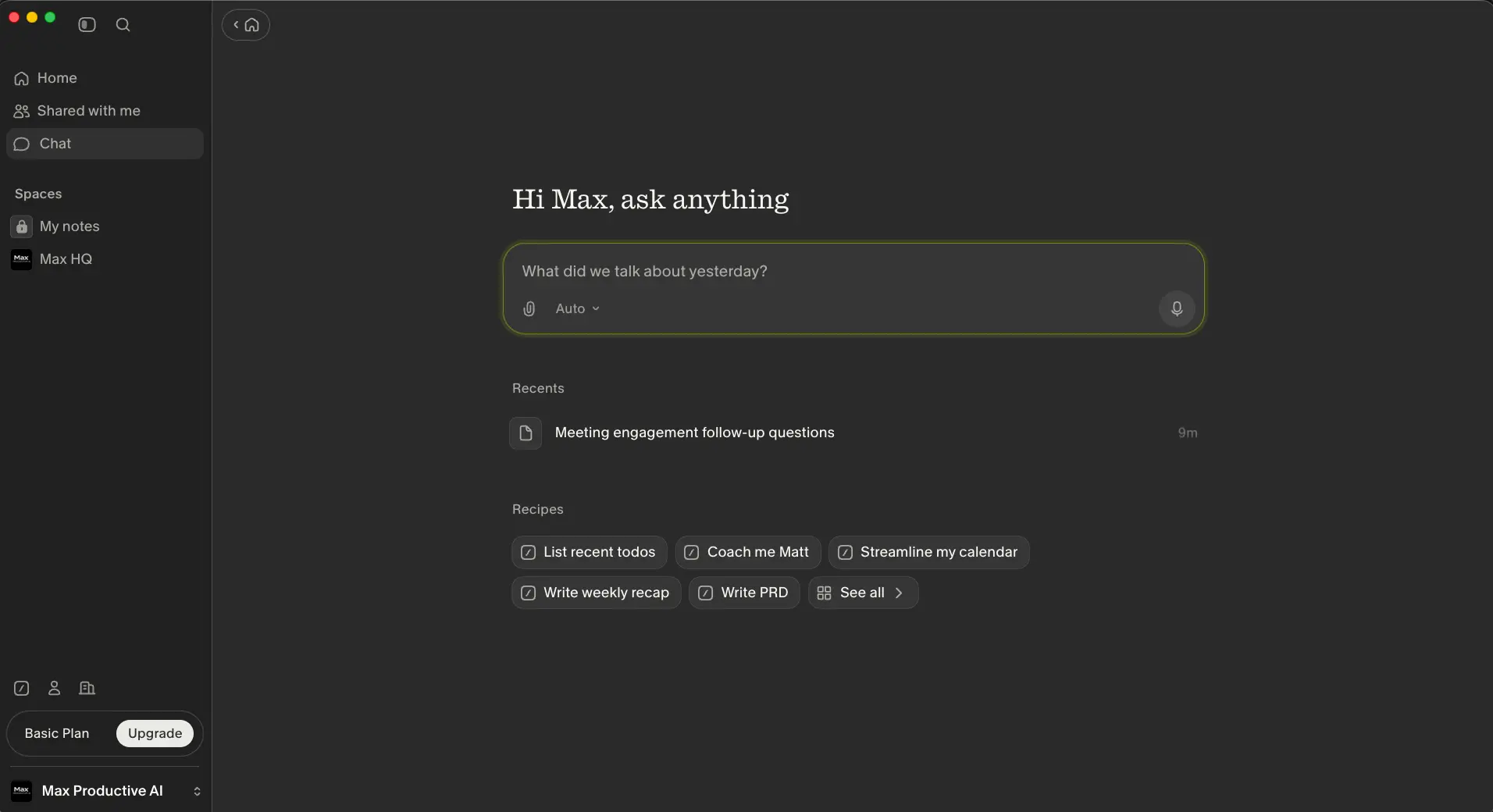
The Best Bot-Free Note Taker,
If You're Willing to Type
Granola made one decision early that the rest of the category is now copying: no bot. It records from your own machine, deletes the audio once it's transcribed, and turns your rough typing into notes you'd actually forward. The notes are among the best I've seen from any tool here. Business at $14 a month is fair, and the free plan is usable rather than a demo. The catch is baked into the design. Granola enhances your notes; it doesn't replace them. Sit silent through a call and you'll get a thinner result than Fathom or Fireflies would give you for free.
✓ What We Love
- Nothing joins the meeting, so it works on any platform, including ones that block bots
- Enhanced notes keep your words and the AI's additions separate
- No audio stored, SOC 2 Type 2, third-party AI providers barred from training
- Templates and shared Recipes cut repeat work on recurring meeting types
! Could Be Better
- Little value if you don't type during the call
- No audio playback and no web app; the desktop app has to be running
- AI training opt-out is a setting, not the default, outside Enterprise
What Is Granola AI?
An AI notepad that sits next to your meeting, not inside it. That distinction runs through everything else on this page.
Granola AI is a meeting note taker that works without a bot. You open the app before a call on Zoom, Google Meet, Microsoft Teams or anything else that plays through your speakers, and it transcribes what's said by capturing your microphone and your computer's system audio. While the call runs, you type whatever you'd normally type: half sentences, names, a number someone mentioned. When the meeting ends, Granola combines your notes with the transcript and produces a structured, editable version. Your original notes stay visible on their own tab, so you can always see what you wrote versus what the AI added.
That's a different job from what Otter AI, Fireflies AI or tl;dv do. They send a participant into the meeting, record it, and hand you a transcript plus a summary you had no part in writing. Granola calls itself a notepad rather than a note taker, and the wording isn't marketing. The product assumes you're still doing some of the work. In return, nobody on the call sees a "Granola Notetaker" join, the recording never exists, and the notes read like a colleague wrote them, not like a machine summarising a transcript.
The company has grown quickly on that idea. It raised $125 million in March 2026 at a $1.5 billion valuation, and the app has expanded from a Mac-only tool into Windows, iOS, Android and an Apple Watch companion. Along the way it added an AI chat that searches across all your meetings, a template library for specific meeting types, a shared "Recipes" library of prompts, and integrations with Notion, Slack, HubSpot and Zapier on the paid tier. One thing has changed since the early days, though. Skipping the bot is no longer a Granola-only trick. Fathom is testing a bot-free mode on Mac, and Krisp has always captured at the audio layer. So the case for Granola now rests on the notes themselves and the workflow around them, not just on what's missing from the call.
How We Evaluated Granola
For this Granola AI review I set up a free Basic account on the Mac app, ran the onboarding demo meeting with the notepad open, generated enhanced notes from it, and spent time in the Ask anything chat, the note templates and the Recipes library. Pricing comes from Granola's own plans page. Accuracy figures and the wider user sentiment come from independent hands-on reviews rather than a controlled test of my own; as with every tool in this category, nobody has published a fair, like-for-like accuracy benchmark, so treat those numbers as indicative.
Who is it for, then? People who live in back-to-back calls and already scribble notes: consultants, founders, recruiters, account managers, product people. If you're the one who sends the follow-up email after a client call, Granola will make that email faster and better. It's a poor fit if you want a fully passive recorder, if you need the audio for compliance or disputes, or if your job is transcribing files rather than attending meetings. For that last group, Notta or HappyScribe are built for it and Granola isn't.
See Granola in Action
Screenshots from our Basic account on the Mac app, from the home screen through to templates and Recipes.
Home Screen and Ask Anything
One search bar across every meeting, recent notes below, Recipe shortcuts underneath
Granola's home screen is unusually sparse for this category. There's no dashboard of minutes used, no upcoming-meetings widget begging for attention. Just a search box that asks "What did we talk about yesterday?", your recent notes, and a row of Recipes: list recent todos, write a weekly recap, and a few shared by other users. Spaces on the left split private notes from shared folders, which is how teams work together on the free plan. The Basic Plan label sits in the corner with an Upgrade button, and that's the only nudge you'll see. After a week of Notta's three-times-per-screen trial prompts, that restraint was a relief.
Taking Notes During a Meeting
Video on the left, Granola's notepad on the right, no bot anywhere on the call
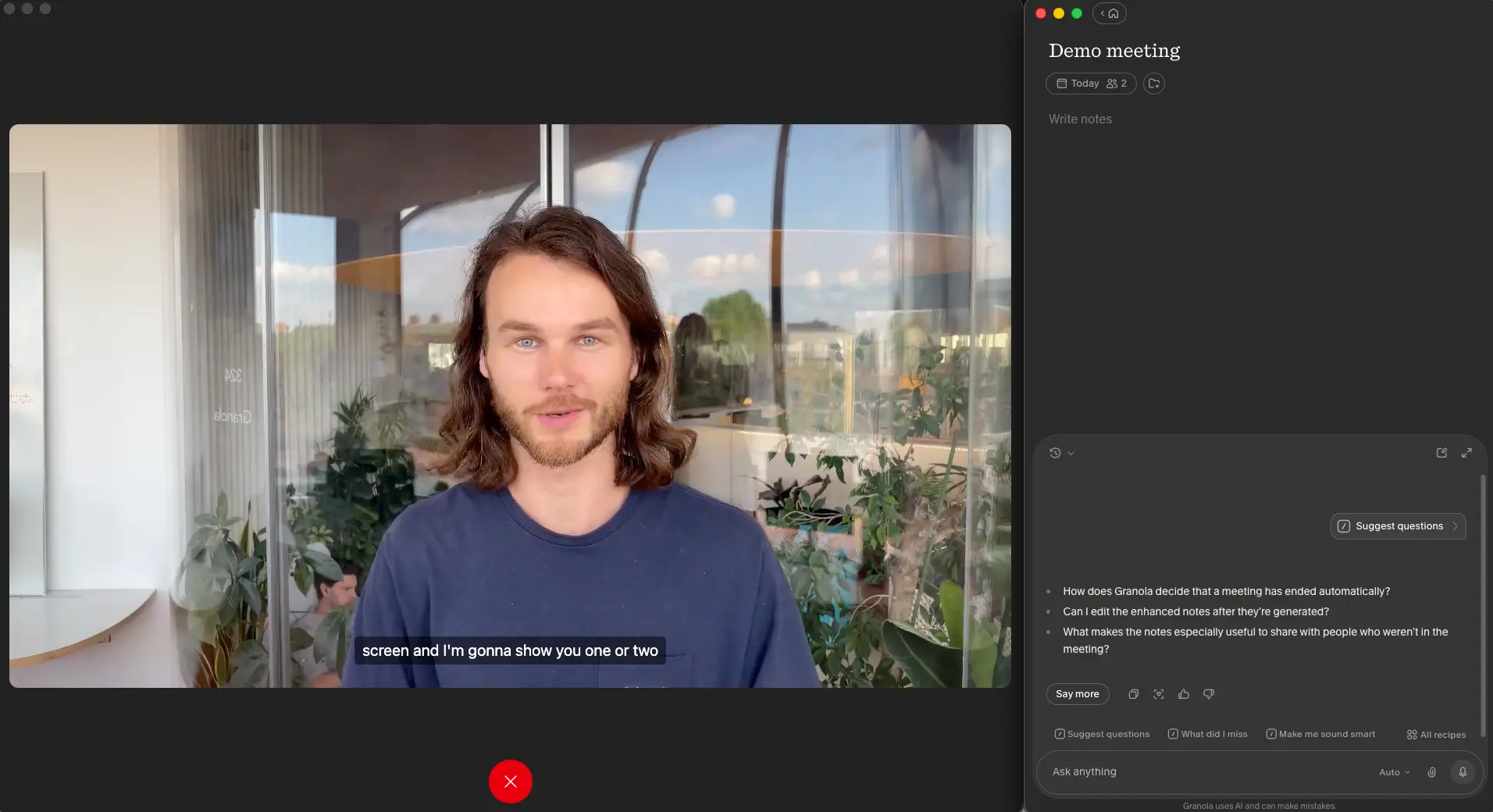
This is Granola's demo meeting, a video walkthrough the app plays during onboarding so you can see the workflow before a real call. The notepad on the right is a plain text editor. There's no transcript scrolling past, no captions, nothing to distract you. Below it sits the chat, and this is where the mid-meeting value lives. "Suggest questions" produced three sensible follow-ups based on what had been said so far, "What did I miss" catches you up after a bathroom break, and "Make me sound smart" does what it says. There's a small footer line under the chat: "Granola uses AI and can make mistakes." They mean it. More on that under accuracy.
Enhanced Notes After the Call
Your notes plus the transcript, rewritten into headed sections you can edit and share
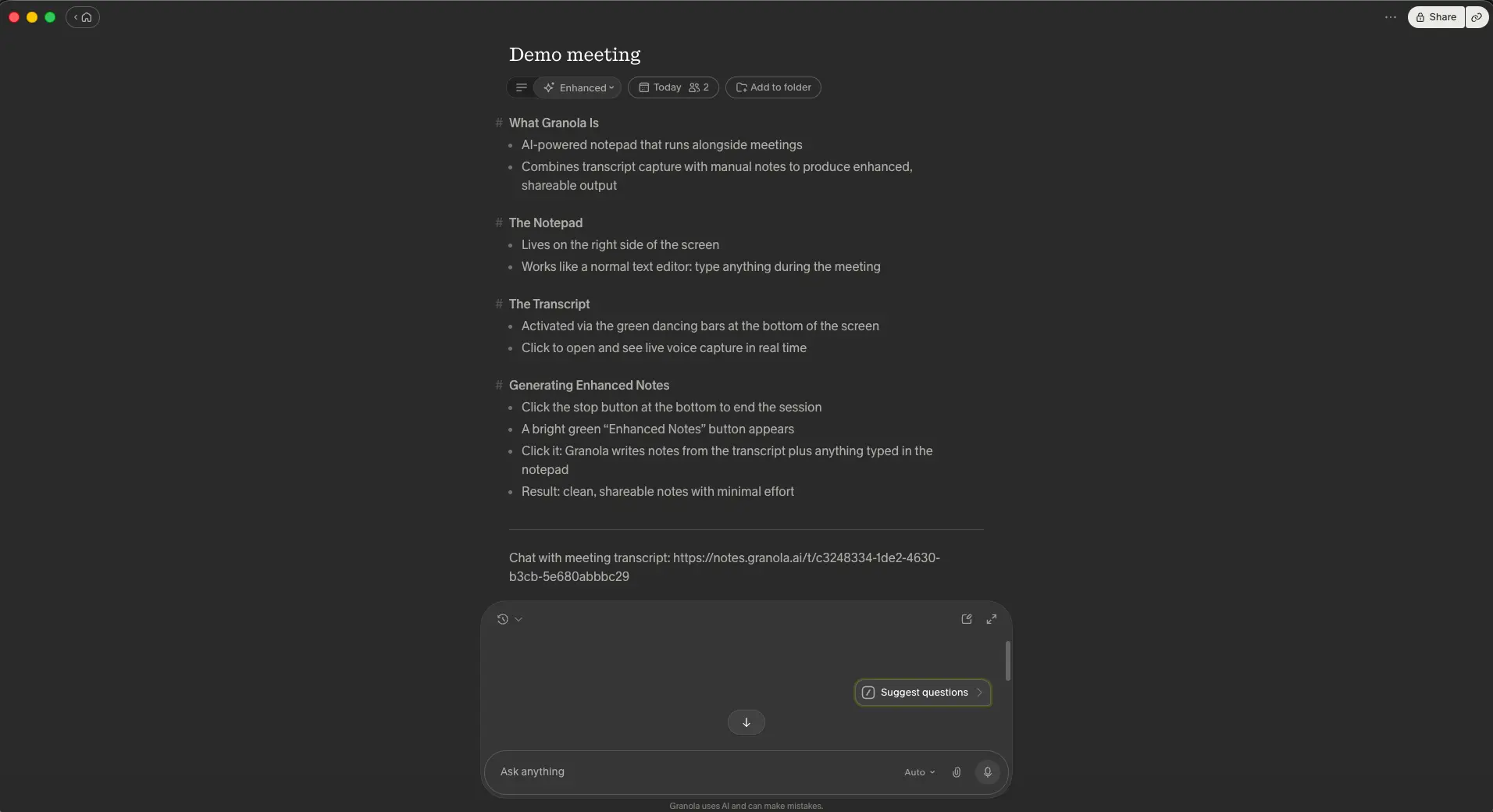
Here's the payoff. Stop the session, click the green "Enhanced notes" button, and Granola rewrites the meeting into headed sections with short bullets. What I like about the output is what it leaves out. No "the participants discussed", no padded summary paragraph, no action items invented to fill a template. The Enhanced dropdown at the top switches back to your raw notes at any time, so the AI never overwrites what you wrote. A "Chat with meeting transcript" link at the bottom opens the full text if you need a quote. Share creates a link that people outside Granola can read. Is it perfect? The section headings can be generic on short meetings, but on a 45-minute client call this is the kind of note I'd send without editing.
Want to see what Granola does with your own notes?
Try Granola →Free Basic plan • No credit card requiredNote Templates by Meeting Type
Pre-built structures for sales, leadership and investor meetings, plus your own
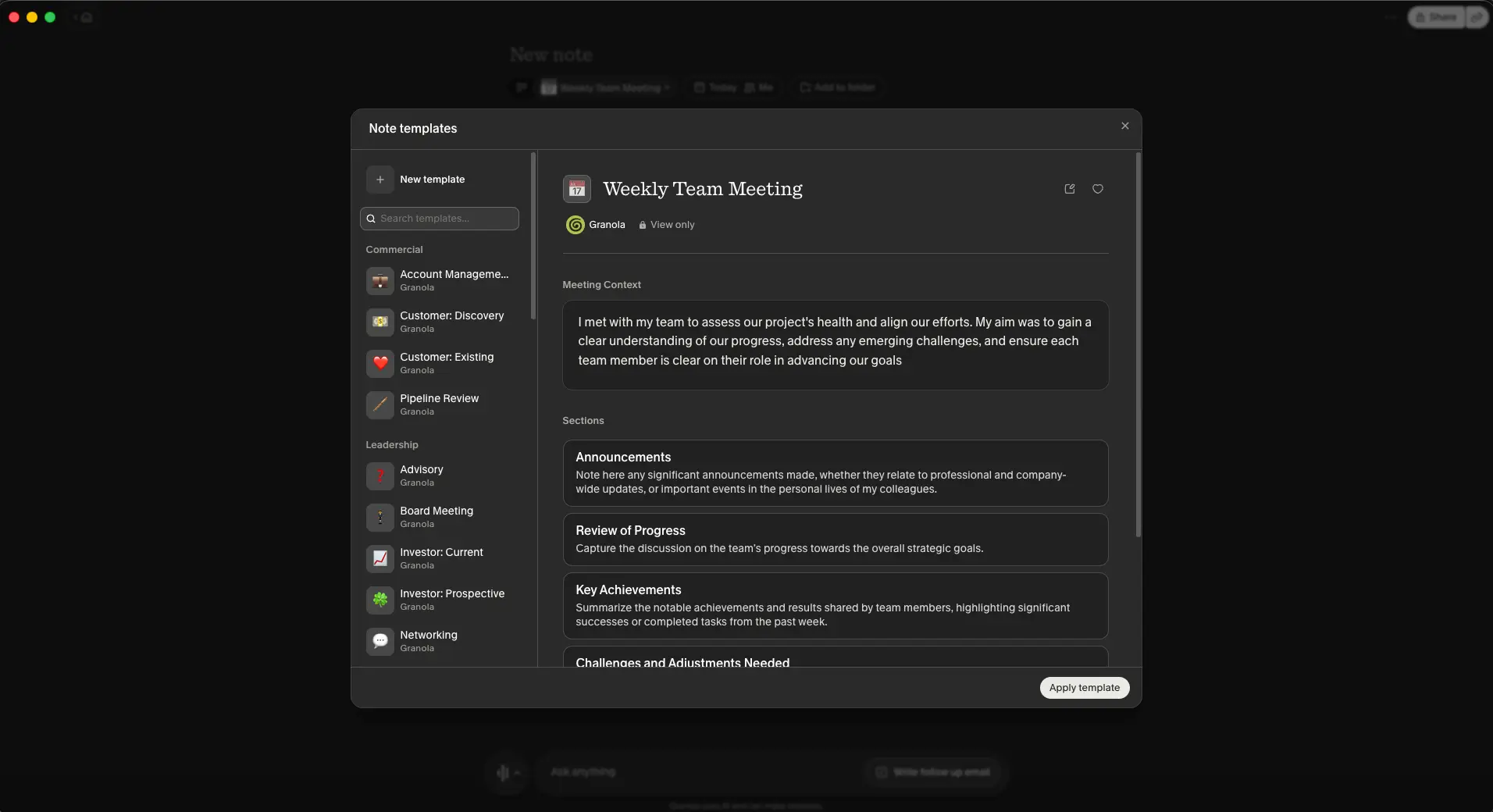
Templates tell Granola what shape the enhanced notes should take. The library is grouped by job: Commercial covers account management, customer discovery, existing-customer check-ins and pipeline reviews; Leadership covers advisory, board, current and prospective investor meetings, and networking. Open one and you'll see a "Meeting Context" paragraph describing the purpose of the meeting and a list of sections, each with a plain-English instruction for what to capture. In other words, a template is just a prompt with a name, and you can write your own. For a consultant running the same discovery call thirty times a quarter, this is worth more than any summary feature.
Recipes Library
Saved prompts you can run on one meeting or across all of them, shared by other users
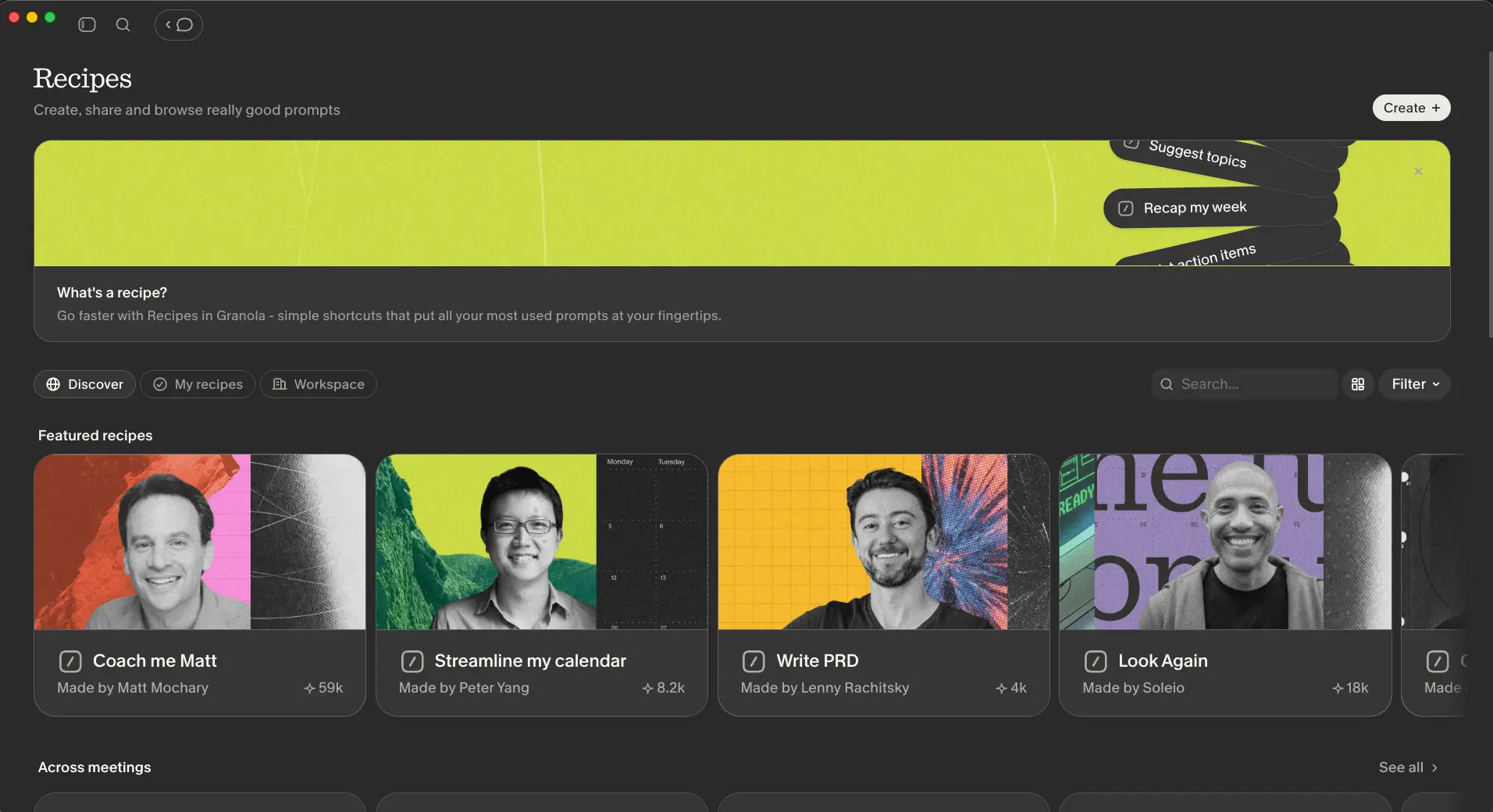
Recipes are Granola's answer to the "type the same prompt again" problem. A recipe is a saved prompt with a name and a button. Some are built in, like recap my week or list action items. Others come from the Discover tab, where users publish theirs: a coaching recipe from an executive coach with 59,000 uses, a product-requirements-doc recipe from a well-known product newsletter writer, a "Look Again" recipe from a designer. You can create your own and share them with your workspace. On paper it's a minor feature. In practice it turned the chat from something I occasionally remembered to use into a row of buttons I press after every call.
How Granola Works
Four steps from a calendar invite to shareable notes, with you doing the middle one.
Open Granola Before the Call
Connect your calendar and Granola creates a note for each meeting automatically, or hit New note for an ad-hoc call. Start the session and the green audio bars at the bottom of the window confirm it's listening. Nobody on the call is notified and nothing joins the roster, which means it works on Zoom, Google Meet, Teams, Webex, a phone call on speaker, or a conversation across a table. One constraint: the desktop app has to be running on the machine playing the audio. There's no web version and the mobile app is for in-person conversations, not for capturing a video call on your laptop.
Type Notes While It Transcribes
This is the step that decides whether Granola works for you. Type whatever you'd type anyway: a name, "pricing objection", "follow up on Q4 budget". The transcript builds silently in the background and you can open it if you need to, but the design pushes you to stay in the conversation. Pick a template first if the meeting has a shape, and use the chat mid-call for questions to ask or a catch-up on what you missed. Sit there typing nothing and you'll still get notes, just noticeably thinner ones than a bot-based tool would produce.
Generate Enhanced Notes
Stop the session and click Enhanced notes. Granola merges your typing with the transcript, applies the template if you chose one, and produces headed sections with bullet points. Your raw notes are preserved under their own tab. Edit anything, add a line the AI missed, and the version you share is the version you approve. Independent testing puts transcription accuracy at roughly 90 to 92 percent in a quiet room with clear speakers, ahead of Otter in the same test, but speaker attribution gets shakier once a call goes past three or four people. And because the audio is discarded, you can't go back and listen to a line you're unsure about.
Ask, Share, Push
The chat panel answers questions about this meeting or every meeting you've had: what a client said about pricing two calls ago, which todos are still open, who owns what. Run a Recipe to draft a follow-up email or a weekly recap. Share a link, drop the note into a shared folder, or, on Business, send it to Notion, Slack, HubSpot, Attio or Affinity, or trigger a Zapier flow. Granola also supports MCP, so other AI tools can read your notes with your permission. What it doesn't do on its own is create tasks in your task manager. That still goes through Zapier or your own hands.
No Bot Doesn't Mean No Consent
Granola's own guidance is to tell participants you're using it, even though nothing visible joins and no recording is kept. I'd go further: treat it exactly as you'd treat a recorder. Recording-consent laws in many places apply to capturing a conversation regardless of whether a bot did the capturing, and a client who finds out afterwards won't care about the technical distinction. Bot-based tools like Notta post a disclosure line in the meeting chat for you. With Granola, that's on you.
Security and Privacy Notes
Granola is SOC 2 Type 2 certified, describes itself as GDPR-aligned, encrypts data in transit and at rest, and contractually stops its AI providers (it names OpenAI and Anthropic) from training on your data. Two things to check before a team rollout. First, opting out of Granola's own model training is a switch in your settings on Basic and Business; it's only the organization-wide default on Enterprise. Second, Granola doesn't offer a HIPAA agreement and doesn't hold ISO 27001, so it isn't the tool for clinical or heavily regulated work. For everyone else, the no-audio-retained design is a real advantage: there's simply less to leak.
Granola Meeting Notes: Key Features
What's on the free plan, what needs Business, and where the design choices bite.
Bot-Free Capture
The reason Granola exists. It records your mic and system audio on your own device, so it works with any platform, including corporate setups that block third-party bots, and nobody sees an extra participant. The trade-off is that your laptop is the recorder. Close the lid, join from your phone, or forget to open the app, and there's no note.
Enhanced Notes
Your typed notes plus the transcript, rewritten into headed sections. Reviewers who've put Granola next to Fathom, Fireflies and Otter tend to rate its notes the highest of the group, and having used all four, I'd agree. They read like notes, not like a summary of a transcript. Your raw version is always one click away.
Ask Anything Chat
Ask a question about one meeting or across all of them. "What did the client say about timing?" "Which todos from last week are still open?" Included on the free plan, which isn't true of every rival's chat feature. Business unlocks the more capable AI models behind it.
Note Templates
Commercial and Leadership libraries out of the box, each template built from a context paragraph and instructed sections. Write your own for the meetings you run on repeat. This matters more than it sounds. Most generic AI notes are generic because the tool had no idea what kind of meeting it was listening to.
Recipes
Saved prompts with a button: follow-up email, weekly recap, action items, or anything you write yourself. Browse a public library, share within your workspace. It's the feature that got me using the chat daily instead of once a week.
Shared Folders and Spaces
Private notes stay private; shared folders put team meetings in one place. Available on the free plan too, so a small team can collaborate without everyone paying. Business adds consolidated billing, and Enterprise adds the admin controls you'd expect at that price.
Integrations, MCP and API
Notion, Slack, HubSpot, Attio, Affinity and Zapier, plus MCP so tools like Claude or ChatGPT can read your notes through a permissioned, read-only connection, and a personal API. All of it needs Business. Fewer native connectors than Fireflies AI, but the MCP route is more forward-looking than most.
Mac, Windows, iOS, Android, Watch
Mac and Windows for video calls, phone apps for in-person meetings and calls, and a Watch app to start a note from your wrist. The Windows app arrived later than Mac and the mobile apps later still, so if you were put off by the Mac-only days, that objection has expired. The missing piece is a web app, and I don't expect one given how the capture works.
Two caveats on the feature list. First, languages. Granola supports transcription and notes in multiple languages on every plan, but its coverage is nowhere near Notta's 58 or MeetGeek's hundred-plus, and accuracy outside English hasn't been independently tested to the same degree. If your calls switch between French, Arabic and English mid-sentence, test it before you commit. Second, the paid tier is where the workflow features live. The free plan is fine for one person taking notes; the moment you want history beyond a month, integrations or better models, you're paying per seat.
Granola AI Pricing
Three plans and no annual discount. Simpler than most, with one thing to double-check on the free tier.
Basic
- ✓ AI-enhanced meeting notes
- ✓ Ask anything chat
- ✓ Templates and Recipes
- ✓ Shared folders
- ✓ Multi-language support
- ✗ Only the last 30 days of history visible; no integrations
Business
- ✓ Unlimited note history
- ✓ Advanced AI models
- ✓ Notion, Slack, HubSpot, Attio, Affinity, Zapier
- ✓ MCP and personal API access
- ✓ Consolidated team billing
- ✓ Everything in Basic
Enterprise
- ✓ Single sign-on
- ✓ Org-wide AI training opt-out
- ✓ Admin controls and auto-deletion policies
- ✓ Enterprise API
- ✓ Priority support
- ✓ Everything in Business
Free tier: Granola describes Basic as unlimited notes with 30 days of visible history; some reviews report a 25-meeting lifetime cap instead. Confirm on the pricing page
Enterprise: Typically for larger teams; SSO is where it becomes necessary
Pricing last verified September 2026. Visit Granola for current rates.
Is It Worth the Money?
At $14 a month, someone in forty calls pays about 35 cents per meeting for notes that need little or no editing. If writing up a client call normally costs you fifteen minutes, one week of meetings pays for the year. The maths gets worse if you only have a handful of calls a month, in which case the free plan probably covers you anyway.
The free plan deserves its own paragraph, because it's the opposite of Notta's. Where Notta caps every conversation at three minutes, Granola lets you take notes on real meetings without limits, and only hides the older history. On my Basic account the sidebar shows the plan name and an Upgrade button, with no meeting counter anywhere, which matches the 30-day version of the story rather than the 25-meeting one. If you're a solo user with a light load, you may never need to pay. The tension appears when you want to search a conversation from two months ago, and that's exactly when the Business plan starts looking reasonable.
Against the competition, the picture depends on how you'd bill. Paid monthly, Business at $14 sits below Fathom Premium ($20), Fireflies Pro ($18) and Otter Pro ($16.99). Paid annually, those rivals drop to $16, $10 and $8.33 respectively, and Granola stays at $14 because there's no annual rate to drop to. MeetGeek Pro at $9.99 and Krisp Core at $8 undercut it either way. So Granola is neither the bargain nor the premium option. You're paying a mid-range price for note quality and a bot-free workflow. I'd have liked to see an annual plan for people who commit, and I suspect one will turn up eventually.
Detailed Pros & Cons
The full picture, including the parts Granola's own site leaves out.
✓ Pros
Nothing joins the call, so there's no awkward "who's Granola Notetaker?" moment, no admin blocking the bot, and no platform it doesn't support. For client-facing work this often decides whether you use a note taker at all, or leave it off for that one sensitive call and lose the notes. Fathom and MeetGeek now offer bot-free modes too, but Granola was built this way from day one and it shows in how little setup there is.
The enhanced notes are the best-structured output I've seen in this category. Because they start from what you typed, they reflect what mattered to you, not what an algorithm thought was frequent. Reviewers testing it against Fathom, Fireflies and Otter keep landing on the same conclusion, and it's the main reason to pay for Granola over a cheaper bot-based tool.
Audio is transcribed and deleted. There's no library of recordings sitting on a server, which simplifies privacy conversations with clients and with your own legal team. Add the certification and the contractual bar on AI providers training on your data, and Granola's privacy setup is stronger than most rivals at the same price.
Unlimited meetings, AI chat, templates and shared folders without a card. That's enough for a solo consultant to run for months. Compare Notta's three-minute cap, tl;dv's ten lifetime AI notes or Krisp's seven-day trial, and Granola's free tier is one of the fairer ones around.
If you run the same type of meeting over and over, a template plus a follow-up Recipe turns each one into a two-click write-up. It doesn't demo well. A month in, it's the thing you'd miss most.
Mac, Windows, iOS, Android and Apple Watch. For a long stretch Granola was Mac-only and that alone ruled it out for a lot of teams. That's no longer a reason to skip it.
✗ Cons
Granola enhances your notes. Give it nothing and you get a generic summary that Fathom would match for free. If you never open a notepad in a meeting, or you want to record and forget, you'll be disappointed. Better to know that now than a month in.
The privacy benefit has a cost. When the transcript says something odd, there's no recording to check it against. For a disputed figure in a negotiation, or any situation where you might need to prove what was said, that's a real gap. Bot-based tools keep the audio; Granola doesn't, by design.
The app must be open on the machine where the call plays. Join a meeting from a browser on a locked-down work laptop where you can't install software, and Granola can't help. The mobile apps are for in-person conversations, not a substitute for the desktop capture.
With two or three people, attribution is reliable. Beyond that, extended testing by reviewers found it starts to muddle who said what, and without audio you can't fix it by listening back. Fine for client calls and 1:1s; less good for a ten-person workshop.
On Basic and Business you have to switch off model training in settings yourself; only Enterprise makes it the org-wide default. Combined with no HIPAA agreement and no ISO 27001, that puts Granola outside regulated healthcare and some enterprise procurement lists. Not a scandal, but something a team lead should know before rolling it out.
The monthly price is fair, but it adds up to $168 a year with no way to bring it down, while most rivals knock 30 to 50 percent off for an annual commitment. And every integration, including Notion and Slack, sits behind that paywall. Notion users in particular will want Business from day one.
Granola vs Alternatives
How the Granola note taker compares with the tools people shortlist alongside it.
| Feature | Reviewed Granola | Fathom | Otter AI | Fireflies AI | Krisp | MeetGeek |
|---|---|---|---|---|---|---|
| Entry Paid Plan | $14/mo (monthly only) | $16/mo annual | $8.33/mo annual | $10/mo annual | $8/mo annual | $9.99/mo annual |
| Free Plan | Unlimited notes, 30-day history | Unlimited recording, ~5 advanced summaries | 300 min/mo, 30 min/conversation | Unlimited transcription, 400 min storage | 7-day trial | 3 hrs/mo, unlimited summaries |
| Capture Method | No bot, device audio | Bot, bot-free beta (Mac) | Bot | Bot | No bot, audio layer | Bot, no-bot option |
| Audio Kept | No | Yes (video too) | Yes | Yes | Real-time only | Yes |
| Platforms | Mac, Windows, iOS, Android | Web, Mac, iOS | Web, iOS, Android | Web, iOS, Android | Mac, Windows, iOS, Android | Web, iOS, Android |
| Standout Strength | Note quality, no bot | Unlimited free tier | Live captions, archive | CRM sync, 100+ languages | Noise cancellation | Value, monthly billing |
| Best For | People who type notes in calls | Individuals, freelancers | English-first teams | Sales teams | Noisy environments | Small teams on a budget |
Granola vs Fathom: The Short Version
This is the comparison most people end up making, because Fathom is the free tool everyone tries first and Granola is the one they hear about next. Fathom wins on cost: unlimited recording and transcription for nothing, with the video kept, and summaries good enough that many people never upgrade. Granola wins on note quality when you take part, on the absence of a bot, and on the privacy story, since there's no recording to manage. Fathom's bot-free mode is in beta on Mac and may close that gap. Price-wise, Fathom Premium at $16 on annual billing and Granola Business at $14 monthly are close enough not to decide anything. So ask yourself one question: do you type during meetings? Yes, Granola. No, Fathom. Our Fathom vs MeetGeek comparison covers Fathom in more depth, and the Otter AI alternatives guide puts both in a wider lineup.
Which Tool Is Right For You?
Granola
ReviewedBest for: Consultants, founders and account teams who type notes during calls, don't want a bot in the meeting, and would rather no recording existed. Come for the enhanced notes. Stay for the templates, the Recipes and the chat that remembers every meeting you've had. Start on the free plan and move to Business when you need history and integrations.

Fathom
Best Free TierBest for: Anyone who wants a fully automatic recorder at no cost. Unlimited recording, transcription and storage on the free plan, summaries among the best rated in the category, and a bot-free mode arriving in beta. The trade-offs are the visible bot on most calls today, ~5 advanced summaries a month on free, and Premium pricing that rose to $16 to $19 in 2026.

Otter AI
The IncumbentBest for: Teams that want live captions, a searchable transcript archive with audio, and a well-known name. Otter's free plan gives 300 minutes a month, which is real, and its AI chat across meetings is mature. Every call has a bot in it, language support is narrow, and Pro is $16.99 paid monthly. It's the mirror image of Granola: passive capture, lots of transcript, less shaping of the notes.
Fireflies AI
CRM FocusBest for: Sales and customer teams that want every call pushed into Salesforce or HubSpot with talk-time and topic analytics. Pro at $10 a month on annual billing is cheaper than Granola, and the integration list is much longer. It's bot-based, keeps recordings, and produces transcripts and summaries rather than notes shaped by what you cared about.
MeetGeek
Budget PickBest for: Small teams that want automatic summaries, 100+ languages and a no-bot recording option at the lowest price in the group. Pro is $9.99 and the free plan includes unlimited AI summaries on three hours of transcription. Its notes don't have Granola's shape, and there's no equivalent of Recipes, but for a budget-conscious team it does a lot.
Notta
MultilingualBest for: Multilingual teams and transcription-heavy work. Fifty-eight languages, bilingual side-by-side transcripts and file or URL uploads, with Pro at $8.17 on annual billing. The free plan's three-minute cap makes it hard to trial, and the AI notes are average next to Granola's. Pick it for language coverage, not for note craft.
Krisp
Also Bot-FreeBest for: Remote workers whose bigger problem is background noise. Krisp captures at the audio layer, so it's bot-free like Granola, and adds meeting notes on top of best-in-class noise cancellation. Core is $8 a month on annual billing. Its notes are a bonus feature rather than the main event, and there's no free plan, only a seven-day trial.
Frequently Asked Questions
Should You Try Granola?
Granola is the best meeting note taker I've used for people who take notes. That qualifier matters. If you open a notepad during calls and hate the idea of a bot sitting in your client meetings, nothing else on this page produces cleaner notes with less friction, and the no-audio-retained design means there's less to worry about afterwards. The free plan is usable, the templates and Recipes turn repeat meetings into a habit, and the cross-meeting chat is better than it has any right to be on a free plan.
The reservations are the flip side of the same design. Contribute nothing and Granola gives you less than Fathom does for free. There's no audio to replay, no web app, and speaker labels wobble in bigger calls. The AI training opt-out should be the default everywhere and isn't, and the absence of an annual rate is a small irritation at this price. For consultants, founders and anyone in back-to-back conversations who already writes things down, Granola is one of the strongest choices around in 2026. For everyone else, start with Fathom's free plan and come back if the bot starts to bother you.
Our Recommendation
Install the free Basic plan on the machine you take calls from, connect your calendar, and run a week of real meetings with the notepad open. Type the way you normally would. If the enhanced notes save you the write-up afterwards, move to Business for the history and the Notion or Slack integration. Before you roll it out to a team, switch off model training in settings and check whether your clients' industries need a HIPAA agreement, because Granola doesn't offer one.