

ngram AI
AI video platform that turns documents, URLs, and screen recordings into finished, on-brand product videos. Script, storyboard, voiceover, and captions generated in minutes — refined in plain language, no timeline skills needed.
Try ngram AI →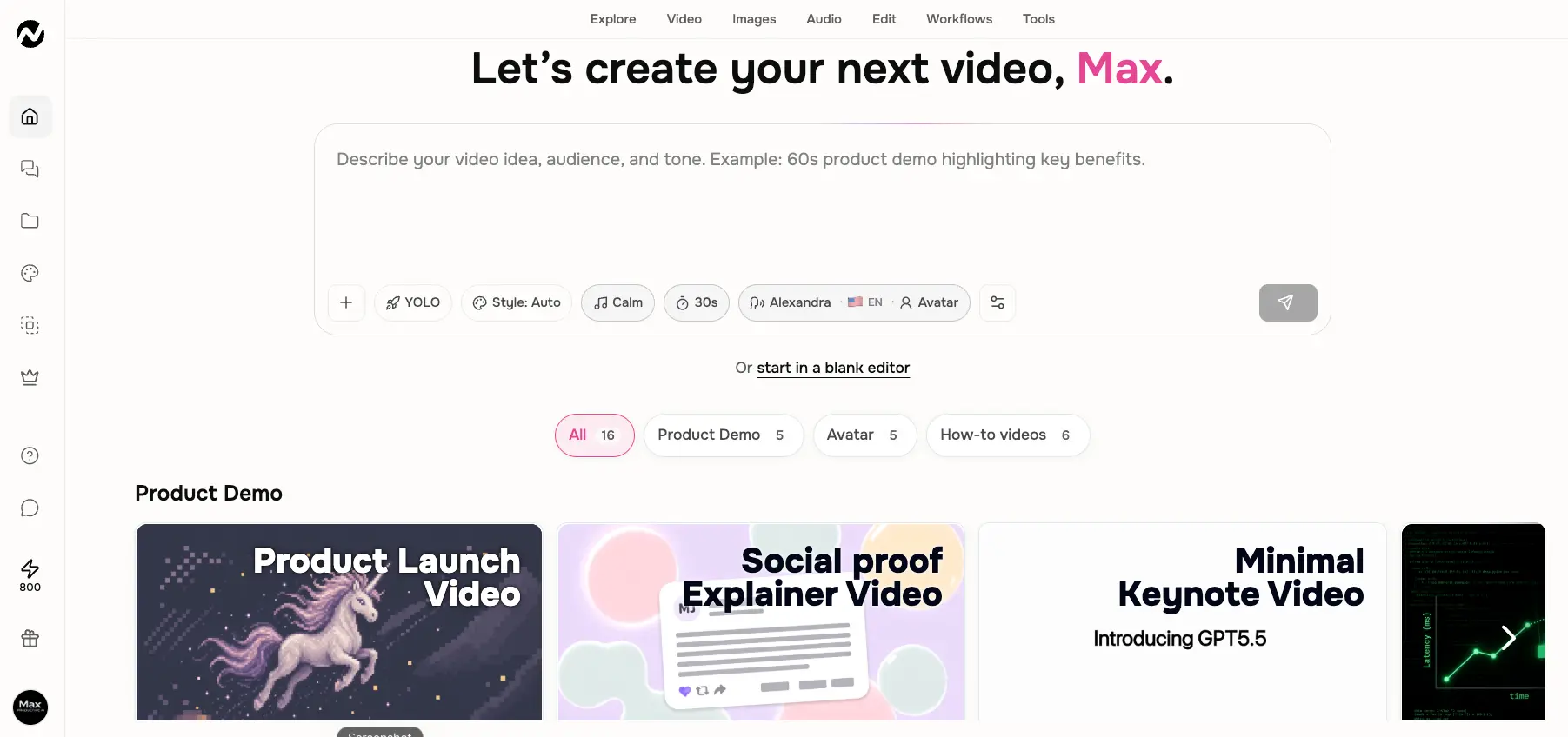
Content-to-Video for Teams
Without a Video Editor
ngram AI gets one thing right that most video generators miss: it starts from what you already have. Feed it a help-center URL, a slide deck, or a raw screen recording, and its staged pipeline — script, then storyboard, then render — produces a video you approve before any credits are spent. Output still needs a human pass before it's client-ready, and the credit system takes some forecasting. But for teams shipping demos and tutorials every week, it replaces a workflow that used to need a dedicated editor — from $29/month.
✓ What We Love
- Turns docs, URLs & screen recordings into finished video
- Script & storyboard approval before rendering starts
- Script (8.5/10) and caption (9/10) quality in hands-on tests
- Veo 3.1, Sora 2, Seedance & Kling in one model picker
! Could Be Better
- Credit-metered costs are hard to forecast
- Entry-plan exports capped below full HD
- Only 3 team seats, even on the top-tier plan
What Is ngram AI?
A look at what it does, how it's different from other AI video generators, and who it's actually built for.
ngram is an AI video creation platform built for product, marketing, sales, and support teams that need a steady stream of demo videos, launch videos, tutorials, and FAQ content — without hiring a video editor. Instead of dropping you onto a blank timeline, it runs a structured, agentic pipeline: idea → script → storyboard → voiceover → render. You review and approve the script and storyboard before any video gets generated, which is a small design decision with a big practical payoff on a credit-metered tool.
The core difference from most of the category is the input. ngram accepts six source types: plain text prompts, documents (PDF, Word), web page URLs, screen recordings, still images, and audio clips. A support team can paste a help-center article URL, or drop in a raw, unedited screen recording, and ngram will extract the content, draft a script, and build a matching video with smart zooms and captions. Avatar platforms like Synthesia and HeyGen start from a script; generation engines like Kling AI start from a prompt. ngram starts from your existing material — and for business teams, that's usually where the work actually is.
Two quick disambiguations, because the name causes confusion. This is not Google's Ngram Viewer, the language-frequency research tool — completely unrelated. And alongside the main platform at ngram.com, there's a separate developer product (an AI video SDK at ngram.dev) for programmatic video pipelines. This review covers the business platform, which is what most people searching for an ngram AI review are looking at.
Our testing: We ran ngram's full pipeline on our own brand — from a text prompt to a finished 30-second explainer with a talking-head presenter, motion graphics, narration, and background music — using the free credits, then spent time in the timeline editor and the model picker. The screenshots below come from that session. Generation of our six-scene video took just over five minutes, and the first draft was watchable without any manual fixes — though "watchable" and "on-brand enough to publish" turned out to be two different bars, which we'll get into.
Who Is ngram AI Best For?
SaaS product marketers, founders, customer success and sales teams, and agencies that need recurring demo, launch, onboarding, or explainer videos built from material they already have — docs, decks, help articles, screen recordings — without budget for a dedicated editor. It's a weaker fit for cinematic creative work, one-off clips, or workflows that demand frame-precise manual control from the start.
What do actual users say? Verified reviews across independent platforms average 4.8/5, with ease of use, BrandKit consistency, and time saved versus freelance editors the most common praise. The recurring criticism is just as consistent: output can feel generic on complex or sensitive topics and needs a manual pass before it's client-ready, and a few users report trial-and-error figuring out which settings improve results. Both sides of that picture matched what we saw in our own session, which is why this lands at 4.3 rather than higher.
See ngram AI in Action
Real screenshots from our test session — the full workflow from prompt to edited video.
Dashboard & Templates
A prompt-first home screen with generation settings and ready-made video templates
Everything starts from one text box: describe your video idea, audience, and tone, and adjust the pills underneath for style, music, length, narrator voice, and avatar. Sixteen templates sit below, grouped into Product Demo, Avatar, and How-to categories — useful starting points if you'd rather not write a brief from scratch. There's also a "start in a blank editor" link for anyone who wants manual control from the first frame.
Animation Mode Selection
Decide how the video gets built before anything is generated
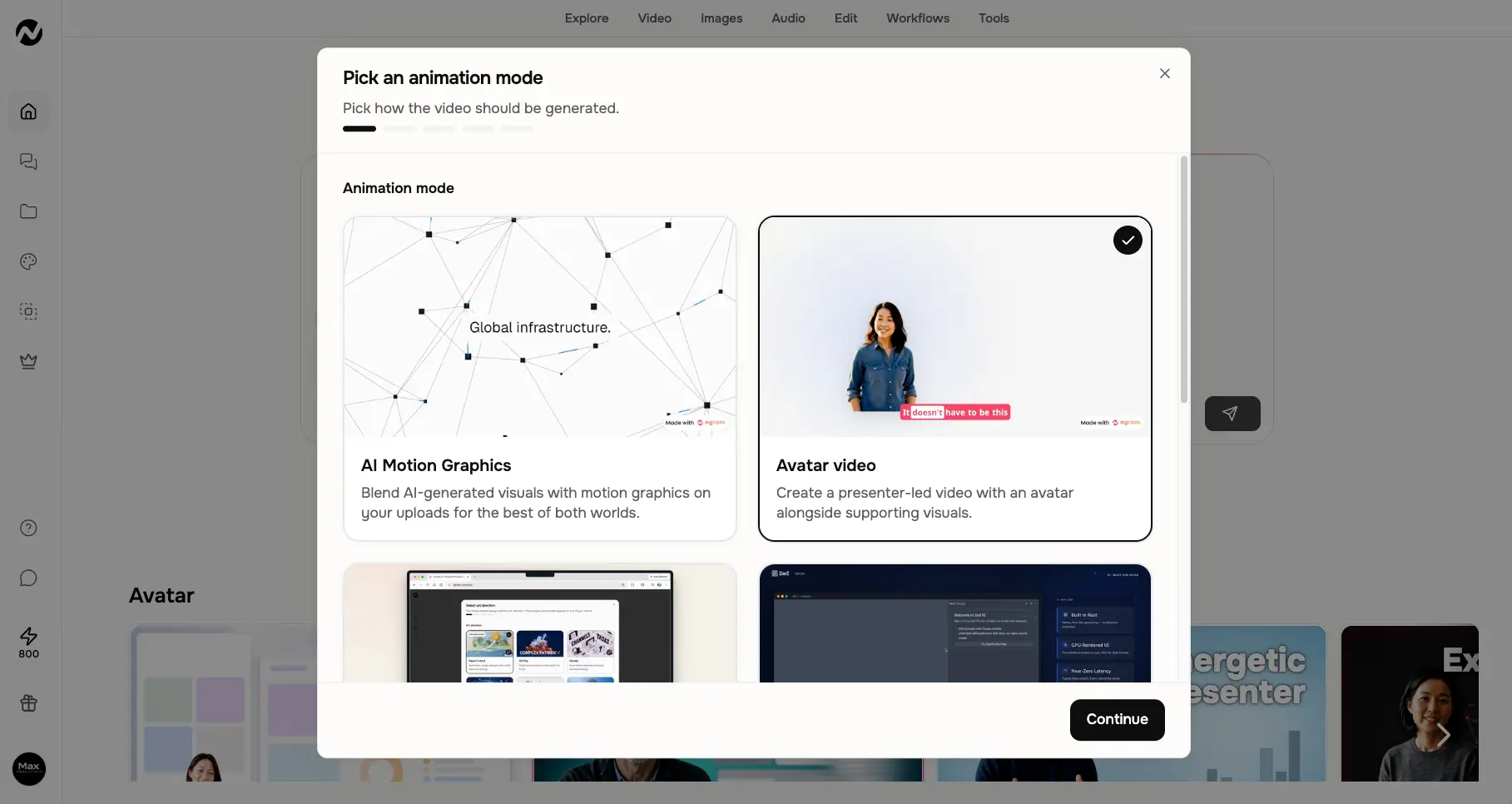
Before generation, ngram asks how the video should be built: AI Motion Graphics (generated visuals blended with your own uploads), Avatar video (a presenter delivering the script alongside supporting visuals), or guided screencast formats. This one choice shapes everything downstream, and it's a smarter framing than most tools offer — you're picking a video format, not fiddling with abstract settings.
Video Model Selection
The quiet standout: pick your generation engine per project
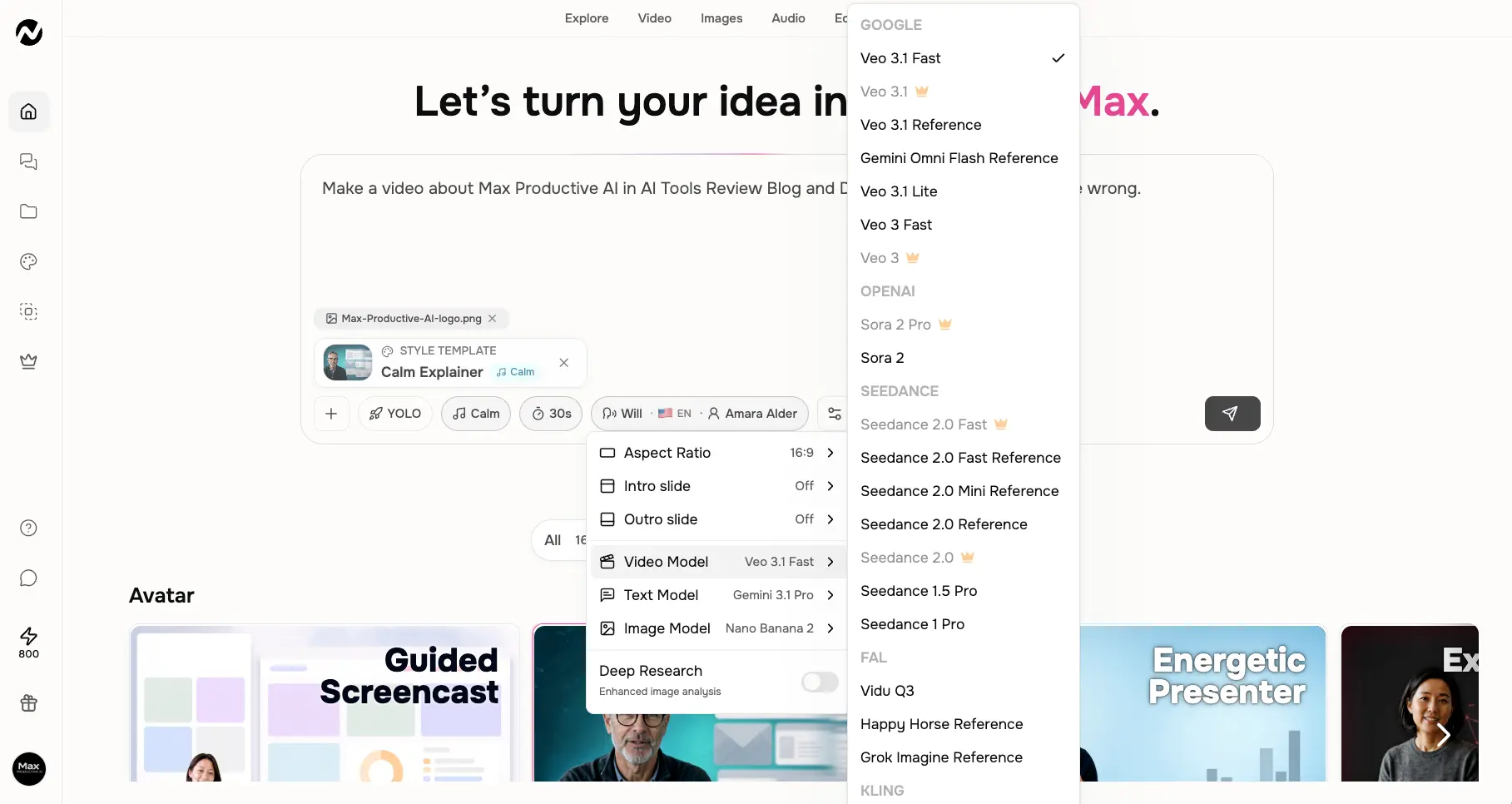
This surprised us. The model menu covers Google's Veo 3.1 family (Veo 3.1 Fast is the default), OpenAI's Sora 2 and Sora 2 Pro, the Seedance 2.0 lineup, Vidu Q3, Kling, and more — with crown icons marking the premium models gated to higher tiers. Text generation runs on Gemini 3.1 Pro and images on Nano Banana 2 by default. In practice that means ngram pairs its automated business-video pipeline with the kind of model choice you'd normally go to an aggregator like Hedra or GoEnhance AI for.
Want to see what it does with your own docs or screen recordings?
Try ngram AI →Free credits to test • Upgrade only if the output fits your brandScript Review Step
Approve or rewrite the script before a single credit is spent on video
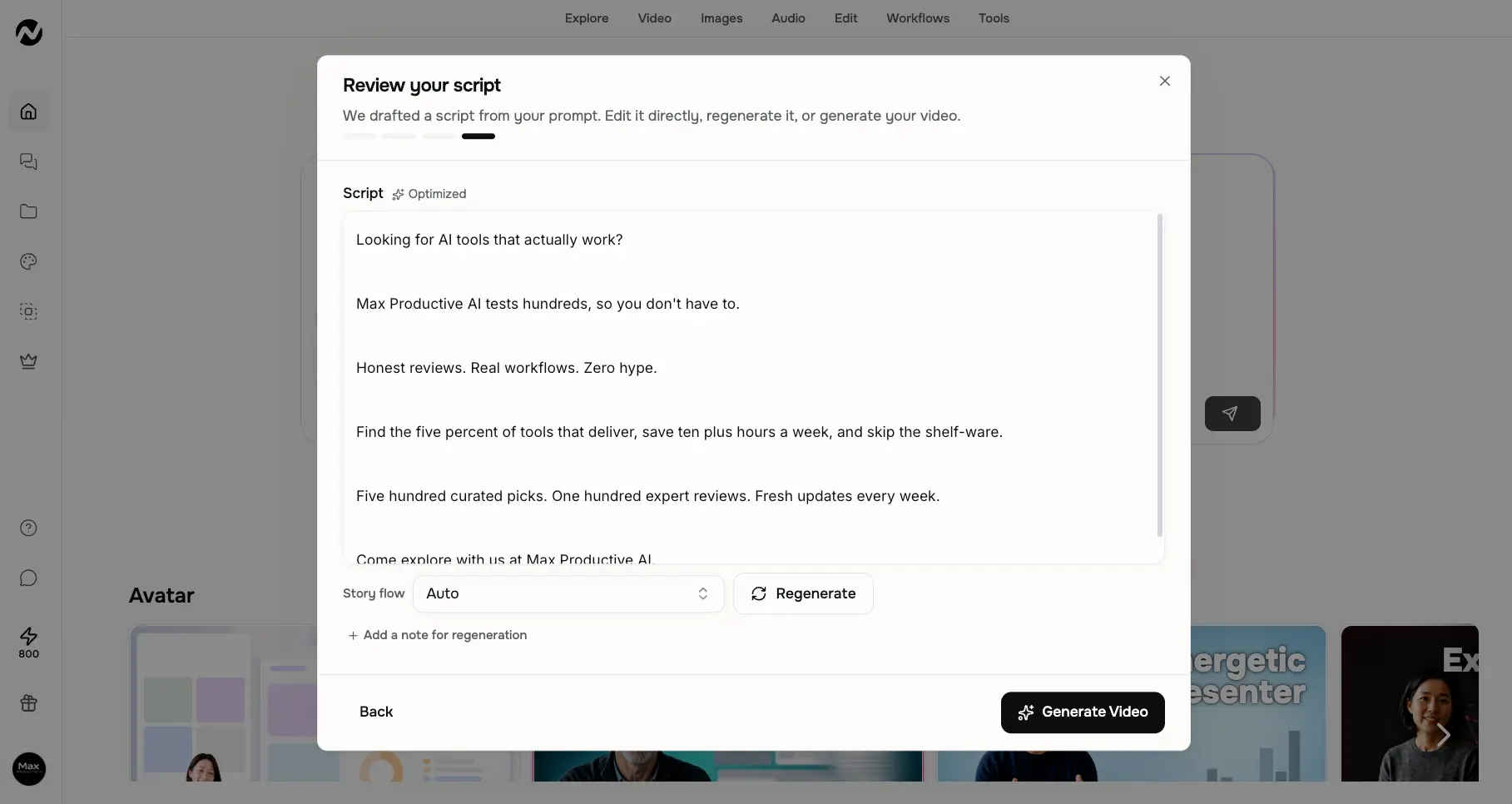
ngram drafts a script from your prompt and stops for review. You can edit lines directly, change the story flow, or regenerate with a note attached. The draft it wrote for our brand was tighter than expected — short lines, a clear hook, an actual call to action — which tracks with the high script marks independent testers have given it. This checkpoint is the single best argument for ngram's workflow: bad scripts get fixed here, in text, instead of after an expensive render.
Storyboard & Video Preview
Scene-by-scene generation with per-scene credit costs in plain view
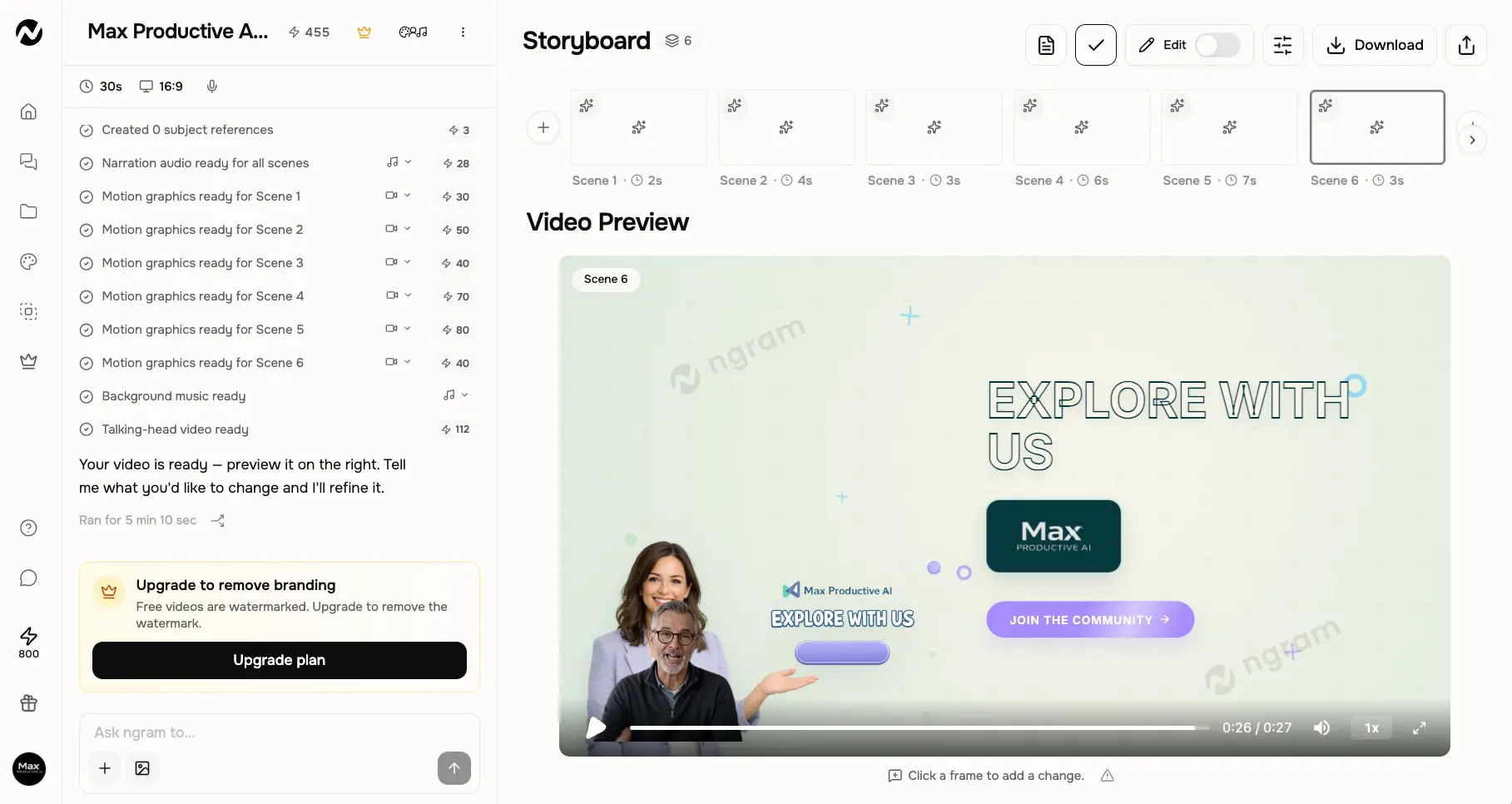
Our 30-second test video came back as six scenes with narration, background music, motion graphics, and a talking-head presenter — generated in 5 minutes 10 seconds. The left panel logs exactly how many credits each element consumed, which we appreciated: most credit-based tools bury this. When it's done, the agent asks what you'd like to change and refines conversationally. One honest note: free-plan exports carry a watermark, and the upgrade prompt is right there in the sidebar.
Timeline Editor & Fix-Up Tools
Manual fine-tuning plus one-click fixes for common video problems
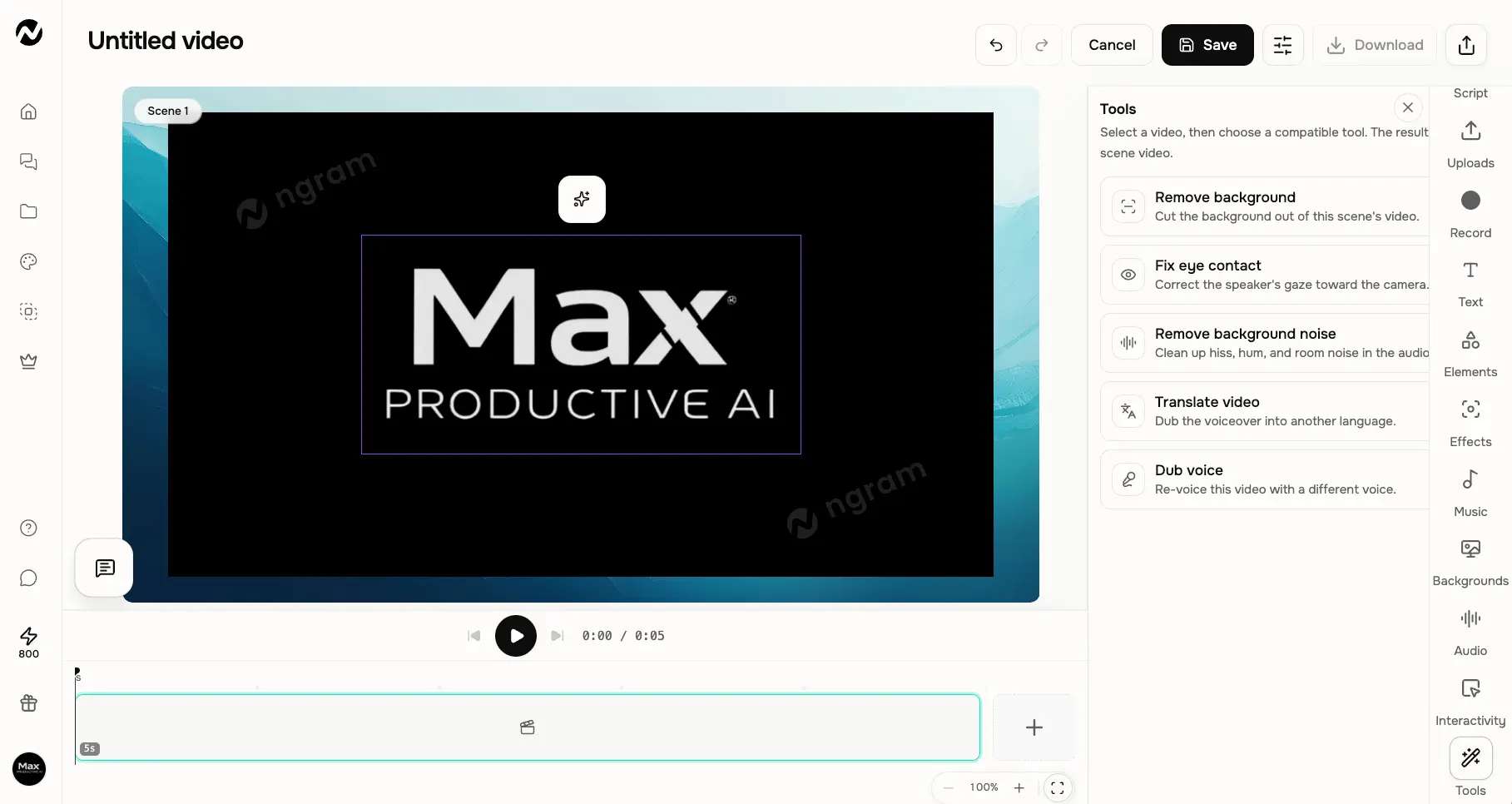
Chat editing gets the headlines, but a real timeline editor exists underneath for anyone who wants hands-on control — with a tools panel covering background removal, eye-contact correction, audio noise cleanup, video translation, and voice dubbing per scene. It's not a Veed.io-grade editing suite, and it doesn't need to be. It covers the fixes business videos actually require.
How ngram AI Works
From source material to shareable video in four steps — with checkpoints where they matter.
Bring What You Already Have
Start from a text prompt, a PDF or Word document, a web page URL, a screen recording, an image, or an audio clip. Then describe the audience, goal, tone, and length in plain language — "60-second product demo for trial users, calm tone" is enough. No brief-writing skills required, though better briefs produce noticeably better first drafts.
Choose How It's Built
Pick an animation mode (AI Motion Graphics, Avatar video, or a guided screencast format), a video model (Veo 3.1 Fast by default, with Sora 2, Seedance 2.0, and Kling on the menu), aspect ratio, narrator voice, and music. You also choose between two workflows: YOLO mode, where the AI runs the entire pipeline automatically, or PRO mode, where it pauses for your approval at each stage. For anything client-facing, use PRO.
Review the Script & Storyboard
ngram drafts the script and lays out a scene-by-scene storyboard for review. Edit lines directly, adjust the story flow, or regenerate with a note. This is the checkpoint that separates ngram from one-shot generators: problems get caught in text, before rendering consumes credits. One reviewer called it a render-waste prevention mechanism, and after testing it, that's exactly the right description.
Generate, Refine, and Ship
Rendering is quick — our test video came back in a few minutes — with narration, music, captions, and brand styling applied automatically. Then refine conversationally — "shorten scene 2," "swap the background" — or open the timeline editor for manual work. Export as MP4, GIF, WebM, PNG, JPG, or even PPTX, in 16:9, 9:16, or 1:1. Budget a review pass before publishing: the first draft is a strong base, not a finished deliverable.
How Credits Are Metered
Every generated element — narration, motion graphics per scene, talking-head footage, music — consumes credits, and heavier models cost more per second. ngram shows the cost of each element as it generates, which is more transparent than most credit-based tools. The flip side: a heavy month is hard to predict in advance, and if you run out mid-cycle, top-ups cost roughly twice as much per credit on Basic as on Ultimate.
YOLO vs PRO Mode
YOLO mode hands the whole pipeline to the AI and returns a finished video — fast, fun, and fine for internal or throwaway content. PRO mode inserts approval gates at the script and storyboard stages. Our advice after testing: default to PRO. The few extra minutes of review consistently beat re-rendering a video that went in the wrong direction.
Key Features
What you're actually getting — and where the tier gating kicks in.
Six-Input Content Ingestion
The reason to pick ngram over anything else in this category. Text prompts, PDFs and Word docs, URLs, screen recordings, images, and audio clips all work as source material — the platform extracts the substance and turns it into scenes. No other tool on our Video Generators list matches this input range.
Staged Script & Storyboard Pipeline
Idea → script → storyboard → voiceover → render, with approval gates in PRO mode. On a credit-metered platform, catching a bad direction at the script stage instead of after rendering is worth real money over a year of use.
Screencast Understanding
Drop in a raw, unedited screen recording and ngram identifies the key moments, structures it into a product demo or explainer, and adds smart zooms and captions. For SaaS teams, this alone can replace hours of manual demo editing per video.
Multi-Model Generation
Veo 3.1 for video, Gemini 3.1 Pro for text, and Nano Banana 2 for images by default — with Sora 2, Sora 2 Pro, Seedance 2.0, Vidu Q3, and Kling selectable per project. Premium models are gated to higher tiers (Basic gets standard models only), so factor that into plan choice.
Chat Editing & Fix-Up Tools
Revise by typing — "shorten scene 2," "make the intro punchier" — instead of dragging clips. When you do need hands-on fixes, the editor's tools panel handles background removal, eye-contact correction, audio noise cleanup, and per-scene re-voicing.
Translation & Re-Dubbing
Multilingual AI voiceovers plus translation and re-dubbing with lip-sync adjustment for localized cuts of the same video. Fine for most business localization; if you need 160+ languages with enterprise compliance, that's still Synthesia territory.
BrandKit & Team Workspaces
Logos, colors, fonts, and approved (or blocked) phrasing applied automatically across every video, plus shared workspaces. The catch: one BrandKit, one custom voice, and one avatar below the Ultimate tier — agencies managing multiple clients will feel that limit fast.
Interactive Video
Quizzes, hotspots, and branching logic inside the video itself — rare at this price point and a genuine option for onboarding and training use cases. Ultimate-only — a real budget jump — but flat-video competitors mostly don't offer it at all.
Beyond the headline features, ngram ships with an Image Lab for thumbnails and graphics, a Clip Studio, slides-to-video conversion for PowerPoint and PDF decks, and multi-format export — MP4, GIF, WebM, PNG, JPG, and PPTX across 16:9, 9:16, and 1:1 aspect ratios. On the integration side there's an API, webhooks, MCP support, and browser capture, which matters if you want video generation wired into an existing content pipeline rather than run by hand.
Curious how the model picker and BrandKit handle your content?
Try ngram AI →Test the full pipeline before choosing a planngram AI Pricing
Credit-based plans from a free tier to enterprise — here's what each one realistically gets you.
Free
- ✓ ~600 one-time credits
- ✓ Roughly 30–60s of premium video
- ✓ Full creation pipeline to test
- ✓ Instant start — sign-up only
- ✓ Watermarked exports
- ✓ Evaluation only — credits don't renew
Basic
- ✓ 3,000 credits (~300s of video)
- ✓ 720p exports
- ✓ Standard AI models
- ✓ Multilingual voiceover
- ✓ Chat-based editing
- ✓ $23.20/mo billed annually
Premium
- ✓ 10,000 credits (~1,000s of video)
- ✓ 1080p exports
- ✓ 1 BrandKit + 1 custom voice & avatar
- ✓ Unused credits roll over 1 cycle
- ✓ Cheaper credit top-ups
- ✓ $47.20/mo billed annually
Important: Annual billing saves roughly 20% across all tiers, and credit top-ups can be bought mid-cycle at better rates on higher plans.
Pricing last verified August 2026. Visit ngram's pricing page for current rates.
Is It Worth the Money?
Premium's monthly credits translate to roughly 1,000 seconds of rendered video — call it ten to fifteen short demos or tutorials. Commissioning a single professionally edited 60–90 second demo routinely costs several hundred dollars, which is why "cheaper than my freelance editor" is the most common refrain in verified user reviews. Just budget honestly: a heavy month can push you into top-ups.
Some context against the closest alternatives: Synthesia's Starter runs $18/month billed annually, HeyGen's Creator is $24/month annually (with real-world costs often closer to $59 once add-ons stack), InVideo AI's Plus sits around $20–25/month, and Kling AI starts near $7/month for raw generation with no editor attached. ngram's $29 entry sits at the top of that range — and honestly, since Basic's export quality is below shipping standard for most brands, Premium is the realistic working tier. What you're paying for isn't cheaper generation. It's the document-and-screencast ingestion pipeline none of those alternatives offer.
Detailed Pros & Cons
An honest breakdown from our test session and the pattern across verified user reviews.
✓ Pros
Docs, decks, URLs, screen recordings, images, audio — the material business teams actually possess becomes the video's source. This is a real workflow difference, not a marketing angle: the hardest part of making a product demo is usually structuring the raw content, and ngram does that step for you.
In PRO mode, nothing renders until you've signed off on the script and storyboard. On a credit-metered tool this is the difference between "iterate cheaply in text" and "burn credits discovering the AI misunderstood you." It's the smartest design decision in the product.
Independent hands-on testing scored scripts around 8.5/10 and subtitle accuracy around 9/10, and our own test draft matched that impression — short, structured, and usable with minor tweaks. For a tool whose whole premise is "we write the video for you," this is the part that had to work, and it does.
Veo 3.1, Sora 2, Seedance 2.0, and Kling selectable per project, alongside Gemini 3.1 Pro for text and Nano Banana 2 for images. You'd normally need an aggregator subscription for this range — here it comes wrapped in an automated pipeline.
Plain-language revisions handle most changes, and the fix-up tools (eye-contact correction, noise removal, per-scene dubbing) cover the rest. Users repeatedly cite this as the reason they stopped outsourcing — nobody on the team needs to learn a timeline. One does exist for fine-tuning when you want it.
The one-time credit allocation is enough to run the full pipeline on your own content and judge output quality before paying — several independent reviewers call it a genuine low-risk trial rather than a marketing gimmick. We'd agree; our entire test session ran on it.
✗ Cons
The most consistent criticism in verified reviews, and we saw it too: first drafts on complex or brand-sensitive topics can come out flat or slightly off-tone, needing a manual pass before they're client-ready. It's a strong base, not a publish button. Plan your workflow around that.
Per-scene, per-model metering means two similar-looking videos can cost meaningfully different amounts, and the free credits are one-time rather than recurring. ngram's in-app cost transparency helps, but if you need a predictable line item, a flat-rate tool will feel calmer.
Basic tops out below full HD — under shipping quality for most brands in 2026 — which quietly makes Premium the real working entry price. The advertised entry price is accurate but not the number most buyers will actually pay.
One BrandKit, one custom voice, and one avatar unless you're on the Ultimate tier. Fine for a single brand; a genuine problem for agencies or anyone running multiple product lines, where competitors like HeyGen gate less tightly.
Ultimate — the top self-serve plan — allows a maximum of three workspace users. That's an unusually tight ceiling for a collaboration-oriented tool, and it pushes any team of four or more into a custom Enterprise conversation earlier than feels reasonable.
The app doesn't clearly explain which settings improve output, so expect some trial-and-error early on — one verified reviewer said exactly this held them back from buying more credits. Another documented limitation: the AI couldn't merge two scenes into one continuous cut without a visible break, even when asked directly. And it's web-only — no desktop app.
ngram AI vs Alternatives
How ngram compares to the tools most buyers weigh it against — and the best ngram AI alternatives by use case.
| Feature | Reviewed ngram AI | Synthesia | HeyGen | InVideo AI |
|---|---|---|---|---|
| Core Input | Docs, URLs, screencasts, prompts | Script/text, PPT | Script/text | Prompt, URL, templates |
| Output Style | Scene-based product/marketing video | Avatar presenter | Avatar presenter | Social/marketing clips |
| Starting Price | $29/mo | $18/mo (annual) | $24/mo (annual) | $20/mo (annual) |
| Free Tier | One-time credits | 3–10 min/month | 3 videos/month | 10 min/week |
| Doc/Screencast Ingestion | ✓ Core strength | PPT import only | ✗ | Partial (URL, PDF) |
| Languages | Multilingual + re-dub w/ lip-sync | 160+ languages | 175+ languages | Not a core strength |
| Training/LMS Fit | Interactive video (top tier) | SCORM export, L&D focus | Limited | None |
| Team Seats | 3 max on top tier | Unlimited on Enterprise | $20/seat add-ons | 5 sub-accounts (Agency) |
| Best For | Demos from existing content | Corporate L&D | Multilingual avatar video | High-volume social clips |
Which Tool Is Right For You?
ngram AI
ReviewedBest for: Product, marketing, and support teams that need a recurring stream of demos, tutorials, launch videos, and FAQ content built from material they already have — and want brand consistency without a video editor on payroll. The staged approval workflow and screencast ingestion are the two things nothing else in this comparison replicates.

Synthesia
Corporate Training StandardBest for: L&D, onboarding, and corporate training at enterprise scale. 230+ stock avatars, 160+ languages with one-click translation, and SCORM export for LMS integration — a feature none of ngram's direct rivals match. Narrower format (talking presenter) but far more mature for regulated, multilingual training deployments.

HeyGen
Multilingual AvatarsBest for: Avatar-led video with the widest language reach — 175+ language lip-sync and the very realistic Avatar IV technology. One caution from independent cost breakdowns: the Creator plan has hidden ceilings (Avatar IV capped at 5 minutes/month, priority processing at extra cost), so real-world spend often lands well above the sticker price.

InVideo AI
Volume Social ContentBest for: High-frequency social and marketing clips, faceless YouTube, and promos — built on a 10,000+ template library and stock footage rather than document ingestion. Its Generative tier notably bundles both Sora 2 and Veo 3.1. Watch the widely-cited "credit trap": AI minutes reset monthly and don't roll over.

Kling AI
Frontier GenerationBest for: Raw cinematic-quality generation — native 4K, audio synced in the same pass, multi-shot storyboarding with consistent characters, and among the best photorealistic humans in the category, from around $7/month. But it's a generation engine, not a business tool: no editor, no BrandKit, no document-to-video. ngram actually offers Kling as one of its selectable models.
Veed.io
Browser Editor + AIBest for: Teams that want to keep manual editing control and use AI as an accelerator rather than a replacement — standout auto-subtitles (95%+ accuracy), Magic Cut for filler-word removal, and built-in screen recording. The philosophical opposite of ngram: you edit, AI assists, instead of AI generates, you approve.
Frequently Asked Questions
Should You Try ngram AI?
ngram AI has found a genuinely useful lane: it takes the content businesses already have — help articles, decks, screen recordings — and turns it into shippable product video through a pipeline you supervise rather than operate. The script quality is strong, the approval checkpoints respect your credits, and the model picker quietly gives you Veo 3.1, Sora 2, and Kling inside a workflow tool. For a team publishing demos and tutorials every week without an editor, that combination is hard to find anywhere else in 2026.
The caveats are real. First drafts can feel generic and need a human pass before anything client-facing goes out. Credit-metered pricing rewards planning and punishes heavy months. And the tier structure is tight — modest export quality at the entry level, one BrandKit below the top plan, and a 3-seat ceiling that arrives far too early on the top plan. None of these are dealbreakers for the core use case. All of them are worth knowing before you subscribe.
Our Recommendation
Start on the free plan and spend the credits deliberately: run one real screen recording and one real document through the pipeline in PRO mode, and judge the storyboard and script quality on your actual content. If the drafts land close to your brand voice, Premium is the plan to buy — the export quality and credit rollover make it the realistic working tier. If your videos come out needing heavy rework, you'll know before spending anything.