
Pippit AI
AI creative agent from the CapCut and ByteDance family that turns a product link or a one-line brief into ready-to-post videos, avatar clips, product photos, and posters for TikTok, Reels, and Shorts.
Try Pippit AI Free →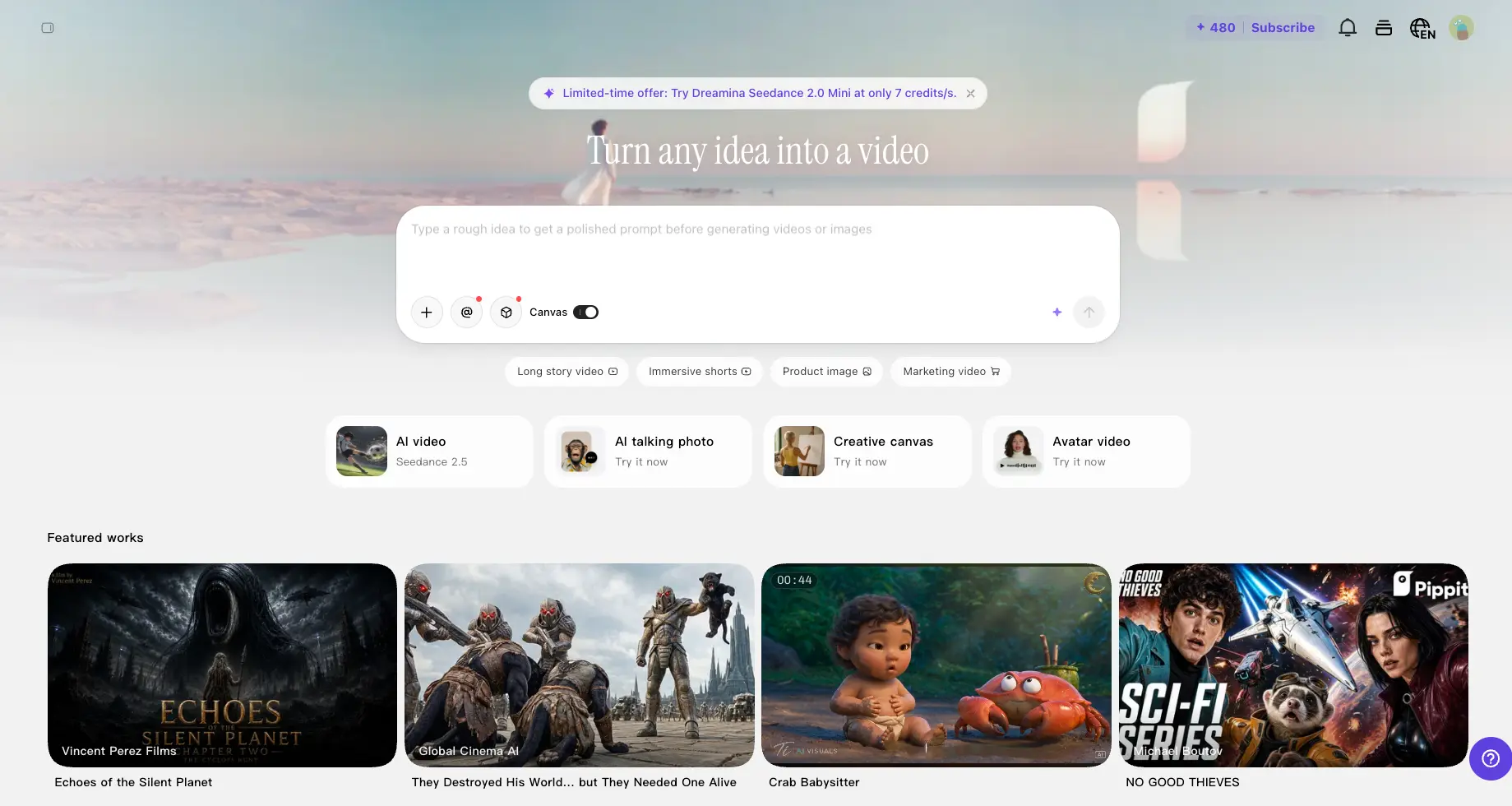
Fast, Feed-Ready Marketing Content
for E-commerce Sellers & Creators
Pippit AI does one thing better than almost any tool in this category: it gets you from product link to publishable ad, fast. Paste a Shopify or TikTok Shop URL and you'll have a scripted, voiced, captioned video in a few minutes — with a genuinely usable free tier to prove it before you pay anything. It's not a precision editing suite, and the credit system caps how far each plan stretches. But for sellers and creators who need volume on TikTok and Reels, this is one of the most practical tools we've reviewed in 2026.
✓ What We Love
- Product link to finished ad in three to four minutes
- Free tier you can test for weeks, not one rushed trial
- Native TikTok Shop and Shopify integration
- Scheduling and analytics built into the same subscription
! Could Be Better
- Credit caps constrain heavy use — premium models burn fast
- Limited manual editing control vs a full editor
- Support experience is hit-or-miss according to users
What Is Pippit AI?
Who's behind it, what it actually does, and who it's built for.
Pippit AI is an AI content platform from the CapCut team — part of ByteDance, the company behind TikTok — built for people who need a lot of short-form marketing content without spending hours in an editor. Paste a product link, upload an image, or type a one-line brief, and it generates ready-to-post videos, avatar clips, product photos, and posters sized for TikTok, Reels, and Shorts. In this Pippit AI review, we'll cover the features, the pricing, the real strengths and weaknesses, and who it's actually for.
The pedigree matters more than it might sound. Pippit evolved from CapCut Commerce Pro, and where general-purpose generators like InVideo AI or Fliki start from a prompt or a script, Pippit starts from your product page. Point it at a Shopify or TikTok Shop listing and it pulls the images and copy itself, writes a script, adds a voiceover and captions, and hands you an ad — often within three to four minutes. For sellers, that's the whole pitch.
Since late 2025, the platform has been shifting from "tool with templates" toward something closer to a creative agent. Its Agent Mode takes a rough idea, loads the relevant marketing "skills," reads best-practice specs, and assembles the asset step by step — script, presenter, scenes, captions. In our own session, we gave it nothing but a logo and a one-sentence brief, and it handled the rest without us touching a timeline once.
A candid note before we go further. Expert reviews of Pippit — ours included — tend to land in the low-to-mid fours out of five, while ratings on consumer review platforms tell a rougher story, mostly around support response times and billing. The creative output itself rarely draws the criticism; the wrap-around service does. We'll come back to this in the cons, because it should shape how you test the tool.
Who Is Pippit AI Best For?
Solo creators, dropshippers, and small e-commerce teams selling through TikTok Shop or Shopify who need daily feed content at low cost. Also social media managers juggling volume across TikTok, Instagram, and Facebook. If your bar is polished brand films, or you need team workflows and hands-on support, the alternatives further down will serve you better.
How We Reviewed Pippit AI
We ran the platform ourselves — the screenshots below come from our own session, where we asked Pippit's ad agent to build a promo for this site from just our logo and a one-line brief. We paired that walkthrough with an audit of Pippit's published pricing and a read-through of user feedback across app stores and review platforms.
Content-wise, the range is wide for one subscription: link-to-video product ads, AI avatars and talking photos with voiceovers in 30+ languages, an image studio for product photography and posters, a Story Studio for episodic short drama, plus a built-in scheduler that publishes straight to TikTok, Instagram, and Facebook with performance analytics attached. It also had a moment: Pippit took Product Hunt's #1 Product of the Day, Week, and Month in April 2025 — early buzz that, for once, matched what the tool actually does.
See Pippit AI in Action
Real screenshots from our session — from the homepage prompt bar to the agent building an ad for us.
Homepage & Prompt Bar
"Turn any idea into a video" — the starting point for everything
The homepage is refreshingly uncluttered for a tool that does this much. One prompt bar takes a rough idea and polishes it before generating; below it sit one-click entry points for AI video (running Seedance 2.5 at the time of our test), talking photos, creative canvas, and avatar video. The featured works row is worth a scroll — it gives you a realistic sense of what the models produce, from cinematic shorts to playful animation.
The Ad Agent at Work
Our actual test: one logo, one sentence, and the agent takes over
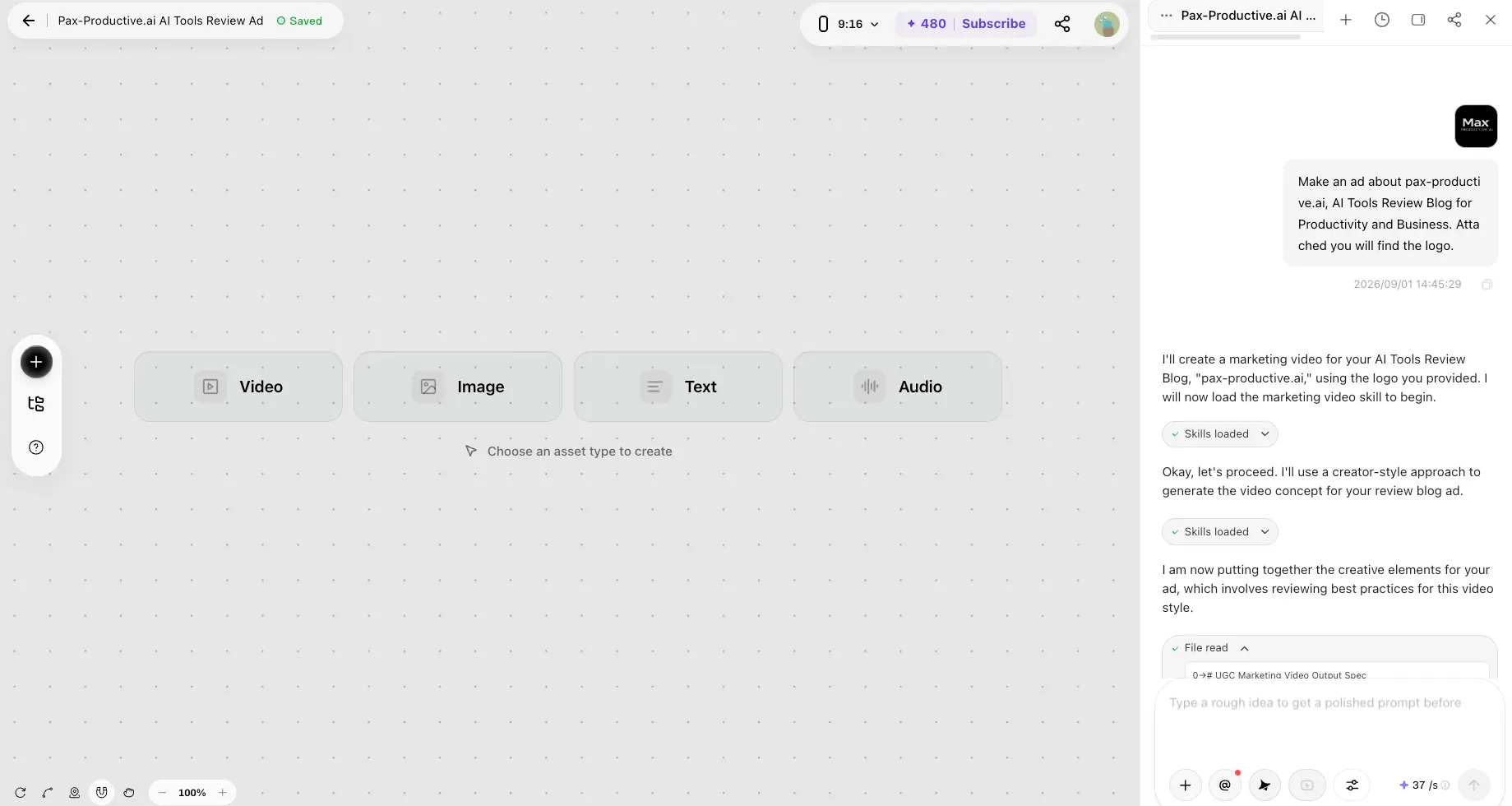
This is our real session. We typed "Make an ad about our AI tools review blog" and attached the logo — nothing else. The agent responded by loading a marketing video skill, reading a UGC output spec, and walking through its plan in a chat panel while the canvas offered asset types to create. Watching it work feels closer to briefing a junior editor than filling out a form, and the whole thing stayed transparent: you see each step as it happens.
Video Model Picker
Choose your engine — and see exactly what each one costs before generating
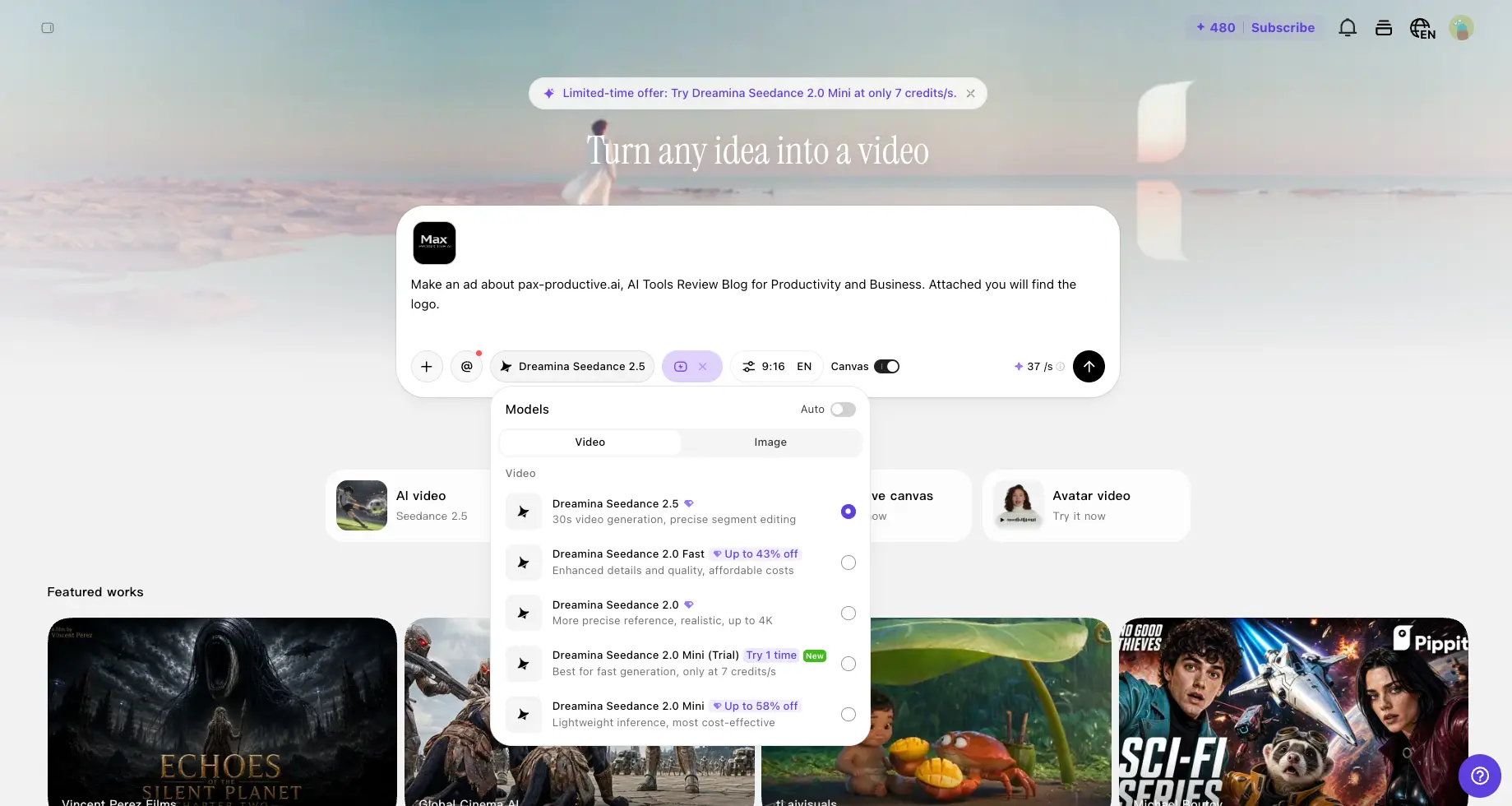
The model picker exposes the Dreamina Seedance range: 2.5 for 30-second generation with precise segment editing, 2.0 for more realistic output up to 4K, and Fast/Mini variants at lower rates. Here's the thing we appreciated most — the credit cost per second is displayed before you hit generate. Premium models are expensive per second, so this transparency matters. Our advice: test with Mini or Fast, save 2.5 for the winners.
Want to see what Pippit makes of your product page?
Try Pippit AI →Free tier available • A product link is all you needAI Presenter & Portrait Editing
The agent generated a presenter for our ad — then handed us the controls
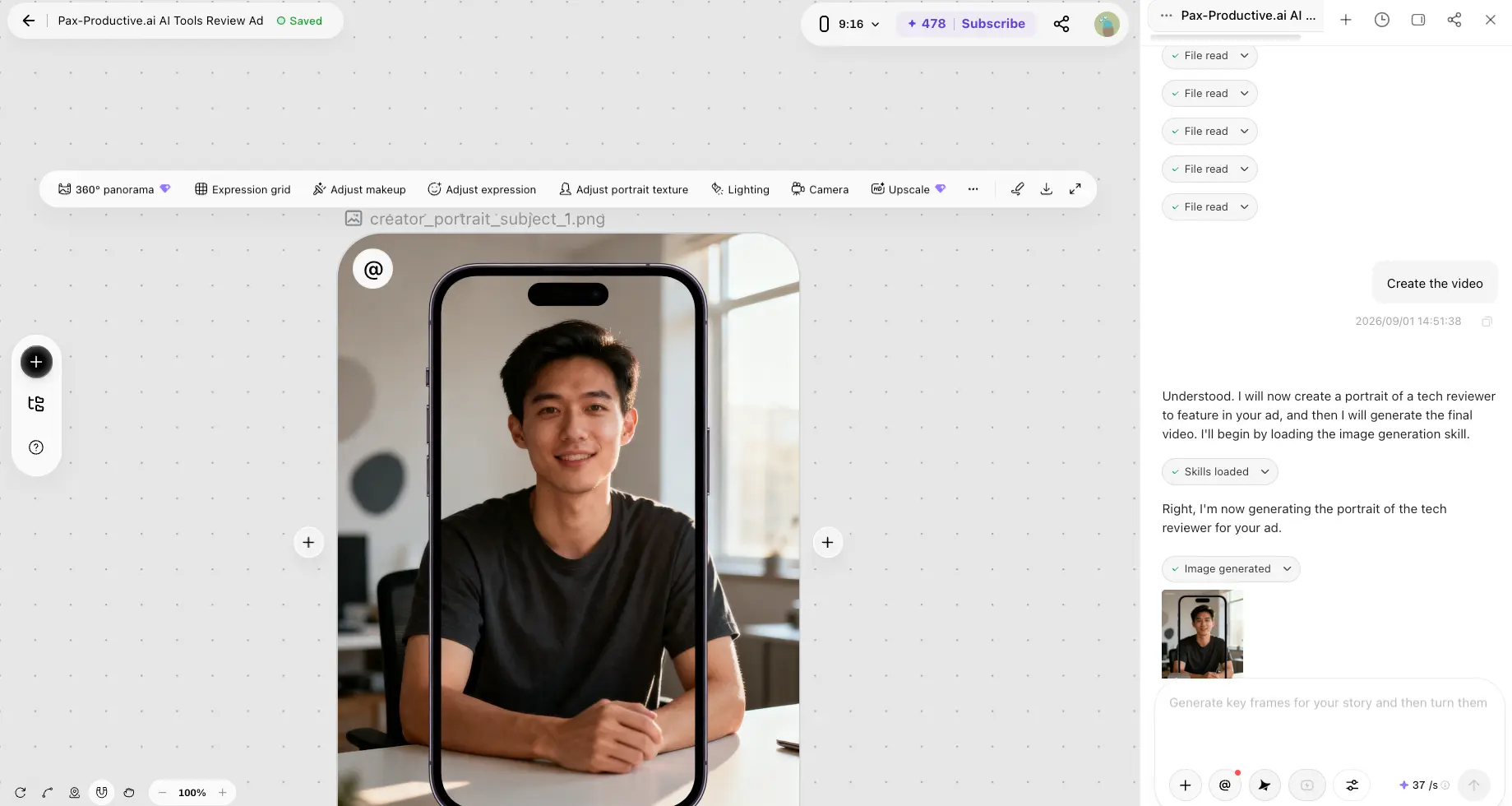
Mid-way through our ad build, the agent generated a tech-reviewer presenter framed inside a phone mockup — a nice touch for a UGC-style spot. The portrait toolbar goes deeper than we expected: 360° panorama, an expression grid, makeup and texture adjustment, lighting, camera angle, and upscaling. It's the one area of Pippit where fine control is genuinely available, which makes the presenter feel less like a stock asset and more like a cast member.
Story Studio
Beyond ads: an AI story agent for short drama and episodic content
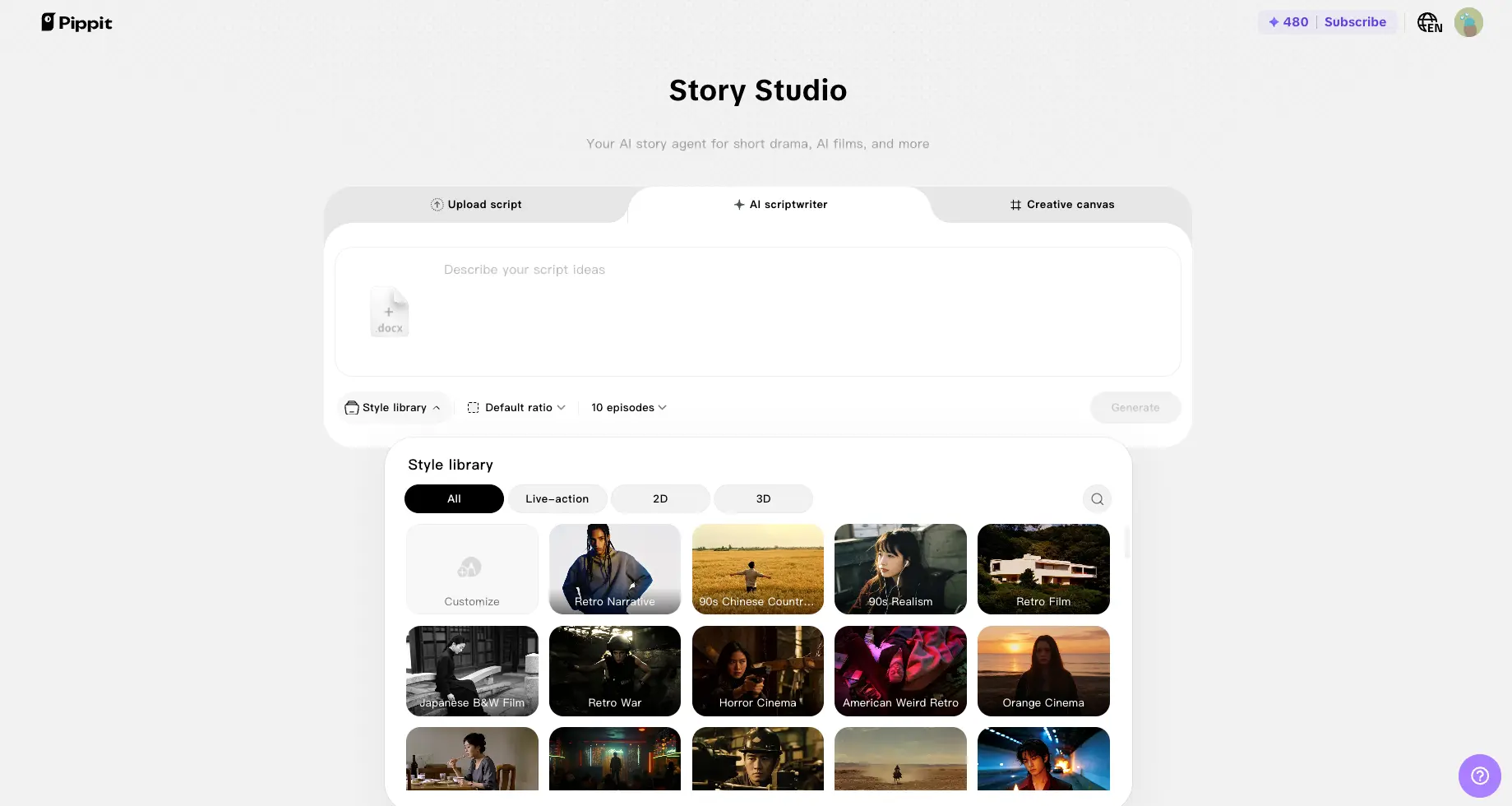
Story Studio is Pippit stretching beyond commerce. Upload a script or let the AI write one, pick a style from a large library — retro film, horror cinema, Japanese black-and-white, plenty more — and generate an episodic series in one pass. Is it brand-film quality? No, and it doesn't pretend to be. But for creators feeding the short-drama trend on TikTok, it's a fun, fast on-ramp — and a hint of where the platform is heading.
How Pippit AI Works
From a product link (or a single sentence) to a scheduled post, in four steps.
Start With a Link, an Image, or a Brief
Paste a Shopify or TikTok Shop product URL, upload a photo, or just type a rough idea into the prompt bar — Pippit polishes vague briefs into proper prompts before generating. No brand-guideline forms, no template hunting. If you sell online, your product page is already the input.
The Agent Assembles the Creative
In Agent Mode, Pippit loads the relevant marketing "skills," reads its own best-practice specs for the format (a UGC ad, a product demo, a talking-photo clip), then builds the piece: script, scenes, presenter, voiceover, captions. In our test this took a few minutes end to end, and the chat panel narrates every step — so you're never staring at a spinner wondering what's happening.
Review, Tweak, and Pick Your Model
Swap scenes, adjust the presenter with the portrait tools, edit the script, and choose your generation engine from the Seedance family — with the credit cost per second visible before you commit. This is where you manage your budget: lighter models for drafts and testing, the heavier ones for the ads you'll actually run.
Publish or Schedule Without Leaving
Push finished content straight to TikTok, Instagram, or Facebook from the built-in scheduler, with TikTok Shop links embedded where relevant. Post-performance and sales analytics live in the same dashboard, so you can see which creatives convert without exporting anything to a spreadsheet. Fewer tabs, fewer downloads.
Understand Credits Before You Commit
Everything in Pippit runs on credits, and the burn rate varies a lot by model. Free credits refresh weekly — use them or lose them — while paid credits arrive monthly. Premium video models cost tens of credits per second of output, so a single polished 30-second clip can eat a meaningful chunk of a Starter allowance. Draft with the cheaper Mini and Fast models; spend on finals.
The ByteDance Advantage
Because Pippit shares infrastructure with CapCut and sits inside the TikTok ecosystem, its output styles track feed trends unusually closely, and its TikTok Shop integration is native rather than bolted on. For content destined for TikTok specifically, that's a structural edge no third-party generator can quite replicate.
Pippit AI Features
What one subscription actually covers — and where each piece stands today.
Link-to-Video Ads
Paste a Shopify or TikTok Shop URL and Pippit pulls the product images and copy, writes the script, adds a voiceover and captions, and embeds your shop link. This is the feature the whole platform is built around — and the one general-purpose competitors haven't matched for commerce.
AI Avatars & Talking Photos
Turn a photo — a person, a cartoon, even a pet — into a talking presenter with synced captions and 25+ voice options across 30+ languages. Not as deep as specialists like Hedra or HeyGen, but plenty for feed ads.
Agent Mode
Describe what you want and the agent loads marketing skills and builds the asset step by step — in our session it even read its own UGC ad spec before generating a single frame. It's the difference between filling out a form and delegating a task, and it's what carried our test from logo to near-finished ad without manual editing.
Multiple Video Models
The Dreamina Seedance family: 2.5 for 30-second generation with segment editing, 2.0 for realism up to 4K, plus cheaper Fast and Mini variants. Per-second credit costs are shown before you generate — during our test, 2.5 ran 37 credits/second while a discounted Mini sat at 7. That gap is your budget lever.
Image Studio & Product Photos
AI product photography, background removal, AI models wearing or holding your product, poster generation, and batch edits. The portrait tools go surprisingly deep — lighting, expression, camera angle, upscaling — and they're cheap: our presenter portrait cost just a couple of credits. It's video seconds, not images, that drain the balance.
Story Studio
An AI story agent for short drama: upload or generate a script, pick a visual style (live-action, 2D, 3D), and produce up to 10 episodes in one run. Ambitious and fun to play with — and clearly still early compared to the ad tools.
Auto-Publish & Analytics
Schedule and publish directly to TikTok, Instagram, and Facebook, with TikTok Shop links embedded and post-performance plus sales analytics in one dashboard. For a solo seller, this quietly replaces a separate scheduling subscription.
Commercial-Ready Assets
Viral template remixing plus royalty-cleared music and visuals licensed for commercial use — one less thing to check before an ad goes live. Paid tiers add 500 GB of cloud storage for your generated library.
Two more capabilities worth flagging: video translation, which localizes a finished video into other languages without re-recording, and reference video, which borrows the structure and pacing of a trending clip and swaps in your product. Neither is unique to Pippit, but having them inside the same credit pool — rather than as separate subscriptions — is part of why the value equation works for small sellers.
All of this sits behind one login and one credit balance:
Try Pippit AI →Start on the free tier and upgrade only if it earns itPippit AI Pricing
Everything runs on credits — here's what each tier really buys.
Free
- ✓ ~150 credits refreshed weekly
- ✓ ≈2 minutes of video or ~75 images
- ✓ No credit card required
- ✓ Core video and image tools
- ✓ Watermarked exports — best for testing
Starter
- ✓ 2,100 credits per month
- ✓ Watermark-free exports
- ✓ Faster generation
- ✓ Advanced AI models
- ✓ Multi-platform publishing
- ✓ 500 GB cloud storage
Plus
- ✓ 6,700 credits per month
- ✓ Everything in Starter
- ✓ Faster generation queue
- ✓ Built for daily posting volume
- ✓ Same tools, more headroom
Worth knowing: prices shown reflect annual billing — monthly billing costs noticeably more — and upgrading buys volume and speed rather than a better per-credit rate
Pricing last verified September 2026. Visit Pippit AI for current rates.
Is Pippit AI Worth It?
A single outsourced UGC-style ad typically costs more than a full month of Pippit's Starter plan. If the tool produces even a handful of usable ads monthly — and in our walkthrough it did — the math works. The catch is credits: if you lean on premium models for everything, you'll outgrow Starter quickly.
For context on where this sits in the market: InVideo AI starts at $17/month on annual billing, but entry-level credits go fast and many users end up on its $85 Max tier; Fliki starts at $21/month with a tighter free tier (5 minutes monthly versus Pippit's weekly refresh); Synthesia starts around $18/month annual and costs meaningfully more per finished minute; and Kling AI is cheaper per clip for raw generation but has no commerce features at all. At a $10–12 entry point, Pippit is the least expensive door into this category — as long as your usage fits inside the credit allowance.
Detailed Pros & Cons
The honest breakdown, based on our walkthrough and a close read of user feedback.
✓ Pros
This isn't marketing spin — reviewers consistently report usable product ads just minutes after pasting a URL, and our own agent test moved just as quickly. For sellers testing creative angles daily, that speed compounds into real hours reclaimed every week.
Credits refresh every week instead of a one-time trial allowance. That's unusual in this category, and it means you can properly evaluate the tool on your own products — over weeks, not a rushed afternoon — before spending anything. For scale: our entire agent session — brief, skill loading, and an AI presenter — burned about 50 credits, a third of one week's free allowance.
TikTok Shop and Shopify integration, embedded shop links, a publishing scheduler, and sales-linked analytics in one place. Most video generators treat commerce as an afterthought; Pippit treats it as the point. If you sell on TikTok, this alone justifies a look.
The output is feed-native by design, format styles track TikTok trends closely, and the Seedance model family keeps improving underneath the product. You're not betting on a startup that might vanish — this is ByteDance's commerce content play.
Video ads, avatars, talking photos, product photography, posters, video translation, a story engine, and a scheduler under one credit balance. For a small seller, that quietly replaces two or three single-purpose subscriptions.
The agent does the assembling, the chat panel narrates each step, and you never touch a timeline unless you want to. In our session, going from a blank canvas to a presenter-led ad draft required exactly one sentence of input. Beginners will be fine here.
✗ Cons
Free credits expire weekly, and the flagship video model ran 37 credits per second during our test — meaning a single 30-second clip at that rate would pass 1,100 credits, over half a Starter month. Upgrading buys volume rather than better unit pricing, so model your real burn rate before picking a plan.
The most repeated complaint in user reviews, by a wide margin, is customer support — slow responses and billing frustrations feature heavily. To be fair, the complaints target the service around the product rather than the output itself. But if hands-on support matters to you, weigh this seriously.
The output is built for scrolling feeds, and it shows: limited manual control, no real timeline editing, and a ceiling that agencies and brand teams will hit quickly. Our first AI presenter came out pleasant but generic — office light, neutral tee, forgettable — and needed a pass through the portrait tools before it felt like ours. Pippit is honest about what it is — a volume tool — but don't expect it to replace a proper editor.
The free tier is an evaluation tool, not a production plan. You'll need Starter or above before anything is actually publishable, which is standard practice for the category but worth knowing before you plan a campaign around free credits.
No shared workspaces, roles, or approval flows — this is a solo operator's tool. Small agencies managing client content will feel the gap immediately and should look at more team-oriented platforms instead.
Ratings on consumer review platforms and app stores run noticeably lower than expert reviews. Read closely and the gap traces mostly to the support and billing issues above rather than to the creative output — but go in with open eyes, and let the free tier settle the question for you.
Pippit AI vs Alternatives
How Pippit stacks up against the closest options in the AI video generator space.
| Feature | Reviewed Pippit AI | InVideo AI | Fliki | Synthesia |
|---|---|---|---|---|
| Starting Price (annual) | $10–12/mo | $17/mo | $21/mo | $18/mo |
| Free Tier | ✓ ~150 credits/week | ✓ Limited, watermarked | ✓ 5 min/month | ✓ ~10 min/month |
| Pricing Model | Credit-based | Credit-based | Minutes/credit-based | Credit-based |
| Link-to-Video Ads | ✓ Product URL import | ✓ Prompt-based | Text/blog-to-video | ✗ Script + avatar |
| TikTok Shop / Shopify | ✓ Native | ✗ | ✗ | ✗ |
| Standout Strength | Commerce speed + publishing | Flexible all-rounder | 2,000+ voices, 80+ languages | 240+ avatars, enterprise polish |
| Best For | E-com sellers, creators | All-round marketing video | Multilingual narration | Corporate training & comms |
Which Tool Is Right For You?
Pippit AI
ReviewedBest for: Solo creators, dropshippers, and small e-commerce sellers who need a steady stream of short-form product ads for TikTok, Reels, and Shorts. The sweet spot: you sell through TikTok Shop or Shopify, you post daily, and you care more about volume and speed than granular creative control. With the free tier requiring no card, you can verify the fit on your own products before spending a cent.

InVideo AI
All-RounderBest for: Marketers who want one flexible generator for many video types — ads, explainers, faceless content — rather than a commerce-first tool. Its current AI product reviews well with users, though entry-tier credits are modest and heavy users tend to land on the $85/month Max tier. No shop integrations, so e-commerce sellers lose Pippit's biggest advantage.

Fliki
Voice & Language DepthBest for: Narration-heavy and multilingual content. With 2,000+ voices across 80+ languages and voice cloning, Fliki outclasses Pippit for faceless YouTube channels and international voiceovers. Its free tier is tighter (5 minutes per month), and it lacks Pippit's product-link import and shop integrations.

Synthesia
Enterprise-GradeBest for: Corporate training, internal comms, and presenter-led explainers. With 240+ avatars and enterprise features like SCORM export and SSO, it's the professional standard for avatar video — at a meaningfully higher cost per finished minute than Pippit. Wrong tool for TikTok ads; right tool for the boardroom.

Kling AI
Generous Free TierBest for: Raw generative video quality on a budget. Kling's free allowance — 66 credits renewing daily — is the most generous recurring free tier in the category, and its per-clip cost on paid plans is hard to beat. It's a generation engine, though: no scheduling, no shop integrations, no ad workflow. You bring the strategy; Kling brings the pixels.

HeyGen
Avatar RealismBest for: Polished avatar presenters and spokesperson-style videos. HeyGen's avatar realism and lip-sync sit ahead of Pippit's talking-photo feature, which makes it the pick when the presenter is the ad. It doesn't touch Pippit's link-to-video commerce workflow, so plenty of sellers end up pairing tools like these rather than choosing one.
Frequently Asked Questions
Should You Try Pippit AI?
Pippit AI earns its place by doing one job faster than anyone else: turning a product page into a publishable short-form ad. The free tier lets you prove that on your own products before paying, the Starter plan is among the cheapest entries in the category, and the TikTok Shop integration is something competitors simply don't have. For e-commerce sellers and creators who live on TikTok and Reels, it's one of the most practical tools we've looked at this year.
The caveats are real and worth weighing. Credits cap how far any plan stretches, the editing ceiling arrives quickly if you want fine control, and the support experience draws more complaints than the product itself. None of that undoes the value — but it does mean Pippit rewards a specific kind of user: one who prizes speed and volume, tests before committing, and doesn't need much hand-holding along the way.
Our Recommendation
Start on the free tier. Paste your best-selling product's link, generate two or three ads, and compare them honestly against what you're posting now. Watch how quickly credits burn with the models you prefer. If the output fits your feed, Starter at $10–12/month is an easy step up; only move to Plus or Pro once your real usage demands it.