MeetGeek
AI meeting assistant that records, transcribes and summarizes your Zoom, Google Meet and Teams calls, then turns the whole archive into something you can search, chat with and automate. Built in the EU, with a free plan that includes the parts most tools hold back.
Try MeetGeek →
A Meeting Assistant That Does More
Than Take Notes
MeetGeek gets the basics right: the bot shows up, the transcript arrives shortly after the call, and the summary is structured enough to forward without a rewrite. What sets it apart is everything built on top of that. Cross-meeting analytics, an AI chat that answers questions across months of calls, and an automation layer that pushes notes into your CRM without you lifting a finger. The free plan includes all of that, which is rare. The one thing to test before committing is transcription accuracy on your own audio, because it's stronger in clear English than in accented or mixed-language calls.
✓ What We Love
- Free plan includes analytics, summaries and every integration
- Cross-meeting analytics most rivals reserve for higher tiers
- Strong compliance: SOC 2, GDPR, HIPAA BAA, EU or US data hosting
- Records with a bot, without one, on mobile, or from uploads
! Could Be Better
- Accuracy dips on accents, crosstalk and multilingual calls
- Free plan keeps audio for one month, transcripts for three
- Support is email only, and response times vary
What Is MeetGeek?
Who makes it, what it does after the transcript, and what this MeetGeek review is based on.
MeetGeek is an AI meeting assistant that records, transcribes and summarizes Zoom, Google Meet and Microsoft Teams calls, built by a team in Bucharest, Romania. It connects to your Google or Microsoft calendar, joins the calls it finds there, and comes back with a transcript, a summary, a list of action items and a set of numbers about how the meeting went. The company says more than 50,000 teams across 100+ countries use it, and it has been around long enough that the product feels settled rather than experimental.
The obvious comparisons are Otter, Fireflies and Fathom, and on the basics they all do a similar job. Where MeetGeek pulls ahead is what happens after the transcript exists. Every meeting feeds a searchable archive, an AI chat that answers questions across that archive, and dashboards that track talk time, engagement and topic trends over weeks and months. Sales managers and recruiters tend to be the people who care most about this, because it turns a pile of recordings into something you can coach from.
Then there's the newer layer, which MeetGeek calls AI Studio. It lets you set up Skills: small agents that run on a schedule or a trigger and produce a digest, a risk report or a task in another tool. There are ready-made ones for marketing, engineering and hiring, and you can write your own from a prompt. Voice Agents that handle inbound and outbound calls live in the same area. None of this is required to get value from the tool, but it's a clear signal of where the product is going.
Two things to know before you get attached. Transcription accuracy is good in clear English and noticeably softer when accents pile up, people talk over each other, or the conversation switches languages mid-call. And the free plan is generous on features but tight on retention: audio disappears after a month, transcripts after three. Neither is a deal-breaker. Both are worth knowing on day one.
Who Is MeetGeek Best For?
Sales and customer-success teams, recruiters, consultants and founders who run a lot of external calls and want more than a summary at the end of each one. It's also a sensible pick for European companies that need SOC 2 and GDPR paperwork plus the option to keep data hosted in the EU. If clean notes are all you're after, a lighter tool may serve you just as well.
How We Reviewed It
We set up MeetGeek on the free Basic plan, connected a Google Calendar, scheduled test meetings with the bot enabled, and spent time in AI Chat, AI Studio, the integrations page and the template library. The screenshots below come from that account. For accuracy on accented and multilingual audio we lean on documented user feedback and independent tests rather than our own English-only calls, since that's where the mixed reports come from.
Language coverage is wide, with automatic detection across more than a hundred languages, subject to the caveat above about mixed-language calls. Capture is flexible too. If you'd rather not have a participant called MeetGeek sitting in a client call, the Chrome extension and desktop app record without one. The mobile app handles in-person meetings, and you can upload older recordings to get them transcribed after the fact.
See MeetGeek in Action
Screenshots from our account, covering the dashboard, AI Chat, AI Studio, integrations and templates.
Upcoming Meetings & Chat Panel
Calendar-synced meetings with a per-call recording toggle and the AI chat one click away
This is the first thing you see after connecting a calendar. Each upcoming meeting gets a purple toggle, so you decide call by call whether the bot joins. The Chat with MeetGeek panel on the right is available from anywhere in the app and comes with prompt suggestions like "Draft meeting agenda" and "Prep next campaign meeting". Small detail we appreciated: the panel carries a visible reminder that AI can make mistakes. More tools should do that.
AI Chat Across Your Meeting History
Ask questions of every call you've recorded, not just the last one
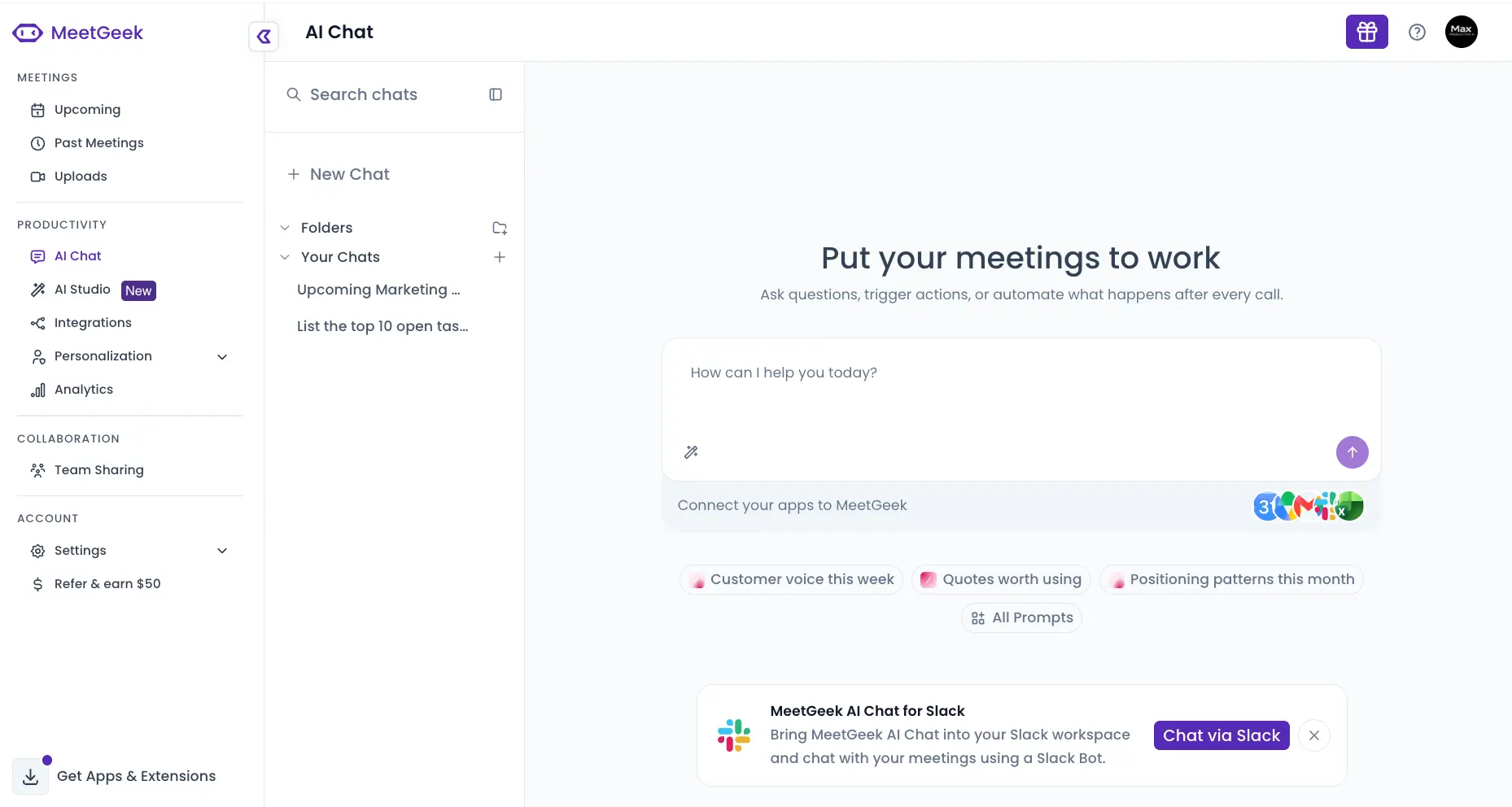
The full AI Chat page is where the "put your meetings to work" pitch lives. You type a question, MeetGeek searches across your recorded meetings and answers from them. Past chats are saved and can be filed into folders, which matters once you have a few dozen going. The prebuilt prompts lean toward marketing and product work: "Customer voice this week", "Quotes worth using", "Positioning patterns this month". There's also a Slack integration that brings the same chat into a channel, so the team can query meetings without opening MeetGeek at all.
AI Studio: Skills, Voice Agents and Prompts
The agent layer, with a library of ready-made Skills to start from

AI Studio is the newest part of the product and still carries a "New" badge in the sidebar. The idea is simple. Instead of asking the chat the same question every Friday, you save it as a Skill that runs on its own and delivers the result. The recommended library includes a Weekly Engineering Digest, a Hiring Pipeline Digest, a Meeting Hygiene Guard that flags overruns and missing transcripts, and a Customer Risk Monitor. On a fresh account the main panel is empty, which is fair enough. The value shows up once a few weeks of meetings have accumulated.
Curious whether the analytics fit the way your team works?
Try MeetGeek →Free plan • Works with Zoom, Google Meet and TeamsInside a Skill: Voice of Customer Digest
Each Skill is a readable prompt you can copy, edit, or add as-is
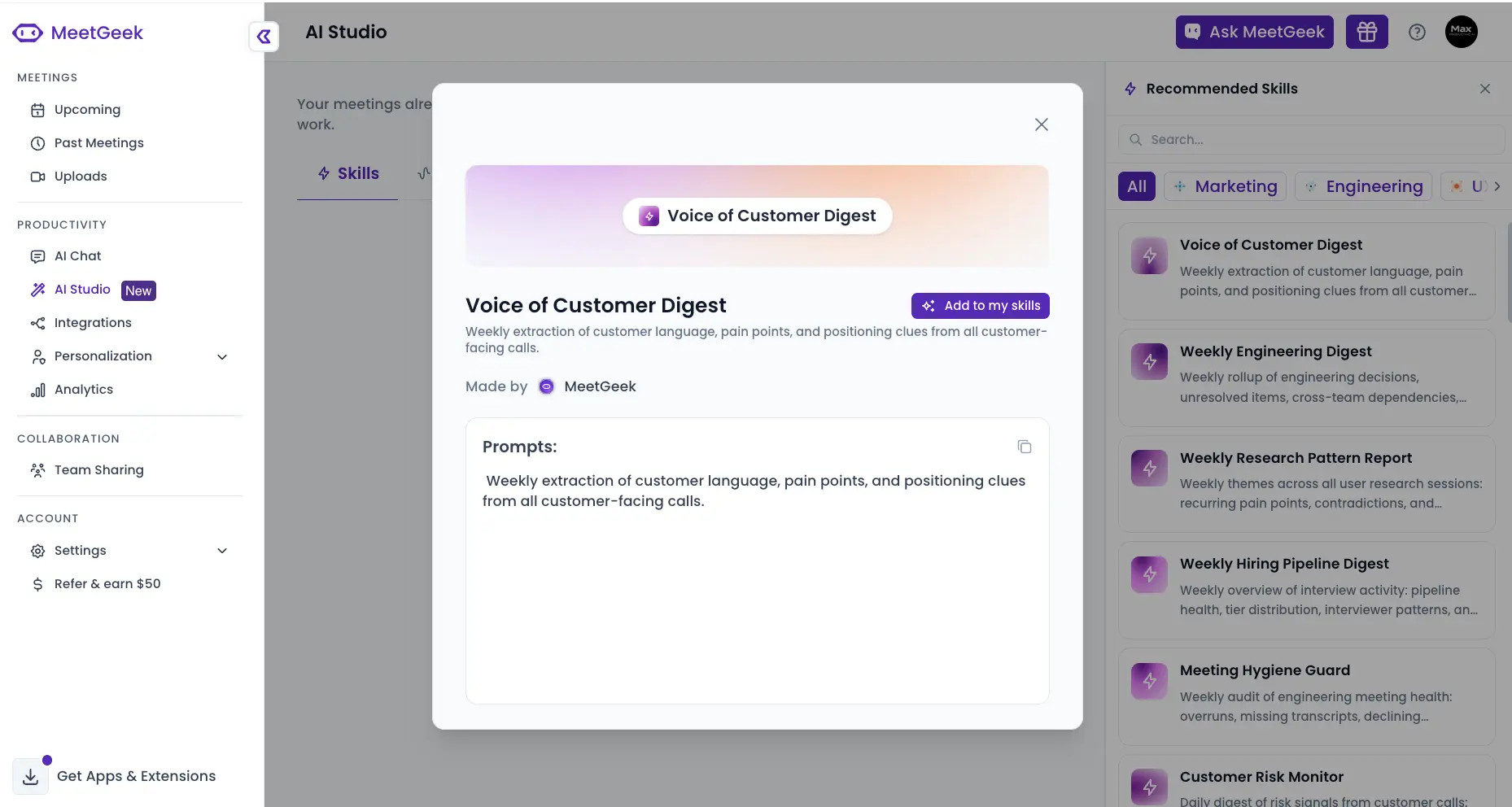
Opening a Skill shows exactly what it does. The Voice of Customer Digest is a weekly extraction of customer language, pain points and positioning clues from every customer-facing call. The prompt is displayed in plain text with a copy button, so you can tweak the wording before adding it. That transparency is a good sign. Plenty of "AI agent" features hide the instructions, which makes them hard to trust when the output looks off.
Integrations & Automations
Native connections to CRMs, project tools and storage, plus Zapier, Make, n8n and a public API

This screen is busier than the rest of the app, and for good reason. Calendar connections (Google and Outlook) sit at the top, then storage (Google Drive, OneDrive, Dropbox), then the CRM and project-management block: HubSpot, Salesforce, Pipedrive, Zoho CRM, Attio, Close, Notion, Slack, Trello, Asana, ClickUp, Monday, Jira. Zapier, Make and n8n cover anything not listed, and there's a public API tile for custom work. WhatsApp is an unusual inclusion for a meeting tool, presumably for teams that run client communication there. Every integration is available on the free plan, which is not the norm in this category.
Meeting Templates
Summary formats matched to the meeting type, from customer discovery to all-hands

Templates control how a summary is structured. A customer discovery call gets a different shape than a project status update or a coaching session, and MeetGeek detects the meeting type to pick the right one. There are twenty built-in templates across six categories, a language selector, and a New Template button for your own. One honest note: the purple banner at the top says it all. Templates are a paid feature, so free users get the general summary format only. It's the clearest upgrade nudge in the app.
How MeetGeek Works
From calendar connection to a searchable, automated meeting archive in four steps.
Connect Your Calendar
Sign in with Google or Microsoft and MeetGeek reads your calendar for meetings with a Zoom, Google Meet or Teams link. From there it's a toggle per meeting: on, and the bot joins; off, and it stays away. Setup took us well under ten minutes and didn't need anything installed or approved by IT, which makes it easy to trial on a personal account before involving the rest of the team.
Pick How You Capture
The default is the Meeting Agent, a bot that appears in the participant list. If that's awkward for client calls, the Chrome extension and desktop app record without one. The mobile app handles in-person meetings and phone calls, and Uploads lets you drop in older audio or video files. Two quirks to plan around: a newly created meeting takes roughly half an hour to become joinable, and the bot won't jump into an instant call you start without a calendar entry.
Get the Transcript, Summary and Action Items
Shortly after the call ends you get a transcript with speaker labels, a summary shaped by the detected meeting type, and a list of action items and decisions. Language detection is automatic. This is also where the tool's main weakness lives. Clean English comes back close to verbatim; a noisy line, or a call that hops between French and English, will need more correcting by hand. If your calls look like that, run a few through the free plan before deciding anything.
Search, Chat, Automate
Everything lands in a searchable archive. Ask AI Chat a question that spans months of calls, check the analytics dashboard for talk-time ratios and trends, or push summaries and action items into your CRM, Notion or Slack through an integration. Skills in AI Studio can run these steps on a schedule so the Monday digest writes itself while you're still on your first coffee.
Security and Data Residency
MeetGeek is SOC 2 Type II certified, GDPR and CCPA compliant, and offers a HIPAA Business Associate Agreement on eligible plans. You can choose EU or US data hosting, the company itself is based in the EU, and its policy states that customer meeting data is not used to train its models. For European buyers who've had to explain a US-hosted meeting recorder to a data protection officer, that combination saves a conversation. Enterprise adds SSO, SCIM and on-premise storage options.
Retention Depends on Your Plan
The free plan keeps transcripts for three months and audio for one. Pro extends that to a year of transcripts and six months of audio; Business keeps transcripts indefinitely and video for twelve months. If the archive is the point for you, budget for at least Pro.
MeetGeek Features
What you get on the free plan, what needs a paid one, and where each piece stands.
Meeting Agent
The calendar-linked bot for Zoom, Google Meet and Teams. It's the least-effort option: toggle a meeting on and forget about it. The trade-off is that a participant named MeetGeek is visible to everyone on the call, which some clients notice and a few will ask about.
Bot-Free & Mobile Capture
The Chrome extension and desktop app record without a bot in the meeting. iOS and Android apps cover in-person conversations and phone calls, and Uploads handles files you already have. Fathom has bot-free recording in beta; Otter and Fireflies don't offer it. Here it's standard on every plan.
Transcription in 100+ Languages
Automatic language detection, speaker labels, timestamps. Strong on clear English, including non-native speakers with decent microphones. Push it with a thick regional accent, a bad headset or two people talking at once and the errors creep in. That's the most consistent complaint about the tool, and worth taking seriously if it describes your meetings.
Summaries & Meeting Templates
Unlimited AI summaries on every plan, with the detected meeting type shaping the format. Twenty built-in templates (customer discovery, project status, coaching session, all-hands and so on) plus custom ones, though the template library itself needs a paid plan. Summaries occasionally miss an action item or keep small talk that should have been cut.
Meeting Analytics
Over 100 tracked metrics: talk-time ratios, speaker engagement, sentiment and topic trends, per meeting and over time. This is MeetGeek's clearest advantage over Fathom, Otter and Fireflies at similar prices, and the reason sales leaders and recruiters gravitate toward it. Team-level analytics need the Business plan.
AI Chat & AI Studio
Ask questions across your whole meeting history, save and file the chats, or use the Slack bot. AI Studio adds Skills (scheduled or triggered agents), Voice Agents and reusable Prompts. Newer, still evolving, and most useful once there's a real backlog of meetings for it to work with.
Integrations, API & MCP Server
Native connections to HubSpot, Salesforce, Pipedrive, Zoho, Attio, Close, Notion, Slack, Asana, ClickUp, Jira, Trello and Monday; Zapier, Make and n8n for the rest. A REST API with signed webhooks and an MCP Server for connecting transcripts to Claude or ChatGPT. Note the API cap of 100 requests a day on Basic and Pro; Business lifts it to 100 a minute.
Security & Compliance
SOC 2, GDPR, CCPA, a HIPAA BAA on eligible plans, EU or US data residency, and SSO with SCIM at Enterprise. Stronger compliance coverage than most tools in this category, which matters for European teams that have to show paperwork before anything gets approved.
A few smaller things round it out: shared workspaces and team sharing on Business, a Personalization area for tuning how the assistant behaves, and the option to mix free and paid seats in one workspace so occasional users don't need a license. Is it perfect? No. But the free tier covers more ground than most of its rivals do at $10 a month.
Every integration and the analytics dashboard are included on the free plan:
See MeetGeek's pricing →Upgrade only when you run out of hoursMeetGeek Pricing
Four plans, one of them free forever. Prices below are per user, per month, on annual billing.
Basic
- ✓ 3 hours of transcription per month
- ✓ Unlimited AI summaries
- ✓ Meeting analytics included
- ✓ All integrations
- ✓ Bot, extension, desktop & mobile capture
- ✓ 3 months of transcripts, 1 month of audio
Pro
- ✓ 20 hours of transcription per month
- ✓ $0.50 per extra hour beyond that
- ✓ 1 year of transcripts, 6 months of audio
- ✓ API access (100 requests/day)
- ✓ Mix with free seats in one workspace
- ✓ Everything in Basic
Business
- ✓ Unlimited transcription
- ✓ Unlimited transcript retention
- ✓ 12 months of video storage
- ✓ Team workspaces & team analytics
- ✓ API at 100 requests/minute
- ✓ Everything in Pro
Discounts: Annual billing saves up to 40% compared with monthly • Startups, nonprofits and schools can apply for 30% off
Pricing last verified September 2026. Visit MeetGeek for current rates.
Is Pro Worth It?
At $9.99 for twenty hours, each recorded hour works out to about fifty cents, which happens to be the overage rate as well. If a summary saves you fifteen minutes of note cleanup per call, the plan pays for itself within the first few meetings of the month. Start on the free plan regardless. Upgrade when you hit the ceiling, not before.
Next to the competition, the Pro entry price is on the lower side. Otter Pro is $8.33 a month for 1,200 minutes, Fireflies Pro is $10 with unlimited transcription, Fathom Premium is $16 and tl;dv Pro is $18. What changes the picture is the free tier. Fathom records unlimited calls for free but caps AI summaries at five a month; Fireflies transcribes without limit but meters its AI features with credits; MeetGeek gives you three hours but includes summaries, analytics and every integration. Which is the better deal depends on whether you're short on hours or short on features.
Detailed Pros & Cons
Where MeetGeek earns its rating, and where it doesn't.
✓ Pros
Basic isn't a demo. Analytics, unlimited summaries, every integration and every capture method are included; the only real limits are hours and retention. For a solo consultant with a few client calls a week, it may be all you ever need.
Talk-time ratios, engagement, sentiment and topic trends across your whole history. Most rivals stop at "here's what was said". MeetGeek adds "here's how your calls are changing", which is the difference between a note taker and a coaching tool.
SOC 2, GDPR, CCPA, a HIPAA BAA, and EU or US hosting. If you sell into regulated industries or European enterprises, this shortens the security questionnaire noticeably.
Bot, extension, desktop app, mobile, uploads. Being able to switch between bot and no-bot depending on who's on the call is more useful than it sounds, especially for agencies and consultants who meet a lot of first-time clients.
Native CRM sync, Notion, Slack and project tools, plus Zapier, Make, n8n, a public API and an MCP Server. The Skills layer in AI Studio means recurring reports can run themselves. Few tools at this price go this far.
Business at $17 per user for unlimited transcription sits comfortably next to Otter Business ($19.99) and Fireflies Business ($19), and the annual discount plus the 30% for startups and nonprofits helps small teams stretch a budget.
✗ Cons
The most consistent criticism across user feedback and independent tests. Accented speakers, people talking over each other, poor microphones and language switching all push the error rate up. Clean English is fine. If your calls aren't, test carefully before you pay.
One month of audio and three of transcripts on the free plan means the archive, which is where much of the value sits, starts thinning out fast. Pro fixes most of this, but it's a nudge you'll feel within the first quarter.
No live chat, and response times are described as inconsistent. When a bot fails to join a client call, waiting on an email thread isn't ideal. A quicker channel would be a welcome addition.
A new meeting needs about thirty minutes before the bot can join, instant calls without a calendar entry aren't picked up, and there's no pause button mid-recording. None of these is serious on its own, but they add up on a busy day.
Meeting templates need a paid plan, team-level analytics need Business, and the API is capped at 100 requests a day on Basic and Pro. Reasonable commercially, but the free plan's summaries are more generic as a result and serious automation needs the top tier.
A minority of users report summaries that drop an action item or keep chit-chat that should have been trimmed. Reviewing the output before forwarding it is still a good habit, as it is with every tool in this category.
MeetGeek Alternatives
How MeetGeek compares with the other meeting note takers we cover, and where each one fits best.
| Feature | Reviewed MeetGeek | Otter | Fireflies | Fathom | tl;dv |
|---|---|---|---|---|---|
| Entry Paid Price | $9.99/mo | $8.33/mo | $10/mo | $16/mo | $18/mo |
| Free Plan | 3 hrs/mo, full features | 300 min/mo, 30-min cap per call | Unlimited transcription, AI credits metered | Unlimited recording, 5 AI summaries/mo | Unlimited recording, AI notes on 10 meetings |
| Entry Plan Transcription | 20 hrs/mo | 1,200 min/mo | Unlimited | Unlimited | Unlimited (weekly caps) |
| Bot-Free Recording | ✓ Extension + desktop | ✗ | ✗ | Beta | ✗ |
| Cross-Meeting Analytics | ✓ 100+ metrics | Limited | Talk-time (Pro+) | Basic (Team+) | ✓ Coaching & playbooks |
| CRM Sync | ✓ All plans | Enterprise only | Business tier | Business tier | All paid tiers |
| Languages | 100+ | English-centric | 100+ | 25+ | 30+ |
| Unique Strength | Analytics + EU/US hosting | Real-time transcription | AI Skills + CRM automation | Free unlimited recording | Sales coaching |
| Best For | Sales, CS, recruiting, EU teams | English-first teams, education | Sales teams on a budget | Individuals, light users | Revenue teams needing coaching |
MeetGeek vs Otter: The Short Version
This is the comparison most people ask about, so here it is plainly. Otter has the more polished real-time transcription experience for English, a long track record, and a slightly cheaper Pro plan. MeetGeek has the deeper analytics, bot-free recording, broader language detection, EU or US data residency, and CRM integrations on every plan rather than at Enterprise level only. Otter's free tier gives you 300 minutes a month with a 30-minute cap per conversation; MeetGeek's gives you 180 minutes, with analytics and integrations included.
Our take: if you mostly need live captions and clean English transcripts, Otter still does that very well and there's no reason to move. If you want to learn something from your meetings over time, connect them to a CRM without an enterprise contract, or keep data in the EU, MeetGeek is the stronger fit. Our Otter review and the Otter AI alternatives roundup go into more detail on both.
Which Tool Is Right For You?
MeetGeek
ReviewedBest for: Teams that live on external calls (sales, customer success, recruiting, consulting) and want analytics and automation on top of the notes, plus European companies that need EU hosting and SOC 2 paperwork. The sweet spot is a team of two to twenty running mostly English calls, with a CRM they'd like to keep updated without manual entry. Start on the free plan and let the archive prove itself.

Otter AI
Real-Time TranscriptionBest for: English-first teams and educators who value live transcription and a mature, familiar product. Pro is $8.33 a month for 1,200 minutes; Business is $19.99 for unlimited. CRM sync and the sales notetaker are Enterprise features, and the free tier's 30-minute cap per conversation is the limit most people bump into first.
Fireflies AI
Sales AutomationBest for: Sales teams that want unlimited transcription and native CRM logging at a low price. The free tier transcribes without limit but meters AI features with credits and keeps only 400 minutes of storage; Pro is $10, Business $19 with CRM sync. The AI Skills and voice agents are strong, though the credit system takes a little getting used to.
Fathom
Free Unlimited RecordingBest for: Individuals and budget-conscious teams who want unlimited free recording. Watch the catch: free AI summaries are capped at five a month, so heavier users end up on Premium ($16 on annual billing) fairly quickly. Bot-free recording is still in beta. Analytics are lighter than MeetGeek's, but note quality is well liked and setup is about as easy as it gets.

Granola
Bot-Free NotesBest for: People who prefer to type their own notes and let AI tidy them up, with no bot and no recording stored. That's also its limitation: there's nothing to replay, and cross-meeting analytics are thin. The free plan keeps roughly a month of history; Business is $14. If the idea of a bot in your calls bothers you, start here.

tl;dv
Sales CoachingBest for: Revenue teams that want call coaching, playbook tracking and a clip library. The free plan records without limit but applies AI notes to ten meetings; Pro is $18 and Business $29, with prices set in euros. It's the closest to MeetGeek on analytics, with more emphasis on sales coaching and less on general-purpose automation. We haven't published a full review yet.
Frequently Asked Questions
Should You Try MeetGeek?
MeetGeek is one of the more complete meeting assistants you can start using for free. The capture options cover every situation, the summaries are structured enough to send on, and the analytics and automation layers give the tool a reason to exist beyond the transcript. Add the compliance credentials and EU hosting, and it's an easy recommendation for teams in Europe and a solid one everywhere else.
The 4.5 comes with a clear caveat. Transcription accuracy on accented, noisy or multilingual audio is the weak spot, and it's the one thing we'd insist you verify yourself. Retention on the free plan is short, support is email only, and a few operational quirks remain. None of that changes the overall picture: for English-dominant teams that want to learn from their meetings and push the results into other tools, MeetGeek does more than most at this price.
Our Recommendation
Start on the free Basic plan. Connect your calendar, let the bot join five or six real calls that represent your typical audio, and check the transcripts against your own memory of the conversation. If they hold up, connect your CRM or Notion, try a Skill in AI Studio, and move to Pro when you hit the monthly hour limit. If the transcripts struggle with your accents or languages, you'll know within a week and it will have cost you nothing.