Fireflies.ai
AI meeting assistant that joins your calls, then turns them into transcripts, summaries, and action items. In 2026 it does a lot more than meetings: email triage, daily briefs, and voice agents, with a free plan to start.
Try Fireflies.ai →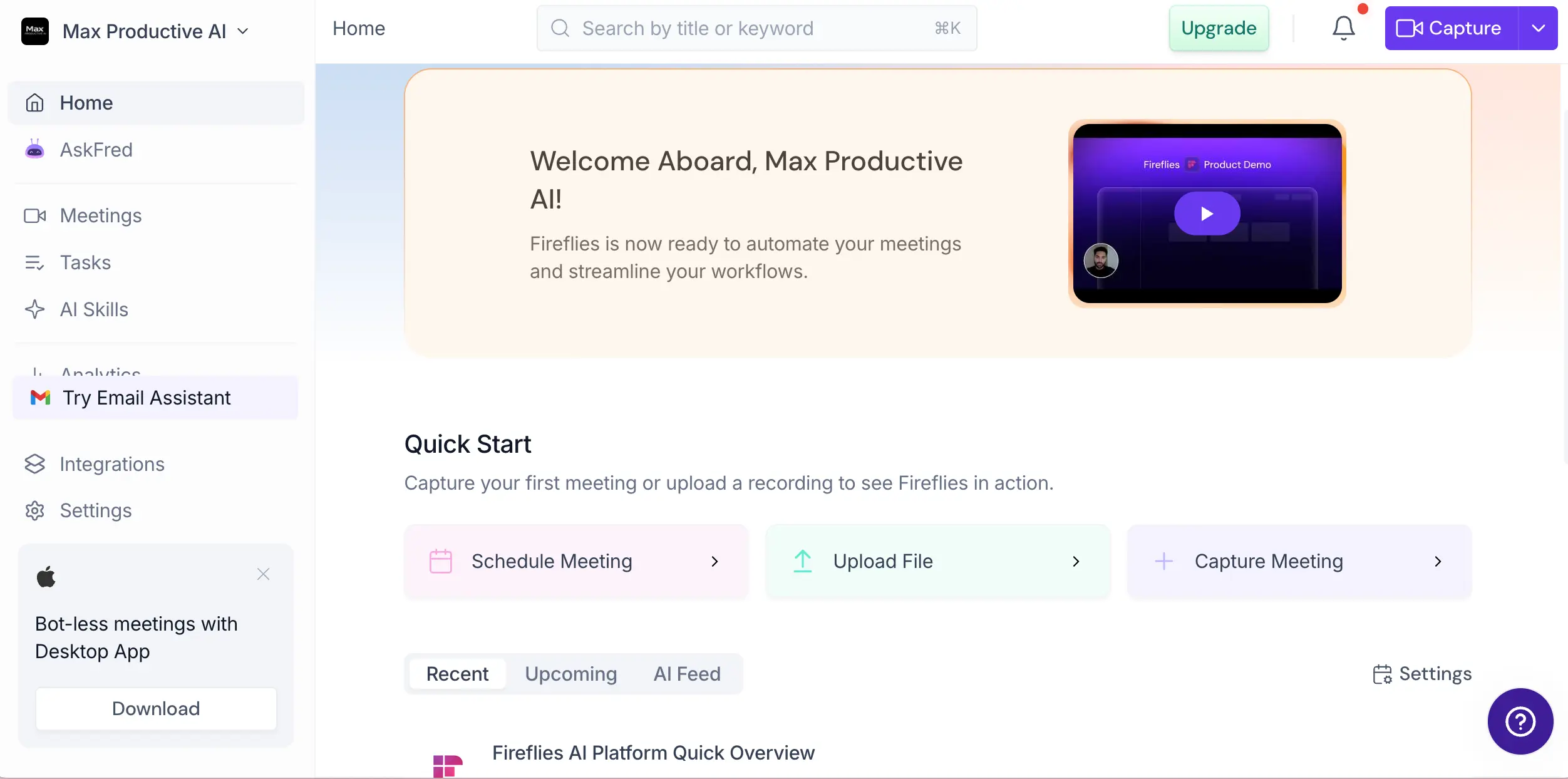
The Meeting Assistant That's
Becoming a Work Assistant
Fireflies.ai has quietly outgrown the note-taker label. The core loop — a bot joins your call, and a transcript, summary, and action items land in your inbox minutes later — works well, and the free plan is one of the most generous in the category. Add the 2026 releases (Email Assistant, Daily Briefs, Voice Agents) and you're looking at a genuine work assistant, not just a meeting recorder. What holds it back from a higher score: no live transcription during calls, accuracy that dips with strong accents, and consent questions around its visible bot that compliance-minded teams will want to think through.
✓ What We Love
- Free plan with no cap on transcription volume
- CRM autofill for Salesforce, HubSpot & Pipedrive
- Transcribes over a hundred languages, auto-detected
- Fast 2026 roadmap: email, briefs, voice agents
! Could Be Better
- No live captions — transcripts arrive after the call
- Accuracy drops with heavy accents or crosstalk
- Visible bot won't suit every meeting or policy
What Is Fireflies.ai?
Where it came from, what it does today, and the one structural thing to understand before you commit.
Fireflies.ai started life in 2018 as a straightforward meeting note-taker: a bot called "Fireflies Notetaker" joins your Zoom, Google Meet, Microsoft Teams, or Webex call, records it, and sends back a transcript with an AI summary. That core job hasn't changed. What has changed is everything around it. By 2026, Fireflies is used by teams at roughly three-quarters of Fortune 500 companies and has pushed into email, Slack, CRM automation, and even AI agents that make phone calls on their own.
Two things separate it from direct rivals like Otter.ai and Fathom. First, CRM depth: native Salesforce, HubSpot, and Pipedrive integrations that fill deal records automatically after a call, plus Deal Intelligence that flags at-risk deals. Second, language breadth: more than a hundred languages with automatic detection, where Otter's core support has historically covered only a handful. If your calls happen in French on Monday and Thai on Tuesday, that difference is not academic.
Then there's AskFred, the built-in AI assistant. It answers natural-language questions across your meetings — and, once connected, your email, Slack, and CRM — with citations back to the source. "What did the client commit to in March?" is the kind of question it handles well, and it's the feature that turns a pile of recordings into something you'll actually query.
A note on how we reviewed this: we set up a free account and worked through the product screen by screen; the screenshots below come from our own workspace. For accuracy figures and legal context, we've leaned on independent testing and public reporting rather than the company's marketing claims, and we'll flag which is which as we go.
Who Is Fireflies.ai Best For?
Sales and customer-success teams that live in their CRM; multilingual organizations; and anyone who wants a serious free plan for meeting notes. It's a "look back" tool — capture, search, automate the follow-through. Less ideal if you need live captions during the call, or if you operate under strict recording-consent rules (more on that below).
One structural thing to understand: Fireflies is primarily a bot-based tool, meaning a visible participant appears in your meetings. Some clients and interview candidates find that intrusive, and recording etiquette varies from one room to the next. The company knows it: a bot-free Desktop App (launched late 2025) captures system audio on Mac and Windows instead, which also unlocks Slack Huddles, WhatsApp calls, FaceTime, and in-person conversations. Worth installing on day one.
See Fireflies.ai in Action
Real screenshots from our own Fireflies workspace, covering the main dashboard through the newest 2026 features.
Home Dashboard
Your starting point: capture, schedule, or upload a meeting
The home screen keeps things simple. Three tiles cover the main entry points — schedule a meeting, upload an existing recording, or capture one live — and the Recent / Upcoming / AI Feed tabs fill up once your calendar is connected. Notice the sidebar banner pushing the desktop app for "bot-less meetings": install it early if the visible bot bothers you or your clients.
Meetings Dashboard
Where every recorded call lives, organized into channels
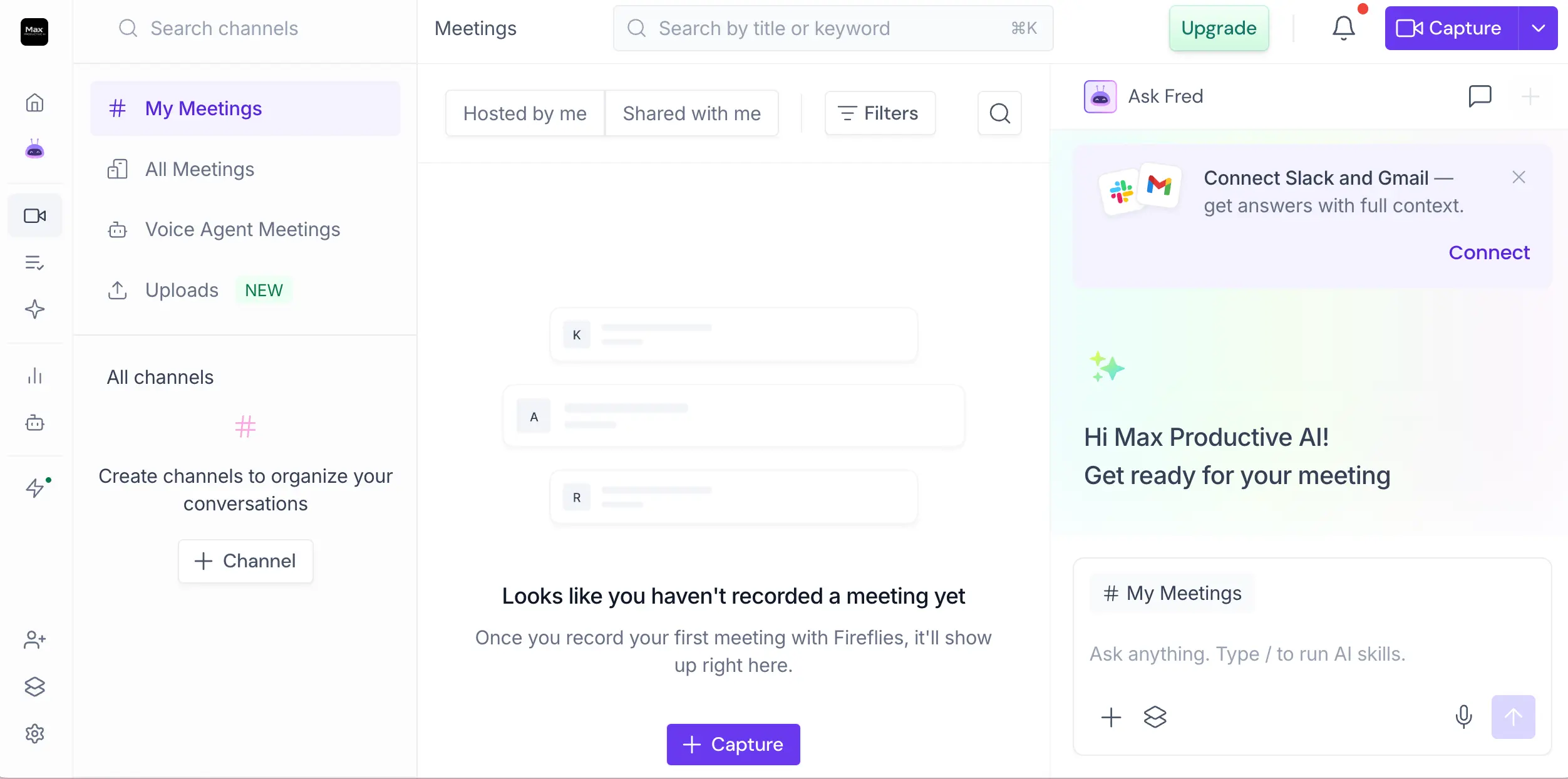
Meetings are organized into channels — a Slack-style structure that works better than a flat list once you're past a few dozen recordings. Uploads get their own section (handy for old recordings or voice memos), and Voice Agent calls are kept separate from human meetings. AskFred docks on the right, so you can ask "what did we decide last week?" while scrolling the archive. Clean layout; nothing to relearn.
AskFred Assistant
A chat interface over everything Fireflies knows about your work
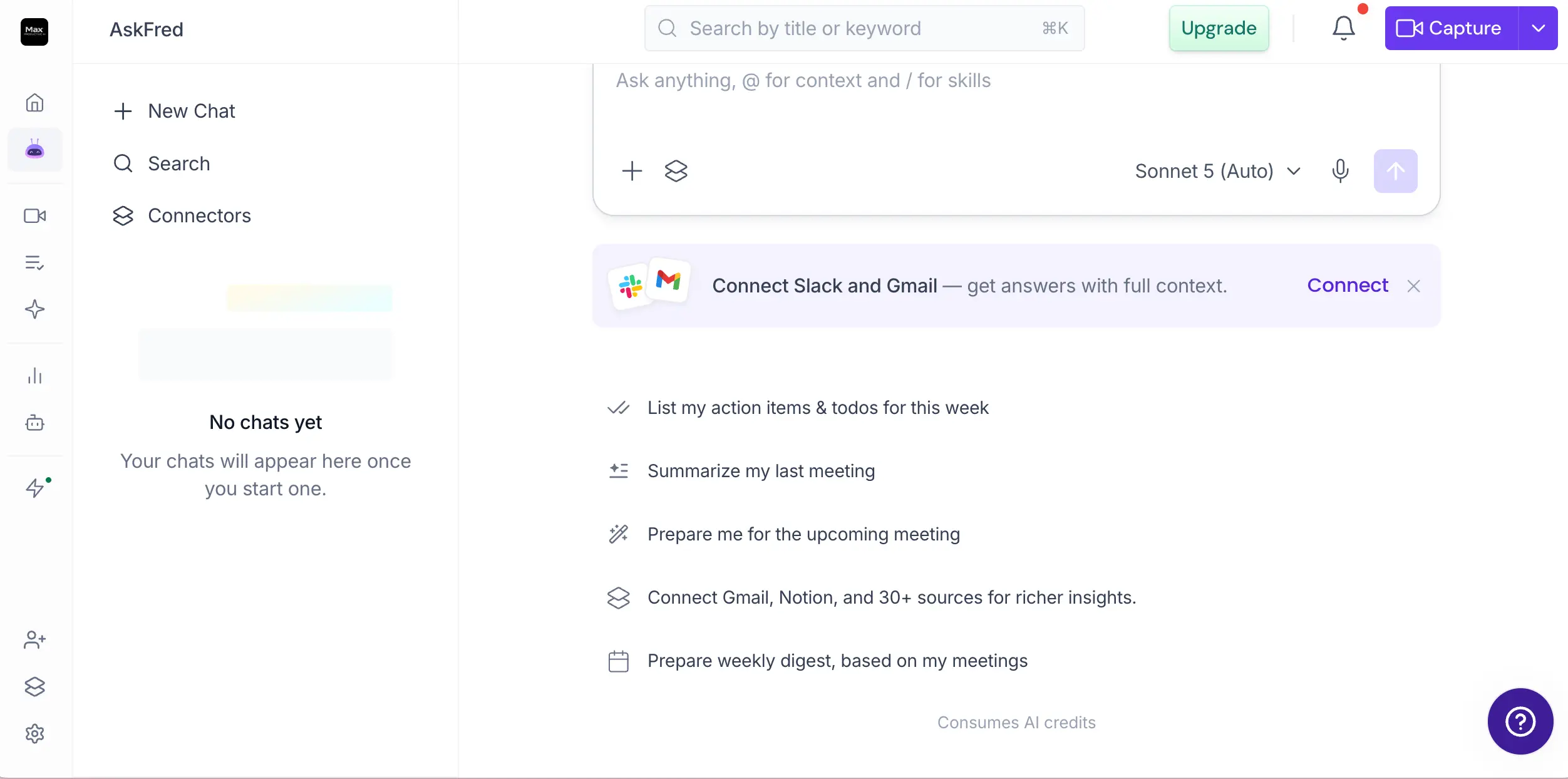
The suggested prompts tell you what AskFred is for: list this week's action items, summarize the last meeting, prep you for the next one, build a weekly digest. You can @-mention meetings for context and type "/" to trigger AI Skills, and there's even a model selector in the corner. One thing to know before you get attached: AskFred consumes AI credits, which are metered separately from your plan. Keep an eye on that meter.
Want to see what AskFred does with your own meetings?
Try Fireflies.ai Free →Free plan • Setup takes a few minutesEmail Assistant
The August 2026 launch that moves Fireflies beyond meetings
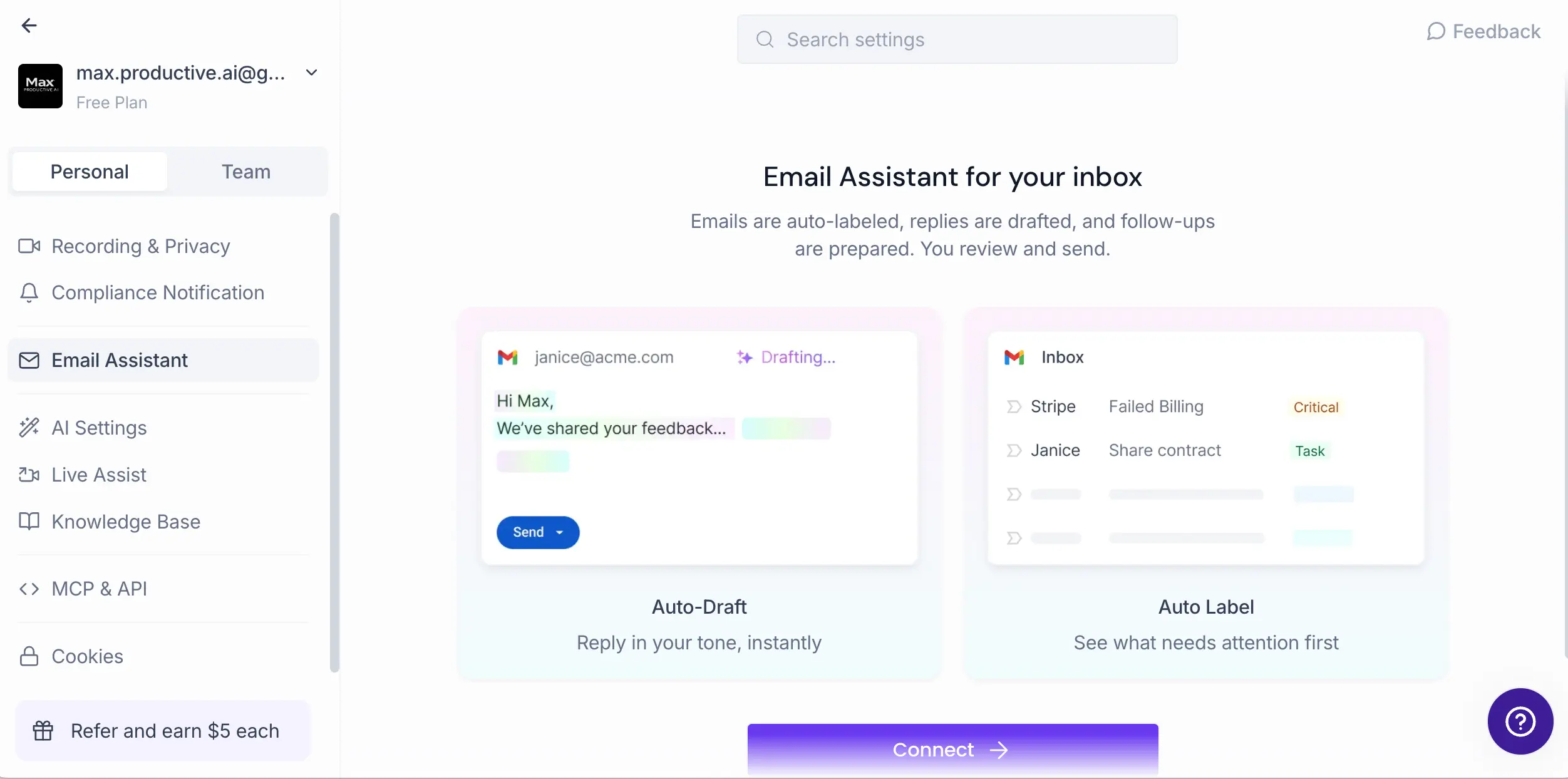
Connect Gmail or Outlook and Fireflies starts labeling incoming mail by urgency and drafting replies — informed by your past meeting history, which is the clever part. A client emails about the proposal you discussed Tuesday? The draft already knows what was said Tuesday. You review and hit send; nothing goes out on its own. It's brand new, so expect rough edges, but shipping this free on every plan — including Free — is an aggressive move.
AI Skills Library
Prebuilt automations you toggle on, or build yourself
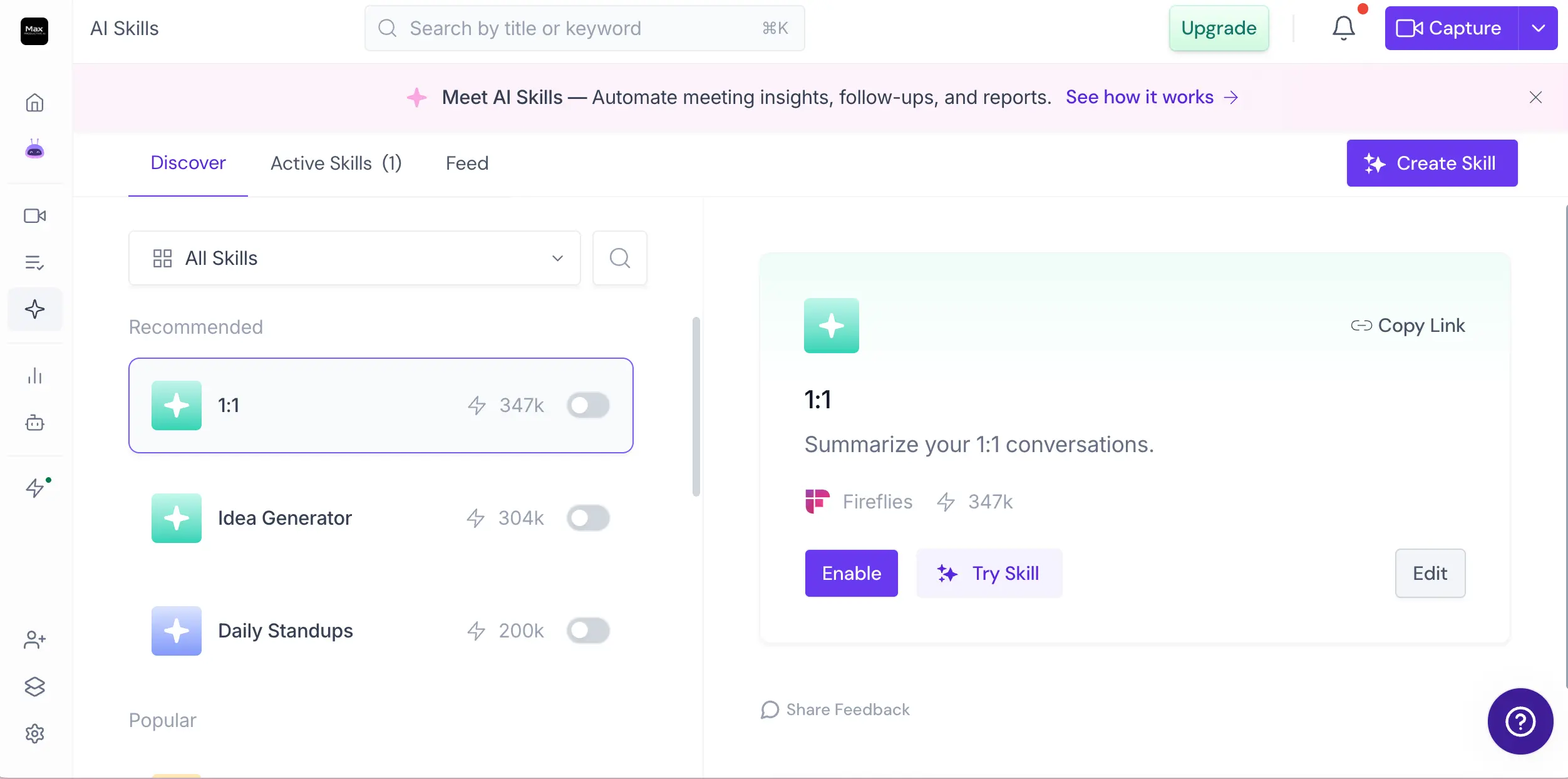
Skills are recipes: "summarize my 1:1s a certain way," "generate ideas from this call," "format daily standups." The activation counts next to each one (the 1:1 skill shows 347k) are a nice touch — you can see what's genuinely popular instead of guessing. Toggle a skill on and it runs against your meetings automatically. Like AskFred, skills draw on AI credits, so heavy automation users will feel the meter faster than casual ones.
Voice Agents
AI that places or answers calls on your behalf
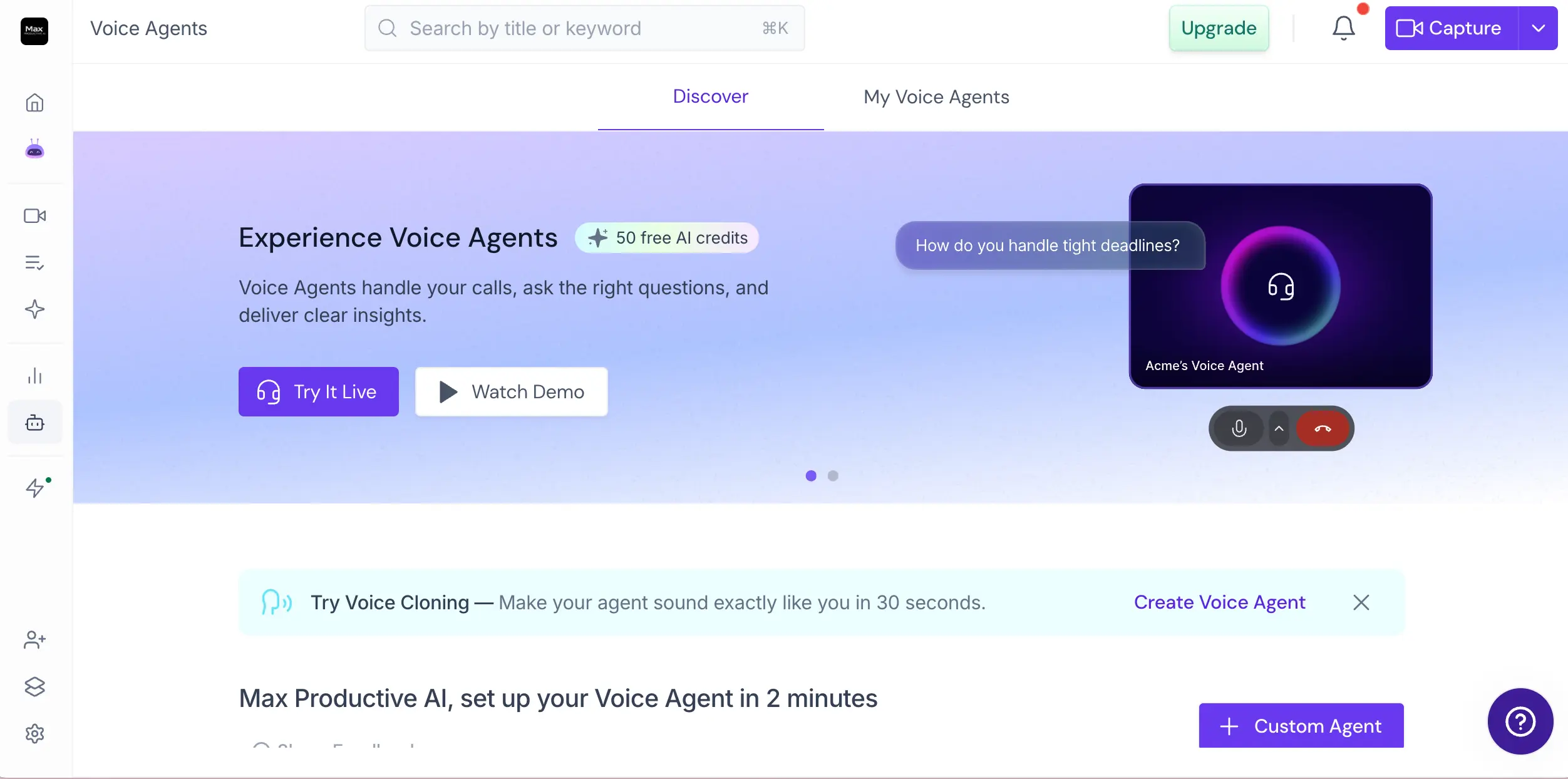
This is the most futuristic corner of the product: agents that autonomously handle calls (screening interviews, discovery calls, inbound questions) and feed the recordings back into your meetings archive. Setup takes about two minutes, and voice cloning makes the agent sound like you. Honest take: it's impressive to demo, and genuinely useful for high-volume screening, but it runs entirely on AI credits, so treat it as an experiment before you build a workflow around it.
How Fireflies.ai Works
From calendar connection to automated follow-through in four steps — plus two things you should know before inviting the bot anywhere.
Connect Your Calendar and Platforms
Sign up with a Google or Microsoft login, connect your calendar, and choose which meetings the Notetaker bot should join — everything, only meetings you own, or a manual pick each time. Coverage is wide: Zoom, Google Meet, Microsoft Teams, Webex, RingCentral, Aircall, and more. Prefer no bot in the participant list? The desktop app records system audio instead, which also covers Slack Huddles, WhatsApp calls, and in-person conversations.
The Recording Is Processed After the Call
Here's the part that surprises people coming from Otter.ai: there's no live caption stream. Fireflies transcribes once the meeting ends, usually within minutes, with automatic language detection spanning a hundred-plus languages. The company claims up to 99% accuracy for English; independent testing lands lower, especially on accented or overlapping speech. For clear audio it's solid. For a chaotic six-person brainstorm, budget for cleanup.
Read the Summary — or Just Ask
Every processed meeting gets a structured summary: topics covered, decisions made, action items with owners. You can read it, or skip it and ask AskFred instead — "what were the objections?", "who owns the pricing follow-up?" — and get answers with citations back to the exact moment in the transcript. Over time, the archive becomes the real asset: users consistently say the ability to resurface an exact quote from months ago is what keeps them subscribed.
Let the Automations Do the Follow-Through
This is where Fireflies pulls ahead of simpler note-takers. Autofill CRM writes call details into your deal records without you touching them. AI Skills route action items to Slack or your task manager. The Email Assistant drafts your follow-ups, and the next morning, Daily Briefs rolls everything — meetings, email, Slack — into one digest. The meeting notes are the input; the follow-through is the product.
The Consent Question — Worth Settling Early
The Notetaker appears as a visible participant, which acts as a recording indicator — but visibility isn't the same as consent everywhere. Recording laws differ by country and U.S. state (some require every participant's agreement), and plenty of companies limit third-party meeting bots by internal policy. Practical advice: announce the recording out loud at the start, review the Speaker Recognition setting if voice identification isn't something you need, and if you're in healthcare, legal, or the EU, loop in whoever handles compliance before a team-wide rollout.
AI Credits: Read This Before You Budget
Core transcription and summaries don't consume credits — they're included in your plan. But the newer AI features do: AskFred queries, AI Skills, custom summary sections, and especially Voice Agents all draw from a metered credit pool. Top-ups run from $5 for 50 credits up to $600 for 10,000. It's fine for moderate use; heavy automation users should model the credit cost before assuming the sticker price is the whole price.
Fireflies.ai Features
What you get across the tiers — with honest notes on which features are mature and which are still settling in.
Automatic Meeting Capture
The bot joins Zoom, Google Meet, Microsoft Teams, Webex, RingCentral, and Aircall calls on its own; the desktop app captures Slack Huddles, WhatsApp, FaceTime, and in-person audio with no bot at all. That's the widest capture coverage in the note-taking category — most rivals stop at the big three platforms.
Transcription, Auto-Detected
Over a hundred languages with automatic detection — the broadest coverage among meeting assistants, with Notta the closest at 58+. Quality is strong on clear audio and weaker on heavy accents or crosstalk, so run your hardest real-world meeting through the free plan before judging.
AI Summaries & Action Items
Structured recaps with topics, decisions, and action items assigned to owners. Mostly reliable — the known weakness is attribution in fast, multi-speaker calls, where tasks occasionally land on the wrong person. Skim before you forward to a client.
AskFred Assistant
Ask questions across meetings, email, Slack, and CRM data — with cited sources, which matters more than it sounds. This is the feature that makes the archive useful instead of just large. Uses AI credits.
CRM Autofill & Deal Intelligence
Native Salesforce, HubSpot, and Pipedrive sync that updates deal records from call content, plus deal-risk flags built on MEDDIC and BANT. Sales users report 10–15 minutes of manual CRM entry saved per meeting — the single strongest business case for this tool.
Email Assistant
Launched August 2026 for Gmail and Outlook: auto-labels your inbox, drafts replies in your tone using meeting context, and preps follow-ups on unanswered threads. Included on every plan, Free included — an unusually generous call for a feature this new.
Daily Briefs
A morning digest that pulls action items, blockers, and updates from meetings, email, and Slack into one place. Rolled out July 2026 to all plans. Simple idea, well executed — the kind of feature you stop noticing because it just becomes how your day starts.
Voice Agents & AI Skills
Agents place or answer calls autonomously in 30+ languages, with voice cloning; the Skills library offers 200+ prebuilt automations plus custom builds. Both are promising and both run on metered credits — great to test, but do the math before making them load-bearing.
There's also a proper developer story: a GraphQL API, an MCP server for two-way integration with AI assistants like Claude and ChatGPT, and a public changelog that shows steady engineering pace (recent entries include a 10x bump to Pro-plan API limits and live-transcript fields). Is every feature equally polished? No. The 2026 additions are newer and it shows. But the direction is unmistakable: this wants to be the layer between your conversations and your tools, not just a transcript machine.
The free plan covers capture, transcription, and summaries — enough to judge it properly:
Visit Fireflies.ai →Paid plans from $10/seat/month if you outgrow itFireflies.ai Pricing
Four plans, and the free one holds up for real daily use. Paid tiers buy storage, video, and automation depth — not better transcripts.
Free
- ✓ Unlimited transcription + AI summaries
- ✓ AskFred assistant
- ✓ Email Assistant & Daily Briefs
- ✓ 400-minute storage per team
- ✓ Audio recording only (no video)
- ✓ Works on all major platforms
Pro
- ✓ Everything in Free
- ✓ Video recording
- ✓ 8,000-minute storage per seat
- ✓ AI Skills access
- ✓ Unlimited integrations
- ✓ Higher API limits
Business
- ✓ Everything in Pro
- ✓ Unlimited storage
- ✓ Conversation intelligence
- ✓ Team analytics & coaching
- ✓ Multi-language mode
- ✓ Priority support
Important: Advanced AI features (Voice Agents, AI Skills, custom summaries) consume separately metered AI credits — top-ups start at $5 for 50 credits.
Pricing last verified August 2026. Visit Fireflies.ai for current rates.
Is It Worth the Money?
Sales users report saving 10–15 minutes of post-call CRM entry per meeting. At 20 meetings a month, that's 3–5 hours recovered against a $10–19 seat. Even if you ignore the CRM angle entirely, the tool pays for itself the first time it saves you writing up two meetings by hand.
For context against the rest of the category: Otter.ai's Pro plan runs $8.33/month with a tightly capped free tier; Fathom charges $16–19/month after a truly uncapped free recording tier; MeetGeek starts at $9.99 with a 3-hour monthly transcription cap on free; and Notta is $8.17 but its free plan is a 120-minute lifetime allowance. If you're pricing the specialists, Granola runs $14 and tl;dv €18. Fireflies' free plan is the volume king — no monthly transcription cap — and Pro at $10 sits right in the middle of the pack for what is arguably the deepest feature set.
Detailed Pros & Cons
Based on our hands-on walkthrough, independent accuracy testing, and public reporting — including the parts Fireflies' own marketing skips.
✓ Pros
Transcription isn't metered at all — record as much as you like — and AI summaries, the Email Assistant, and Daily Briefs are included at $0. The limits are storage (a 400-minute team pool) and no video recording. Compare that to Otter's five hours a month or Notta's 120 minutes for life, and the generosity stands out.
Autofill writes call outcomes straight into the deal record, no manual entry, and Deal Intelligence flags at-risk deals against standard sales-qualification frameworks. This is the feature set that separates Fireflies from note-takers that just produce a summary and stop.
Auto-detected transcription across more languages than any direct rival — a real advantage for GCC, European, and APAC teams whose calls switch languages mid-week. Nothing else comes close except Notta and MeetGeek, and neither matches the surrounding feature depth.
Long-term users keep coming back to the same point: being able to resurface an exact quote or commitment from months ago, with a citation to the moment it was said, changes how you use meetings. The archive compounds in value the longer you stay — which is also why churn is hard once you're in.
Email Assistant, Daily Briefs, Voice Agents, a native Google Meet SDK integration, an admin permissions dashboard, and an MCP server — all shipped in 2026, with over a dozen more products announced for the year ahead. Plenty of tools in this category feel finished; this one visibly isn't done.
Beyond the big three meeting platforms, the bot covers Webex, RingCentral, and Aircall, and the desktop app picks up Slack Huddles, WhatsApp, FaceTime, and in-person conversations. If your work spreads across channels, this breadth matters more than any single feature.
✗ Cons
Everything is processed after the call — there's no on-screen caption stream while the meeting happens. Reviewers describe Fireflies as a "look back" tool rather than a "look forward" one, and that's fair. If live captions matter for accessibility or in-meeting reference, Otter.ai is built for exactly that.
Independent tests measure roughly 88–95% accuracy on clear, native-English audio, falling to about 73–80% with strong accents or overlapping speakers. The official claim of up to 99% describes the best case, not the average one. This is an industry-wide problem — but the marketing doesn't flag it, so we will.
A "Fireflies Notetaker" in the participant list changes the feel of a call. Some companies restrict outside notetaker bots as a matter of policy, and consent requirements aren't the same everywhere — meeting them is your responsibility, not the tool's. The desktop app's bot-free capture softens the issue, but treat consent as part of your setup rather than an afterthought.
A recurring complaint in user reviews: in fast, multi-speaker meetings, the AI occasionally assigns a task to the wrong participant or garbles who committed to what. It's an edit-before-you-send issue rather than a dealbreaker, but if you forward summaries to clients unreviewed, you'll get burned eventually.
The newest features — the ones in all the announcements — are metered. Credits can run out mid-cycle, and heavy Voice Agent or Skills usage means paid top-ups on top of your subscription. The core product's pricing is honest; the frontier features add a variable line item.
The certifications are real: SOC 2 Type II, GDPR, HIPAA with a BAA, AES-256 encryption at rest. But the policy also permits use of personal data for marketing, caps liability at $100 or six months of fees, and allows 45–90 days to fulfill deletion requests. None of it is unusual for SaaS; all of it is worth knowing before you feed it every conversation you have.
Fireflies.ai vs Alternatives
How it stacks up against the rest of the note-taking field — and where each rival earns the pick.
| Feature | Reviewed Fireflies.ai | Fathom | Otter.ai | MeetGeek |
|---|---|---|---|---|
| Paid From | $10/seat/mo | $16/mo | $8.33/mo | $9.99/mo |
| Free Plan | No transcription cap; 400-min storage | Unlimited recordings; 5 AI summaries/mo | 300 min/mo; 30 min/call | 3 hrs transcription/mo |
| Real-Time Transcription | ✗ (post-meeting) | ✗ | ✓ Strongest | Near real-time |
| Languages | 100+ | ~38 | ~6 core | 100+ |
| CRM Sync | Salesforce, HubSpot, Pipedrive + autofill | Salesforce, HubSpot, Close | Salesforce, HubSpot (paid) | HubSpot, Zapier |
| Capture Method | Bot + bot-free desktop app | Bot | Bot | Bot or bot-free |
| Unique Strength | CRM depth + language breadth | Best free tier | Live captions | Free-tier feature depth |
| Best For | Sales & multilingual teams | Individuals on a budget | Live-caption users | Small teams at $0 |
Fireflies.ai vs Otter.ai
Since this is the comparison most people land here for: Fireflies.ai and Otter.ai solve the same problem with opposite architectures. Otter is built around the live meeting — captions on screen as people speak, highlights marked as the call happens. Fireflies is built around what comes after: deeper summaries, CRM sync, automations, and a searchable archive, delivered minutes post-call. The gaps are concrete. Language support isn't close (a hundred-plus for Fireflies against Otter's handful), and neither are the free limits: Otter caps at 300 minutes a month, 30 per call, and three file imports ever. Otter's real edge is that reading along live matters for accessibility and quick reactions, and its cross-meeting AI chat is mature. Both rely on a visible bot joining the call, so the consent homework is the same either way. Our take: default to Fireflies unless live captions are the specific thing you need. If you're weighing the whole field, our Otter.ai alternatives roundup goes deeper.
Which Tool Is Right For You?
Fireflies.ai
ReviewedBest for: Sales and customer-success teams that want meeting outcomes flowing straight into the CRM; multilingual organizations; and anyone who wants a serious free plan that doesn't meter transcription minutes. The 2026 additions (email, briefs, voice agents) make it the most ambitious platform in this comparison — with the caveats on live transcription and privacy covered above.
Fathom
Best Free TierBest for: Individuals and small teams who want the most generous free plan in the category — recordings and transcripts with no cap at all, though advanced AI summaries are limited to five per month. Independent tests also score it top of the class for clean-audio accuracy. The catch: Premium pricing jumped 27% in early 2026, so the paid math is less compelling than it used to be.

Otter.ai
Real-Time LeaderBest for: Anyone who needs to read the transcript while the meeting happens — live captions remain Otter's signature, and no one in this comparison does them better. Go in with clear eyes on the free plan (tight monthly and per-call minute caps, three file imports total) and the narrow language support.
MeetGeek
Value PickBest for: Small teams that want a lot at $0 — its free tier includes uncapped AI summaries, sentiment analytics, and even published SOC 2/GDPR/HIPAA compliance, which is unusual at that price. The squeeze is the 3-hour monthly transcription cap, which heavy meeting schedules will hit fast.

Granola
Bot-FreeBest for: People who take their own notes during calls and want AI to polish them — no bot ever joins the meeting, which sidesteps the consent friction entirely. Know the limits: free history caps at roughly 25–30 days of notes, and speaker attribution degrades past three participants.
tl;dv
Sales CoachingBest for: Sales orgs building a coaching video library — strong clipping, timestamps, and multi-meeting intelligence on its Revenue plan. It's priced in euros (€18–29/seat) with one of the steepest free-to-paid jumps in the category. We haven't published a full review yet.
Two more tools from our note-taking lineup solve neighboring problems rather than competing head-on: HappyScribe if your actual need is transcribing and subtitling audio or video files rather than live meetings, and Talknotes if you want voice memos turned into clean, structured text on the go. Neither replaces a meeting assistant, but if you landed here for transcription in general, one of them might be the better-shaped tool.
Frequently Asked Questions
Should You Try Fireflies.ai?
Fireflies.ai earns its 4.3. The fundamentals are done well — wide platform coverage, dependable summaries on clean audio, a free plan generous enough to be someone's permanent setup — and the CRM automation delivers measurable time back to the teams that need it most. Meanwhile, 2026 has made the direction clear: email, daily briefs, and voice agents point at something bigger than a note-taker, and the pace of shipping backs it up.
The deductions are specific, not vague. You don't get live transcription, so in-meeting use cases belong elsewhere. Accuracy is real but audio-dependent, and the marketing won't tell you that. And the visible bot won't suit every room — recording-consent expectations differ across clients, industries, and countries, and that's a question to answer before you scale it across the org, not after. None of this undoes the value; all of it belongs in the decision.
Our Recommendation
Start on the free plan and run it against a week of your real meetings — your accents, your audio quality, your platforms. If the transcripts hold up, Pro at $10/seat is easy math, and sales teams should trial CRM Autofill specifically, since that's where the hours come back. If your organization has strict recording-consent obligations, check the ground rules first or consider bot-free Granola instead. Low commitment either way: the free plan is the trial.