Krisp AI
Voice AI that strips background noise from your calls in real time, then takes the meeting notes for you. No bot, no plugin, works with any calling app you already use.
Try Krisp →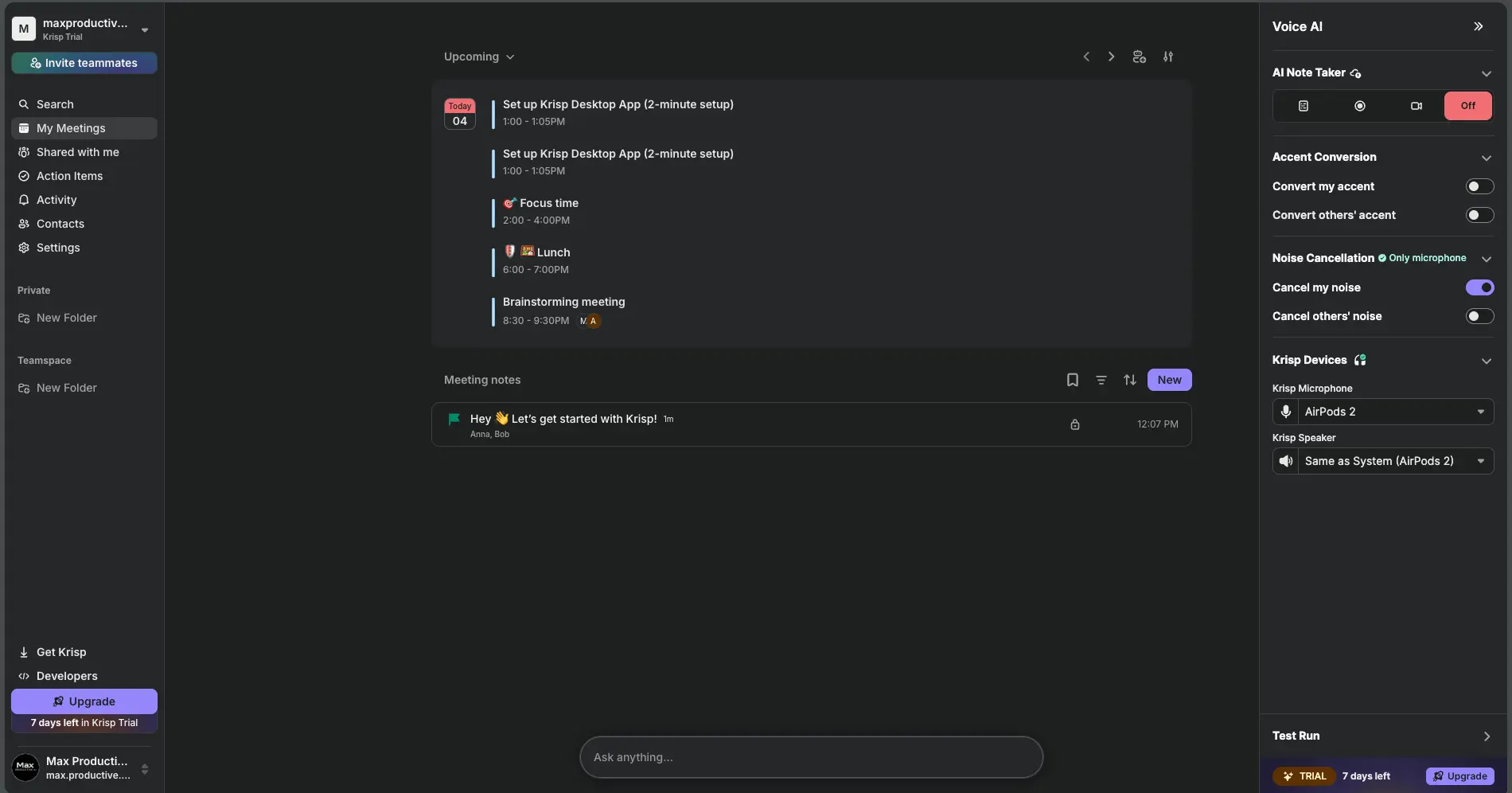
Noise Cancellation Done Right,
Meeting Notes as the Bonus
Krisp AI does one thing better than any other software we've used: it removes background noise from both sides of a call, on your own machine, without making you sound like a robot. The bot-free AI meeting notes that sit on top are useful and getting better, but they're not why you'd buy it. If you take calls from a noisy apartment, a shared office or a kitchen table, the $8-a-month Core plan (billed annually) is easy to justify. If you want the deepest meeting archive on the market, look elsewhere.
✓ What We Like
- Two-way noise cancellation that works in any calling app
- Audio is processed locally, nothing leaves your device
- No bot joins the call, and it records in-person meetings
- SOC 2 Type II, ISO 27001, no AI training on your data
! Could Be Better
- No permanent free plan once the trial week ends
- Can eat CPU on older laptops
- Notes and search trail dedicated note-takers
- Noise cancellation doesn't run on mobile
What Is Krisp AI?
Where it came from, what it actually does, and who it's built for.
Krisp AI is a voice app that removes background noise from your calls in real time and takes bot-free AI meeting notes on the same audio. It started life as a single-purpose noise app, and that's still the reason most people install it. Over the last couple of years the company (Krisp Technologies, based in Berkeley, California) has stacked a full voice layer on top: an AI Note Taker, transcription, accent conversion, and a separate Call Center product for support teams. The consumer-facing app you'll actually use is the AI Meeting Assistant, and that's what this Krisp AI review covers.
The architecture is the thing to understand first. Krisp doesn't plug into Zoom or Teams. It installs a virtual microphone and a virtual speaker on your computer. You pick "Krisp Microphone" inside whatever calling app you're on, and every bit of audio going out (and, if you want, coming in) passes through Krisp's model before it reaches the other side. That's why it works with Zoom, Google Meet, Microsoft Teams, Slack Huddles, Discord, softphones, even games. Anything with an audio device picker.
The same trick powers the meeting notes. Because Krisp already sits on your audio, it can transcribe the call without sending a bot into the room. There's no "Krisp Notetaker" in the participant list, no consent banner popping up for the other side, and it works for in-person meetings too. That puts it in the same bot-free camp as Granola, and apart from the bot-based majority: Otter.ai, Fireflies.ai, MeetGeek and tl;dv all join your call as a visible participant.
Here's the honest framing, though: Krisp is a noise cancellation product that happens to take notes, not a note-taking product that happens to cancel noise. Independent reviewers are near-unanimous on the first half and noticeably cooler on the second. The notes are solid. The noise cancellation is the best we've heard from software. Keep that order in mind and you'll buy it for the right reason, and you won't be disappointed by the notes either, because you weren't expecting Fireflies.
How We Reviewed Krisp
We set up Krisp on our own trial workspace, ran the desktop app through its onboarding, the AI Note Taker settings, templates and integrations, and used the sample meeting to check how notes, action items and the transcript view are built. The screenshots below are from that workspace. For the noise cancellation itself, we lean on Krisp's own documentation plus a cross-section of independent hands-on reviews rather than a lab-grade audio test we didn't run. No fake numbers, no invented benchmarks.
Who Is Krisp AI Best For?
Remote workers and freelancers who take several calls a day from a home with kids, pets, traffic or a partner on another call. Sales and support reps in open-plan offices. Anyone who works with clients from a co-working space or a café. Non-native English speakers who want the accent conversion option. And teams that want meeting notes without a bot showing up on client calls. If that describes you, Krisp earns its subscription in the first week. If your calls already sound fine, keep reading, but keep your wallet closed until the pricing section.
Krisp AI Screenshots: Inside the App
Six screens from our own Krisp workspace, so you know what you're getting before the trial starts.
Meeting Dashboard and Voice AI Panel
Your calendar, your notes, and the noise controls all in one window
The desktop app opens on a dark dashboard: upcoming meetings pulled from your calendar in the middle, saved meeting notes below, and a Voice AI panel on the right. That panel is where you spend most of your time. "Cancel my noise" and "Cancel others' noise" are separate switches, accent conversion has its own pair, and the AI Note Taker can be flipped between notes only, recording, or off. Underneath, the Krisp Devices section shows which physical mic and speaker Krisp is wrapping (in our case a pair of AirPods). It's clean. Nothing here needs a manual, which is more than we can say for a few note-takers that bury the record button three menus deep.
AI Note Taker Settings
Decide when Krisp records, what it does afterwards, and who sees the result
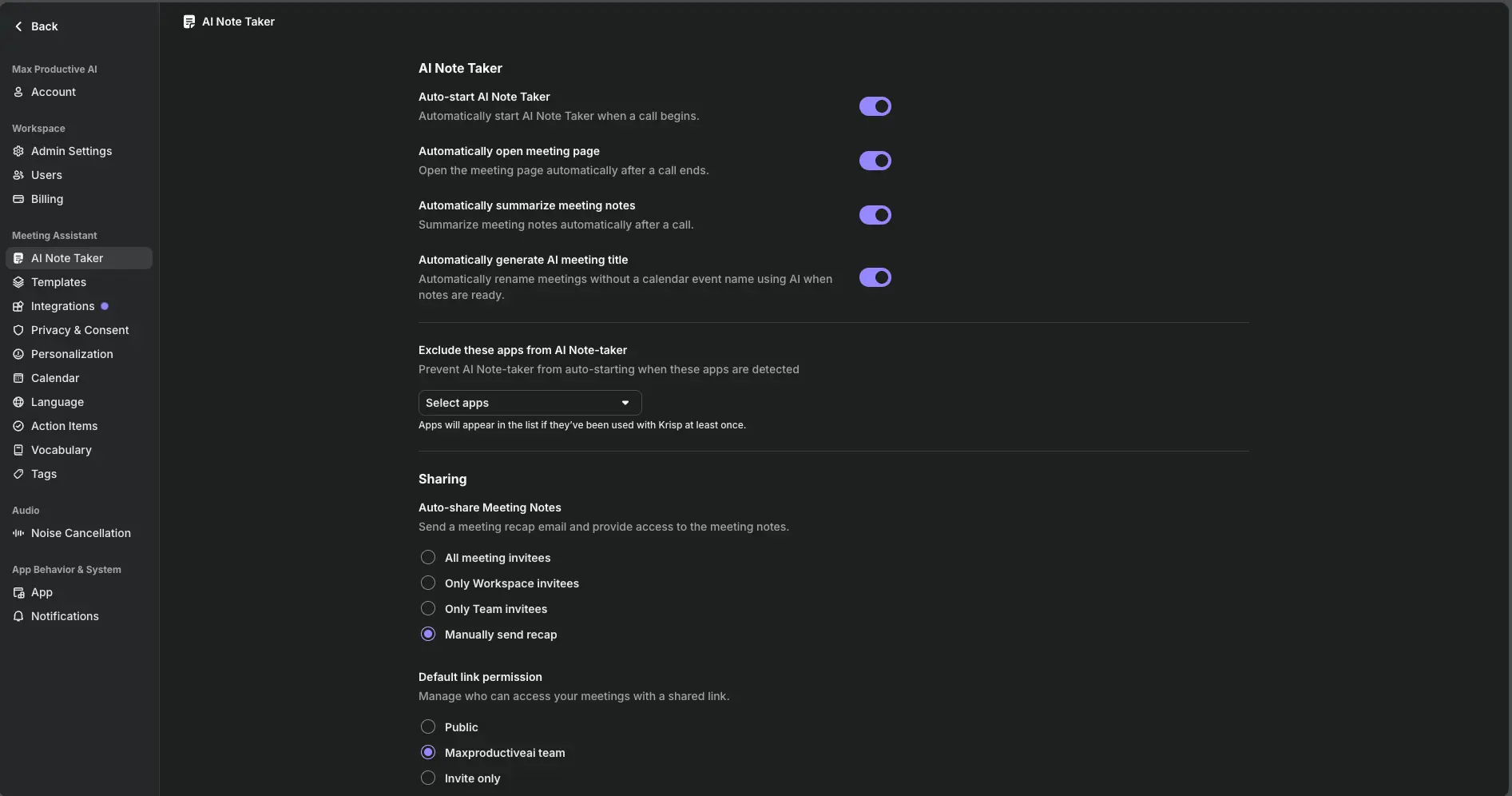
This page matters more than it looks. Auto-start means Krisp will transcribe any call it detects, which is convenient right up until it captures a personal one. The "Exclude these apps" dropdown fixes that: any app you've used with Krisp once shows up in the list, and you can tell the Note Taker to ignore it. Sharing defaults are sensible too. Auto-share can be limited to workspace or team invitees, or left on manual, and shared links can be locked to your team or invite-only. Worth noting: auto-share defaulted to "Manually send recap" on our account, which is the right call. Nobody wants a recap email going to a prospect before they've read the notes themselves.
Meeting Notes Templates
Eleven ready-made note structures, plus your own
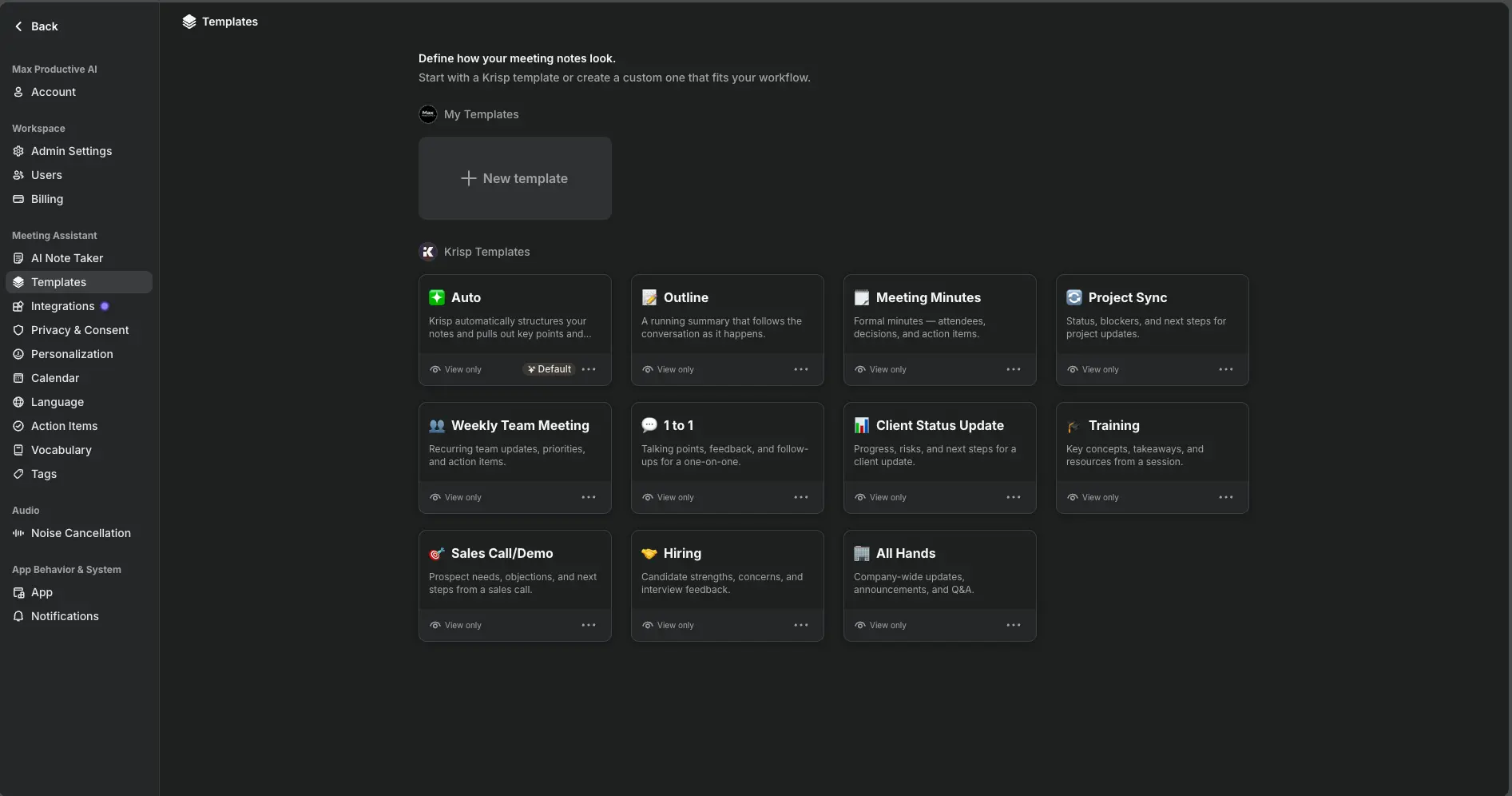
The Auto template is the default and it's the one most people should leave on: Krisp reads the meeting and structures the notes itself. If you want consistency, there are ten fixed layouts (Meeting Minutes, Outline, Project Sync, Weekly Team Meeting, 1 to 1, Client Status Update, Training, Sales Call/Demo, Hiring, All Hands) and a "New template" button for your own. It's a smaller library than MeetGeek offers, but the presets cover the meetings most teams actually run.
Curious how Krisp handles your own background noise?
Try Krisp →Full access during the trial • Desktop setup takes about two minutesAI-Generated Meeting Notes
Action items first, key points with timestamps, and a feedback prompt
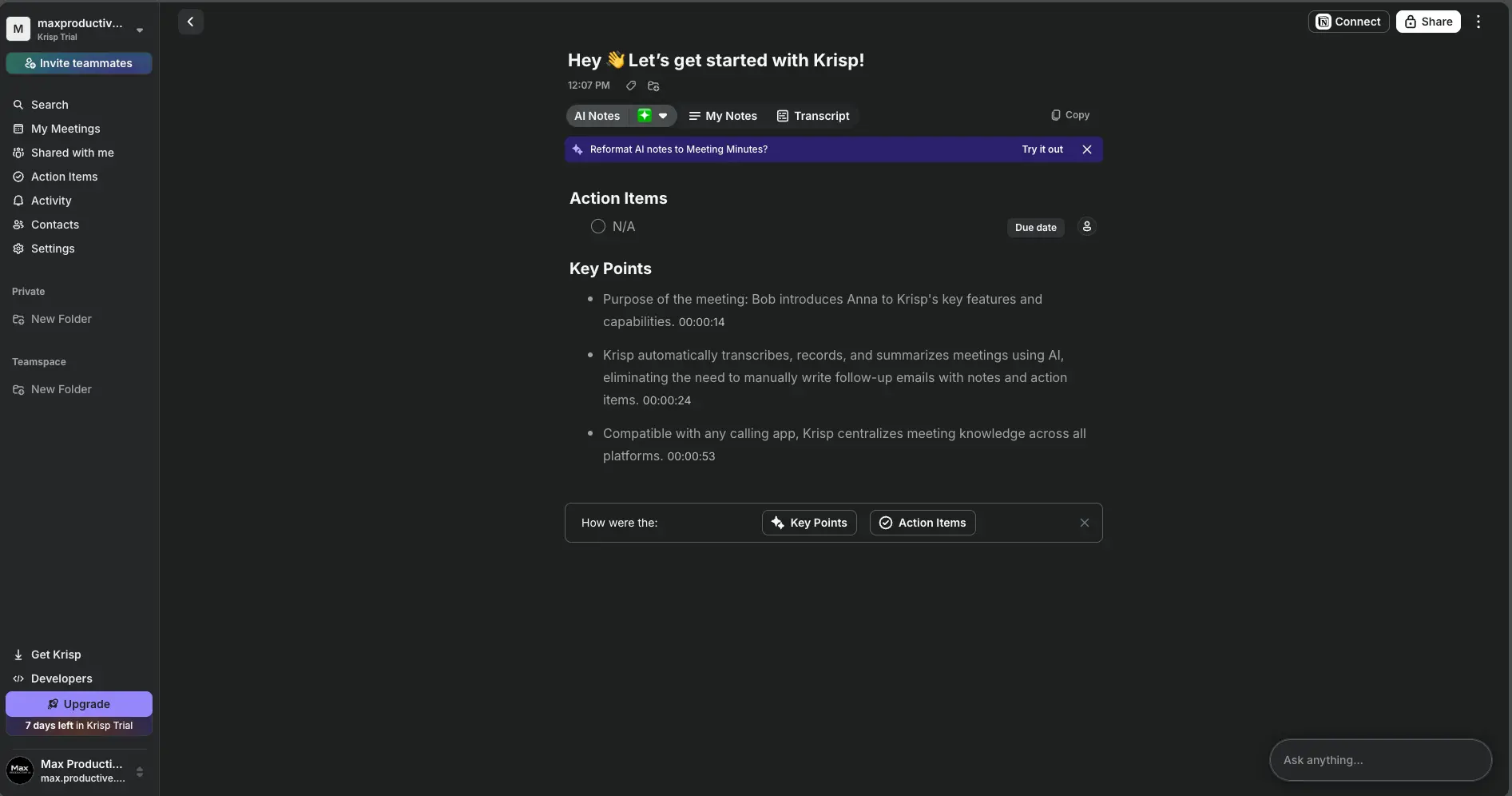
After a call you land on AI Notes: action items at the top (with owners and due dates you can set), then key points, each stamped with the moment in the recording it came from. Click the timestamp and the audio jumps there. A banner offers to reformat the notes into Meeting Minutes if Auto wasn't what you wanted, and a small "How were the Key Points / Action Items?" prompt collects feedback. Three tabs sit above: AI Notes, My Notes (for your own typing), and Transcript. There's also an "Ask anything" box for chatting with the meeting. It's a tidy layout, and the Krisp AI meeting notes it produced on our sample call were accurate to the transcript, timestamps included. What you don't get is the cross-meeting analysis or topic tracking that Fireflies.ai builds its whole product around.
Transcript With Speaker Labels
Speaker-by-speaker text synced to the audio player
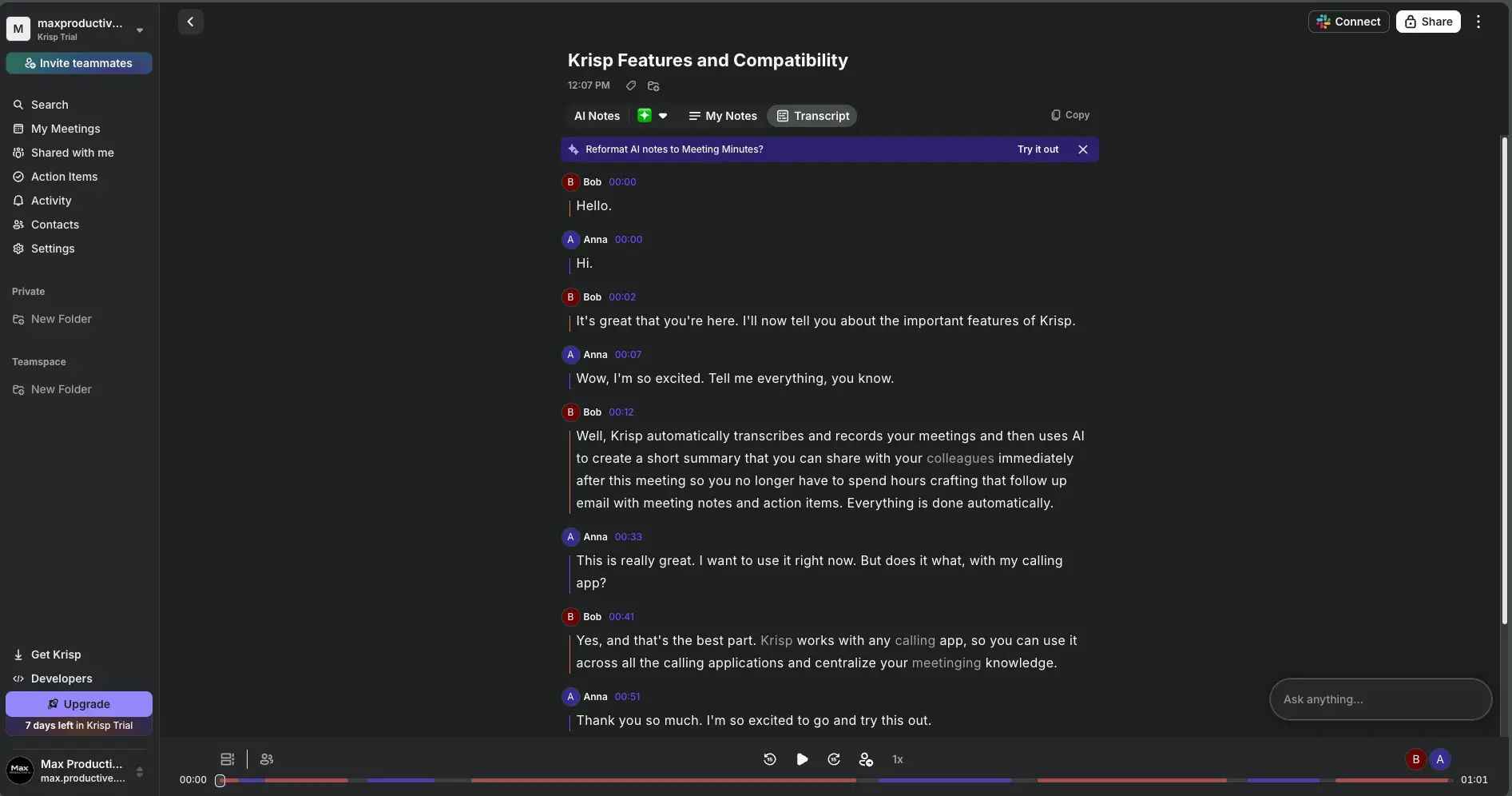
The transcript view is what you'd expect from a modern note-taker: each turn labeled by speaker, timestamped, with keywords picked out in blue and an audio bar along the bottom showing who spoke when. Krisp's own published benchmarks claim about a 7% word error rate and 97% speaker diarization accuracy. Independent comparisons put raw accuracy in the same league as the competition rather than ahead of it, with one useful twist: because the audio has already been cleaned, Krisp's transcription copes better with noisy recordings than tools working on the raw feed.
Integrations, Including MCP for Claude and ChatGPT
Push notes into your stack, or let your AI assistant query them
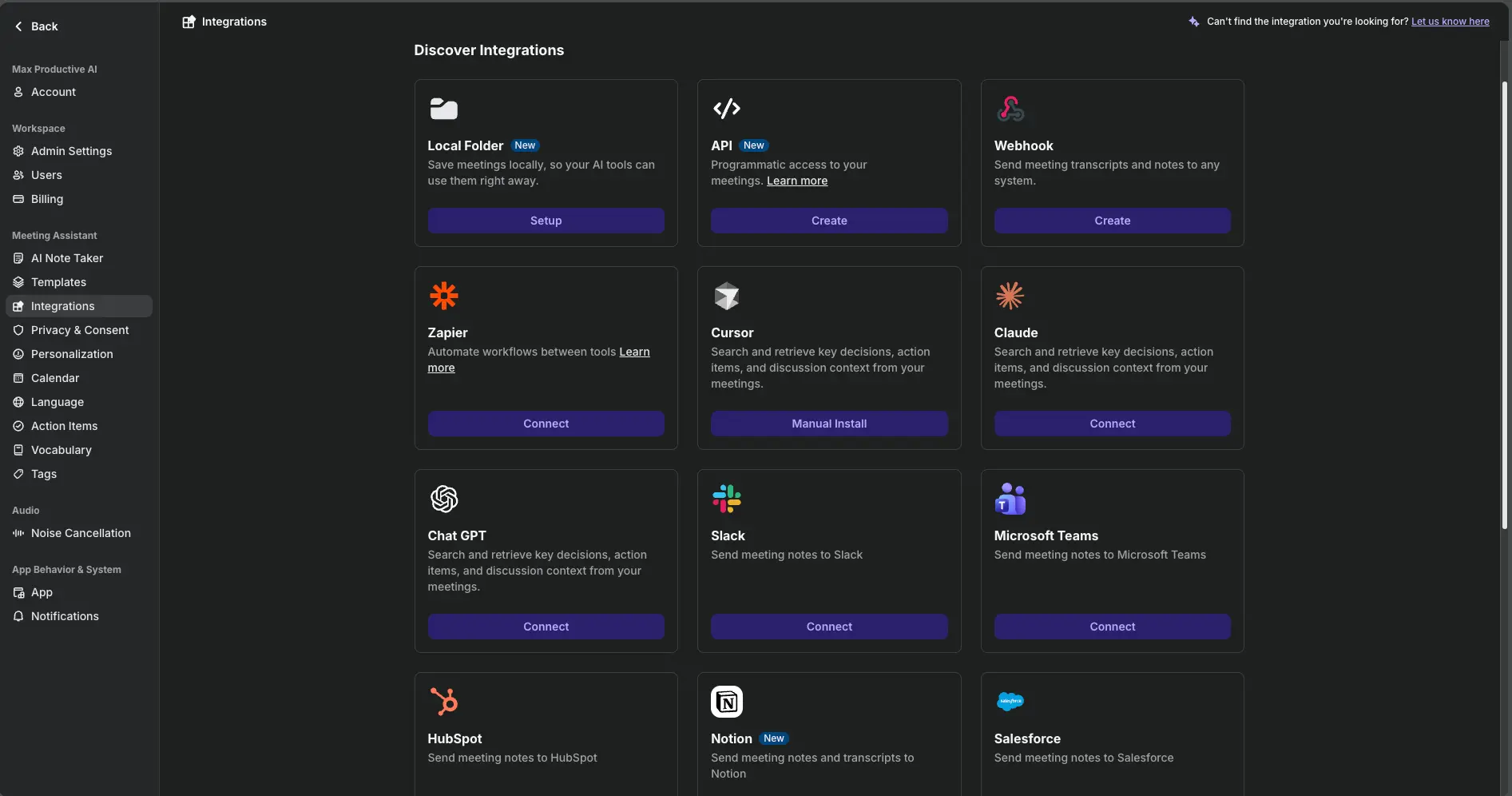
This is the screen that surprised us. Alongside the usual Slack, Microsoft Teams, Notion, HubSpot and Salesforce hooks, Krisp now exposes your meetings to Claude, ChatGPT and Cursor through MCP, so you can ask your AI assistant what was decided in last Tuesday's call without opening Krisp. There's a Zapier connector, a webhook, a proper API, and a Local Folder option that saves notes to disk for whatever tools you run locally. Salesforce needs the Advanced plan; the rest, including MCP, are on Core.
How Krisp Noise Cancellation Works
From install to a clean call in four steps, plus what the model is actually doing.
Install the Desktop App
Krisp runs on Windows, macOS, Linux and ChromeOS. Installation creates two virtual audio devices, Krisp Microphone and Krisp Speaker, that wrap your real hardware. Setup took us under two minutes, which matches the "2-minute setup" event Krisp drops into your calendar during onboarding.
Select Krisp in Your Calling App
Open Zoom, Teams, Meet or whatever you use, and choose Krisp Microphone as your mic. Optionally set Krisp Speaker as your output too. That's the whole integration. There's no plugin per app, which is why it also works in tools nobody writes plugins for.
The Model Separates Voice From Noise
Krisp's model looks at the incoming audio many times a second and decides what's human speech and what isn't. Keyboard clatter, a dog, traffic, an air conditioner, a leaf blower outside: all of it gets removed before the signal leaves your machine. Passive earbuds and ANC headphones only clean what you hear. Krisp cleans what the other person hears, and with "Cancel others' noise" switched on, it cleans their audio for you as well, even if they've never heard of Krisp.
Notes Ride on the Same Audio
With the AI Note Taker on, the same clean stream feeds the transcription engine. Krisp records, transcribes with speaker labels, then builds the summary using your chosen template. Set it to auto-start and you'll never hit record again; set exclusions for the apps you don't want captured. Notes land in your dashboard and, if you've connected them, in Slack, Notion or your CRM.
Where Your Audio Goes
Noise cancellation is processed entirely on your device. Krisp's servers never see that audio. The cloud only enters the picture if you enable the AI Note Taker or the Live Interpreter, which need to send audio out for transcription and summarization. Krisp states it doesn't train its models on customer data, and the Enterprise tier can keep transcription on-device as well.
Where It Struggles
Steady noise is Krisp's sweet spot. Where reviewers see it strain is sudden, voice-shaped sound: a sharp laugh from the next desk or someone calling your name can leak through for a fraction of a second before the model catches up. Krisp's own docs also recommend staying within about 50 cm of the mic. And this is the part nobody likes: the model is doing real work, which shows up as CPU load on older laptops. More on that in the cons.
Krisp AI Features: Meeting Notes, Accent AI and More
What's included, what's plan-gated, and what's still finding its feet.
Two-Way Noise Cancellation
The reason Krisp exists. Removes noise, echo and room reverb from your mic and, separately, from the audio you receive. On-device, works in any app. Unlimited on every paid plan. If you only read one line on this page, it's this one.
Bot-Free AI Note Taker
Unlimited transcription, summaries and action items with nothing joining the participant list. Records in-person meetings too. The notes are good; the analysis behind them is lighter than what Fireflies.ai or tl;dv provide.
Accent Conversion
Converts your accent (or the other person's) toward a more neutral English in real time. Supports Indian, Filipino, South African and Latin American accents among others. Listener-side conversion is unlimited only on Advanced. Impressive tech, still a bit uneven, and some people will find the idea uncomfortable. It's optional.
Templates and Custom Vocabulary
Eleven note templates plus your own, and a vocabulary list so product names and jargon stop coming out mangled. Small features, big difference to how usable the notes are on day two.
16+ Languages
Transcripts and AI chat in 16+ languages. Fine for most teams, thin next to Notta or HappyScribe, which are built around multilingual work. Noise cancellation itself doesn't care what language you speak.
Integrations and MCP
Slack, Teams, Notion, HubSpot, Zapier, webhooks, API, local folder, and MCP connectors for Claude, ChatGPT and Cursor. Salesforce and ConnectWise sit on Advanced. The MCP piece is ahead of most competitors right now.
Every Desktop Platform, Plus Mobile
Windows, macOS, Linux and ChromeOS get the full app. Mobile and the Chrome extension cover the meeting assistant side (reviewing notes, recording in person) but not noise cancellation. Linux support alone makes Krisp unusual in this category.
Security and Compliance
SOC 2 Type II, ISO 27001, GDPR support, encryption in transit and at rest. SSO/SCIM and SOC 2 report access arrive with Advanced; a HIPAA BAA and on-device transcription need Enterprise. Meeting data lives on US servers only, which matters if your compliance team insists on EU residency.
Two things worth flagging that don't fit a card. First, the AI Note Taker's "Ask anything" chat works across your meetings, so you can ask what a client promised last month and get an answer with a timestamp. Second, Krisp sells a separate Call Center AI product with agent-side voice isolation and real-time Agent Assist; it's priced per agent with a 40-seat minimum and is a different purchase from the meeting app reviewed here.
Krisp AI Pricing
Per-user plans, a trial instead of a free tier, and a doubling for monthly billing.
Free Trial
- ✓ Every paid feature unlocked
- ✓ No credit card required
- ✓ Unlimited noise cancellation
- ✓ Unlimited transcription and notes
- ✓ All integrations, incl. MCP
- ✗ Drops to a capped daily allowance after day 7
Core
- ✓ Unlimited noise cancellation
- ✓ Unlimited transcription and AI notes
- ✓ Mobile app and Chrome extension
- ✓ 10 GB storage
- ✓ Slack, Teams, Notion, HubSpot, Zapier, MCP
- ✓ $16/user/mo if billed monthly
Advanced
- ✓ Everything in Core
- ✓ Unlimited listener-side accent conversion
- ✓ Salesforce and ConnectWise
- ✓ SSO / SCIM, SOC 2 report access
- ✓ 60 GB storage
- ✓ $30/user/mo if billed monthly
Watch the billing toggle: monthly billing is exactly double the annual rate on both plans.
Pricing last verified September 2026. Visit Krisp for current rates.
Let's be blunt about the free tier, because it's the most common point of confusion. Krisp used to be known for a generous free plan. Today the front door is a trial: seven days of everything, no card. What you're left with afterwards is a small daily allowance (third-party trackers report around 60 minutes of noise cancellation and two AI summaries a day, and Krisp's own pricing page doesn't advertise it as a plan). Treat it as an extended test, not as a way to use Krisp for free long-term. The honest comparison is that Fathom records and transcribes unlimited meetings for free, MeetGeek gives you three hours a month, and Otter.ai 300 minutes. On free tiers, Krisp loses.
On paid tiers the picture flips. Core at $8 per user per month annual sits right alongside Notta ($8.17) and Otter.ai's Pro ($8.33), undercuts Fireflies.ai Pro ($10) and MeetGeek Pro ($9.99), and is roughly half of Fathom Premium ($16) and tl;dv Pro (around $18). None of those bundle noise cancellation at all. If you were going to pay for a noise app and a note-taker, Krisp on Core is the cheapest way to get both in one subscription. Is Core enough? For most individuals, yes. Advanced is really an IT-department plan: SSO, Salesforce and the compliance paperwork.
Is It Worth the Money?
Think about the last call where you had to apologize for the noise, or asked a client to repeat themselves three times. Krisp costs less per day than the coffee you drank during that call. If audio is a recurring problem for you, the math isn't close. If your calls already sound fine, Core is $96 a year for a decent but not class-leading note-taker, and Fathom's free plan will serve you just as well.
Krisp AI Review: Pros and Cons
The honest breakdown, with the cons given the same weight as the pros.
✓ Pros
Reviewers across the board describe it the same way: dogs, keyboards, crying babies and street noise disappear, and your voice comes through sounding like your voice rather than a compressed radio signal. Built-in suppression in Zoom or Teams cleans only your own mic inside that one app; Krisp cleans both directions, everywhere. That's the difference people pay for.
Virtual devices mean no per-app integration. Zoom, Meet, Teams, Slack, Discord, WhatsApp desktop, browser softphones, games: if it has a mic picker, Krisp works with it. Bot-based note-takers have to maintain a list of supported platforms. Krisp doesn't.
Nothing joins the call, nothing shows up on the client's screen, and you can record a conversation across a table. For sales reps and consultants who've had a prospect ask "what's that Notetaker thing?", this is the quiet win. It does mean you should tell people you're recording, since the app won't do it for you.
Noise processing never leaves the device, the certifications your compliance team will ask for are in place, the no-training policy is stated plainly, and Enterprise can sign a BAA. The exclusions list and sharing controls in the Note Taker settings are thoughtful too. Few tools in this category make the privacy conversation this easy.
Core buys you unlimited noise cancellation plus unlimited transcription and notes for less than most rivals charge for notes alone. Comparable note-takers charge the same or more for notes alone, and Krisp's Core plan includes the MCP and workflow integrations rather than gating them.
MCP connectors for Claude, ChatGPT and Cursor, a real API, webhooks and a local-folder export put Krisp's meeting data wherever you actually work. Being able to ask your AI assistant about last week's calls, without opening a meeting app, is the kind of thing that changes habits.
✗ Cons
Seven days and then a capped daily allowance that isn't really a plan. In a category where Fathom's free plan is this generous, that stings. If you only need occasional notes and your audio is fine, you'll get more for free elsewhere.
The model does real work, and on older or low-spec laptops that can mean an extra 10 to 20 percent CPU, occasional voice cutouts and fan noise (ironic, we know). Krisp's performance modes help, and the company has shipped lighter and GPU-accelerated builds, but if your laptop already struggles with a Teams call, test during the trial before committing.
The notes are tidy and the timestamped key points are handy, but there's no talk-time analytics, no topic tracking across calls, no sales coaching layer, and the CRM sync is shallower than Fireflies.ai or tl;dv. If meeting intelligence is the job, Krisp isn't the specialist.
Phone calls don't get cleaned. The mobile app covers notes and in-person recording, which is useful, but the headline feature stays on your laptop. Field sales and anyone who lives on their phone should know that going in.
Recordings, transcripts and notes are stored on US servers with no EU or other regional residency option. For many teams that's fine. For regulated European organizations with strict residency rules, it can be a blocker regardless of the certifications.
It's a headline feature and it works, but results vary by accent and it's rationed on Core. Some users also find the concept itself a little uncomfortable. We'd call it a nice option rather than a reason to buy.
Krisp AI vs Alternatives
How Krisp lines up against the note-takers most people cross-shop it with.
| Feature | Reviewed Krisp AI | Fathom | Fireflies.ai | Granola | Otter.ai |
|---|---|---|---|---|---|
| Paid entry (annual) | $8/user/mo | $16/user/mo | $10/user/mo | $14/user/mo | $8.33/user/mo |
| Free tier | 7-day trial, then capped | Unlimited recording | Unlimited transcription, 400 min storage | Unlimited, limited history | 300 min/month |
| Noise cancellation | ✓ Two-way, on-device | ✗ | ✗ | ✗ | ✗ |
| Bot-free | ✓ Always | Beta (Mac) | ✗ Bot joins | ✓ Always | ✗ Bot joins |
| In-person recording | ✓ | Limited | Mobile app | ✓ | Mobile app |
| Languages | 16+ | English-first | 100+ | ~10 | English-first |
| Unique strength | Audio clarity anywhere | Free unlimited recording | CRM + conversation analytics | Enhances your own typed notes | Live captions, mature archive |
| Best for | Noisy environments | Budget-first users | Sales and revenue teams | People who type in meetings | Live transcription |
Krisp AI vs Otter.ai: Which One Should You Pick?
This is the comparison we get asked about most. Otter.ai is a transcription product first: live captions, a big searchable archive, and a bot that joins your calls. Krisp is an audio product first: it makes you sound better and takes notes as a side effect, with no bot. On price they're neighbours (Otter Pro $8.33 versus Krisp Core $8, both annual), but Otter meters minutes on every tier while Krisp's transcription is unlimited. Pick Otter.ai if you need live captions during the call or the largest possible transcript history. Pick Krisp if the audio itself is the problem, or if a visible bot on client calls is a non-starter. Plenty of people run Krisp underneath Otter and get the best of both.
Which Tool Is Right For You?
Krisp AI
ReviewedBest for: people whose calls suffer from background noise and who'd like solid, bot-free meeting notes thrown in. The combination is unique in this list. Strongest for remote workers, freelancers, open-plan sales teams and consultants who record client calls. Weakest for teams whose real need is cross-meeting analytics or a free-forever archive.

Fathom
Free Unlimited RecordingBest for: anyone who wants unlimited meeting recording and transcripts for free, with a paid tier only for advanced summaries and follow-up emails. Fathom is our highest-rated note-taker in this category. It does nothing for your audio quality, and its bot-free mode is still a Mac-only beta, but as a pure note-taker it's the first one to try.
Fireflies.ai
Sales TeamsBest for: sales and revenue teams that need deep CRM sync, talk-time and sentiment analytics, and 100+ languages at $10 per user per month. Fireflies is the specialist where Krisp is the generalist. It sends a bot into every call, so if that's a problem for your clients, it's the wrong pick.

Granola
Bot-Free NotepadBest for: people who type their own notes during calls and want AI to fill in the gaps afterwards. Like Krisp, Granola is bot-free and runs locally. Unlike Krisp, it only shines if you're an active note-taker; passive listeners get much less from it. Around 10 languages and no Android app.
MeetGeek
Strong Free TierBest for: teams that want a usable free tier (three hours a month), a large template library and 2,000+ integrations without paying enterprise prices. Bot-based, but with a no-bot recording option and clear data controls. If Krisp's notes feel thin and you don't need noise cancellation, MeetGeek is the natural step up.
Otter.ai
Live TranscriptionBest for: live captions during calls and a mature, searchable transcript archive. Every Otter tier meters minutes, including paid ones, and a bot joins your meetings. We don't have an affiliate relationship with Otter; see our review for the full picture.

tl;dv
Video LibraryBest for: sales organizations that treat meetings as a video library, with clips, timestamps and coaching analytics on higher tiers. Pricier than Krisp once you need the revenue features, and bot-based. A different job from audio cleanup.
Krisp AI: Frequently Asked Questions
Should You Try Krisp AI?
Krisp AI is the tool to buy when the problem is the sound of your calls. Nothing else in software cleans audio this well, in both directions, inside every app you use, without sending anything to the cloud. The bot-free meeting notes are a real, well-built extra: templates, timestamped key points, action items, and integrations that reach further than most, including MCP for Claude and ChatGPT.
The reasons it isn't a 4.5 are just as real. There's no free plan to live on after the trial. It can lean on older CPUs. The meeting intelligence stops well short of what Fireflies.ai or tl;dv offer. And the noise cancellation stays on your desktop. None of that changes the core verdict: for remote workers, sales reps and consultants who take calls from imperfect places, Krisp on the $8 Core plan is one of the easiest subscriptions to justify in this category.
Our Recommendation
Start the trial on the machine you actually take calls from, turn on both noise toggles, and make three or four real calls in your normal environment. Check your CPU during the calls. Ask the other person if they noticed anything. If the audio is clearly better and your laptop copes, sign up for Core on annual billing and leave the AI Note Taker on auto-start with your personal apps excluded. If audio was never really your problem, save the money and start with Fathom's free plan instead.