
10 Best Sora Alternatives in 2026: Where Sora Users Actually Went (and What It Really Costs)
OpenAI switched Sora off in April, the API follows on September 24, and nearly every "alternatives" list ranking on Google was written by a vendor putting itself first. We compared the ten tools Sora users actually moved to — with screenshots from our own accounts where we have them, pricing checked in August 2026, and the credit-system traps that no marketing page mentions.
The short answer, as of August 2026: Kling AI is where most displaced Sora users landed, and for good reason: output quality that trades blows with anything on the market, native 4K since Kling 3.0, a free tier, and paid plans starting under $10 a month. Its weakness is the credit system, which we break down honestly below. Google Veo 3.1 is the safest pick if you want synchronized dialogue audio and a company unlikely to shut the product down next year. And if the Sora shutdown taught you anything, multi-model platforms like Magnific and InVideo AI are the hedge: one subscription that switches between several current models, so no single lab can strand you again.
Best overall replacement: Kling AI
Kling AI was the default recommendation across the Sora migration threads we tracked, and its 3.0 model holds multiple entries in the Artificial Analysis top 10. If what you want is simply an AI like Sora (text in, cinematic clip out), this is the closest direct swap at the lowest serious price. Just read our credit-cost section before subscribing.
Best for professional work: Runway
Runway pairs its own Gen-4.5 model with the best control surface in the category: motion brushes, scene consistency, a real editing workflow. Its paid tiers also bundle third-party models including Veo 3.1 and Kling 3.0 Pro. Filmmakers and agencies migrating off Sora recommend it more than anything else in the pro tier.
| Tool | Built For | Entry Price | Rating |
|---|---|---|---|
| Kling AI | Direct Sora swap, best value | $8.80/mo (after intro) | 4.5 / 5 |
| Google Veo 3.1 | Dialogue audio, big-tech safety | $19.99/mo (Google AI Pro) | — |
| Runway | Pro workflows, editing control | $12/mo (annual) | — |
| Magnific | Multi-model hedge, full suite | See live pricing | 4.6 / 5 |
Prices verified August 2026 against live pricing pages; Kling renewal price shown, not the discounted first month
Search for Sora alternatives right now and look at who's answering: PixVerse ranking its own blog, HeyGen ranking its own blog, Hedra's comparison cited inside Google's AI Overview, and a string of thin listicles from tools you've never heard of putting themselves at #1. The only genuinely useful result is a Reddit thread from March. We don't sell a video generator. We reviewed Kling AI (4.5/5), Hedra (4.2/5), InVideo AI (4.3/5), Runway, and Luma on this site long before Sora died, and the screenshots below come from our own dashboards, not vendor press kits.
What Happened to Sora — and the Deadline You Still Have
The timeline, since half the internet still has it wrong: OpenAI announced on March 24, 2026 that it was discontinuing Sora entirely, framing the decision as a refocus on robotics, world-simulation research, and enterprise work. The consumer app and website closed on April 26, 2026. The API, which is what keeps Sora alive inside various third-party platforms, shuts down on September 24, 2026. After that, Sora is gone, and OpenAI has announced no successor. Searches for Sora 2 alternatives spiked in April and haven't come back down, which matches what we see in the migration threads: this wasn't a weekend of outrage, it's an ongoing exodus.
If you still have videos locked in your old account, this is the practical part: OpenAI's sunset page (sora.chatgpt.com/sunset) lets you export your content, and unexported data is permanently deleted once the window closes. Do it today, before reading further. It takes five minutes and there is no recovery afterward.
One more thing worth saying plainly, because it shapes every recommendation below: the lesson of the shutdown isn't "OpenAI bad." It's that any single-model subscription can vanish with 30 days' notice, no matter how famous the lab. That's why two of our ten picks are multi-model platforms rather than single models, and why we'd think twice before locking a production workflow to any one provider again.
The 10 Best Sora Alternatives at a Glance
| Tool | Best for | Entry price (Aug 2026) | Free tier | Our rating |
|---|---|---|---|---|
| Kling AI | Direct Sora replacement, value | $6.99 first month, $8.80/mo after | Yes | 4.5 / 5 |
| Google Veo 3.1 | Dialogue audio, ecosystem | $19.99/mo (Google AI Pro) | Limited | — |
| Runway | Pro control, editing workflow | $12/mo (annual) | 125 one-time credits | Reviewed |
| Luma (Dream Machine) | Photoreal image-to-video | $9.99/mo (legacy tier) | Yes | Reviewed |
| MiniMax Hailuo | Cheap watermark-free clips | ~$9.99/mo (often discounted) | Trial credits | — |
| Seedance (Dreamina) | Leaderboard-topping quality | ~$15/mo (Dreamina Basic) | Yes | — |
| PixVerse | Anime & stylized content | Free + paid credit plans | Yes | — |
| Magnific | Multi-model hedge, full creative suite | Suite subscription | Yes | 4.6 / 5 |
| InVideo AI | Full videos, not just clips | Freemium + paid plans | Yes (watermarked exports) | 4.3 / 5 |
| Hedra | Characters that talk and emote | Freemium + paid plans | Yes | 4.2 / 5 |
Verified August 2026. Kling shows the standard renewal price; several vendors run intro discounts that revert after month one. "—" or ranges mean the vendor doesn't publish a flat list price; check the live page for your exact plan.
1. Kling AI — The Default Migration Destination
Ask displaced Sora users where they went and Kling is the name that keeps coming up. Kuaishou's model earned it: Kling 3.0, released February 4, 2026, generates native 4K at 60fps in clips up to 15 seconds, with multilingual lip-sync, and holds multiple entries in the Artificial Analysis top 10, the same leaderboard where Western models have been losing ground to Chinese labs all year. In practice, its output is the closest thing to a like-for-like Sora swap: prompt in, cinematic clip out, physics that mostly behave.
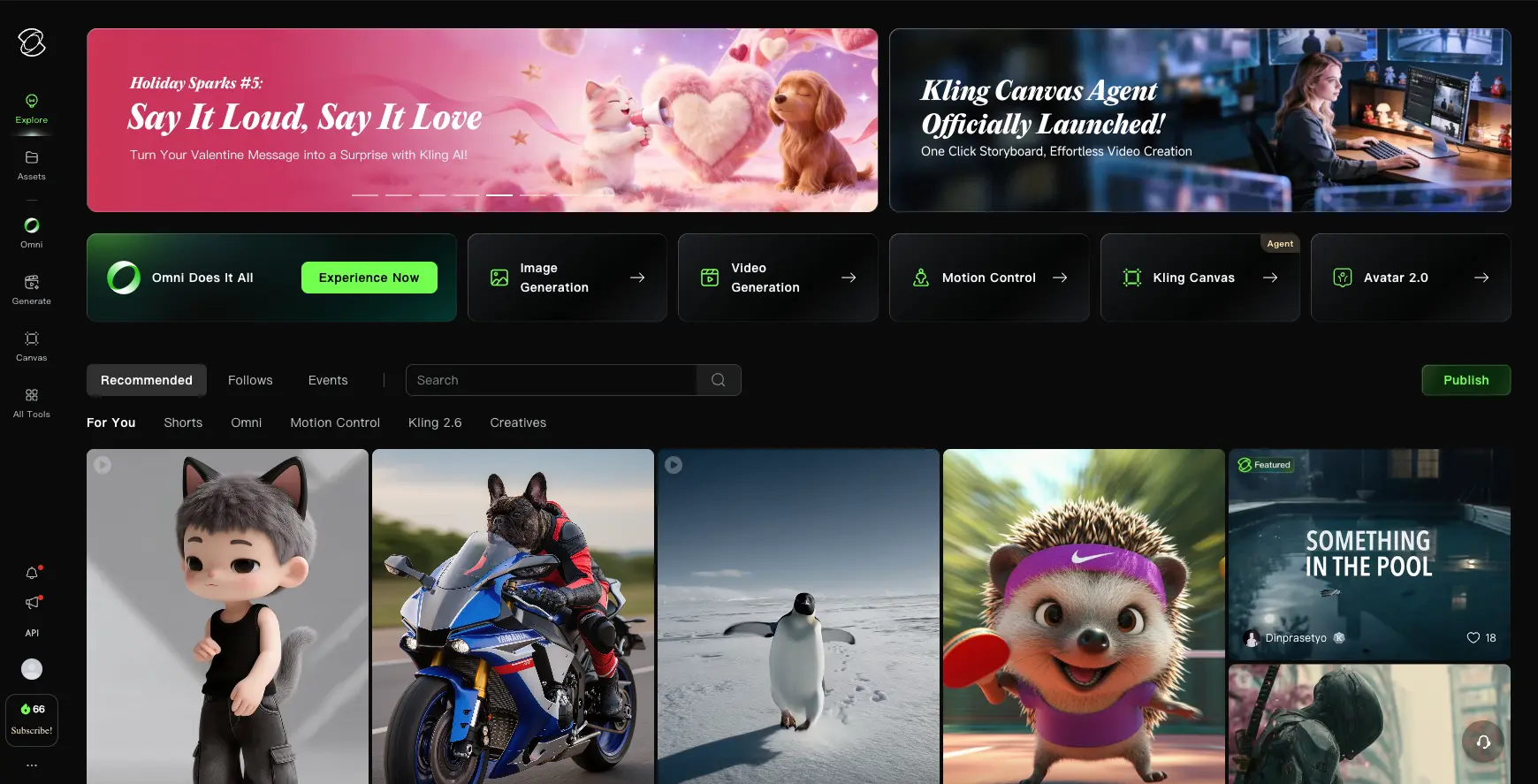
Pricing is where you need to pay attention. The paid ladder runs Standard ($6.99 first month, $8.80/month on renewal, 660 credits), Pro ($25.99 then $32.56, 3,000 credits), Premier ($64.99 then $80.96, 8,000 credits), and Ultra ($127.99 then $159.99, 26,000 credits). Those intro discounts are real, but budget on the renewal price, and understand the credit math before you commit, because a 10-second Kling 3.0 clip with audio costs 90 credits at 720p and 120 at 1080p. On the Standard plan, that's five to seven finished clips a month if every generation comes out right. They won't all come out right. We cover what that means in the credit-trap section below, along with the community's well-documented grievances about it.
Two practical warnings from our own use. First, the official site is klingai.com: no hyphen, no lookalike domain. Kling's popularity spawned a swarm of mirror sites that resell access at a markup or worse; bookmark the real one. Second, the free tier exists and works, but expect long queues at peak hours. It's a way to evaluate the model, not a way to run a channel.
Who it's for: anyone who wants the closest direct Sora replacement at the lowest serious price, and can live with credit-based billing. Try Kling AI here, or read our full Kling AI review first.
2. Google Veo 3.1 — The Safe Pick With the Best Audio
Veo 3.1 is the model we point people to when their first question is "which of these companies will still exist in three years?" Google's video model sits at the top of the with-audio leaderboards and remains the only one generating true 48kHz synchronized dialogue: characters that speak their lines, not clips with sound effects pasted on. If your work involves talking scenes, that single capability can end the comparison.
Access comes two ways, and most articles muddle them. Consumers get Veo through Google's AI subscriptions inside the Gemini app and Google's Flow filmmaking tool: Google AI Pro at $19.99/month, with heavier limits and 4K on the $249.99/month Ultra tier. Developers pay per second of generated video through the API: from $0.05/sec for the Lite tier at 720p up to $0.60/sec for 4K Standard output. That per-second model makes costs predictable for pipelines but means there's no "unlimited" plan to speak of. We covered the model's capabilities in depth when it launched in our Veo 3.1 release breakdown.
Who it's for: creators who need real dialogue audio, Google-ecosystem users, and anyone burned badly enough by the Sora shutdown to prioritize institutional stability.
3. Runway — For People Who Make Films, Not Clips
Runway's Gen-4.5 led the leaderboards at launch in late 2025 and has since been passed on raw quality. But raw quality was never really Runway's pitch. It's the control: motion brushes, scene and character consistency, camera direction, and an editing environment that treats generation as one step in a production workflow rather than the whole product. In the Sora migration threads, Runway is what professionals recommend to other professionals.
The 2026 pricing story needs a heads-up. Plans run Free (125 one-time credits), Standard ($12/user/month billed annually), Pro ($28 annually or $35 monthly), and Max ($76 annually or $95 monthly). Max is the important one, because Runway is retiring its legacy Unlimited plan. New subscribers lost access to Unlimited on June 1, 2026, and existing Unlimited customers migrate to Max by September 1, 2026. If you're a grandfathered Unlimited user reading this, that deadline is why your bill is about to change. The silver lining: paid tiers now bundle third-party models (Veo 3.1, Kling 3.0 Pro, Seedance 2.0) alongside Runway's own, which quietly turns Runway into a multi-model platform too.
Who it's for: filmmakers, agencies, and anyone whose output is a finished piece rather than a raw clip. Our Runway review has the full workflow breakdown.
4. Luma Dream Machine — Photoreal Image-to-Video, Confusing Pricing
Luma's Dream Machine earned its reputation on photorealistic image-to-video: feed it a still and it produces motion that keeps characters and lighting coherent. The Ray 3 model family pushed that further in 2026, and in the Reddit migration threads Luma comes up repeatedly as "really strong for photoreal and image-to-video stuff" — a direct quote of the sentiment, and consistent with what we found reviewing it.
The catch is that Luma currently runs two parallel pricing ladders, and its marketing pages lead with the expensive one. The legacy Dream Machine tiers still exist: Free, Lite at $9.99/month, Plus at $29.99, Unlimited at $94.99. The newer "Luma Agents" ladder, launched around March 2026 and built on Ray 3, runs $30/$90/$300 per month with no free tier. Same company, two price lists. Before you subscribe, make sure you know which ladder you're on; the difference at the entry level is three-fold.
Who it's for: image-to-video work, photoreal product and lifestyle shots, and anyone starting from stills rather than prompts. Full details in our Luma review.
5. MiniMax Hailuo — The Budget Watermark Killer
Hailuo 2.3 is MiniMax's short-form specialist, and it wins on a simple, underrated equation: every paid tier removes the watermark and includes commercial rights, and the entry tier lists around $9.99–14.99/month with frequent discounts to roughly $7.99. For creators producing volume for TikTok and Reels, where a visible watermark is the difference between content and an ad for someone else's product, that combination matters more than leaderboard positions.
Quality-wise it's a serious model, particularly for motion and short cinematic beats, though it trails Kling and Seedance at the top end. The ladder scales to heavy-use tiers (up to $199.99/month for 20,000 credits), and developers get separate per-video API pricing from about $0.19 per clip. The free tier is trial credits with a watermark: enough to judge the model, not to publish with.
Who it's for: high-volume short-form creators on a budget who need clean, commercially-licensed exports.
6. ByteDance Seedance — The Quality Leader Most People Can't Name
Here's the uncomfortable fact for anyone still ranking "Sora vs Veo vs Runway" in their head: ByteDance's Seedance 2.0, released February 2026, sits at or near the top of the Artificial Analysis video arena, and most Western creators have never used it. It generates with synchronized audio, handles multi-shot sequences, and, being ByteDance, is engineered for exactly the short-form content that dominates attention right now.
The awkward part is access. Seedance reaches users through three channels with three price lists: the Chinese Jimeng app (cheapest), the international Dreamina platform (roughly $15–70/month across its tiers), and the Volcano Engine developer API (per-second billing from about $0.09/sec). Seedance 2.5 began rolling out on web platforms this summer with final API pricing still settling, so treat any specific 2.5 numbers you read, including ours, as provisional until ByteDance publishes firm rate cards.
Who it's for: quality-first creators willing to work through Dreamina's interface, and anyone making content for TikTok-native audiences.
7. PixVerse — The Anime and Stylized Specialist
Not every Sora refugee wants photorealism. PixVerse built its following on anime, stylized, and effects-heavy generation: the aesthetic corner of AI video where the big general-purpose models are consistently mediocre. Its V4.5-era models handle character-driven stylized motion better than tools costing several times more, and its template and effects system is genuinely fun in a way this category rarely is.
You should know that PixVerse's own blog ranks aggressively for Sora-alternative searches (with PixVerse featured prominently, naturally), which is partly why we held it to the same standard as everything else here. It earns the slot on merit for its niche: a workable free tier, paid credit plans, and a mobile app that's better than most desktop-first rivals'. For photoreal work, pick something above; for stylized work, start here.
Who it's for: anime-style and stylized content creators, and mobile-first workflows.
8. Magnific — One Subscription, Every Current Model
If the Sora shutdown left you with trust issues, this is the structural fix. Magnific (the platform formerly known as Freepik, rebranded April 28, 2026) includes an AI video generator that wraps multiple frontier models behind one interface and one subscription. When a model improves, you switch. When a model dies, you shrug. Here's the model picker in our own account:
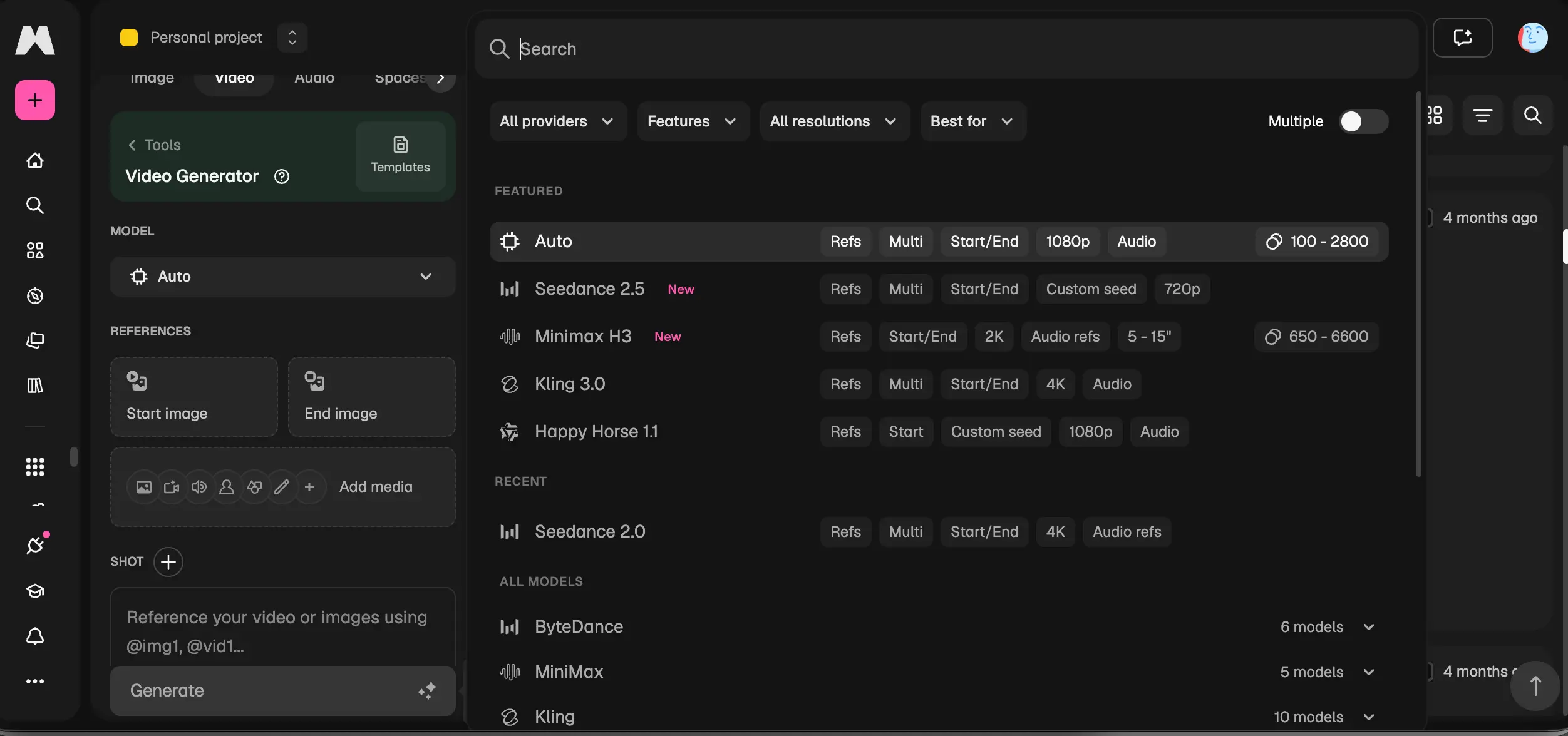
The video generator is one piece of a larger suite: 250 million-plus stock assets, image generation, upscaling (the original Magnific product), and design tools. That changes the value calculation. You're not buying a video tool; you're buying a creative platform where video is included. For marketers and content teams already paying for stock assets somewhere, consolidating into one subscription that also generates video is an easy sell. Existing Freepik subscriptions carry over unchanged until they expire, per the company's rebrand announcement.
Who it's for: creators and teams who want model flexibility without juggling subscriptions, and anyone who also needs stock assets and image tools. Try Magnific here.
9. InVideo AI — Full Videos, Not Ten-Second Clips
Everything above generates clips. InVideo AI generates videos: scripted, voiced, multi-scene pieces assembled from a prompt. Since 2026 it has also bundled access to third-party generative models inside that workflow. Here's the model picker from our account, which tells you something about the state of the market: Veo 3.1 sits alongside Sora 2, which InVideo could legitimately offer while the API stays live until the late-September sunset. After that, expect the Sora option to quietly disappear from menus like this everywhere.
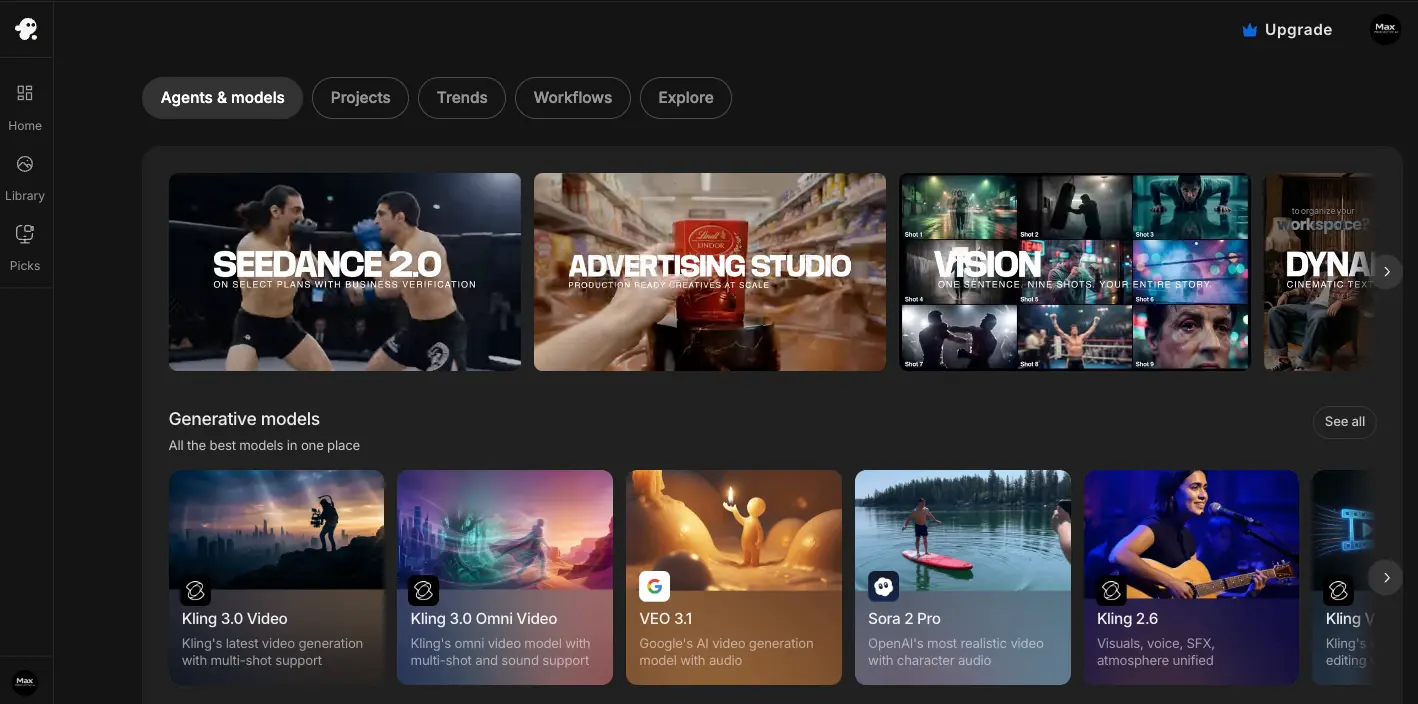
The practical distinction: if your end product is a YouTube video, an explainer, or an ad (something with a script, voiceover, and structure), InVideo AI gets you from prompt to finished piece in one tool, using generative clips where they help. If your end product is the clip itself, the dedicated models above will serve you better. The free plan exports with a watermark; paid plans remove it. One naming note, since the company runs two products: InVideo AI is the generative one covered here; InVideo Studio is the older template editor. Our InVideo AI review covers the plans in detail.
Who it's for: YouTubers and marketers producing complete videos rather than raw generative clips. Try InVideo AI here.
10. Hedra — When Your Video Needs a Face
Hedra occupies the corner of this market Sora never served well: characters that talk, emote, and hold expression. Give it a character image and audio (or a script), and it produces performance video: the foundation of virtual presenters, singing characters, and the character-driven content filling shorts feeds. Its template and preset system makes the workflow faster than the raw-model tools:
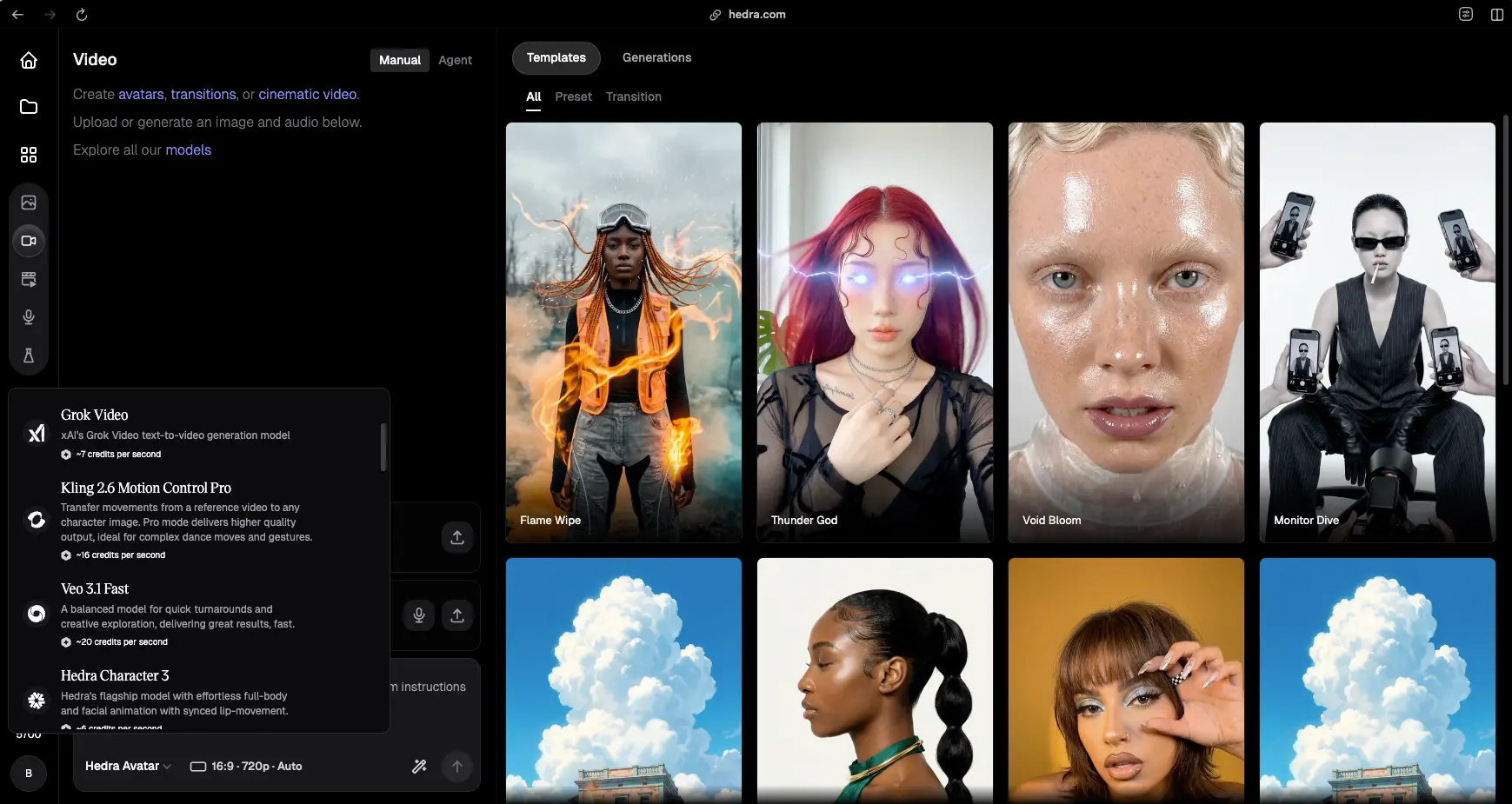
Is it a Sora alternative in the strict text-to-video sense? Partly — and we're including it because the migration data says so: Hedra's own comparison content gets cited in Google's AI Overview for these searches, and a meaningful share of Sora users were making character content all along. If that's you, a character-native tool beats a general model forced into the job. For the broader avatar and talking-head category, our best AI avatar generators roundup covers the full field.
Who it's for: character content, virtual presenters, and creators whose videos center on a performing face. Try Hedra here, or read our Hedra review.
The Free Route Nobody Sponsors: Wan, LTX, and ComfyUI
Here's the section you won't find on any vendor's alternatives page. The consistent answer in community threads to "what's a good free Sora alternative?" isn't a freemium tier at all. It's open-source models, chiefly Alibaba's Wan family and Lightricks' LTX, running locally through ComfyUI. Cost per clip: zero. Watermarks: none. Content restrictions: whatever you decide. Generation limits: your electricity bill.
The honest trade-offs: you need real hardware (community consensus puts the practical floor around an RTX 3060 with 32GB of system RAM, 64GB recommended), a tolerance for node-based interfaces, and an afternoon of setup. Output quality trails the frontier commercial models, though the gap narrows with every release. For creators generating at volume (the exact people credit-based pricing punishes hardest), the math tilts toward local generation surprisingly fast. If the phrase "download a workflow JSON" doesn't scare you, this is the best free Sora alternative available, and it can never be shut down out from under you.
The Credit Trap: Read This Before You Subscribe to Anything
Every mainstream tool in this list except Veo's API prices the same way: a flat monthly fee that buys credits, which generations consume at varying rates. The marketing leads with the monthly price. Your actual cost per finished video depends on the credit math, and on three patterns that show up in dated community complaints across multiple platforms, consistently enough that we consider them structural rather than anecdotal.
First: failed generations usually still cost credits. AI video fails a lot (wrong motion, mangled hands, ignored prompts), and on most platforms a bad generation burns the same credits as a good one, with no refund mechanism. Community threads have documented this for Kling since 2024 (an August 2025 thread bluntly asked whether the practice was "a borderline, legal scam"), and the same complaint pattern appears for other credit-based tools. Budget for retries: a realistic planning number is two to three generations per usable clip.
Second: new models cost more credits on the same plan. When Kling 3.0 launched in February 2026, community threads immediately documented the new rates: 90 credits for a 10-second clip with audio at 720p, 120 at 1080p, up sharply from the prior model's costs, on unchanged subscription prices. Your plan didn't get more expensive; your credits just buy less. Watch for this pattern everywhere as 2026's model releases roll through.
Third: credits expire and policies shift. Kling shortened purchased-credit validity and eliminated daily free credits in early 2025, documented in threads from users who watched balances change under them. Trustpilot reviews as recent as May 2026 describe charges continuing after cancellation. None of this makes these tools unusable (Kling is still our top pick), but it's exactly the information a vendor-written alternatives list will never volunteer, and it's why we recommend starting every subscription monthly, never annual, until you've watched a full billing cycle with your own workload.
What the Sora Alternatives Reddit Threads Actually Say
Type Sora alternatives Reddit into Google and you'll find the most useful research in this category: a running record of what displaced users tried, kept, and refunded, from the March 24 shutdown announcement (a 210-plus-comment thread within hours) through migration threads still active this month. The picture across them is more consistent than Reddit usually manages.
The pattern: Kling is the default recommendation for most users, on cost and quality. Runway is what professionals recommend to professionals, fidelity over price. Veo 3.1 gets suggested to casual users already inside Google's ecosystem. Luma comes up specifically for photoreal image-to-video. And in every thread about free options, the top-voted answers point to local open-source setups (Wan and LTX via ComfyUI) rather than any freemium tier. An April thread from a creator running an animal-content channel got exactly this spread of answers; so did one from last week. Weigh it as what it is: unverified individual experience, not data. But five months of threads landing on the same names, matching what the leaderboards and pricing pages show, is about as strong as community signal gets.
If Your Real Job Isn't Text-to-Video
A lot of people searching for Sora replacements don't actually need a raw generation model: they need a tool for the specific videos they make. If that's you: for talking-head and presenter videos with realistic avatars, Synthesia (4.5/5) and the tools in our avatar generator roundup are built for exactly that job. For faceless narrated content (listicles, documentaries, story channels), Fliki (4.3/5) assembles script, voiceover, and visuals in one pass. For editing and repurposing footage you already have, Veed (4.2/5) is the right shelf, and our Veed vs CapCut comparison settles that particular matchup. And for upgrading or restyling existing video with AI, GoEnhance AI (our review: 4.2/5) does style transfer and enhancement rather than generation. Picking the tool that matches the job beats forcing a text-to-video model into a role it wasn't built for.
How to Choose Your Sora Replacement
Match the tool to what you actually lost when Sora died. You made cinematic clips and want the closest swap: Kling AI, with eyes open about credits. Your videos have characters who speak: Veo 3.1 for generated dialogue, Hedra if the character is the whole video. You're producing professionally, with clients: Runway, and consider its bundled third-party models a bonus hedge. You animate stills: Luma. You publish short-form at volume on a budget: Hailuo, for the watermark-free paid tiers. You make stylized or anime content: PixVerse. You want one subscription that survives the next shutdown: Magnific or InVideo AI, depending on whether your output is clips or complete videos. You generate constantly and own a decent GPU: go local with Wan or LTX and stop renting credits entirely.
And whichever you pick: start monthly, run one real billing cycle, count your actual credits-per-finished-video, and only then decide about annual plans. That single habit would have saved the authors of most of the complaint threads we read a lot of money.
Final Verdict — The Best Sora Alternatives in 2026
| Best overall replacement | Kling AI (quality, price, free tier — watch the credits) |
| Best for dialogue & stability | Google Veo 3.1 (48kHz speech, big-tech backing) |
| Best for professional work | Runway (control surface + bundled models) |
| Best budget short-form pick | Hailuo (watermark-free on every paid tier) |
| Best shutdown-proof hedge | Magnific (multi-model, full creative suite) |
| Best free Sora alternative | Wan / LTX via ComfyUI (open-source, local, unlimited) |
Bottom line: Sora's death turned out to be a smaller loss than it felt like in March. The field caught up and, in places, passed it: Kling and Seedance on the leaderboards, Veo on audio, Runway on workflow, at prices Sora never matched. The real lesson isn't which tool to pick; it's to stop treating any single model as infrastructure. Pick the tool that fits your job today, keep a multi-model platform or a local setup as your hedge, and export your old Sora videos before September 24, because that part is not optional.